> ## Documentation Index
> Fetch the complete documentation index at: https://notes.kodekloud.com/llms.txt
> Use this file to discover all available pages before exploring further.
# Design tagging strategy
> Guidance for designing consistent Azure resource tagging strategy covering governance, automation, policies, tag categories, examples, billing, and operational best practices
Designed for resource tagging.
A tag is metadata you attach to Azure resources to identify, group, or categorize them. When designing a tagging strategy for Azure, focus on consistency, governance, and automation so tags remain useful for cost allocation, operations, and security.
## Key considerations
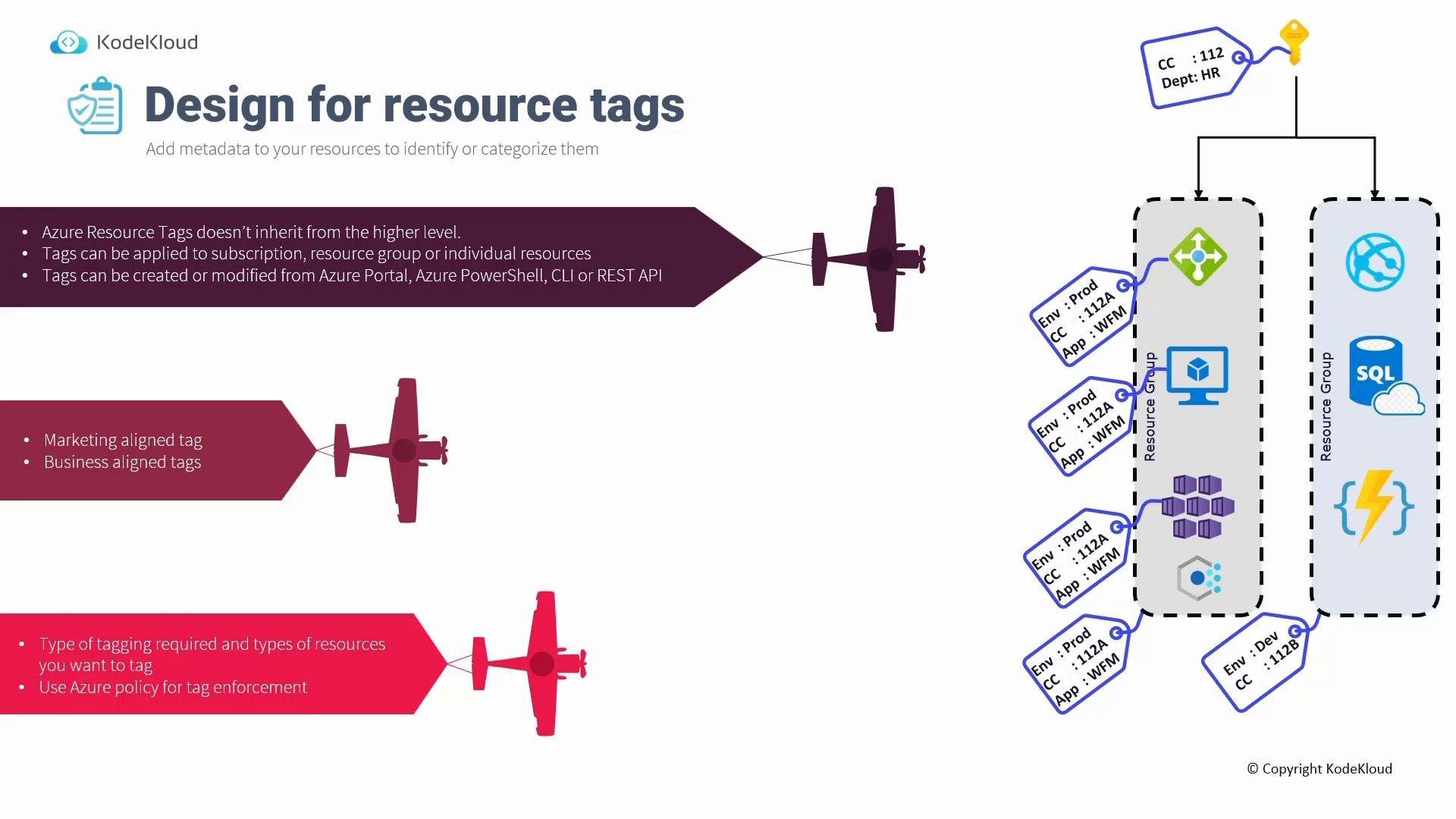
Tags are not inherited
* Unlike role-based access control (RBAC) and many policy assignments, tags do not automatically propagate from a subscription or resource group down to the resources inside them.
* If you apply tags at the subscription or resource group scope, those tags are not automatically applied to the contained resources. You must explicitly tag resource groups and individual resources unless you use a policy to set or enforce tags.
Tags are not inherited by default. To enforce consistent tags across resources, use Azure Policy or automation at deployment time—do not rely on manual tagging only.
Applying and modifying tags
* Tags can be added or modified from the Azure Portal, Azure PowerShell, Azure CLI, or the REST API.
* By default, assignment is manual: to ensure a resource carries a tag you must set it on that resource (or configure automation or policy to set it).
Use policy to enforce and inherit tags
* Azure Policy can automatically add tags to resources or require that specific tags exist at deployment time. With the right policy, you can achieve tag “inheritance” behavior by ensuring resources receive required tags when they are created.
* Policies can also force users to provide required tags during deployment rather than skipping them during the Review + create step.
Use Azure Policy to ensure consistent tagging across environments: it can add tags, require tags on deployment, and prevent resources from being created without required metadata.
## Tag categories and recommended examples
Use a small, high-value set of tags that cover governance, cost, ownership, and lifecycle. Standardize keys and values across subscriptions and tenants.
| Category | Purpose | Example tags |
| - | -: | - |
| Management / Financial | Operational billing and chargeback | `CostCenter`, `FinanceTeam`, `BillingCode` |
| Business / Application | Business purpose, environment and role | `Environment` (`Production`, `Staging`, `Dev`), `AppName`, `Tier` (`Web`, `DB`, `API`) |
| Ownership | Who owns or supports the resource | `Owner`, `OwnerEmail` |
| Lifecycle | Retirement and maintenance planning | `EndOfLife` (`2023-07-31`) |
| Classification | Data sensitivity and SLA | `Classification` (`Internal`, `Confidential`), `SLA` (`05:30`) |
## Common tagging dimensions
| Dimension | Why it matters | Examples |
| - | -: | - |
| Functional / Role | Understand application role and support boundaries | `App=Payroll`, `Tier=Web` |
| Billing / Cost allocation | Filter and aggregate costs for chargeback | `Department=HR`, `CostCenter=112A` |
| Ownership & Contact | Identify who to contact for incidents | `Owner=Mark`, `OwnerEmail=mark@xyz.com` |
| Purpose & Impact | Prioritize operations and incident response | `BusinessImpact=High`, `RevenueImpact=100000` |
| Lifecycle planning | Schedule cleanup and forecast costs | `EndOfLife=2023-07-31` |
## Using tags for billing and reporting
* Many organizations rely on tags during cost reporting. When tag values are included in the billing/export CSV, you can filter and aggregate costs by tag (for example, filter `CostCenter=112` to view related charges).
* Not all Azure resource types support tags in billing exports. Always check the Microsoft documentation to confirm whether a resource type supports tagging and whether tags appear in billing/export CSVs: [https://learn.microsoft.com/azure/azure-resource-manager/management/tag-resources](https://learn.microsoft.com/azure/azure-resource-manager/management/tag-resources)
## Practical advice and operational steps
* Define a consistent naming and key/value format across subscriptions. For example, standardize `Environment` values to `Production`, `Staging`, `Development`.
* Favor a small set of high-value tags that drive governance, billing, security, and operations rather than many low-value tags.
* Use Azure Policy and automation (Terraform, ARM templates, Bicep, Azure CLI/PowerShell scripts) to apply and maintain tags so users don’t have to remember to add them manually.
* Consider lifecycle tags such as `EndOfLife` to aid capacity planning and cost forecasting.
* Tagging becomes essential at scale: for hundreds or thousands of resources, consistent tags enable meaningful cost management, automation, and governance.
Quick checklist
* Standardize tag names and allowed values.
* Enforce required tags with Azure Policy at deployment scope.
* Automate tagging in CI/CD, templates, or Terraform modules.
* Periodically audit tags (and their values) and report on missing or non-conforming entries.
## Examples: CLI, PowerShell, and a simple Policy pattern
Azure CLI: update tags on a resource
```bash theme={null}
az resource update --ids --set tags.Environment=Production
```
PowerShell: set tags on a resource
```powershell theme={null}
Set-AzResource -ResourceId -Tag @{Environment="Production"; Owner="mark@xyz.com"} -Force
```
Azure Policy pattern (conceptual): add a missing `Environment` tag at deployment time
```json theme={null}
{
"if": {
"field": "tags.Environment",
"exists": "false"
},
"then": {
"effect": "modify",
"details": {
"operations": [
{
"operation": "add",
"field": "tags.Environment",
"value": "Production"
}
]
}
}
}
```
For full Policy examples and deployment instructions, see: [https://learn.microsoft.com/azure/governance/policy/how-to](https://learn.microsoft.com/azure/governance/policy/how-to)
## Examples in practice
* Tagging a resource group with `Environment=Production` does not automatically tag VMs, storage accounts, or other resources inside that group unless you use Azure Policy or automation to propagate that metadata.
* Assigning an Azure Policy that enforces or adds `Environment=Production` to resources created in a scope ensures new resources receive the tag at creation time—achieving the desired inheritance behavior.
Recommended tag to consider
* `EndOfLife` (a date): helps identify resources scheduled for retirement and supports cost forecasting and cleanup activities.
Next, design for policy and role-based access control. This section builds on the discussion of policies and RBAC.
 This documentation is built and hosted on [Mintlify](https://mintlify.com), a developer documentation platform.