> ## Documentation Index
> Fetch the complete documentation index at: https://notes.kodekloud.com/llms.txt
> Use this file to discover all available pages before exploring further.
# Decoding Notifications from Scanning Instruments
> This guide explains how to interpret notifications from security scanning tools in CI/CD pipelines to identify vulnerabilities and prioritize remediation.
In this guide, we’ll dive into interpreting notifications from security scanning tools commonly used in CI/CD pipelines. By understanding these reports, you can quickly spot vulnerabilities, license compliance issues, and prioritize actionable remediation steps.
## 1. Understanding the Overall Vulnerability Score
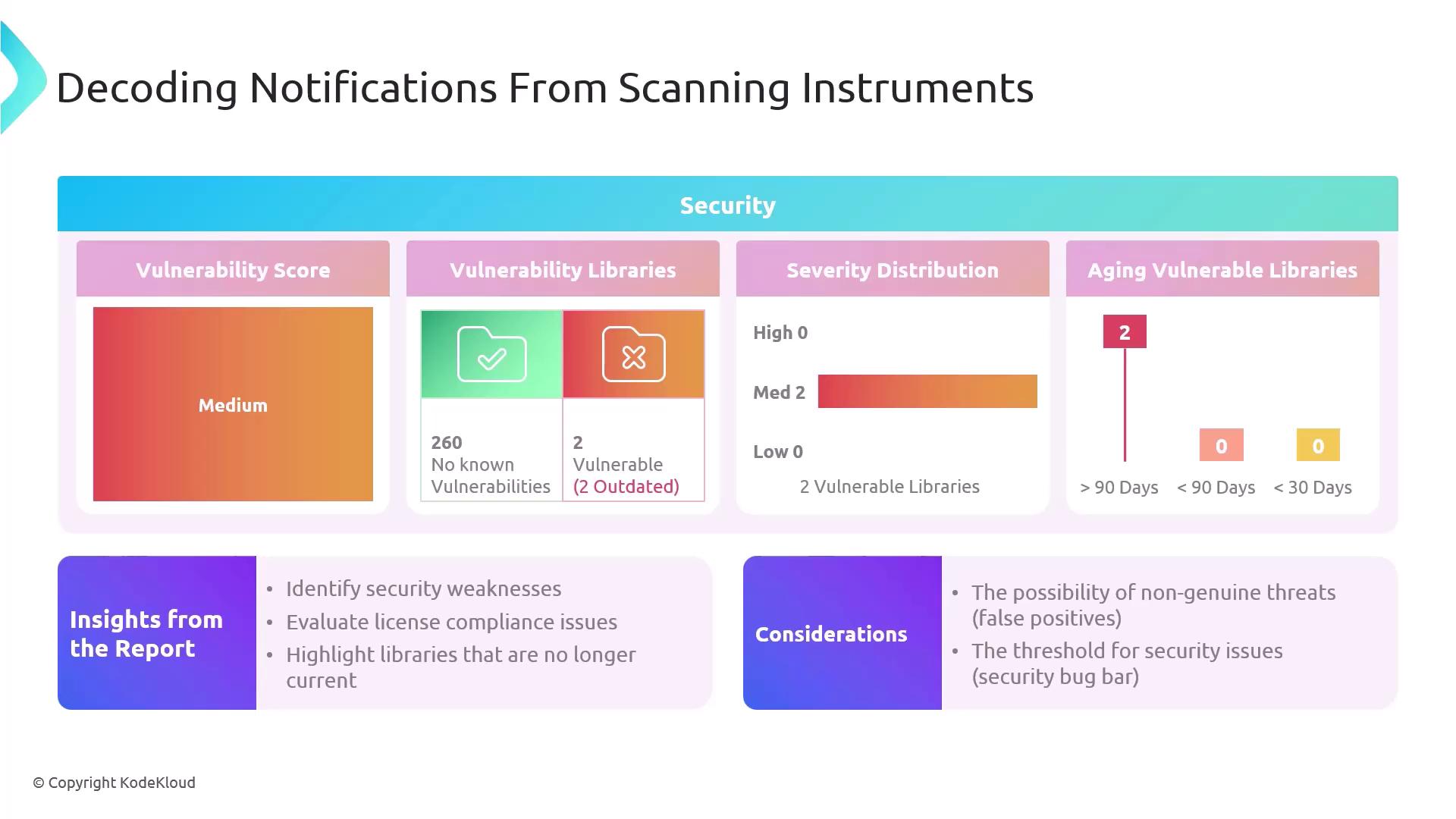
The first metric you’ll encounter is the **vulnerability score**. In our example, a score of **260** indicates that no critical vulnerabilities were detected. This single number offers a high-level view of your application’s security posture.
## 2. Identifying Vulnerable Dependencies
Security scanners not only detect vulnerabilities in your code but also flag outdated or unpatched libraries. In this scan:
* **2 libraries** are marked vulnerable out of the total scanned.
* Both require updates to eliminate known security flaws.
Keeping your dependencies current is a fundamental step in vulnerability management. Automate dependency checks using tools like [Dependabot](https://github.com/dependabot) or [Renovate](https://github.com/renovatebot/renovate).
## 3. Assessing Severity Distribution
Severity ratings help you triage which issues need immediate attention versus those that can be scheduled for later. Here’s a quick breakdown:
| Severity Level | Count | Action Priority |
| -------------- | ----- | ------------------- |
| Critical | 0 | Immediate |
| High | 0 | High |
| Medium | 2 | Medium (Plan fix) |
| Low | 0 | Low (Monitor/Defer) |
Focusing on **medium** severity vulnerabilities first allows you to reduce overall risk without being overwhelmed.
## 4. Evaluating Vulnerability Aging
The aging chart tracks how long vulnerabilities remain open. In this example, both issues have lingered for **over 90 days**, indicating that remediation has been delayed.
| Metric | Value | Description |
| --------------------- | ----- | --------------------------------------- |
| Overall Vulnerability | 260 | Score with no critical or high issues |
| Vulnerable Libraries | 2 | Outdated dependencies requiring updates |
| Medium Severity | 2 | Number of medium-rated vulnerabilities |
| Aging (90+ days) | 2 | Issues unresolved for more than 90 days |
Maintaining an SLA for vulnerability patching can prevent technical debt and reduce your attack surface.
## 5. Mitigation and Remediation Strategy
Once you’ve decoded the report, follow these steps:
1. **Validate findings.** Eliminate false positives by cross-checking with CVE databases like [NVD](https://nvd.nist.gov/).
2. **Align with risk thresholds.** Decide which vulnerabilities meet your organization’s risk criteria.
3. **Plan updates.** Prioritize library upgrades or patches for medium severity issues.
4. **Verify fixes.** Rerun scans to confirm that vulnerabilities are resolved.
Not every flagged issue is an immediate threat. Always verify if the vulnerability is exploitable in your context before rushing to patch.
## Conclusion
Mastering how to read and act on security scan results is essential for robust DevOps security and compliance. By regularly monitoring vulnerability scores, dependency health, severity distributions, and aging trends, you’ll keep your software both secure and up to date.
## Links and References
* [OWASP Top 10](https://owasp.org/www-project-top-ten/)
* [DevSecOps Best Practices](https://www.redhat.com/en/topics/devops/what-is-devsecops)
* [Common Vulnerabilities and Exposures (CVE)](https://cve.mitre.org/)