> ## Documentation Index
> Fetch the complete documentation index at: https://notes.kodekloud.com/llms.txt
> Use this file to discover all available pages before exploring further.
# Choose Between Private Peering Only Microsoft Peering Only or Both
> Explains choosing Private, Microsoft, or both peerings for Azure ExpressRoute to provide private connectivity to VNets and Microsoft public services
When planning an ExpressRoute deployment, you must decide whether to enable Private Peering, Microsoft Peering, or both. This choice determines which Azure and Microsoft services your on-premises network can reach over the dedicated ExpressRoute connection and how those services are addressed and routed.
Private peering provides secure, high-performance connectivity between your on-premises network and Azure virtual networks (VNets). This path is commonly used to treat Azure as an extension of your datacenter: access IaaS resources (VMs, databases hosted in VNets), internal services and APIs using private IP addressing. Typical scenarios include hybrid applications, file services, backup, and disaster recovery.
Microsoft peering enables connectivity to Microsoft public services such as Microsoft 365, Dynamics 365, and Azure services that expose public endpoints (for example, Azure SQL Database public endpoints). Traffic to these services travels over ExpressRoute into the Microsoft edge network, but the services are addressed using Microsoft’s public IP address space. Use Microsoft peering when you need private, reliable connectivity to SaaS and PaaS offerings and want to avoid sending that traffic over the public Internet.
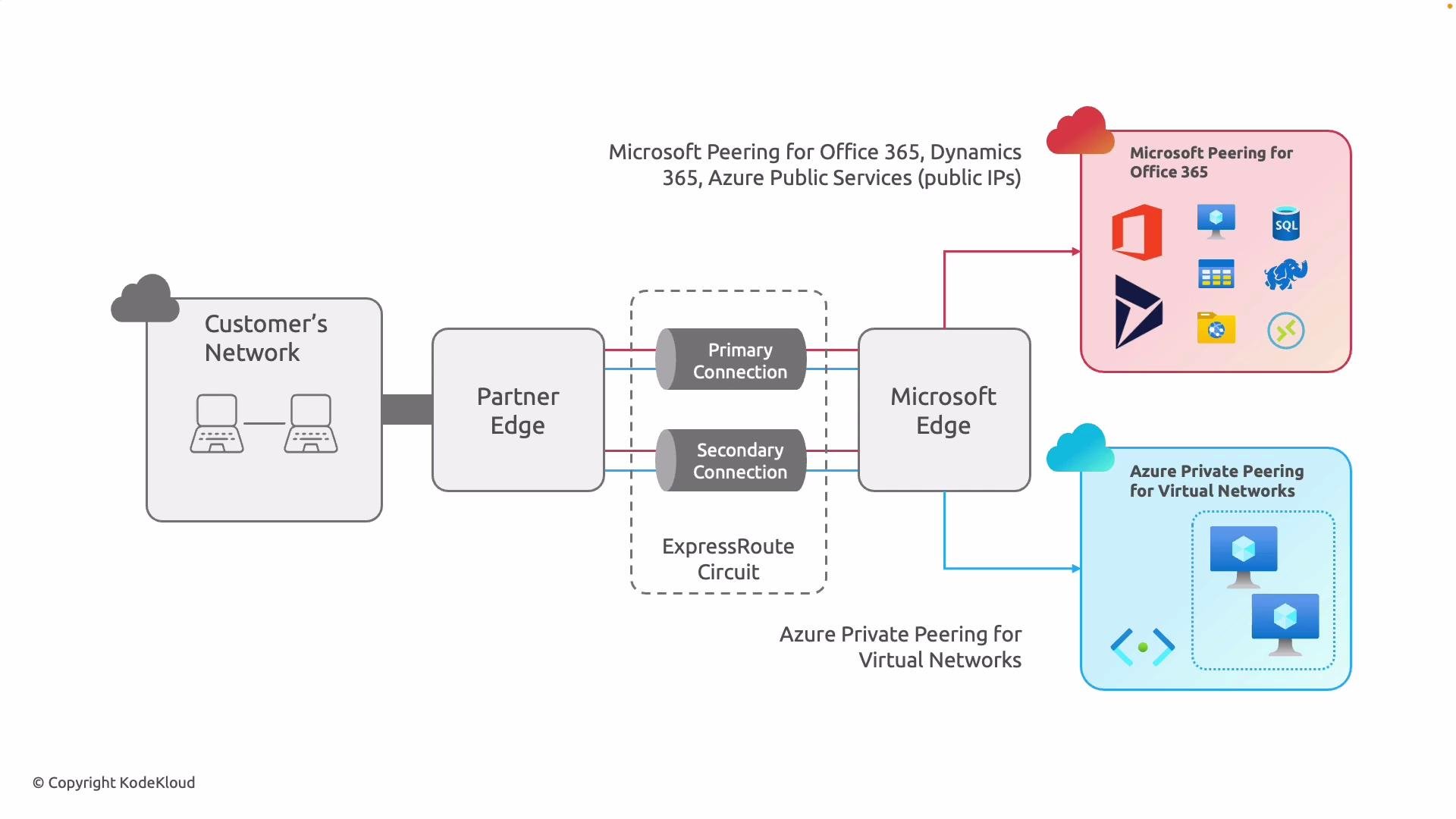 Many enterprises enable both peerings on the same ExpressRoute circuit. That configuration gives you private IP access to VNets via private peering and private reachability to Microsoft SaaS/PaaS via Microsoft peering. Conceptually this is a layered approach:
* Blue layer (Private Peering): Infrastructure-level connectivity for your custom workloads and internal services.
* Red layer (Microsoft Peering): Private access to Microsoft-managed SaaS and PaaS services, using Microsoft public IP prefixes.
Decision factors at a glance:
* If you only need to extend your private network into Azure for hybrid apps, DR, or lift-and-shift, private peering alone may be sufficient.
* If your users or apps rely heavily on Microsoft SaaS (Microsoft 365, Dynamics 365) and you want to bypass the public Internet, enable Microsoft peering.
* If you need both private IP access to VNets and private access to Microsoft public services, enable both peerings on the same circuit.
* Each peering uses separate BGP sessions and route advertisement policies; configure route filters and prefix filters on Microsoft peering to control which Microsoft public prefixes you receive and advertise.
* Consider security, compliance, and latency requirements when selecting peerings.
| Decision question | Recommendation |
| --------------------------------------------------------------------------------------------------------- | --------------------------------------------------------------------------- |
| Do you need private IP access to Azure VNets (IaaS)? | Use Private Peering. |
| Do you need private, dedicated access to Microsoft 365, Dynamics 365, or other Microsoft public services? | Use Microsoft Peering. |
| Do you need both sets of capabilities? | Enable both Private and Microsoft Peering on the same ExpressRoute circuit. |
| Need fine-grained control over which Microsoft services are reachable? | Use route filters/prefix filtering on Microsoft Peering. |
Best practices and operational notes:
* Manage each peering independently: they have separate BGP sessions, prefixes, and routing policies. This provides granular routing control and easier troubleshooting.
* Use route filters on Microsoft peering to avoid receiving unnecessary Microsoft public prefixes and to limit advertised prefixes.
* Test routing and failover behavior in a staging environment before deploying to production.
* Monitor ExpressRoute circuit health and performance with Azure monitoring tools and service provider telemetry.
Align your peering choices with your application topology, security posture, and compliance requirements. For many organizations, the recommended approach is to enable both peerings so internal infrastructure and Microsoft SaaS traffic each follow the most appropriate, private path.
Summary
* Private peering = Azure VNets, private IP addressing, infrastructure-level connectivity.
* Microsoft peering = Microsoft public services (SaaS/PaaS) reachable over ExpressRoute using Microsoft public IP prefixes.
* Choose peerings based on which services you need to reach privately, routing control needs, and performance/compliance goals.
Links and references
* Azure ExpressRoute overview: [https://learn.microsoft.com/azure/expressroute/](https://learn.microsoft.com/azure/expressroute/)
* ExpressRoute peering and routing: [https://learn.microsoft.com/azure/expressroute/expressroute-peering](https://learn.microsoft.com/azure/expressroute/expressroute-peering)
* Microsoft 365 network connectivity guidance: [https://learn.microsoft.com/microsoft-365/enterprise/office-365-ip-addresses-and-endpoints](https://learn.microsoft.com/microsoft-365/enterprise/office-365-ip-addresses-and-endpoints)
Many enterprises enable both peerings on the same ExpressRoute circuit. That configuration gives you private IP access to VNets via private peering and private reachability to Microsoft SaaS/PaaS via Microsoft peering. Conceptually this is a layered approach:
* Blue layer (Private Peering): Infrastructure-level connectivity for your custom workloads and internal services.
* Red layer (Microsoft Peering): Private access to Microsoft-managed SaaS and PaaS services, using Microsoft public IP prefixes.
Decision factors at a glance:
* If you only need to extend your private network into Azure for hybrid apps, DR, or lift-and-shift, private peering alone may be sufficient.
* If your users or apps rely heavily on Microsoft SaaS (Microsoft 365, Dynamics 365) and you want to bypass the public Internet, enable Microsoft peering.
* If you need both private IP access to VNets and private access to Microsoft public services, enable both peerings on the same circuit.
* Each peering uses separate BGP sessions and route advertisement policies; configure route filters and prefix filters on Microsoft peering to control which Microsoft public prefixes you receive and advertise.
* Consider security, compliance, and latency requirements when selecting peerings.
| Decision question | Recommendation |
| --------------------------------------------------------------------------------------------------------- | --------------------------------------------------------------------------- |
| Do you need private IP access to Azure VNets (IaaS)? | Use Private Peering. |
| Do you need private, dedicated access to Microsoft 365, Dynamics 365, or other Microsoft public services? | Use Microsoft Peering. |
| Do you need both sets of capabilities? | Enable both Private and Microsoft Peering on the same ExpressRoute circuit. |
| Need fine-grained control over which Microsoft services are reachable? | Use route filters/prefix filtering on Microsoft Peering. |
Best practices and operational notes:
* Manage each peering independently: they have separate BGP sessions, prefixes, and routing policies. This provides granular routing control and easier troubleshooting.
* Use route filters on Microsoft peering to avoid receiving unnecessary Microsoft public prefixes and to limit advertised prefixes.
* Test routing and failover behavior in a staging environment before deploying to production.
* Monitor ExpressRoute circuit health and performance with Azure monitoring tools and service provider telemetry.
Align your peering choices with your application topology, security posture, and compliance requirements. For many organizations, the recommended approach is to enable both peerings so internal infrastructure and Microsoft SaaS traffic each follow the most appropriate, private path.
Summary
* Private peering = Azure VNets, private IP addressing, infrastructure-level connectivity.
* Microsoft peering = Microsoft public services (SaaS/PaaS) reachable over ExpressRoute using Microsoft public IP prefixes.
* Choose peerings based on which services you need to reach privately, routing control needs, and performance/compliance goals.
Links and references
* Azure ExpressRoute overview: [https://learn.microsoft.com/azure/expressroute/](https://learn.microsoft.com/azure/expressroute/)
* ExpressRoute peering and routing: [https://learn.microsoft.com/azure/expressroute/expressroute-peering](https://learn.microsoft.com/azure/expressroute/expressroute-peering)
* Microsoft 365 network connectivity guidance: [https://learn.microsoft.com/microsoft-365/enterprise/office-365-ip-addresses-and-endpoints](https://learn.microsoft.com/microsoft-365/enterprise/office-365-ip-addresses-and-endpoints)