> ## Documentation Index
> Fetch the complete documentation index at: https://notes.kodekloud.com/llms.txt
> Use this file to discover all available pages before exploring further.
# Configure Microsoft Peering
> Guide to configuring Microsoft Peering on ExpressRoute, covering requirements, BGP setup, public prefix registration, ASN, subnets, VLANs, validation, and comparison with private peering
Configuring Microsoft Peering for ExpressRoute
Microsoft Peering lets your on-premises network connect directly and securely to Microsoft public services—such as [Microsoft 365](https://www.microsoft.com/microsoft-365), [Dynamics 365](https://dynamics.microsoft.com/), and many Azure public services (for example, [Azure SQL Database](https://learn.microsoft.com/azure/azure-sql/) or [Cosmos DB](https://learn.microsoft.com/azure/cosmos-db/))—over an [ExpressRoute circuit](https://learn.microsoft.com/azure/expressroute/expressroute-introduction). This avoids traversing the public internet, improving performance, predictability, and security for traffic to Microsoft public endpoints.
What Microsoft Peering provides
* Private connectivity to Microsoft public services over ExpressRoute.
* BGP-based routing exchange for public prefixes between your network and Microsoft.
* Redundancy and resiliency using primary and secondary links across the ExpressRoute circuit.
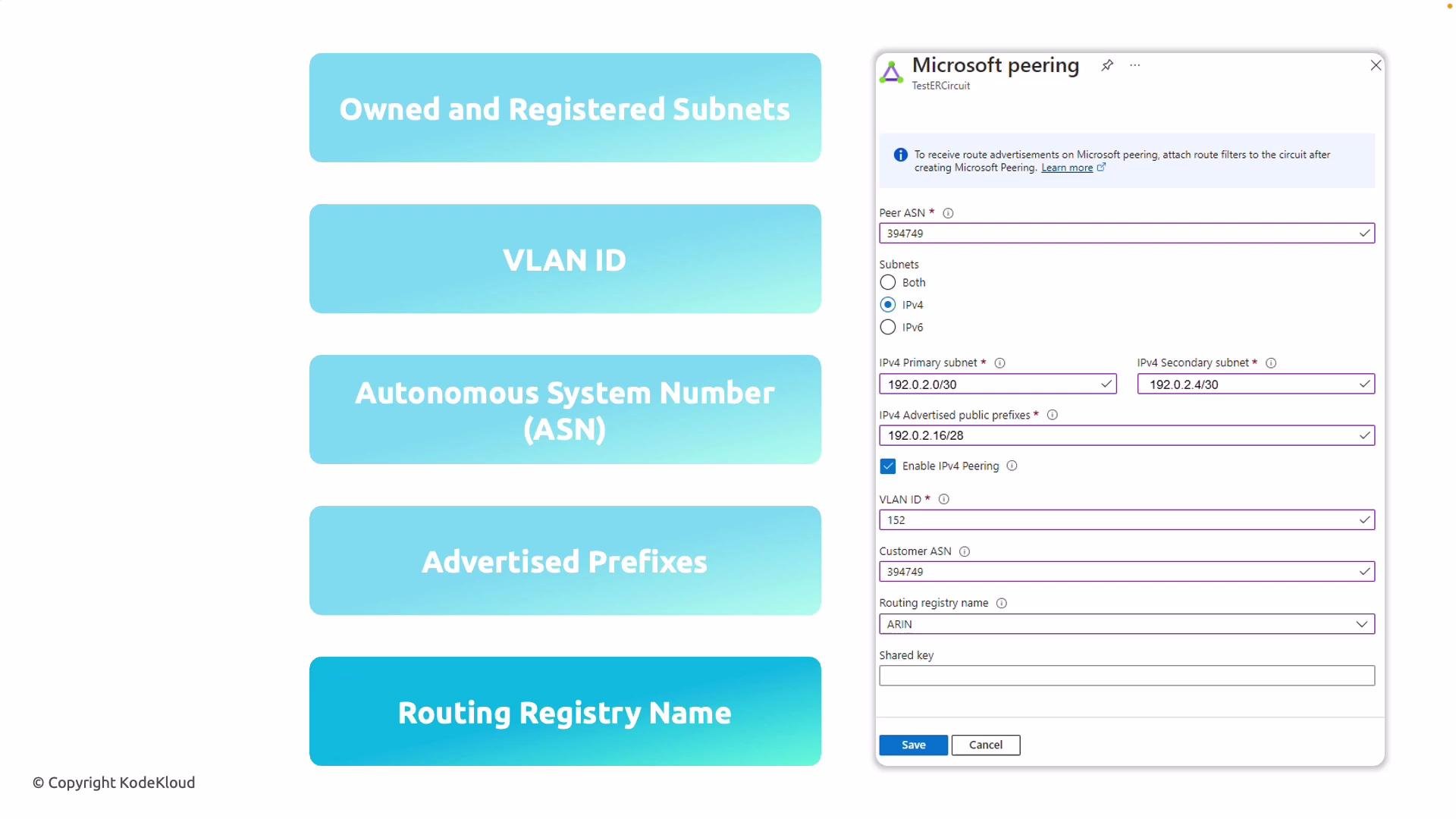
Key requirements and configuration items
| Requirement | Description | Notes |
| ----------------------------------------- | ----------------------------------------------------------------------------------------------------------------------------------------------------------------------------------------------------------------------- | --------------------------------------------------------------------------------------- |
| Customer-owned, publicly routable subnets | You must supply public IP prefixes that you own and that are registered in an Internet Routing Registry (IRR) such as [ARIN](https://www.arin.net/), [RIPE](https://www.ripe.net/), or [APNIC](https://www.apnic.net/). | Do not use private addresses; `RFC1918` ranges are not permitted for Microsoft Peering. |
| Primary and secondary subnets | Two subnets are required—one assigned to the primary link and one to the secondary link—to provide redundancy across the ExpressRoute connection. | Each subnet corresponds to a different ExpressRoute circuit path. |
| VLAN ID | VLAN ID for the peering separates Microsoft Peering traffic from other peering types on the same circuit. | Must be unique per peering on a circuit. |
| ASN (Autonomous System Number) | Your ASN is required for BGP sessions with Microsoft. | Microsoft will peer with your ASN to exchange routes. |
| Public prefixes to advertise | The public IP prefixes that you will advertise to Microsoft. | Prefixes must be announced from the registered IRR records. |
| Routing registry | The IRR where your prefixes are registered (for example, ARIN or RIPE). | Microsoft verifies prefix ownership against the registry during peering setup. |
How to prepare and configure Microsoft Peering (high-level steps)
1. Gather required information:
* Public prefixes you will advertise and the IRR where they are registered.
* Your ASN.
* Two subnets (primary and secondary) from your public address space.
* VLAN ID to use for this peering.
2. Confirm prefix ownership in the routing registry (ARIN, RIPE, APNIC, etc.). Microsoft verifies this before establishing peering.
3. In the Azure portal (`https://portal.azure.com`), open your ExpressRoute circuit and choose the Microsoft Peering configuration blade.
4. Enter the ASN, primary and secondary subnets, VLAN ID, the list of prefixes to advertise, and the routing registry.
5. Submit the configuration and wait for Microsoft to validate the prefixes and complete the peering session setup.
6. After validation, establish BGP sessions and verify route exchange and reachability to Microsoft public services.
ExpressRoute portal UI example
 Choosing between Microsoft Peering and Private Peering
| Peering Type | Purpose | Addressing | Routing | Common Use Cases |
| ----------------- | ---------------------------------------------------------------------------------------------------- | ------------------------------------------------------------------------------------------------------ | ------------------------------------------------------------------------------------------------ | --------------------------------------------------------------------------------------------------------------------------------------------- |
| Microsoft Peering | Access Microsoft public services (Microsoft 365, Dynamics 365) and many Azure public-facing services | Customer-owned, publicly routable prefixes registered in an IRR | You advertise your public prefixes to Microsoft; Microsoft advertises its public prefixes to you | Office 365 optimization, direct access to Microsoft public endpoints, hybrid or multi-cloud scenarios requiring direct Microsoft connectivity |
| Private Peering | Connect to Azure virtual networks and private-facing Azure services | Private IP ranges (e.g., `RFC1918`) for BGP peering between your on-prem router and Azure VNet routers | Exchange of `RFC1918` routes to reach VNets and private services | Extending on-prem networks into Azure VNets, hosting private workloads in Azure |
Before submitting Microsoft Peering configuration, ensure the public prefixes you intend to advertise are owned by your organization and properly registered in the indicated IRR. Microsoft validates registry ownership and will not accept unregistered or incorrectly registered prefixes.
Links and references
* [ExpressRoute overview and concepts](https://learn.microsoft.com/azure/expressroute/expressroute-introduction)
* [Azure Virtual Network—Private Peering](https://learn.microsoft.com/azure/expressroute/expressroute-howto-circuit-portal-resource-manager#private-peering)
* [Internet Routing Registry (IRR) resources](https://www.irr.net/) — examples: [ARIN](https://www.arin.net/), [RIPE](https://www.ripe.net/), [APNIC](https://www.apnic.net/)
* [Azure public services and Microsoft 365 documentation](https://learn.microsoft.com/azure/)
Choosing between Microsoft Peering and Private Peering
| Peering Type | Purpose | Addressing | Routing | Common Use Cases |
| ----------------- | ---------------------------------------------------------------------------------------------------- | ------------------------------------------------------------------------------------------------------ | ------------------------------------------------------------------------------------------------ | --------------------------------------------------------------------------------------------------------------------------------------------- |
| Microsoft Peering | Access Microsoft public services (Microsoft 365, Dynamics 365) and many Azure public-facing services | Customer-owned, publicly routable prefixes registered in an IRR | You advertise your public prefixes to Microsoft; Microsoft advertises its public prefixes to you | Office 365 optimization, direct access to Microsoft public endpoints, hybrid or multi-cloud scenarios requiring direct Microsoft connectivity |
| Private Peering | Connect to Azure virtual networks and private-facing Azure services | Private IP ranges (e.g., `RFC1918`) for BGP peering between your on-prem router and Azure VNet routers | Exchange of `RFC1918` routes to reach VNets and private services | Extending on-prem networks into Azure VNets, hosting private workloads in Azure |
Before submitting Microsoft Peering configuration, ensure the public prefixes you intend to advertise are owned by your organization and properly registered in the indicated IRR. Microsoft validates registry ownership and will not accept unregistered or incorrectly registered prefixes.
Links and references
* [ExpressRoute overview and concepts](https://learn.microsoft.com/azure/expressroute/expressroute-introduction)
* [Azure Virtual Network—Private Peering](https://learn.microsoft.com/azure/expressroute/expressroute-howto-circuit-portal-resource-manager#private-peering)
* [Internet Routing Registry (IRR) resources](https://www.irr.net/) — examples: [ARIN](https://www.arin.net/), [RIPE](https://www.ripe.net/), [APNIC](https://www.apnic.net/)
* [Azure public services and Microsoft 365 documentation](https://learn.microsoft.com/azure/)