> ## Documentation Index
> Fetch the complete documentation index at: https://notes.kodekloud.com/llms.txt
> Use this file to discover all available pages before exploring further.
# Connect Virtual Network to an ExpressRoute Circuit
> Guide to connecting an Azure Virtual Network to an ExpressRoute circuit via the portal, including prerequisites, configuration steps, validation, and troubleshooting.
This guide walks through connecting an Azure Virtual Network (VNet) to an ExpressRoute circuit using the Azure portal. Follow these steps to provision a private, high-bandwidth connection between your on-premises network and Azure VNets.
## Prerequisites
* An existing ExpressRoute circuit.
* A Virtual Network with an associated virtual network gateway configured for ExpressRoute (not a VPN gateway).
* Appropriate permissions in the subscription or access to an authorization key if the circuit is in another subscription.
## Steps: Create the ExpressRoute Connection
1. Open the ExpressRoute circuit you want to use in the Azure portal.
2. In the left-hand menu, choose **Connections**, then click **Add** at the top of the page to create a new connection.
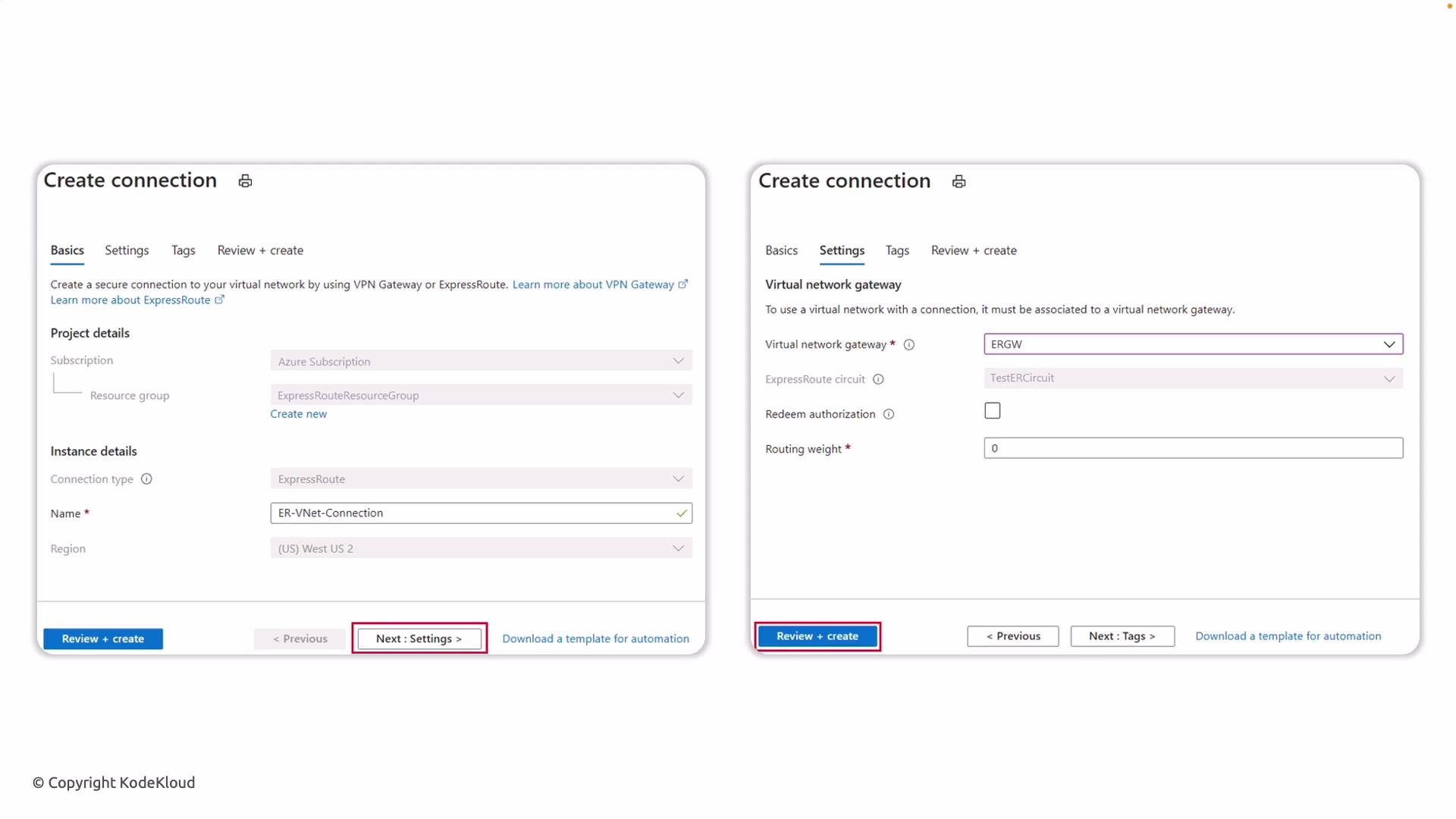
When you click **Add**, the Create connection blade opens. Because you started from a specific ExpressRoute circuit, several fields are pre-populated:
* Subscription, resource group, and region.
* Connection type set in context of this circuit.
On the Basics blade you only need to enter a display name for the connection.
 ### Settings blade — what to configure
On the Settings blade, pick the virtual network gateway that corresponds to the VNet you want to attach. Important details:
* Gateway type must be configured for ExpressRoute (you cannot select a VPN gateway).
* Selecting the correct gateway binds the ExpressRoute circuit to that VNet.
Use the table below to quickly validate each option on the Settings blade.
| Field | Purpose | Example / Notes |
| ----------------------- | ---------------------------------------------------------------- | -------------------------------------------------------------- |
| Virtual network gateway | Associates the VNet gateway with the ExpressRoute circuit | Must be an ExpressRoute-enabled gateway |
| ExpressRoute Circuit | The circuit you are working in | Auto-populates when you create the connection from the circuit |
| Redeem authorization | Use when the ExpressRoute circuit is in a different subscription | You must redeem the authorization key from the circuit owner |
| Routing weight | Influence route preference when multiple paths exist | Higher value increases path preference |
After configuring these values, click **Review + create** to validate, then **Create** to provision the connection.
## Provisioning and validation
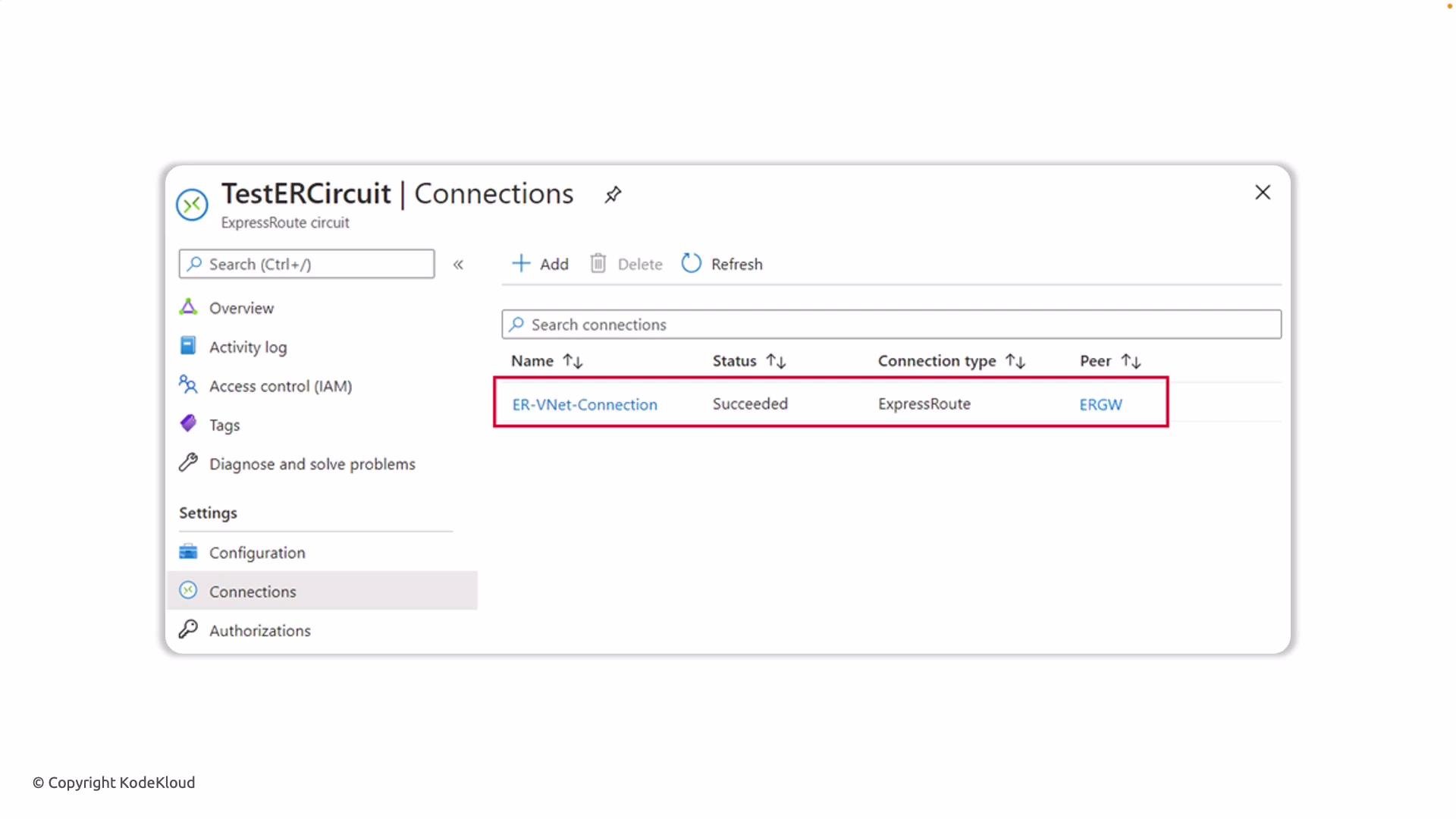
Azure will provision the connection. After deployment completes, return to the Connections page for the ExpressRoute circuit. The new connection should appear in the list.
You should see:
* Status: `Succeeded`
* Type: `ExpressRoute`
* Peers: the name of the virtual network gateway linked to the circuit
### Settings blade — what to configure
On the Settings blade, pick the virtual network gateway that corresponds to the VNet you want to attach. Important details:
* Gateway type must be configured for ExpressRoute (you cannot select a VPN gateway).
* Selecting the correct gateway binds the ExpressRoute circuit to that VNet.
Use the table below to quickly validate each option on the Settings blade.
| Field | Purpose | Example / Notes |
| ----------------------- | ---------------------------------------------------------------- | -------------------------------------------------------------- |
| Virtual network gateway | Associates the VNet gateway with the ExpressRoute circuit | Must be an ExpressRoute-enabled gateway |
| ExpressRoute Circuit | The circuit you are working in | Auto-populates when you create the connection from the circuit |
| Redeem authorization | Use when the ExpressRoute circuit is in a different subscription | You must redeem the authorization key from the circuit owner |
| Routing weight | Influence route preference when multiple paths exist | Higher value increases path preference |
After configuring these values, click **Review + create** to validate, then **Create** to provision the connection.
## Provisioning and validation
Azure will provision the connection. After deployment completes, return to the Connections page for the ExpressRoute circuit. The new connection should appear in the list.
You should see:
* Status: `Succeeded`
* Type: `ExpressRoute`
* Peers: the name of the virtual network gateway linked to the circuit
 ## Post-connection verification
* Validate BGP peering and route propagation between your on-premises routers and Azure.
* Confirm that the on-premises network can reach intended Azure subnets.
* Verify effective routes on the VNet and on the virtual machines’ NICs if needed.
## Common issues and troubleshooting
* Connection stuck in provisioning: check gateway SKU and gateway status.
* Cross-subscription connections fail: ensure authorization key has been redeemed by the connecting subscription.
* Routes not learned: verify BGP is established and routing weight / filters are configured correctly.
Ensure the virtual network gateway SKU supports ExpressRoute connectivity. You cannot connect a VNet using a VPN-only gateway — the gateway must be configured for ExpressRoute. If the circuit is in another subscription, make sure the authorization key is redeemed before creating the connection.
After the connection is created, validate routing and peering (BGP) to ensure traffic flows as expected. For details on gateway SKUs and ExpressRoute requirements, see the [Azure ExpressRoute documentation](https://learn.microsoft.com/azure/expressroute/).
This completes the connection process for linking an Azure VNet to an ExpressRoute circuit.
## Post-connection verification
* Validate BGP peering and route propagation between your on-premises routers and Azure.
* Confirm that the on-premises network can reach intended Azure subnets.
* Verify effective routes on the VNet and on the virtual machines’ NICs if needed.
## Common issues and troubleshooting
* Connection stuck in provisioning: check gateway SKU and gateway status.
* Cross-subscription connections fail: ensure authorization key has been redeemed by the connecting subscription.
* Routes not learned: verify BGP is established and routing weight / filters are configured correctly.
Ensure the virtual network gateway SKU supports ExpressRoute connectivity. You cannot connect a VNet using a VPN-only gateway — the gateway must be configured for ExpressRoute. If the circuit is in another subscription, make sure the authorization key is redeemed before creating the connection.
After the connection is created, validate routing and peering (BGP) to ensure traffic flows as expected. For details on gateway SKUs and ExpressRoute requirements, see the [Azure ExpressRoute documentation](https://learn.microsoft.com/azure/expressroute/).
This completes the connection process for linking an Azure VNet to an ExpressRoute circuit.