> ## Documentation Index
> Fetch the complete documentation index at: https://notes.kodekloud.com/llms.txt
> Use this file to discover all available pages before exploring further.
# Route Filters
> Creating and managing Azure ExpressRoute route filters to whitelist Microsoft service BGP communities, control advertised public prefixes, and reduce on-premises routing complexity.
Route filters are a whitelist mechanism for BGP community values that Microsoft advertises over ExpressRoute Microsoft peering. Use route filters to control which Microsoft public services (for example, Microsoft 365, Dynamics 365) or which Azure region-specific public prefixes you will receive routes for over your ExpressRoute circuit. Without a route filter you will not receive those public service routes at all.
Route filters apply only to Microsoft (public/SaaS) peering. They are not used for private peering.
Why use route filters?
* Restrict advertised public prefixes to only the Microsoft services your organization consumes.
* Reduce the number of BGP routes learned on-premises, simplifying routing tables.
* Improve operational security and traffic predictability by excluding unnecessary service prefixes.
How route filters work (high-level)
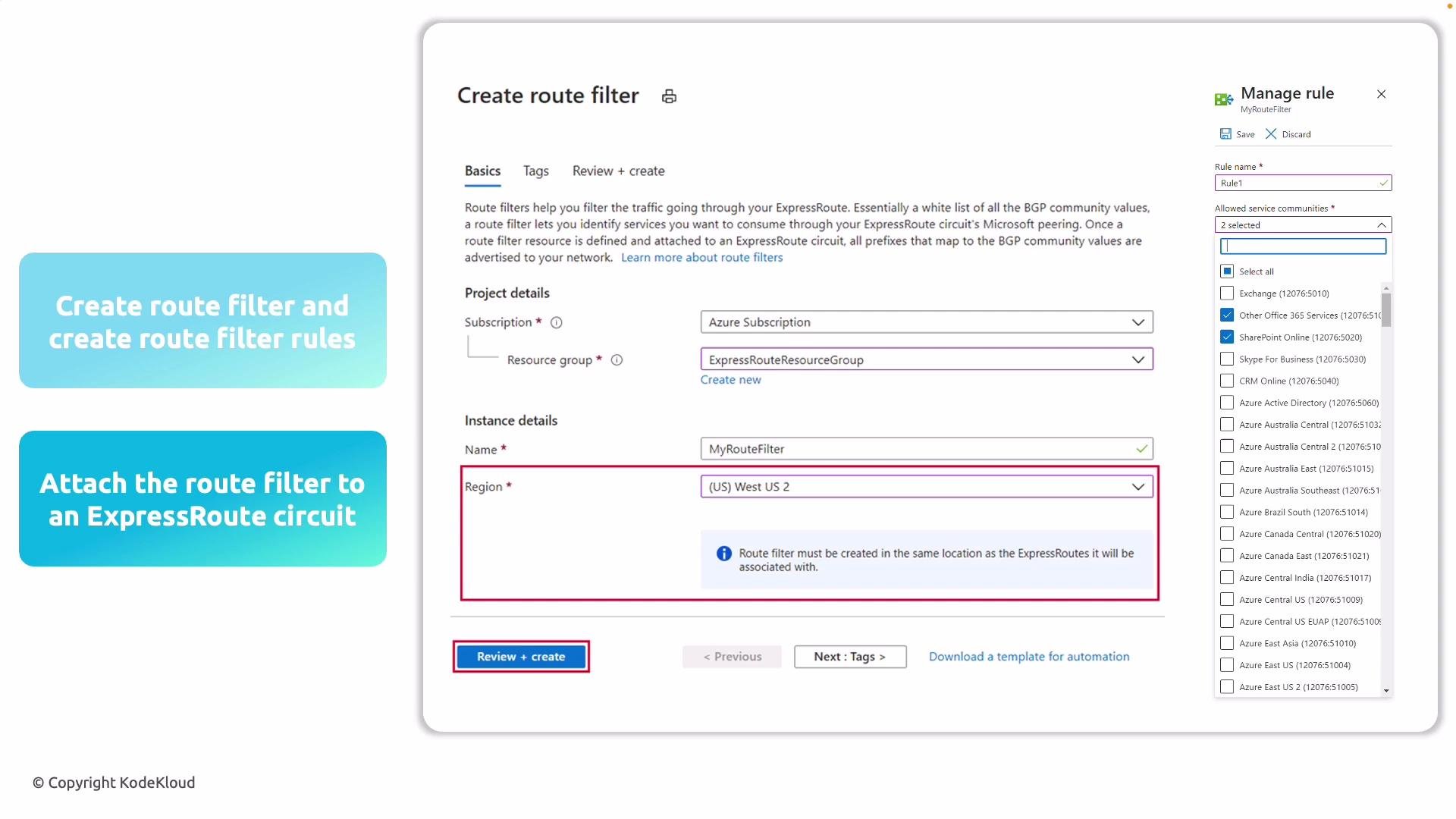
1. Create a route filter resource in your Azure subscription. Choose a resource group and an Azure region — the route filter's region must match the region of the ExpressRoute circuit you will attach.
2. Add route filter rules. Each rule references a Microsoft service community (for example, SharePoint Online, Exchange Online) or a specific Azure region. Each selection corresponds to a set of public IP prefixes that Microsoft manages and advertises.
3. Attach the route filter to your ExpressRoute circuit. Once attached, Microsoft will advertise only the BGP routes you’ve whitelisted.
4. Update the route filter over time as your service usage changes to keep your routing table clean and relevant.
 Detailed step checklist
| Step | Action | Notes / Best Practices |
| ------------------- | --------------------------------------------------------------------------------------------------------------- | --------------------------------------------------------------------------------------------------- |
| Create route filter | Provision a `RouteFilter` resource in the same Azure region as your ExpressRoute circuit. | The region must match the ExpressRoute circuit region. Use meaningful naming for easier management. |
| Add rules | Add one or more route filter rules that reference Microsoft service communities or region-specific communities. | Keep rule sets minimal — only include services your organization uses (e.g., SharePoint Online). |
| Attach filter | Attach the route filter to the ExpressRoute circuit (Microsoft peering). | Attaching the filter enforces the whitelist for advertised public prefixes. |
| Maintain | Regularly review and update rules as service consumption changes. | Schedule periodic audits to reduce stale or unnecessary routes. |
Examples and use cases
* If your organization uses only SharePoint Online and Exchange Online, include only those service communities in your route filter to avoid receiving routes for Dynamics 365 or other services you don’t use.
* If you need service prefixes for a specific Azure region only, add the region-specific community rather than global service communities.
Best practices
* Ensure the route filter’s Azure region matches the ExpressRoute circuit’s region before attaching.
* Start with the smallest required set of service communities and expand only when necessary.
* Document each rule with rationale and owner for easier audits and troubleshooting.
* Periodically verify BGP advertisements after attaching a filter to confirm only expected prefixes are learned.
When creating a route filter, ensure its Azure region matches the region of the ExpressRoute circuit you will attach it to. Also remember route filters only influence Microsoft peering (public/SaaS services), not private peering.
Summary
Route filters give you granular control over which Microsoft public service prefixes are advertised to your on-premises network through ExpressRoute Microsoft peering. They reduce routing complexity, enhance operational security, and should be maintained as your service usage evolves.
Links and references
* [ExpressRoute overview - Microsoft Docs](https://learn.microsoft.com/azure/expressroute/expressroute-introduction)
* [Route filters for Azure ExpressRoute - Microsoft Docs](https://learn.microsoft.com/azure/expressroute/expressroute-howto-route-filter)
* [BGP routing concepts - Microsoft Docs](https://learn.microsoft.com/azure/expressroute/expressroute-routing)
The following section explains how to connect a virtual network (VNet) to an ExpressRoute circuit.
Detailed step checklist
| Step | Action | Notes / Best Practices |
| ------------------- | --------------------------------------------------------------------------------------------------------------- | --------------------------------------------------------------------------------------------------- |
| Create route filter | Provision a `RouteFilter` resource in the same Azure region as your ExpressRoute circuit. | The region must match the ExpressRoute circuit region. Use meaningful naming for easier management. |
| Add rules | Add one or more route filter rules that reference Microsoft service communities or region-specific communities. | Keep rule sets minimal — only include services your organization uses (e.g., SharePoint Online). |
| Attach filter | Attach the route filter to the ExpressRoute circuit (Microsoft peering). | Attaching the filter enforces the whitelist for advertised public prefixes. |
| Maintain | Regularly review and update rules as service consumption changes. | Schedule periodic audits to reduce stale or unnecessary routes. |
Examples and use cases
* If your organization uses only SharePoint Online and Exchange Online, include only those service communities in your route filter to avoid receiving routes for Dynamics 365 or other services you don’t use.
* If you need service prefixes for a specific Azure region only, add the region-specific community rather than global service communities.
Best practices
* Ensure the route filter’s Azure region matches the ExpressRoute circuit’s region before attaching.
* Start with the smallest required set of service communities and expand only when necessary.
* Document each rule with rationale and owner for easier audits and troubleshooting.
* Periodically verify BGP advertisements after attaching a filter to confirm only expected prefixes are learned.
When creating a route filter, ensure its Azure region matches the region of the ExpressRoute circuit you will attach it to. Also remember route filters only influence Microsoft peering (public/SaaS services), not private peering.
Summary
Route filters give you granular control over which Microsoft public service prefixes are advertised to your on-premises network through ExpressRoute Microsoft peering. They reduce routing complexity, enhance operational security, and should be maintained as your service usage evolves.
Links and references
* [ExpressRoute overview - Microsoft Docs](https://learn.microsoft.com/azure/expressroute/expressroute-introduction)
* [Route filters for Azure ExpressRoute - Microsoft Docs](https://learn.microsoft.com/azure/expressroute/expressroute-howto-route-filter)
* [BGP routing concepts - Microsoft Docs](https://learn.microsoft.com/azure/expressroute/expressroute-routing)
The following section explains how to connect a virtual network (VNet) to an ExpressRoute circuit.