> ## Documentation Index
> Fetch the complete documentation index at: https://notes.kodekloud.com/llms.txt
> Use this file to discover all available pages before exploring further.
# Public IP Addresses
> Guide to assigning and choosing static or dynamic public IPs in Azure for resources, SKU differences, best practices, and an Azure CLI example.
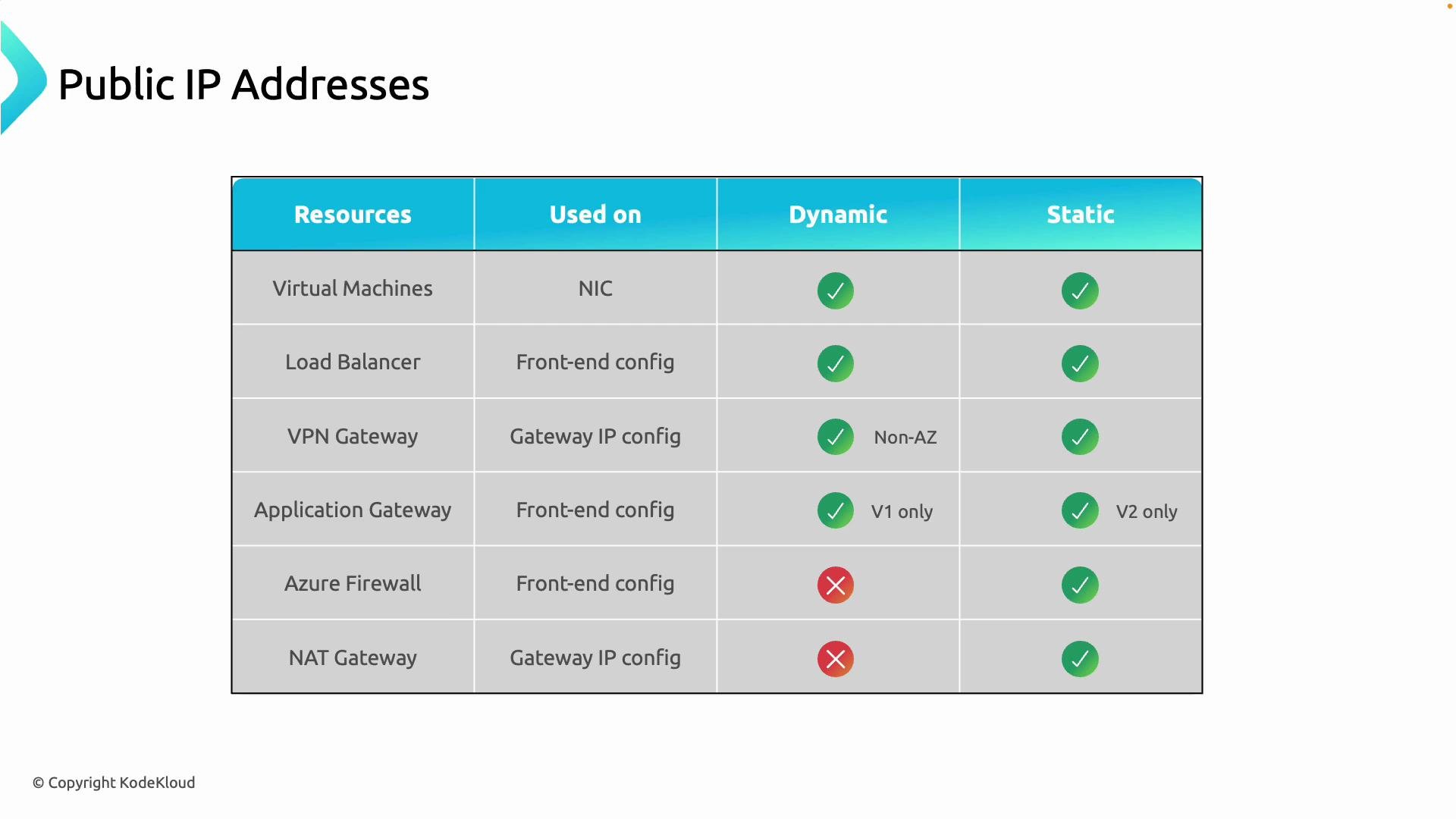
So far we've focused on private connectivity between Azure resources. When you need resources—websites, APIs, VPN endpoints, or predictable outbound addresses—reachable from the internet, you must assign public IP addresses. This guide explains where to assign public IPs for common Azure services, whether they support dynamic or static allocation, and practical guidance for production deployments.
Below is a concise reference that answers two key questions for each resource:
* Where do you assign the public IP?
* Can the resource use a dynamic or static public IP?
Then we walk through configuration guidance and include a short Azure CLI walkthrough to assign a public IP to a Virtual Machine.
## Quick reference table
| Resource | Where to assign the public IP | Dynamic vs Static | Guidance |
| ------------------- | -------------------------------------------------------------------: | --------------------------------------------------------------------- | --------------------------------------------------------------------------- |
| Virtual Machine | Attach to the VM's network interface (NIC) | Dynamic or Static | Use static for DNS records or stable endpoints. |
| Load Balancer | Assign to the load balancer frontend configuration | Dynamic or Static (Standard SKU often uses static) | Use static for production, public-facing load balancers. |
| VPN Gateway | Attached to the gateway IP configuration | Static recommended (supported) | Use static to ensure predictable connectivity for site-to-site or P2S VPNs. |
| Application Gateway | Assigned to the Application Gateway frontend configuration (layer 7) | v1: dynamic; v2: supports static | Use Application Gateway v2 with static IP for stable web endpoints. |
| Azure Firewall | Configured on the firewall frontend | Static only | Required for consistent firewall rules and NAT. |
| NAT Gateway | Associated with subnets for outbound NAT | Static public IP or public IP prefix required (dynamic not supported) | Use for predictable and scalable outbound SNAT for subnets. |
## Resource-by-resource details
### Virtual Machines
* Where to assign: Attach the public IP to the VM's NIC (network interface) IP configuration.
* Dynamic vs Static: Both are supported.
* Guidance: Prefer a static public IP when you need a stable address (for DNS records, allow-lists, or monitoring).
### Load Balancer
* Where to assign: Assign the public IP to the load balancer frontend IP configuration.
* Dynamic vs Static: Both are supported depending on SKU and configuration. Standard SKU typically uses static addresses.
* Guidance: Use static public IPs for public-facing load balancers serving production traffic to avoid endpoint changes.
### VPN Gateway
* Where to assign: Public IP attaches to the gateway's IP configuration.
* Dynamic vs Static: Static public IPs are supported and recommended for predictable connectivity.
* Guidance: VPN gateways must have a reachable public IP so remote networks or on-premises sites can connect (site-to-site and point-to-site).
 ### Application Gateway
* Where to assign: Attach the public IP to the Application Gateway frontend configuration (Application Gateway is a layer-7 load balancer).
* Dynamic vs Static:
* v1: typically used with dynamic public IPs.
* v2: supports static public IPs and is recommended for stable endpoints.
* Guidance: For publishing apps to the Internet with a stable endpoint, use Application Gateway v2 and a static public IP.
### Azure Firewall
* Where to assign: Configure the firewall's public IP on its frontend.
* Dynamic vs Static: Only static public IPs are supported.
* Guidance: Static public IPs ensure predictable source/destination addressing and consistent firewall rules and NAT behavior.
### NAT Gateway
* Where to assign: Associate the NAT Gateway with one or more subnets to provide outbound internet connectivity for resources in those subnets.
* Dynamic vs Static: Dynamic public IPs are not supported. Use one or more static public IP addresses or a public IP prefix.
* Guidance: Use NAT Gateway for scalable and predictable outbound SNAT addressing.
Key takeaway: While some services allow dynamic public IP addresses, production scenarios should use static public IPs and the Standard SKU for reliability and security.
## Public IP SKUs: Standard vs Basic
| SKU | Allocation | Default security posture | Zone support | Recommended for |
| -------- | ----------------: | -------------------------------------------------- | --------------------------: | -------------------------------------------- |
| Standard | Always static | Secure by default — inbound blocked unless allowed | Supports availability zones | Production, high-availability workloads |
| Basic | Static or dynamic | Open by default (less secure) | No zone support | Legacy/test only — avoid for new deployments |
Prefer the Standard SKU for new deployments: it provides static addressing, availability-zone support, and a more secure default posture.
Basic SKU is being retired. Avoid creating new Basic public IPs and plan migration of existing Basic public IPs to Standard before retirement.
## Example: Create and attach a public IP to a VM (Azure CLI)
This example creates a Standard (static) public IP and attaches it to an existing NIC. Replace the placeholders with your resource names and resource group.
1. Create a Standard, static public IP:
```bash theme={null}
az network public-ip create \
--resource-group MyResourceGroup \
--name myPublicIP \
--sku Standard \
--allocation-method Static
```
2. Attach the public IP to an existing NIC IP configuration (`ipconfig1` is the default name; adjust if different):
```bash theme={null}
az network nic ip-config update \
--resource-group MyResourceGroup \
--nic-name myNic \
--name ipconfig1 \
--public-ip-address myPublicIP
```
3. Verify the public IP is attached to the VM:
```bash theme={null}
az network nic show --resource-group MyResourceGroup --name myNic --query "ipConfigurations"
```
Notes:
* To create a VM with a public IP in a single command, use `az vm create` with the `--public-ip-address` parameter.
* For Basic SKU and dynamic allocation, change `--sku` and `--allocation-method` respectively (e.g., `--sku Basic --allocation-method Dynamic`), but prefer Standard/Static for production.
## Best practices and guidance
* Use static public IPs for production systems to prevent endpoint drift and simplify DNS and firewall rules.
* Use Standard SKU for security defaults and availability-zone support.
* Minimize exposure: only assign public IPs when necessary. Use internal load balancers, VPN/ExpressRoute, Application Gateway, or Azure Firewall to reduce direct public exposure.
* For outbound predictability, use NAT Gateway with static public IPs or a public IP prefix.
* Automate resource creation and IP assignment using ARM templates, Bicep, or Terraform to ensure consistency across environments.
## Further reading and references
* [Azure Public IP address documentation](https://learn.microsoft.com/azure/virtual-network/public-ip-addresses)
* [Azure Load Balancer documentation](https://learn.microsoft.com/azure/load-balancer/)
* [Azure Application Gateway documentation](https://learn.microsoft.com/azure/application-gateway/)
* [Azure Firewall documentation](https://learn.microsoft.com/azure/firewall/)
* [NAT Gateway overview](https://learn.microsoft.com/azure/virtual-network/nat-gateway)
Summary:
* Assign public IPs where the resource expects them (NICs, frontend configs, gateway IP configs, firewall frontends, NAT Gateway associations).
* Prefer static addresses and the Standard SKU for production deployments to ensure predictable, secure endpoints.
### Application Gateway
* Where to assign: Attach the public IP to the Application Gateway frontend configuration (Application Gateway is a layer-7 load balancer).
* Dynamic vs Static:
* v1: typically used with dynamic public IPs.
* v2: supports static public IPs and is recommended for stable endpoints.
* Guidance: For publishing apps to the Internet with a stable endpoint, use Application Gateway v2 and a static public IP.
### Azure Firewall
* Where to assign: Configure the firewall's public IP on its frontend.
* Dynamic vs Static: Only static public IPs are supported.
* Guidance: Static public IPs ensure predictable source/destination addressing and consistent firewall rules and NAT behavior.
### NAT Gateway
* Where to assign: Associate the NAT Gateway with one or more subnets to provide outbound internet connectivity for resources in those subnets.
* Dynamic vs Static: Dynamic public IPs are not supported. Use one or more static public IP addresses or a public IP prefix.
* Guidance: Use NAT Gateway for scalable and predictable outbound SNAT addressing.
Key takeaway: While some services allow dynamic public IP addresses, production scenarios should use static public IPs and the Standard SKU for reliability and security.
## Public IP SKUs: Standard vs Basic
| SKU | Allocation | Default security posture | Zone support | Recommended for |
| -------- | ----------------: | -------------------------------------------------- | --------------------------: | -------------------------------------------- |
| Standard | Always static | Secure by default — inbound blocked unless allowed | Supports availability zones | Production, high-availability workloads |
| Basic | Static or dynamic | Open by default (less secure) | No zone support | Legacy/test only — avoid for new deployments |
Prefer the Standard SKU for new deployments: it provides static addressing, availability-zone support, and a more secure default posture.
Basic SKU is being retired. Avoid creating new Basic public IPs and plan migration of existing Basic public IPs to Standard before retirement.
## Example: Create and attach a public IP to a VM (Azure CLI)
This example creates a Standard (static) public IP and attaches it to an existing NIC. Replace the placeholders with your resource names and resource group.
1. Create a Standard, static public IP:
```bash theme={null}
az network public-ip create \
--resource-group MyResourceGroup \
--name myPublicIP \
--sku Standard \
--allocation-method Static
```
2. Attach the public IP to an existing NIC IP configuration (`ipconfig1` is the default name; adjust if different):
```bash theme={null}
az network nic ip-config update \
--resource-group MyResourceGroup \
--nic-name myNic \
--name ipconfig1 \
--public-ip-address myPublicIP
```
3. Verify the public IP is attached to the VM:
```bash theme={null}
az network nic show --resource-group MyResourceGroup --name myNic --query "ipConfigurations"
```
Notes:
* To create a VM with a public IP in a single command, use `az vm create` with the `--public-ip-address` parameter.
* For Basic SKU and dynamic allocation, change `--sku` and `--allocation-method` respectively (e.g., `--sku Basic --allocation-method Dynamic`), but prefer Standard/Static for production.
## Best practices and guidance
* Use static public IPs for production systems to prevent endpoint drift and simplify DNS and firewall rules.
* Use Standard SKU for security defaults and availability-zone support.
* Minimize exposure: only assign public IPs when necessary. Use internal load balancers, VPN/ExpressRoute, Application Gateway, or Azure Firewall to reduce direct public exposure.
* For outbound predictability, use NAT Gateway with static public IPs or a public IP prefix.
* Automate resource creation and IP assignment using ARM templates, Bicep, or Terraform to ensure consistency across environments.
## Further reading and references
* [Azure Public IP address documentation](https://learn.microsoft.com/azure/virtual-network/public-ip-addresses)
* [Azure Load Balancer documentation](https://learn.microsoft.com/azure/load-balancer/)
* [Azure Application Gateway documentation](https://learn.microsoft.com/azure/application-gateway/)
* [Azure Firewall documentation](https://learn.microsoft.com/azure/firewall/)
* [NAT Gateway overview](https://learn.microsoft.com/azure/virtual-network/nat-gateway)
Summary:
* Assign public IPs where the resource expects them (NICs, frontend configs, gateway IP configs, firewall frontends, NAT Gateway associations).
* Prefer static addresses and the Standard SKU for production deployments to ensure predictable, secure endpoints.