> ## Documentation Index
> Fetch the complete documentation index at: https://notes.kodekloud.com/llms.txt
> Use this file to discover all available pages before exploring further.
# Setting up Site to Site Connection
> Guide for configuring an IPsec Site-to-Site VPN between on-premises networks and Azure, covering architecture, device requirements, Azure resources, and portal setup steps.
This guide explains how to configure a Site-to-Site (IPsec) VPN between an on-premises network and Azure. It covers architecture, on-premises device requirements, Azure resource choices, and the Azure portal steps required to create the connection and Local Network Gateway. This lesson is a portal walkthrough — a real tunnel requires a reachable on-premises public IP and a configured VPN device.
## Architecture overview
* Azure VNet: `10.1.0.0/16`
* On‑premises network (branch office): `10.0.0.0/24`
* Ensure these address ranges do not overlap.
* The tunnel is formed between your on‑premises static public IP and the Azure VPN gateway public IP.
* Authentication: pre-shared key (PSK) or certificates (X.509 preview). The same PSK/certificate must be configured on both endpoints.
 Quick reference
| Resource | Purpose | Example / Notes |
| --------------------- | ------------------------------------------------------------- | ---------------------------- |
| Azure VNet | Azure-side IP space | `10.1.0.0/16` |
| On-premises network | Branch office IP space | `10.0.0.0/24` |
| Local Network Gateway | Azure metadata for on-prem device (public IP/FQDN + prefixes) | `local-network-gateway-NYC` |
| VPN Gateway | Azure gateway providing the public IP for the tunnel | Deployed in the VNet |
| Connection | Site-to-site connection object | Uses PSK or certificate auth |
## Key on-premises device considerations
1. Device compatibility
* Confirm your VPN device is supported by Azure. See Azure’s validated device list: [https://learn.microsoft.com/azure/vpn-gateway/vpn-gateway-about-vpn-devices](https://learn.microsoft.com/azure/vpn-gateway/vpn-gateway-about-vpn-devices)
2. Route-based vs policy-based
* Azure supports both, but route-based (VTI + typically IKEv2) is recommended for flexibility and compatibility with modern setups: [https://learn.microsoft.com/azure/vpn-gateway/vpn-gateway-about-vpn-types](https://learn.microsoft.com/azure/vpn-gateway/vpn-gateway-about-vpn-types)
3. IPsec / IKE parameters
* Match encryption, integrity/hash algorithms, Diffie–Hellman group, IKE version (IKEv1 vs IKEv2), and SA lifetimes on both sides. See IPsec/IKE policy guidance: [https://learn.microsoft.com/azure/vpn-gateway/vpn-gateway-ipsecike-policy](https://learn.microsoft.com/azure/vpn-gateway/vpn-gateway-ipsecike-policy)
4. Reachability
* Your on-prem device must be reachable at a static public IP (or FQDN resolving to a stable address). This IP is entered into the Azure Local Network Gateway.
5. Authentication
* Configure the same PSK on both sides, unless using certificate-based authentication (preview in some scenarios).
Make sure the on-premises VPN device is assigned a static public IP (for example, `73.97.x.x`). If the address is dynamically assigned by the ISP, the IP can change and break the tunnel unless you use a dynamic DNS-based update mechanism or a device that supports automatic updates.
## Connection type choices in Azure
* Site-to-site (IPsec): Connects your on-premises network to an Azure VNet via a VPN gateway.
* VNet-to-VNet: Use when connecting VNets in different subscriptions or regions; requires a gateway in each VNet.
* VNet peering: Preferred for same-region, same-subscription connectivity (lower latency/cost), but it does not provide encrypted transit across regions/subscriptions.
* BGP option: Enable BGP for dynamic routing across the tunnel when you need route exchange and automatic path updates: [https://learn.microsoft.com/azure/vpn-gateway/vpn-gateway-bgp-overview](https://learn.microsoft.com/azure/vpn-gateway/vpn-gateway-bgp-overview)
* IPsec/IKE policy: Use custom policies for stricter crypto requirements or to satisfy compliance.
## Portal walkthrough — prerequisites and limitations
Note: This walkthrough shows the Azure portal steps. To complete a functioning tunnel you must have:
* A deployed Azure VPN gateway (Public IP assigned)
* A Local Network Gateway configured with your on‑premises public IP and address prefixes
* A reachable on-premises VPN device configured with the same PSK or certificates
Quick reference
| Resource | Purpose | Example / Notes |
| --------------------- | ------------------------------------------------------------- | ---------------------------- |
| Azure VNet | Azure-side IP space | `10.1.0.0/16` |
| On-premises network | Branch office IP space | `10.0.0.0/24` |
| Local Network Gateway | Azure metadata for on-prem device (public IP/FQDN + prefixes) | `local-network-gateway-NYC` |
| VPN Gateway | Azure gateway providing the public IP for the tunnel | Deployed in the VNet |
| Connection | Site-to-site connection object | Uses PSK or certificate auth |
## Key on-premises device considerations
1. Device compatibility
* Confirm your VPN device is supported by Azure. See Azure’s validated device list: [https://learn.microsoft.com/azure/vpn-gateway/vpn-gateway-about-vpn-devices](https://learn.microsoft.com/azure/vpn-gateway/vpn-gateway-about-vpn-devices)
2. Route-based vs policy-based
* Azure supports both, but route-based (VTI + typically IKEv2) is recommended for flexibility and compatibility with modern setups: [https://learn.microsoft.com/azure/vpn-gateway/vpn-gateway-about-vpn-types](https://learn.microsoft.com/azure/vpn-gateway/vpn-gateway-about-vpn-types)
3. IPsec / IKE parameters
* Match encryption, integrity/hash algorithms, Diffie–Hellman group, IKE version (IKEv1 vs IKEv2), and SA lifetimes on both sides. See IPsec/IKE policy guidance: [https://learn.microsoft.com/azure/vpn-gateway/vpn-gateway-ipsecike-policy](https://learn.microsoft.com/azure/vpn-gateway/vpn-gateway-ipsecike-policy)
4. Reachability
* Your on-prem device must be reachable at a static public IP (or FQDN resolving to a stable address). This IP is entered into the Azure Local Network Gateway.
5. Authentication
* Configure the same PSK on both sides, unless using certificate-based authentication (preview in some scenarios).
Make sure the on-premises VPN device is assigned a static public IP (for example, `73.97.x.x`). If the address is dynamically assigned by the ISP, the IP can change and break the tunnel unless you use a dynamic DNS-based update mechanism or a device that supports automatic updates.
## Connection type choices in Azure
* Site-to-site (IPsec): Connects your on-premises network to an Azure VNet via a VPN gateway.
* VNet-to-VNet: Use when connecting VNets in different subscriptions or regions; requires a gateway in each VNet.
* VNet peering: Preferred for same-region, same-subscription connectivity (lower latency/cost), but it does not provide encrypted transit across regions/subscriptions.
* BGP option: Enable BGP for dynamic routing across the tunnel when you need route exchange and automatic path updates: [https://learn.microsoft.com/azure/vpn-gateway/vpn-gateway-bgp-overview](https://learn.microsoft.com/azure/vpn-gateway/vpn-gateway-bgp-overview)
* IPsec/IKE policy: Use custom policies for stricter crypto requirements or to satisfy compliance.
## Portal walkthrough — prerequisites and limitations
Note: This walkthrough shows the Azure portal steps. To complete a functioning tunnel you must have:
* A deployed Azure VPN gateway (Public IP assigned)
* A Local Network Gateway configured with your on‑premises public IP and address prefixes
* A reachable on-premises VPN device configured with the same PSK or certificates
 High-level portal steps
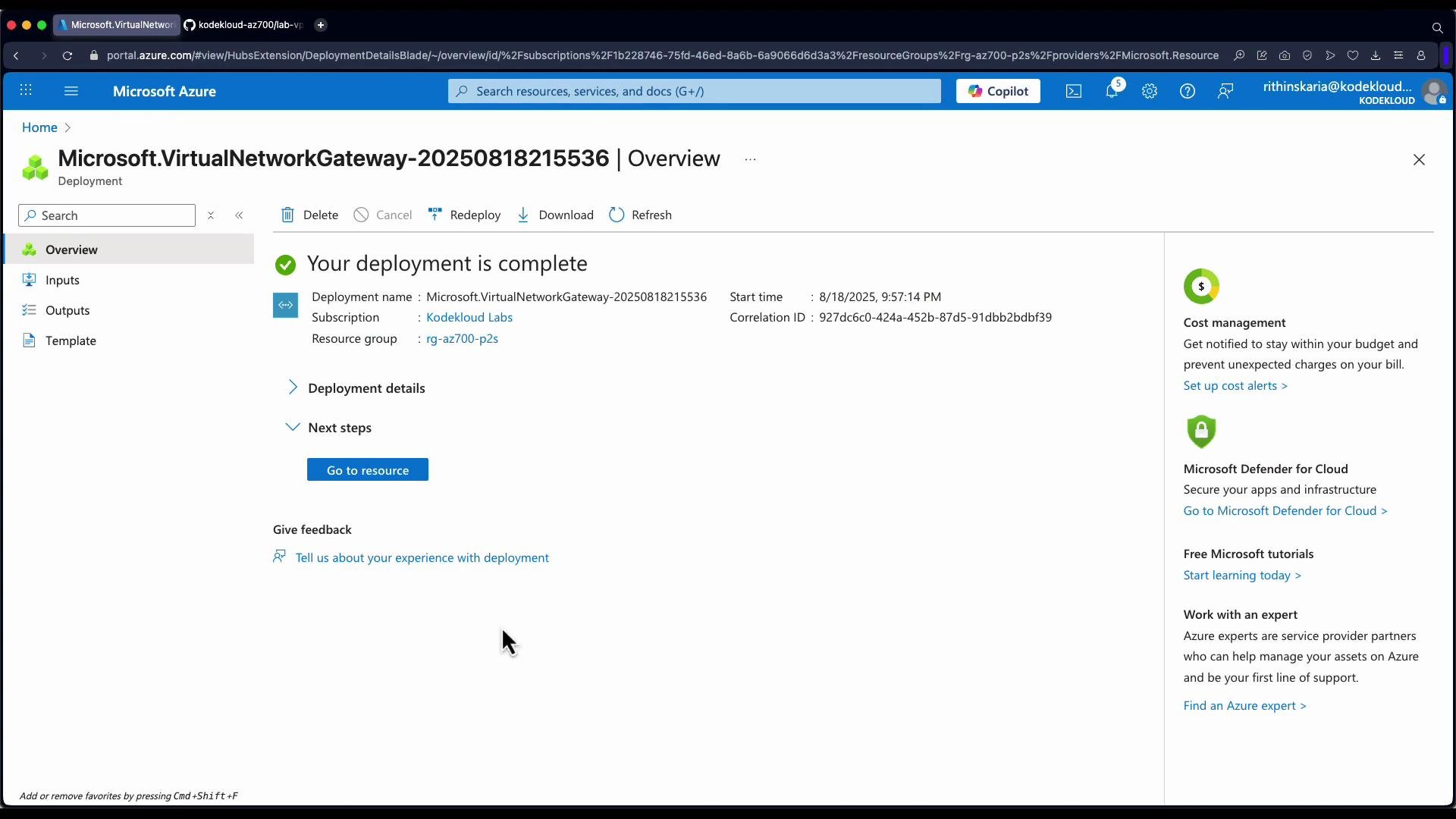
1. Open your Virtual Network Gateway resource in the Azure portal and click "Go to resource".
2. Expand Settings -> Connections, then click Add.
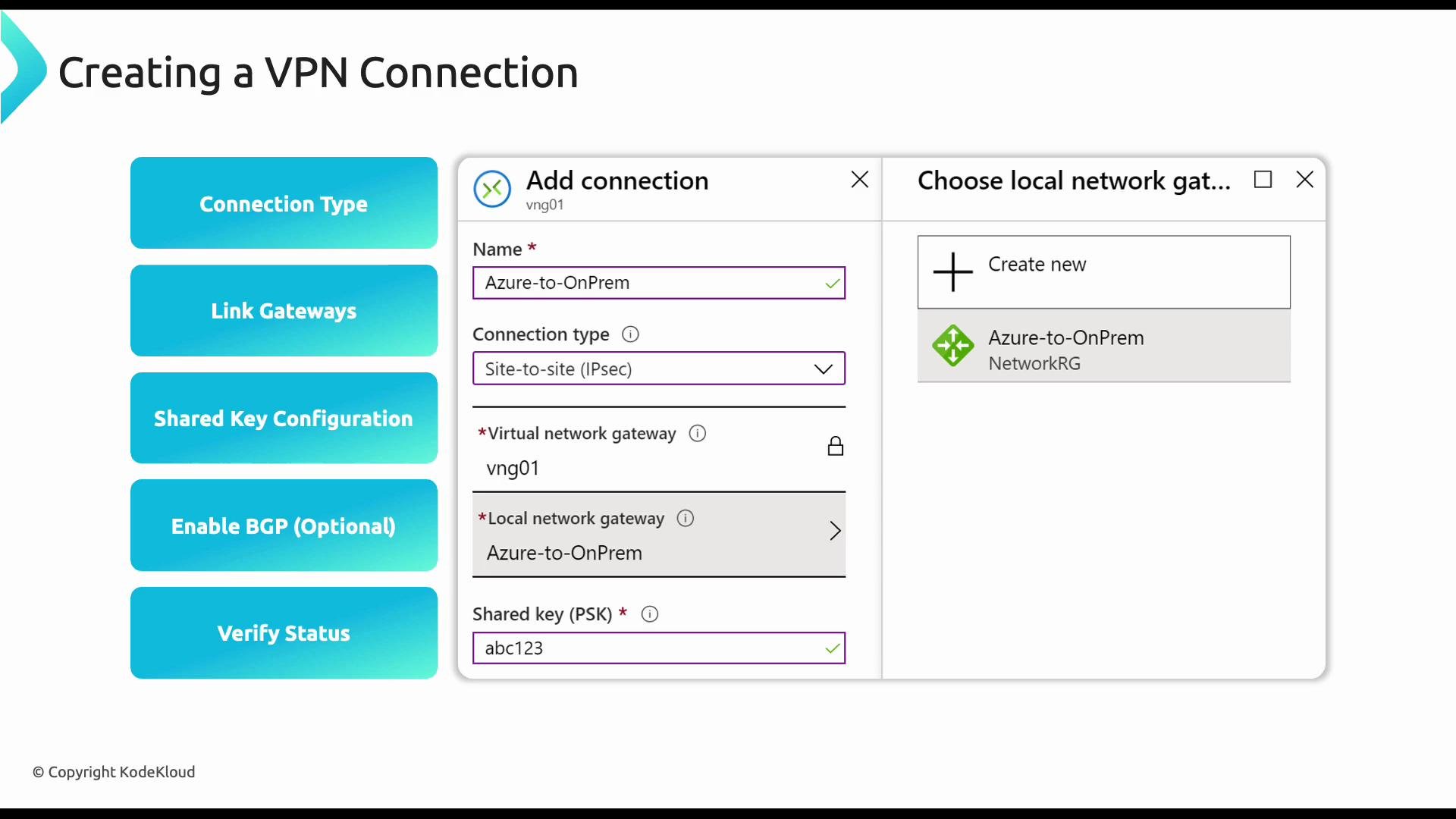
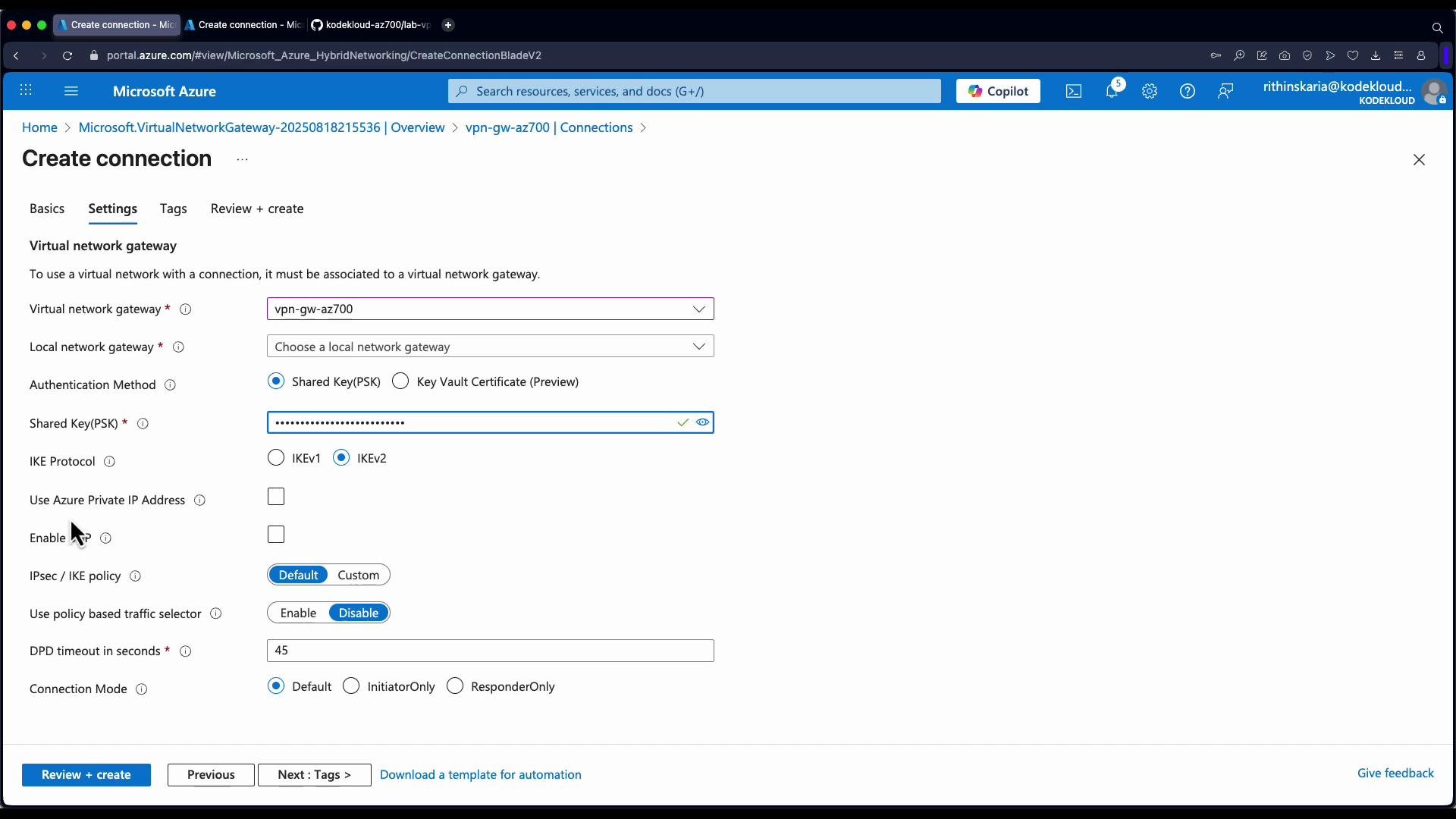
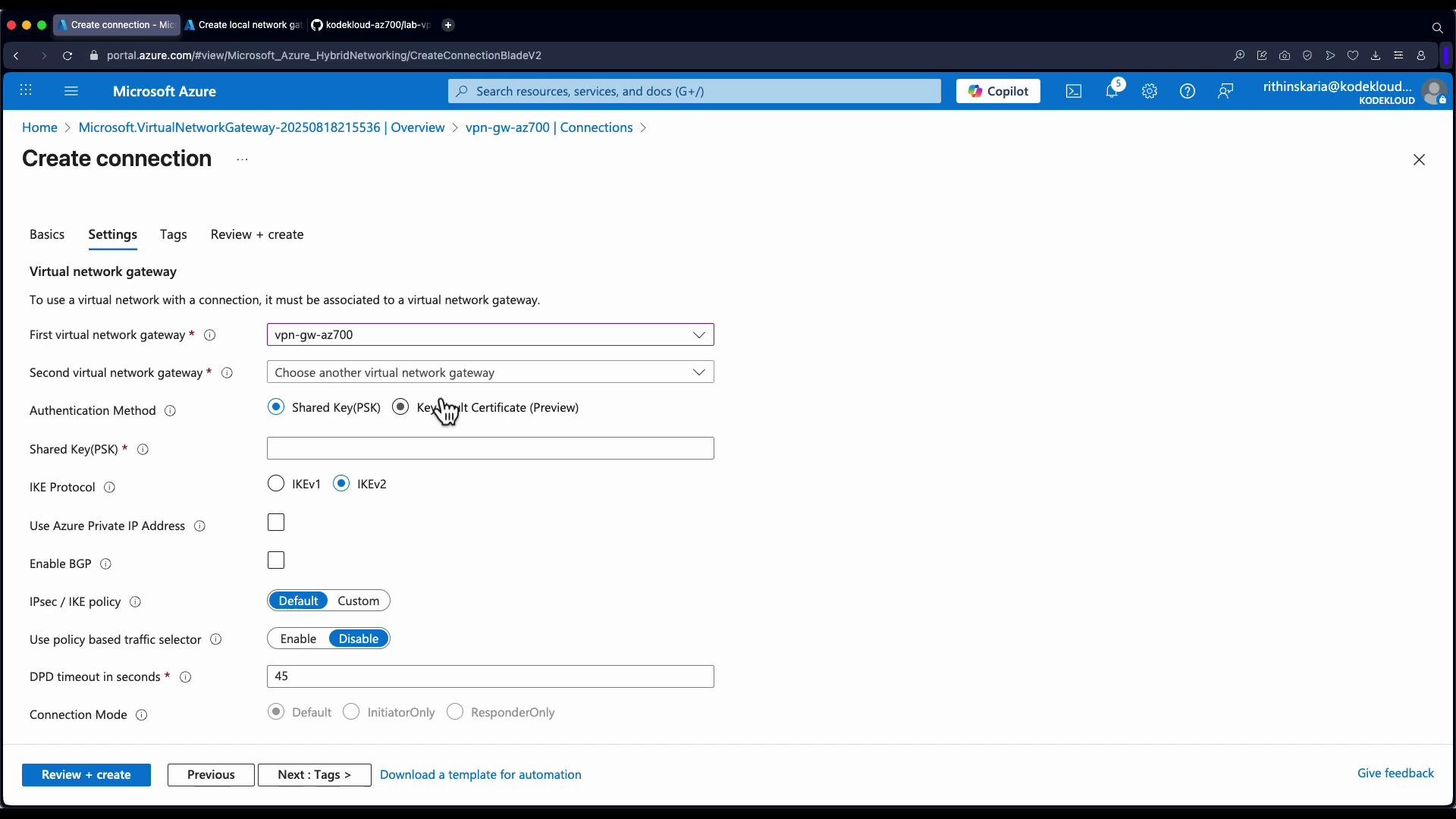
3. In the Create connection blade:
* Connection type: select "Site-to-site (IPsec)".
* Give the connection a descriptive name (e.g., `site-to-site-Azure-to-NYC`).
* Virtual network gateway is pre-selected when you start the create operation from the gateway resource.
* Local network gateway: select an existing Local Network Gateway or create a new one (see next section).
* Authentication type: typically `Pre-shared key` (PSK). If using certificates, choose X.509 where available.
* Enter the same PSK value that is configured on the on-premises device.
* Optionally enable BGP and set a custom IPsec/IKE policy (encryption, hashing, DH group, lifetime).
4. Review + create. The new connection will show in the gateway’s Connections list with a Status field that will become Connected once the tunnel is up.
High-level portal steps
1. Open your Virtual Network Gateway resource in the Azure portal and click "Go to resource".
2. Expand Settings -> Connections, then click Add.
3. In the Create connection blade:
* Connection type: select "Site-to-site (IPsec)".
* Give the connection a descriptive name (e.g., `site-to-site-Azure-to-NYC`).
* Virtual network gateway is pre-selected when you start the create operation from the gateway resource.
* Local network gateway: select an existing Local Network Gateway or create a new one (see next section).
* Authentication type: typically `Pre-shared key` (PSK). If using certificates, choose X.509 where available.
* Enter the same PSK value that is configured on the on-premises device.
* Optionally enable BGP and set a custom IPsec/IKE policy (encryption, hashing, DH group, lifetime).
4. Review + create. The new connection will show in the gateway’s Connections list with a Status field that will become Connected once the tunnel is up.
 ## Creating the Local Network Gateway (represents on-premises)
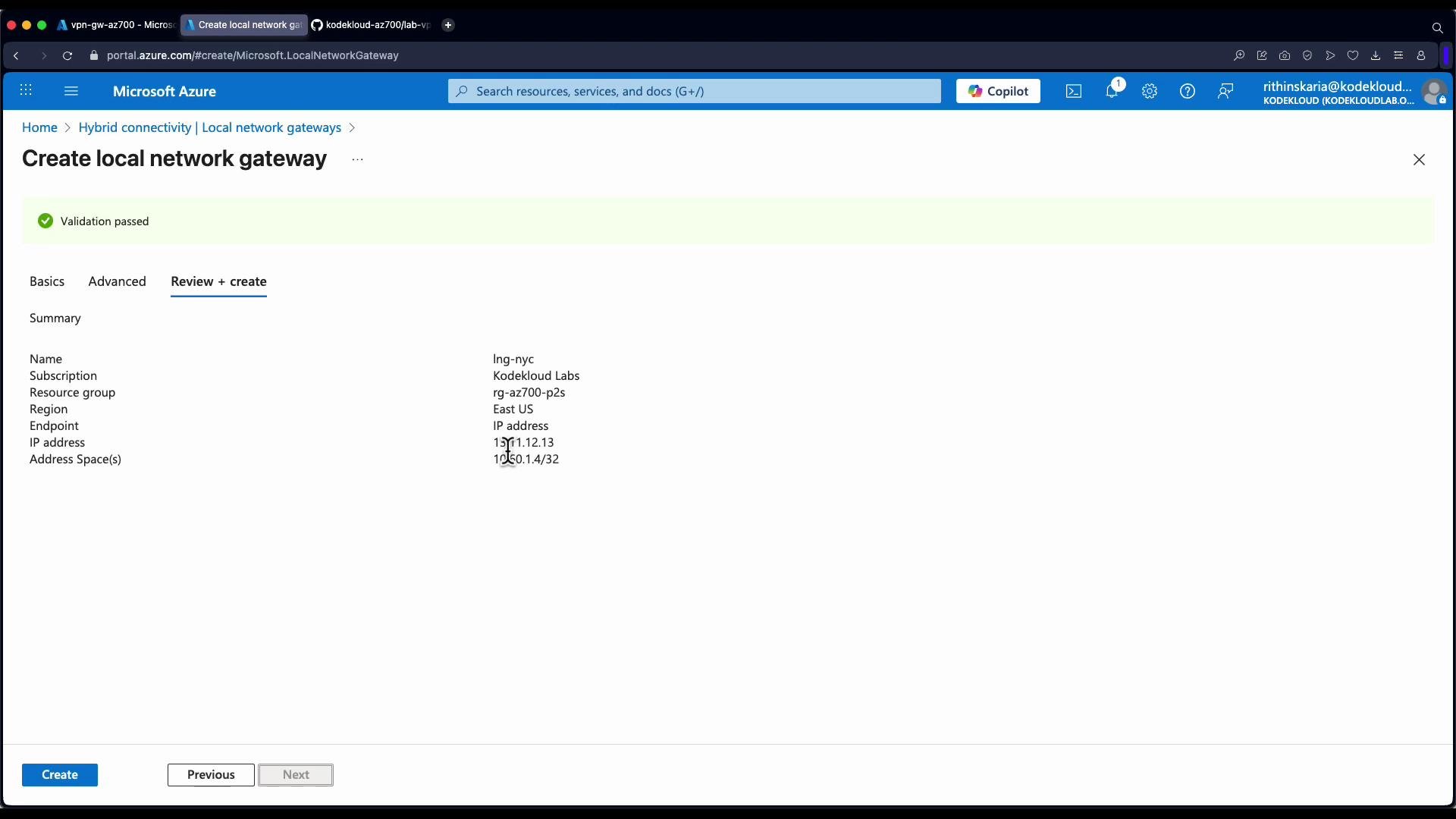
The Local Network Gateway is an Azure metadata object that contains:
* The public IP (or FQDN) of your on‑premises VPN device
* The address prefixes behind that device that should be routed to Azure
Steps to create a Local Network Gateway in the portal:
1. Click Create -> Local network gateway.
2. Enter:
* Name (e.g., `local-network-gateway-NYC`)
* Region (select appropriately)
* IP address or FQDN of the on-premises VPN device (public IP)
* Address space(s) for the on-premises network (e.g., `10.0.0.0/24`)
3. (Optional) Configure BGP settings if using dynamic routing.
4. Review + create.
A Local Network Gateway is a reference object only. Azure does not validate the configured public IP at creation — it simply stores the IP/FQDN and prefix information for use when establishing the connection.
## Creating the Local Network Gateway (represents on-premises)
The Local Network Gateway is an Azure metadata object that contains:
* The public IP (or FQDN) of your on‑premises VPN device
* The address prefixes behind that device that should be routed to Azure
Steps to create a Local Network Gateway in the portal:
1. Click Create -> Local network gateway.
2. Enter:
* Name (e.g., `local-network-gateway-NYC`)
* Region (select appropriately)
* IP address or FQDN of the on-premises VPN device (public IP)
* Address space(s) for the on-premises network (e.g., `10.0.0.0/24`)
3. (Optional) Configure BGP settings if using dynamic routing.
4. Review + create.
A Local Network Gateway is a reference object only. Azure does not validate the configured public IP at creation — it simply stores the IP/FQDN and prefix information for use when establishing the connection.
 ## Recommended IPsec / IKE policy example
Use Azure’s IPsec/IKE policy to harden the tunnel. Below is a common secure configuration pattern — adjust for your organizational requirements.
* IKE version: IKEv2 (preferred)
* Encryption: AES256
* Integrity/hash: SHA256
* DH group: ECP384 (or Group24/2+ depending on compatibility)
* SA lifetime: 28,800 seconds (8 hours) or as required
See full options and compatibility details: [https://learn.microsoft.com/azure/vpn-gateway/vpn-gateway-ipsecike-policy](https://learn.microsoft.com/azure/vpn-gateway/vpn-gateway-ipsecike-policy)
## Validation and troubleshooting
* After the connection is created and the on‑premises device configured, the portal shows the connection Status as Connected when the tunnel is established.
* Basic validation:
* Ping/telnet or access resources across the tunnel from either side, respecting any NSG or firewall rules.
* Check logs on the on‑premises VPN device for IKE/IPsec negotiation errors.
* Ensure PSK, IPsec/IKE parameters, and public IPs match exactly on both ends.
* For dynamic routing issues, validate BGP peering and advertised prefixes.
## Recommended IPsec / IKE policy example
Use Azure’s IPsec/IKE policy to harden the tunnel. Below is a common secure configuration pattern — adjust for your organizational requirements.
* IKE version: IKEv2 (preferred)
* Encryption: AES256
* Integrity/hash: SHA256
* DH group: ECP384 (or Group24/2+ depending on compatibility)
* SA lifetime: 28,800 seconds (8 hours) or as required
See full options and compatibility details: [https://learn.microsoft.com/azure/vpn-gateway/vpn-gateway-ipsecike-policy](https://learn.microsoft.com/azure/vpn-gateway/vpn-gateway-ipsecike-policy)
## Validation and troubleshooting
* After the connection is created and the on‑premises device configured, the portal shows the connection Status as Connected when the tunnel is established.
* Basic validation:
* Ping/telnet or access resources across the tunnel from either side, respecting any NSG or firewall rules.
* Check logs on the on‑premises VPN device for IKE/IPsec negotiation errors.
* Ensure PSK, IPsec/IKE parameters, and public IPs match exactly on both ends.
* For dynamic routing issues, validate BGP peering and advertised prefixes.
 ## Additional notes
* VNet-to-VNet connections require a gateway in each VNet and incur gateway charges for each deployment. For same-region, same-subscription connectivity prefer VNet peering for simplicity and cost savings.
* If you enable BGP, ensure autonomous system numbers (ASNs) and BGP peering settings are configured correctly on both sides.
## Links and references
* Azure VPN Gateway overview: [https://learn.microsoft.com/azure/vpn-gateway/vpn-gateway-about-vpngateways](https://learn.microsoft.com/azure/vpn-gateway/vpn-gateway-about-vpngateways)
* Validated VPN devices: [https://learn.microsoft.com/azure/vpn-gateway/vpn-gateway-about-vpn-devices](https://learn.microsoft.com/azure/vpn-gateway/vpn-gateway-about-vpn-devices)
* IPsec/IKE policy configuration: [https://learn.microsoft.com/azure/vpn-gateway/vpn-gateway-ipsecike-policy](https://learn.microsoft.com/azure/vpn-gateway/vpn-gateway-ipsecike-policy)
* BGP overview for VPN gateway: [https://learn.microsoft.com/azure/vpn-gateway/vpn-gateway-bgp-overview](https://learn.microsoft.com/azure/vpn-gateway/vpn-gateway-bgp-overview)
* Virtual network peering: [https://learn.microsoft.com/azure/virtual-network/virtual-network-peering-overview](https://learn.microsoft.com/azure/virtual-network/virtual-network-peering-overview)
Following this, the course proceeds to Point-to-Site connections and demonstrates gateway transit and client connectivity testing.
## Additional notes
* VNet-to-VNet connections require a gateway in each VNet and incur gateway charges for each deployment. For same-region, same-subscription connectivity prefer VNet peering for simplicity and cost savings.
* If you enable BGP, ensure autonomous system numbers (ASNs) and BGP peering settings are configured correctly on both sides.
## Links and references
* Azure VPN Gateway overview: [https://learn.microsoft.com/azure/vpn-gateway/vpn-gateway-about-vpngateways](https://learn.microsoft.com/azure/vpn-gateway/vpn-gateway-about-vpngateways)
* Validated VPN devices: [https://learn.microsoft.com/azure/vpn-gateway/vpn-gateway-about-vpn-devices](https://learn.microsoft.com/azure/vpn-gateway/vpn-gateway-about-vpn-devices)
* IPsec/IKE policy configuration: [https://learn.microsoft.com/azure/vpn-gateway/vpn-gateway-ipsecike-policy](https://learn.microsoft.com/azure/vpn-gateway/vpn-gateway-ipsecike-policy)
* BGP overview for VPN gateway: [https://learn.microsoft.com/azure/vpn-gateway/vpn-gateway-bgp-overview](https://learn.microsoft.com/azure/vpn-gateway/vpn-gateway-bgp-overview)
* Virtual network peering: [https://learn.microsoft.com/azure/virtual-network/virtual-network-peering-overview](https://learn.microsoft.com/azure/virtual-network/virtual-network-peering-overview)
Following this, the course proceeds to Point-to-Site connections and demonstrates gateway transit and client connectivity testing.