> ## Documentation Index
> Fetch the complete documentation index at: https://notes.kodekloud.com/llms.txt
> Use this file to discover all available pages before exploring further.
# Site to Site VPN Connections
> Guide to planning and configuring Azure site-to-site IPsec/IKE VPNs, covering gateway setup, Local Network Gateway, security best practices, routing, and verification steps
Site-to-site VPN connections create secure IPsec/IKE tunnels between an on-premises network and an Azure Virtual Network (VNet). A typical deployment uses an on-premises VPN device to establish an IPsec/IKE tunnel over the internet to an Azure VPN gateway, enabling encrypted connectivity between the two networks.
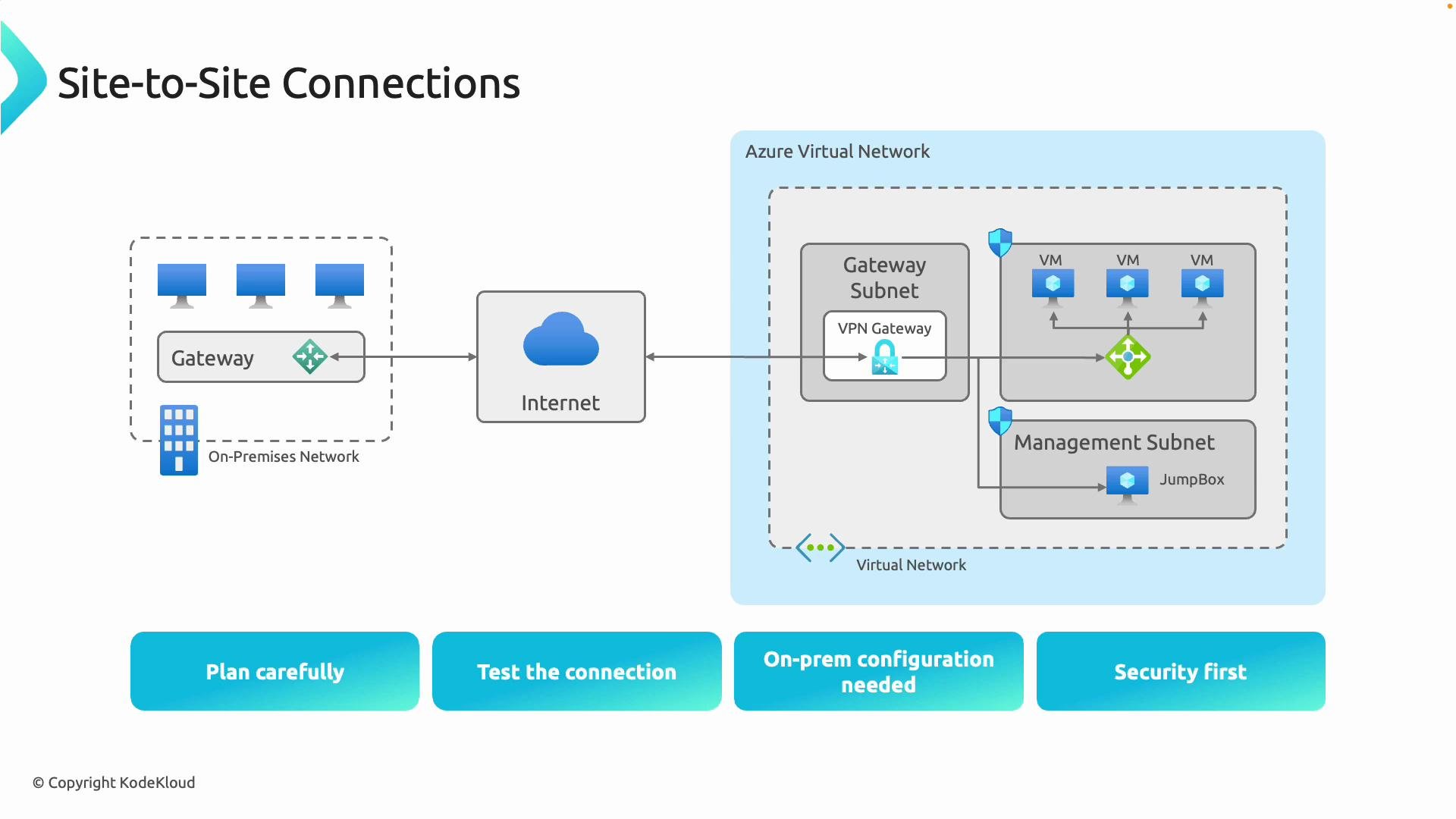 ## Planning checklist
Plan before you deploy—addressing addressing, capacity, and compliance up front avoids downtime and rework.
| Item | Recommendation | Why it matters |
| --------------------- | --------------------------------------------------------------------------------------------------------------------- | ------------------------------------------------------------- |
| Address space | Ensure VNet and on-premises networks do not overlap | Overlapping prefixes prevent proper routing across the tunnel |
| Throughput & SKU | Choose a VPN gateway SKU that meets throughput needs (e.g., `VpnGw4`, `VpnGw5` or current equivalents for multi‑Gbps) | Incorrect SKU can throttle traffic or lack required features |
| Compliance & security | Confirm encryption, logging, and data residency requirements | Meets organizational and regulatory requirements |
| DNS & routing | Decide on custom DNS servers or DNS forwarding and routing (propagated routes vs static) | Ensures name resolution and correct path selection |
Plan address space and gateway SKU before deployment. Overlapping address ranges will prevent proper routing, and choosing the correct gateway SKU ensures the required bandwidth and features.
## Security considerations
* Prefer certificate-based authentication where supported; certificates provide stronger authentication than pre-shared keys (PSKs).
* If PSKs are used, ensure they are high-entropy and rotated regularly.
* Use modern encryption and integrity algorithms for IKE/IPsec and prefer IKEv2 when supported by both endpoints.
* Apply strict access control, logging, and monitoring on both the Azure and on-premises sides.
* Validate device compatibility—consult vendor documentation for supported configurations.
Do not reuse weak PSKs. If using PSKs, ensure they are complex and rotated according to your security policies. Consider certificate-based authentication for higher security where possible.
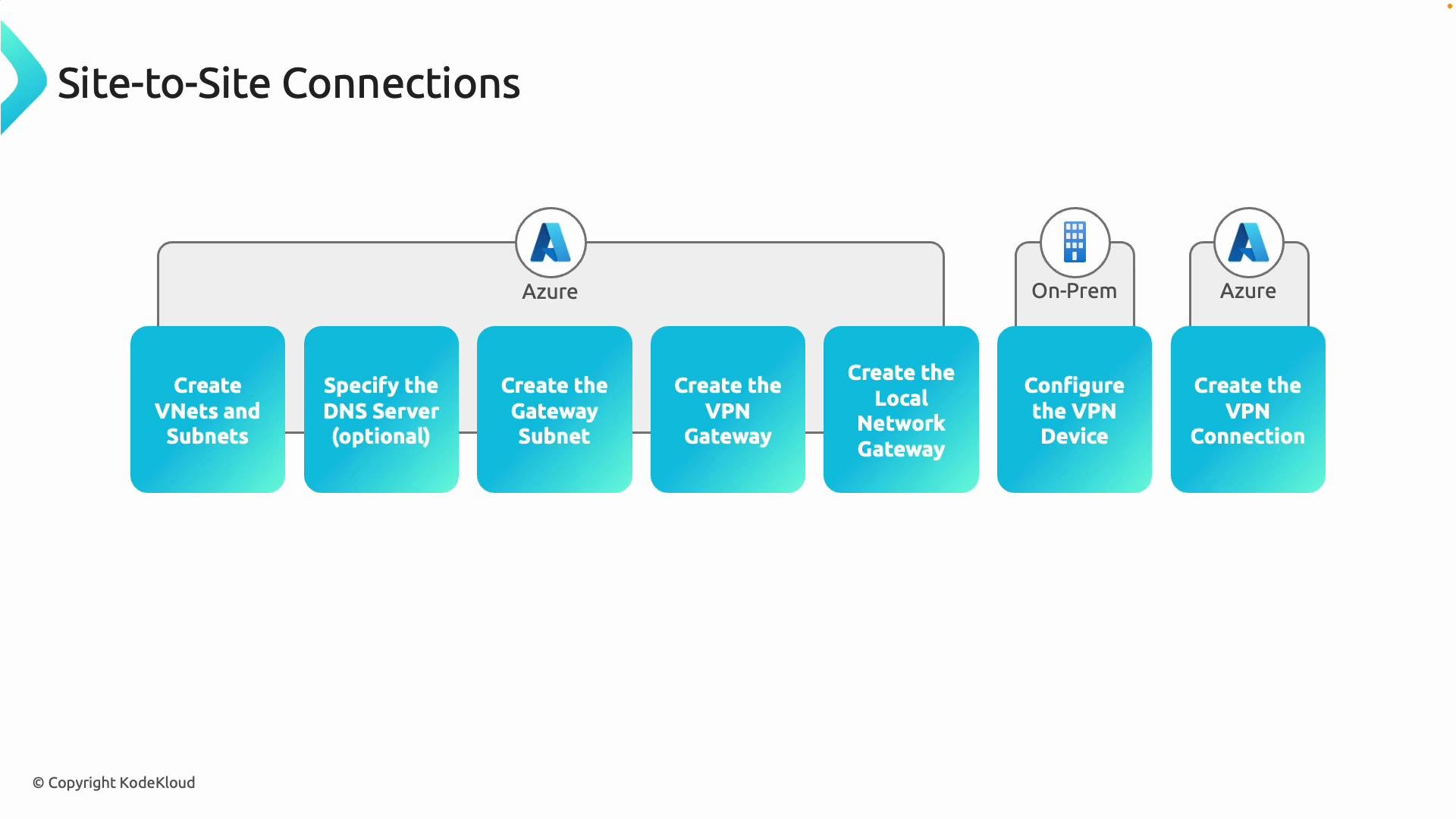
## High-level setup steps
1. Create the Azure Virtual Network(s) and subnets.
* Reserve a subnet named exactly `GatewaySubnet`. Microsoft recommends a size of `/27` or larger to allow for gateway instances.
* Optionally configure custom DNS servers or forwarding for resources inside the VNet.
2. Deploy the Azure VPN gateway into the `GatewaySubnet`.
* Choose gateway type `Vpn` and VPN type `RouteBased` (recommended for BGP support and most modern scenarios). Use `PolicyBased` only for specific legacy scenarios.
* Select an appropriate SKU (throughput, SLA, and feature set).
3. Create a Local Network Gateway in Azure.
* The Local Network Gateway stores the on-premises VPN device public IP (or FQDN) and the on-premises address prefixes that Azure should route to.
4. Configure your on-premises VPN device.
* Configure the on-premises device with the Azure VPN gateway public IP or FQDN, the same PSK or certificate settings, and advertise/allow the on-premises prefixes.
5. Create the site-to-site VPN connection in Azure to link the VPN gateway and the Local Network Gateway.
6. Validate connectivity and routing end-to-end.
* Verify tunnel(s) are established, routes are propagated, and firewalls/NSGs permit the desired traffic.
## Planning checklist
Plan before you deploy—addressing addressing, capacity, and compliance up front avoids downtime and rework.
| Item | Recommendation | Why it matters |
| --------------------- | --------------------------------------------------------------------------------------------------------------------- | ------------------------------------------------------------- |
| Address space | Ensure VNet and on-premises networks do not overlap | Overlapping prefixes prevent proper routing across the tunnel |
| Throughput & SKU | Choose a VPN gateway SKU that meets throughput needs (e.g., `VpnGw4`, `VpnGw5` or current equivalents for multi‑Gbps) | Incorrect SKU can throttle traffic or lack required features |
| Compliance & security | Confirm encryption, logging, and data residency requirements | Meets organizational and regulatory requirements |
| DNS & routing | Decide on custom DNS servers or DNS forwarding and routing (propagated routes vs static) | Ensures name resolution and correct path selection |
Plan address space and gateway SKU before deployment. Overlapping address ranges will prevent proper routing, and choosing the correct gateway SKU ensures the required bandwidth and features.
## Security considerations
* Prefer certificate-based authentication where supported; certificates provide stronger authentication than pre-shared keys (PSKs).
* If PSKs are used, ensure they are high-entropy and rotated regularly.
* Use modern encryption and integrity algorithms for IKE/IPsec and prefer IKEv2 when supported by both endpoints.
* Apply strict access control, logging, and monitoring on both the Azure and on-premises sides.
* Validate device compatibility—consult vendor documentation for supported configurations.
Do not reuse weak PSKs. If using PSKs, ensure they are complex and rotated according to your security policies. Consider certificate-based authentication for higher security where possible.
## High-level setup steps
1. Create the Azure Virtual Network(s) and subnets.
* Reserve a subnet named exactly `GatewaySubnet`. Microsoft recommends a size of `/27` or larger to allow for gateway instances.
* Optionally configure custom DNS servers or forwarding for resources inside the VNet.
2. Deploy the Azure VPN gateway into the `GatewaySubnet`.
* Choose gateway type `Vpn` and VPN type `RouteBased` (recommended for BGP support and most modern scenarios). Use `PolicyBased` only for specific legacy scenarios.
* Select an appropriate SKU (throughput, SLA, and feature set).
3. Create a Local Network Gateway in Azure.
* The Local Network Gateway stores the on-premises VPN device public IP (or FQDN) and the on-premises address prefixes that Azure should route to.
4. Configure your on-premises VPN device.
* Configure the on-premises device with the Azure VPN gateway public IP or FQDN, the same PSK or certificate settings, and advertise/allow the on-premises prefixes.
5. Create the site-to-site VPN connection in Azure to link the VPN gateway and the Local Network Gateway.
6. Validate connectivity and routing end-to-end.
* Verify tunnel(s) are established, routes are propagated, and firewalls/NSGs permit the desired traffic.
 ## About the Local Network Gateway
* The Local Network Gateway is an Azure resource that represents your on-premises network and VPN device. It stores:
* The on-premises public IP address of the VPN device.
* The on-premises address prefixes that Azure should route to that device.
* Example: if your on-premises VPN device public IP is `33.2.1.5`, create a Local Network Gateway and set its gateway IP address to `33.2.1.5` and add the on-premises address ranges to be reachable from Azure (for example: `10.0.0.0/16`).
* For multiple branch offices or data centers, create multiple Local Network Gateways and individual site-to-site connections from the Azure VPN gateway to each location.
## Putting it together
* Create the `GatewaySubnet` and deploy the Azure VPN gateway into that subnet.
* Create the Local Network Gateway resource(s) that point to your on-premises public IP(s) and include the on-premises prefixes.
* Configure the on-premises VPN device to point to the Azure VPN gateway public IP (or FQDN), and configure matching PSK or certificate settings.
* Create the site-to-site connection resource in Azure to link the VPN gateway and Local Network Gateway.
* When parameters match on both sides, the IPsec/IKE tunnel should establish and traffic will route between on-premises address ranges and Azure VNets.
## Verification checklist
| What to check | How to check |
| ---------------- | ------------------------------------------------------------------------------------------------------------------------ |
| Tunnel status | Azure Portal or `az network vpn-connection show --name --resource-group ` |
| Routes | Check effective routes on Azure VM NIC and route tables; ensure on-premises routes advertise expected prefixes |
| NSGs & firewalls | Verify Network Security Group and on-premises firewall rules allow required ports/protocols |
| Traffic flows | Test connectivity both ways (on-premises -> Azure and Azure -> on-premises) and validate latency/throughput requirements |
## References and further reading
* Azure VPN gateway documentation: [https://learn.microsoft.com/en-us/azure/vpn-gateway/](https://learn.microsoft.com/en-us/azure/vpn-gateway/)
* Azure VPN device configuration guide: [https://learn.microsoft.com/en-us/azure/vpn-gateway/vpn-gateway-about-vpn-devices](https://learn.microsoft.com/en-us/azure/vpn-gateway/vpn-gateway-about-vpn-devices)
This article covered the architecture, planning considerations, required Azure resources (`GatewaySubnet`, VPN gateway, Local Network Gateway), and the step-by-step sequence to establish a site-to-site VPN. For device-specific configuration examples and the latest SKU/performance information, refer to the Azure VPN gateway documentation and your device vendor guides.
## About the Local Network Gateway
* The Local Network Gateway is an Azure resource that represents your on-premises network and VPN device. It stores:
* The on-premises public IP address of the VPN device.
* The on-premises address prefixes that Azure should route to that device.
* Example: if your on-premises VPN device public IP is `33.2.1.5`, create a Local Network Gateway and set its gateway IP address to `33.2.1.5` and add the on-premises address ranges to be reachable from Azure (for example: `10.0.0.0/16`).
* For multiple branch offices or data centers, create multiple Local Network Gateways and individual site-to-site connections from the Azure VPN gateway to each location.
## Putting it together
* Create the `GatewaySubnet` and deploy the Azure VPN gateway into that subnet.
* Create the Local Network Gateway resource(s) that point to your on-premises public IP(s) and include the on-premises prefixes.
* Configure the on-premises VPN device to point to the Azure VPN gateway public IP (or FQDN), and configure matching PSK or certificate settings.
* Create the site-to-site connection resource in Azure to link the VPN gateway and Local Network Gateway.
* When parameters match on both sides, the IPsec/IKE tunnel should establish and traffic will route between on-premises address ranges and Azure VNets.
## Verification checklist
| What to check | How to check |
| ---------------- | ------------------------------------------------------------------------------------------------------------------------ |
| Tunnel status | Azure Portal or `az network vpn-connection show --name --resource-group ` |
| Routes | Check effective routes on Azure VM NIC and route tables; ensure on-premises routes advertise expected prefixes |
| NSGs & firewalls | Verify Network Security Group and on-premises firewall rules allow required ports/protocols |
| Traffic flows | Test connectivity both ways (on-premises -> Azure and Azure -> on-premises) and validate latency/throughput requirements |
## References and further reading
* Azure VPN gateway documentation: [https://learn.microsoft.com/en-us/azure/vpn-gateway/](https://learn.microsoft.com/en-us/azure/vpn-gateway/)
* Azure VPN device configuration guide: [https://learn.microsoft.com/en-us/azure/vpn-gateway/vpn-gateway-about-vpn-devices](https://learn.microsoft.com/en-us/azure/vpn-gateway/vpn-gateway-about-vpn-devices)
This article covered the architecture, planning considerations, required Azure resources (`GatewaySubnet`, VPN gateway, Local Network Gateway), and the step-by-step sequence to establish a site-to-site VPN. For device-specific configuration examples and the latest SKU/performance information, refer to the Azure VPN gateway documentation and your device vendor guides.