> ## Documentation Index
> Fetch the complete documentation index at: https://notes.kodekloud.com/llms.txt
> Use this file to discover all available pages before exploring further.
# What is Azure Virtual WAN
> Overview of Azure Virtual WAN, a managed global networking service for centralized, scalable connectivity across VNets, branches, remote users, and multi-region hybrid networks
Azure Virtual WAN
In this lesson we explain Azure Virtual WAN: a managed networking service that centralizes and simplifies connectivity across branch offices, remote users, and cloud resources spanning multiple regions. Virtual WAN acts as a global, managed backbone—replacing the manual hub in a traditional hub-and-spoke topology with a Virtual WAN hub that Azure manages for you.
A Virtual WAN hub is a managed networking object that connects many VNets, on-premises sites, remote users, and even other Virtual WAN hubs in different regions. This reduces the number of individual connections and peering relationships you must configure and maintain.
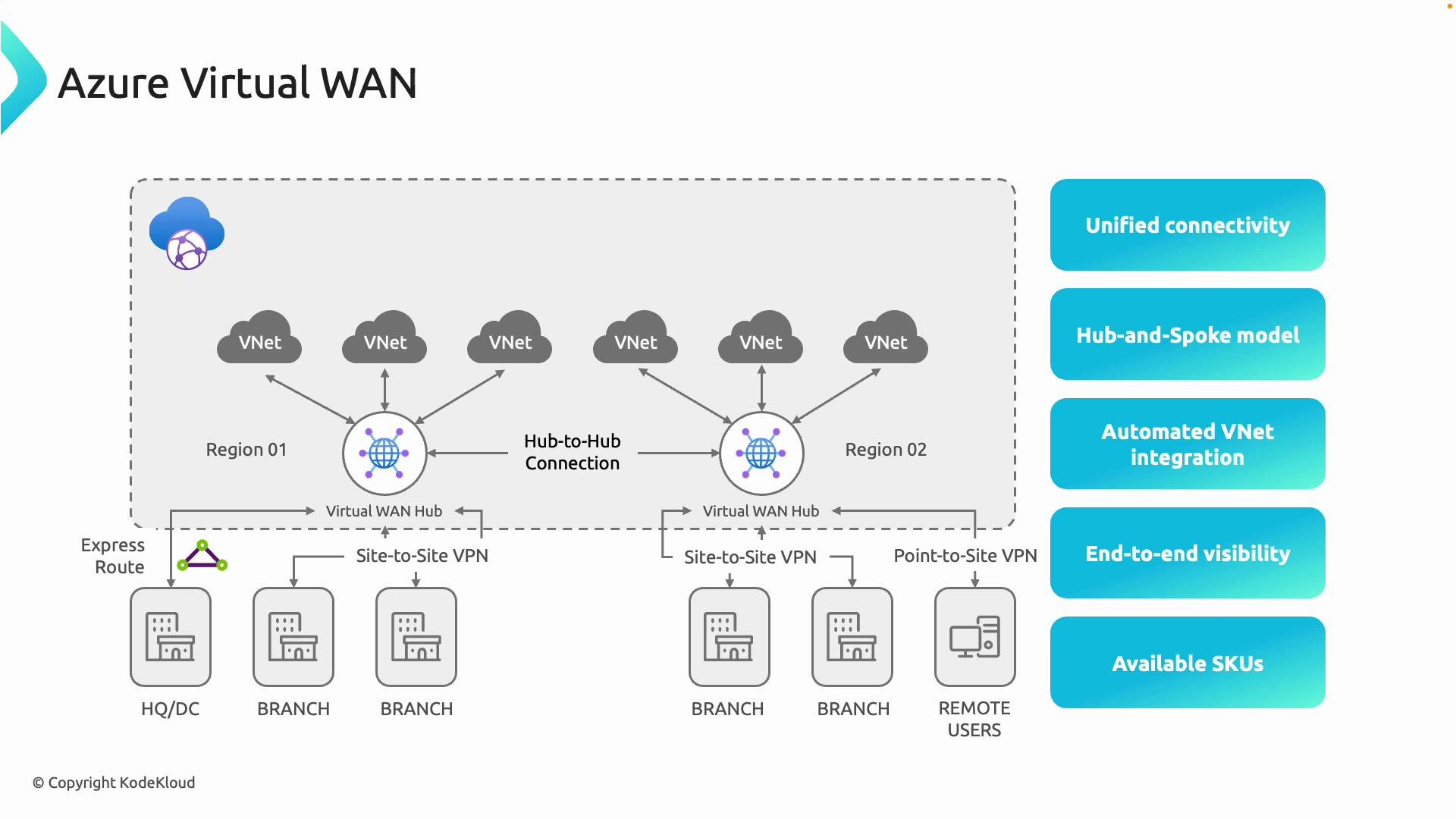 Core connectivity patterns supported by Virtual WAN:
* Site-to-site VPNs from branch offices or datacenters to the Virtual WAN hub.
* Point-to-site (remote user) VPNs for individual client connections.
* ExpressRoute integration for private, high-throughput links.
* VNet integration so cloud workloads connect to the managed hub without manual peering.
* Inter-hub transit (hub-to-hub) enabling region-to-region transit across the managed fabric.
Benefits of using Virtual WAN:
* Centralized routing and security controls with operational visibility.
* Reduced chance of misconfiguration compared to many manual peering relationships.
* Simplified scaling for multi-region and hybrid connectivity scenarios.
Key features
* Hub-spoke model using Virtual WAN hubs as managed network termination points.
* Automated VNet integration that removes the need to manually peer VNets or configure route tables for hub attachment.
* End-to-end visibility and troubleshooting across on-premises, branches, remote users, and VNets via a single pane of glass.
Available SKUs
Azure Virtual WAN is available in two main SKUs: Basic and Standard. Choose the SKU that matches your connectivity requirements and expected scale.
| SKU | Primary Use Case | Supported Capabilities |
| -------- | ----------------------------------------------------------------------- | ----------------------------------------------------------------------------------------------------------------------------------------------------- |
| Basic | Simple site-to-site VPN scenarios and small deployments | Cost-effective for branch connectivity; does **not** support remote user VPNs, ExpressRoute integration, or inter-hub transit |
| Standard | Enterprise and hybrid scenarios requiring scale and varied connectivity | Supports point-to-site (remote user) VPNs, ExpressRoute connectivity, VNet-to-VNet transit through the hub, and inter-hub connectivity across regions |
Use Standard when you need global transit, a mix of connection types, or integration with ExpressRoute. Use Basic for smaller deployments that only require site-to-site VPNs.
Core connectivity patterns supported by Virtual WAN:
* Site-to-site VPNs from branch offices or datacenters to the Virtual WAN hub.
* Point-to-site (remote user) VPNs for individual client connections.
* ExpressRoute integration for private, high-throughput links.
* VNet integration so cloud workloads connect to the managed hub without manual peering.
* Inter-hub transit (hub-to-hub) enabling region-to-region transit across the managed fabric.
Benefits of using Virtual WAN:
* Centralized routing and security controls with operational visibility.
* Reduced chance of misconfiguration compared to many manual peering relationships.
* Simplified scaling for multi-region and hybrid connectivity scenarios.
Key features
* Hub-spoke model using Virtual WAN hubs as managed network termination points.
* Automated VNet integration that removes the need to manually peer VNets or configure route tables for hub attachment.
* End-to-end visibility and troubleshooting across on-premises, branches, remote users, and VNets via a single pane of glass.
Available SKUs
Azure Virtual WAN is available in two main SKUs: Basic and Standard. Choose the SKU that matches your connectivity requirements and expected scale.
| SKU | Primary Use Case | Supported Capabilities |
| -------- | ----------------------------------------------------------------------- | ----------------------------------------------------------------------------------------------------------------------------------------------------- |
| Basic | Simple site-to-site VPN scenarios and small deployments | Cost-effective for branch connectivity; does **not** support remote user VPNs, ExpressRoute integration, or inter-hub transit |
| Standard | Enterprise and hybrid scenarios requiring scale and varied connectivity | Supports point-to-site (remote user) VPNs, ExpressRoute connectivity, VNet-to-VNet transit through the hub, and inter-hub connectivity across regions |
Use Standard when you need global transit, a mix of connection types, or integration with ExpressRoute. Use Basic for smaller deployments that only require site-to-site VPNs.
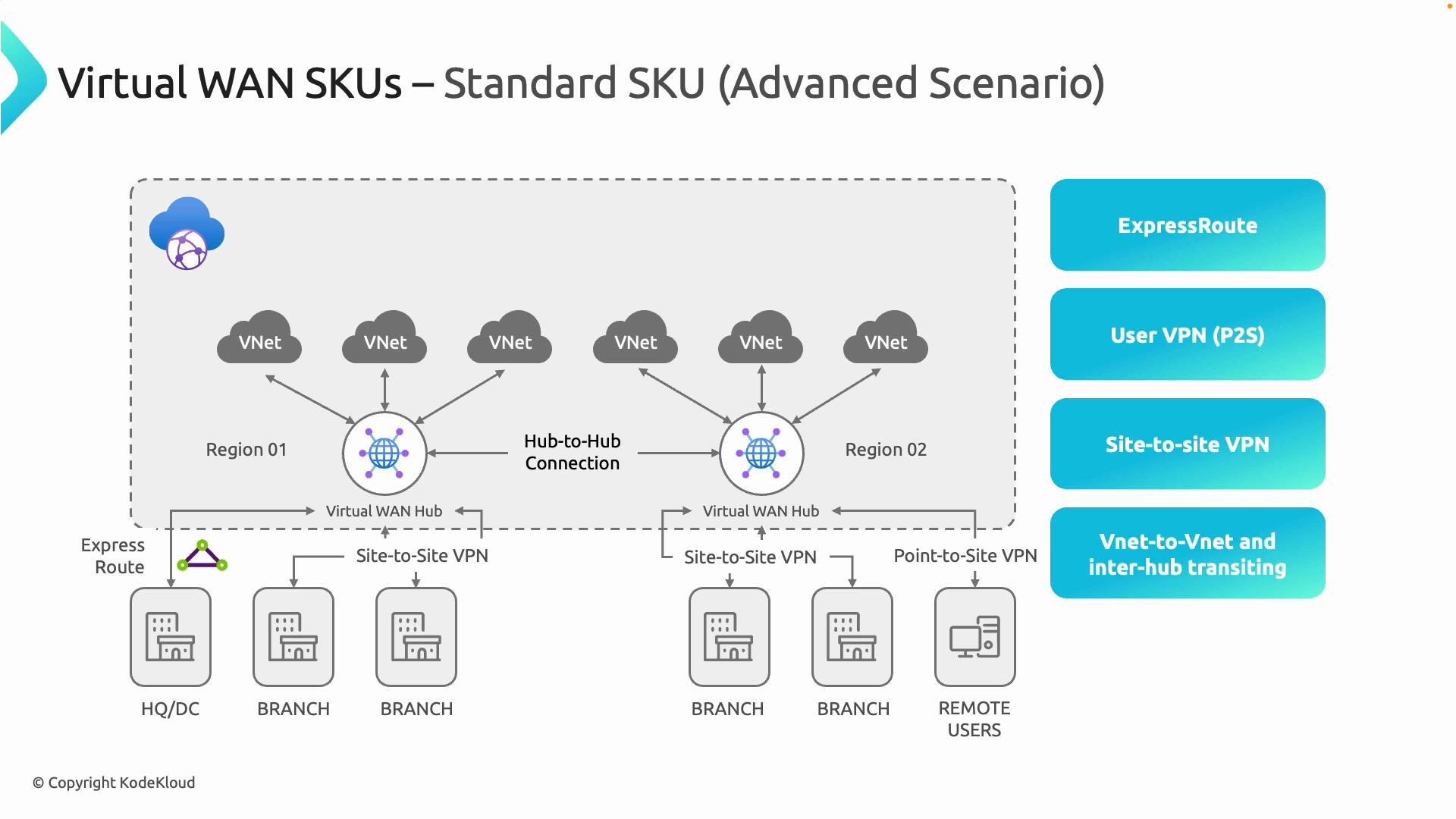 Important: Hub type must match WAN SKU
The capabilities available on a Virtual WAN hub are determined by the Virtual WAN SKU. A Virtual WAN created with the Basic SKU requires Basic hubs. If you need Standard capabilities (for example, ExpressRoute or point-to-site VPNs), the Virtual WAN must be Standard and the hubs must be Standard as well.
Hub IP addressing and subnetting
When provisioning a Virtual WAN hub you specify an overall address space for the hub. Key rules and best practices:
* The smallest supported prefix for a hub is /24 (256 IPv4 addresses).
* Azure reserves several IPs internally (gateway, infrastructure), so plan your address range accordingly.
* Azure automatically creates and manages the internal subnets used by the hub (for gateways, firewalls, etc.), so you do not need to create those subnets manually—only provide the hub address range.
* Ensure the hub address space does not overlap with on-premises or other cloud network ranges to avoid routing conflicts. Azure uses the hub address space internally for routing and infrastructure services.
Important: Hub type must match WAN SKU
The capabilities available on a Virtual WAN hub are determined by the Virtual WAN SKU. A Virtual WAN created with the Basic SKU requires Basic hubs. If you need Standard capabilities (for example, ExpressRoute or point-to-site VPNs), the Virtual WAN must be Standard and the hubs must be Standard as well.
Hub IP addressing and subnetting
When provisioning a Virtual WAN hub you specify an overall address space for the hub. Key rules and best practices:
* The smallest supported prefix for a hub is /24 (256 IPv4 addresses).
* Azure reserves several IPs internally (gateway, infrastructure), so plan your address range accordingly.
* Azure automatically creates and manages the internal subnets used by the hub (for gateways, firewalls, etc.), so you do not need to create those subnets manually—only provide the hub address range.
* Ensure the hub address space does not overlap with on-premises or other cloud network ranges to avoid routing conflicts. Azure uses the hub address space internally for routing and infrastructure services.
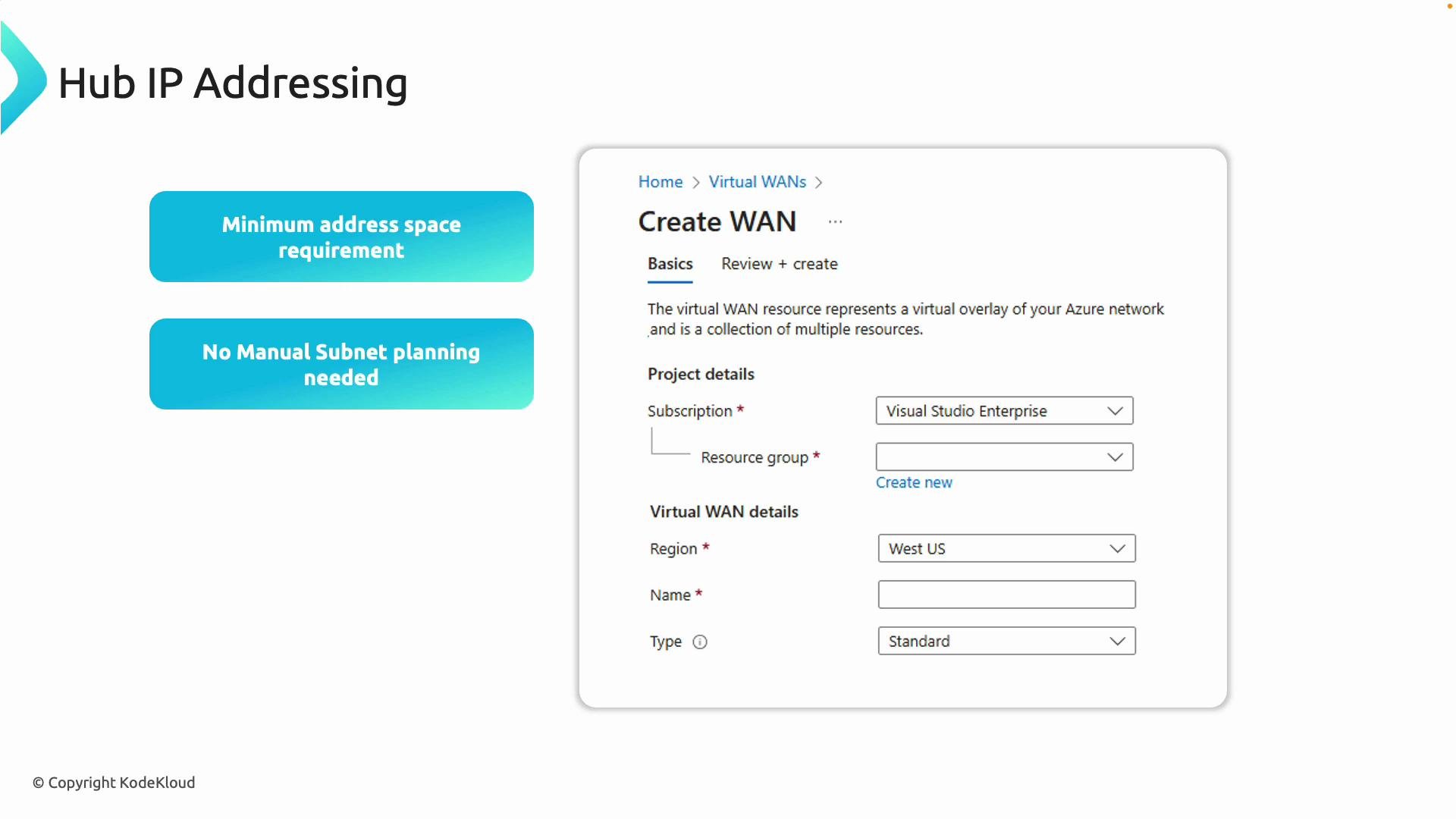 When planning your Virtual WAN, choose a hub address range that doesn’t overlap with on-premises or existing VNet ranges. Azure handles subnet creation and allocates infrastructure IPs automatically inside the address space you provide.
Summary
Azure Virtual WAN provides a managed, scalable, and secure backbone for hybrid and multi-region network topologies. By choosing the correct SKU (Basic or Standard), attaching VNets to managed Virtual WAN hubs, and carefully planning non-overlapping hub address spaces, you can simplify operations, improve visibility, and reduce the risk of network misconfiguration.
Links and references
* Azure Virtual WAN documentation: [https://learn.microsoft.com/azure/virtual-wan](https://learn.microsoft.com/azure/virtual-wan)
* Azure ExpressRoute overview: [https://learn.microsoft.com/azure/expressroute](https://learn.microsoft.com/azure/expressroute)
* Azure VPN Gateway: [https://learn.microsoft.com/azure/vpn-gateway](https://learn.microsoft.com/azure/vpn-gateway)
When planning your Virtual WAN, choose a hub address range that doesn’t overlap with on-premises or existing VNet ranges. Azure handles subnet creation and allocates infrastructure IPs automatically inside the address space you provide.
Summary
Azure Virtual WAN provides a managed, scalable, and secure backbone for hybrid and multi-region network topologies. By choosing the correct SKU (Basic or Standard), attaching VNets to managed Virtual WAN hubs, and carefully planning non-overlapping hub address spaces, you can simplify operations, improve visibility, and reduce the risk of network misconfiguration.
Links and references
* Azure Virtual WAN documentation: [https://learn.microsoft.com/azure/virtual-wan](https://learn.microsoft.com/azure/virtual-wan)
* Azure ExpressRoute overview: [https://learn.microsoft.com/azure/expressroute](https://learn.microsoft.com/azure/expressroute)
* Azure VPN Gateway: [https://learn.microsoft.com/azure/vpn-gateway](https://learn.microsoft.com/azure/vpn-gateway)