> ## Documentation Index
> Fetch the complete documentation index at: https://notes.kodekloud.com/llms.txt
> Use this file to discover all available pages before exploring further.
# Deploy an NVA in Your Virtual Hub
> Guide to deploying third party Network Virtual Appliances into an Azure Virtual WAN hub, covering vendor selection, licensing, sizing, and integration
Welcome to this lesson on deploying a Network Virtual Appliance (NVA) into an Azure Virtual WAN hub. An NVA is a virtual machine (VM) that provides network functions such as firewalling, WAN optimization, or SD‑WAN; these are typically provided by third‑party vendors. Azure Virtual WAN simplifies integrating NVAs into the hub so they participate directly in the hub’s routing fabric, enabling centralized security and traffic inspection for hub‑connected networks.
Overview
* Choose the Virtual WAN hub where the NVA will be deployed (this determines region and which networks can use the appliance).
* Select a supported NVA vendor from Azure Marketplace (examples: Barracuda, Cisco, Check Point, Fortinet, VMware).
* Configure vendor- and deployment-specific parameters such as scale/infrastructure units, licensing, and any required authentication tokens.
* Review and create. Azure provisions the NVA and integrates it with the hub.
When selecting a vendor, consider your organization’s security, throughput, licensing model (BYOL vs. PAYG), and existing vendor relationships. Integrating an NVA into the hub brings enterprise-grade inspection and policy enforcement to Azure without complex manual routing.
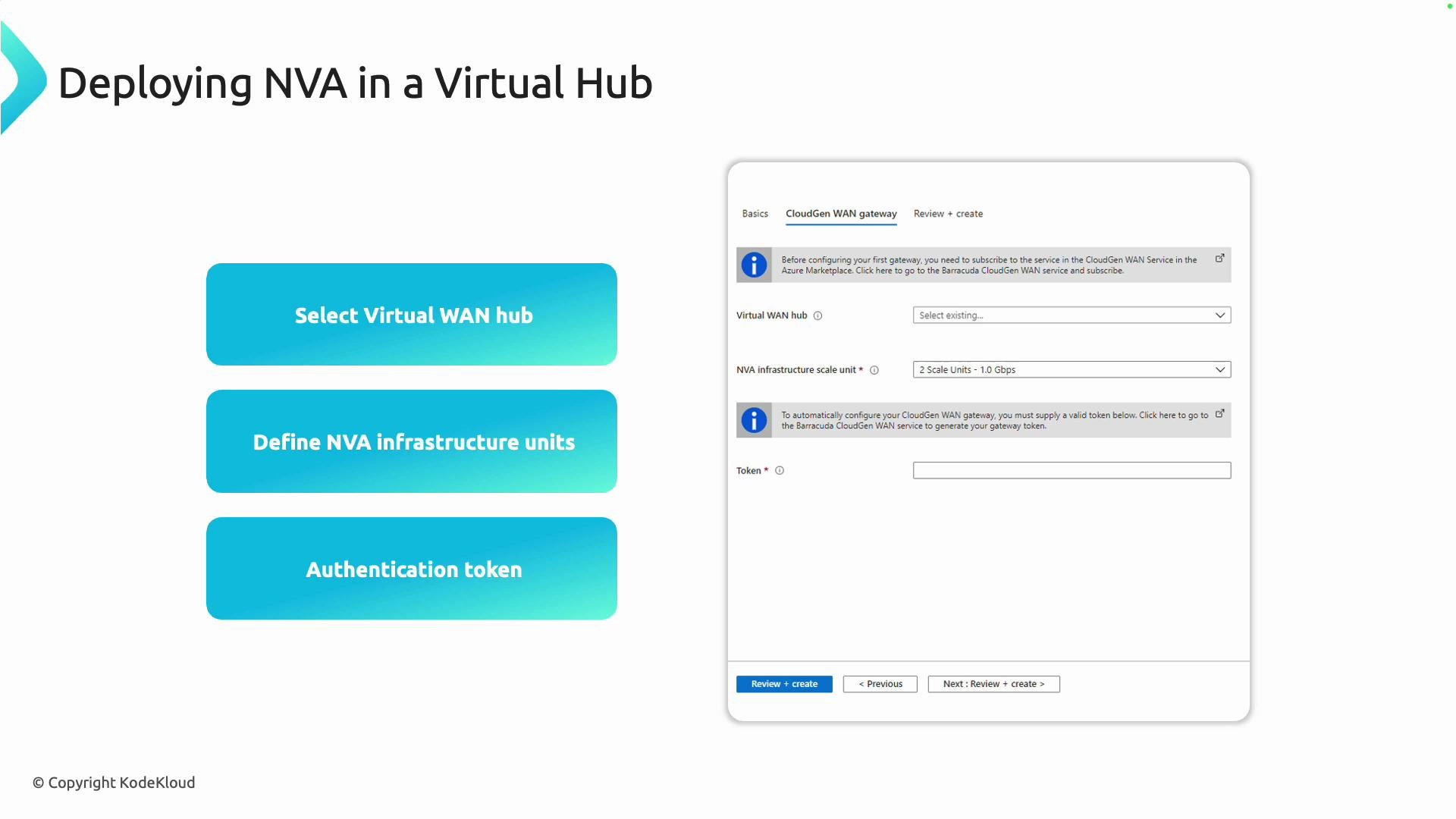 Key configuration options
| Option | Purpose | Notes / Example |
| -------------------------------- | ----------------------------------------------------------------- | ----------------------------------------------------------------------------------------------------- |
| Virtual WAN hub | Target hub where the NVA will be attached | Hub determines region and connected VNets/branches that can use the appliance |
| Infrastructure / scale units | Capacity sizing for the NVA | Scale units are vendor-dependent. For example, 2 units might map to \~1 Gbps — verify with the vendor |
| Licensing / authentication token | BYOL or marketplace licensing; some vendors require an auth token | Tokens commonly come from the vendor portal or Marketplace subscription flow |
| Vendor plan | Choose between PAYG or BYOL plans | Review pricing and features on the Marketplace page |
Always check vendor documentation for scale-unit definitions and licensing requirements—these details vary by vendor and affect throughput and billing.
Step-by-step: Deploying an NVA from the Azure portal
1. Open the Azure portal and navigate to your Virtual WAN resource.
2. From the Virtual WAN overview, select Hubs and open the hub where you want to deploy the appliance.
3. Inside the hub blade, choose Network virtual appliances and click Create.
4. Select a vendor/solution from the supported NVA list and click Create to open that vendor’s Marketplace offer.
5. On the Marketplace page, choose a plan (BYOL vs PAYG), supply vendor-specific details (e.g., licensing token, admin credentials, instance size), and follow the Create flow.
6. Review + create. Azure will provision the appliance and automatically register it with the hub’s routing fabric.
If you already have a Virtual WAN and hub, the process is primarily a guided Marketplace flow with vendor prompts.
Key configuration options
| Option | Purpose | Notes / Example |
| -------------------------------- | ----------------------------------------------------------------- | ----------------------------------------------------------------------------------------------------- |
| Virtual WAN hub | Target hub where the NVA will be attached | Hub determines region and connected VNets/branches that can use the appliance |
| Infrastructure / scale units | Capacity sizing for the NVA | Scale units are vendor-dependent. For example, 2 units might map to \~1 Gbps — verify with the vendor |
| Licensing / authentication token | BYOL or marketplace licensing; some vendors require an auth token | Tokens commonly come from the vendor portal or Marketplace subscription flow |
| Vendor plan | Choose between PAYG or BYOL plans | Review pricing and features on the Marketplace page |
Always check vendor documentation for scale-unit definitions and licensing requirements—these details vary by vendor and affect throughput and billing.
Step-by-step: Deploying an NVA from the Azure portal
1. Open the Azure portal and navigate to your Virtual WAN resource.
2. From the Virtual WAN overview, select Hubs and open the hub where you want to deploy the appliance.
3. Inside the hub blade, choose Network virtual appliances and click Create.
4. Select a vendor/solution from the supported NVA list and click Create to open that vendor’s Marketplace offer.
5. On the Marketplace page, choose a plan (BYOL vs PAYG), supply vendor-specific details (e.g., licensing token, admin credentials, instance size), and follow the Create flow.
6. Review + create. Azure will provision the appliance and automatically register it with the hub’s routing fabric.
If you already have a Virtual WAN and hub, the process is primarily a guided Marketplace flow with vendor prompts.
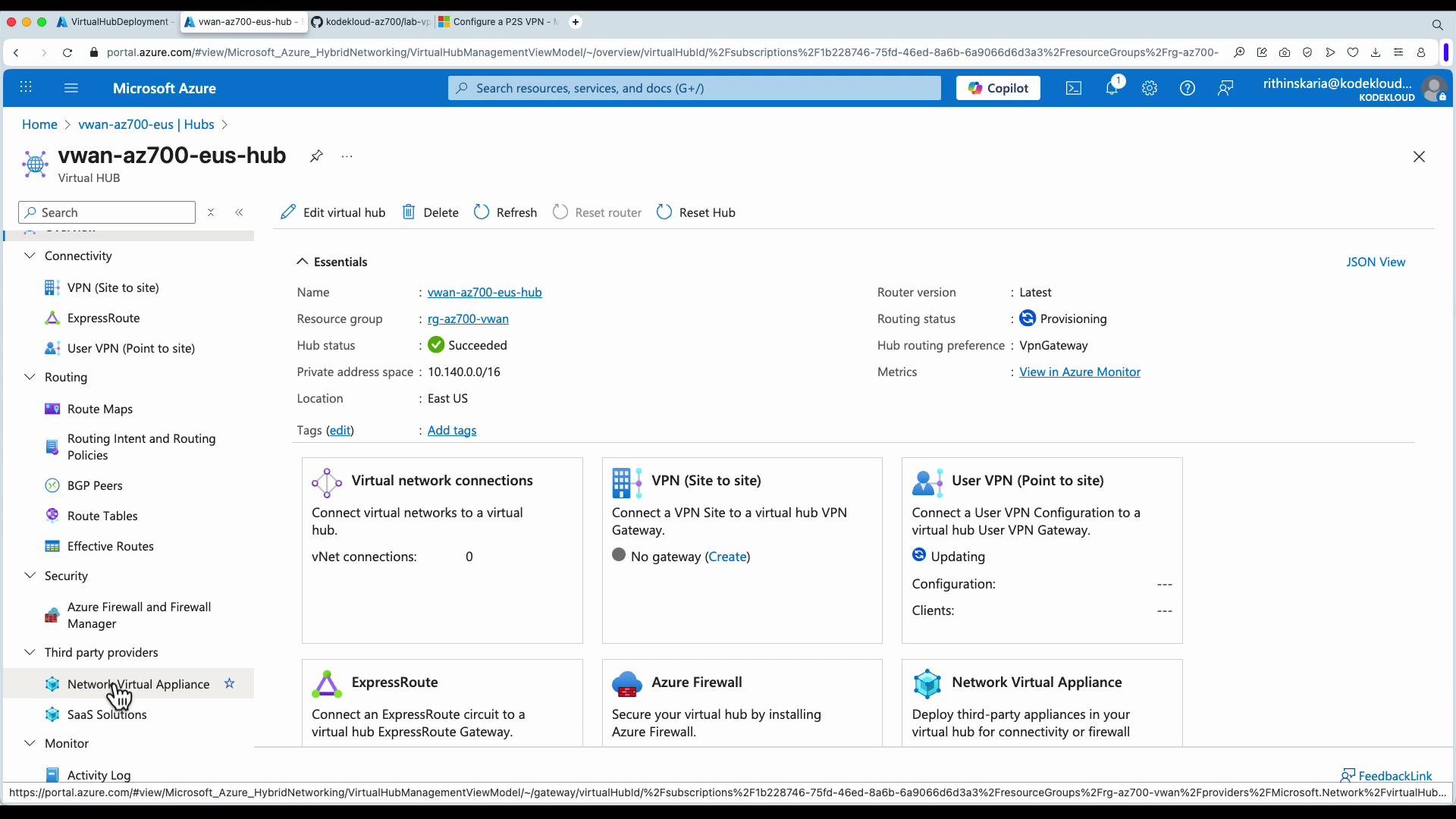 Marketplace and vendor configuration
* After selecting a solution (for example, Fortinet FortiGate), the Marketplace entry displays available SKUs, pricing, and deployment options.
* Complete any vendor-specific configuration (admin credentials, network interface settings, license/token). Some vendors provide onboarding or license activation steps in their portal.
* Confirm networking configuration: ensure the NVA’s interfaces are attached to the correct hub subnet(s) and that route propagation to hub-connected spokes/branches is as expected.
* Finish the deployment and validate that the NVA appears under the hub’s Network virtual appliances list.
Marketplace and vendor configuration
* After selecting a solution (for example, Fortinet FortiGate), the Marketplace entry displays available SKUs, pricing, and deployment options.
* Complete any vendor-specific configuration (admin credentials, network interface settings, license/token). Some vendors provide onboarding or license activation steps in their portal.
* Confirm networking configuration: ensure the NVA’s interfaces are attached to the correct hub subnet(s) and that route propagation to hub-connected spokes/branches is as expected.
* Finish the deployment and validate that the NVA appears under the hub’s Network virtual appliances list.
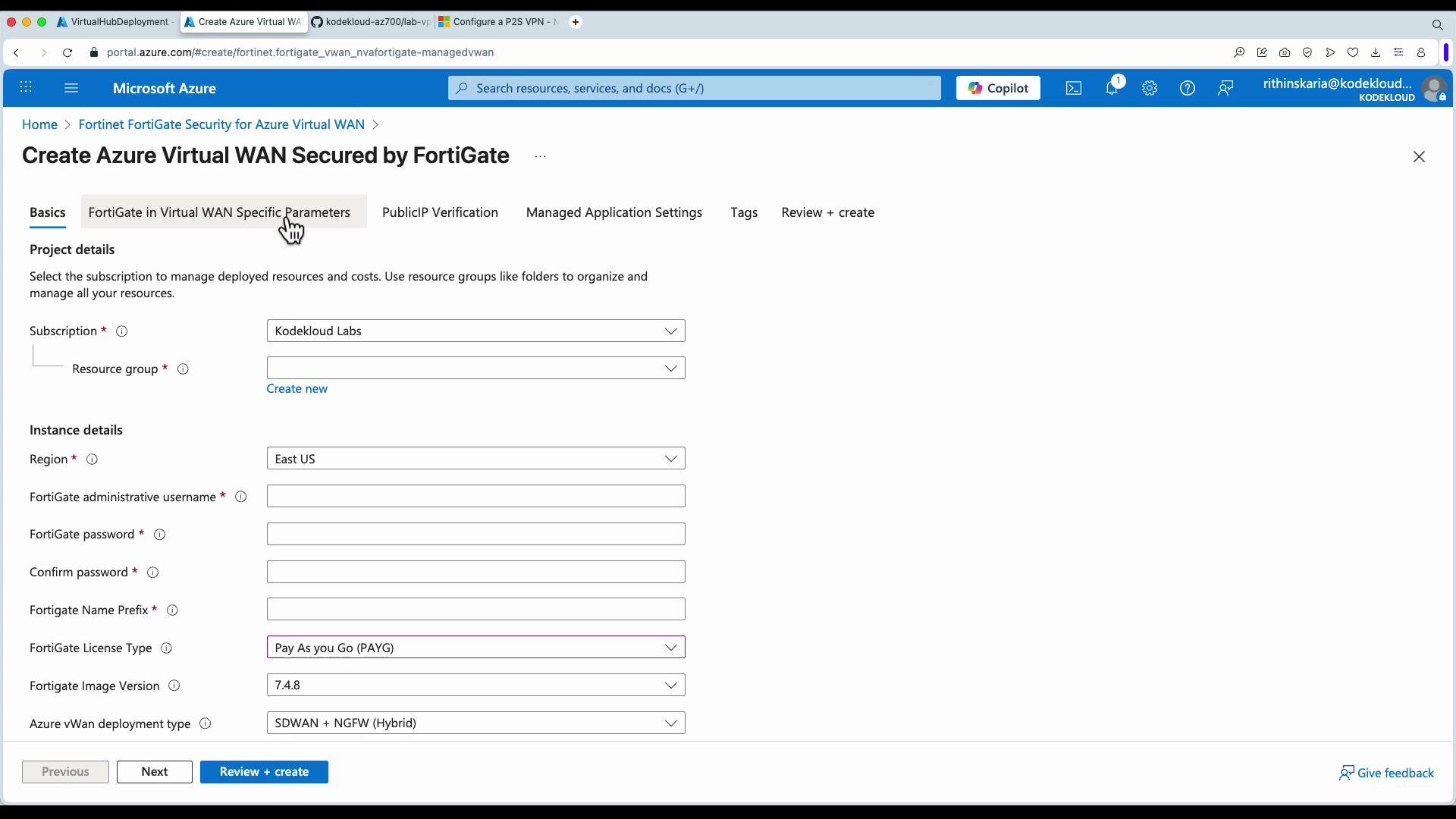 Licensing and operational considerations
* BYOL vs PAYG: BYOL may require you to bring a license key or register with the vendor portal. PAYG charges are billed via Azure Marketplace.
* High availability: Check the vendor’s HA recommendations and whether multiple instances or availability zones are required for resilience.
* Monitoring and logging: Integrate NVA logs with Azure Monitor, SIEM, or the vendor’s logging solution for visibility.
* Throughput limits: Match scale units to your expected traffic patterns. Scale-up/scale-down processes and billing details differ by vendor.
Vendor licensing and tokens are critical—if you skip required registration or token entry, the NVA may not fully function or may incur unexpected charges. Confirm license activation before production traffic flows.
Summary
Deploying an NVA into an Azure Virtual WAN hub allows you to centralize advanced network functions (firewalling, SD‑WAN, inspection) inside the hub’s routing fabric. The Azure Marketplace guides vendor selection, licensing, and instance sizing; Azure handles provisioning and integration with the hub so hub-connected VNets and branch sites can leverage the appliance.
Links and references
* Azure Virtual WAN overview: [https://learn.microsoft.com/en-us/azure/virtual-wan/overview](https://learn.microsoft.com/en-us/azure/virtual-wan/overview)
* Azure Marketplace: [https://azuremarketplace.microsoft.com/](https://azuremarketplace.microsoft.com/)
* Vendor examples: Fortinet ([https://www.fortinet.com/products/next-generation-firewall/fortigate](https://www.fortinet.com/products/next-generation-firewall/fortigate)), Barracuda ([https://www.barracuda.com/](https://www.barracuda.com/)), Cisco ([https://www.cisco.com/](https://www.cisco.com/)), Check Point ([https://www.checkpoint.com/](https://www.checkpoint.com/)), VMware ([https://www.vmware.com/](https://www.vmware.com/))
I hope this lesson clarified how to deploy NVAs into your Virtual WAN hub.
Licensing and operational considerations
* BYOL vs PAYG: BYOL may require you to bring a license key or register with the vendor portal. PAYG charges are billed via Azure Marketplace.
* High availability: Check the vendor’s HA recommendations and whether multiple instances or availability zones are required for resilience.
* Monitoring and logging: Integrate NVA logs with Azure Monitor, SIEM, or the vendor’s logging solution for visibility.
* Throughput limits: Match scale units to your expected traffic patterns. Scale-up/scale-down processes and billing details differ by vendor.
Vendor licensing and tokens are critical—if you skip required registration or token entry, the NVA may not fully function or may incur unexpected charges. Confirm license activation before production traffic flows.
Summary
Deploying an NVA into an Azure Virtual WAN hub allows you to centralize advanced network functions (firewalling, SD‑WAN, inspection) inside the hub’s routing fabric. The Azure Marketplace guides vendor selection, licensing, and instance sizing; Azure handles provisioning and integration with the hub so hub-connected VNets and branch sites can leverage the appliance.
Links and references
* Azure Virtual WAN overview: [https://learn.microsoft.com/en-us/azure/virtual-wan/overview](https://learn.microsoft.com/en-us/azure/virtual-wan/overview)
* Azure Marketplace: [https://azuremarketplace.microsoft.com/](https://azuremarketplace.microsoft.com/)
* Vendor examples: Fortinet ([https://www.fortinet.com/products/next-generation-firewall/fortigate](https://www.fortinet.com/products/next-generation-firewall/fortigate)), Barracuda ([https://www.barracuda.com/](https://www.barracuda.com/)), Cisco ([https://www.cisco.com/](https://www.cisco.com/)), Check Point ([https://www.checkpoint.com/](https://www.checkpoint.com/)), VMware ([https://www.vmware.com/](https://www.vmware.com/))
I hope this lesson clarified how to deploy NVAs into your Virtual WAN hub.