> ## Documentation Index
> Fetch the complete documentation index at: https://notes.kodekloud.com/llms.txt
> Use this file to discover all available pages before exploring further.
# Application Security Groups ASG
> Explains Azure Application Security Groups for grouping network interfaces and simplifying Network Security Group rules to enforce scalable role based VM network access and security
Application Security Groups (ASGs) provide an application-centric way to manage Network Security Group (NSG) rules in Azure. Instead of writing rules that target static IP addresses, ASGs let you group network interfaces (NICs) — and by extension the virtual machines that own those NICs — and reference those groups in NSG rules. This enables dynamic, reusable, and scalable security policies.
Key benefits:
* Group NICs logically regardless of IP address or subnet.
* A NIC can belong to multiple ASGs; an ASG can be referenced by many NSGs.
* Simplifies rule maintenance when VMs scale, are replaced, or move subnets.
 ## How ASGs work (brief)
* Create an ASG and add NICs as members.
* Reference the ASG in NSG rules as source or destination.
* When traffic is evaluated, NSGs match against the ASG membership (not IPs).
* Use ASGs to build layered, role-based network security policies.
## Example scenario (problem to solve)
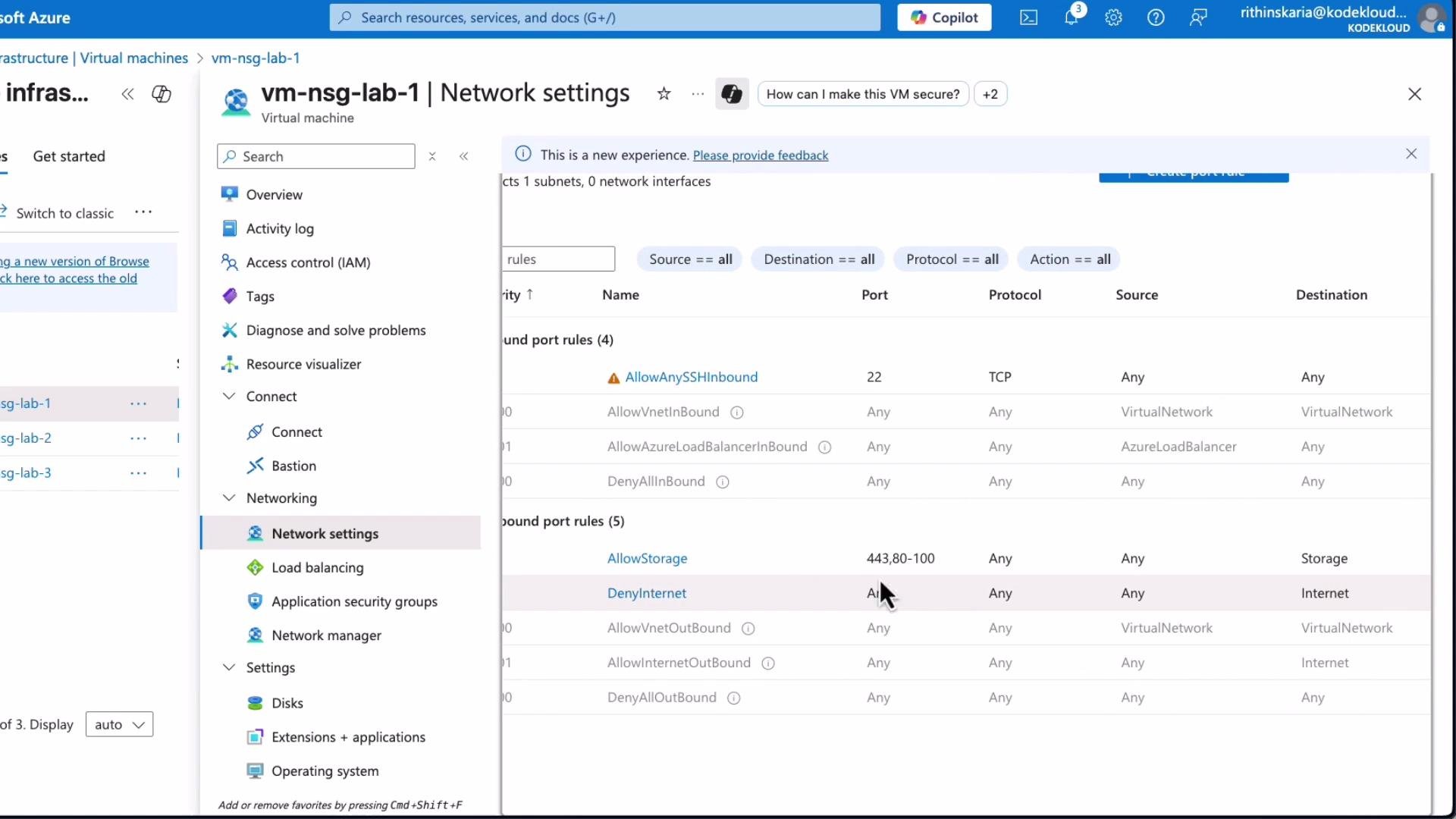
* A subnet has a broad NSG rule that allows access to a storage account — by default every VM in the subnet inherits it.
* Requirement: Only specific VMs (lab1 and lab2) should access the storage account; lab3 must be excluded.
* Without ASGs, you would manually maintain IP addresses in NSG rules — error-prone and hard to scale.
## How ASGs work (brief)
* Create an ASG and add NICs as members.
* Reference the ASG in NSG rules as source or destination.
* When traffic is evaluated, NSGs match against the ASG membership (not IPs).
* Use ASGs to build layered, role-based network security policies.
## Example scenario (problem to solve)
* A subnet has a broad NSG rule that allows access to a storage account — by default every VM in the subnet inherits it.
* Requirement: Only specific VMs (lab1 and lab2) should access the storage account; lab3 must be excluded.
* Without ASGs, you would manually maintain IP addresses in NSG rules — error-prone and hard to scale.
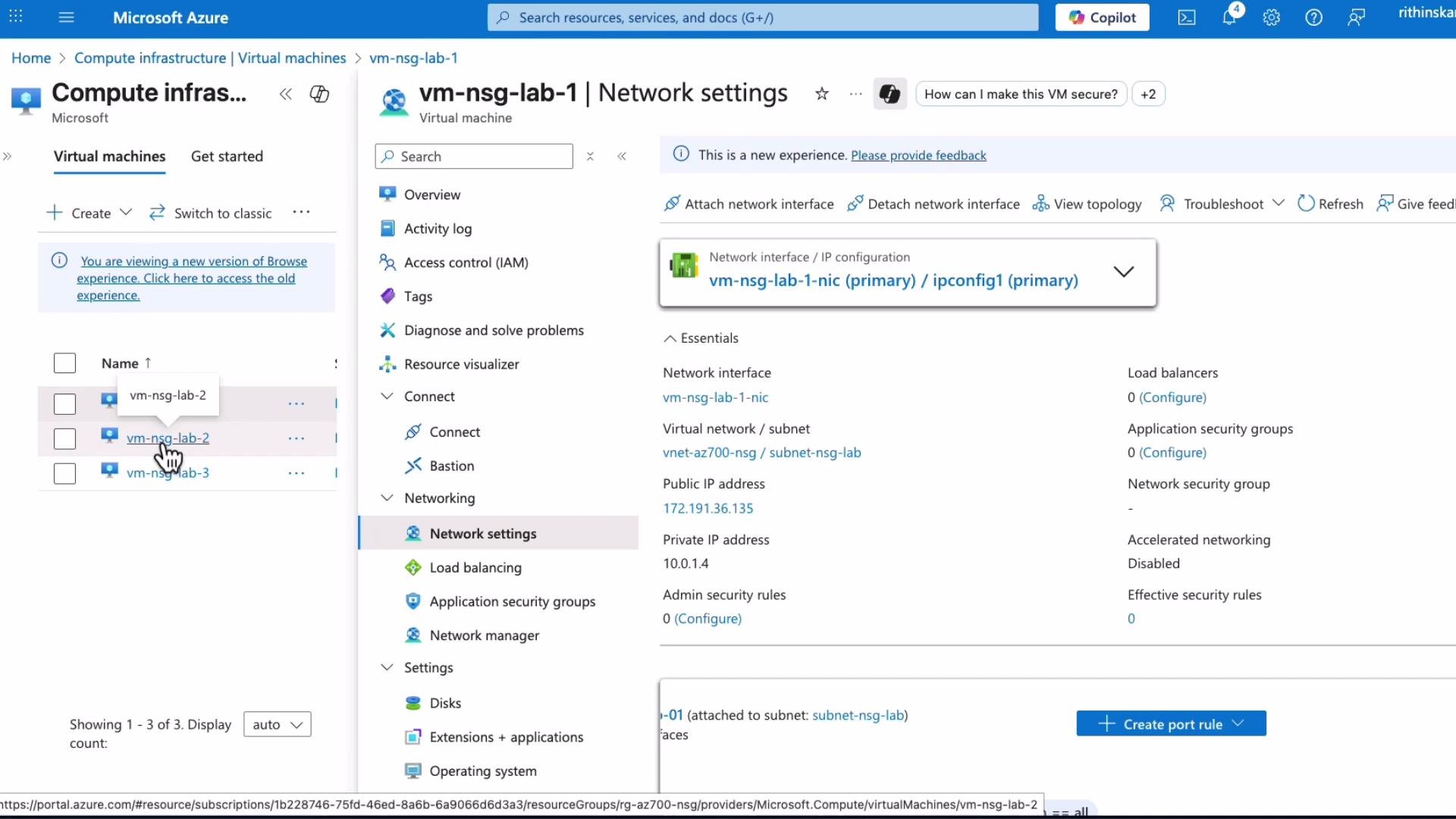 Solution overview:
1. Create an ASG (for example, `ASG-storage-servers`).
2. Associate the NICs for `lab1` and `lab2` with that ASG.
3. Update NSG rules to reference the ASG (instead of IP addresses).
4. Verify that `lab1`/`lab2` can access the Storage service and that `lab3` cannot.
## Step-by-step: Create ASG and enforce NSG rules
1. Create an ASG
* In the Azure portal search for "Application security groups" → Add → provide a name such as `ASG-storage-servers`.
2. Add NICs to the ASG
* Open the VM → Networking → Network interface → Application security groups → Add → select `ASG-storage-servers`.
* Repeat for the second VM (`lab2`).
3. Consider NIC-level NSGs
* If a NIC-level NSG exists, it will be evaluated together with subnet-level NSGs. To ensure consistent behavior, either disassociate the NIC-level NSG or update its rules so they don't conflict.
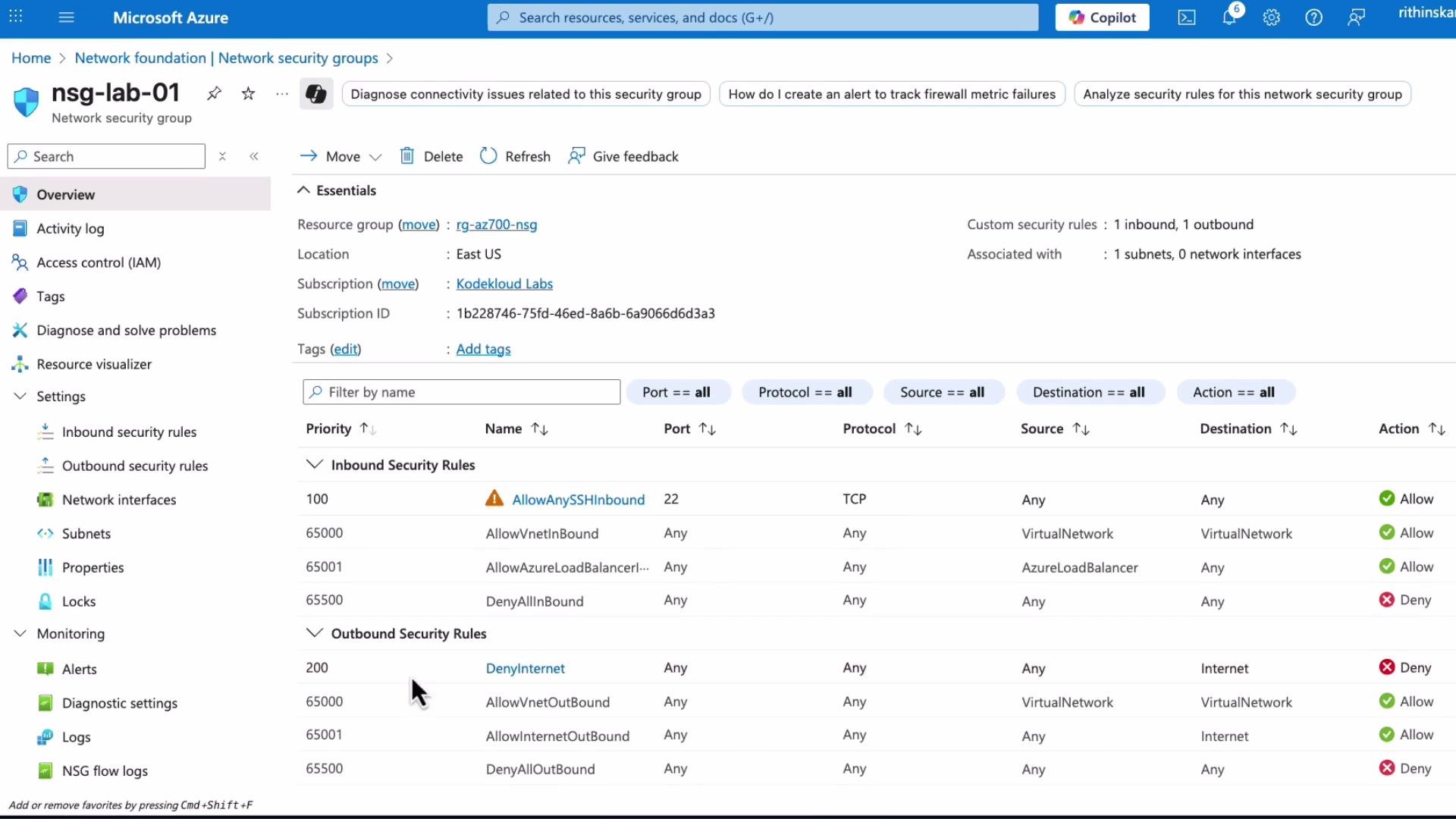
You can inspect the NSG and its current rules to confirm the configuration:
Solution overview:
1. Create an ASG (for example, `ASG-storage-servers`).
2. Associate the NICs for `lab1` and `lab2` with that ASG.
3. Update NSG rules to reference the ASG (instead of IP addresses).
4. Verify that `lab1`/`lab2` can access the Storage service and that `lab3` cannot.
## Step-by-step: Create ASG and enforce NSG rules
1. Create an ASG
* In the Azure portal search for "Application security groups" → Add → provide a name such as `ASG-storage-servers`.
2. Add NICs to the ASG
* Open the VM → Networking → Network interface → Application security groups → Add → select `ASG-storage-servers`.
* Repeat for the second VM (`lab2`).
3. Consider NIC-level NSGs
* If a NIC-level NSG exists, it will be evaluated together with subnet-level NSGs. To ensure consistent behavior, either disassociate the NIC-level NSG or update its rules so they don't conflict.
You can inspect the NSG and its current rules to confirm the configuration:
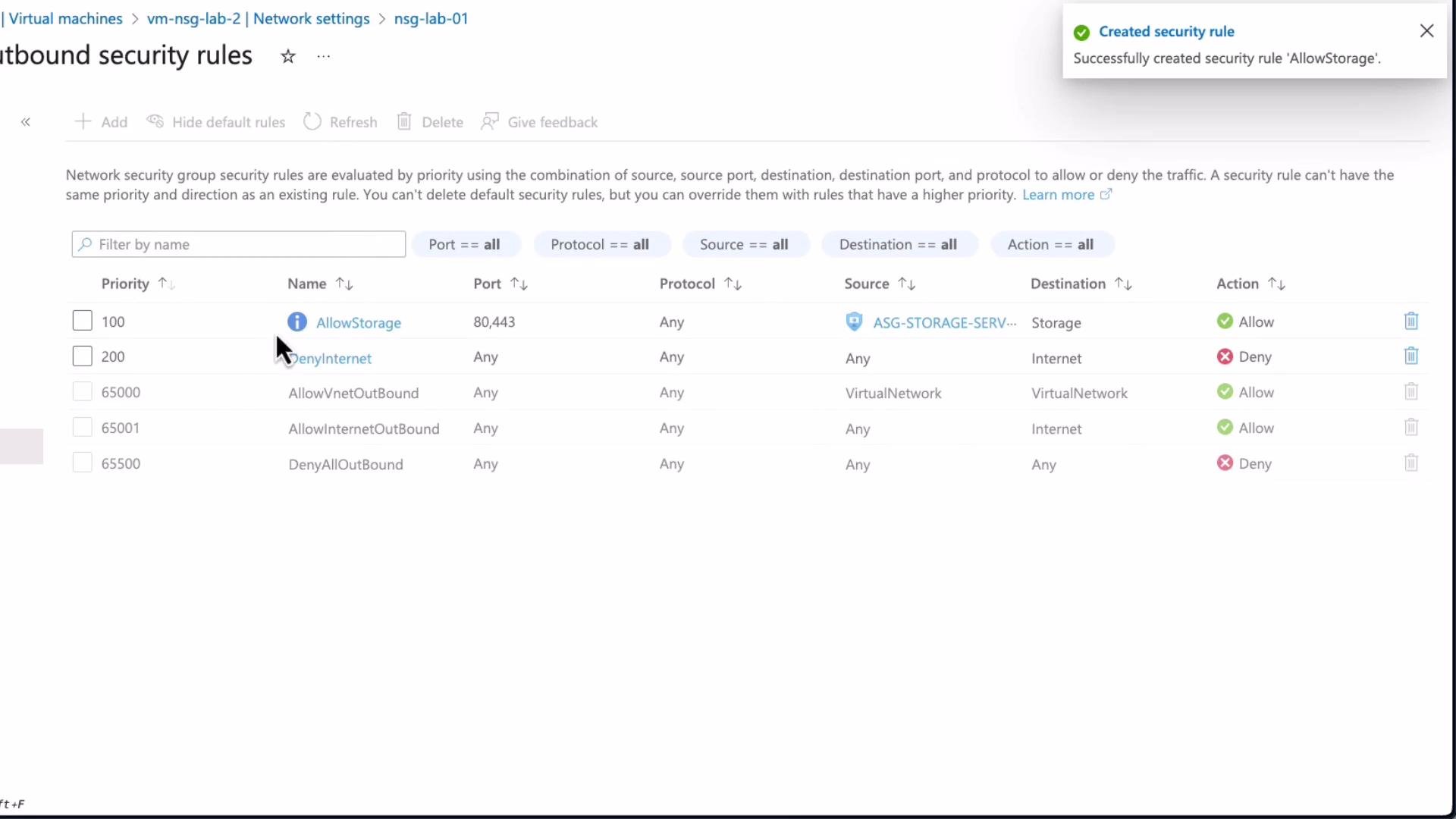
 4. Create the NSG rule referencing the ASG
* In the NSG outbound (or inbound) rules pane, click Add and set:
* Source: `ASG-storage-servers`
* Destination: Service tag `Storage`
* Destination ports: `80, 443` (or ports required by your service)
* Protocol: `Any` (or `TCP` to restrict)
* Action: `Allow`
* Priority: choose a lower numeric value than an existing deny rule (e.g., `100` if a Deny is `200`)
Open the NSG outbound rules pane and click Add to configure the rule:
4. Create the NSG rule referencing the ASG
* In the NSG outbound (or inbound) rules pane, click Add and set:
* Source: `ASG-storage-servers`
* Destination: Service tag `Storage`
* Destination ports: `80, 443` (or ports required by your service)
* Protocol: `Any` (or `TCP` to restrict)
* Action: `Allow`
* Priority: choose a lower numeric value than an existing deny rule (e.g., `100` if a Deny is `200`)
Open the NSG outbound rules pane and click Add to configure the rule:
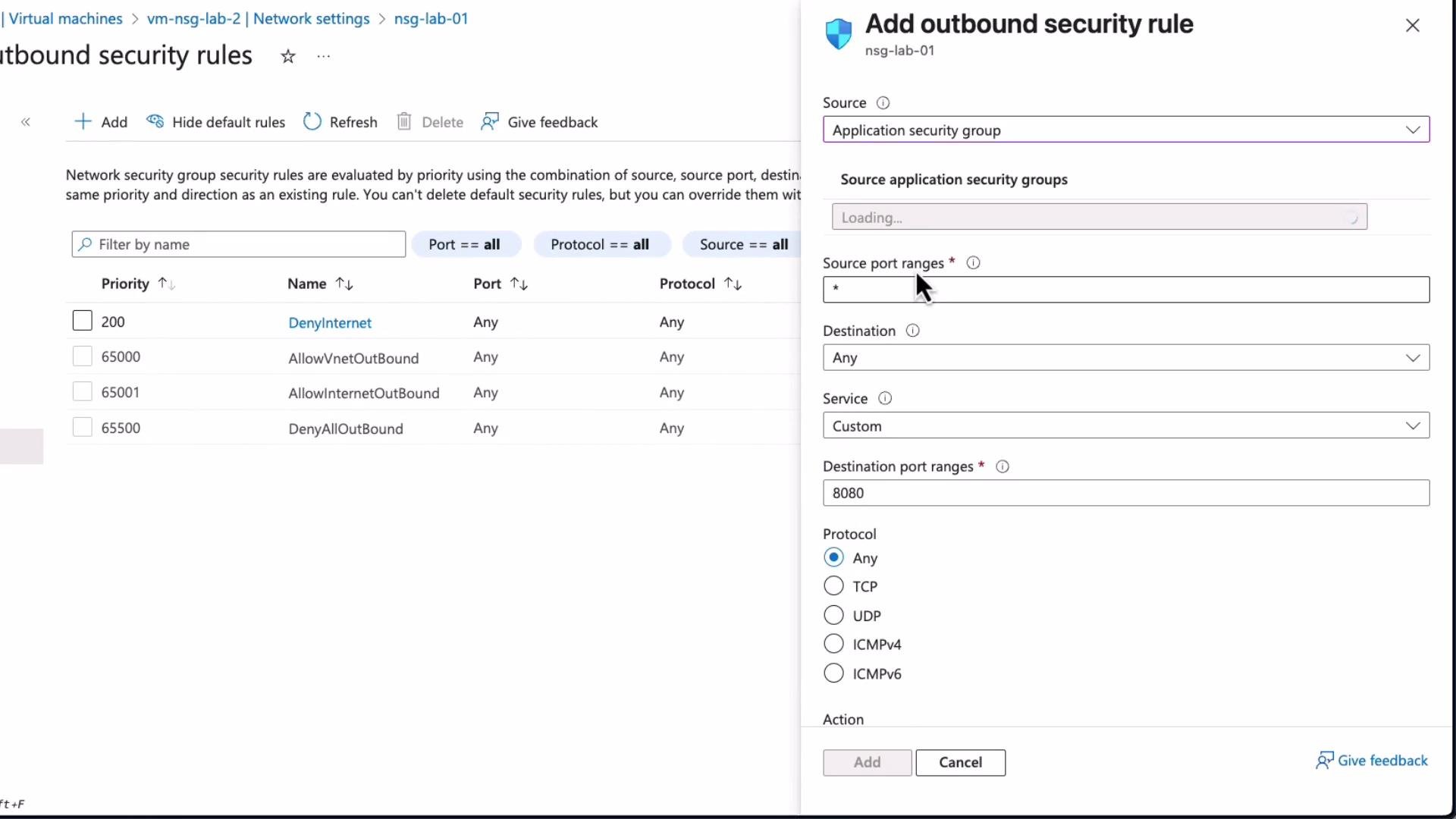 After adding the rule, the NSG should list the new allow rule (for example `AllowStorage`) that permits traffic from your ASG to the Storage service tag on the specified ports.
 ## Verify connectivity from the VMs
* From a VM in the ASG (`lab1` or `lab2`), you should be able to reach the storage account.
* From a VM not in the ASG (`lab3`), access should be blocked by the subnet-level deny rule or by the absence of the Allow condition.
Example commands (replace IP/hostnames with your environment values):
```bash theme={null}
# SSH into a VM that is a member of the ASG
ssh kodekloud@172.191.36.135
# Check the storage blob endpoint with a header request
curl -I https://cskodekloudaz01.blob.core.windows.net/vision/note.jpeg
# Check access to an external site (example)
curl -I https://www.microsoft.com
```
Expected outcomes:
* From a VM that is allowed to access Storage:
```bash theme={null}
HTTP/1.1 200 OK
Content-Type: image/jpeg
Content-Length: 12345
...
```
* From a VM blocked from Internet or Storage:
```bash theme={null}
curl: (28) Failed to connect to www.microsoft.com port 443: Connection timed out
```
This confirms that NSG rules referencing the ASG permit only the intended VMs to reach the storage service while others remain blocked.
## Quick reference table
| Resource | Purpose | Example |
| ---------------------: | ---------------------------------------- | -------------------------------------------------------- |
| ASG | Logical group of NICs for NSG rules | `ASG-storage-servers` |
| NSG rule (source) | Use ASG as source instead of IPs | Source: `ASG-storage-servers` |
| NSG rule (destination) | Use built-in service tags as destination | Destination: `Storage` |
| NIC-level NSG | Optional; evaluated with subnet NSG | Disassociate if you want subnet NSG to be sole evaluator |
Application Security Groups simplify NSG management by letting you add or remove VMs from logical groups instead of repeatedly editing IP-based rules. Reuse ASGs across multiple NSGs to enforce consistent, layered network security policies.
## References
* Azure Application Security Groups documentation: [https://learn.microsoft.com/azure/virtual-network/application-security-groups](https://learn.microsoft.com/azure/virtual-network/application-security-groups)
* Azure Network Security Groups documentation: [https://learn.microsoft.com/azure/virtual-network/network-security-groups-overview](https://learn.microsoft.com/azure/virtual-network/network-security-groups-overview)
Now proceed to the next topic.
## Verify connectivity from the VMs
* From a VM in the ASG (`lab1` or `lab2`), you should be able to reach the storage account.
* From a VM not in the ASG (`lab3`), access should be blocked by the subnet-level deny rule or by the absence of the Allow condition.
Example commands (replace IP/hostnames with your environment values):
```bash theme={null}
# SSH into a VM that is a member of the ASG
ssh kodekloud@172.191.36.135
# Check the storage blob endpoint with a header request
curl -I https://cskodekloudaz01.blob.core.windows.net/vision/note.jpeg
# Check access to an external site (example)
curl -I https://www.microsoft.com
```
Expected outcomes:
* From a VM that is allowed to access Storage:
```bash theme={null}
HTTP/1.1 200 OK
Content-Type: image/jpeg
Content-Length: 12345
...
```
* From a VM blocked from Internet or Storage:
```bash theme={null}
curl: (28) Failed to connect to www.microsoft.com port 443: Connection timed out
```
This confirms that NSG rules referencing the ASG permit only the intended VMs to reach the storage service while others remain blocked.
## Quick reference table
| Resource | Purpose | Example |
| ---------------------: | ---------------------------------------- | -------------------------------------------------------- |
| ASG | Logical group of NICs for NSG rules | `ASG-storage-servers` |
| NSG rule (source) | Use ASG as source instead of IPs | Source: `ASG-storage-servers` |
| NSG rule (destination) | Use built-in service tags as destination | Destination: `Storage` |
| NIC-level NSG | Optional; evaluated with subnet NSG | Disassociate if you want subnet NSG to be sole evaluator |
Application Security Groups simplify NSG management by letting you add or remove VMs from logical groups instead of repeatedly editing IP-based rules. Reuse ASGs across multiple NSGs to enforce consistent, layered network security policies.
## References
* Azure Application Security Groups documentation: [https://learn.microsoft.com/azure/virtual-network/application-security-groups](https://learn.microsoft.com/azure/virtual-network/application-security-groups)
* Azure Network Security Groups documentation: [https://learn.microsoft.com/azure/virtual-network/network-security-groups-overview](https://learn.microsoft.com/azure/virtual-network/network-security-groups-overview)
Now proceed to the next topic.