> ## Documentation Index
> Fetch the complete documentation index at: https://notes.kodekloud.com/llms.txt
> Use this file to discover all available pages before exploring further.
# Configure Application Gateway
> Guide to configuring Azure Application Gateway components, TLS termination, routing rules, health probes, and optional WAF to reliably route client traffic to healthy backend targets
This guide walks through the core steps to configure an Azure Application Gateway, describes each major component, and explains how they connect to route traffic from clients to backend targets. Follow the sequence below to design an Application Gateway that reliably terminates TLS (when required), applies routing and security rules, and sends traffic only to healthy backend instances.
Key building blocks you will configure:
* Frontend IP (public or private)
* Listener (binds IP, port, protocol, and certificate for HTTPS)
* Routing rules (basic or path-based)
* Backend pool (VMs, VMSS, App Services, IPs)
* HTTP settings (backend protocol, port, affinity, probes)
* Health probes (default or custom)
* Optional Web Application Firewall (WAF)
The request flow: client -> frontend IP -> listener -> routing rules evaluation -> HTTP settings (including probe association) -> healthy backend instances in the backend pool.
Components and purpose
| Component | Role | Configuration tip |
| ------------------------------ | ------------------------------------------------------------- | --------------------------------------------------------------------------------------------------------- |
| Frontend IP | Entry point for incoming traffic (public or private) | Use a Public IP for Internet-facing gateways or a Private IP for internal-only scenarios. |
| Listener | Binds frontend IP + port + protocol; terminates TLS for HTTPS | For HTTPS listeners, upload or reference an SSL certificate to enable TLS offloading. |
| Routing rules | Maps listeners to backend pools; can be basic or path-based | Use path-based rules to direct different URL paths to different backends. |
| Backend pool | Holds backend targets that receive traffic | Include IPs, FQDNs, App Service instances, or NICs from VMs/VMSS. |
| HTTP settings | Controls how the gateway connects to backend targets | Configure backend protocol/port, cookie-based affinity, connection draining, and select the probe to use. |
| Health probes | Determine backend instance health | Use defaults for simple scenarios, or create custom probes for application-specific endpoints. |
| Web Application Firewall (WAF) | Optional layer 7 protection | Enable WAF SKU for centralized rule sets and managed rule options. |
Detailed component descriptions
Frontend IP
* The frontend IP configuration is the gateway’s external or internal address. Choose a Public IP for internet-facing services; use a Private IP in a virtual network for internal applications.
Listener
* A listener binds the selected frontend IP, frontend port (commonly `80` or `443`), and protocol (HTTP/HTTPS). For HTTPS listeners, upload or reference an SSL certificate to perform TLS termination (SSL offloading) at the gateway. If you need end-to-end TLS, use HTTPS in the HTTP settings and deploy the necessary trust certificates on the gateway so it can validate backend TLS.
Routing rules
* Routing rules map a listener to backend pools and HTTP settings. Rules can be:
* Basic: all traffic from the listener forwards to a single backend pool.
* Path-based: route requests to different backend pools based on URL path segments (for example, `/api` -> API pool, `/static` -> CDN or storage fronting).
Backend pool
* Backend pools contain the endpoints that will serve requests: VM NICs, VM scale set instances, public/private IP addresses, or App Services. Use health probes to ensure only healthy endpoints receive traffic.
HTTP settings
* HTTP settings determine how Application Gateway communicates with backend endpoints. Key fields include:
* Backend protocol: `HTTP` or `HTTPS`
* Backend port: e.g., `80` or `443`
* Cookie-based affinity: enable if session stickiness is required
* Connection draining: allow existing requests to complete during scale down or maintenance
* Probe association: reference a custom probe if your application requires a specific health endpoint
Web Application Firewall (WAF)
* WAF is optional. Select the WAF-enabled SKU to enable OWASP-based protection and managed rule sets. If WAF is not required, use the Standard\_v2 SKU for features such as autoscaling and zone redundancy without the application-layer protection.
Health probes
* Health probes keep track of backend instance health. You can use:
* Default probe: built-in checks suitable for simple backends
* Custom probe: define `HTTP`/`HTTPS`, host header, path (for example `/health`), interval, timeout, and unhealthy threshold
* After creating a custom probe, associate it with the HTTP settings that your routing rules use. Only backends that pass the probe will receive traffic.
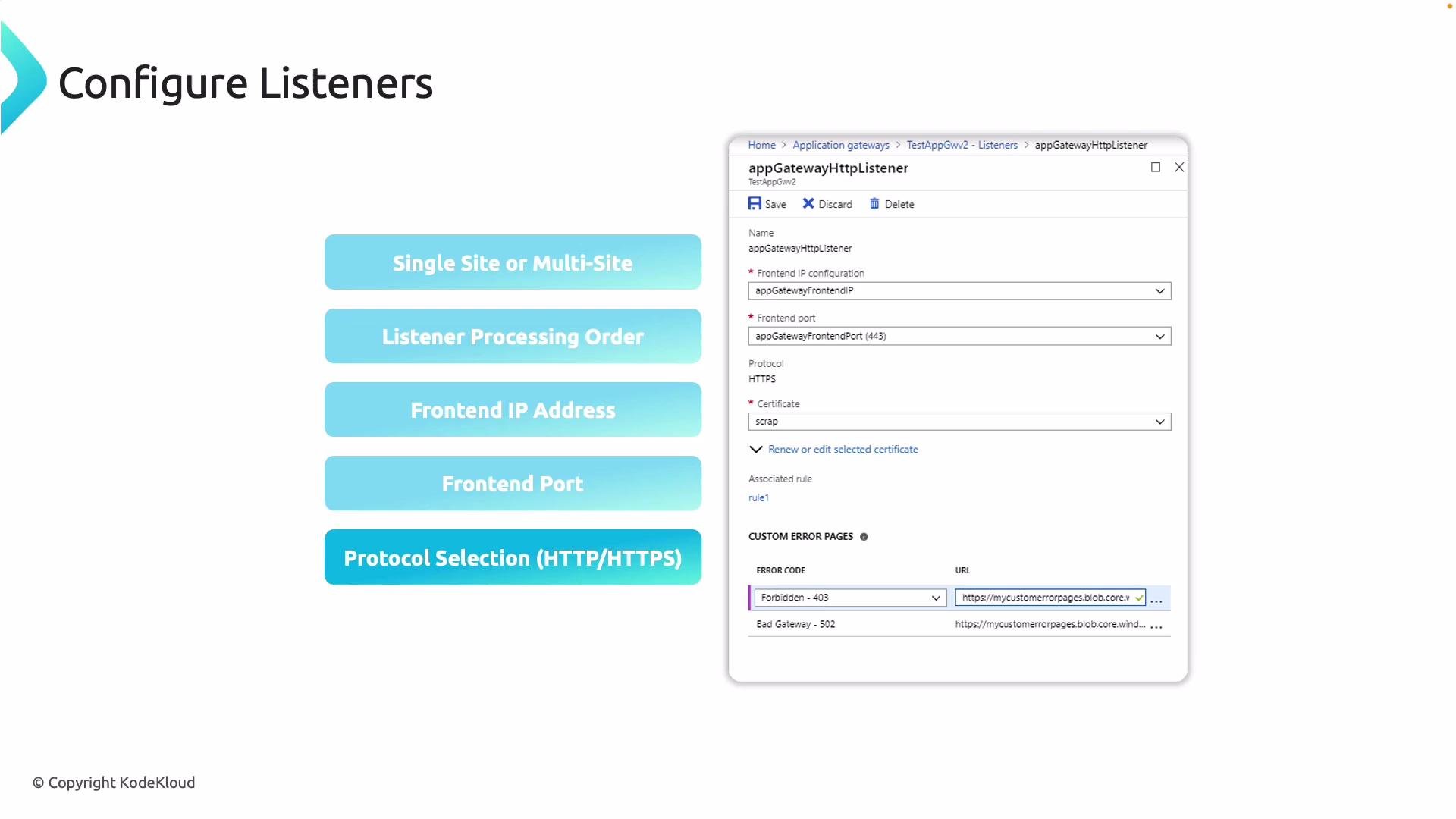
Listener configuration details
When creating listeners and routing rules, consider:
* Listener type:
* Basic (single-site) listener – for single domain scenarios.
* Multi-site (host-based) listener – supports multiple host names (domains) on the same frontend IP and port.
* Frontend IP: pick the Public/Private IP configuration the listener should bind to.
* Frontend port: commonly `80` (HTTP) or `443` (HTTPS).
* Protocol: `HTTP` or `HTTPS`. For `HTTPS`, upload or attach an SSL certificate to terminate TLS at the gateway.
* End-to-end TLS: if required, set HTTP settings to use `HTTPS` and supply backend trust certificates so the gateway can validate backend certificates.
* Rule priority and processing order: ensure path-based rules and multiple listeners are ordered correctly so requests match the intended rule. Explicit path rules should be more specific than catch-all rules.
 Health probe configuration
Health probes are critical to prevent routing traffic to unhealthy backends. In the Azure portal you can:
* Use the default built-in probe behavior for simple backends.
* Create a custom probe to specify:
* Protocol: `HTTP` or `HTTPS`
* Host name or host header
* Request path (for example, `/health` or `/status/ready`)
* Probe interval and timeout
* Unhealthy threshold (how many failures before marking an instance unhealthy)
* Expected status codes or match criteria (for advanced matching in v2 SKUs)
After creating a custom probe, associate it with the HTTP settings used by the routing rule so the Application Gateway uses that probe for marking backend health. Correct probe configuration prevents user requests from being sent to failing instances and improves overall availability.
When creating custom probes, remember to match the probe's host header and path to something the backend understands (for example, a dedicated health endpoint). Then reference that probe from the HTTP settings used by the routing rule.
References and further reading
* Microsoft Docs: [Azure Application Gateway overview](https://learn.microsoft.com/azure/application-gateway/overview)
* Microsoft Docs: [Configure health probes for Application Gateway](https://learn.microsoft.com/azure/application-gateway/application-gateway-probe-overview)
* Microsoft Docs: [Application Gateway listener and routing rules](https://learn.microsoft.com/azure/application-gateway/configuration-overview)
Use these docs as authoritative references while designing production-ready Application Gateway deployments.
Health probe configuration
Health probes are critical to prevent routing traffic to unhealthy backends. In the Azure portal you can:
* Use the default built-in probe behavior for simple backends.
* Create a custom probe to specify:
* Protocol: `HTTP` or `HTTPS`
* Host name or host header
* Request path (for example, `/health` or `/status/ready`)
* Probe interval and timeout
* Unhealthy threshold (how many failures before marking an instance unhealthy)
* Expected status codes or match criteria (for advanced matching in v2 SKUs)
After creating a custom probe, associate it with the HTTP settings used by the routing rule so the Application Gateway uses that probe for marking backend health. Correct probe configuration prevents user requests from being sent to failing instances and improves overall availability.
When creating custom probes, remember to match the probe's host header and path to something the backend understands (for example, a dedicated health endpoint). Then reference that probe from the HTTP settings used by the routing rule.
References and further reading
* Microsoft Docs: [Azure Application Gateway overview](https://learn.microsoft.com/azure/application-gateway/overview)
* Microsoft Docs: [Configure health probes for Application Gateway](https://learn.microsoft.com/azure/application-gateway/application-gateway-probe-overview)
* Microsoft Docs: [Application Gateway listener and routing rules](https://learn.microsoft.com/azure/application-gateway/configuration-overview)
Use these docs as authoritative references while designing production-ready Application Gateway deployments.