> ## Documentation Index
> Fetch the complete documentation index at: https://notes.kodekloud.com/llms.txt
> Use this file to discover all available pages before exploring further.
# What is Application Gateway
> Overview of Azure Application Gateway covering Layer 7 load balancing, path and host based routing, WAF integration, SKU choices, configuration components and CLI examples.
Azure Application Gateway is an intelligent, Layer 7 load-balancer and application delivery controller designed to be the entry point for your web applications. It inspects HTTP/HTTPS traffic and makes routing decisions based on application-layer attributes (host, path, headers), not just network-level information. This enables advanced scenarios such as SSL termination, cookie-based session affinity, path- or host-based routing, and integration with a Web Application Firewall (WAF).
How a request flows through Application Gateway:
* Client request hits the Application Gateway front-end IP.
* A configured HTTP/HTTPS listener accepts the request and inspects Layer 7 attributes.
* Routing rules evaluate the request and forward it to the appropriate backend pool using configured HTTP settings.
* Backend pools consist of Azure VMs, VM scale sets, App Services, or on-premises endpoints; health probes monitor them and the gateway keeps traffic directed to healthy targets.
Key runtime behaviors:
* Front-end listeners accept incoming HTTP/HTTPS requests.
* Rules (path- or host-based) map listeners to backend pools.
* HTTP settings control protocol, ports, timeouts, session affinity, and client/backend certificate handling.
* WAF integration protects applications from common web attacks when required.
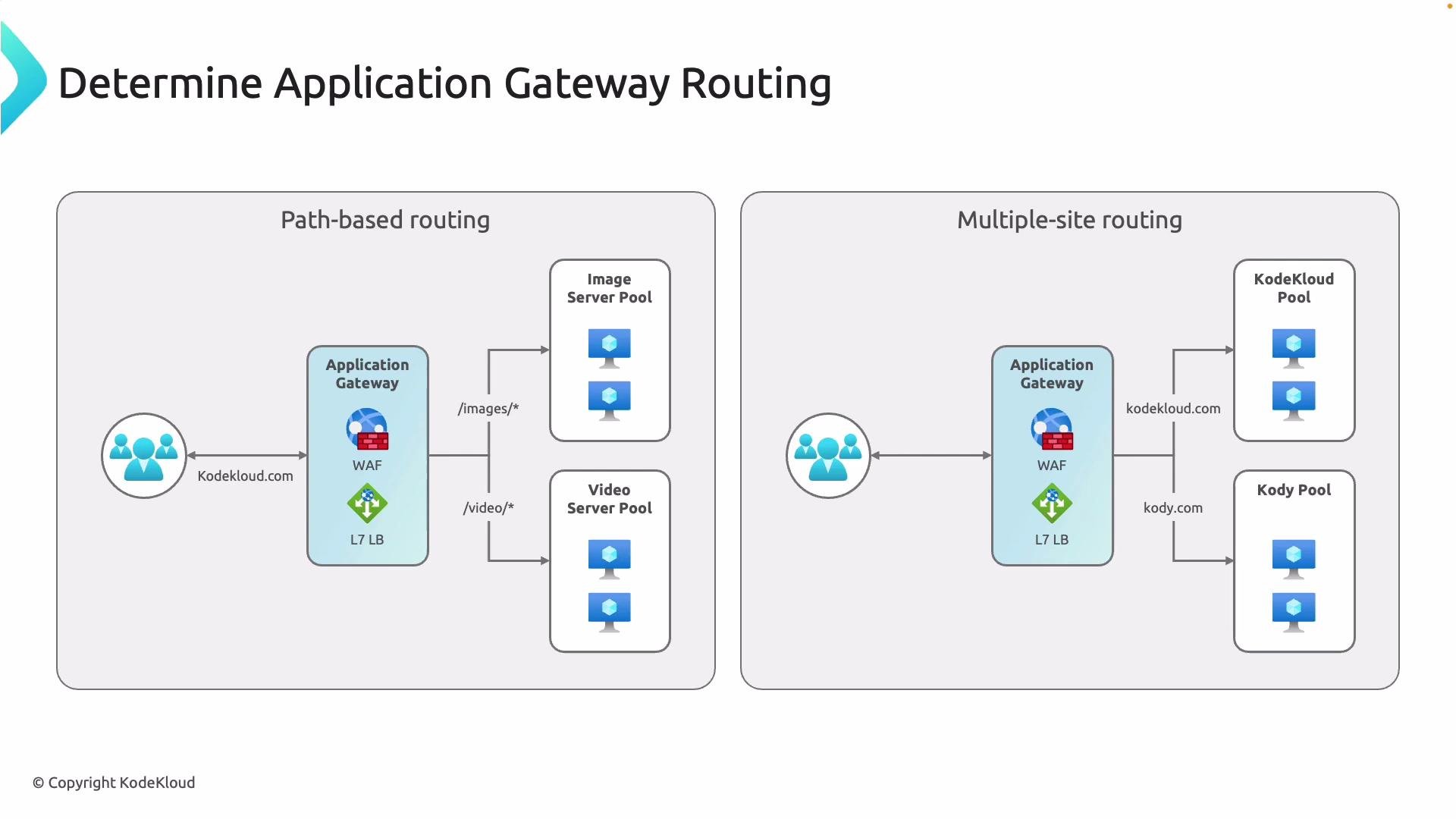 Path-based and host-based routing examples:
* Path-based routing: Route requests for specific URL paths to distinct backend pools. Example: `/images` → image servers, `/video` → video-optimized pool. This lets you scale and tune resources per content type.
* Multi-site (host-based) routing: Host multiple domains behind a single Application Gateway. The gateway inspects the Host header and routes traffic to separate backend infrastructures (for example, `example.com` and `api.example.com` on the same public IP).
These application-aware capabilities are far more flexible than network-only or DNS-based routing, and they simplify management of complex web architectures.
## Choosing a SKU
Selecting the correct SKU matters for performance, autoscaling, SLA, and available features (WAF, autoscale, etc.). The most common SKUs are Basic (for simple or dev/test workloads) and Standard\_v2 (recommended for production).
Path-based and host-based routing examples:
* Path-based routing: Route requests for specific URL paths to distinct backend pools. Example: `/images` → image servers, `/video` → video-optimized pool. This lets you scale and tune resources per content type.
* Multi-site (host-based) routing: Host multiple domains behind a single Application Gateway. The gateway inspects the Host header and routes traffic to separate backend infrastructures (for example, `example.com` and `api.example.com` on the same public IP).
These application-aware capabilities are far more flexible than network-only or DNS-based routing, and they simplify management of complex web architectures.
## Choosing a SKU
Selecting the correct SKU matters for performance, autoscaling, SLA, and available features (WAF, autoscale, etc.). The most common SKUs are Basic (for simple or dev/test workloads) and Standard\_v2 (recommended for production).
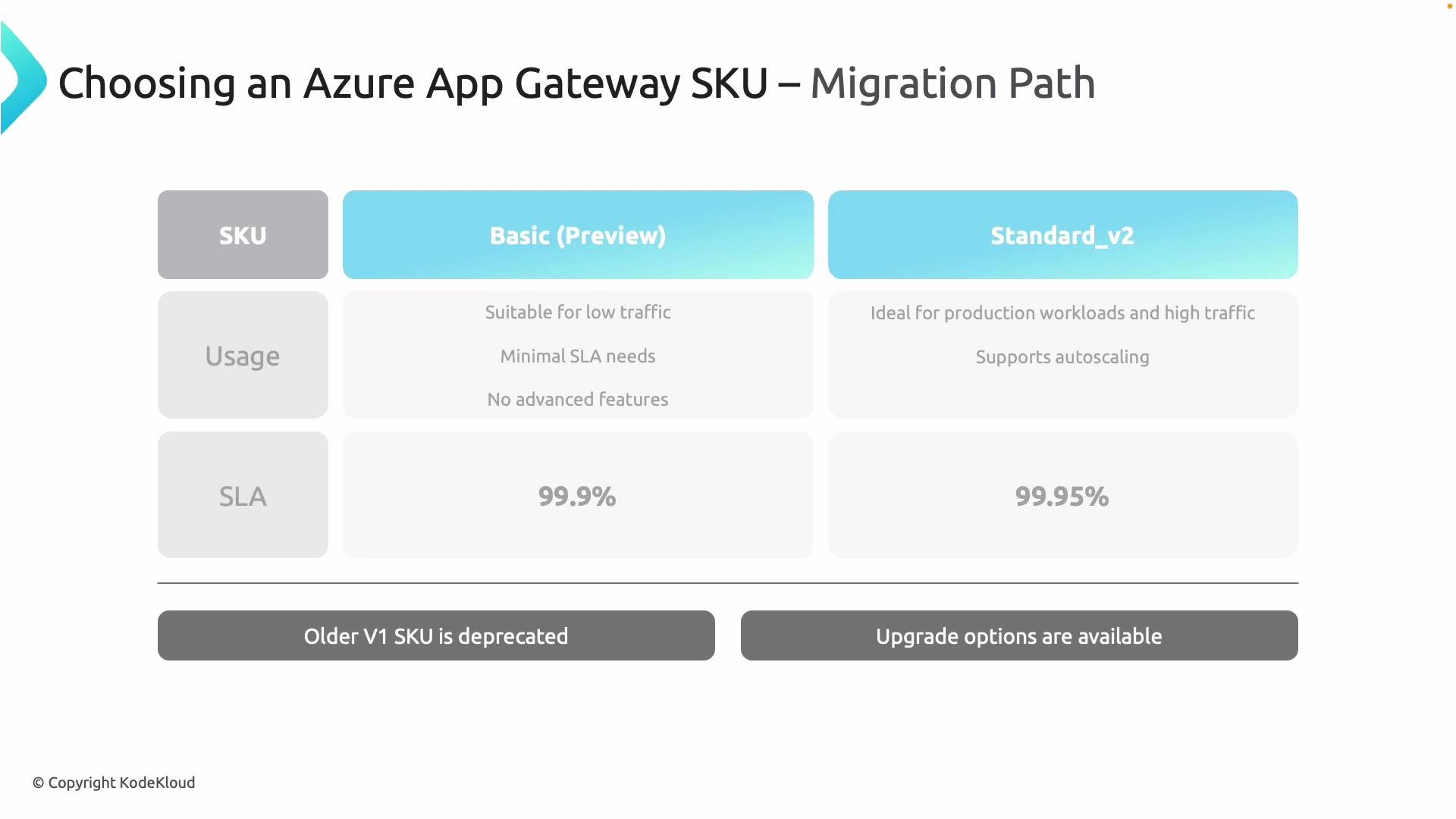 High-level SKU comparison:
| SKU | Best for | Key features | SLA / capacity |
| ------------ | -------------------------- | ------------------------------------------------- | ---------------------------------------------------- |
| Basic | Dev/test, low-traffic apps | Minimal advanced features | Example SLA: 99.9%; lower connection capacity |
| Standard\_v2 | Production, enterprise | Autoscaling, WAF\_v2 support, improved throughput | Example SLA: 99.95%; much higher connection capacity |
Standard\_v1 is deprecated. If you run Standard\_v1, plan migration to Standard\_v2. See the official migration guide: [https://learn.microsoft.com/en-us/azure/application-gateway/migrate-v1-to-v2](https://learn.microsoft.com/en-us/azure/application-gateway/migrate-v1-to-v2)
If you need a managed WAF, choose WAF\_v2. For third-party firewall appliances (Palo Alto, FortiGate, etc.), use Standard\_v2 and place the firewall appropriately in your network architecture.
## Core configuration concepts
Deploying Application Gateway requires planning the following building blocks so your gateway meets access, security, and performance requirements.
High-level SKU comparison:
| SKU | Best for | Key features | SLA / capacity |
| ------------ | -------------------------- | ------------------------------------------------- | ---------------------------------------------------- |
| Basic | Dev/test, low-traffic apps | Minimal advanced features | Example SLA: 99.9%; lower connection capacity |
| Standard\_v2 | Production, enterprise | Autoscaling, WAF\_v2 support, improved throughput | Example SLA: 99.95%; much higher connection capacity |
Standard\_v1 is deprecated. If you run Standard\_v1, plan migration to Standard\_v2. See the official migration guide: [https://learn.microsoft.com/en-us/azure/application-gateway/migrate-v1-to-v2](https://learn.microsoft.com/en-us/azure/application-gateway/migrate-v1-to-v2)
If you need a managed WAF, choose WAF\_v2. For third-party firewall appliances (Palo Alto, FortiGate, etc.), use Standard\_v2 and place the firewall appropriately in your network architecture.
## Core configuration concepts
Deploying Application Gateway requires planning the following building blocks so your gateway meets access, security, and performance requirements.
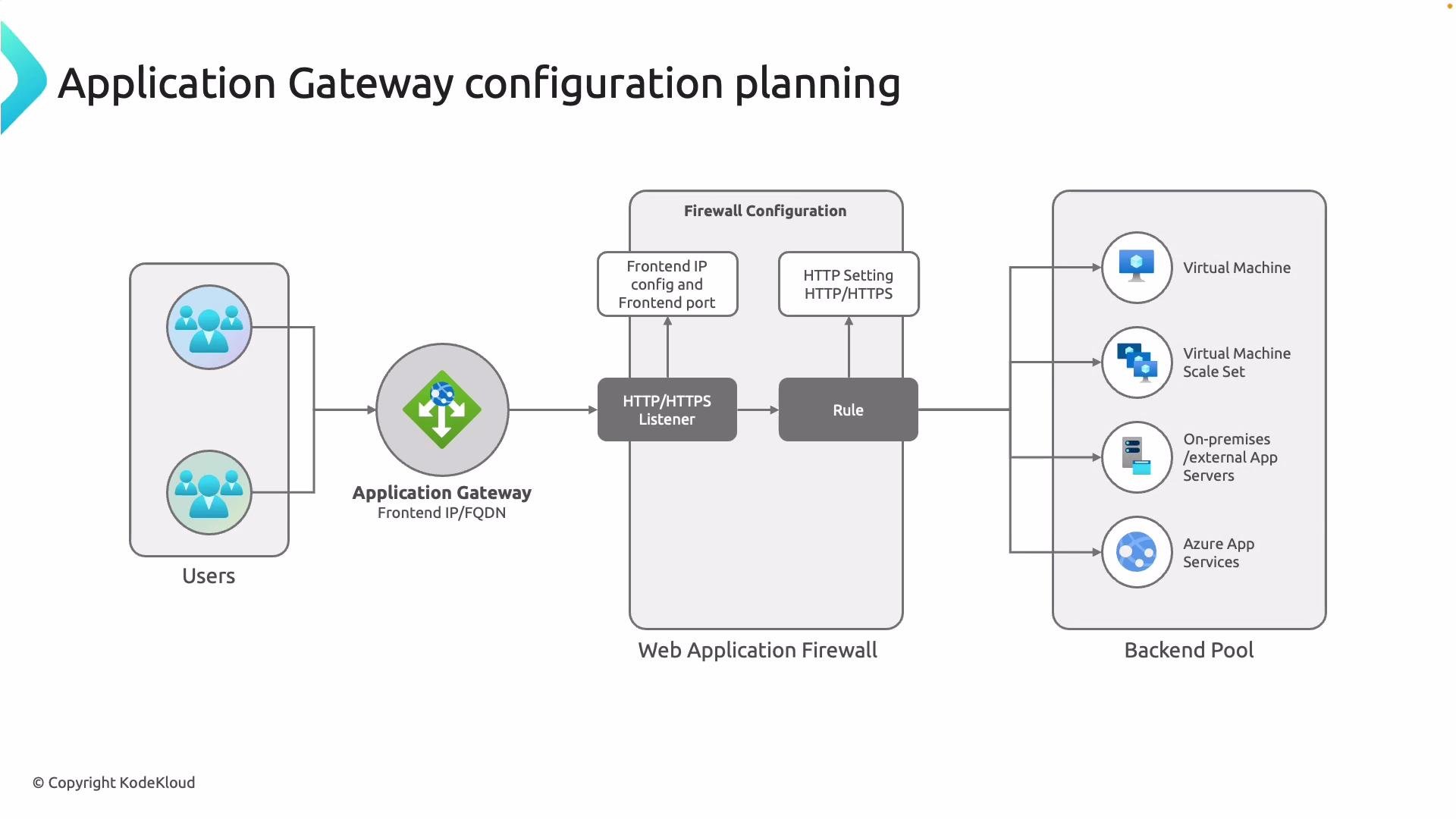 Configuration planning essentials:
| Component | Purpose | Example / Notes |
| -------------- | ------------------------------------------------------------------ | ---------------------------------------------------------------------------- |
| Front-end type | Public or private exposure (public IP vs internal) | Choose public for internet-facing apps; choose private for internal apps |
| Listeners | Entry points (port, protocol, TLS certificate) | Create HTTP/HTTPS listeners; attach certificates for TLS |
| Rules | Bind listeners to backend pools; routing logic (path/host/basic) | Path-based or host-based routing rules |
| HTTP settings | How gateway talks to backends (protocol, port, timeouts, affinity) | Enable `cookie-based affinity`, connection draining, backend cert validation |
| Backend pools | Targets for requests (VMs, scale sets, App Services, on-prem) | Configure health probes to monitor endpoints |
| WAF | Edge-protection for web apps | Enable WAF\_v2 for managed rule sets and centralized protection |
Sample Azure CLI snippets for common tasks
Create a public IP for Application Gateway:
```bash theme={null}
az network public-ip create \
--resource-group MyResourceGroup \
--name MyAGPublicIP \
--sku Standard \
--allocation-method Static
```
Create an Application Gateway (Standard\_v2 example):
```bash theme={null}
az network application-gateway create \
--name MyAppGateway \
--resource-group MyResourceGroup \
--location eastus \
--sku Standard_v2 \
--public-ip-address MyAGPublicIP \
--capacity 2
```
Add a basic HTTPS listener and routing rule (high-level example):
```bash theme={null}
az network application-gateway http-listener create \
--gateway-name MyAppGateway \
--name MyHttpsListener \
--resource-group MyResourceGroup \
--frontend-port 443 \
--frontend-ip MyFrontendIP \
--ssl-cert MySslCert
az network application-gateway rule create \
--gateway-name MyAppGateway \
--name MyRule \
--resource-group MyResourceGroup \
--http-listener MyHttpsListener \
--rule-type Basic \
--address-pool MyBackendPool \
--http-settings MyHttpSettings
```
Note: Use the Azure CLI `az network application-gateway` subcommands to script advanced configuration including path-based rules, host-based routing, WAF policy attachment, and custom health probes. For detailed reference, see the Azure Application Gateway docs: [https://learn.microsoft.com/azure/application-gateway/](https://learn.microsoft.com/azure/application-gateway/)
This lesson includes deeper configuration guidance for listeners, routing rules, HTTP settings, health probes, and WAF policies with examples and best practices for production deployments.
Configuration planning essentials:
| Component | Purpose | Example / Notes |
| -------------- | ------------------------------------------------------------------ | ---------------------------------------------------------------------------- |
| Front-end type | Public or private exposure (public IP vs internal) | Choose public for internet-facing apps; choose private for internal apps |
| Listeners | Entry points (port, protocol, TLS certificate) | Create HTTP/HTTPS listeners; attach certificates for TLS |
| Rules | Bind listeners to backend pools; routing logic (path/host/basic) | Path-based or host-based routing rules |
| HTTP settings | How gateway talks to backends (protocol, port, timeouts, affinity) | Enable `cookie-based affinity`, connection draining, backend cert validation |
| Backend pools | Targets for requests (VMs, scale sets, App Services, on-prem) | Configure health probes to monitor endpoints |
| WAF | Edge-protection for web apps | Enable WAF\_v2 for managed rule sets and centralized protection |
Sample Azure CLI snippets for common tasks
Create a public IP for Application Gateway:
```bash theme={null}
az network public-ip create \
--resource-group MyResourceGroup \
--name MyAGPublicIP \
--sku Standard \
--allocation-method Static
```
Create an Application Gateway (Standard\_v2 example):
```bash theme={null}
az network application-gateway create \
--name MyAppGateway \
--resource-group MyResourceGroup \
--location eastus \
--sku Standard_v2 \
--public-ip-address MyAGPublicIP \
--capacity 2
```
Add a basic HTTPS listener and routing rule (high-level example):
```bash theme={null}
az network application-gateway http-listener create \
--gateway-name MyAppGateway \
--name MyHttpsListener \
--resource-group MyResourceGroup \
--frontend-port 443 \
--frontend-ip MyFrontendIP \
--ssl-cert MySslCert
az network application-gateway rule create \
--gateway-name MyAppGateway \
--name MyRule \
--resource-group MyResourceGroup \
--http-listener MyHttpsListener \
--rule-type Basic \
--address-pool MyBackendPool \
--http-settings MyHttpSettings
```
Note: Use the Azure CLI `az network application-gateway` subcommands to script advanced configuration including path-based rules, host-based routing, WAF policy attachment, and custom health probes. For detailed reference, see the Azure Application Gateway docs: [https://learn.microsoft.com/azure/application-gateway/](https://learn.microsoft.com/azure/application-gateway/)
This lesson includes deeper configuration guidance for listeners, routing rules, HTTP settings, health probes, and WAF policies with examples and best practices for production deployments.