> ## Documentation Index
> Fetch the complete documentation index at: https://notes.kodekloud.com/llms.txt
> Use this file to discover all available pages before exploring further.
# What is Azure Front Door
> Overview of Azure Front Door providing global layer-7 traffic routing, acceleration, edge TLS, health-based failover, and integrated WAF with Standard and Premium SKU comparisons
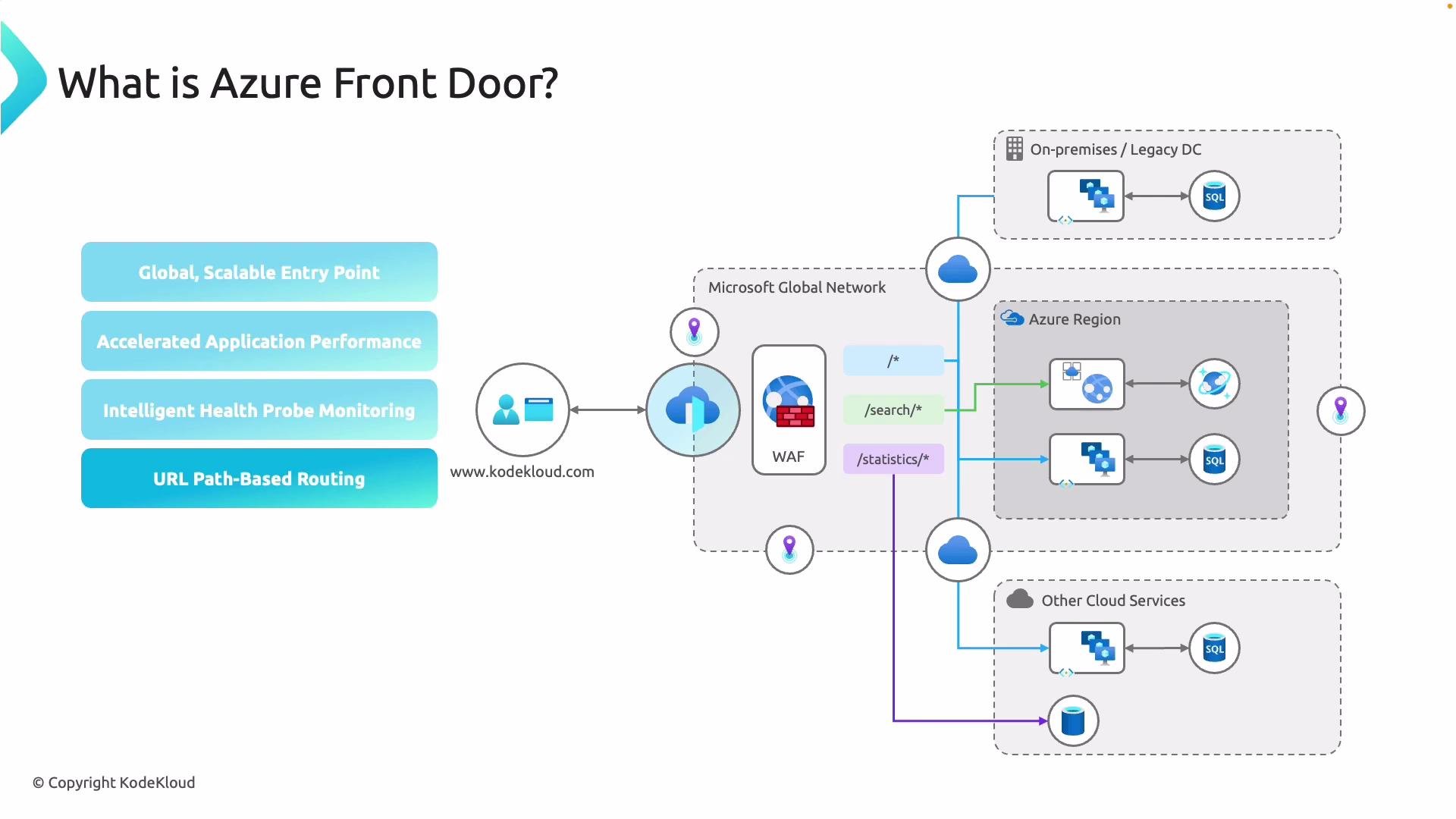
Azure Front Door is Microsoft's global, layer-7 entry point for web applications. It sits on the Microsoft Global Network and optimizes every client connection before traffic reaches your origins—whether those origins are in Azure, on-premises, or located in another cloud provider. Front Door provides global load balancing, URL/path-based routing, edge TLS termination, health probes and fast failover, and integrated security controls such as a Web Application Firewall (WAF).
Front Door is commonly used to:
* Reduce latency by routing users to the nearest edge POP (point of presence) and sending traffic across the Microsoft backbone.
* Improve reliability with continuous health monitoring and automatic failover.
* Offload TLS termination at the edge to reduce CPU load on origin servers.
* Centralize routing, certificate management, and telemetry for multi-region, multi-site deployments.
 Key capabilities and how they work
* Global entry point and accelerated delivery\
Front Door uses the Microsoft Edge network to bring users to the nearest edge POP, reducing latency for both static and dynamic content.
* Anycast routing and TCP optimizations\
Anycast routes user requests to the closest POP. Front Door then leverages TCP connection optimizations across Microsoft's backbone so requests traverse the shortest, fastest path to your origin.
* Health probes and automatic failover\
Continuous health probing of backend endpoints enables fast, automatic rerouting to healthy endpoints when an origin fails—minimizing downtime and eliminating manual failover steps.
* Path- and URL-based routing\
Route traffic by path to different backend pools (for example, send `/images/*` to a CDN-backed pool, and `/api/*` to application servers), allowing workload-specific optimization.
* TLS termination and end-to-end TLS options\
Terminate TLS at the edge to reduce origin CPU overhead and manage certificates from the Azure portal. If required, configure end-to-end TLS so traffic remains encrypted all the way to origin.
* Layered security with integrated WAF and bot mitigation\
Front Door integrates WAF rule sets, bot protection, and threat-intelligence based blocking to protect your applications at the edge.
* Host multiple domains and central telemetry\
A single Front Door frontend configuration can host multiple custom domains, centralize TLS certificate management, and provide unified traffic and health telemetry for multi-region deployments.
Feature summary
| Capability | Why it matters |
| -------------------------------- | -------------------------------------------------------------------------------- |
| Global acceleration | Lowers latency by routing to the nearest edge POP and using Microsoft’s backbone |
| Anycast + TCP optimizations | Faster, more reliable connections to origin |
| Health probes & failover | Automatic reroute to healthy endpoints for higher availability |
| URL/path-based routing | Split traffic by workload for optimized handling |
| Edge TLS termination | Offloads crypto work from origins and simplifies certificate management |
| Integrated WAF & bot mitigation | Edge-level security before requests reach your origin |
| Multi-domain hosting & telemetry | Centralized control plane for complex global deployments |
For more details, see the official Azure Front Door documentation: [Azure Front Door documentation](https://learn.microsoft.com/azure/frontdoor/).
Choosing between Standard and Premium SKUs
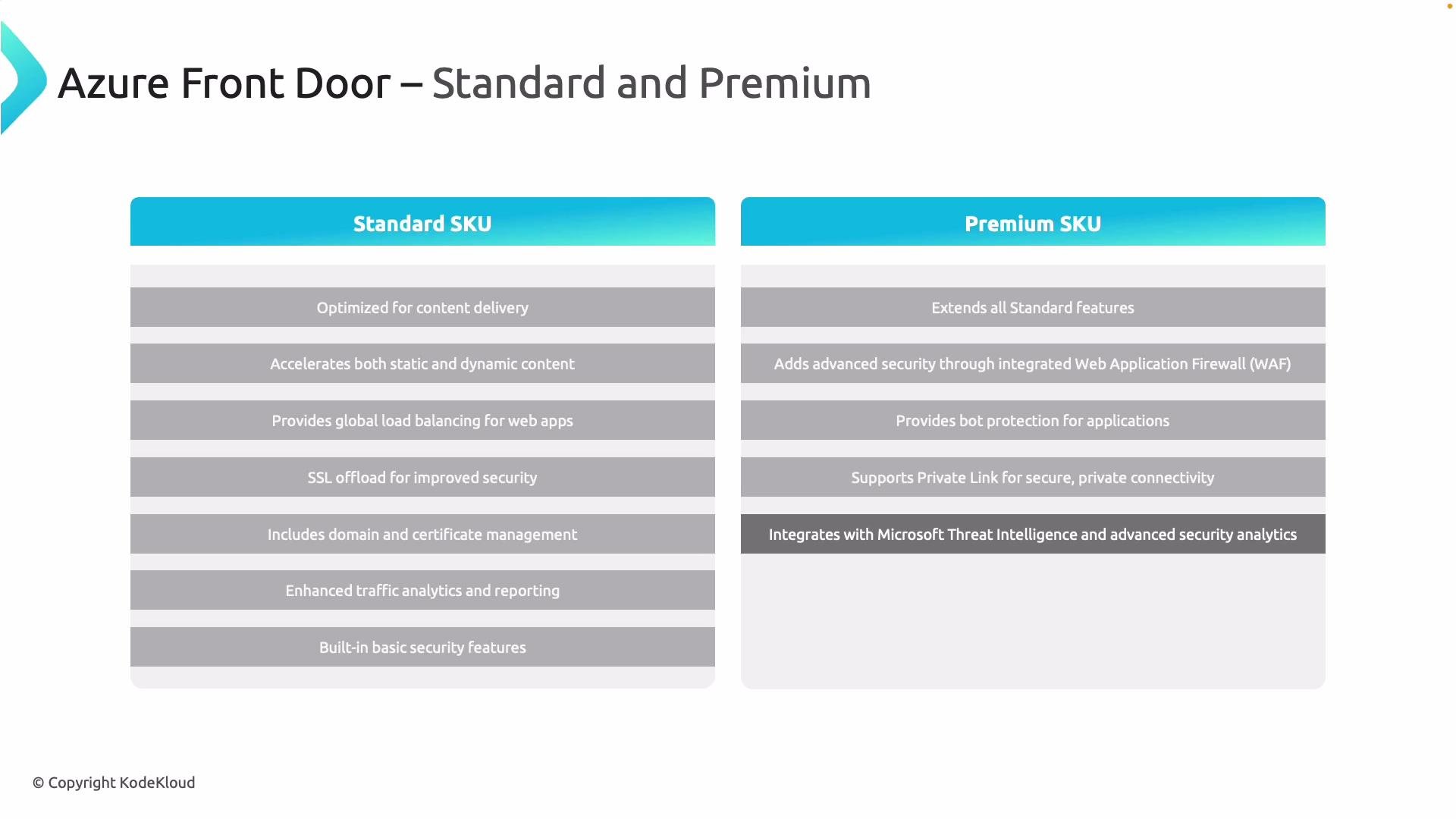
Both Standard and Premium SKUs provide the core global delivery features: edge acceleration for static and dynamic content, URL/path-based routing, health probes and failover, TLS termination at the edge, and centralized telemetry.
Common features across Standard and Premium:
* Global acceleration using the Microsoft Edge network
* Automatic traffic balancing and fast failover across backend regions
* TLS termination and managed certificate options for custom domains
* Telemetry and logging for traffic, health, and diagnostics
Differences to consider
| Feature area | Standard | Premium |
| ---------------------------------------- | ------------------------------------------- | ------------------------------------------------------------------ |
| Advanced WAF capabilities | Core WAF rule sets | Enhanced WAF with advanced rule customization and managed rulesets |
| Bot mitigation | Basic protections | Advanced bot protection and mitigation features |
| Private connectivity | No Private Link | Supports Private Link for private connectivity to Azure backends |
| Threat intelligence & security telemetry | Standard logs | Expanded telemetry and security integrations for threat detection |
| Enterprise features | Suitable for most global acceleration needs | Designed for strict security/compliance and large enterprises |
When to pick each SKU:
* Start with Standard if your primary needs are global acceleration, basic WAF protections, edge TLS, and simplified certificate management.
* Choose Premium when you need enterprise-grade security controls, advanced WAF customizations, bot protection, Private Link for private backend connectivity, or deeper security telemetry and integrations.
Implementation tip:
* Evaluate using a staged approach: deploy Standard to validate routing, performance, and cost, then upgrade to Premium only if your threat model, regulatory requirements, or private connectivity needs demand the enhanced capabilities.
Key capabilities and how they work
* Global entry point and accelerated delivery\
Front Door uses the Microsoft Edge network to bring users to the nearest edge POP, reducing latency for both static and dynamic content.
* Anycast routing and TCP optimizations\
Anycast routes user requests to the closest POP. Front Door then leverages TCP connection optimizations across Microsoft's backbone so requests traverse the shortest, fastest path to your origin.
* Health probes and automatic failover\
Continuous health probing of backend endpoints enables fast, automatic rerouting to healthy endpoints when an origin fails—minimizing downtime and eliminating manual failover steps.
* Path- and URL-based routing\
Route traffic by path to different backend pools (for example, send `/images/*` to a CDN-backed pool, and `/api/*` to application servers), allowing workload-specific optimization.
* TLS termination and end-to-end TLS options\
Terminate TLS at the edge to reduce origin CPU overhead and manage certificates from the Azure portal. If required, configure end-to-end TLS so traffic remains encrypted all the way to origin.
* Layered security with integrated WAF and bot mitigation\
Front Door integrates WAF rule sets, bot protection, and threat-intelligence based blocking to protect your applications at the edge.
* Host multiple domains and central telemetry\
A single Front Door frontend configuration can host multiple custom domains, centralize TLS certificate management, and provide unified traffic and health telemetry for multi-region deployments.
Feature summary
| Capability | Why it matters |
| -------------------------------- | -------------------------------------------------------------------------------- |
| Global acceleration | Lowers latency by routing to the nearest edge POP and using Microsoft’s backbone |
| Anycast + TCP optimizations | Faster, more reliable connections to origin |
| Health probes & failover | Automatic reroute to healthy endpoints for higher availability |
| URL/path-based routing | Split traffic by workload for optimized handling |
| Edge TLS termination | Offloads crypto work from origins and simplifies certificate management |
| Integrated WAF & bot mitigation | Edge-level security before requests reach your origin |
| Multi-domain hosting & telemetry | Centralized control plane for complex global deployments |
For more details, see the official Azure Front Door documentation: [Azure Front Door documentation](https://learn.microsoft.com/azure/frontdoor/).
Choosing between Standard and Premium SKUs
Both Standard and Premium SKUs provide the core global delivery features: edge acceleration for static and dynamic content, URL/path-based routing, health probes and failover, TLS termination at the edge, and centralized telemetry.
Common features across Standard and Premium:
* Global acceleration using the Microsoft Edge network
* Automatic traffic balancing and fast failover across backend regions
* TLS termination and managed certificate options for custom domains
* Telemetry and logging for traffic, health, and diagnostics
Differences to consider
| Feature area | Standard | Premium |
| ---------------------------------------- | ------------------------------------------- | ------------------------------------------------------------------ |
| Advanced WAF capabilities | Core WAF rule sets | Enhanced WAF with advanced rule customization and managed rulesets |
| Bot mitigation | Basic protections | Advanced bot protection and mitigation features |
| Private connectivity | No Private Link | Supports Private Link for private connectivity to Azure backends |
| Threat intelligence & security telemetry | Standard logs | Expanded telemetry and security integrations for threat detection |
| Enterprise features | Suitable for most global acceleration needs | Designed for strict security/compliance and large enterprises |
When to pick each SKU:
* Start with Standard if your primary needs are global acceleration, basic WAF protections, edge TLS, and simplified certificate management.
* Choose Premium when you need enterprise-grade security controls, advanced WAF customizations, bot protection, Private Link for private backend connectivity, or deeper security telemetry and integrations.
Implementation tip:
* Evaluate using a staged approach: deploy Standard to validate routing, performance, and cost, then upgrade to Premium only if your threat model, regulatory requirements, or private connectivity needs demand the enhanced capabilities.
 Summary
Azure Front Door acts as an intelligent global traffic cop—accelerating delivery, improving availability through health checks and failover, and protecting applications with edge security features. Use Front Door to centralize routing, TLS, and telemetry for multi-region web applications and choose the SKU that matches your security posture and connectivity needs.
When evaluating SKUs, base your decision on your threat model, compliance needs, and whether you require private back-end connectivity. Start with Standard for broad acceleration and move to Premium when you need enterprise-grade security and Private Link.
Summary
Azure Front Door acts as an intelligent global traffic cop—accelerating delivery, improving availability through health checks and failover, and protecting applications with edge security features. Use Front Door to centralize routing, TLS, and telemetry for multi-region web applications and choose the SKU that matches your security posture and connectivity needs.
When evaluating SKUs, base your decision on your threat model, compliance needs, and whether you require private back-end connectivity. Start with Standard for broad acceleration and move to Premium when you need enterprise-grade security and Private Link.