> ## Documentation Index
> Fetch the complete documentation index at: https://notes.kodekloud.com/llms.txt
> Use this file to discover all available pages before exploring further.
# Private DNS Zones
> Explains Azure Private DNS zones, internal name resolution within VNets, role of reserved platform IP 168.63.129.16, virtual network links, hybrid scenarios, private endpoints and best practices.
This article explains Azure Private DNS zones and how internal name resolution works inside virtual networks. You'll learn the resolution flow, the role of the reserved platform IP `168.63.129.16`, best practices, and common use cases.
## How internal name resolution works
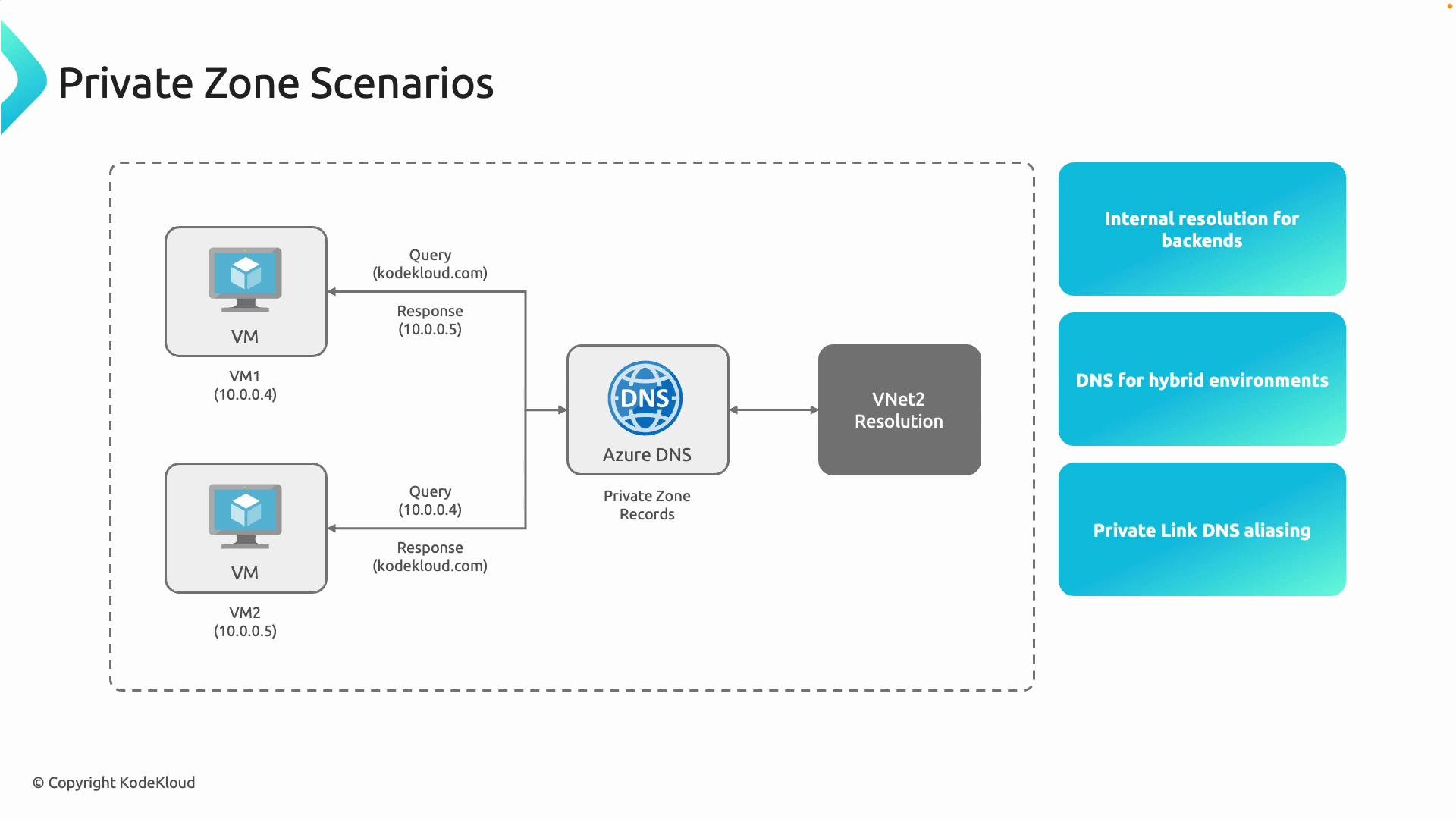
When you use Azure Private DNS zones, name resolution for private resources follows this flow:
1. A VM (or any resource) in a virtual network sends a DNS query for a private name, for example `sql.kodekloud.com`.
2. The Azure platform DNS endpoint at `168.63.129.16` receives the query. If the Private DNS zone for `kodekloud.com` is linked to the VM's VNet and the record exists, Azure DNS returns the private IP, e.g., `10.0.0.4`.
3. The VM connects to the returned private IP. Traffic stays within Azure and never traverses the public internet.
Think of a Private DNS zone as an internal phone book for your Azure resources: use DNS names instead of hard-coded IPs to simplify management and keep communications private.
 ## Key capabilities and common use cases
* Centralized name resolution across VNets: Create one Private DNS zone and link multiple VNets using virtual network links so resources in different VNets resolve internal names without duplicate zones.
* Hybrid connectivity: Forward queries from on-premises to Azure DNS (via a DNS forwarder VM or Azure DNS Private Resolver) over VPN/ExpressRoute to resolve Azure-only names from on-premises.
* Private endpoints for PaaS: When you create private endpoints for PaaS services, Azure can automatically add DNS records to your Private DNS zone for private access.
Table: Use cases and recommendations
| Use case | Recommendation | Example |
| ------------------------------------------ | ----------------------------------------------------: | -------------------------------------------------------------- |
| Centralized cross-VNet resolution | Use a single Private DNS zone + virtual network links | Link `prod-vnet` and `shared-services-vnet` to `corp.internal` |
| On-premises resolution of Azure-only names | Deploy DNS forwarder or Azure DNS Private Resolver | Forwarders over ExpressRoute to Azure DNS |
| Private PaaS connectivity | Use private endpoints + Private DNS zone | Private endpoint for Azure SQL with auto-created record |
## Virtual network links
Virtual network links are required for a VNet to resolve names in a Private DNS zone. Without a link, the VNet cannot see the zone. Use links to:
* Grant multiple VNets visibility to a single zone (centralized resolution).
* Control registration behavior (auto-registration of records from VMs is configurable per link).
* Break down isolation between VNets for DNS while retaining network separation.
When creating a virtual network link, consider whether you want automatic virtual machine registration. Enable auto-registration only if you want VMs in that VNet to create A records automatically in the zone.
## Reserved platform IP: 168.63.129.16
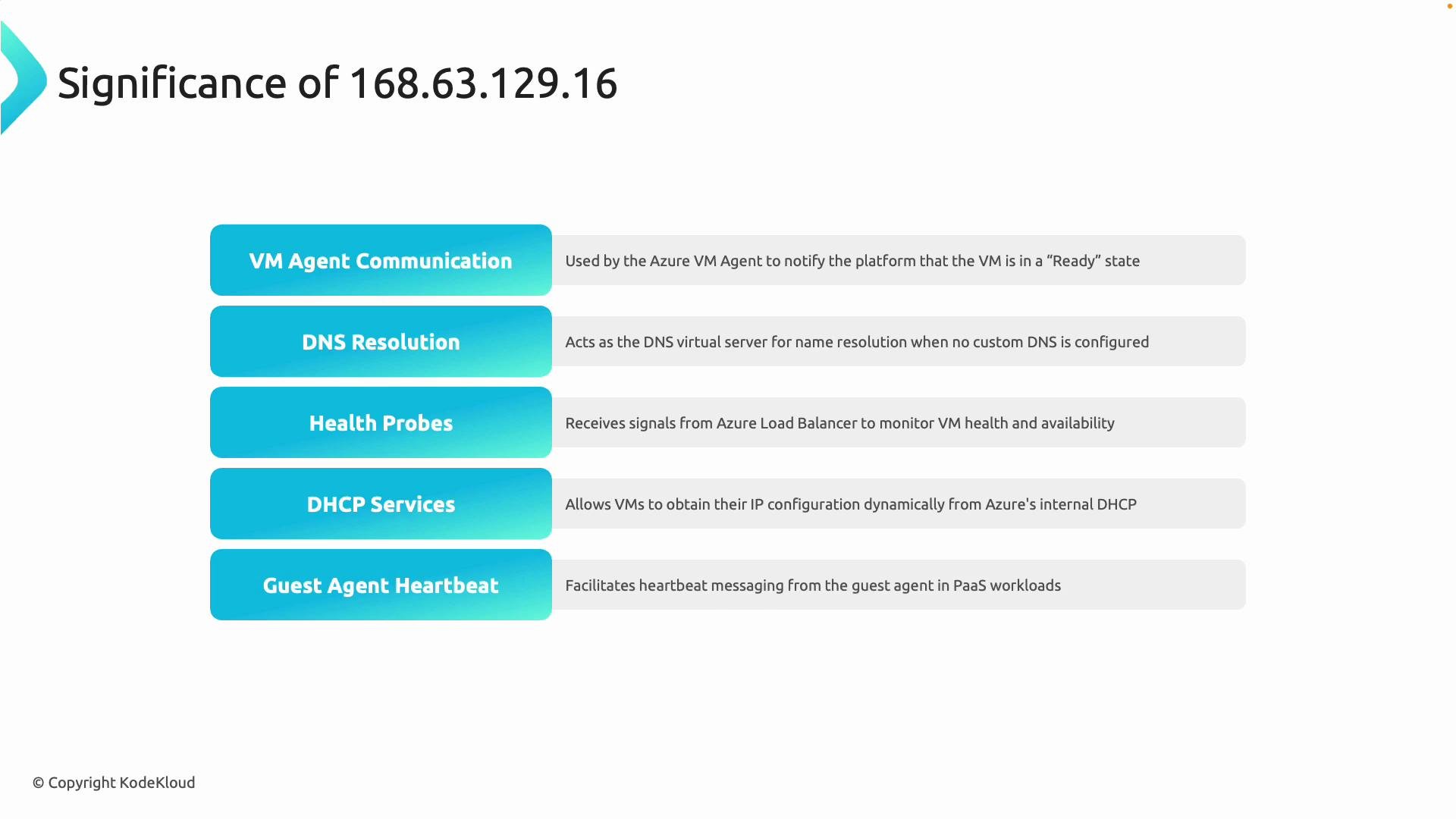
Azure reserves `168.63.129.16` as a platform-managed IP reachable from all VMs. It’s used for multiple platform functions:
| Role | Description |
| ---------------------- | -------------------------------------------------------------------------------------- |
| DNS | VMs receive `168.63.129.16` by DHCP as the default resolver unless you set custom DNS. |
| DHCP services | VMs obtain network configuration via Azure DHCP services exposed at this endpoint. |
| VM agent communication | The Azure VM agent uses this endpoint to interact with platform services. |
| Health & telemetry | Platform probes, agent heartbeats, and health operations use it. |
## Key capabilities and common use cases
* Centralized name resolution across VNets: Create one Private DNS zone and link multiple VNets using virtual network links so resources in different VNets resolve internal names without duplicate zones.
* Hybrid connectivity: Forward queries from on-premises to Azure DNS (via a DNS forwarder VM or Azure DNS Private Resolver) over VPN/ExpressRoute to resolve Azure-only names from on-premises.
* Private endpoints for PaaS: When you create private endpoints for PaaS services, Azure can automatically add DNS records to your Private DNS zone for private access.
Table: Use cases and recommendations
| Use case | Recommendation | Example |
| ------------------------------------------ | ----------------------------------------------------: | -------------------------------------------------------------- |
| Centralized cross-VNet resolution | Use a single Private DNS zone + virtual network links | Link `prod-vnet` and `shared-services-vnet` to `corp.internal` |
| On-premises resolution of Azure-only names | Deploy DNS forwarder or Azure DNS Private Resolver | Forwarders over ExpressRoute to Azure DNS |
| Private PaaS connectivity | Use private endpoints + Private DNS zone | Private endpoint for Azure SQL with auto-created record |
## Virtual network links
Virtual network links are required for a VNet to resolve names in a Private DNS zone. Without a link, the VNet cannot see the zone. Use links to:
* Grant multiple VNets visibility to a single zone (centralized resolution).
* Control registration behavior (auto-registration of records from VMs is configurable per link).
* Break down isolation between VNets for DNS while retaining network separation.
When creating a virtual network link, consider whether you want automatic virtual machine registration. Enable auto-registration only if you want VMs in that VNet to create A records automatically in the zone.
## Reserved platform IP: 168.63.129.16
Azure reserves `168.63.129.16` as a platform-managed IP reachable from all VMs. It’s used for multiple platform functions:
| Role | Description |
| ---------------------- | -------------------------------------------------------------------------------------- |
| DNS | VMs receive `168.63.129.16` by DHCP as the default resolver unless you set custom DNS. |
| DHCP services | VMs obtain network configuration via Azure DHCP services exposed at this endpoint. |
| VM agent communication | The Azure VM agent uses this endpoint to interact with platform services. |
| Health & telemetry | Platform probes, agent heartbeats, and health operations use it. |
 Never block or filter access to `168.63.129.16`. Blocking this endpoint can break DNS, DHCP, VM agent communications, and other platform features required for normal VM and Azure service operation.
If you choose to use custom DNS servers (for example, an on-premises DNS server or a domain controller), set custom DNS at the VNet or NIC level. Be aware that some platform operations still require connectivity to `168.63.129.16`. If you override DNS, ensure forwarding or conditional forwarders are configured so platform name resolution and required services continue to function.
## Best practices
* Centralize Private DNS zones to reduce administrative overhead and avoid replication of records.
* Use virtual network links to provide controlled visibility of zones across VNets.
* For hybrid scenarios, deploy DNS forwarders or Azure DNS Private Resolver to enable on-premises clients to resolve Azure Private DNS zones.
* Do not block `168.63.129.16`. Validate network security groups (NSGs) and firewall rules allow necessary access.
## Summary
* Azure Private DNS zones provide secure, private name resolution for resources inside VNets.
* Virtual network links are required for VNet visibility to a Private DNS zone.
* Private endpoints can automatically register DNS records in your Private DNS zone.
* `168.63.129.16` is a critical Azure platform endpoint — do not block it.
## Links and references
* [Azure Private DNS documentation](https://learn.microsoft.com/azure/dns/private-dns-overview)
* [Azure DNS Private Resolver](https://learn.microsoft.com/azure/dns/dns-private-resolver)
* [Azure Virtual Network documentation](https://learn.microsoft.com/azure/virtual-network/)
Next: a step-by-step demonstration to create a Private DNS zone, link VNets, and validate cross-VNet name resolution.
Never block or filter access to `168.63.129.16`. Blocking this endpoint can break DNS, DHCP, VM agent communications, and other platform features required for normal VM and Azure service operation.
If you choose to use custom DNS servers (for example, an on-premises DNS server or a domain controller), set custom DNS at the VNet or NIC level. Be aware that some platform operations still require connectivity to `168.63.129.16`. If you override DNS, ensure forwarding or conditional forwarders are configured so platform name resolution and required services continue to function.
## Best practices
* Centralize Private DNS zones to reduce administrative overhead and avoid replication of records.
* Use virtual network links to provide controlled visibility of zones across VNets.
* For hybrid scenarios, deploy DNS forwarders or Azure DNS Private Resolver to enable on-premises clients to resolve Azure Private DNS zones.
* Do not block `168.63.129.16`. Validate network security groups (NSGs) and firewall rules allow necessary access.
## Summary
* Azure Private DNS zones provide secure, private name resolution for resources inside VNets.
* Virtual network links are required for VNet visibility to a Private DNS zone.
* Private endpoints can automatically register DNS records in your Private DNS zone.
* `168.63.129.16` is a critical Azure platform endpoint — do not block it.
## Links and references
* [Azure Private DNS documentation](https://learn.microsoft.com/azure/dns/private-dns-overview)
* [Azure DNS Private Resolver](https://learn.microsoft.com/azure/dns/dns-private-resolver)
* [Azure Virtual Network documentation](https://learn.microsoft.com/azure/virtual-network/)
Next: a step-by-step demonstration to create a Private DNS zone, link VNets, and validate cross-VNet name resolution.