> ## Documentation Index
> Fetch the complete documentation index at: https://notes.kodekloud.com/llms.txt
> Use this file to discover all available pages before exploring further.
# Azure Firewall
> Overview of Azure Firewall features, hub-and-spoke and hybrid deployment patterns, rule types, threat intelligence, logging, diagnostics, and centralized policy for managing and protecting Azure network traffic.
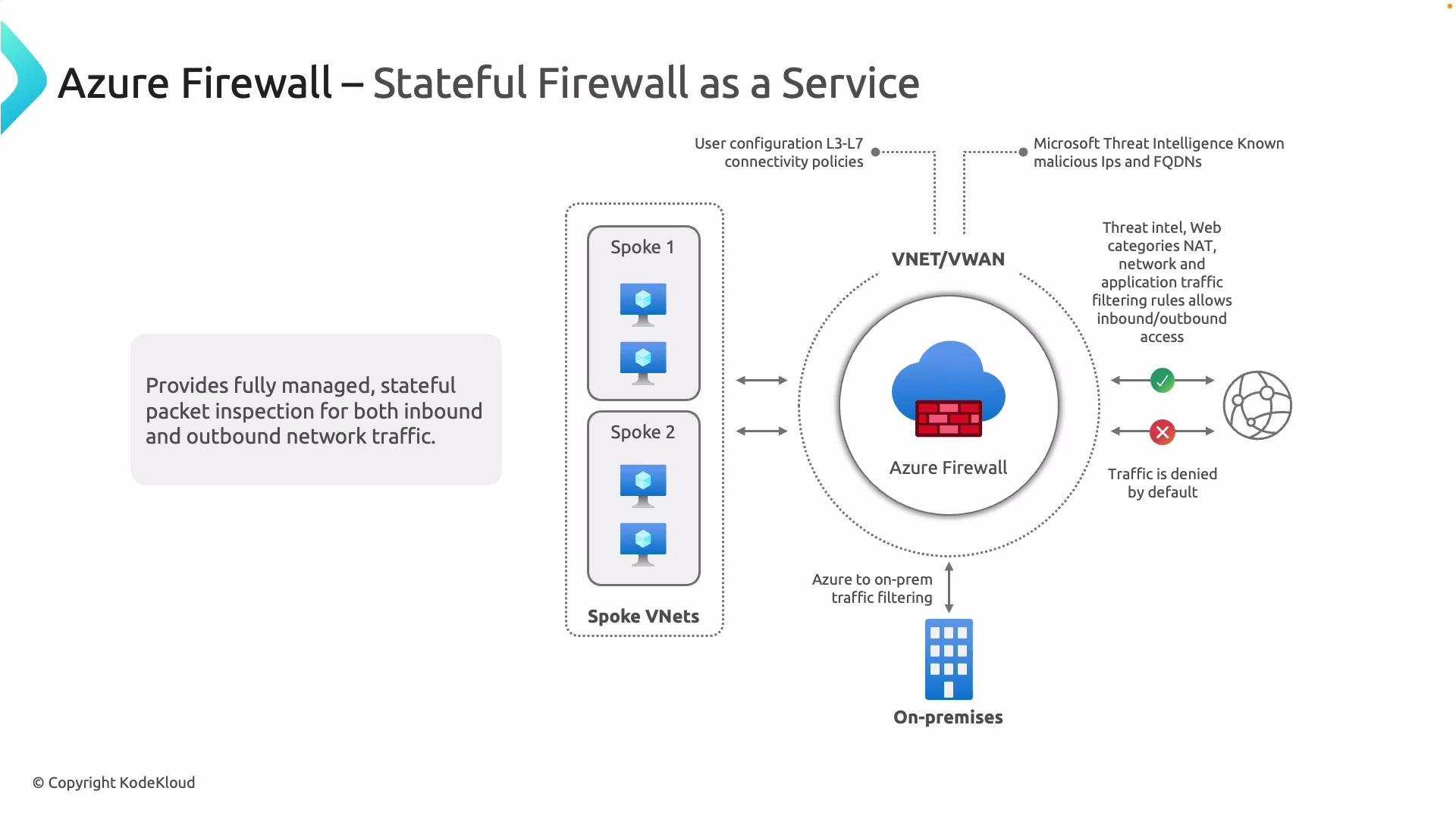
Azure Firewall is a fully managed, native firewall-as-a-service from Microsoft Azure. This article explains where Azure Firewall fits within a typical network architecture, highlights its core capabilities, and reviews the rule types and diagnostic options used to enforce and monitor security in hub-spoke and hybrid designs.
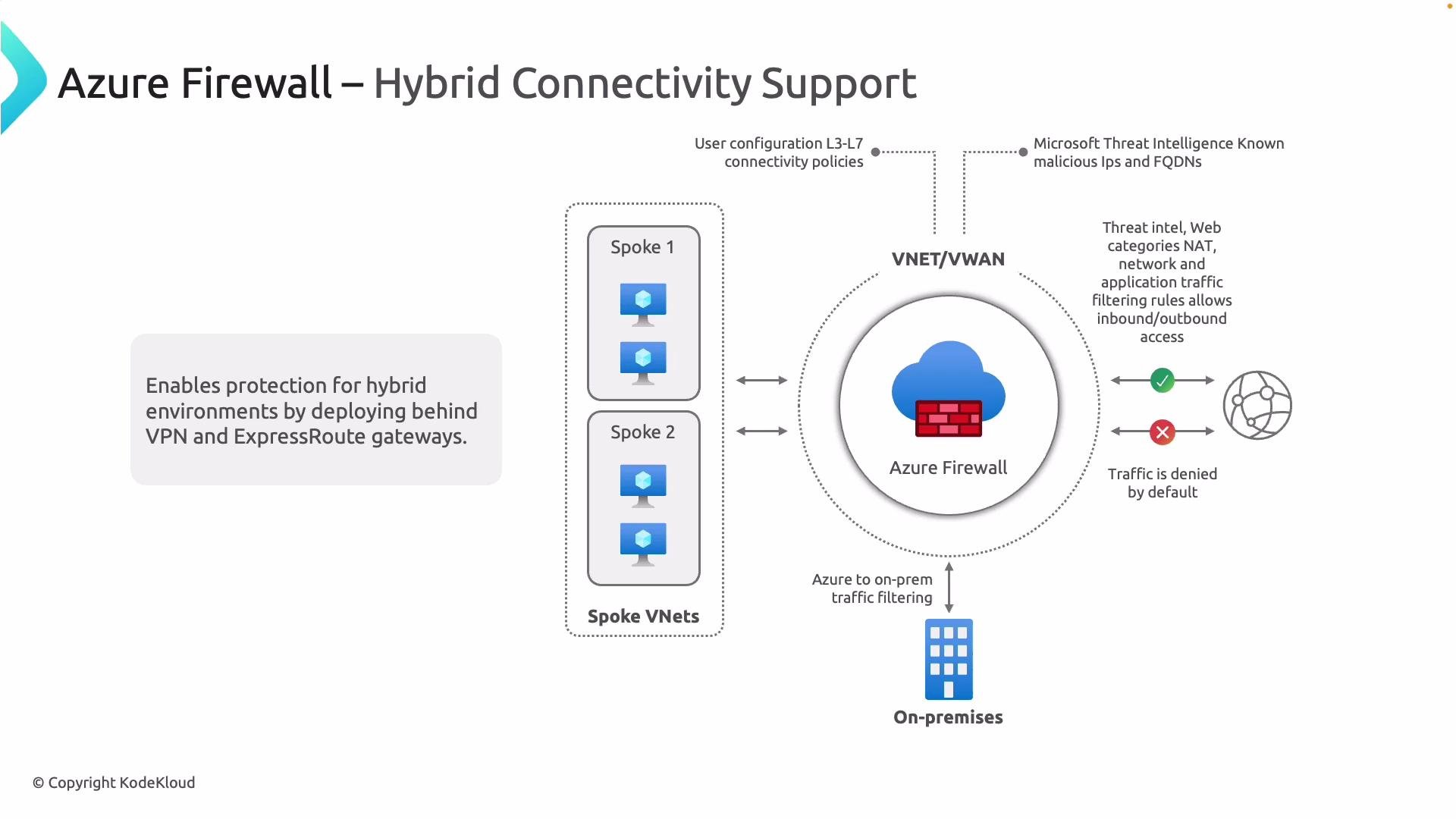
Azure Firewall is commonly deployed at the network edge in a hub-and-spoke topology. Multiple spoke VNets route traffic through a centralized hub where Azure Firewall inspects and enforces policies for Internet-bound and hybrid traffic. Many organizations replace third-party NVAs with Azure Firewall to take advantage of a native, managed service with integrated logging, scaling, and centralized policy management.
 ## Core capabilities
Use cases and capabilities that make Azure Firewall suitable for enterprise edge and hub deployments:
| Capability | Description |
| --------------------------------- | ----------------------------------------------------------------------------------------------------------------------------- |
| Stateful packet inspection | Inspects both inbound and outbound traffic and maintains session state for robust enforcement across L3–L7. |
| Built-in redundancy & autoscaling | Native high availability with no single point of failure, plus autoscaling to match workload demand. |
| Centralized policy & management | Define and manage application- and network-level rules centrally using Azure Firewall Manager and built-in policy constructs. |
| Threat intelligence | Block or alert on traffic to known malicious IPs, domains, and URLs using Microsoft threat intelligence feeds. |
| Monitoring & logging | Send logs and metrics to Azure Monitor (Log Analytics, Storage, Event Hubs) for analysis, alerting, and retention. |
| Hybrid connectivity | Place Firewall behind VPN or ExpressRoute gateways to protect hybrid and on-premises traffic flows. |
For official guidance, see the Azure Firewall documentation: [Azure Firewall overview](https://learn.microsoft.com/azure/firewall/overview).
## Azure Firewall rule types
Azure Firewall supports several rule types that determine how traffic is evaluated and enforced. Each rule type targets different protocols and enforcement layers.
## Core capabilities
Use cases and capabilities that make Azure Firewall suitable for enterprise edge and hub deployments:
| Capability | Description |
| --------------------------------- | ----------------------------------------------------------------------------------------------------------------------------- |
| Stateful packet inspection | Inspects both inbound and outbound traffic and maintains session state for robust enforcement across L3–L7. |
| Built-in redundancy & autoscaling | Native high availability with no single point of failure, plus autoscaling to match workload demand. |
| Centralized policy & management | Define and manage application- and network-level rules centrally using Azure Firewall Manager and built-in policy constructs. |
| Threat intelligence | Block or alert on traffic to known malicious IPs, domains, and URLs using Microsoft threat intelligence feeds. |
| Monitoring & logging | Send logs and metrics to Azure Monitor (Log Analytics, Storage, Event Hubs) for analysis, alerting, and retention. |
| Hybrid connectivity | Place Firewall behind VPN or ExpressRoute gateways to protect hybrid and on-premises traffic flows. |
For official guidance, see the Azure Firewall documentation: [Azure Firewall overview](https://learn.microsoft.com/azure/firewall/overview).
## Azure Firewall rule types
Azure Firewall supports several rule types that determine how traffic is evaluated and enforced. Each rule type targets different protocols and enforcement layers.
 | Rule type | Layer | Primary use | Quick example |
| ----------------------------- | ------------------: | ------------------------------------------------------------------------------------------------------------------------------------------------------- | --------------------------------------------- |
| Network rules | L3–L4 | Allow or deny based on source/destination IP, protocol (`TCP`/`UDP`), and destination port — ideal for non-HTTP/S traffic. | Allow TCP 22 from `10.0.1.0/24` to `10.0.2.4` |
| Application rules | L7 | HTTP/S and MSSQL filtering using FQDNs and (where supported) URL filtering — used to restrict outbound web access. | Allow `https://contoso.com` |
| NAT rules (DNAT / SNAT) | L3–L4 (translation) | DNAT: map a firewall public IP:port to a private endpoint for inbound access. SNAT: translate private sources to the firewall’s public IP for outbound. | `DNAT publicIP:443 -> 10.0.2.4:443` |
| Threat Intelligence | L3–L7 indicators | Alert or deny traffic matching Microsoft’s malicious IPs/domains. | Deny traffic to known-malicious domain |
| Additional / Premium features | L7+ | TLS inspection, IDPS, advanced URL filtering, FQDN tags (Premium SKU) and centralized policy via Firewall Manager. | TLS inspection for decrypt+inspect (Premium) |
### Example: creating a DNAT rule (Azure CLI)
This example maps incoming traffic on the firewall public IP port 443 to an internal server at 10.0.2.4:443:
```bash theme={null}
az network firewall nat-rule create \
--resource-group MyResourceGroup \
--firewall-name MyFirewall \
--collection-name DNAT-Collection \
--name DNAT-HTTPS \
--protocols TCP \
--source-addresses '*' \
--destination-ports 443 \
--destination-addresses \
--translated-address 10.0.2.4 \
--translated-port 443 \
--action Dnat
```
Note: SNAT behavior for outbound traffic typically uses the firewall’s public IPs and can be influenced by configured public IPs and SNAT rules.
TLS inspection and other advanced controls (IDPS, URL filtering) are provided by the Azure Firewall Premium SKU. Enabling TLS inspection requires certificate management (for example, storing CA certificates in Azure Key Vault). Assess compliance and privacy implications before enabling decryption.
## Logging, diagnostics, and monitoring
Configure diagnostic settings to send Azure Firewall logs and metrics to one or more of the following targets:
| Destination | Use case |
| --------------- | --------------------------------------------------- |
| Log Analytics | Real-time analysis, queries, workbooks, and alerts. |
| Storage account | Long-term retention and archival. |
| Event Hubs | Integration with SIEMs and streaming analytics. |
Use Azure Monitor workbooks and Log Analytics queries to analyze traffic patterns, investigate anomalies, and generate alerts. Common logs to collect include `AzureFirewallApplicationRule`, `AzureFirewallNetworkRule`, `AzureFirewallNatRule`, and `AzureFirewallThreatIntel`.
## Placement & design considerations
* Hub-and-spoke is the recommended pattern for centralizing security: route spoke traffic through a dedicated hub VNet with Azure Firewall.
* Replace NVAs when you need a managed, autoscaling, and highly available firewall service integrated with Azure management and monitoring.
* For hybrid scenarios, route on-premises traffic over VPN/ExpressRoute into the hub so the firewall can inspect hybrid flows.
* Plan for IP addressing, forced tunneling, and routing (UDRs) to ensure expected traffic passes through Azure Firewall.
This overview covers Azure Firewall’s role in a hub-spoke and hybrid architecture, its core capabilities, supported rule types, and logging/diagnostic options. For deployment patterns, configuration examples, and up-to-date SKU features, consult the official docs:
* [Azure Firewall overview](https://learn.microsoft.com/azure/firewall/overview)
* [Azure Firewall pricing and SKUs](https://learn.microsoft.com/azure/firewall/pricing)
* [Azure Monitor documentation](https://learn.microsoft.com/azure/azure-monitor/)
| Rule type | Layer | Primary use | Quick example |
| ----------------------------- | ------------------: | ------------------------------------------------------------------------------------------------------------------------------------------------------- | --------------------------------------------- |
| Network rules | L3–L4 | Allow or deny based on source/destination IP, protocol (`TCP`/`UDP`), and destination port — ideal for non-HTTP/S traffic. | Allow TCP 22 from `10.0.1.0/24` to `10.0.2.4` |
| Application rules | L7 | HTTP/S and MSSQL filtering using FQDNs and (where supported) URL filtering — used to restrict outbound web access. | Allow `https://contoso.com` |
| NAT rules (DNAT / SNAT) | L3–L4 (translation) | DNAT: map a firewall public IP:port to a private endpoint for inbound access. SNAT: translate private sources to the firewall’s public IP for outbound. | `DNAT publicIP:443 -> 10.0.2.4:443` |
| Threat Intelligence | L3–L7 indicators | Alert or deny traffic matching Microsoft’s malicious IPs/domains. | Deny traffic to known-malicious domain |
| Additional / Premium features | L7+ | TLS inspection, IDPS, advanced URL filtering, FQDN tags (Premium SKU) and centralized policy via Firewall Manager. | TLS inspection for decrypt+inspect (Premium) |
### Example: creating a DNAT rule (Azure CLI)
This example maps incoming traffic on the firewall public IP port 443 to an internal server at 10.0.2.4:443:
```bash theme={null}
az network firewall nat-rule create \
--resource-group MyResourceGroup \
--firewall-name MyFirewall \
--collection-name DNAT-Collection \
--name DNAT-HTTPS \
--protocols TCP \
--source-addresses '*' \
--destination-ports 443 \
--destination-addresses \
--translated-address 10.0.2.4 \
--translated-port 443 \
--action Dnat
```
Note: SNAT behavior for outbound traffic typically uses the firewall’s public IPs and can be influenced by configured public IPs and SNAT rules.
TLS inspection and other advanced controls (IDPS, URL filtering) are provided by the Azure Firewall Premium SKU. Enabling TLS inspection requires certificate management (for example, storing CA certificates in Azure Key Vault). Assess compliance and privacy implications before enabling decryption.
## Logging, diagnostics, and monitoring
Configure diagnostic settings to send Azure Firewall logs and metrics to one or more of the following targets:
| Destination | Use case |
| --------------- | --------------------------------------------------- |
| Log Analytics | Real-time analysis, queries, workbooks, and alerts. |
| Storage account | Long-term retention and archival. |
| Event Hubs | Integration with SIEMs and streaming analytics. |
Use Azure Monitor workbooks and Log Analytics queries to analyze traffic patterns, investigate anomalies, and generate alerts. Common logs to collect include `AzureFirewallApplicationRule`, `AzureFirewallNetworkRule`, `AzureFirewallNatRule`, and `AzureFirewallThreatIntel`.
## Placement & design considerations
* Hub-and-spoke is the recommended pattern for centralizing security: route spoke traffic through a dedicated hub VNet with Azure Firewall.
* Replace NVAs when you need a managed, autoscaling, and highly available firewall service integrated with Azure management and monitoring.
* For hybrid scenarios, route on-premises traffic over VPN/ExpressRoute into the hub so the firewall can inspect hybrid flows.
* Plan for IP addressing, forced tunneling, and routing (UDRs) to ensure expected traffic passes through Azure Firewall.
This overview covers Azure Firewall’s role in a hub-spoke and hybrid architecture, its core capabilities, supported rule types, and logging/diagnostic options. For deployment patterns, configuration examples, and up-to-date SKU features, consult the official docs:
* [Azure Firewall overview](https://learn.microsoft.com/azure/firewall/overview)
* [Azure Firewall pricing and SKUs](https://learn.microsoft.com/azure/firewall/pricing)
* [Azure Monitor documentation](https://learn.microsoft.com/azure/azure-monitor/)