> ## Documentation Index
> Fetch the complete documentation index at: https://notes.kodekloud.com/llms.txt
> Use this file to discover all available pages before exploring further.
# High Availability
> Explains Azure VPN Gateway high availability options including zone‑redundant, active‑standby and active‑active configurations, deployment considerations and design tips to ensure resilient VPN connectivity.
This lesson explains high-availability options for Azure Virtual Network Gateways and how to design resilient VPN connectivity between Azure and on-premises environments. You’ll learn about zone-redundant deployments, the default active‑standby configuration, and the active‑active configuration — plus practical deployment considerations to avoid single points of failure.
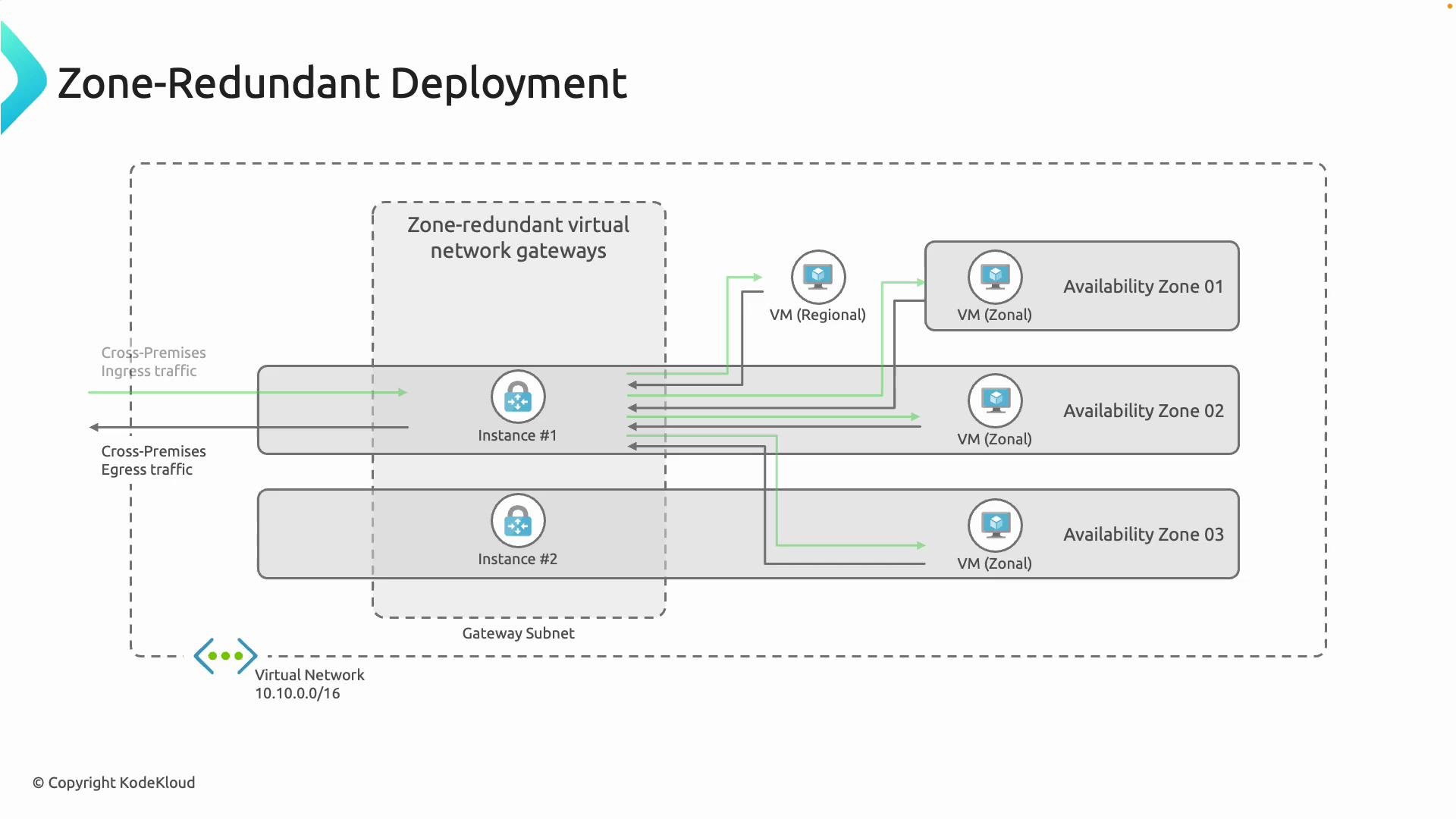
Azure supports zone-redundant virtual network gateways that distribute gateway instances across multiple Availability Zones within a region. In a zone-redundant deployment, if one Availability Zone experiences an outage, an instance in another zone can continue to handle traffic so connections remain available.
 ## Default: Active‑Standby
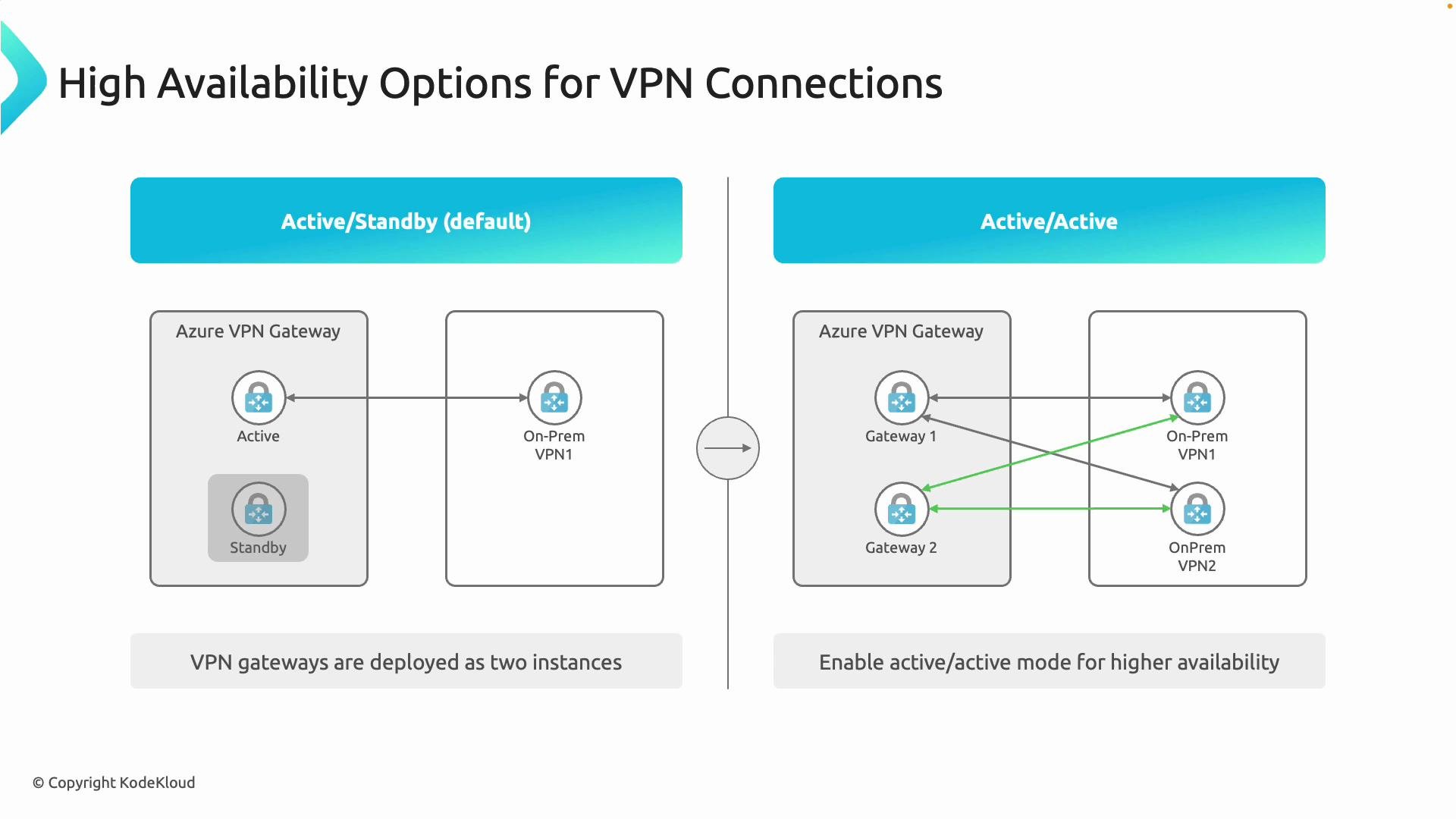
By default, Azure Virtual Network Gateways use an active‑standby arrangement:
* Two gateway instances are provisioned for redundancy.
* One instance is active and handles traffic.
* The other instance remains in standby, ready to take over if the active instance fails.
When the active instance fails, the standby instance takes over quickly, minimizing downtime. This default configuration provides a simple, reliable high-availability model for most scenarios.
Keep in mind: “default” does not mean a single instance — Azure maintains two gateway instances even in active‑standby mode to enable fast failover.
## Active‑Active for higher throughput and resiliency
Active‑active configuration runs both gateway instances actively handling connections and forwarding traffic at the same time. This increases aggregate throughput and improves resiliency by allowing traffic to be balanced across both instances.
## Default: Active‑Standby
By default, Azure Virtual Network Gateways use an active‑standby arrangement:
* Two gateway instances are provisioned for redundancy.
* One instance is active and handles traffic.
* The other instance remains in standby, ready to take over if the active instance fails.
When the active instance fails, the standby instance takes over quickly, minimizing downtime. This default configuration provides a simple, reliable high-availability model for most scenarios.
Keep in mind: “default” does not mean a single instance — Azure maintains two gateway instances even in active‑standby mode to enable fast failover.
## Active‑Active for higher throughput and resiliency
Active‑active configuration runs both gateway instances actively handling connections and forwarding traffic at the same time. This increases aggregate throughput and improves resiliency by allowing traffic to be balanced across both instances.
 ## Quick comparison
| High‑availability option | Description | Pros | Cons | Typical use case |
| ------------------------ | ------------------------------------------------------: | -------------------------------------- | --------------------------------------------------------------- | ---------------------------------------------- |
| Zone‑redundant | Gateway instances distributed across Availability Zones | Protects against zonal outages | Requires region with AZ support | Regional resiliency for production workloads |
| Active‑standby (default) | One active, one standby instance | Simple failover, minimal configuration | Only one instance handles traffic at a time | Most VNet-to-VNet or site-to-site deployments |
| Active‑active | Both instances active and load traffic | Higher throughput, better resilience | Requires supported SKU, multiple public IPs, on‑prem redundancy | High-performance, mission‑critical VPN tunnels |
## Deployment considerations for active‑active
* Use a gateway SKU and configuration that support active‑active. See the Azure VPN Gateway documentation for supported SKUs and features: [https://learn.microsoft.com/en-us/azure/vpn-gateway/vpn-gateway-about-vpngateways](https://learn.microsoft.com/en-us/azure/vpn-gateway/vpn-gateway-about-vpngateways).
* Active‑active requires multiple public IP addresses so each gateway instance is reachable independently.
* Your on‑premises topology must be resilient to take full advantage of Azure-side redundancy:
* Ideally have two on‑prem VPN devices (or virtual appliances) so each on‑prem device can establish tunnels to both Azure gateway instances.
* Typical topology: Gateway1 ↔ OnPrem1, Gateway1 ↔ OnPrem2, Gateway2 ↔ OnPrem1, Gateway2 ↔ OnPrem2.
* Running active‑active in Azure while keeping a single on‑premises VPN device introduces a single point of failure on premises and negates much of the cloud-side redundancy.
Important: Active‑active increases resiliency only when both sides of the connection are designed for redundancy. Verify gateway SKU support and provision multiple public IP addresses and on‑prem devices before relying on active‑active for production SLAs.
## Design tips
* Align redundancy goals between cloud and on‑premises: match the number of independent VPN devices and networks you have on‑premises to the redundancy you implement in Azure.
* If you need zonal protection, prefer zone‑redundant gateways in regions that support Availability Zones.
* For throughput-sensitive workloads, evaluate active‑active SKUs and ensure your on‑prem devices support multiple tunnels and load distribution.
* Test failover behavior and routing asymmetry — verify that routes and BGP (if used) are correctly configured to avoid traffic blackholing during failover.
## References
* Azure VPN Gateway overview and SKUs: [https://learn.microsoft.com/en-us/azure/vpn-gateway/vpn-gateway-about-vpngateways](https://learn.microsoft.com/en-us/azure/vpn-gateway/vpn-gateway-about-vpngateways)
With these patterns and considerations, you can design VPN connectivity that meets your availability and performance requirements for mission‑critical applications.
## Quick comparison
| High‑availability option | Description | Pros | Cons | Typical use case |
| ------------------------ | ------------------------------------------------------: | -------------------------------------- | --------------------------------------------------------------- | ---------------------------------------------- |
| Zone‑redundant | Gateway instances distributed across Availability Zones | Protects against zonal outages | Requires region with AZ support | Regional resiliency for production workloads |
| Active‑standby (default) | One active, one standby instance | Simple failover, minimal configuration | Only one instance handles traffic at a time | Most VNet-to-VNet or site-to-site deployments |
| Active‑active | Both instances active and load traffic | Higher throughput, better resilience | Requires supported SKU, multiple public IPs, on‑prem redundancy | High-performance, mission‑critical VPN tunnels |
## Deployment considerations for active‑active
* Use a gateway SKU and configuration that support active‑active. See the Azure VPN Gateway documentation for supported SKUs and features: [https://learn.microsoft.com/en-us/azure/vpn-gateway/vpn-gateway-about-vpngateways](https://learn.microsoft.com/en-us/azure/vpn-gateway/vpn-gateway-about-vpngateways).
* Active‑active requires multiple public IP addresses so each gateway instance is reachable independently.
* Your on‑premises topology must be resilient to take full advantage of Azure-side redundancy:
* Ideally have two on‑prem VPN devices (or virtual appliances) so each on‑prem device can establish tunnels to both Azure gateway instances.
* Typical topology: Gateway1 ↔ OnPrem1, Gateway1 ↔ OnPrem2, Gateway2 ↔ OnPrem1, Gateway2 ↔ OnPrem2.
* Running active‑active in Azure while keeping a single on‑premises VPN device introduces a single point of failure on premises and negates much of the cloud-side redundancy.
Important: Active‑active increases resiliency only when both sides of the connection are designed for redundancy. Verify gateway SKU support and provision multiple public IP addresses and on‑prem devices before relying on active‑active for production SLAs.
## Design tips
* Align redundancy goals between cloud and on‑premises: match the number of independent VPN devices and networks you have on‑premises to the redundancy you implement in Azure.
* If you need zonal protection, prefer zone‑redundant gateways in regions that support Availability Zones.
* For throughput-sensitive workloads, evaluate active‑active SKUs and ensure your on‑prem devices support multiple tunnels and load distribution.
* Test failover behavior and routing asymmetry — verify that routes and BGP (if used) are correctly configured to avoid traffic blackholing during failover.
## References
* Azure VPN Gateway overview and SKUs: [https://learn.microsoft.com/en-us/azure/vpn-gateway/vpn-gateway-about-vpngateways](https://learn.microsoft.com/en-us/azure/vpn-gateway/vpn-gateway-about-vpngateways)
With these patterns and considerations, you can design VPN connectivity that meets your availability and performance requirements for mission‑critical applications.