> ## Documentation Index
> Fetch the complete documentation index at: https://notes.kodekloud.com/llms.txt
> Use this file to discover all available pages before exploring further.
# Plan a VPN Gateway
> Guidance for designing and selecting Azure VPN gateway placement, connection types, SKUs, and deployment considerations for secure scalable connectivity.
Welcome to the Plan-a-VPN-Gateway section for Azure. This guide helps you design VPN connectivity for your Azure environment by covering:
* Where to place the VPN gateway
* Supported connection options
* How to choose an appropriate SKU and generation for performance and scale
Understanding these topics will let you design secure, scalable VPN solutions that meet your organization’s connectivity needs.
Deployment overview
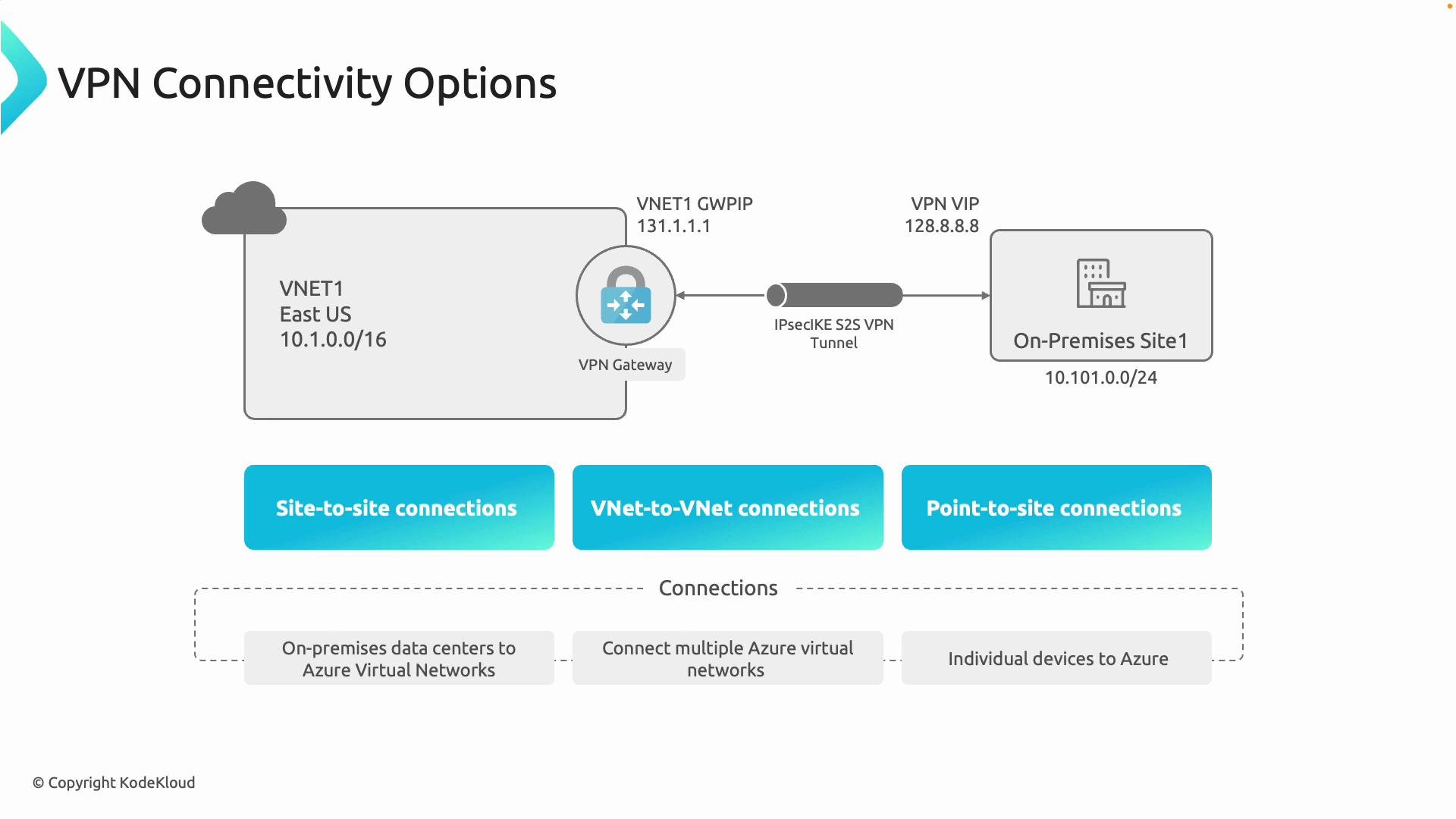
A VPN gateway is deployed inside an Azure virtual network (VNet) in a dedicated subnet named `GatewaySubnet`. The gateway establishes encrypted tunnels to other VNets, on-premises locations, or remote devices and services.
Key VPN Gateway connection types
Use the following connection types according to your connectivity scenario:
| Connection type | Primary use case | Encryption / Protocol | Typical scale |
| ------------------- | ----------------------------------------------------------------------------------------------- | ---------------------------- | ------------------------------------------------------------------------------------------------- |
| Site-to-site (S2S) | Connect an on-premises datacenter or office to an Azure VNet for always-on network connectivity | IPsec/IKE encrypted tunnel | Multiple site tunnels; suitable for branch/datacenter interconnects |
| VNet-to-VNet | Connect two Azure VNets (cross-region and cross-subscription) with encrypted traffic | IPsec/IKE between gateways | Useful for secure region-to-region or subscription-to-subscription connectivity |
| Point-to-site (P2S) | Individual clients (laptops, remote workers) connecting to Azure over the internet | SSL or IKE-based client VPNs | Single-user or small-scale remote access; supports hundreds–thousands of clients depending on SKU |
 Choosing connection types — practical guidance
* Use Site-to-Site when connecting entire sites (for example, branch offices or datacenters such as Boston, New York, and Texas) to Azure.
* Use Point-to-Site for individual developers, contractors, or remote workers who need secure access from personal devices.
* Use VNet peering for high-throughput, low-latency connectivity between VNets inside Azure when you do not require IPsec encryption of the underlying traffic. Use VNet-to-VNet via VPN Gateway only when you explicitly need encrypted traffic or cross-region encrypted links.
Selecting an appropriate SKU and generation
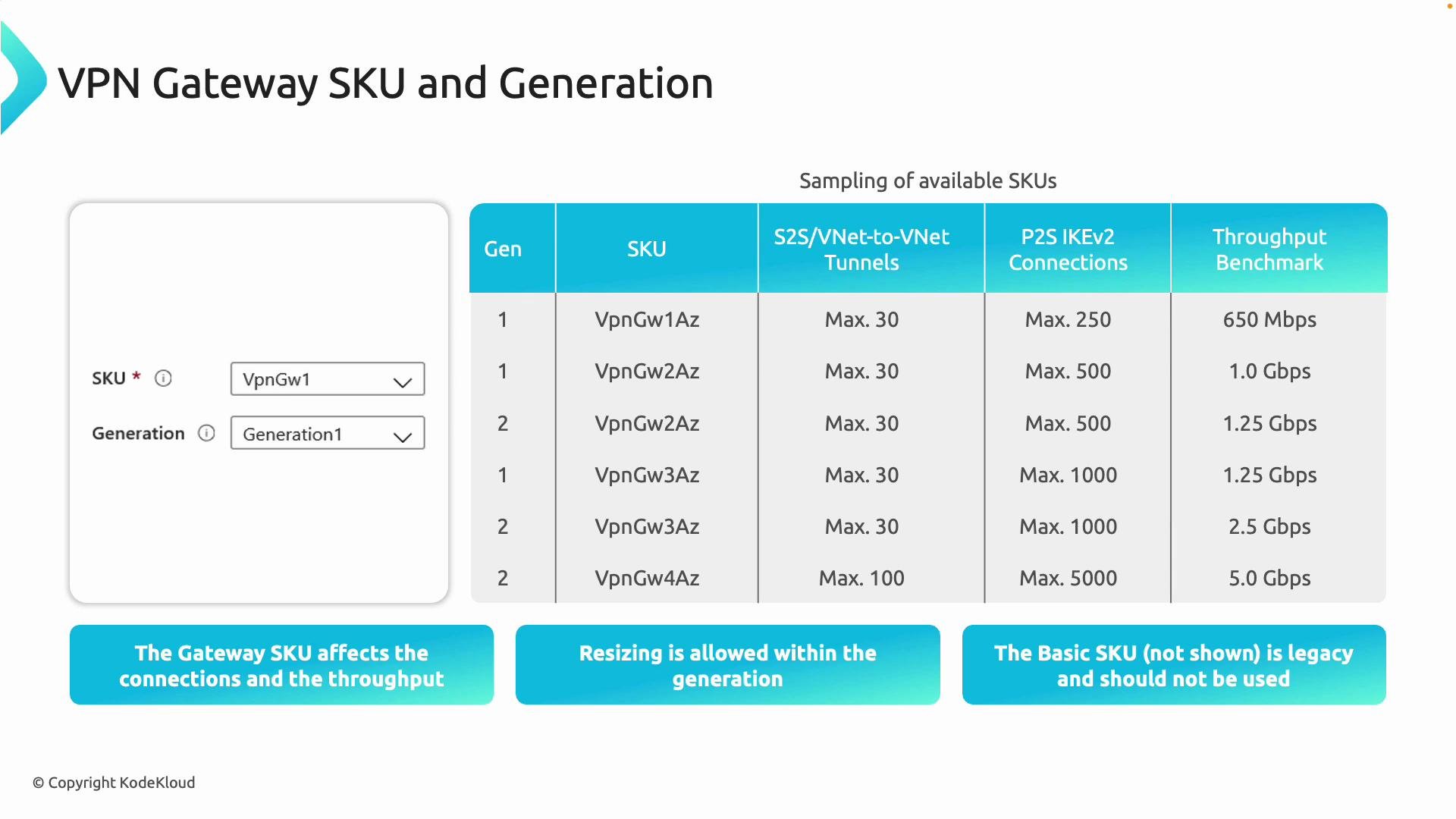
The VPN gateway SKU determines the supported number of tunnels, P2S client capacity, and expected aggregate throughput. Generation 2 SKUs typically provide improved throughput, higher connection limits, and better performance characteristics versus Generation 1 SKUs. You can usually resize an existing gateway to a different SKU within the same generation to scale capacity.
Use this planning guidance when choosing a SKU:
| Planning factor | What to consider |
| ------------------------- | -------------------------------------------------------------------------------- |
| Number of S2S tunnels | Estimate total simultaneous site-to-site tunnels required |
| P2S concurrent clients | Forecast the maximum simultaneous remote user connections |
| Throughput / bandwidth | Sum expected traffic egress/ingress across tunnels and P2S clients |
| Availability requirements | Choose zone-redundant (AZ) SKUs if you need resilience across availability zones |
| Future growth | Prefer SKUs that allow in-place scaling within the same generation |
Example characteristics (high level)
* Lower-tier SKUs: fewer tunnels, fewer P2S clients, lower aggregate throughput — suitable for small offices or limited remote-user access.
* Higher-tier and AZ SKUs: support many tunnels, thousands of P2S clients, and multiple Gbps of throughput — suitable for large-scale production deployments.
* Generation 2 SKUs: generally higher throughput and larger connection limits than Generation 1 SKUs.
Choosing connection types — practical guidance
* Use Site-to-Site when connecting entire sites (for example, branch offices or datacenters such as Boston, New York, and Texas) to Azure.
* Use Point-to-Site for individual developers, contractors, or remote workers who need secure access from personal devices.
* Use VNet peering for high-throughput, low-latency connectivity between VNets inside Azure when you do not require IPsec encryption of the underlying traffic. Use VNet-to-VNet via VPN Gateway only when you explicitly need encrypted traffic or cross-region encrypted links.
Selecting an appropriate SKU and generation
The VPN gateway SKU determines the supported number of tunnels, P2S client capacity, and expected aggregate throughput. Generation 2 SKUs typically provide improved throughput, higher connection limits, and better performance characteristics versus Generation 1 SKUs. You can usually resize an existing gateway to a different SKU within the same generation to scale capacity.
Use this planning guidance when choosing a SKU:
| Planning factor | What to consider |
| ------------------------- | -------------------------------------------------------------------------------- |
| Number of S2S tunnels | Estimate total simultaneous site-to-site tunnels required |
| P2S concurrent clients | Forecast the maximum simultaneous remote user connections |
| Throughput / bandwidth | Sum expected traffic egress/ingress across tunnels and P2S clients |
| Availability requirements | Choose zone-redundant (AZ) SKUs if you need resilience across availability zones |
| Future growth | Prefer SKUs that allow in-place scaling within the same generation |
Example characteristics (high level)
* Lower-tier SKUs: fewer tunnels, fewer P2S clients, lower aggregate throughput — suitable for small offices or limited remote-user access.
* Higher-tier and AZ SKUs: support many tunnels, thousands of P2S clients, and multiple Gbps of throughput — suitable for large-scale production deployments.
* Generation 2 SKUs: generally higher throughput and larger connection limits than Generation 1 SKUs.
 Important deployment note: the gateway must be deployed into a dedicated subnet named `GatewaySubnet`. That subnet should be sized appropriately for the SKU and should not contain other resources (virtual machines, etc.).
Avoid using the Basic SKU for new deployments—Basic is legacy and lacks many capabilities and scale options available in newer SKUs.
Practical checklist before deployment
* Confirm you have a dedicated `GatewaySubnet` large enough for your chosen SKU.
* Document the number of S2S tunnels and expected concurrent P2S clients.
* Estimate aggregate throughput and traffic patterns (east–west vs north–south).
* Decide whether zone-redundant SKUs are required for your SLA needs.
* Validate device compatibility and IPsec/IKE settings for on-premises VPN devices.
Further reading and references
* [Azure VPN Gateway documentation](https://learn.microsoft.com/azure/vpn-gateway) — official guidance, SKU details, and deployment examples.
* For quick comparisons and SKU-specific limits, check the Azure VPN Gateway limits and performance documentation in the Microsoft docs.
By mapping your business requirements (sites, users, throughput, and availability) to connection types and SKU characteristics, you can design an Azure VPN gateway deployment that is secure, cost-effective, and scalable.
Important deployment note: the gateway must be deployed into a dedicated subnet named `GatewaySubnet`. That subnet should be sized appropriately for the SKU and should not contain other resources (virtual machines, etc.).
Avoid using the Basic SKU for new deployments—Basic is legacy and lacks many capabilities and scale options available in newer SKUs.
Practical checklist before deployment
* Confirm you have a dedicated `GatewaySubnet` large enough for your chosen SKU.
* Document the number of S2S tunnels and expected concurrent P2S clients.
* Estimate aggregate throughput and traffic patterns (east–west vs north–south).
* Decide whether zone-redundant SKUs are required for your SLA needs.
* Validate device compatibility and IPsec/IKE settings for on-premises VPN devices.
Further reading and references
* [Azure VPN Gateway documentation](https://learn.microsoft.com/azure/vpn-gateway) — official guidance, SKU details, and deployment examples.
* For quick comparisons and SKU-specific limits, check the Azure VPN Gateway limits and performance documentation in the Microsoft docs.
By mapping your business requirements (sites, users, throughput, and availability) to connection types and SKU characteristics, you can design an Azure VPN gateway deployment that is secure, cost-effective, and scalable.