> ## Documentation Index
> Fetch the complete documentation index at: https://notes.kodekloud.com/llms.txt
> Use this file to discover all available pages before exploring further.
# VNet Peering
> Explains Azure VNet peering, features, configuration flags, regional and global modes, hub-spoke topologies with NVAs and gateway transit, addressing, routing, and troubleshooting.
Azure Virtual Network (VNet) peering connects separate VNets so resources (for example, virtual machines) communicate privately using their private IP addresses. Peering uses the Microsoft backbone network, providing low-latency, high-bandwidth connectivity without traversing the public internet. This enables secure, fast communication that preserves the native network experience.
What you'll learn in this article:
* When to use VNet peering (regional vs. global)
* Key features and configuration flags
* How peering fits into common topologies such as hub-spoke with NVAs and gateway transit
* Addressing and routing considerations
## Types of VNet peering
VNet peering supports two modes:
| Peering type | Scope | Use case |
| --------------------- | ---------------------------- | ----------------------------------------------------------------------------------------------------------------------- |
| Regional VNet peering | Within the same Azure region | Low-latency communication between VNets in a single region (e.g., for microservice separation or environment isolation) |
| Global VNet peering | Across Azure regions | Connect VNets across regions for geo-redundancy, multi-region services, or cross-region migrations |
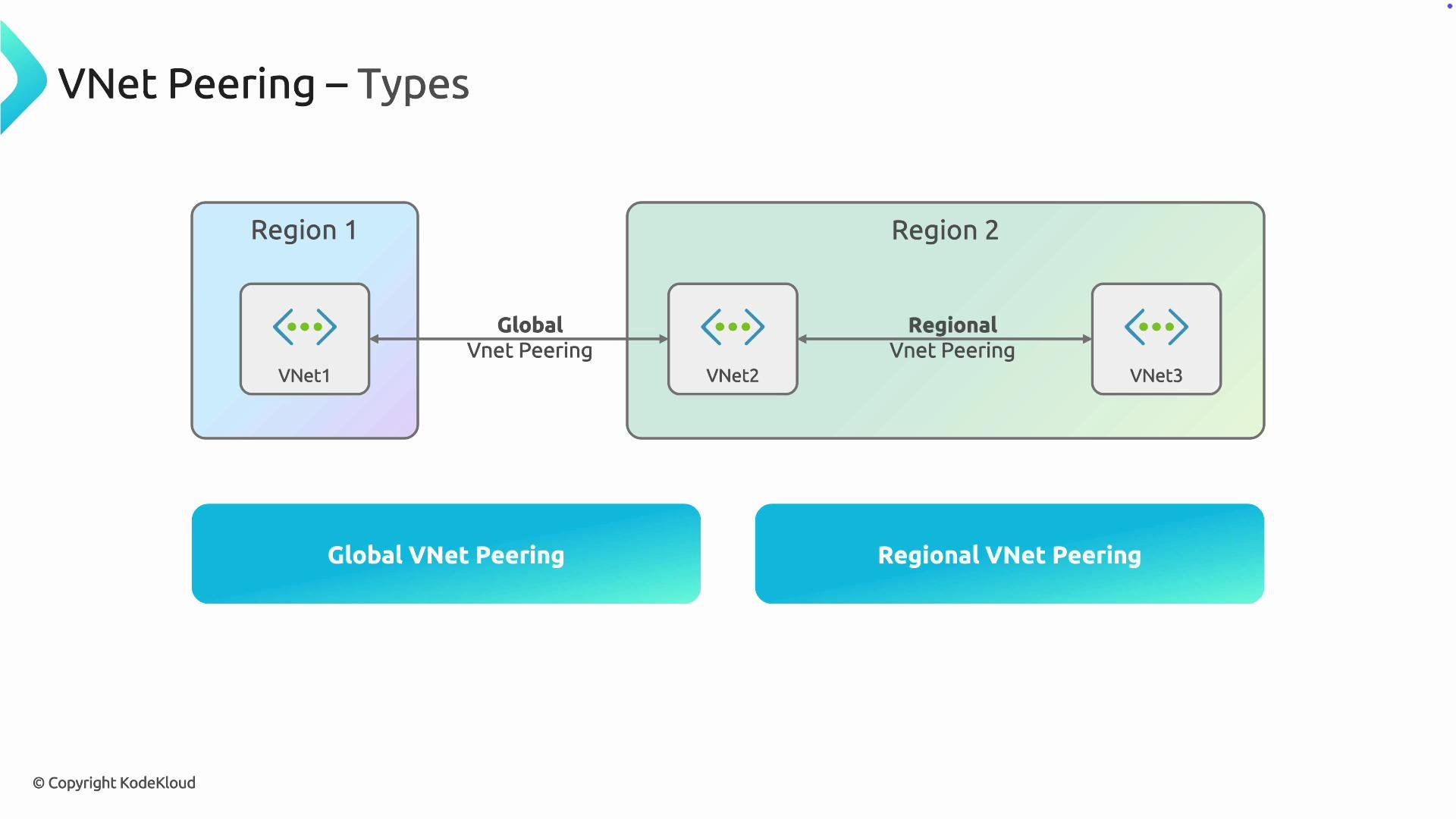 This flexibility lets you design either regional or global topologies depending on requirements such as latency, data residency, or redundancy.
## Key features
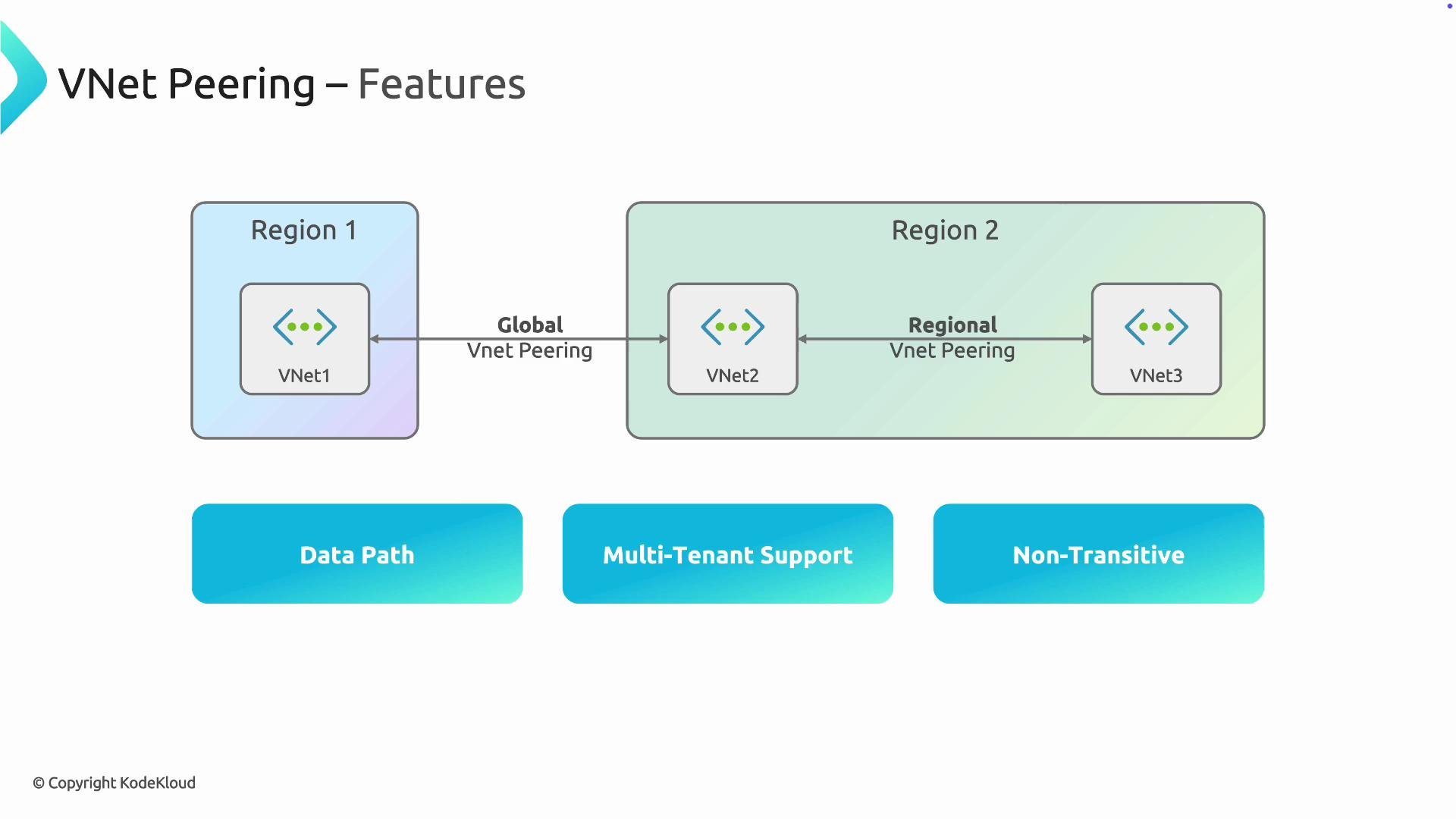
1. Data path
* Traffic between peered VNets flows directly over the Microsoft backbone network; it does not transit the public internet. This improves both performance and security.
2. Cross-subscription and cross-tenant support
* You can peer VNets across subscriptions and Azure Active Directory tenants (with the correct authorization). This is useful for multi-account organizations or when consolidating services across business units.
3. Peering controls and configuration flags
* Each peering has several important configuration options you should plan for when designing your network.
| Flag | Default | Description | Typical use |
| --------------------------- | ------- | -------------------------------------------------------------------------------- | ---------------------------------------------------------- |
| `AllowVirtualNetworkAccess` | true | Enables traffic between the two VNets. | Default connectivity between peered VNets. |
| `AllowForwardedTraffic` | false | Allows forwarded traffic from an NVA in the peered VNet to reach the local VNet. | Required for hub NVAs forwarding transit traffic. |
| `AllowGatewayTransit` | false | Allows a peered VNet to advertise its gateway to other VNets. | Enable on the hub VNet to allow spokes to use its gateway. |
| `UseRemoteGateways` | false | Lets a VNet use the gateway of a peered VNet. | Enable on spokes when centralizing gateway in the hub. |
4. Non-transitive connectivity
* VNet peering is non-transitive. If VNet A is peered to VNet B, and VNet B is peered to VNet C, A does not have automatic connectivity to C. You must peer A↔C directly or forward traffic explicitly using an NVA and appropriate routing.
Peering is non-transitive by design. If you expect hub-to-spoke transit, configure user-defined routes and allow forwarded traffic where necessary. Assuming transitive connectivity without explicit configuration can break traffic flows.
This flexibility lets you design either regional or global topologies depending on requirements such as latency, data residency, or redundancy.
## Key features
1. Data path
* Traffic between peered VNets flows directly over the Microsoft backbone network; it does not transit the public internet. This improves both performance and security.
2. Cross-subscription and cross-tenant support
* You can peer VNets across subscriptions and Azure Active Directory tenants (with the correct authorization). This is useful for multi-account organizations or when consolidating services across business units.
3. Peering controls and configuration flags
* Each peering has several important configuration options you should plan for when designing your network.
| Flag | Default | Description | Typical use |
| --------------------------- | ------- | -------------------------------------------------------------------------------- | ---------------------------------------------------------- |
| `AllowVirtualNetworkAccess` | true | Enables traffic between the two VNets. | Default connectivity between peered VNets. |
| `AllowForwardedTraffic` | false | Allows forwarded traffic from an NVA in the peered VNet to reach the local VNet. | Required for hub NVAs forwarding transit traffic. |
| `AllowGatewayTransit` | false | Allows a peered VNet to advertise its gateway to other VNets. | Enable on the hub VNet to allow spokes to use its gateway. |
| `UseRemoteGateways` | false | Lets a VNet use the gateway of a peered VNet. | Enable on spokes when centralizing gateway in the hub. |
4. Non-transitive connectivity
* VNet peering is non-transitive. If VNet A is peered to VNet B, and VNet B is peered to VNet C, A does not have automatic connectivity to C. You must peer A↔C directly or forward traffic explicitly using an NVA and appropriate routing.
Peering is non-transitive by design. If you expect hub-to-spoke transit, configure user-defined routes and allow forwarded traffic where necessary. Assuming transitive connectivity without explicit configuration can break traffic flows.
 ## Example: Create VNet peering (Azure CLI)
Here is a concise example that creates peering between two VNets using the Azure CLI. Adjust names, resource groups, and locations to your environment.
```bash theme={null}
# Create peering from VNetA to VNetB
az network vnet peering create \
--name VNetA-to-VNetB \
--resource-group rg-a \
--vnet-name VNetA \
--remote-vnet /subscriptions//resourceGroups/rg-b/providers/Microsoft.Network/virtualNetworks/VNetB \
--allow-vnet-access true
# Create peering from VNetB to VNetA (reciprocal)
az network vnet peering create \
--name VNetB-to-VNetA \
--resource-group rg-b \
--vnet-name VNetB \
--remote-vnet /subscriptions//resourceGroups/rg-a/providers/Microsoft.Network/virtualNetworks/VNetA \
--allow-vnet-access true
```
Note: For `AllowGatewayTransit` and `UseRemoteGateways`, you must set these appropriately on the hub and spoke peerings and deploy a gateway in the hub's `GatewaySubnet`.
## Hub-spoke architecture, NVAs, and gateway transit
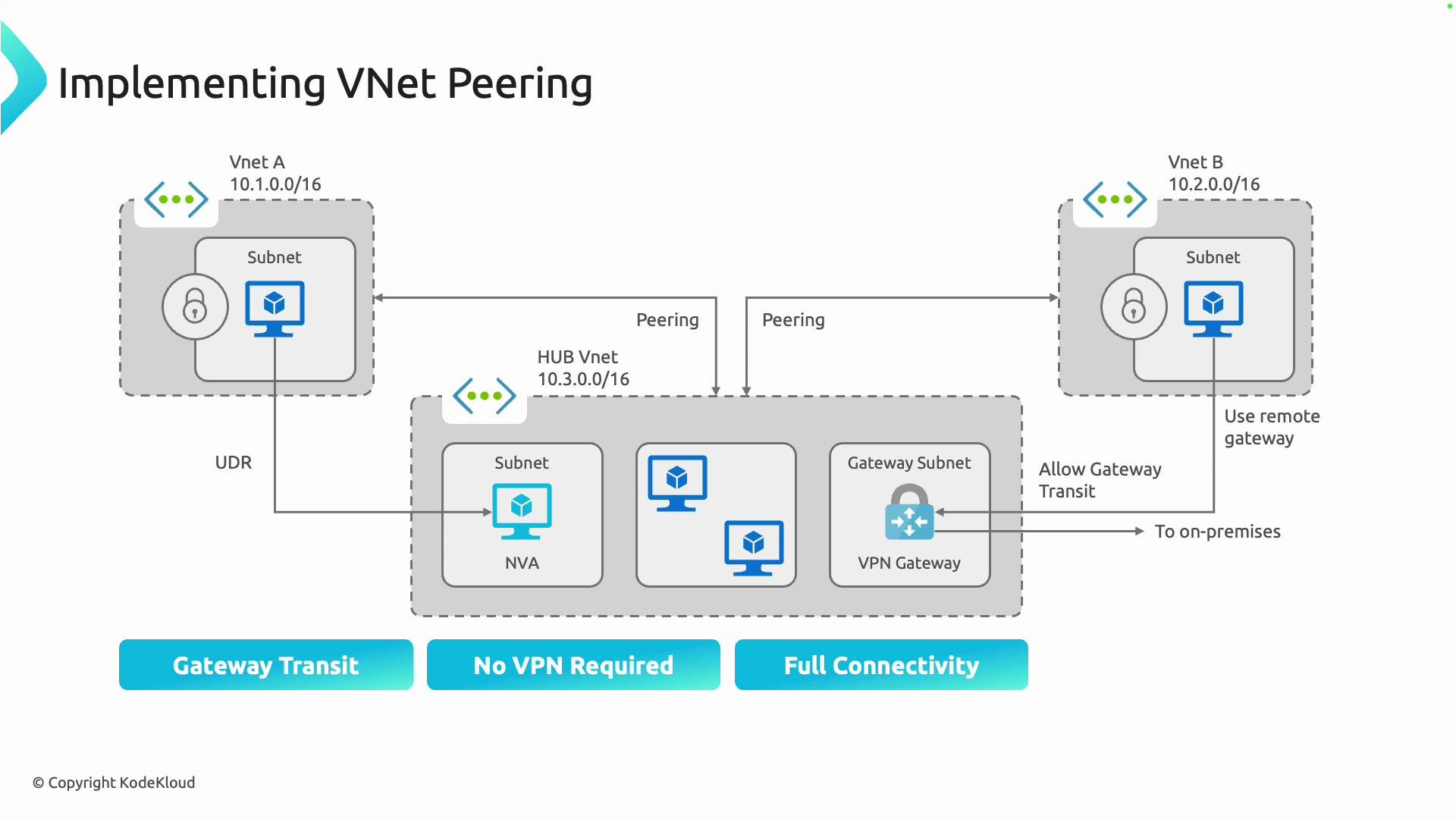
A common design pattern is hub-spoke, where the hub VNet hosts shared services (for example, an NVA, firewall, VPN gateway, or ExpressRoute). Spokes peer with the hub to consume those shared services.
NVAs and forwarding
* Because peering is non-transitive, to route traffic from Spoke A to Spoke B via an NVA in the hub:
* Configure user-defined routes (UDRs) in the spokes to direct the relevant traffic to the hub NVA.
* Enable `AllowForwardedTraffic` on the peering(s) if the NVA will forward traffic across peered VNets.
* Ensure the NVA’s routing and Network Security Groups (NSGs) allow and forward the traffic to the intended destination.
Gateway transit
* To centralize an on-premises VPN or ExpressRoute gateway in the hub (saving cost and simplifying management):
* On the hub peering, enable `AllowGatewayTransit`.
* On the spoke peering(s), enable `UseRemoteGateways`.
* The hub must have a VPN or ExpressRoute gateway deployed in its `GatewaySubnet`.
* Centralizing gateways requires careful capacity, routing, and security planning; monitor throughput and failover behavior.
## Example: Create VNet peering (Azure CLI)
Here is a concise example that creates peering between two VNets using the Azure CLI. Adjust names, resource groups, and locations to your environment.
```bash theme={null}
# Create peering from VNetA to VNetB
az network vnet peering create \
--name VNetA-to-VNetB \
--resource-group rg-a \
--vnet-name VNetA \
--remote-vnet /subscriptions//resourceGroups/rg-b/providers/Microsoft.Network/virtualNetworks/VNetB \
--allow-vnet-access true
# Create peering from VNetB to VNetA (reciprocal)
az network vnet peering create \
--name VNetB-to-VNetA \
--resource-group rg-b \
--vnet-name VNetB \
--remote-vnet /subscriptions//resourceGroups/rg-a/providers/Microsoft.Network/virtualNetworks/VNetA \
--allow-vnet-access true
```
Note: For `AllowGatewayTransit` and `UseRemoteGateways`, you must set these appropriately on the hub and spoke peerings and deploy a gateway in the hub's `GatewaySubnet`.
## Hub-spoke architecture, NVAs, and gateway transit
A common design pattern is hub-spoke, where the hub VNet hosts shared services (for example, an NVA, firewall, VPN gateway, or ExpressRoute). Spokes peer with the hub to consume those shared services.
NVAs and forwarding
* Because peering is non-transitive, to route traffic from Spoke A to Spoke B via an NVA in the hub:
* Configure user-defined routes (UDRs) in the spokes to direct the relevant traffic to the hub NVA.
* Enable `AllowForwardedTraffic` on the peering(s) if the NVA will forward traffic across peered VNets.
* Ensure the NVA’s routing and Network Security Groups (NSGs) allow and forward the traffic to the intended destination.
Gateway transit
* To centralize an on-premises VPN or ExpressRoute gateway in the hub (saving cost and simplifying management):
* On the hub peering, enable `AllowGatewayTransit`.
* On the spoke peering(s), enable `UseRemoteGateways`.
* The hub must have a VPN or ExpressRoute gateway deployed in its `GatewaySubnet`.
* Centralizing gateways requires careful capacity, routing, and security planning; monitor throughput and failover behavior.
 ## Address space requirements
* Peered VNets must have non-overlapping IP address ranges. If address spaces overlap, the peering cannot be created.
* Plan address spaces during design to avoid collisions and to accommodate future growth and cross-region expansion.
Plan IP addressing and peering settings (`AllowForwardedTraffic`, `AllowGatewayTransit`, `UseRemoteGateways`) before implementation. Early planning prevents routing surprises in hub-spoke and NVA scenarios.
## Troubleshooting checklist
* Confirm address spaces do not overlap.
* Verify peering status is "Connected" in both VNets.
* Check `AllowVirtualNetworkAccess`, `AllowForwardedTraffic`, and gateway settings on both sides.
* Validate UDRs and NSGs to ensure traffic is routed and permitted as expected.
* For cross-tenant peering, ensure the required role assignments and authorizations are in place.
## Summary and next steps
VNet peering provides private, high-performance connectivity across VNets using the Microsoft backbone. It supports cross-subscription and cross-tenant peering and enables hub-spoke topologies with NVAs and centralized gateways when properly configured. Remember:
* Peering is non-transitive—explicit peering or NVAs + routing are required for multi-hop connectivity.
* VNets must have non-overlapping address spaces.
* Plan peering flags and routing before deployment.
Next steps:
* Follow the Azure portal walkthrough or the Azure CLI examples to create peering in your subscription.
* Review related concepts: Virtual Network, Network Security Groups, User-Defined Routes (UDRs), and Azure VPN/ExpressRoute gateways.
Links and references
* [Azure Virtual Network peering overview](https://learn.microsoft.com/azure/virtual-network/virtual-network-peering)
* [Designing a hub-spoke topology in Azure](https://learn.microsoft.com/azure/architecture/reference-architectures/hybrid-networking/hub-spoke)
* [Azure CLI: az network vnet peering](https://learn.microsoft.com/cli/azure/network/vnet/peering)
## Address space requirements
* Peered VNets must have non-overlapping IP address ranges. If address spaces overlap, the peering cannot be created.
* Plan address spaces during design to avoid collisions and to accommodate future growth and cross-region expansion.
Plan IP addressing and peering settings (`AllowForwardedTraffic`, `AllowGatewayTransit`, `UseRemoteGateways`) before implementation. Early planning prevents routing surprises in hub-spoke and NVA scenarios.
## Troubleshooting checklist
* Confirm address spaces do not overlap.
* Verify peering status is "Connected" in both VNets.
* Check `AllowVirtualNetworkAccess`, `AllowForwardedTraffic`, and gateway settings on both sides.
* Validate UDRs and NSGs to ensure traffic is routed and permitted as expected.
* For cross-tenant peering, ensure the required role assignments and authorizations are in place.
## Summary and next steps
VNet peering provides private, high-performance connectivity across VNets using the Microsoft backbone. It supports cross-subscription and cross-tenant peering and enables hub-spoke topologies with NVAs and centralized gateways when properly configured. Remember:
* Peering is non-transitive—explicit peering or NVAs + routing are required for multi-hop connectivity.
* VNets must have non-overlapping address spaces.
* Plan peering flags and routing before deployment.
Next steps:
* Follow the Azure portal walkthrough or the Azure CLI examples to create peering in your subscription.
* Review related concepts: Virtual Network, Network Security Groups, User-Defined Routes (UDRs), and Azure VPN/ExpressRoute gateways.
Links and references
* [Azure Virtual Network peering overview](https://learn.microsoft.com/azure/virtual-network/virtual-network-peering)
* [Designing a hub-spoke topology in Azure](https://learn.microsoft.com/azure/architecture/reference-architectures/hybrid-networking/hub-spoke)
* [Azure CLI: az network vnet peering](https://learn.microsoft.com/cli/azure/network/vnet/peering)