> ## Documentation Index
> Fetch the complete documentation index at: https://notes.kodekloud.com/llms.txt
> Use this file to discover all available pages before exploring further.
# Coexisting Site to Site and ExpressRoute
> Designing an Azure VNet that uses both ExpressRoute for high throughput private connectivity and VPN site-to-site for encrypted backup and branch connections with BGP failover
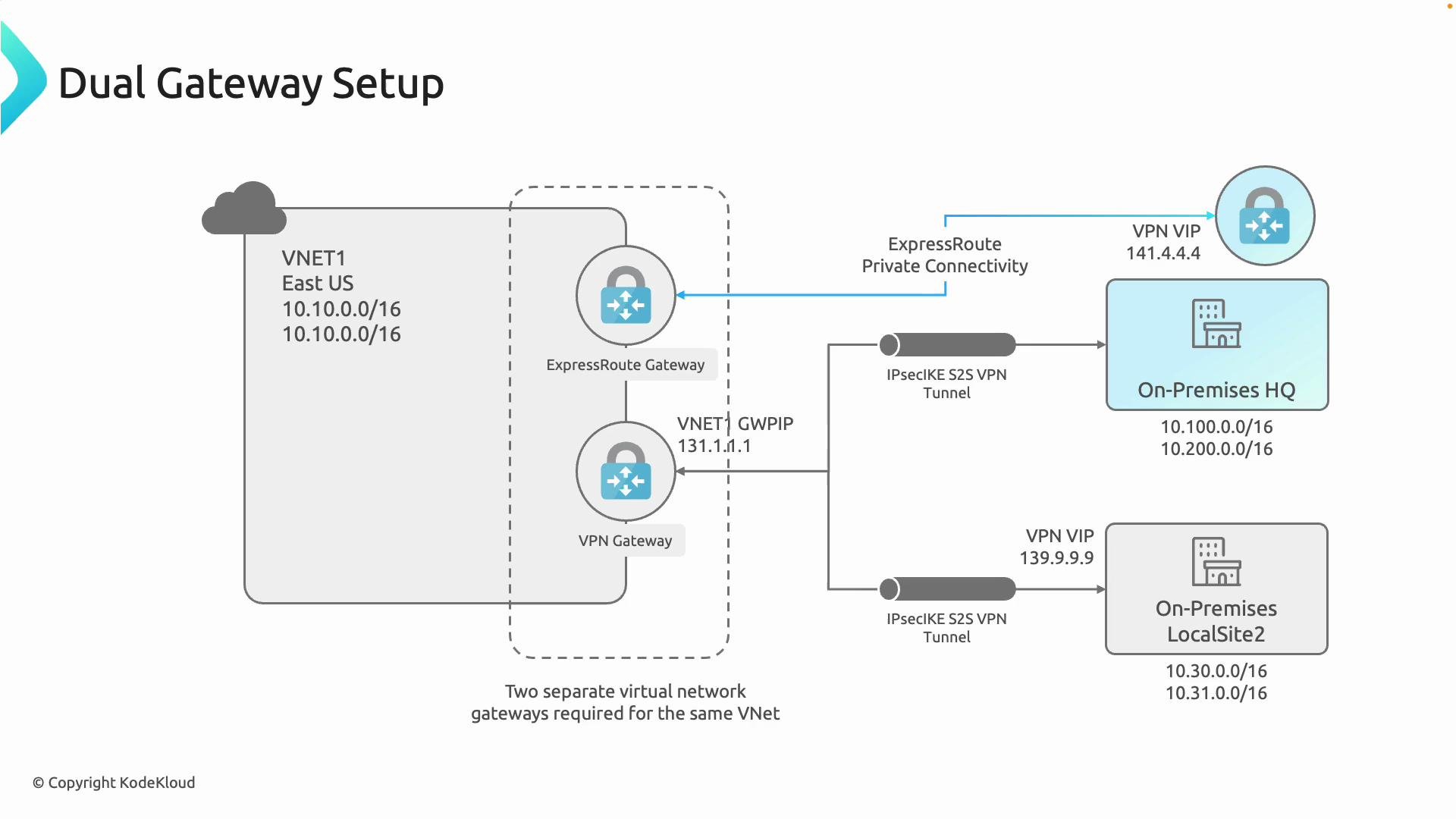
In this lesson we cover how to design an Azure virtual network (VNet) that concurrently uses both ExpressRoute and site-to-site (S2S) VPN connectivity. This hybrid pattern is common for organizations that require high throughput private connectivity to a primary datacenter while also supporting encrypted IPsec tunnels for remote offices, branch sites, or failover paths.
At a high level:
* The VNet contains two separate virtual network gateway resources in the GatewaySubnet: an ExpressRoute gateway for private peering and a VPN gateway for IPsec S2S (and optionally point-to-site) connections.
* ExpressRoute provides private, high-throughput connectivity to the main on-premises datacenter.
* The VPN gateway provides encrypted IPsec tunnels (and requires a public IP address for the gateway resource) for headquarters backup links and smaller branches that do not have ExpressRoute.
 Implementation summary
* Deploy two distinct virtual network gateways in the same VNet (within the GatewaySubnet): one virtual network gateway configured for ExpressRoute and one for VPN. Each gateway supports only its corresponding connection type, so separation is required.
* Configure BGP and route preference attributes so the desired path (ExpressRoute vs VPN) is selected under normal conditions and so failover behavior occurs as intended.
Each gateway must be created and configured for its respective purpose—ExpressRoute for private peering and the VPN gateway for IPsec-based site-to-site or point-to-site connections. They can coexist on the same VNet but are deployed as separate gateway resources.
Why use both (benefits)
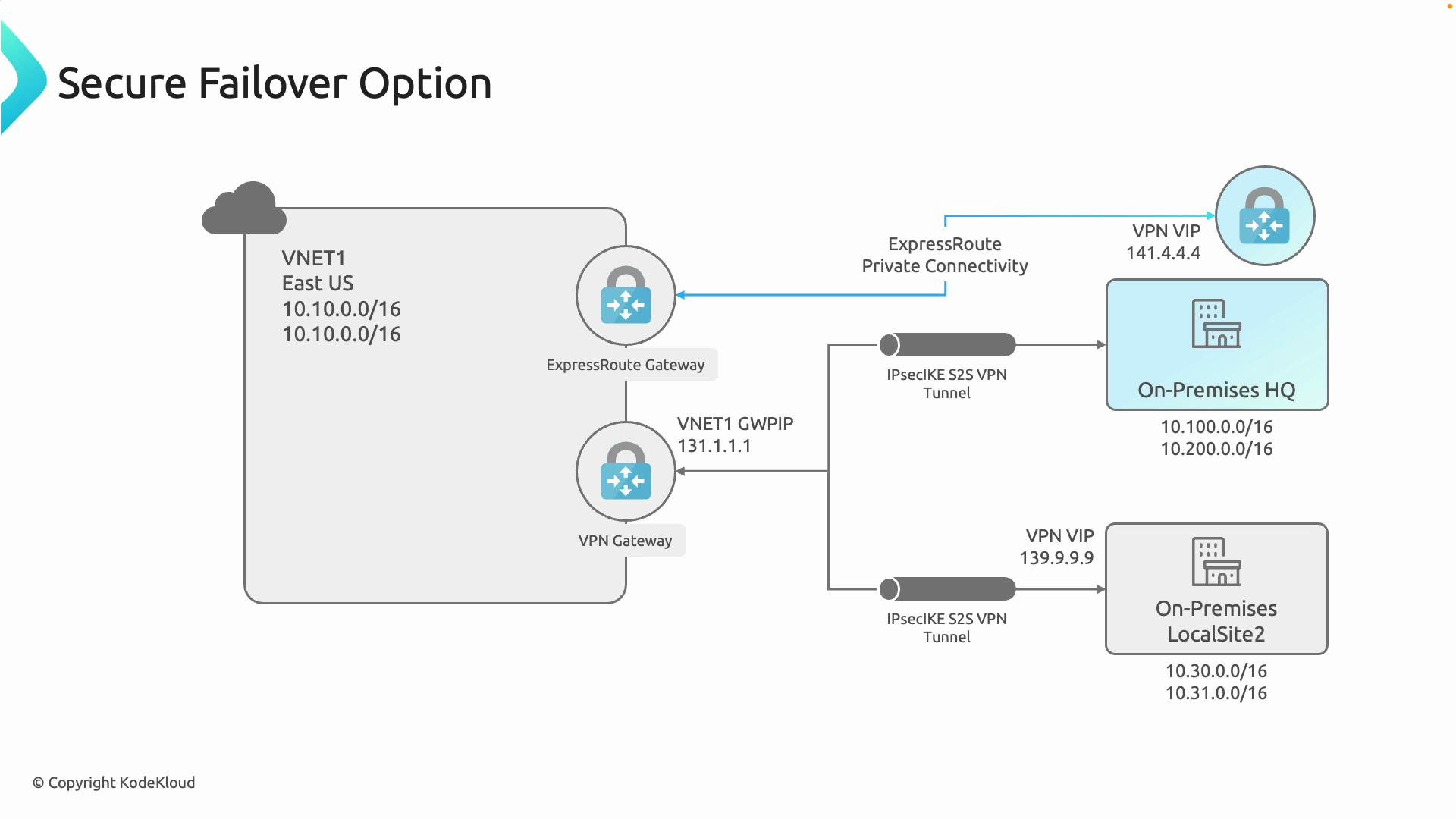
* Resiliency and business continuity: Use the VPN gateway as a failover for ExpressRoute when the private circuit is impacted (provider outage or maintenance). Proper routing/BGP configuration is required to ensure seamless failover.
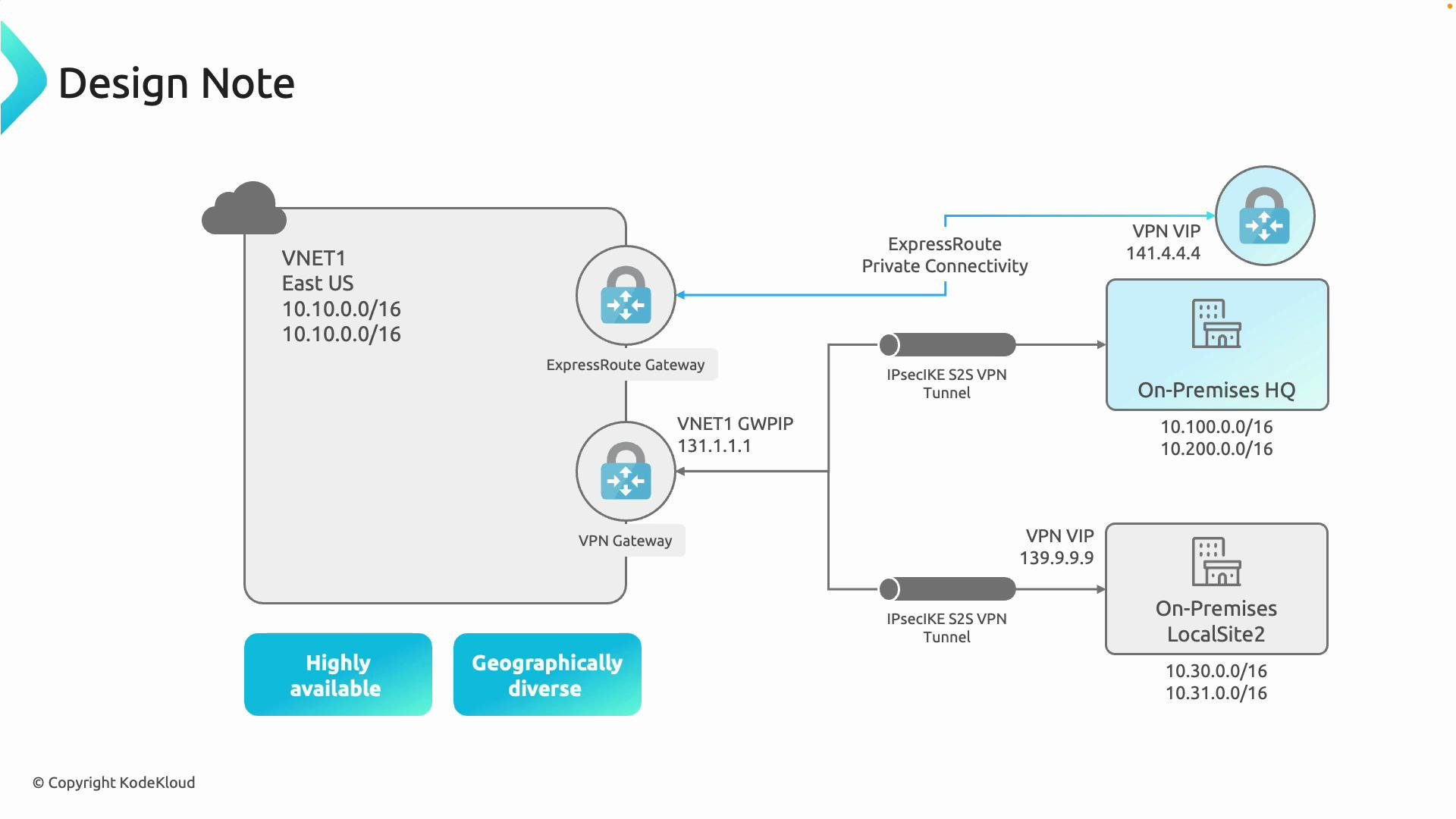
* Flexibility: Connect smaller branches and remote workers over S2S or P2S VPN while keeping critical datacenter traffic on high-throughput ExpressRoute links.
* Geographical diversity: Use ExpressRoute for main datacenter capacity and VPN for geographically dispersed or temporary sites.
Gateway types at a glance
| Gateway Type | Primary use case | Notes / Example |
| --------------------- | ----------------------------------------------------------------- | -------------------------------------------------------------------------------------------------------- |
| ExpressRoute gateway | Private, high-throughput connectivity to on-premises datacenter | Requires ExpressRoute circuit and private peering; does not require an Azure public IP like VPN gateways |
| VPN gateway (S2S/P2S) | Encrypted IPsec/IKE tunnels for remote sites or clients | Requires a public IP for the gateway; supports IPsec S2S and point-to-site connections |
| Both coexisting | Hybrid designs needing both high throughput and branch/remote VPN | Deploy both gateway resources in the same GatewaySubnet and manage routing preferences via BGP |
Resiliency and failover considerations
* Routing and BGP: Use BGP route attributes (AS path, local preference, MED) to prefer ExpressRoute routes under normal operation and to allow the VPN route to take over during ExpressRoute disruption.
* Route advertisement: Ensure on-premises networks advertise the correct prefixes to both ExpressRoute and the VPN peer so Azure receives multiple paths and can switch when necessary.
* Health detection: Combine Azure routing with monitoring and automation to detect ExpressRoute failures and validate VPN path readiness.
* Bandwidth and cost: Remember the VPN path may have throughput and pricing differences compared to ExpressRoute; verify SKUs and throughput requirements.
Implementation summary
* Deploy two distinct virtual network gateways in the same VNet (within the GatewaySubnet): one virtual network gateway configured for ExpressRoute and one for VPN. Each gateway supports only its corresponding connection type, so separation is required.
* Configure BGP and route preference attributes so the desired path (ExpressRoute vs VPN) is selected under normal conditions and so failover behavior occurs as intended.
Each gateway must be created and configured for its respective purpose—ExpressRoute for private peering and the VPN gateway for IPsec-based site-to-site or point-to-site connections. They can coexist on the same VNet but are deployed as separate gateway resources.
Why use both (benefits)
* Resiliency and business continuity: Use the VPN gateway as a failover for ExpressRoute when the private circuit is impacted (provider outage or maintenance). Proper routing/BGP configuration is required to ensure seamless failover.
* Flexibility: Connect smaller branches and remote workers over S2S or P2S VPN while keeping critical datacenter traffic on high-throughput ExpressRoute links.
* Geographical diversity: Use ExpressRoute for main datacenter capacity and VPN for geographically dispersed or temporary sites.
Gateway types at a glance
| Gateway Type | Primary use case | Notes / Example |
| --------------------- | ----------------------------------------------------------------- | -------------------------------------------------------------------------------------------------------- |
| ExpressRoute gateway | Private, high-throughput connectivity to on-premises datacenter | Requires ExpressRoute circuit and private peering; does not require an Azure public IP like VPN gateways |
| VPN gateway (S2S/P2S) | Encrypted IPsec/IKE tunnels for remote sites or clients | Requires a public IP for the gateway; supports IPsec S2S and point-to-site connections |
| Both coexisting | Hybrid designs needing both high throughput and branch/remote VPN | Deploy both gateway resources in the same GatewaySubnet and manage routing preferences via BGP |
Resiliency and failover considerations
* Routing and BGP: Use BGP route attributes (AS path, local preference, MED) to prefer ExpressRoute routes under normal operation and to allow the VPN route to take over during ExpressRoute disruption.
* Route advertisement: Ensure on-premises networks advertise the correct prefixes to both ExpressRoute and the VPN peer so Azure receives multiple paths and can switch when necessary.
* Health detection: Combine Azure routing with monitoring and automation to detect ExpressRoute failures and validate VPN path readiness.
* Bandwidth and cost: Remember the VPN path may have throughput and pricing differences compared to ExpressRoute; verify SKUs and throughput requirements.
 Common deployment checklist
* Create the GatewaySubnet in the VNet (correct size for gateways).
* Provision an ExpressRoute gateway and associate with your ExpressRoute circuit and private peering configuration.
* Provision a VPN gateway (choose an appropriate SKU for required throughput).
* Configure VPN S2S connections and/or point-to-site configurations for remote users.
* Enable BGP on both ExpressRoute and VPN gateways and configure route preferences for failover logic.
* Test failover: simulate ExpressRoute outage and validate traffic fails over to VPN, and fails back when ExpressRoute is restored.
Use cases and design notes
* Use ExpressRoute for primary datacenter connectivity (low latency, high throughput).
* Use VPN S2S as backup/failover for ExpressRoute or to connect smaller branches.
* Use point-to-site VPN for remote worker access if needed.
* Consider security, compliance, and routing policies when routing traffic across dual gateways.
Common deployment checklist
* Create the GatewaySubnet in the VNet (correct size for gateways).
* Provision an ExpressRoute gateway and associate with your ExpressRoute circuit and private peering configuration.
* Provision a VPN gateway (choose an appropriate SKU for required throughput).
* Configure VPN S2S connections and/or point-to-site configurations for remote users.
* Enable BGP on both ExpressRoute and VPN gateways and configure route preferences for failover logic.
* Test failover: simulate ExpressRoute outage and validate traffic fails over to VPN, and fails back when ExpressRoute is restored.
Use cases and design notes
* Use ExpressRoute for primary datacenter connectivity (low latency, high throughput).
* Use VPN S2S as backup/failover for ExpressRoute or to connect smaller branches.
* Use point-to-site VPN for remote worker access if needed.
* Consider security, compliance, and routing policies when routing traffic across dual gateways.
 Configuration example snippets (Azure CLI)
* Create a GatewaySubnet:
```bash theme={null}
az network vnet subnet create \
--resource-group myRG \
--vnet-name myVNet \
--name GatewaySubnet \
--address-prefixes 10.0.255.0/27
```
* Create a VPN gateway (example):
```bash theme={null}
az network vnet-gateway create \
--resource-group myRG \
--name myVpnGateway \
--vnet myVNet \
--public-ip-address myVpnGatewayPIP \
--gateway-type Vpn \
--vpn-type RouteBased \
--sku VpnGw2
```
* Create an ExpressRoute gateway (example):
```bash theme={null}
az network vnet-gateway create \
--resource-group myRG \
--name myERGateway \
--vnet myVNet \
--gateway-type ExpressRoute \
--sku ErGw2AZ
```
Be mindful of gateway SKUs, throughput limits, and costs. Some SKUs do not support parallel VPN and ExpressRoute features or may impose throughput constraints—validate SKU capabilities before deploying to production.
Further reading and references
* [Azure ExpressRoute overview](https://learn.microsoft.com/azure/expressroute/overview)
* [Configure a VPN gateway](https://learn.microsoft.com/azure/vpn-gateway/vpn-gateway-howto-site-to-site-resource-manager-portal)
* [Virtual network gateway SKUs and limits](https://learn.microsoft.com/azure/vpn-gateway/vpn-gateway-about-vpngateways)
This article covered the architecture, benefits, and deployment considerations for running ExpressRoute and site-to-site VPN in the same Azure VNet, including high-level configuration, failover behavior, and practical deployment steps.
Configuration example snippets (Azure CLI)
* Create a GatewaySubnet:
```bash theme={null}
az network vnet subnet create \
--resource-group myRG \
--vnet-name myVNet \
--name GatewaySubnet \
--address-prefixes 10.0.255.0/27
```
* Create a VPN gateway (example):
```bash theme={null}
az network vnet-gateway create \
--resource-group myRG \
--name myVpnGateway \
--vnet myVNet \
--public-ip-address myVpnGatewayPIP \
--gateway-type Vpn \
--vpn-type RouteBased \
--sku VpnGw2
```
* Create an ExpressRoute gateway (example):
```bash theme={null}
az network vnet-gateway create \
--resource-group myRG \
--name myERGateway \
--vnet myVNet \
--gateway-type ExpressRoute \
--sku ErGw2AZ
```
Be mindful of gateway SKUs, throughput limits, and costs. Some SKUs do not support parallel VPN and ExpressRoute features or may impose throughput constraints—validate SKU capabilities before deploying to production.
Further reading and references
* [Azure ExpressRoute overview](https://learn.microsoft.com/azure/expressroute/overview)
* [Configure a VPN gateway](https://learn.microsoft.com/azure/vpn-gateway/vpn-gateway-howto-site-to-site-resource-manager-portal)
* [Virtual network gateway SKUs and limits](https://learn.microsoft.com/azure/vpn-gateway/vpn-gateway-about-vpngateways)
This article covered the architecture, benefits, and deployment considerations for running ExpressRoute and site-to-site VPN in the same Azure VNet, including high-level configuration, failover behavior, and practical deployment steps.