> ## Documentation Index
> Fetch the complete documentation index at: https://notes.kodekloud.com/llms.txt
> Use this file to discover all available pages before exploring further.
# Configure Encryption over ExpressRoute
> Guidance on encrypting Azure ExpressRoute traffic, comparing MACsec link level and customer‑managed IPsec end‑to‑end options and implementation considerations
This guide describes how to protect traffic that traverses an Azure ExpressRoute circuit. It explains the security characteristics of ExpressRoute, the available encryption options, and guidance for choosing between link‑level and end‑to‑end encryption based on compliance, performance, and operational needs.
ExpressRoute provides a private, dedicated circuit between your on‑premises network and Microsoft Azure. While this isolates traffic from the public internet, the traffic flowing across the physical link is not encrypted by default. If your organization requires encryption in transit over the dedicated link, you must deploy an additional mechanism such as MACsec or customer‑managed IPsec.
ExpressRoute is private (isolated from the public internet) but not encrypted by default. To meet encryption‑in‑transit requirements, enable an additional mechanism such as MACsec (link‑level) or a customer‑managed IPsec tunnel (end‑to‑end).
## Options for encrypting ExpressRoute traffic
Two common approaches provide stronger guarantees for traffic traversing the ExpressRoute circuit:
1. MACsec — encrypts the physical link (Layer 2) between your edge device and Microsoft Edge.
2. Customer‑managed IPsec — runs an IPsec VPN tunnel on top of the private ExpressRoute circuit, providing end‑to‑end payload protection.
Below are details and architecture diagrams for each option.
### MACsec (Media Access Control Security)
MACsec (IEEE 802.1AE) provides Layer 2 encryption on the physical link between your on‑premises edge device and Microsoft Edge when supported by your connectivity provider and customer edge device. With MACsec enabled, Layer 2 frames are encrypted on the link so a physical tap yields encrypted data only.
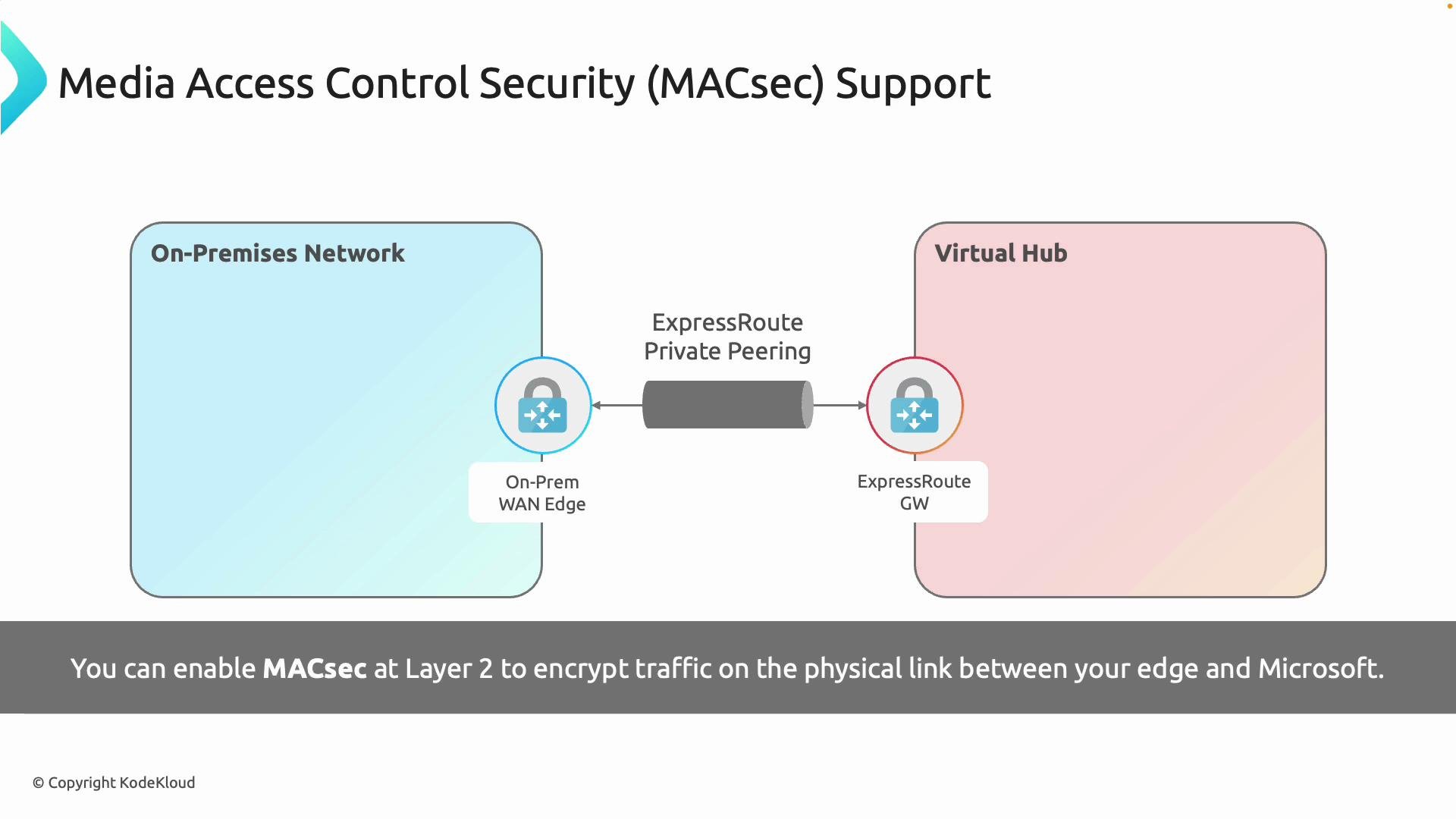 How MACsec works:
* Operates at Layer 2; encrypts Ethernet frames on the physical circuit.
* Requires support from both the service provider (carrier) and the customer edge switch/router.
* Adds minimal latency and is transparent to IP networking above Layer 2.
* Ideal for meeting link‑level encryption requirements in regulated environments.
When to choose MACsec:
* You have strict compliance requirements mandating link encryption.
* Your carrier and customer edge equipment support MACsec.
* You need minimal impact on network architecture and latency.
### Customer‑managed IPsec (end-to-end encryption)
If you require end‑to‑end encryption from an on‑premises endpoint to an Azure endpoint (for example, to a VM, application, or virtual appliance), you can terminate an IPsec tunnel on your routers or security appliances before sending traffic across ExpressRoute. This effectively creates a VPN on top of the private circuit, ensuring payload confidentiality and integrity independent of the underlying transport.
How MACsec works:
* Operates at Layer 2; encrypts Ethernet frames on the physical circuit.
* Requires support from both the service provider (carrier) and the customer edge switch/router.
* Adds minimal latency and is transparent to IP networking above Layer 2.
* Ideal for meeting link‑level encryption requirements in regulated environments.
When to choose MACsec:
* You have strict compliance requirements mandating link encryption.
* Your carrier and customer edge equipment support MACsec.
* You need minimal impact on network architecture and latency.
### Customer‑managed IPsec (end-to-end encryption)
If you require end‑to‑end encryption from an on‑premises endpoint to an Azure endpoint (for example, to a VM, application, or virtual appliance), you can terminate an IPsec tunnel on your routers or security appliances before sending traffic across ExpressRoute. This effectively creates a VPN on top of the private circuit, ensuring payload confidentiality and integrity independent of the underlying transport.
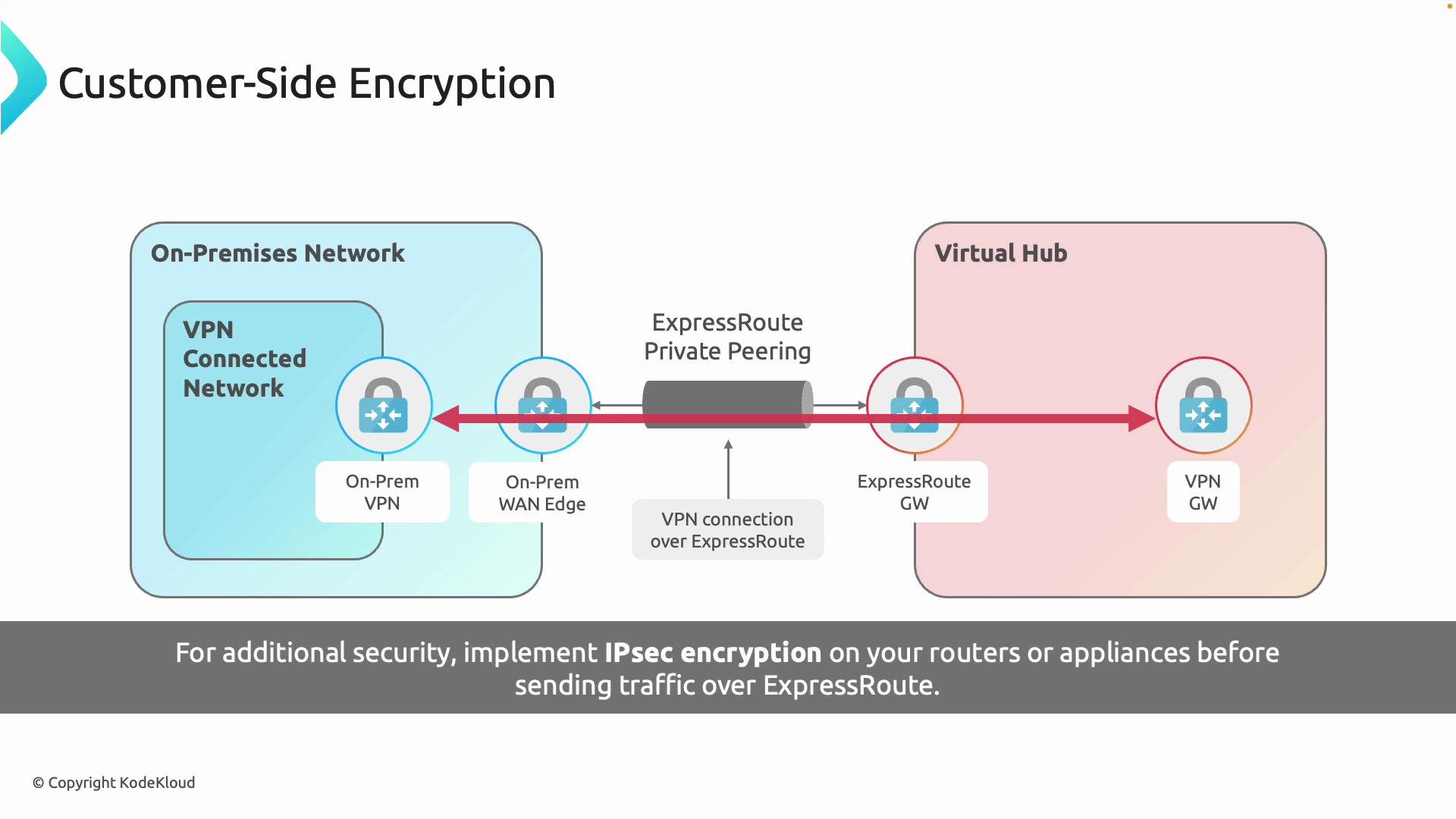 Key points about customer‑managed IPsec:
* Provides true end‑to‑end encryption between endpoints you control.
* Can be selective—apply to specific application flows or destinations in Azure.
* Introduces additional processing overhead and potential latency depending on device throughput and encryption algorithms.
* Requires management of keys, tunnels, and potentially HA/topology for scale.
## Comparison: MACsec vs IPsec vs ExpressRoute default
| Feature | ExpressRoute (default) | MACsec (Layer 2) | Customer‑managed IPsec (Layer 3/above) |
| ---------------------- | ----------------------------------------------: | ---------------------------------------------------- | ------------------------------------------------------------------------ |
| Encryption by default | No | Yes (link only) | Yes (payload/end‑to‑end) |
| OSI layer | Layer 3+ (no encryption) | Layer 2 | Layer 3 or higher |
| Where it terminates | N/A | On the physical link between edge and Microsoft Edge | On customer edge/router or appliance and the Azure endpoint |
| Use cases | Private connectivity, lower management overhead | Link‑level compliance, minimal latency impact | Application‑specific confidentiality, regulatory end‑to‑end requirements |
| Operational complexity | Low | Medium (requires carrier & hardware support) | Medium–High (tunnel management, keys, scaling) |
| Performance impact | None | Minimal | Variable — depends on device throughput and encryption settings |
## Choosing the right option
* Use MACsec when:
* You must encrypt the physical link itself.
* Your carrier and customer edge devices support MACsec.
* You want minimal additional latency and transparent operation above Layer 2.
* Use customer‑managed IPsec when:
* You require end‑to‑end payload protection, independent of the transport.
* You need selective encryption for specific services or Azure endpoints.
* You can accept additional management and potential performance overhead.
* Consider both when:
* You need defense‑in‑depth: MACsec for link protection plus IPsec for payload protection.
* Regulatory requirements demand both link encryption and end‑to‑end confidentiality.
## Implementation checklist
* Confirm requirements:
* Determine whether your compliance needs mandate link‑level encryption, end‑to‑end encryption, or both.
* Verify vendor and carrier support:
* For MACsec, confirm support on both the customer edge device and the connectivity provider.
* Plan topology and termination:
* For IPsec, decide where to terminate tunnels (on-prem appliance to an Azure VM, virtual appliance, or Azure virtual hub).
* Capacity and performance:
* Validate device throughput and expected latency impact for encryption workloads.
* Key management and operations:
* Establish key rotation, monitoring, and incident response procedures for encrypted tunnels.
## Summary
* ExpressRoute provides a private circuit but does not encrypt traffic by default.
* MACsec encrypts the physical link (Layer 2) and is suitable when carriers and edge devices support it.
* Customer‑managed IPsec provides end‑to‑end encryption on top of ExpressRoute and is appropriate when payload confidentiality must be ensured regardless of the underlying transport.
* You can combine both for layered security to balance compliance, performance, and operational complexity.
## Links and references
* [Azure ExpressRoute overview](https://learn.microsoft.com/azure/expressroute/)
* [MACsec (IEEE 802.1AE) — overview](https://en.wikipedia.org/wiki/Media_Access_Control_Security)
* [IPsec overview (Microsoft)](https://learn.microsoft.com/azure/vpn-gateway/vpn-gateway-about-vpn-tunnels)
* [Designing for ExpressRoute and VPN coexistence](https://learn.microsoft.com/azure/expressroute/expressroute-howto-coexist-vpn-gateway)
Key points about customer‑managed IPsec:
* Provides true end‑to‑end encryption between endpoints you control.
* Can be selective—apply to specific application flows or destinations in Azure.
* Introduces additional processing overhead and potential latency depending on device throughput and encryption algorithms.
* Requires management of keys, tunnels, and potentially HA/topology for scale.
## Comparison: MACsec vs IPsec vs ExpressRoute default
| Feature | ExpressRoute (default) | MACsec (Layer 2) | Customer‑managed IPsec (Layer 3/above) |
| ---------------------- | ----------------------------------------------: | ---------------------------------------------------- | ------------------------------------------------------------------------ |
| Encryption by default | No | Yes (link only) | Yes (payload/end‑to‑end) |
| OSI layer | Layer 3+ (no encryption) | Layer 2 | Layer 3 or higher |
| Where it terminates | N/A | On the physical link between edge and Microsoft Edge | On customer edge/router or appliance and the Azure endpoint |
| Use cases | Private connectivity, lower management overhead | Link‑level compliance, minimal latency impact | Application‑specific confidentiality, regulatory end‑to‑end requirements |
| Operational complexity | Low | Medium (requires carrier & hardware support) | Medium–High (tunnel management, keys, scaling) |
| Performance impact | None | Minimal | Variable — depends on device throughput and encryption settings |
## Choosing the right option
* Use MACsec when:
* You must encrypt the physical link itself.
* Your carrier and customer edge devices support MACsec.
* You want minimal additional latency and transparent operation above Layer 2.
* Use customer‑managed IPsec when:
* You require end‑to‑end payload protection, independent of the transport.
* You need selective encryption for specific services or Azure endpoints.
* You can accept additional management and potential performance overhead.
* Consider both when:
* You need defense‑in‑depth: MACsec for link protection plus IPsec for payload protection.
* Regulatory requirements demand both link encryption and end‑to‑end confidentiality.
## Implementation checklist
* Confirm requirements:
* Determine whether your compliance needs mandate link‑level encryption, end‑to‑end encryption, or both.
* Verify vendor and carrier support:
* For MACsec, confirm support on both the customer edge device and the connectivity provider.
* Plan topology and termination:
* For IPsec, decide where to terminate tunnels (on-prem appliance to an Azure VM, virtual appliance, or Azure virtual hub).
* Capacity and performance:
* Validate device throughput and expected latency impact for encryption workloads.
* Key management and operations:
* Establish key rotation, monitoring, and incident response procedures for encrypted tunnels.
## Summary
* ExpressRoute provides a private circuit but does not encrypt traffic by default.
* MACsec encrypts the physical link (Layer 2) and is suitable when carriers and edge devices support it.
* Customer‑managed IPsec provides end‑to‑end encryption on top of ExpressRoute and is appropriate when payload confidentiality must be ensured regardless of the underlying transport.
* You can combine both for layered security to balance compliance, performance, and operational complexity.
## Links and references
* [Azure ExpressRoute overview](https://learn.microsoft.com/azure/expressroute/)
* [MACsec (IEEE 802.1AE) — overview](https://en.wikipedia.org/wiki/Media_Access_Control_Security)
* [IPsec overview (Microsoft)](https://learn.microsoft.com/azure/vpn-gateway/vpn-gateway-about-vpn-tunnels)
* [Designing for ExpressRoute and VPN coexistence](https://learn.microsoft.com/azure/expressroute/expressroute-howto-coexist-vpn-gateway)