> ## Documentation Index
> Fetch the complete documentation index at: https://notes.kodekloud.com/llms.txt
> Use this file to discover all available pages before exploring further.
# What is ExpressRoute
> Overview of Azure ExpressRoute, a private dedicated BGP-based connection offering predictable low latency, high throughput, redundancy, scalable bandwidth and global reach for enterprise cloud networking.
In this article we explain what Azure ExpressRoute is, how it works, and why organizations choose it for private connectivity to Microsoft Azure.
Azure ExpressRoute provides a private, dedicated connection between your on-premises network and Azure. Unlike VPNs that traverse the public internet, ExpressRoute uses private connectivity over Microsoft’s network or via a connectivity partner. This delivers predictable latency, higher throughput, and enterprise-grade reliability for business‑critical workloads.
Key technical highlights include:
* Layer‑3 redundant connectivity using industry-standard BGP (Border Gateway Protocol) for dynamic route failover and high availability. Learn more about BGP: [https://learn.microsoft.com/en-us/azure/virtual-network/bgp-overview](https://learn.microsoft.com/en-us/azure/virtual-network/bgp-overview)
* Avoiding the public internet hop improves performance consistency and security posture.
* Integration options with your existing WAN (for example, MPLS).
 How ExpressRoute connectivity works
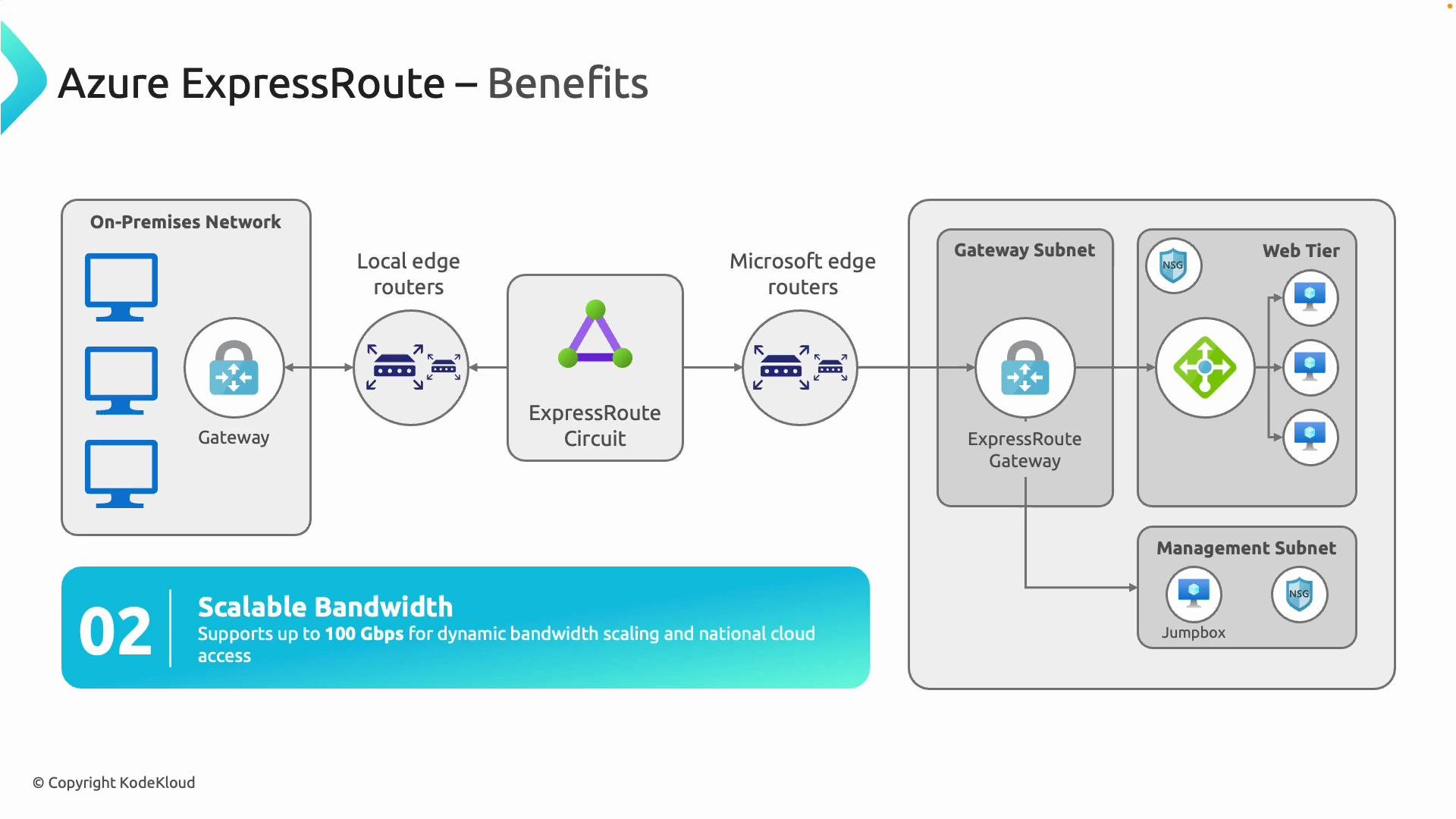
* Your on-premises edge routers (customer edge devices) peer with a connectivity provider or Microsoft edge routers over an ExpressRoute circuit.
* The circuit terminates at Microsoft’s edge and connects into Azure through an ExpressRoute gateway (an Azure gateway configured specifically for ExpressRoute).
* BGP advertises routes between your network and Azure, enabling automated failover and route control. When creating the Azure gateway, set the gateway type to ExpressRoute via the Azure portal or CLI.
Global reach and hub connectivity
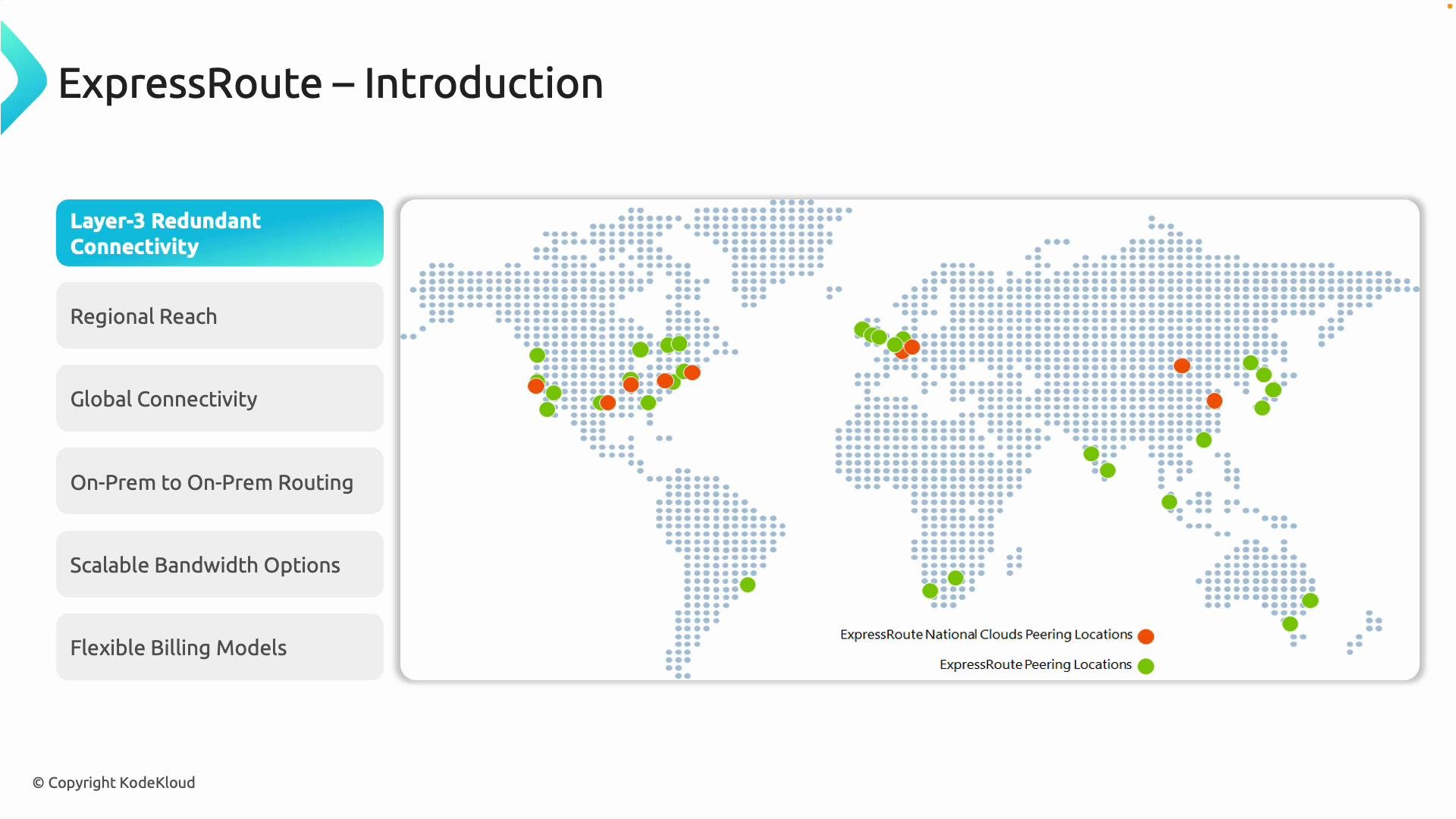
* With a single ExpressRoute circuit you can connect to any Azure region within a chosen geography (for example, North America).
* For multinational reach across geographies, the ExpressRoute Premium add-on extends connectivity to Azure regions in other geographies.
* ExpressRoute Global Reach lets you interconnect on-premises sites (multiple datacenters or branch offices) across Microsoft’s backbone, enabling Azure to act as the hub in your WAN design.
Capacity and billing
ExpressRoute supports a wide range of bandwidths and two billing models to fit different operational needs:
| Capability | Details |
| ----------------: | ------------------------------------------------------------------------------------------------------ |
| Bandwidth options | From 50 Mbps up to 100 Gbps for large-scale workloads and migrations |
| Billing models | `Unlimited` data plan for predictable monthly costs; `Metered` plan for variable/low traffic scenarios |
| Premium add-on | Extends reach across geographies and increases route limits for large deployments |
How ExpressRoute connectivity works
* Your on-premises edge routers (customer edge devices) peer with a connectivity provider or Microsoft edge routers over an ExpressRoute circuit.
* The circuit terminates at Microsoft’s edge and connects into Azure through an ExpressRoute gateway (an Azure gateway configured specifically for ExpressRoute).
* BGP advertises routes between your network and Azure, enabling automated failover and route control. When creating the Azure gateway, set the gateway type to ExpressRoute via the Azure portal or CLI.
Global reach and hub connectivity
* With a single ExpressRoute circuit you can connect to any Azure region within a chosen geography (for example, North America).
* For multinational reach across geographies, the ExpressRoute Premium add-on extends connectivity to Azure regions in other geographies.
* ExpressRoute Global Reach lets you interconnect on-premises sites (multiple datacenters or branch offices) across Microsoft’s backbone, enabling Azure to act as the hub in your WAN design.
Capacity and billing
ExpressRoute supports a wide range of bandwidths and two billing models to fit different operational needs:
| Capability | Details |
| ----------------: | ------------------------------------------------------------------------------------------------------ |
| Bandwidth options | From 50 Mbps up to 100 Gbps for large-scale workloads and migrations |
| Billing models | `Unlimited` data plan for predictable monthly costs; `Metered` plan for variable/low traffic scenarios |
| Premium add-on | Extends reach across geographies and increases route limits for large deployments |
 Reliability, redundancy, and SLAs
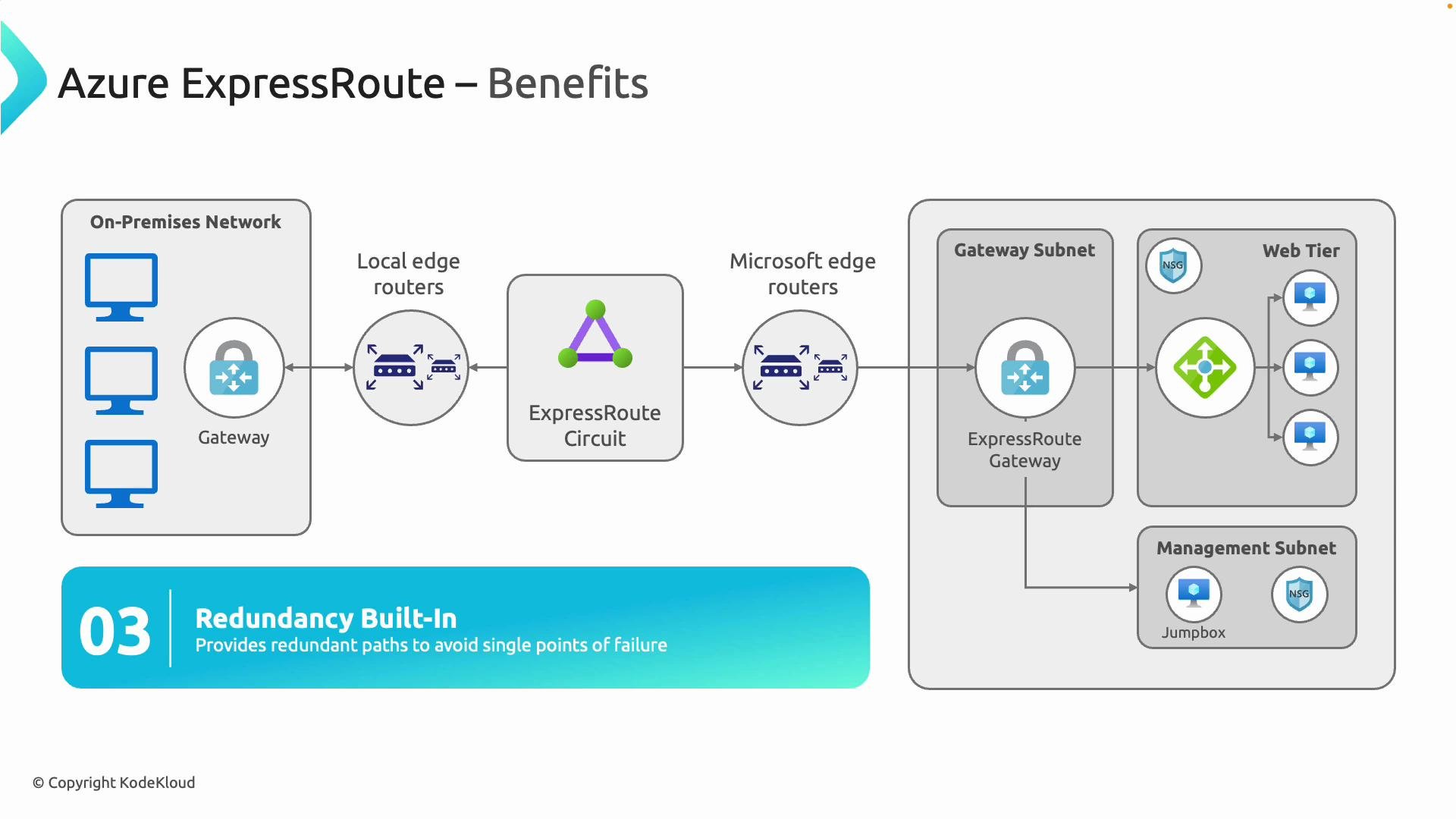
* ExpressRoute circuits are provisioned with redundant physical links and use BGP path selection for failover, reducing single points of failure.
* Microsoft publishes availability SLAs for ExpressRoute configurations (for example, up to 99.95% for some setups). See the official SLA documentation for details: [https://learn.microsoft.com/en-us/azure/expressroute/expressroute-sla](https://learn.microsoft.com/en-us/azure/expressroute/expressroute-sla)
* These characteristics make ExpressRoute suitable for SAP, ERP, real-time analytics, large-scale backups/migrations, and other latency-sensitive or high-throughput workloads.
Reliability, redundancy, and SLAs
* ExpressRoute circuits are provisioned with redundant physical links and use BGP path selection for failover, reducing single points of failure.
* Microsoft publishes availability SLAs for ExpressRoute configurations (for example, up to 99.95% for some setups). See the official SLA documentation for details: [https://learn.microsoft.com/en-us/azure/expressroute/expressroute-sla](https://learn.microsoft.com/en-us/azure/expressroute/expressroute-sla)
* These characteristics make ExpressRoute suitable for SAP, ERP, real-time analytics, large-scale backups/migrations, and other latency-sensitive or high-throughput workloads.
 Operational considerations and planning checklist
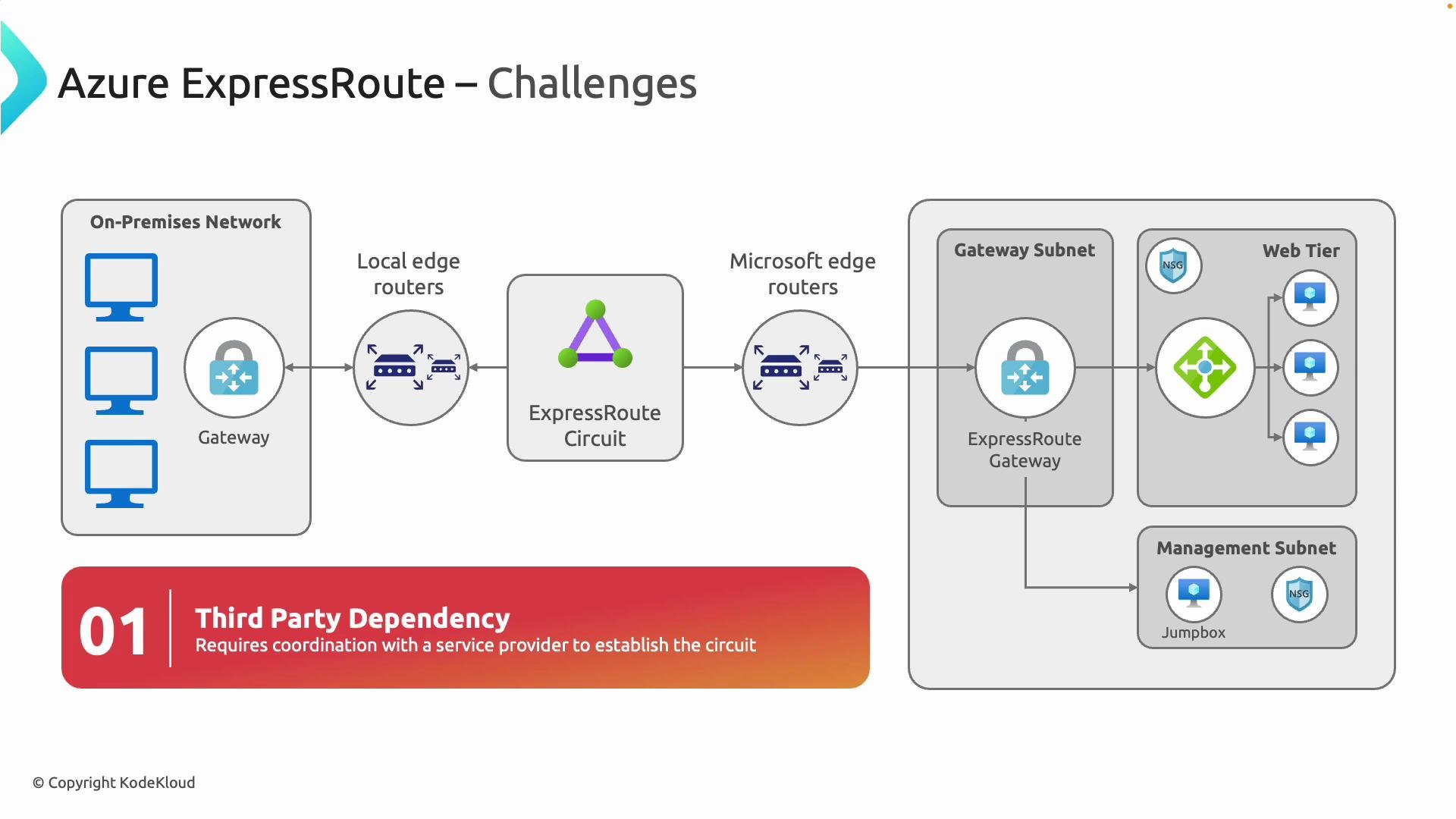
Provisioning ExpressRoute typically involves coordination with Microsoft connectivity partners and your telecom provider. Because it often requires physical circuits and inter-provider provisioning, setup can be more complex and take longer than an internet VPN.
Key planning items:
* Ensure on-premises edge routers support BGP and the throughput for your chosen bandwidth.
* Plan ASN assignments, BGP peering parameters, route filters, and route advertisement policies.
* Decide between metered vs. unlimited billing and whether you need the Premium add-on for global reach.
* Coordinate lead times and provisioning windows with your connectivity partner and carrier.
* Incorporate ExpressRoute into your disaster recovery and high‑availability strategies.
ExpressRoute requires BGP and proper routing design. Work with your connectivity partner and network team to plan ASN assignments, BGP peering, route filters, and access controls before provisioning.
Operational considerations and planning checklist
Provisioning ExpressRoute typically involves coordination with Microsoft connectivity partners and your telecom provider. Because it often requires physical circuits and inter-provider provisioning, setup can be more complex and take longer than an internet VPN.
Key planning items:
* Ensure on-premises edge routers support BGP and the throughput for your chosen bandwidth.
* Plan ASN assignments, BGP peering parameters, route filters, and route advertisement policies.
* Decide between metered vs. unlimited billing and whether you need the Premium add-on for global reach.
* Coordinate lead times and provisioning windows with your connectivity partner and carrier.
* Incorporate ExpressRoute into your disaster recovery and high‑availability strategies.
ExpressRoute requires BGP and proper routing design. Work with your connectivity partner and network team to plan ASN assignments, BGP peering, route filters, and access controls before provisioning.
 Summary: When to choose ExpressRoute
ExpressRoute is the right choice when you need:
* Private, dedicated connectivity with predictable latency and higher throughput than internet-based VPNs.
* Redundant, BGP-driven routing with SLA-backed availability for critical services.
* Scalable bandwidth up to 100 Gbps and the ability to interconnect on-premises sites through Azure (ExpressRoute Global Reach).
* Integration with enterprise WANs such as MPLS while maintaining a secure, private path to Azure.
Quick reference: ExpressRoute at a glance
| Topic | Key takeaway |
| ----------------- | ---------------------------------------------------------------------- |
| Connectivity type | Private, dedicated circuit (not the public internet) |
| Routing | BGP (Layer‑3) for dynamic failover and route control |
| Bandwidth | 50 Mbps — 100 Gbps |
| Billing | `Unlimited` or `Metered` |
| Global reach | Single geography by default; Premium add-on for cross-geography access |
| Use cases | SAP, ERP, analytics, large migrations, backup, low-latency apps |
Further reading and resources
* ExpressRoute overview and features: [https://learn.microsoft.com/en-us/azure/expressroute/expressroute-introduction](https://learn.microsoft.com/en-us/azure/expressroute/expressroute-introduction)
* BGP overview for Azure: [https://learn.microsoft.com/en-us/azure/virtual-network/bgp-overview](https://learn.microsoft.com/en-us/azure/virtual-network/bgp-overview)
* ExpressRoute SLA: [https://learn.microsoft.com/en-us/azure/expressroute/expressroute-sla](https://learn.microsoft.com/en-us/azure/expressroute/expressroute-sla)
* MPLS overview: [https://en.wikipedia.org/wiki/Multi\_protocol\_label\_switching](https://en.wikipedia.org/wiki/Multi_protocol_label_switching)
ExpressRoute delivers predictable, secure, and high-performance connectivity between your network and Azure—but requires careful planning, the right hardware, and coordination with partners to realize its full benefits.
Summary: When to choose ExpressRoute
ExpressRoute is the right choice when you need:
* Private, dedicated connectivity with predictable latency and higher throughput than internet-based VPNs.
* Redundant, BGP-driven routing with SLA-backed availability for critical services.
* Scalable bandwidth up to 100 Gbps and the ability to interconnect on-premises sites through Azure (ExpressRoute Global Reach).
* Integration with enterprise WANs such as MPLS while maintaining a secure, private path to Azure.
Quick reference: ExpressRoute at a glance
| Topic | Key takeaway |
| ----------------- | ---------------------------------------------------------------------- |
| Connectivity type | Private, dedicated circuit (not the public internet) |
| Routing | BGP (Layer‑3) for dynamic failover and route control |
| Bandwidth | 50 Mbps — 100 Gbps |
| Billing | `Unlimited` or `Metered` |
| Global reach | Single geography by default; Premium add-on for cross-geography access |
| Use cases | SAP, ERP, analytics, large migrations, backup, low-latency apps |
Further reading and resources
* ExpressRoute overview and features: [https://learn.microsoft.com/en-us/azure/expressroute/expressroute-introduction](https://learn.microsoft.com/en-us/azure/expressroute/expressroute-introduction)
* BGP overview for Azure: [https://learn.microsoft.com/en-us/azure/virtual-network/bgp-overview](https://learn.microsoft.com/en-us/azure/virtual-network/bgp-overview)
* ExpressRoute SLA: [https://learn.microsoft.com/en-us/azure/expressroute/expressroute-sla](https://learn.microsoft.com/en-us/azure/expressroute/expressroute-sla)
* MPLS overview: [https://en.wikipedia.org/wiki/Multi\_protocol\_label\_switching](https://en.wikipedia.org/wiki/Multi_protocol_label_switching)
ExpressRoute delivers predictable, secure, and high-performance connectivity between your network and Azure—but requires careful planning, the right hardware, and coordination with partners to realize its full benefits.