> ## Documentation Index
> Fetch the complete documentation index at: https://notes.kodekloud.com/llms.txt
> Use this file to discover all available pages before exploring further.
# Capabilities of Azure Virtual Networks
> Core capabilities of Azure Virtual Networks for secure, scalable cloud networking including external and internal connectivity, hybrid integration, traffic control, and customizable routing
Now that you know what an Azure Virtual Network (VNet) is, this page explains the practical capabilities a VNet provides and how those capabilities help you design secure, scalable cloud networks.
Understanding VNet capabilities is essential because VNets do more than connect resources — they control how resources communicate with one another and with the Internet. Below are the main capabilities, presented in the order you’ll typically consider them when designing networks.
* External connectivity\
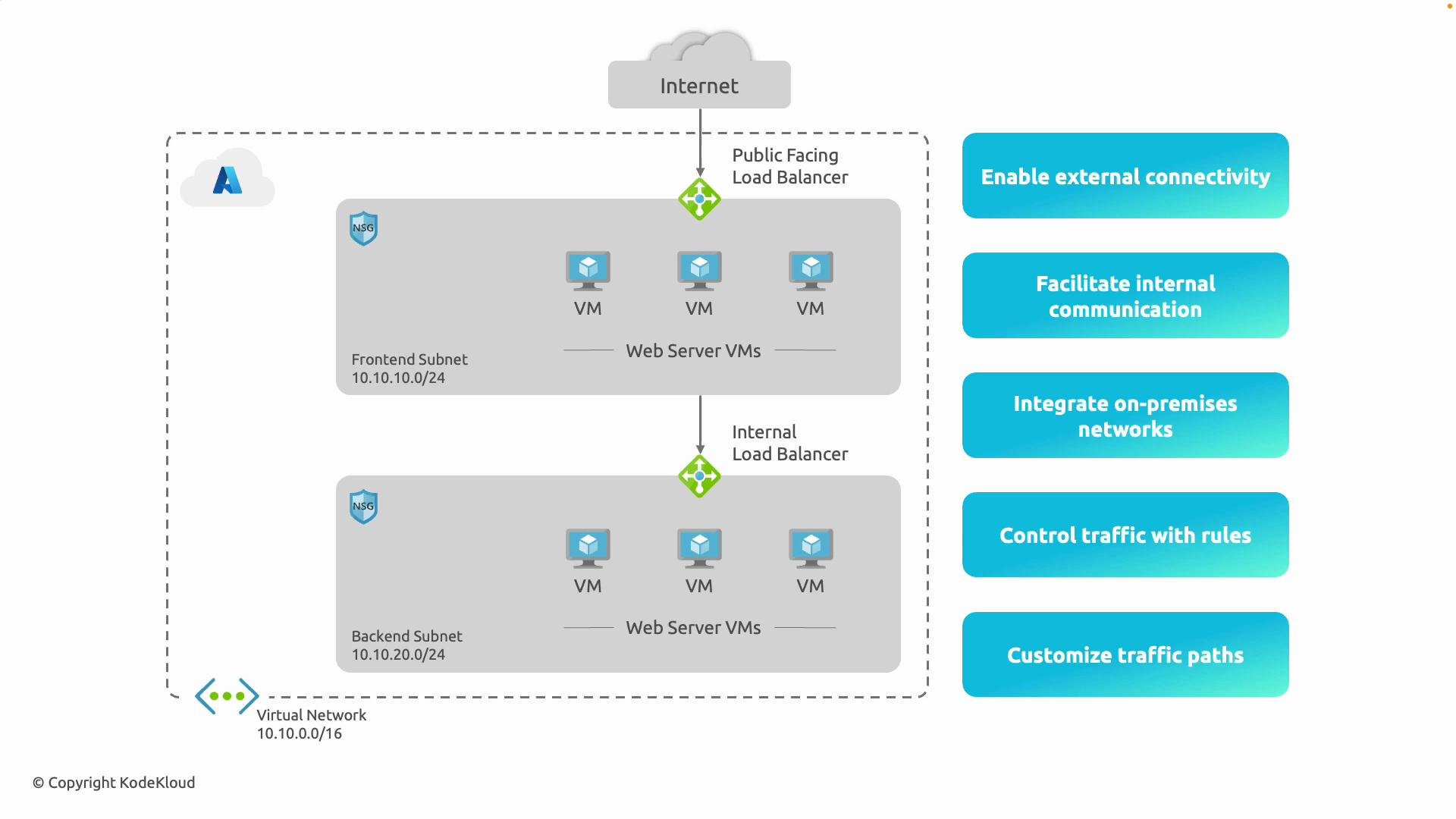
Azure VNets enable selective exposure of resources to the Internet. For example, place web servers in a frontend subnet behind a public-facing load balancer so users anywhere can reach your website, while keeping backend systems private. Load balancers distribute incoming traffic across healthy servers and provide resilience and scale.
* Internal communication\
Many workloads only need private, lateral communication. Use separate subnets for frontend and backend tiers so frontend servers can call backend services (for example, a web server talking to a database) using an internal load balancer or direct routing. This traffic stays inside the VNet, providing low latency and isolation from the Internet.
* Integrate on-premises networks (hybrid connectivity)\
VNets support hybrid architectures by connecting on-premises datacenters or branch networks to Azure using VPN Gateway or ExpressRoute. With these connections, on-premises and cloud resources can communicate as if they were on the same local network.
* Control traffic with security policies and routes\
Apply Network Security Groups (NSGs) to define allow/deny rules for inbound and outbound traffic at subnet or NIC level. Use NSGs to limit management access to specific IP ranges or permit only HTTP/HTTPS to web servers. Combined with Azure Firewall or third-party appliances, these controls enforce a layered security posture.
* Customize traffic paths\
When you need deterministic routing, use User Defined Routes (UDRs) and custom route tables to define exact traffic paths. For example, route all outbound traffic through a firewall for inspection, or send inter-subnet traffic to a virtual appliance for filtering, logging, or protocol translation.
 Common implementation examples
* Route all outbound traffic from a subnet through a firewall for inspection and logging.
* Send inter-subnet traffic to a virtual appliance for filtering, protocol translation, or deep packet inspection.
Key terms you’ll see repeatedly in Azure networking (NSGs, UDRs, load balancers, VPN Gateway, ExpressRoute, etc.) will be covered in detail in later sections. If you want to preview the official docs, see the Azure networking references below.
This lesson introduced the core capabilities of Azure VNets: selective external connectivity, isolated internal communication, hybrid on-premises integration, traffic control with security and routing, and customizable traffic paths. Use these capabilities together to design secure, scalable, and efficient cloud architectures.
Quick reference table
| Capability | Typical use case | Azure components |
| ---------------------- | ---------------------------------------------- | ------------------------------------------------------------ |
| External connectivity | Host public-facing web applications | Public Load Balancer, Public IP, Network Security Groups |
| Internal communication | Private backend tiers and database access | Internal Load Balancer, VNet peering, NSGs |
| Hybrid integration | Connect on-premises datacenter to Azure | VPN Gateway, ExpressRoute |
| Security & routing | Enforce traffic policies and segment access | Network Security Groups (NSGs), Azure Firewall |
| Custom path control | Force traffic through inspection or appliances | User Defined Routes (UDRs), Route tables, Virtual appliances |
Relevant links and references
* [Azure Virtual Network overview](https://learn.microsoft.com/azure/virtual-network/virtual-networks-overview)
* [Network Security Groups (NSGs)](https://learn.microsoft.com/azure/virtual-network/network-security-groups-overview)
* [User Defined Routes (UDRs)](https://learn.microsoft.com/azure/virtual-network/udr-overview)
* [Azure VPN Gateway](https://learn.microsoft.com/azure/vpn-gateway/vpn-gateway-about-vpngateways)
* [ExpressRoute](https://learn.microsoft.com/azure/expressroute/overview)
In summary, Azure Virtual Networks provide more than basic IP connectivity: they let you expose only the services you need, keep the rest protected, connect cloud and on-premises environments seamlessly, enforce strict security policies, and create tailored traffic flows.
Next: let’s explore the core components of an Azure Virtual Network and how they fit together.
Common implementation examples
* Route all outbound traffic from a subnet through a firewall for inspection and logging.
* Send inter-subnet traffic to a virtual appliance for filtering, protocol translation, or deep packet inspection.
Key terms you’ll see repeatedly in Azure networking (NSGs, UDRs, load balancers, VPN Gateway, ExpressRoute, etc.) will be covered in detail in later sections. If you want to preview the official docs, see the Azure networking references below.
This lesson introduced the core capabilities of Azure VNets: selective external connectivity, isolated internal communication, hybrid on-premises integration, traffic control with security and routing, and customizable traffic paths. Use these capabilities together to design secure, scalable, and efficient cloud architectures.
Quick reference table
| Capability | Typical use case | Azure components |
| ---------------------- | ---------------------------------------------- | ------------------------------------------------------------ |
| External connectivity | Host public-facing web applications | Public Load Balancer, Public IP, Network Security Groups |
| Internal communication | Private backend tiers and database access | Internal Load Balancer, VNet peering, NSGs |
| Hybrid integration | Connect on-premises datacenter to Azure | VPN Gateway, ExpressRoute |
| Security & routing | Enforce traffic policies and segment access | Network Security Groups (NSGs), Azure Firewall |
| Custom path control | Force traffic through inspection or appliances | User Defined Routes (UDRs), Route tables, Virtual appliances |
Relevant links and references
* [Azure Virtual Network overview](https://learn.microsoft.com/azure/virtual-network/virtual-networks-overview)
* [Network Security Groups (NSGs)](https://learn.microsoft.com/azure/virtual-network/network-security-groups-overview)
* [User Defined Routes (UDRs)](https://learn.microsoft.com/azure/virtual-network/udr-overview)
* [Azure VPN Gateway](https://learn.microsoft.com/azure/vpn-gateway/vpn-gateway-about-vpngateways)
* [ExpressRoute](https://learn.microsoft.com/azure/expressroute/overview)
In summary, Azure Virtual Networks provide more than basic IP connectivity: they let you expose only the services you need, keep the rest protected, connect cloud and on-premises environments seamlessly, enforce strict security policies, and create tailored traffic flows.
Next: let’s explore the core components of an Azure Virtual Network and how they fit together.