> ## Documentation Index
> Fetch the complete documentation index at: https://notes.kodekloud.com/llms.txt
> Use this file to discover all available pages before exploring further.
# Virtual Network Address Space and Subnets
> Designing Azure virtual network address spaces and subnets with sizing, reservations, special ranges and security considerations.
Plan your virtual network like an architectural blueprint. In Azure, the blueprint starts with the VNet address space and the subnets you carve from it. This lesson explains what an address space is, why it matters, how subnets organize and secure resources, and practical considerations for designing a scalable Azure network.
Starting with a virtual network address space
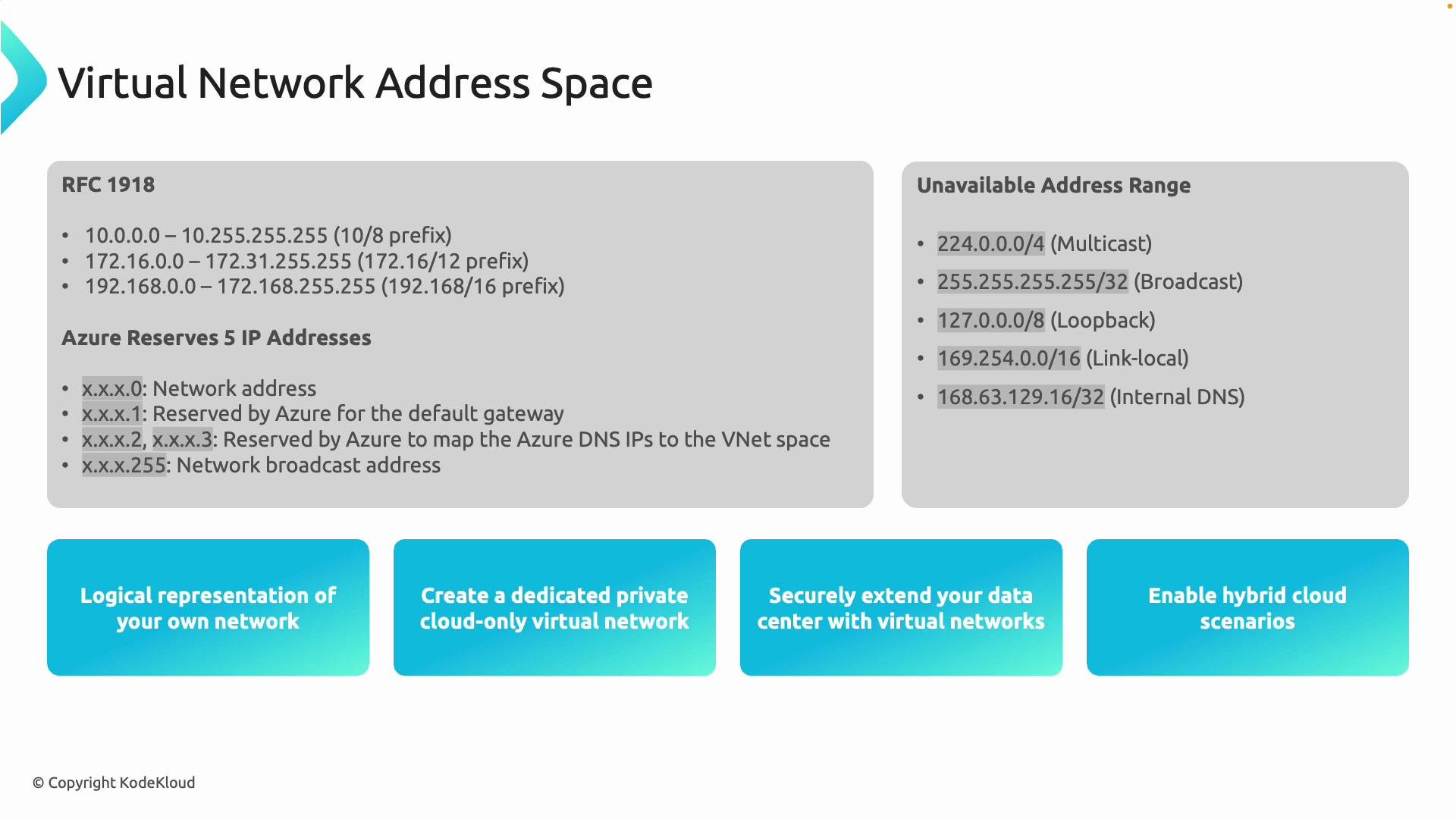
When you create an Azure virtual network (VNet), the first decision is its address space—this defines the boundaries from which you allocate subnets and IPs. Azure supports RFC 1918 private addressing, so choose a range that fits your scale and future growth needs.
| RFC 1918 Range | CIDR Example | Best for |
| ----------------------------- | ---------------: | ----------------------------------------------------- |
| 10.0.0.0 – 10.255.255.255 | `10.0.0.0/8` | Very large networks and multi-tenant address planning |
| 172.16.0.0 – 172.31.255.255 | `172.16.0.0/12` | Medium-sized enterprise networks |
| 192.168.0.0 – 192.168.255.255 | `192.168.0.0/16` | Small networks, labs, or NAT-heavy environments |
Example: choose `10.1.0.0/16` for a VNet, then split it into subnets like `10.1.1.0/24`, `10.1.2.0/24`, etc.
Azure platform reservations and minimum subnet size
Azure reserves five addresses in every subnet: the first four addresses and the last address. For instance, a `/24` (256 addresses) has 251 usable IPs after reservation. The smallest supported subnet is `/29` (8 addresses), which yields 3 usable IPs after the platform reservation—plan your subnet sizes accordingly.
Azure reserves the first four and the last IP address in every subnet (5 addresses total). A `/24` subnet leaves 251 usable IPs. The smallest supported subnet is `/29` (8 addresses), which provides 3 usable IPs after reservations.
Unavailable and special-purpose IP ranges
Avoid using special-purpose ranges inside VNets, such as loopback, multicast, and link-local addresses. Azure also relies on a platform-managed IP address that you must not assign or block:
* Loopback: `127.0.0.0/8`
* Link-local: `169.254.0.0/16`
* Multicast: `224.0.0.0/4`
* Azure platform IP: `168.63.129.16` (used for DNS, DHCP, and health probes)
Do not assign or block the Azure platform IP `168.63.129.16`. It is required for DNS, DHCP, and health probes and must remain reachable by the platform. See the Azure documentation for details: [https://learn.microsoft.com/en-us/azure/virtual-network/what-is-168-63-129-16](https://learn.microsoft.com/en-us/azure/virtual-network/what-is-168-63-129-16)
What a virtual network gives you
A VNet is the logical encapsulation of a private network in Azure and provides:
* A private, cloud-only network boundary for your Azure resources.
* Secure hybrid connectivity to on-premises datacenters using VPN Gateway or ExpressRoute.
* A central hub to peer or connect other VNets and external networks for hub-and-spoke or mesh topologies.
 What are subnets?
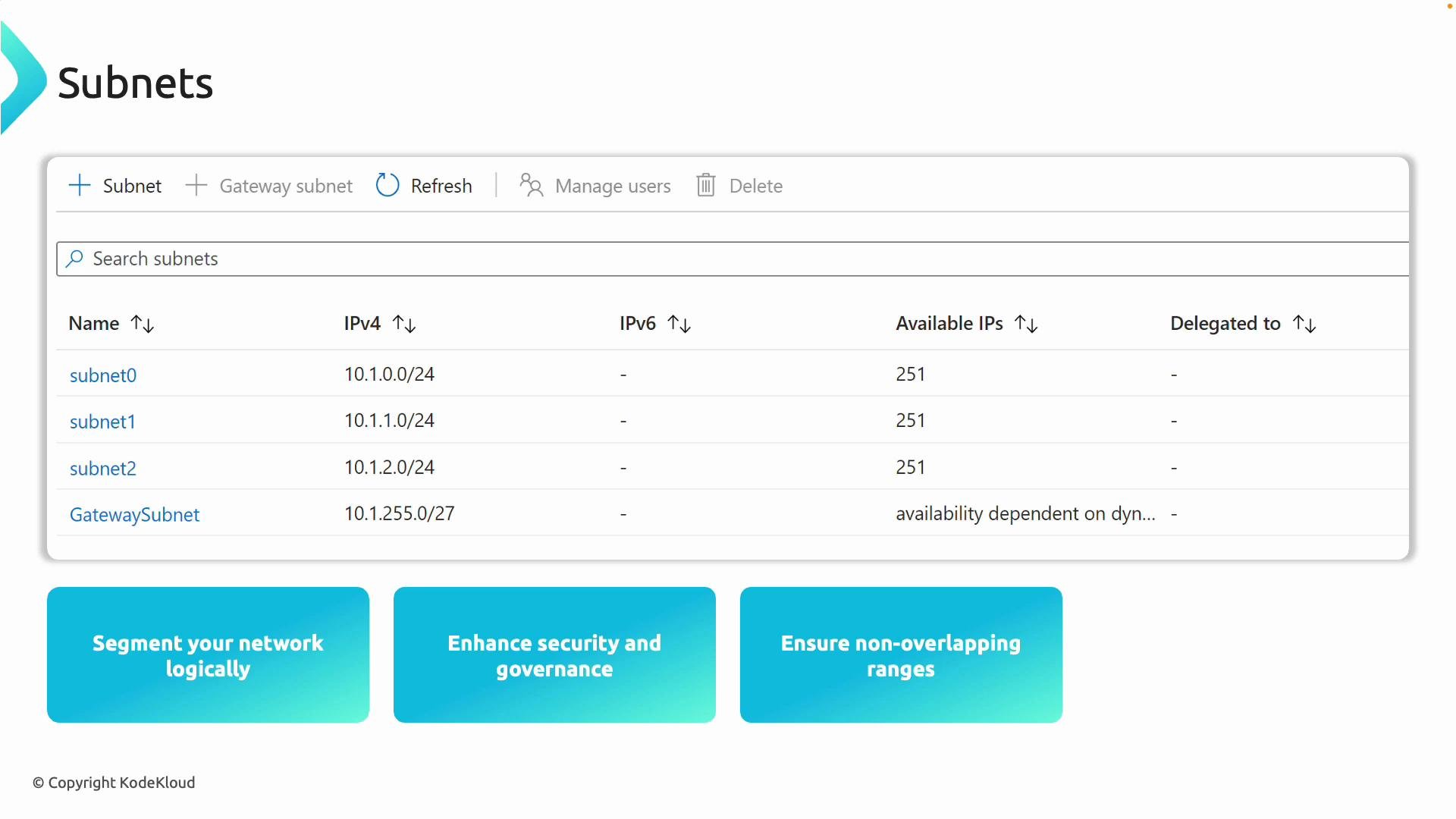
A subnet is a contiguous portion of the VNet address space used to group resources with similar function, security, or connectivity requirements. For example, if your VNet is `10.1.0.0/16`, you might create:
* `10.1.1.0/24` — web tier (`subnet-web`)
* `10.1.2.0/24` — database tier (`subnet-db`)
* `10.1.3.0/28` — management/monitoring tools
Some Azure services require specially named subnets:
| Service | Required Subnet Name |
| -------------- | --------------------- |
| VPN Gateway | `GatewaySubnet` |
| Azure Bastion | `AzureBastionSubnet` |
| Azure Firewall | `AzureFirewallSubnet` |
Use Network Security Groups (NSGs) and Application Security Groups (ASGs) to apply granular security controls at the subnet or workload level. Never allow overlapping address ranges between VNets or subnets—overlap breaks routing and prevents communication.
What are subnets?
A subnet is a contiguous portion of the VNet address space used to group resources with similar function, security, or connectivity requirements. For example, if your VNet is `10.1.0.0/16`, you might create:
* `10.1.1.0/24` — web tier (`subnet-web`)
* `10.1.2.0/24` — database tier (`subnet-db`)
* `10.1.3.0/28` — management/monitoring tools
Some Azure services require specially named subnets:
| Service | Required Subnet Name |
| -------------- | --------------------- |
| VPN Gateway | `GatewaySubnet` |
| Azure Bastion | `AzureBastionSubnet` |
| Azure Firewall | `AzureFirewallSubnet` |
Use Network Security Groups (NSGs) and Application Security Groups (ASGs) to apply granular security controls at the subnet or workload level. Never allow overlapping address ranges between VNets or subnets—overlap breaks routing and prevents communication.
 Scalability and growth planning
Plan your VNet and subnet CIDR sizes with headroom for growth—adding subnets is simple, but changing an address space or re-IPing resources is disruptive. Use a consistent addressing scheme and naming convention to simplify automation, monitoring, and troubleshooting.
Private IP allocation methods
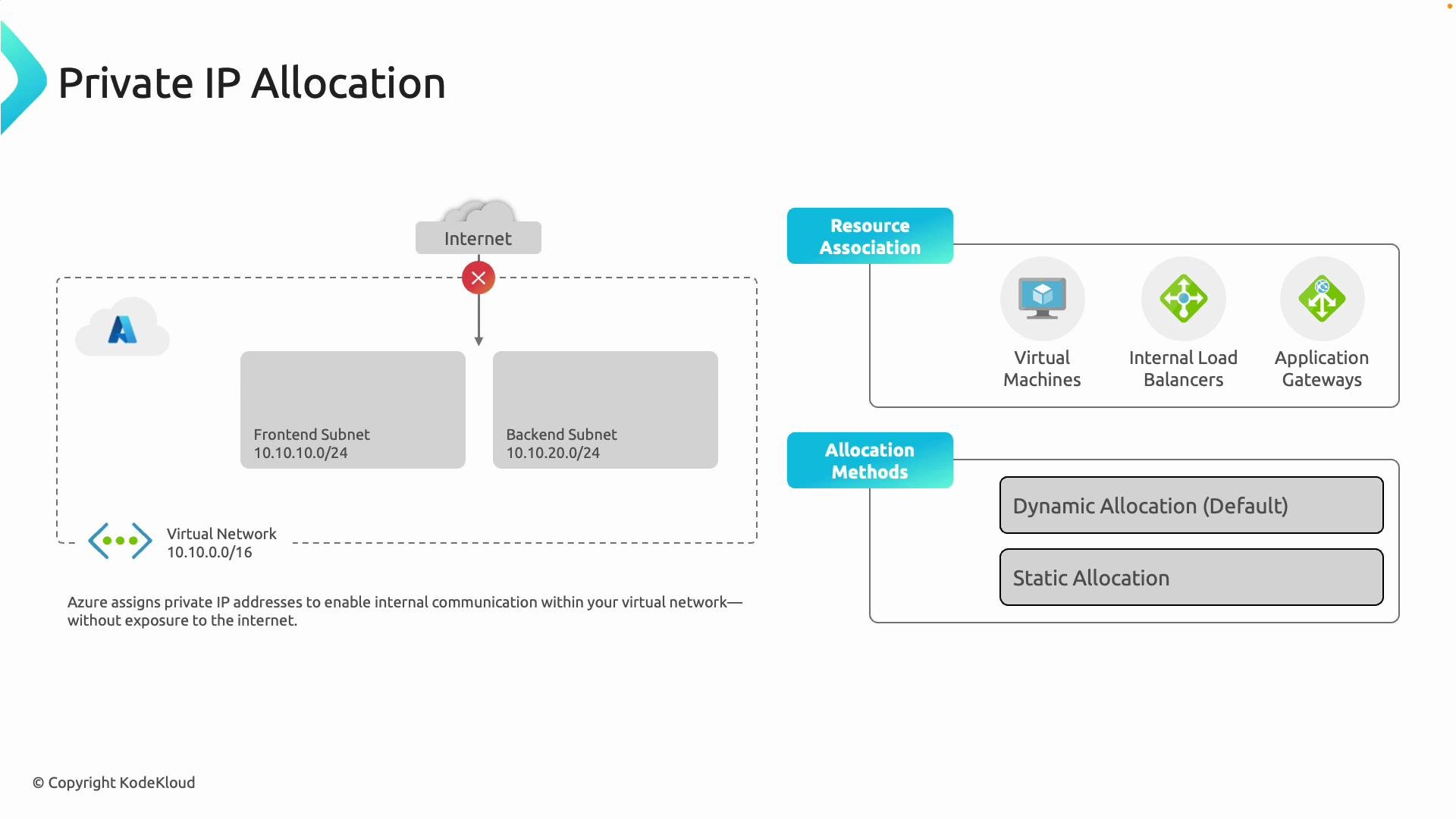
Azure assigns private IPs from the subnet range to resources (VMs, internal load balancers, Application Gateway, etc.) using two allocation methods:
* Dynamic (default): Azure auto-assigns the next available IP when the resource is created—suitable for most workloads.
* Static: Manually assign a fixed IP from the subnet range for services that require a stable address (e.g., internal databases or appliances).
Private IPs keep traffic internal to Azure unless you explicitly create public endpoints, configure NAT, or attach a public IP resource.
Scalability and growth planning
Plan your VNet and subnet CIDR sizes with headroom for growth—adding subnets is simple, but changing an address space or re-IPing resources is disruptive. Use a consistent addressing scheme and naming convention to simplify automation, monitoring, and troubleshooting.
Private IP allocation methods
Azure assigns private IPs from the subnet range to resources (VMs, internal load balancers, Application Gateway, etc.) using two allocation methods:
* Dynamic (default): Azure auto-assigns the next available IP when the resource is created—suitable for most workloads.
* Static: Manually assign a fixed IP from the subnet range for services that require a stable address (e.g., internal databases or appliances).
Private IPs keep traffic internal to Azure unless you explicitly create public endpoints, configure NAT, or attach a public IP resource.
 Quick design checklist
| Task | Recommendation |
| -------------------- | ------------------------------------------------------------------------------------------------------------------------- |
| Choose address space | Pick an RFC 1918 block that scales (e.g., `10.0.0.0/8` for large, `172.16.0.0/12` for medium, `192.168.0.0/16` for small) |
| Subnet sizing | Reserve extra /24 or /22 blocks for expected growth; avoid `/29` except for tiny appliances |
| Reservations | Account for Azure's 5 reserved IPs per subnet |
| Special subnets | Create `GatewaySubnet`, `AzureBastionSubnet`, and `AzureFirewallSubnet` when required |
| Avoid conflicts | Prevent overlapping IP spaces with on-premises networks and other VNets |
| Allocation method | Use dynamic by default; use static for services requiring fixed addresses |
Summary
* Choose a suitable RFC 1918 address space for your VNet (`10/8`, `172.16/12`, or `192.168/16`).
* Divide the space into non-overlapping subnets for separation and policy enforcement.
* Azure reserves the first four and the last IP in each subnet (5 addresses total).
* Avoid special-use ranges and never assign or block the platform IP `168.63.129.16`.
* Use dynamic private IP allocation by default; assign static IPs where stable addressing is needed.
Practice exercise
Create a VNet in the Azure portal using `10.1.0.0/16` and add the following subnets:
* `10.1.1.0/24` — web
* `10.1.2.0/24` — db
* `10.1.3.0/28` — tools
Deploy a VM in each subnet and observe the private IPs assigned. Add an NSG to the web subnet to allow only HTTP/HTTPS traffic and verify connectivity between subnets.
Links and references
* RFC 1918 — [https://datatracker.ietf.org/doc/html/rfc1918](https://datatracker.ietf.org/doc/html/rfc1918)
* Azure platform IP `168.63.129.16` — [https://learn.microsoft.com/en-us/azure/virtual-network/what-is-168-63-129-16](https://learn.microsoft.com/en-us/azure/virtual-network/what-is-168-63-129-16)
* Azure Virtual Network documentation — [https://learn.microsoft.com/en-us/azure/virtual-network/](https://learn.microsoft.com/en-us/azure/virtual-network/)
So—ready to design and deploy your first VNet?
Quick design checklist
| Task | Recommendation |
| -------------------- | ------------------------------------------------------------------------------------------------------------------------- |
| Choose address space | Pick an RFC 1918 block that scales (e.g., `10.0.0.0/8` for large, `172.16.0.0/12` for medium, `192.168.0.0/16` for small) |
| Subnet sizing | Reserve extra /24 or /22 blocks for expected growth; avoid `/29` except for tiny appliances |
| Reservations | Account for Azure's 5 reserved IPs per subnet |
| Special subnets | Create `GatewaySubnet`, `AzureBastionSubnet`, and `AzureFirewallSubnet` when required |
| Avoid conflicts | Prevent overlapping IP spaces with on-premises networks and other VNets |
| Allocation method | Use dynamic by default; use static for services requiring fixed addresses |
Summary
* Choose a suitable RFC 1918 address space for your VNet (`10/8`, `172.16/12`, or `192.168/16`).
* Divide the space into non-overlapping subnets for separation and policy enforcement.
* Azure reserves the first four and the last IP in each subnet (5 addresses total).
* Avoid special-use ranges and never assign or block the platform IP `168.63.129.16`.
* Use dynamic private IP allocation by default; assign static IPs where stable addressing is needed.
Practice exercise
Create a VNet in the Azure portal using `10.1.0.0/16` and add the following subnets:
* `10.1.1.0/24` — web
* `10.1.2.0/24` — db
* `10.1.3.0/28` — tools
Deploy a VM in each subnet and observe the private IPs assigned. Add an NSG to the web subnet to allow only HTTP/HTTPS traffic and verify connectivity between subnets.
Links and references
* RFC 1918 — [https://datatracker.ietf.org/doc/html/rfc1918](https://datatracker.ietf.org/doc/html/rfc1918)
* Azure platform IP `168.63.129.16` — [https://learn.microsoft.com/en-us/azure/virtual-network/what-is-168-63-129-16](https://learn.microsoft.com/en-us/azure/virtual-network/what-is-168-63-129-16)
* Azure Virtual Network documentation — [https://learn.microsoft.com/en-us/azure/virtual-network/](https://learn.microsoft.com/en-us/azure/virtual-network/)
So—ready to design and deploy your first VNet?