> ## Documentation Index
> Fetch the complete documentation index at: https://notes.kodekloud.com/llms.txt
> Use this file to discover all available pages before exploring further.
# Load Balancing Options for Azure
> Guide to Azure load balancing options and decision flow for choosing Application Gateway, Front Door, Load Balancer, or Traffic Manager
Azure offers multiple load-balancing solutions tailored to different protocols, scopes, and feature requirements. This guide reviews the core services, how they differ, and a decision flow to help you choose the right option for your workload.
## Core Azure load-balancing services
* Application Gateway\
A Layer 7 (HTTP/HTTPS) regional load balancer and web application delivery controller. Supports internal and public deployments, SSL/TLS termination (offloading), URL-based routing, session affinity, and integration with a Web Application Firewall (WAF) for protection against common web attacks.
* Azure Front Door\
A global Layer 7 service for high-performance, globally distributed web applications. Provides global HTTP/HTTPS load balancing, TLS termination, caching and site acceleration, and intelligent routing based on proximity and latency. Front Door operates at the Microsoft edge and routes traffic globally.
* Azure Load Balancer\
A Layer 4 (TCP/UDP) load balancer offering ultra-low latency and high throughput. It supports both public and internal scenarios and is suitable for non-HTTP workloads (for example SQL, RDP, gaming, or custom TCP/UDP services). Use the Standard SKU for zone redundancy and predictable performance.
* Traffic Manager\
A DNS-based traffic-routing service. Traffic Manager answers DNS queries to direct clients to the most appropriate endpoint based on routing method (priority, performance, geographic, weighted, etc.). Because it operates at the DNS layer, it does not act as a proxy and is protocol-agnostic—useful for global DNS-based failover and distribution across regions.
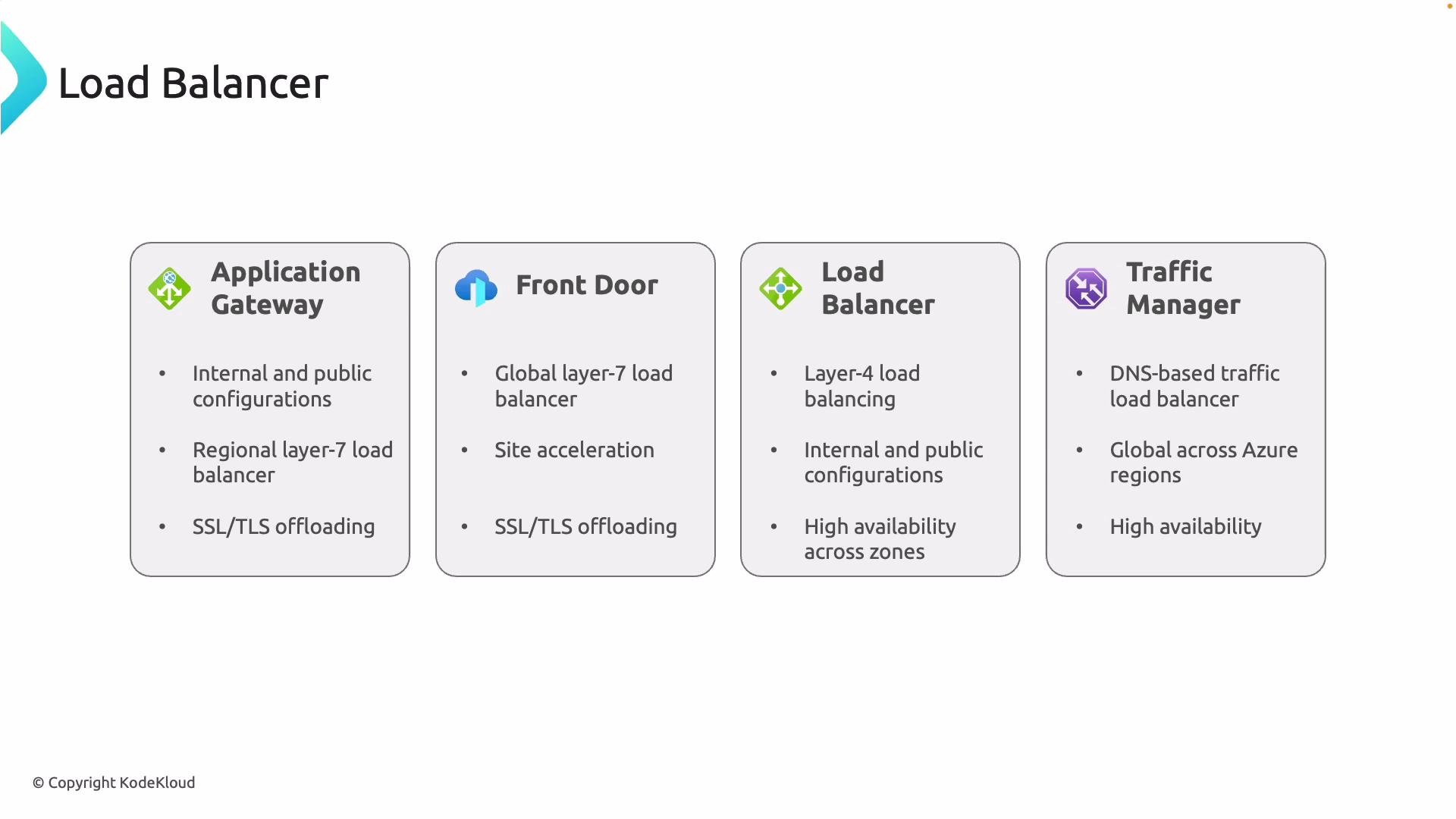 Traffic Manager directs clients using DNS responses, which makes it ideal for distributing traffic across global Azure regions for geo-redundancy and failover. In contrast, Front Door and Application Gateway act as HTTP(S) proxy/load-balancing planes that inspect and forward requests on your behalf.
Key decision criteria: protocol (HTTP/HTTPS vs TCP/UDP), scope (regional vs global), required features (WAF, TLS offload, URL-based routing, caching), availability and failover model (zone redundancy, regional failover, instant failover), and cost. Use these factors to map your application to the appropriate Azure service.
## Quick comparison
| Service | Layer | Scope | Best for | Key features |
| ------------------: | :-------: | :------: | :------------------------------------------- | :------------------------------------------------------------------- |
| Application Gateway | Layer 7 | Regional | Web apps needing app-layer controls | `WAF`, URL-based routing, SSL/TLS offload, session affinity |
| Azure Front Door | Layer 7 | Global | Global web apps needing edge acceleration | Global routing, TLS termination, caching, latency-based routing |
| Azure Load Balancer | Layer 4 | Regional | Non-HTTP workloads, high throughput | Low-latency TCP/UDP load balancing, Standard SKU for zone redundancy |
| Traffic Manager | DNS layer | Global | Cross-region DNS-based failover/distribution | Protocol-agnostic DNS routing (priority, performance, geographic) |
## Decision checklist
Ask these questions when selecting a load-balancing strategy:
* What protocol does the application use? (`HTTP/HTTPS` → Layer 7; otherwise Layer 4)
* Is the application regional or global?
* Do you need application-layer features such as WAF, path-based routing, or TLS offloading?
* Is instant failover required, or is DNS-based failover acceptable?
* What are the cost and management trade-offs?
Traffic Manager directs clients using DNS responses, which makes it ideal for distributing traffic across global Azure regions for geo-redundancy and failover. In contrast, Front Door and Application Gateway act as HTTP(S) proxy/load-balancing planes that inspect and forward requests on your behalf.
Key decision criteria: protocol (HTTP/HTTPS vs TCP/UDP), scope (regional vs global), required features (WAF, TLS offload, URL-based routing, caching), availability and failover model (zone redundancy, regional failover, instant failover), and cost. Use these factors to map your application to the appropriate Azure service.
## Quick comparison
| Service | Layer | Scope | Best for | Key features |
| ------------------: | :-------: | :------: | :------------------------------------------- | :------------------------------------------------------------------- |
| Application Gateway | Layer 7 | Regional | Web apps needing app-layer controls | `WAF`, URL-based routing, SSL/TLS offload, session affinity |
| Azure Front Door | Layer 7 | Global | Global web apps needing edge acceleration | Global routing, TLS termination, caching, latency-based routing |
| Azure Load Balancer | Layer 4 | Regional | Non-HTTP workloads, high throughput | Low-latency TCP/UDP load balancing, Standard SKU for zone redundancy |
| Traffic Manager | DNS layer | Global | Cross-region DNS-based failover/distribution | Protocol-agnostic DNS routing (priority, performance, geographic) |
## Decision checklist
Ask these questions when selecting a load-balancing strategy:
* What protocol does the application use? (`HTTP/HTTPS` → Layer 7; otherwise Layer 4)
* Is the application regional or global?
* Do you need application-layer features such as WAF, path-based routing, or TLS offloading?
* Is instant failover required, or is DNS-based failover acceptable?
* What are the cost and management trade-offs?
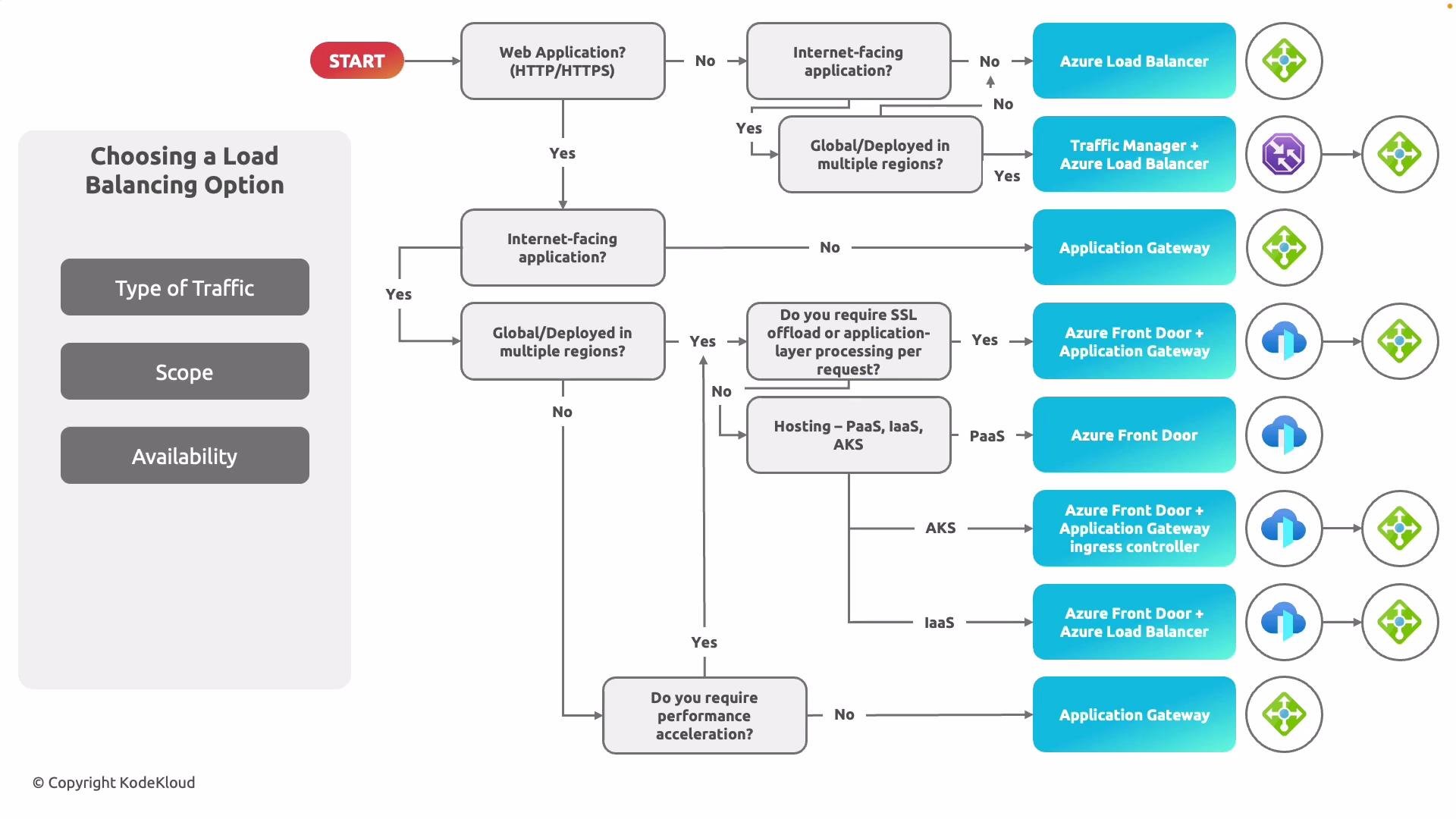 ## Example decision flows
* Non-HTTP (TCP/UDP) + regional → Azure Load Balancer (Standard) for low latency and high throughput.
* HTTP(S) + regional + need app-layer processing (WAF, path-based routing, TLS termination) → Application Gateway.
* HTTP(S) + global + require edge acceleration, fast failover → Azure Front Door (or Front Door + Application Gateway for edge routing + deep regional processing).
* Need DNS-level control across protocols or a simple global failover → Traffic Manager (often placed in front of regional Load Balancers or other endpoints).
## Common deployment patterns
* Regional web app with WAF and URL routing: Application Gateway.
* Global web app requiring edge acceleration and global failover: Azure Front Door (optionally paired with Application Gateway for regional processing).
* Multi-region deployments serving any protocol: Traffic Manager directing DNS to regional Azure Load Balancers.
* IaaS or AKS backends: combine patterns such as Front Door → Application Gateway → VM Scale Sets / AKS, or Front Door → Load Balancer depending on protocol and features required.
## Practical guidance & links
* For deep regional security and URL routing, deploy Application Gateway with WAF.
* For global performance, use Front Door at the edge; optionally chain Front Door to Application Gateway when you need both global routing and regional WAF or path-based routing.
* For low-latency TCP/UDP services (databases, gaming, RDP), prefer Azure Load Balancer (Standard).
* Use Traffic Manager when you want DNS-level routing for global failover across arbitrary endpoints or protocols.
Useful references:
* [Azure Application Gateway documentation](https://learn.microsoft.com/azure/application-gateway/)
* [Azure Front Door documentation](https://learn.microsoft.com/azure/frontdoor/)
* [Azure Load Balancer documentation](https://learn.microsoft.com/azure/load-balancer/)
* [Azure Traffic Manager documentation](https://learn.microsoft.com/azure/traffic-manager/)
Now step through the decision flow above and match your application’s protocol, scope, and feature requirements to the most appropriate Azure service or combination of services.
Now we will move on to the first load balancing solution in the next section.
## Example decision flows
* Non-HTTP (TCP/UDP) + regional → Azure Load Balancer (Standard) for low latency and high throughput.
* HTTP(S) + regional + need app-layer processing (WAF, path-based routing, TLS termination) → Application Gateway.
* HTTP(S) + global + require edge acceleration, fast failover → Azure Front Door (or Front Door + Application Gateway for edge routing + deep regional processing).
* Need DNS-level control across protocols or a simple global failover → Traffic Manager (often placed in front of regional Load Balancers or other endpoints).
## Common deployment patterns
* Regional web app with WAF and URL routing: Application Gateway.
* Global web app requiring edge acceleration and global failover: Azure Front Door (optionally paired with Application Gateway for regional processing).
* Multi-region deployments serving any protocol: Traffic Manager directing DNS to regional Azure Load Balancers.
* IaaS or AKS backends: combine patterns such as Front Door → Application Gateway → VM Scale Sets / AKS, or Front Door → Load Balancer depending on protocol and features required.
## Practical guidance & links
* For deep regional security and URL routing, deploy Application Gateway with WAF.
* For global performance, use Front Door at the edge; optionally chain Front Door to Application Gateway when you need both global routing and regional WAF or path-based routing.
* For low-latency TCP/UDP services (databases, gaming, RDP), prefer Azure Load Balancer (Standard).
* Use Traffic Manager when you want DNS-level routing for global failover across arbitrary endpoints or protocols.
Useful references:
* [Azure Application Gateway documentation](https://learn.microsoft.com/azure/application-gateway/)
* [Azure Front Door documentation](https://learn.microsoft.com/azure/frontdoor/)
* [Azure Load Balancer documentation](https://learn.microsoft.com/azure/load-balancer/)
* [Azure Traffic Manager documentation](https://learn.microsoft.com/azure/traffic-manager/)
Now step through the decision flow above and match your application’s protocol, scope, and feature requirements to the most appropriate Azure service or combination of services.
Now we will move on to the first load balancing solution in the next section.