> ## Documentation Index
> Fetch the complete documentation index at: https://notes.kodekloud.com/llms.txt
> Use this file to discover all available pages before exploring further.
# Using Microsoft Defender for Cloud for Regulatory Compliance
> How Microsoft Defender for Cloud maps compliance frameworks to Azure Policy, provides a compliance dashboard, and prioritizes security recommendations for remediation and monitoring.
This guide explains how Microsoft Defender for Cloud helps you meet regulatory and compliance requirements in Azure. Defender for Cloud maps industry frameworks to Azure Policy initiatives, provides a centralized compliance dashboard, and surfaces prioritized security recommendations so you can remediate the most critical gaps first.
Key topics covered:
* What the compliance view shows and how to interpret it
* Compliance dashboard features and reporting
* How to attach standards and view their policy initiatives
* How recommendations are generated and acted on
* Defender plans, coverage, and cost considerations
What the compliance view shows
At the top of the Defender for Cloud compliance view you’ll see which security frameworks are applied to your scope (subscription or management group)—for example, the Azure Security Benchmark, PCI DSS, or ISO 27001. The dashboard highlights frameworks, subscription details, the set of security controls, and the severity and count of compliance issues for each control.
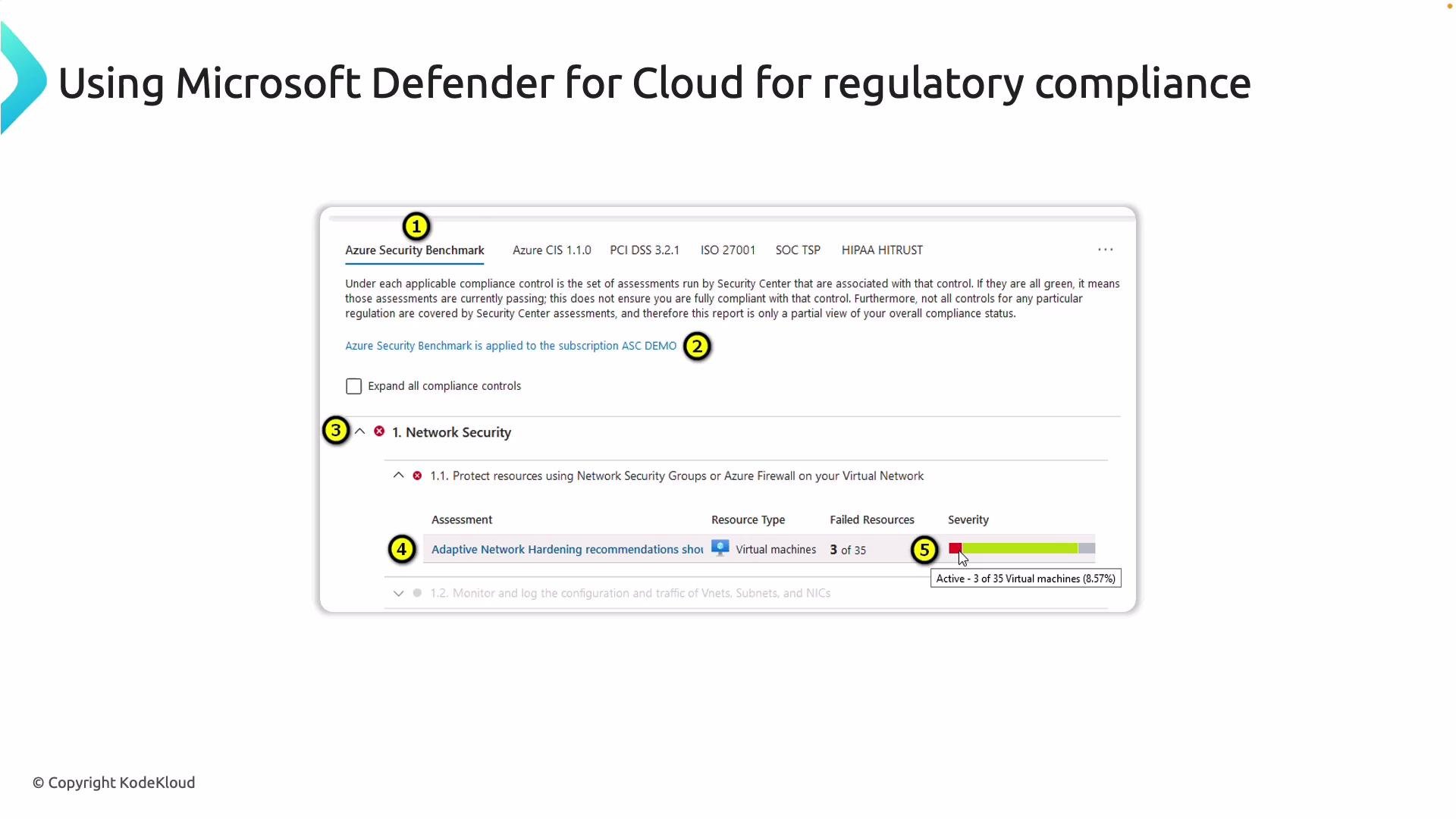 Important elements in this view:
* Which compliance standards are attached to the selected scope (so you know what’s actively monitored).
* Expanded security controls (for example, Network Security) showing discrete checks Defender for Cloud performs—NSG rules, firewall configuration, subnet association, etc. Many checks reference industry mappings like `NS-1`, `NS-2` (CIS) or controls from the Azure Security Benchmark.
* Targeted recommendations for specific resources (for example: VMs, subnets, or firewalls that require configuration changes).
* A visual summary of how many resources fail each control and the severity of those failures so you can prioritize remediation.
Compliance dashboard features
Defender for Cloud’s Regulatory compliance dashboard provides a single pane for posture, scoring, reporting, and response.
| Feature | Purpose | Notes / Example |
| ---------------------- | ----------------------------------------------------------------------------- | ------------------------------------------------------------------------------------- |
| Framework coverage | Attach industry or regulatory standards to a subscription or management group | Examples: `ISO 27001:2013`, `PCI DSS`, `HIPAA`, `Azure Security Benchmark` |
| Secure Score | Quantifies security posture and prioritizes improvements | See [Secure Score](https://learn.microsoft.com/azure/defender-for-cloud/secure-score) |
| Audit & reporting | Exportable reports for compliance teams and auditors | Downloadable CSV/PDF audit reports |
| Alerts & investigation | Threat alerts, investigation tools, playbooks, and automated remediation | Detects DDoS, suspicious RDP, lateral movement, etc. |
Below is an example security alerts dashboard that shows detected threats, their severity, and affected resources.
Important elements in this view:
* Which compliance standards are attached to the selected scope (so you know what’s actively monitored).
* Expanded security controls (for example, Network Security) showing discrete checks Defender for Cloud performs—NSG rules, firewall configuration, subnet association, etc. Many checks reference industry mappings like `NS-1`, `NS-2` (CIS) or controls from the Azure Security Benchmark.
* Targeted recommendations for specific resources (for example: VMs, subnets, or firewalls that require configuration changes).
* A visual summary of how many resources fail each control and the severity of those failures so you can prioritize remediation.
Compliance dashboard features
Defender for Cloud’s Regulatory compliance dashboard provides a single pane for posture, scoring, reporting, and response.
| Feature | Purpose | Notes / Example |
| ---------------------- | ----------------------------------------------------------------------------- | ------------------------------------------------------------------------------------- |
| Framework coverage | Attach industry or regulatory standards to a subscription or management group | Examples: `ISO 27001:2013`, `PCI DSS`, `HIPAA`, `Azure Security Benchmark` |
| Secure Score | Quantifies security posture and prioritizes improvements | See [Secure Score](https://learn.microsoft.com/azure/defender-for-cloud/secure-score) |
| Audit & reporting | Exportable reports for compliance teams and auditors | Downloadable CSV/PDF audit reports |
| Alerts & investigation | Threat alerts, investigation tools, playbooks, and automated remediation | Detects DDoS, suspicious RDP, lateral movement, etc. |
Below is an example security alerts dashboard that shows detected threats, their severity, and affected resources.
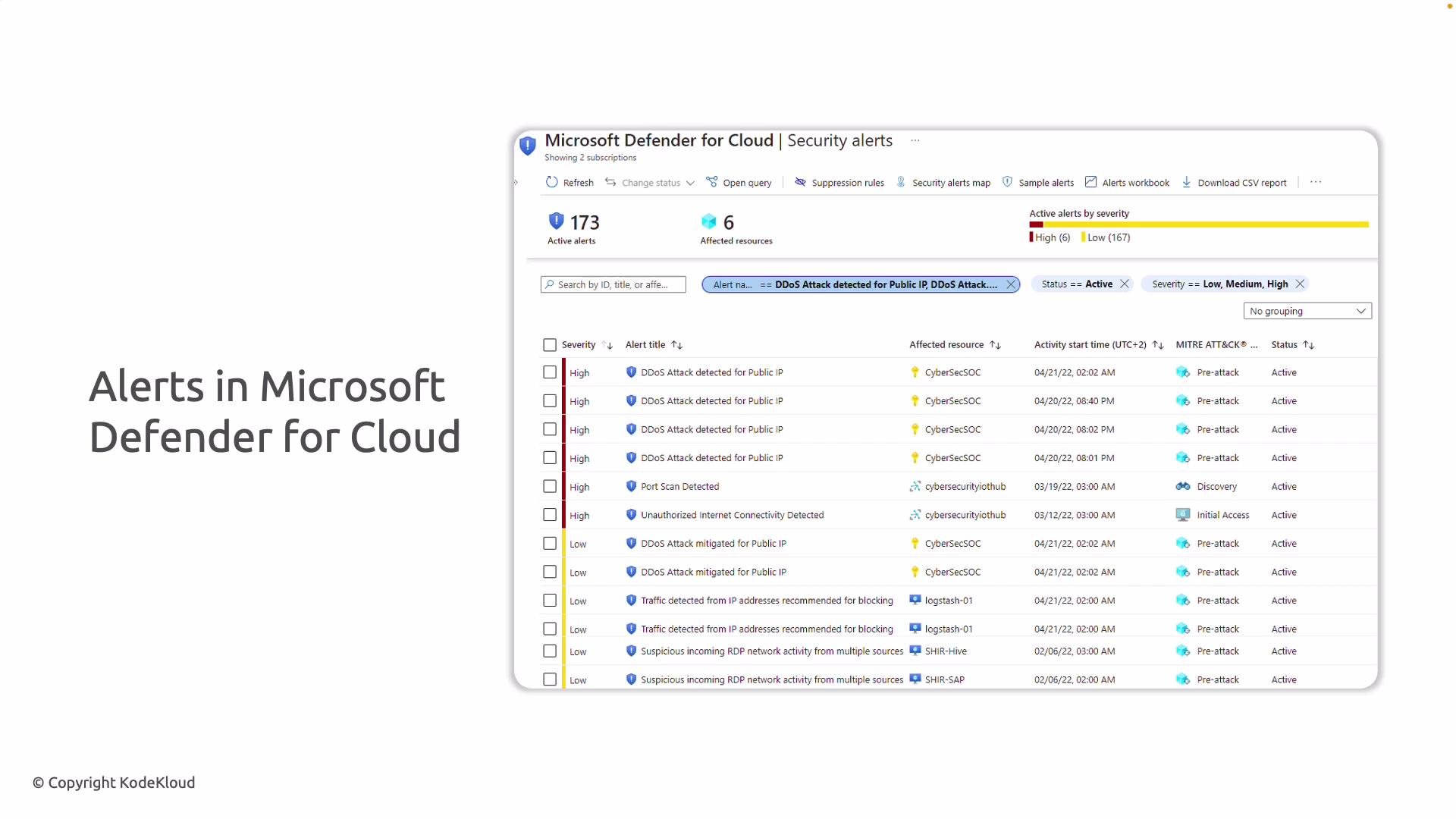 You can sort alerts by severity, identify at-risk systems, run playbooks, and trigger remediation workflows directly from the alerts dashboard.
How to attach compliance standards in the Azure portal
Follow these steps to attach frameworks at the desired scope:
1. Open Microsoft Defender for Cloud (search for “Defender for Cloud” in the Azure portal).
2. From the Defender for Cloud overview, select Regulatory compliance.
3. Click Manage compliance standards to open Environment settings.
4. Choose the environment scope (subscription or management group).
5. Under Security policies you’ll see the Azure Policy initiatives (frameworks) available to attach and configure.
The Security policies screen lists initiatives such as the Microsoft Cloud Security Benchmark and others with toggles to enable or disable them for your environment.
You can sort alerts by severity, identify at-risk systems, run playbooks, and trigger remediation workflows directly from the alerts dashboard.
How to attach compliance standards in the Azure portal
Follow these steps to attach frameworks at the desired scope:
1. Open Microsoft Defender for Cloud (search for “Defender for Cloud” in the Azure portal).
2. From the Defender for Cloud overview, select Regulatory compliance.
3. Click Manage compliance standards to open Environment settings.
4. Choose the environment scope (subscription or management group).
5. Under Security policies you’ll see the Azure Policy initiatives (frameworks) available to attach and configure.
The Security policies screen lists initiatives such as the Microsoft Cloud Security Benchmark and others with toggles to enable or disable them for your environment.
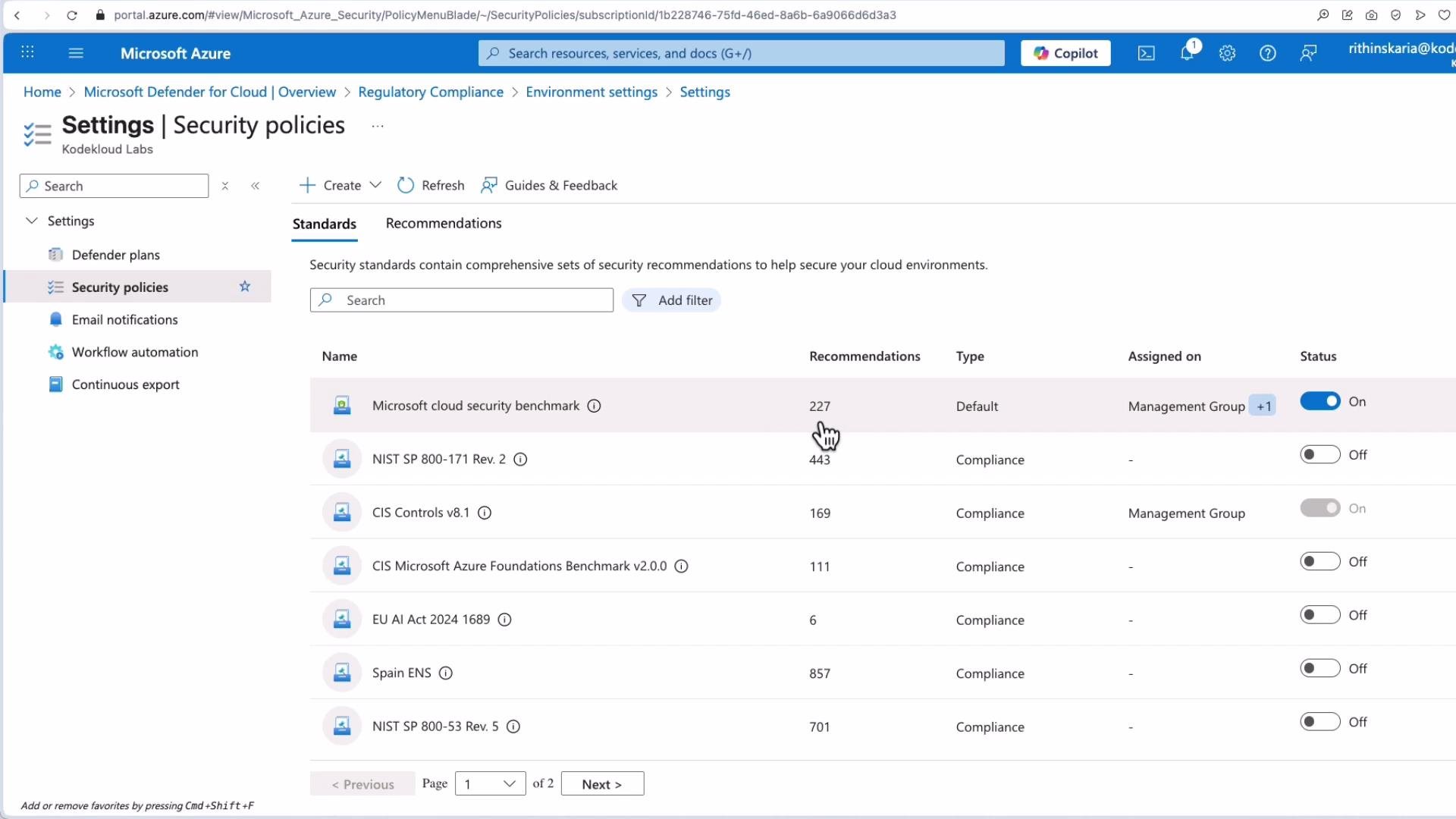 Common framework sizes (example):
* Microsoft Cloud Security Benchmark: \~227 recommendations
* CIS: \~169 recommendations
* NIST and others: may require additional parameters (for example, VM audit settings) before evaluation begins
Viewing controls and their policy definitions
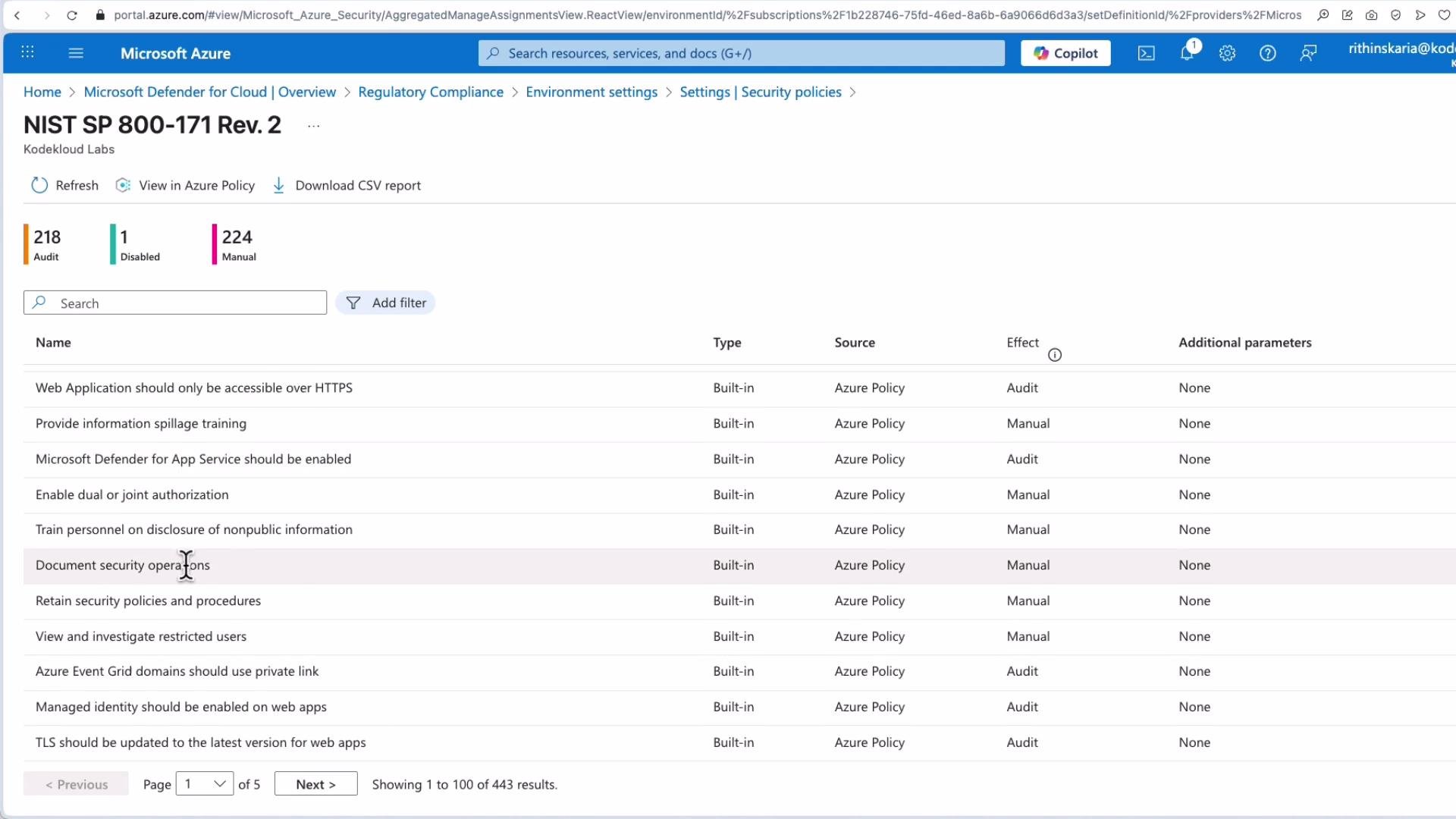
Click any attached compliance standard to inspect its controls and associated policy definitions. This lets you see which Azure Policy rules map to each control and which resources are evaluated by them.
Common framework sizes (example):
* Microsoft Cloud Security Benchmark: \~227 recommendations
* CIS: \~169 recommendations
* NIST and others: may require additional parameters (for example, VM audit settings) before evaluation begins
Viewing controls and their policy definitions
Click any attached compliance standard to inspect its controls and associated policy definitions. This lets you see which Azure Policy rules map to each control and which resources are evaluated by them.
 How recommendations are generated
* Defender for Cloud evaluates resources using the Azure Policy initiatives attached to each compliance standard plus built-in security assessment rules.
* After enabling a standard, Defender for Cloud scans resources and generates recommendations. Expect results within \~8–24 hours depending on resource count and evaluation cadence.
* Each recommendation provides context: risk details, remediation steps, automation options (Logic Apps playbooks), and the option to exempt or suppress specific resources when appropriate.
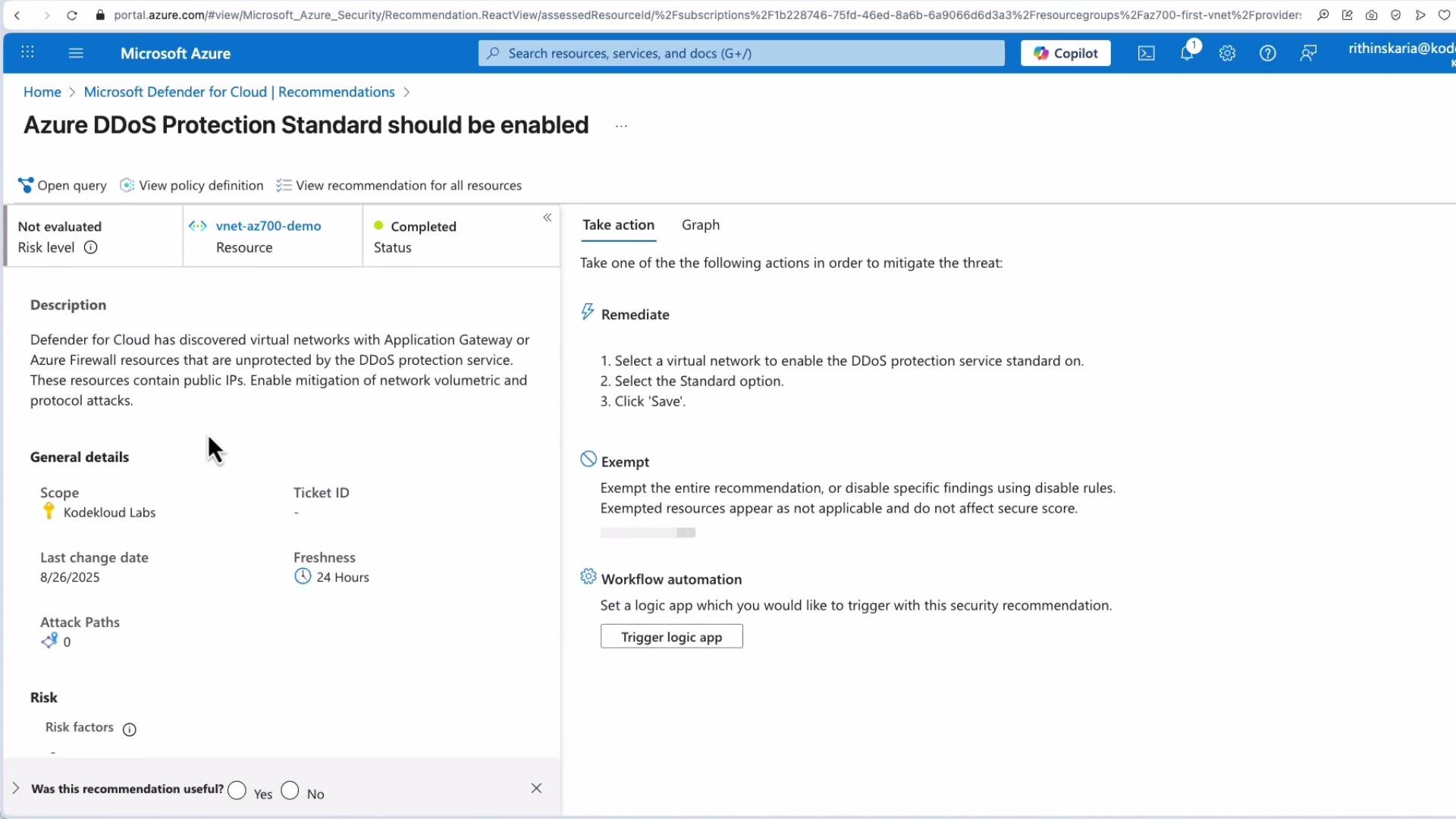
A typical recommendation example is enabling Azure DDoS Protection Standard; Defender for Cloud surfaces the recommendation and links to remediation guidance and automation.
How recommendations are generated
* Defender for Cloud evaluates resources using the Azure Policy initiatives attached to each compliance standard plus built-in security assessment rules.
* After enabling a standard, Defender for Cloud scans resources and generates recommendations. Expect results within \~8–24 hours depending on resource count and evaluation cadence.
* Each recommendation provides context: risk details, remediation steps, automation options (Logic Apps playbooks), and the option to exempt or suppress specific resources when appropriate.
A typical recommendation example is enabling Azure DDoS Protection Standard; Defender for Cloud surfaces the recommendation and links to remediation guidance and automation.
 Other common network-related recommendations
* Associate a subnet with a Network Security Group (NSG).
* Ensure NSGs follow published best practices and rules order (mappings like `NS-1`, `NS-2`).
* Configure firewalls and route tables to align with your selected benchmarks.
Defender plans and coverage
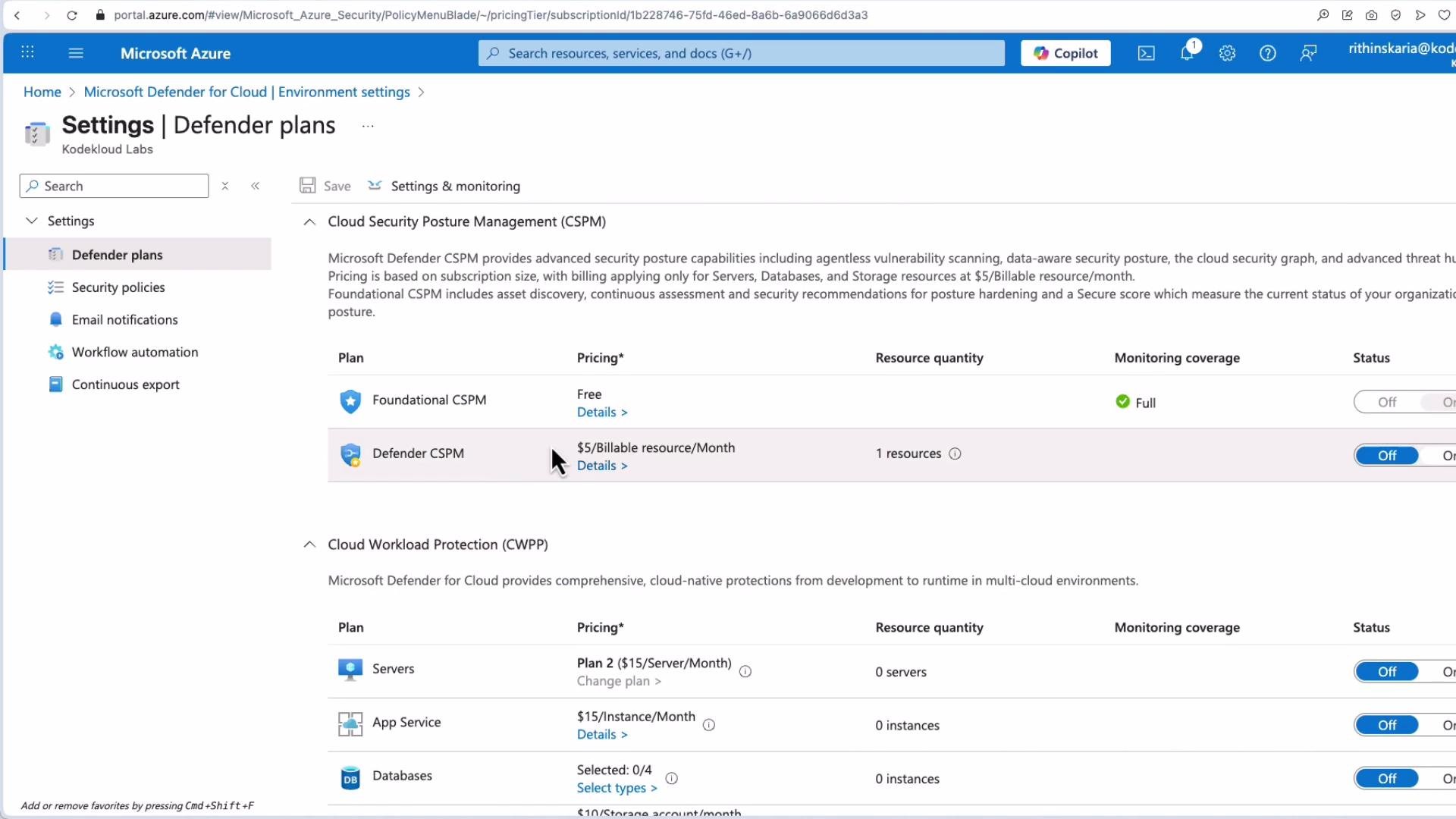
Defender for Cloud offers multiple plans that expand detection and protection beyond CSPM. These plans increase visibility and add workload-focused protections (Cloud Workload Protection, or CWP). See the Defender for Cloud overview for plan specifics and pricing.
Benefits of enabling Defender plans:
* Broader detection and protections for servers, App Services, containers, and databases
* Additional security recommendations and deeper telemetry
* Integration with EDR and endpoint protection for advanced investigations
Consider cost and coverage before enabling plans; review the scope and estimated charges in the portal.
Other common network-related recommendations
* Associate a subnet with a Network Security Group (NSG).
* Ensure NSGs follow published best practices and rules order (mappings like `NS-1`, `NS-2`).
* Configure firewalls and route tables to align with your selected benchmarks.
Defender plans and coverage
Defender for Cloud offers multiple plans that expand detection and protection beyond CSPM. These plans increase visibility and add workload-focused protections (Cloud Workload Protection, or CWP). See the Defender for Cloud overview for plan specifics and pricing.
Benefits of enabling Defender plans:
* Broader detection and protections for servers, App Services, containers, and databases
* Additional security recommendations and deeper telemetry
* Integration with EDR and endpoint protection for advanced investigations
Consider cost and coverage before enabling plans; review the scope and estimated charges in the portal.
 Allow 8–24 hours after enabling a compliance standard for recommendations to appear. The time can vary based on resource count and evaluation cadence.
Enabling Defender plans (CSPM/CWP) increases visibility and protection but may incur additional charges. Review pricing and required coverage before enabling.
Summary and next steps
* Microsoft Defender for Cloud maps industry frameworks to Azure Policy initiatives, presents a consolidated compliance dashboard, and provides prioritized remediation recommendations.
* Attach frameworks at the subscription or management group level via Environment settings → Security policies.
* After enabling frameworks, allow time for policy evaluations to populate recommendations.
* Evaluate the cost/benefit of enabling Defender plans to expand workload protection and detection.
Useful links and references
* Microsoft Defender for Cloud overview: [https://learn.microsoft.com/azure/defender-for-cloud/](https://learn.microsoft.com/azure/defender-for-cloud/)
* Azure Policy overview: [https://learn.microsoft.com/azure/governance/policy/overview](https://learn.microsoft.com/azure/governance/policy/overview)
* Azure Security Benchmark: [https://learn.microsoft.com/azure/security/fundamentals/azure-security-benchmark](https://learn.microsoft.com/azure/security/fundamentals/azure-security-benchmark)
* Secure Score in Defender for Cloud: [https://learn.microsoft.com/azure/defender-for-cloud/secure-score](https://learn.microsoft.com/azure/defender-for-cloud/secure-score)
* Azure DDoS Protection: [https://learn.microsoft.com/azure/ddos-protection/ddos-protection-overview](https://learn.microsoft.com/azure/ddos-protection/ddos-protection-overview)
This guide describes how Defender for Cloud helps manage regulatory compliance and prioritize network-security remediation in Azure.
Allow 8–24 hours after enabling a compliance standard for recommendations to appear. The time can vary based on resource count and evaluation cadence.
Enabling Defender plans (CSPM/CWP) increases visibility and protection but may incur additional charges. Review pricing and required coverage before enabling.
Summary and next steps
* Microsoft Defender for Cloud maps industry frameworks to Azure Policy initiatives, presents a consolidated compliance dashboard, and provides prioritized remediation recommendations.
* Attach frameworks at the subscription or management group level via Environment settings → Security policies.
* After enabling frameworks, allow time for policy evaluations to populate recommendations.
* Evaluate the cost/benefit of enabling Defender plans to expand workload protection and detection.
Useful links and references
* Microsoft Defender for Cloud overview: [https://learn.microsoft.com/azure/defender-for-cloud/](https://learn.microsoft.com/azure/defender-for-cloud/)
* Azure Policy overview: [https://learn.microsoft.com/azure/governance/policy/overview](https://learn.microsoft.com/azure/governance/policy/overview)
* Azure Security Benchmark: [https://learn.microsoft.com/azure/security/fundamentals/azure-security-benchmark](https://learn.microsoft.com/azure/security/fundamentals/azure-security-benchmark)
* Secure Score in Defender for Cloud: [https://learn.microsoft.com/azure/defender-for-cloud/secure-score](https://learn.microsoft.com/azure/defender-for-cloud/secure-score)
* Azure DDoS Protection: [https://learn.microsoft.com/azure/ddos-protection/ddos-protection-overview](https://learn.microsoft.com/azure/ddos-protection/ddos-protection-overview)
This guide describes how Defender for Cloud helps manage regulatory compliance and prioritize network-security remediation in Azure.