> ## Documentation Index
> Fetch the complete documentation index at: https://notes.kodekloud.com/llms.txt
> Use this file to discover all available pages before exploring further.
# Configure Forced Tunneling
> Configuring Azure forced tunneling to route selected subnet internet traffic through an on-premises security stack via site-to-site VPN for inspection, filtering, and centralized egress control
Configuring forced tunneling in Azure
This guide explains how to route outbound Internet traffic from selected Azure subnets through an on-premises security stack via a site-to-site VPN. Forced tunneling is used when you must inspect, filter, or apply on-premises security and NAT to Azure-originated Internet traffic for compliance, monitoring, or centralized egress control.
What you’ll learn
* The forced tunneling architecture pattern
* Step-by-step configuration using User-Defined Routes (UDRs)
* Example Azure CLI/PowerShell commands
* Operational considerations and testing tips
Architecture overview
In the example architecture below, front-end subnets are allowed to egress directly to the Internet, while back-end and mid-tier subnets have their Internet-bound traffic routed to the Virtual Network Gateway. That gateway sends traffic over the site-to-site VPN to on-premises appliances (firewalls, proxies, IDS/IPS) which inspect, filter, and perform NAT before forwarding to the Internet. Return traffic is routed back to on-premises and then over the VPN to Azure subnets.
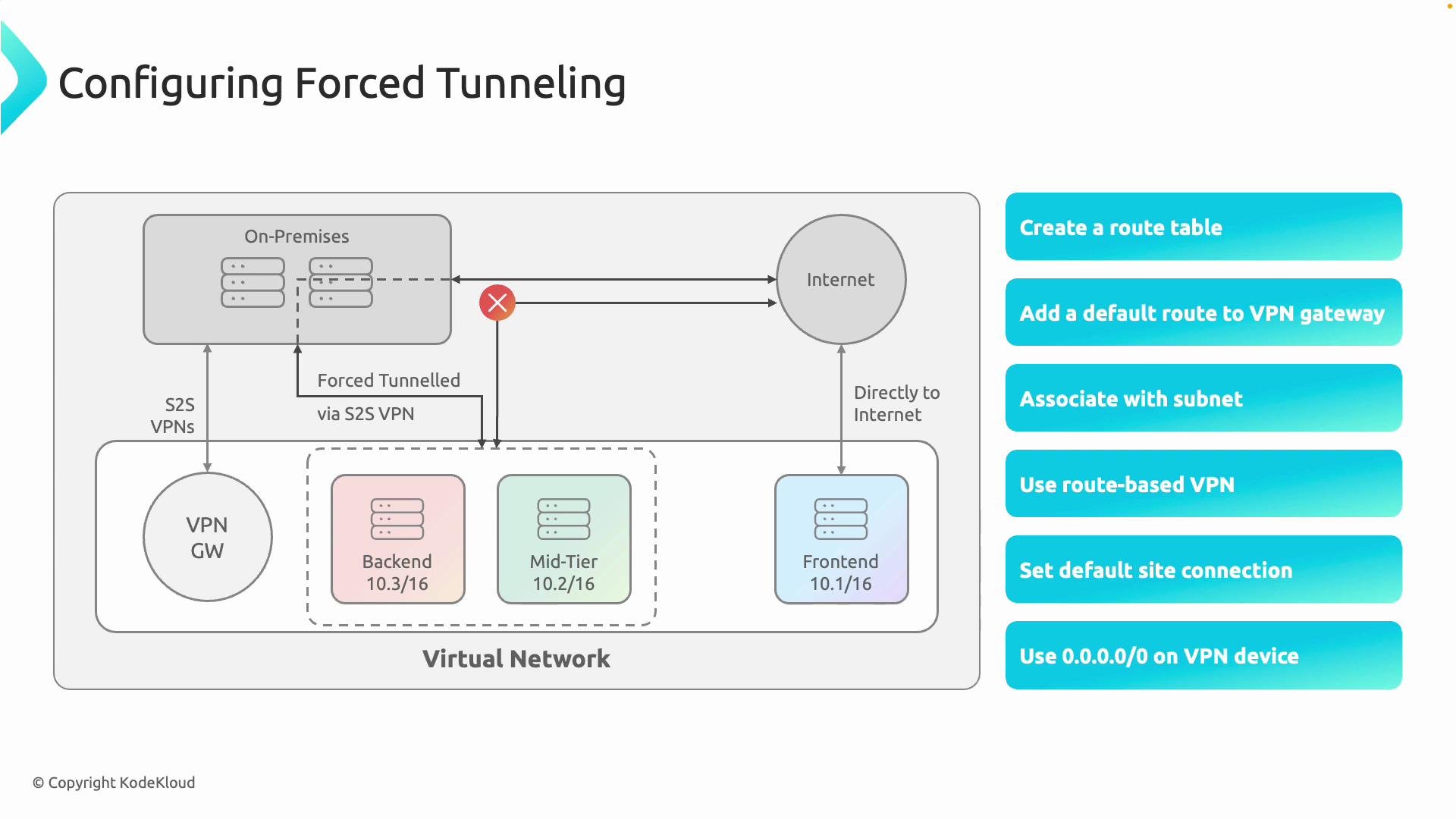 How forced tunneling works — step by step
1. Create a custom route table (UDR)
* Azure provides default system routes that allow VMs to egress directly to the Internet. To override that for selected subnets, create a User-Defined Route (UDR) route table and add explicit routes.
Example (Azure CLI):
```bash theme={null}
az network route-table create \
--name rt-forced-tunnel \
--resource-group MyResourceGroup \
--location eastus
```
2. Add a catch-all route that points to the Virtual Network Gateway
* Add a route with destination `0.0.0.0/0` and set the next hop type to `VirtualNetworkGateway`. This forces Internet-bound traffic from associated subnets to the VPN gateway.
Example (Azure CLI):
```bash theme={null}
az network route-table route create \
--resource-group MyResourceGroup \
--route-table-name rt-forced-tunnel \
--name DefaultRouteToVPN \
--address-prefix 0.0.0.0/0 \
--next-hop-type VirtualNetworkGateway
```
Note: Available next hop types include `VirtualNetwork`, `VirtualAppliance`, `Internet`, `VirtualNetworkGateway`, and others. For forced tunneling choose `VirtualNetworkGateway`.
3. Associate the route table with the target subnets
* Link the route table to the subnet(s) whose outbound traffic you want to force through on-premises (for example, backend and mid-tier subnets). Do not associate the UDR with the `GatewaySubnet`.
Example (Azure CLI):
```bash theme={null}
az network vnet subnet update \
--resource-group MyResourceGroup \
--vnet-name MyVNet \
--name BackEndSubnet \
--route-table rt-forced-tunnel
```
4. Ensure the VPN gateway is route-based
* Forced tunneling requires a route-based Virtual Network Gateway. Policy-based gateways do not support sending a `0.0.0.0/0` UDR to the gateway.
Make sure the Virtual Network Gateway is configured as route-based. Policy-based gateways do not support forced tunneling via a `0.0.0.0/0` UDR to the gateway.
How to check (Azure CLI):
```bash theme={null}
az network vnet-gateway show \
--resource-group MyResourceGroup \
--name MyVNetGateway \
--query "vpnType"
# Expected output: "RouteBased"
```
5. Configure the default/local network gateway and VPN connection
* In the Virtual Network Gateway settings, configure the default site (local network gateway) or the appropriate connection so Azure knows which on-premises gateway should receive Internet-bound traffic. Ensure the site-to-site connection is healthy.
6. Prepare your on-premises devices for backhaul and NAT
* On-premises VPN devices and security appliances must accept all Internet-bound traffic from Azure, perform inspection/filtering and NAT (if required), and forward traffic to the Internet. Return traffic must be routed back to on-premises so it can traverse the VPN back to Azure.
On-premises appliances will receive significantly more traffic when forced tunneling is enabled. Ensure capacity planning, correct NAT rules, and routing/backhaul for return traffic are in place; otherwise you can cause connectivity loss for Azure workloads.
Key considerations and best practices
| Topic | Recommendation | Example / Notes |
| --------------------- | --------------------------------------------------------------------- | -------------------------------------------------------------------------------------- |
| Gateway type | Use a route-based Virtual Network Gateway | `vpnType == "RouteBased"` |
| GatewaySubnet | Do not apply UDRs to the `GatewaySubnet` | Avoid associating route tables with the gateway subnet to prevent gateway disruption |
| NSGs and service tags | Continue to use NSGs to control permitted traffic inside Azure | UDRs control path; NSGs control allowed traffic flows |
| BGP | If using BGP, ensure proper route advertisement and route preferences | Make sure on-premises advertises routes for Azure subnets and respects preferred paths |
| DNS | Validate name resolution if on-premises proxies or filters affect DNS | Test Azure VM DNS lookups and proxied requests |
| Capacity planning | Ensure on-premises egress devices can handle increased throughput | Monitor bandwidth and session capacity before enabling globally |
Testing and validation
* Validate route propagation:
* From a VM in an associated subnet, examine the effective routes and confirm the `0.0.0.0/0` next hop is the Virtual Network Gateway.
* Azure CLI to view effective routes (example for Network Interface):
```bash theme={null}
az network nic show-effective-route-table \
--resource-group MyResourceGroup \
--name MyVMNic
```
* Functional test:
* From a VM in a forced-tunnel subnet, initiate an outbound request (e.g., `curl https://ifconfig.co`) and confirm the public IP matches the on-premises NATed egress IP—indicating traffic was NATed on-premises.
* Verify inspection logs, proxy logs, or firewall sessions on the on-premises appliances show the Azure-originated connections.
* Monitoring:
* Use Network Watcher flow logs and on-premises monitoring to verify traffic patterns and troubleshoot drops or asymmetric routing.
When to choose forced tunneling
* Use forced tunneling when you require centralized inspection, logging, or egress NAT for Azure-originated Internet traffic.
* Avoid if on-premises devices lack capacity, or if the added latency and failure domain are unacceptable for specific workloads.
Summary
To implement forced tunneling in Azure:
1. Create a custom route table (UDR).
2. Add a `0.0.0.0/0` route with the next hop `VirtualNetworkGateway`.
3. Associate the UDR with only the subnets that require forced tunneling (never the `GatewaySubnet`).
4. Ensure the Virtual Network Gateway is route-based and the site-to-site VPN is healthy.
5. Prepare on-premises appliances to inspect, NAT, and forward traffic and to route responses back to Azure.
References
* [Azure Virtual Network routing overview](https://learn.microsoft.com/azure/virtual-network/virtual-networks-udr-overview)
* [Forced tunneling with VPN Gateway](https://learn.microsoft.com/azure/vpn-gateway/vpn-gateway-forced-tunneling)
* [Configure a site-to-site VPN connection in Azure](https://learn.microsoft.com/azure/vpn-gateway/vpn-gateway-howto-site-to-site-resource-manager)
How forced tunneling works — step by step
1. Create a custom route table (UDR)
* Azure provides default system routes that allow VMs to egress directly to the Internet. To override that for selected subnets, create a User-Defined Route (UDR) route table and add explicit routes.
Example (Azure CLI):
```bash theme={null}
az network route-table create \
--name rt-forced-tunnel \
--resource-group MyResourceGroup \
--location eastus
```
2. Add a catch-all route that points to the Virtual Network Gateway
* Add a route with destination `0.0.0.0/0` and set the next hop type to `VirtualNetworkGateway`. This forces Internet-bound traffic from associated subnets to the VPN gateway.
Example (Azure CLI):
```bash theme={null}
az network route-table route create \
--resource-group MyResourceGroup \
--route-table-name rt-forced-tunnel \
--name DefaultRouteToVPN \
--address-prefix 0.0.0.0/0 \
--next-hop-type VirtualNetworkGateway
```
Note: Available next hop types include `VirtualNetwork`, `VirtualAppliance`, `Internet`, `VirtualNetworkGateway`, and others. For forced tunneling choose `VirtualNetworkGateway`.
3. Associate the route table with the target subnets
* Link the route table to the subnet(s) whose outbound traffic you want to force through on-premises (for example, backend and mid-tier subnets). Do not associate the UDR with the `GatewaySubnet`.
Example (Azure CLI):
```bash theme={null}
az network vnet subnet update \
--resource-group MyResourceGroup \
--vnet-name MyVNet \
--name BackEndSubnet \
--route-table rt-forced-tunnel
```
4. Ensure the VPN gateway is route-based
* Forced tunneling requires a route-based Virtual Network Gateway. Policy-based gateways do not support sending a `0.0.0.0/0` UDR to the gateway.
Make sure the Virtual Network Gateway is configured as route-based. Policy-based gateways do not support forced tunneling via a `0.0.0.0/0` UDR to the gateway.
How to check (Azure CLI):
```bash theme={null}
az network vnet-gateway show \
--resource-group MyResourceGroup \
--name MyVNetGateway \
--query "vpnType"
# Expected output: "RouteBased"
```
5. Configure the default/local network gateway and VPN connection
* In the Virtual Network Gateway settings, configure the default site (local network gateway) or the appropriate connection so Azure knows which on-premises gateway should receive Internet-bound traffic. Ensure the site-to-site connection is healthy.
6. Prepare your on-premises devices for backhaul and NAT
* On-premises VPN devices and security appliances must accept all Internet-bound traffic from Azure, perform inspection/filtering and NAT (if required), and forward traffic to the Internet. Return traffic must be routed back to on-premises so it can traverse the VPN back to Azure.
On-premises appliances will receive significantly more traffic when forced tunneling is enabled. Ensure capacity planning, correct NAT rules, and routing/backhaul for return traffic are in place; otherwise you can cause connectivity loss for Azure workloads.
Key considerations and best practices
| Topic | Recommendation | Example / Notes |
| --------------------- | --------------------------------------------------------------------- | -------------------------------------------------------------------------------------- |
| Gateway type | Use a route-based Virtual Network Gateway | `vpnType == "RouteBased"` |
| GatewaySubnet | Do not apply UDRs to the `GatewaySubnet` | Avoid associating route tables with the gateway subnet to prevent gateway disruption |
| NSGs and service tags | Continue to use NSGs to control permitted traffic inside Azure | UDRs control path; NSGs control allowed traffic flows |
| BGP | If using BGP, ensure proper route advertisement and route preferences | Make sure on-premises advertises routes for Azure subnets and respects preferred paths |
| DNS | Validate name resolution if on-premises proxies or filters affect DNS | Test Azure VM DNS lookups and proxied requests |
| Capacity planning | Ensure on-premises egress devices can handle increased throughput | Monitor bandwidth and session capacity before enabling globally |
Testing and validation
* Validate route propagation:
* From a VM in an associated subnet, examine the effective routes and confirm the `0.0.0.0/0` next hop is the Virtual Network Gateway.
* Azure CLI to view effective routes (example for Network Interface):
```bash theme={null}
az network nic show-effective-route-table \
--resource-group MyResourceGroup \
--name MyVMNic
```
* Functional test:
* From a VM in a forced-tunnel subnet, initiate an outbound request (e.g., `curl https://ifconfig.co`) and confirm the public IP matches the on-premises NATed egress IP—indicating traffic was NATed on-premises.
* Verify inspection logs, proxy logs, or firewall sessions on the on-premises appliances show the Azure-originated connections.
* Monitoring:
* Use Network Watcher flow logs and on-premises monitoring to verify traffic patterns and troubleshoot drops or asymmetric routing.
When to choose forced tunneling
* Use forced tunneling when you require centralized inspection, logging, or egress NAT for Azure-originated Internet traffic.
* Avoid if on-premises devices lack capacity, or if the added latency and failure domain are unacceptable for specific workloads.
Summary
To implement forced tunneling in Azure:
1. Create a custom route table (UDR).
2. Add a `0.0.0.0/0` route with the next hop `VirtualNetworkGateway`.
3. Associate the UDR with only the subnets that require forced tunneling (never the `GatewaySubnet`).
4. Ensure the Virtual Network Gateway is route-based and the site-to-site VPN is healthy.
5. Prepare on-premises appliances to inspect, NAT, and forward traffic and to route responses back to Azure.
References
* [Azure Virtual Network routing overview](https://learn.microsoft.com/azure/virtual-network/virtual-networks-udr-overview)
* [Forced tunneling with VPN Gateway](https://learn.microsoft.com/azure/vpn-gateway/vpn-gateway-forced-tunneling)
* [Configure a site-to-site VPN connection in Azure](https://learn.microsoft.com/azure/vpn-gateway/vpn-gateway-howto-site-to-site-resource-manager)