> ## Documentation Index
> Fetch the complete documentation index at: https://notes.kodekloud.com/llms.txt
> Use this file to discover all available pages before exploring further.
# Web Application Firewall Custom Rules
> Azure Front Door WAF custom rules creation and management to allow, block, or log requests, set priorities and rate limits, enable logging, testing, and prevent bypass to protect backends
WAF custom rules for Azure Front Door.
Up to this point we looked at the Default Rule Set (DRS), which provides baseline protection against common web attacks. However, every deployment has unique traffic patterns and constraints. Custom rules let administrators implement precise policies that reflect real-world requirements—such as allowing only traffic from specific countries or rate-limiting abusive clients.
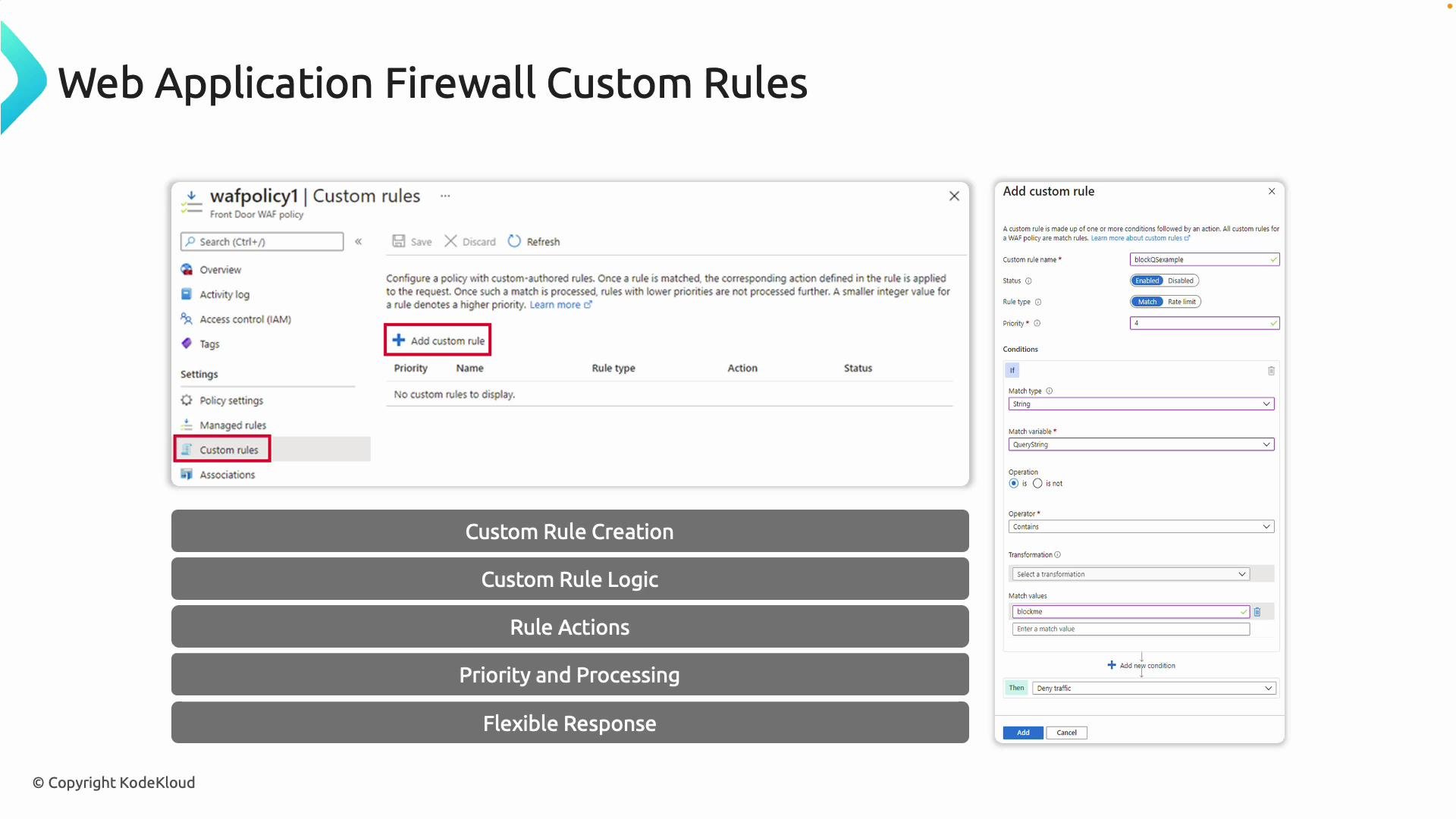 What are custom rules?
Custom rules are user-defined policies composed of match conditions and a resulting action. They extend the Default Rule Set so you can block, allow, or log requests that meet specific criteria unique to your environment. Because these rules are evaluated before the DRS, they give you the ability to override or short-circuit default protections when needed.
Common match variables and example uses:
| Match variable | Typical use case | Example |
| ---------------------- | ------------------------------------------------ | ---------------------------- |
| IP address (source IP) | Block or allow specific IPs/ranges | `203.0.113.0/24` |
| Geo-location | Deny traffic from an entire country or region | `Country == United States` |
| HTTP method | Restrict unsafe methods to certain endpoints | `Method == POST` |
| Query string values | Block requests with suspicious query parameters | `queryparam == "debug=true"` |
| Headers and cookies | Enforce header-based access or security policies | `User-Agent contains "bot"` |
| Request body size | Prevent large payloads to protect resources | `RequestBodyLength > 10240` |
Actions available:
| Action | Behavior |
| ------ | ------------------------------------------------------------------ |
| Allow | Immediately permit the request and skip further WAF processing |
| Block | Drop the request and return a managed response |
| Log | Record the request to diagnostics for observation without blocking |
Rule evaluation order and priorities
* Custom rules run before the Default Rule Set.
* Lower numeric priority values are evaluated before higher ones (e.g., priority `1` executes before `10`).
* Proper ordering is critical when multiple rules could match the same request—use priority to enforce the intended precedence.
Custom rules types
* Match: Evaluate conditions and apply the chosen action.
* Rate limit: Track request rates and block when a threshold is exceeded.
Because custom rules are under your control, they let you respond quickly to targeted threats (for example, a sudden spike from a malicious IP range) without waiting for DRS updates.
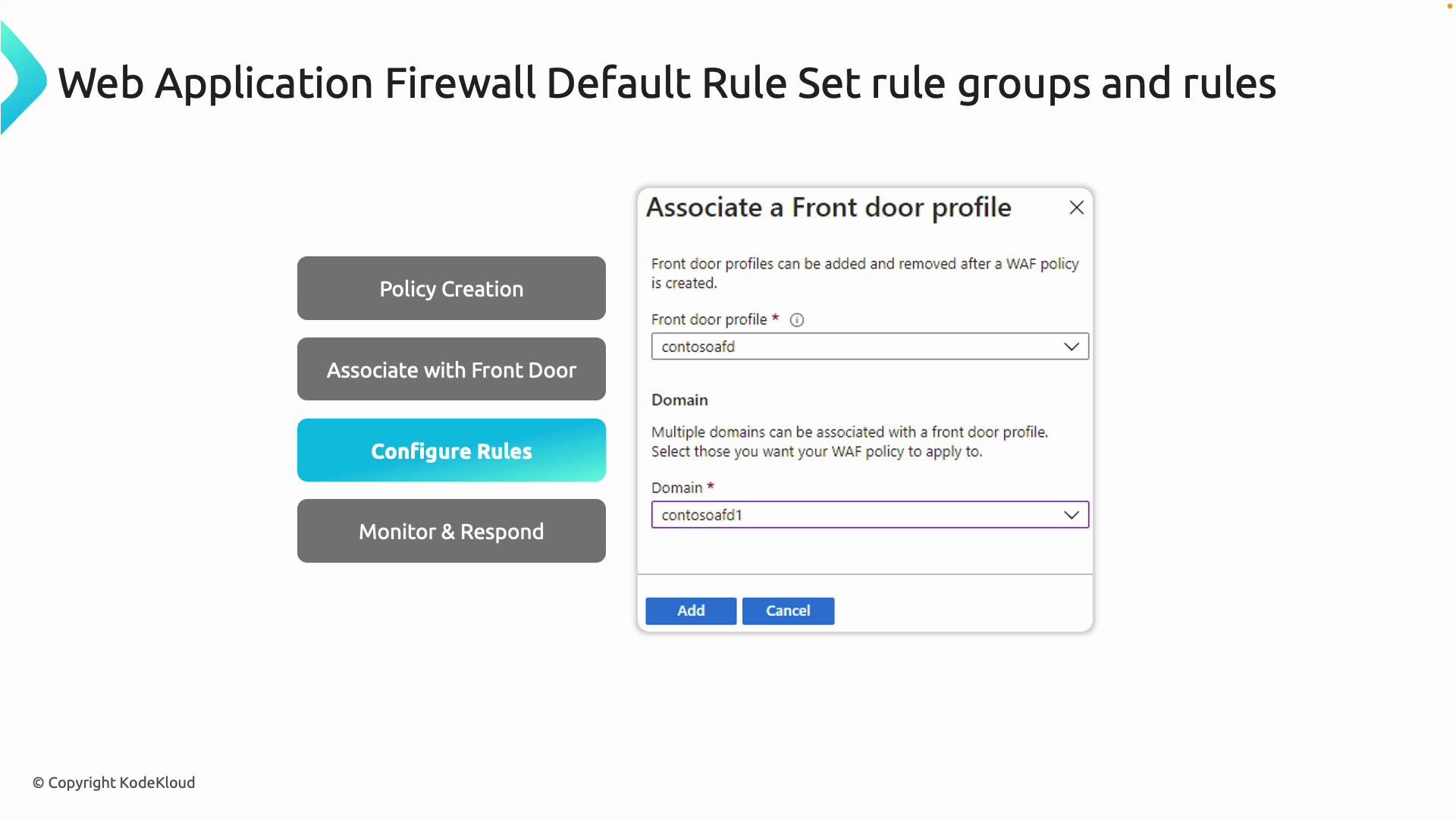
Associating WAF policy with Front Door
Create a WAF policy to hold both your Default Rule Set configuration and your custom rules; then associate that policy with your Front Door profile. When attached to Front Door, the policy protects incoming requests at the edge before they reach your backend applications—providing centralized, edge-level enforcement. Inside the policy you can tune the DRS, enable/disable WAF rule groups, and add multiple custom rules.
What are custom rules?
Custom rules are user-defined policies composed of match conditions and a resulting action. They extend the Default Rule Set so you can block, allow, or log requests that meet specific criteria unique to your environment. Because these rules are evaluated before the DRS, they give you the ability to override or short-circuit default protections when needed.
Common match variables and example uses:
| Match variable | Typical use case | Example |
| ---------------------- | ------------------------------------------------ | ---------------------------- |
| IP address (source IP) | Block or allow specific IPs/ranges | `203.0.113.0/24` |
| Geo-location | Deny traffic from an entire country or region | `Country == United States` |
| HTTP method | Restrict unsafe methods to certain endpoints | `Method == POST` |
| Query string values | Block requests with suspicious query parameters | `queryparam == "debug=true"` |
| Headers and cookies | Enforce header-based access or security policies | `User-Agent contains "bot"` |
| Request body size | Prevent large payloads to protect resources | `RequestBodyLength > 10240` |
Actions available:
| Action | Behavior |
| ------ | ------------------------------------------------------------------ |
| Allow | Immediately permit the request and skip further WAF processing |
| Block | Drop the request and return a managed response |
| Log | Record the request to diagnostics for observation without blocking |
Rule evaluation order and priorities
* Custom rules run before the Default Rule Set.
* Lower numeric priority values are evaluated before higher ones (e.g., priority `1` executes before `10`).
* Proper ordering is critical when multiple rules could match the same request—use priority to enforce the intended precedence.
Custom rules types
* Match: Evaluate conditions and apply the chosen action.
* Rate limit: Track request rates and block when a threshold is exceeded.
Because custom rules are under your control, they let you respond quickly to targeted threats (for example, a sudden spike from a malicious IP range) without waiting for DRS updates.
Associating WAF policy with Front Door
Create a WAF policy to hold both your Default Rule Set configuration and your custom rules; then associate that policy with your Front Door profile. When attached to Front Door, the policy protects incoming requests at the edge before they reach your backend applications—providing centralized, edge-level enforcement. Inside the policy you can tune the DRS, enable/disable WAF rule groups, and add multiple custom rules.
 Logging and observability
WAF logs are integrated with Azure Monitor and can be forwarded to:
* Log Analytics
* Event Hubs
* Storage Accounts
These logs let you track blocked requests, detect suspicious patterns, and review false positives. Use them to iteratively refine rules and confirm the effectiveness of your controls.
When testing geo-based rules, remember that geo-location is inferred from the source IP. Using a VPN or a test client located in the target region is the most reliable way to validate country-based blocking.
Walkthrough: adding a custom rule in the Azure portal
1. Open your Front Door WAF policy in the Azure portal.
2. Select "Custom rules" and click "Add custom rule."
3. Provide a name (for example, `DenyUS`) and set the status to Enabled. Choose the rule type: Match or Rate limit.
4. Assign a priority (lower numbers run first — e.g., `1`).
5. Add one or more match conditions (for geo-blocking, select the Geo Location match variable that maps source IP to country).
6. Select the action: Allow, Block, or Log.
7. Save the policy — the rule is now enforced at the edge.
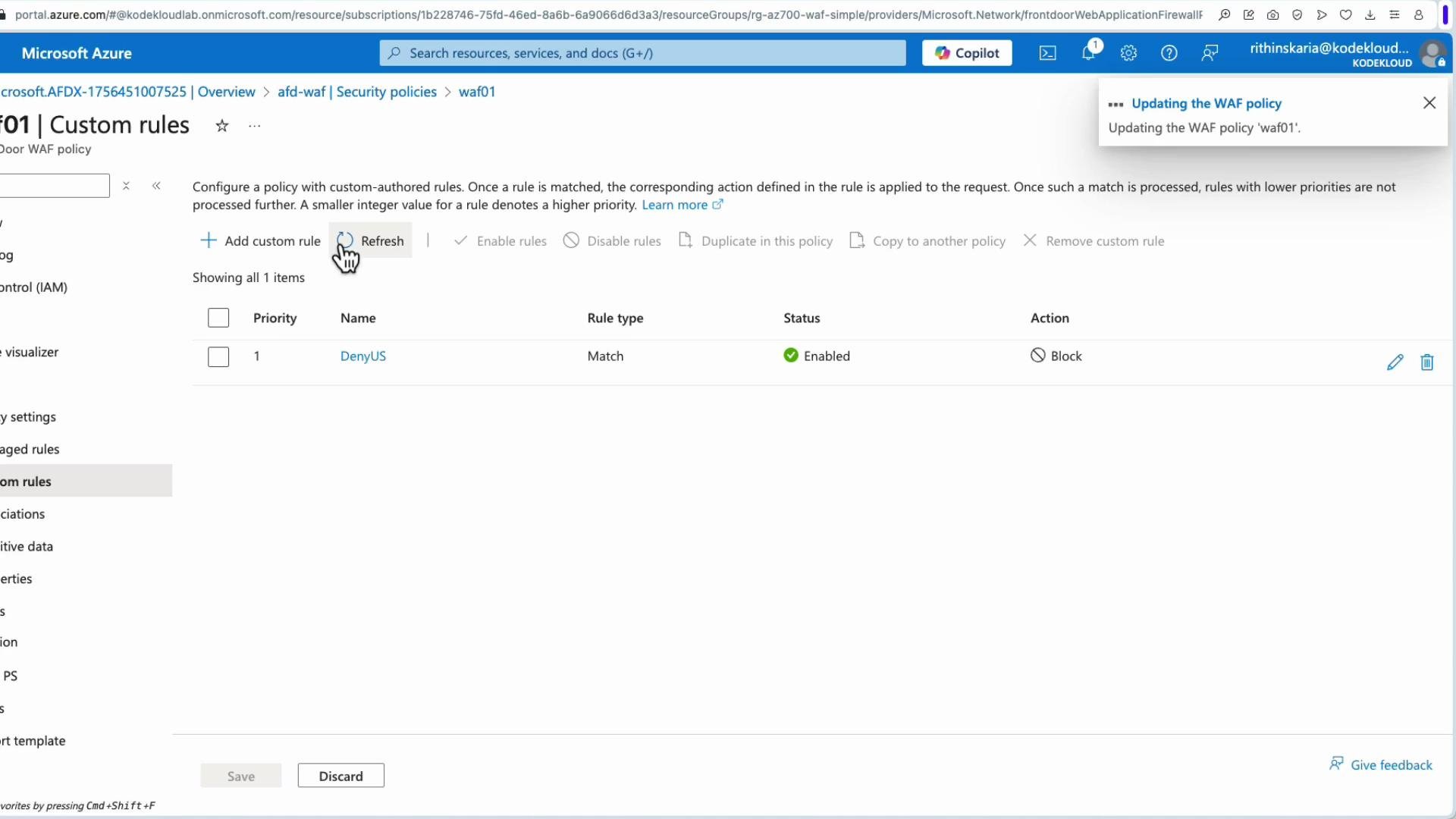
Example: DenyUS
In this example the administrator creates a match rule named `DenyUS`, enabled, with action `Block` and priority `1`. The policy immediately starts rejecting requests that match the geo-location condition.
Logging and observability
WAF logs are integrated with Azure Monitor and can be forwarded to:
* Log Analytics
* Event Hubs
* Storage Accounts
These logs let you track blocked requests, detect suspicious patterns, and review false positives. Use them to iteratively refine rules and confirm the effectiveness of your controls.
When testing geo-based rules, remember that geo-location is inferred from the source IP. Using a VPN or a test client located in the target region is the most reliable way to validate country-based blocking.
Walkthrough: adding a custom rule in the Azure portal
1. Open your Front Door WAF policy in the Azure portal.
2. Select "Custom rules" and click "Add custom rule."
3. Provide a name (for example, `DenyUS`) and set the status to Enabled. Choose the rule type: Match or Rate limit.
4. Assign a priority (lower numbers run first — e.g., `1`).
5. Add one or more match conditions (for geo-blocking, select the Geo Location match variable that maps source IP to country).
6. Select the action: Allow, Block, or Log.
7. Save the policy — the rule is now enforced at the edge.
Example: DenyUS
In this example the administrator creates a match rule named `DenyUS`, enabled, with action `Block` and priority `1`. The policy immediately starts rejecting requests that match the geo-location condition.
 Testing rules
* For geo-based denies, originate requests from the target geography (for example via a VPN endpoint in the United States) to verify they are blocked.
* To test specific attack mitigations (e.g., XSS), send benign test payloads and confirm requests are either blocked or logged. Example payloads:
```html theme={null}
Testing rules
* For geo-based denies, originate requests from the target geography (for example via a VPN endpoint in the United States) to verify they are blocked.
* To test specific attack mitigations (e.g., XSS), send benign test payloads and confirm requests are either blocked or logged. Example payloads:
```html theme={null}
 ```
In the demo, the admin connected through a US-based VPN and loaded the application root; the request was blocked by WAF. After disconnecting the VPN (so requests originated from an allowed region), the application became reachable again—confirming the geo-based block behaved as expected.
WAF applied at Front Door protects traffic that flows through Front Door. It does not protect direct access to a web app's platform URL (for example `yourapp.azurewebsites.net`). If an attacker discovers the direct app endpoint, they can bypass Front Door/WAF unless additional access controls are in place.
Preventing bypass of Front Door
To ensure all internet traffic flows through Front Door/WAF and to prevent direct access to the backend:
* Restrict the backend with Private Endpoints or network controls so it is not publicly addressable.
* Use Service Endpoints, Private Endpoints, or access restrictions on App Service to remove the public surface.
* Combine Front Door (edge protection) with private connectivity to the backend so the WAF is the single entry point for internet traffic.
Best practices and recommendations
* Start by logging (Log action) new rules for a period to monitor impact before switching to Block.
* Keep rule priorities explicit and document the intended precedence.
* Use Log Analytics queries to detect false positives and tune rules iteratively.
* For high-risk, time-sensitive threats, create temporary high-priority rules and review them regularly.
* Regularly review the Default Rule Set updates and reconcile them with your custom rules to avoid unintended conflicts.
References and further reading
* [Azure Monitor documentation](https://learn.microsoft.com/azure/azure-monitor/)
* [Log Analytics overview](https://learn.microsoft.com/azure/azure-monitor/logs/)
* [Event Hubs documentation](https://learn.microsoft.com/azure/event-hubs/)
* [Azure Storage documentation](https://learn.microsoft.com/azure/storage)
```
In the demo, the admin connected through a US-based VPN and loaded the application root; the request was blocked by WAF. After disconnecting the VPN (so requests originated from an allowed region), the application became reachable again—confirming the geo-based block behaved as expected.
WAF applied at Front Door protects traffic that flows through Front Door. It does not protect direct access to a web app's platform URL (for example `yourapp.azurewebsites.net`). If an attacker discovers the direct app endpoint, they can bypass Front Door/WAF unless additional access controls are in place.
Preventing bypass of Front Door
To ensure all internet traffic flows through Front Door/WAF and to prevent direct access to the backend:
* Restrict the backend with Private Endpoints or network controls so it is not publicly addressable.
* Use Service Endpoints, Private Endpoints, or access restrictions on App Service to remove the public surface.
* Combine Front Door (edge protection) with private connectivity to the backend so the WAF is the single entry point for internet traffic.
Best practices and recommendations
* Start by logging (Log action) new rules for a period to monitor impact before switching to Block.
* Keep rule priorities explicit and document the intended precedence.
* Use Log Analytics queries to detect false positives and tune rules iteratively.
* For high-risk, time-sensitive threats, create temporary high-priority rules and review them regularly.
* Regularly review the Default Rule Set updates and reconcile them with your custom rules to avoid unintended conflicts.
References and further reading
* [Azure Monitor documentation](https://learn.microsoft.com/azure/azure-monitor/)
* [Log Analytics overview](https://learn.microsoft.com/azure/azure-monitor/logs/)
* [Event Hubs documentation](https://learn.microsoft.com/azure/event-hubs/)
* [Azure Storage documentation](https://learn.microsoft.com/azure/storage)