> ## Documentation Index
> Fetch the complete documentation index at: https://notes.kodekloud.com/llms.txt
> Use this file to discover all available pages before exploring further.
# Web Application Firewall
> Overview of Azure Web Application Firewall features, deployment options, policy modes, managed and custom rules, and logging to protect web applications from common threats like SQL injection and XSS
Web Application Firewall (WAF) delivers layered, application-focused protection for web workloads. An effective WAF simplifies security operations and reduces risk by providing centralized inspection, rapid mitigation, and built-in protections that address common web threats.
First, centralized protection.
Rather than configuring each application individually, you define and manage WAF policies centrally and apply them across multiple applications. Centralized policy management enforces consistent controls, reduces configuration drift, and speeds response when threats emerge.
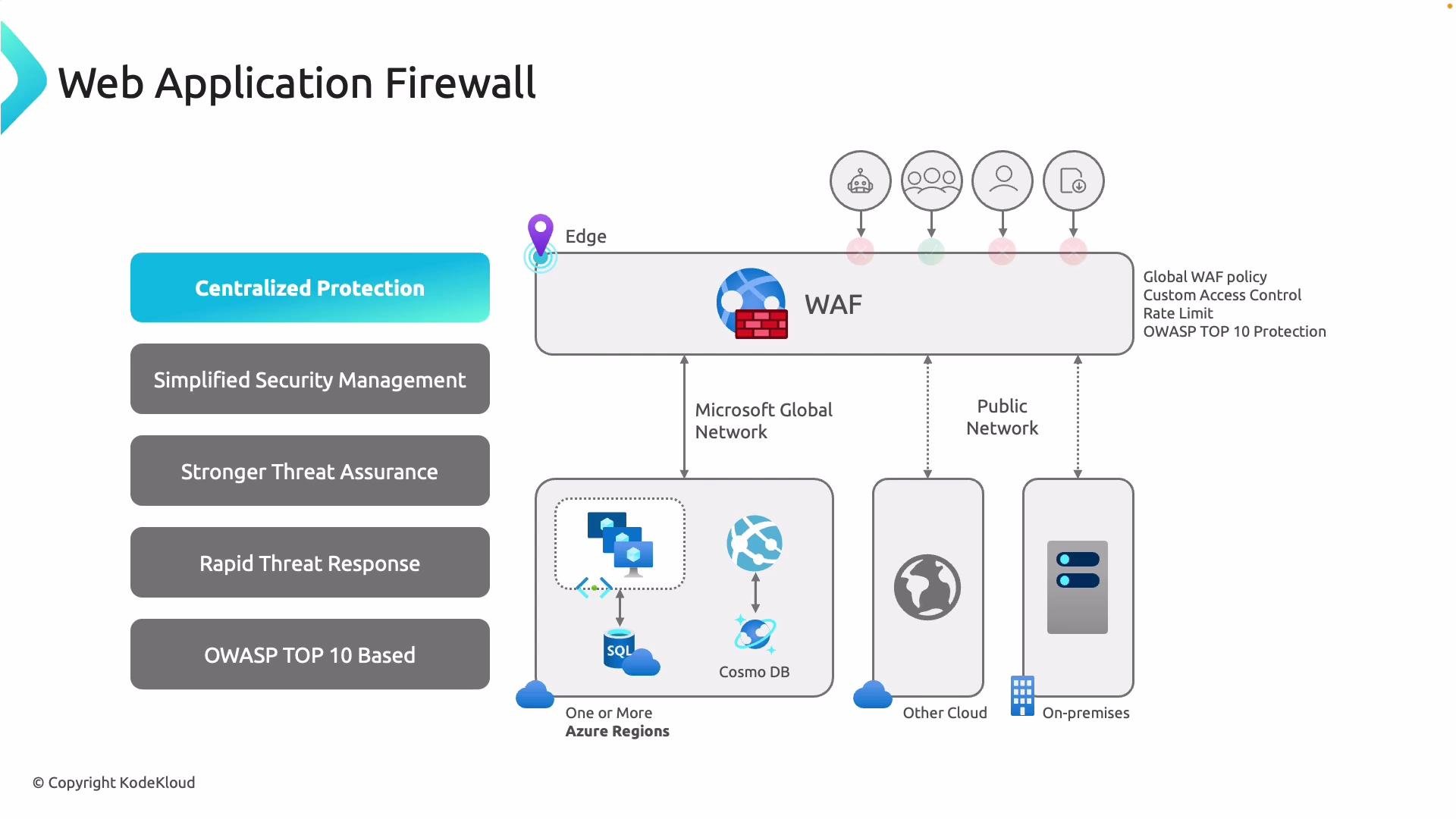 Second, simplified security management.
Security teams can author, tune, and roll out WAF rules from one place without coordinating with dozens of application teams. When a new attack is discovered, enabling or adjusting a rule reduces exposure for all protected applications immediately.
Third, threat assurance.
Whether deployed at the edge or inside your virtual network, a WAF inspects incoming HTTP(S) traffic and filters common web attacks—such as SQL injection, cross-site scripting (XSS), and automated malicious bot traffic—before they reach your back-end servers. This inspection reduces the attack surface and helps protect sensitive data and credentials.
Fourth, rapid response.
WAF policies provide a fast mitigation path for zero-day vulnerabilities and emerging threats. Because rules are applied centrally, you can protect multiple applications before application code patches are available.
Finally, coverage of the OWASP Top 10.
Azure WAF managed rule sets include protections that map to many categories in the OWASP Top 10 (for example, injection, broken authentication, and sensitive data exposure). Enabling WAF gives you an immediate baseline of defense against the most common risk categories.
Azure provides two primary WAF deployment options. Choose the option that best fits where you need inspection and control:
| Deployment | Runs where | Best for | Key capabilities |
| -------------------------- | --------------------------------------------- | ---------------------------------------------------------------------------------------- | ------------------------------------------------------------------------------------------------------------------------------------- |
| WAF on Application Gateway | In an Azure region, integrated with your VNet | Applications hosted inside VNets with private back ends | Per-listener / path / backend WAF policy associations; per-application logging and analytics; strong VNet integration |
| WAF on Azure Front Door | Microsoft global edge | Global, multi-region, or hybrid applications that require edge inspection close to users | Global policy applied across endpoints and origins; low-latency edge filtering; convenient for multi-region routing and CDN scenarios |
* WAF on Application Gateway: Use when your apps are hosted within VNets and you need granular, per-application policy associations (listeners, URL path-based routing, or back-end scopes). Logs are tied to the gateway for detailed per-application analysis.
* WAF on Azure Front Door: Use when you want inspection at Microsoft’s global edge to stop malicious requests close to users and origins. A single WAF policy can span multiple Front Door endpoints and origins—ideal for global consistency.
A WAF operates in two primary modes; understanding them is important for safe rollout:
* Detection mode (default): The WAF evaluates traffic against rules but does not block requests; it only logs matches. This lets you observe which rules would trigger and fine-tune exclusions or mitigations before enforcing blocks.
* Prevention mode: The WAF blocks requests that match configured malicious signatures or rules while still logging those events. In prevention mode, an attempted SQL injection or XSS payload is dropped at the edge and never reaches the origin.
Second, simplified security management.
Security teams can author, tune, and roll out WAF rules from one place without coordinating with dozens of application teams. When a new attack is discovered, enabling or adjusting a rule reduces exposure for all protected applications immediately.
Third, threat assurance.
Whether deployed at the edge or inside your virtual network, a WAF inspects incoming HTTP(S) traffic and filters common web attacks—such as SQL injection, cross-site scripting (XSS), and automated malicious bot traffic—before they reach your back-end servers. This inspection reduces the attack surface and helps protect sensitive data and credentials.
Fourth, rapid response.
WAF policies provide a fast mitigation path for zero-day vulnerabilities and emerging threats. Because rules are applied centrally, you can protect multiple applications before application code patches are available.
Finally, coverage of the OWASP Top 10.
Azure WAF managed rule sets include protections that map to many categories in the OWASP Top 10 (for example, injection, broken authentication, and sensitive data exposure). Enabling WAF gives you an immediate baseline of defense against the most common risk categories.
Azure provides two primary WAF deployment options. Choose the option that best fits where you need inspection and control:
| Deployment | Runs where | Best for | Key capabilities |
| -------------------------- | --------------------------------------------- | ---------------------------------------------------------------------------------------- | ------------------------------------------------------------------------------------------------------------------------------------- |
| WAF on Application Gateway | In an Azure region, integrated with your VNet | Applications hosted inside VNets with private back ends | Per-listener / path / backend WAF policy associations; per-application logging and analytics; strong VNet integration |
| WAF on Azure Front Door | Microsoft global edge | Global, multi-region, or hybrid applications that require edge inspection close to users | Global policy applied across endpoints and origins; low-latency edge filtering; convenient for multi-region routing and CDN scenarios |
* WAF on Application Gateway: Use when your apps are hosted within VNets and you need granular, per-application policy associations (listeners, URL path-based routing, or back-end scopes). Logs are tied to the gateway for detailed per-application analysis.
* WAF on Azure Front Door: Use when you want inspection at Microsoft’s global edge to stop malicious requests close to users and origins. A single WAF policy can span multiple Front Door endpoints and origins—ideal for global consistency.
A WAF operates in two primary modes; understanding them is important for safe rollout:
* Detection mode (default): The WAF evaluates traffic against rules but does not block requests; it only logs matches. This lets you observe which rules would trigger and fine-tune exclusions or mitigations before enforcing blocks.
* Prevention mode: The WAF blocks requests that match configured malicious signatures or rules while still logging those events. In prevention mode, an attempted SQL injection or XSS payload is dropped at the edge and never reaches the origin.
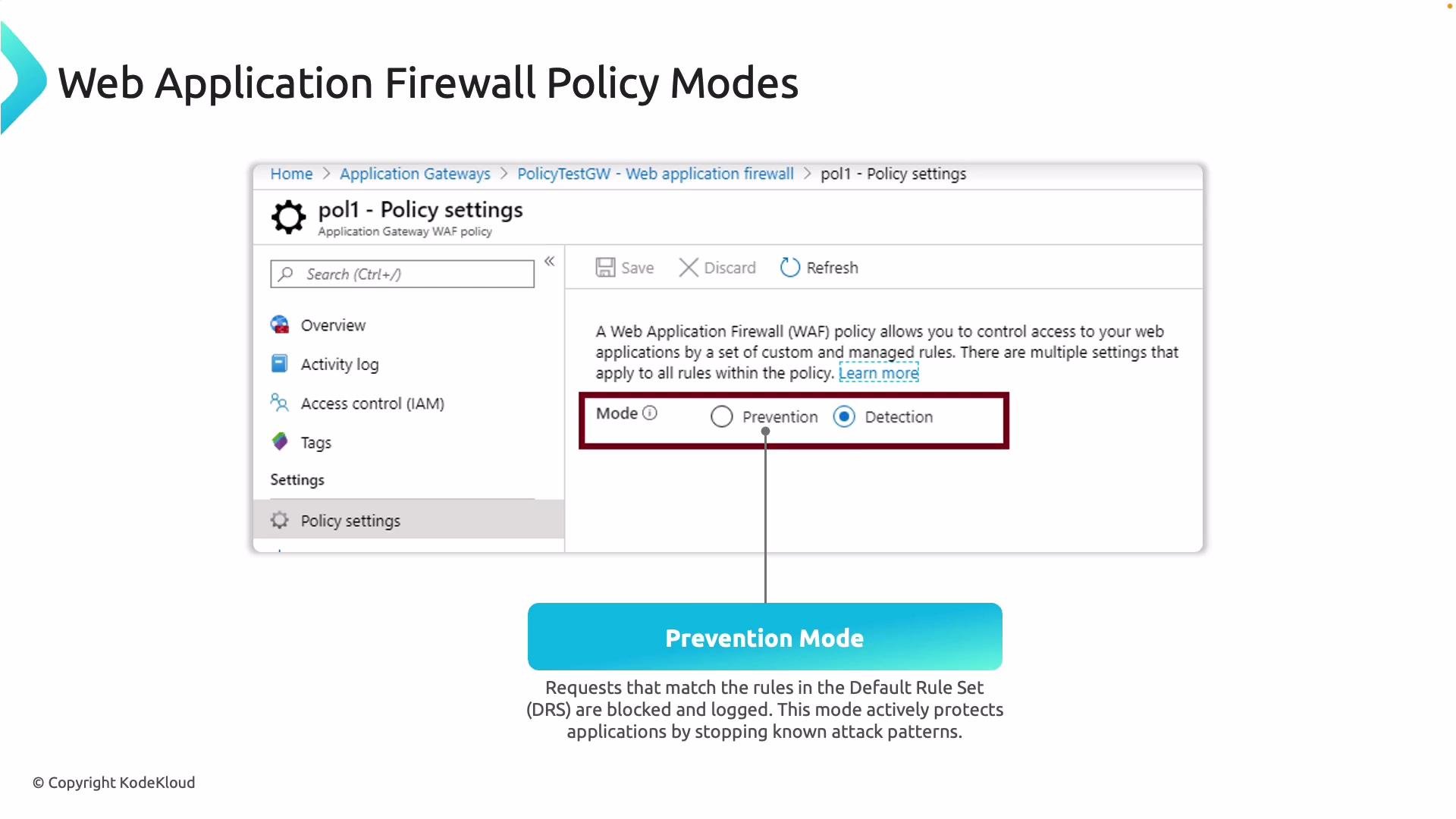 Only legitimate traffic is forwarded to your applications once policies are enforced.
Start new WAF deployments in Detection mode to review logs and tune rules. Move to Prevention mode only after validating that the policy does not block legitimate traffic.
Now that you understand what a WAF is and the available policy modes, here is an overview of the default rule set and how rules are organized and managed.
Default rule set (overview)
* Managed Rule Sets: Azure WAF uses Microsoft-managed rule sets (MRS) built on widely adopted rules such as the OWASP Core Rule Set (CRS). Managed rules provide baseline coverage for common attack categories and are versioned and updated by Microsoft.
* Rule IDs and granular control: Every managed rule has an identifier. You can enable or disable individual rules, add exclusions for specific request parts (headers, query strings, cookies, URL path, etc.), or change rule actions at the policy level to suit your application behavior.
* Custom rules: In addition to managed rules, you can create custom WAF rules for IP or geo-blocking, header- or path-based matching, or other request conditions. Note that capabilities such as rate-limiting and certain advanced controls depend on the Azure WAF SKU and whether you are using Front Door or Application Gateway.
* Logging and diagnostics: Diagnostic logs provide detailed records of matched rules and actions taken. Send logs to Log Analytics, Storage accounts, or Event Hubs for analysis, alerting, and long-term archiving. Use these logs to tune policies and investigate incidents.
Rule types and purposes
| Rule type | Purpose | When to use |
| ------------------------------- | -------------------------------------------------------------------------------- | --------------------------------------------------------------- |
| Managed rules (MRS / OWASP CRS) | Broad, curated protections for common attack patterns | Default baseline to block known attack signatures |
| Custom rules | Tailored conditions such as IP allow/deny, geofencing, or specific header checks | Application-specific controls or business rules |
| Exclusions | Prevent specific request parts from being evaluated by certain rules | Avoid false positives for known safe payloads or APIs |
| Rate-limiting (if available) | Throttle abusive traffic patterns | Mitigate credential stuffing, scraping, or brute-force attempts |
Together, managed and custom rules let you balance wide automated coverage with precise, application-level controls.
Links and references
* [Azure Application Gateway WAF documentation](https://learn.microsoft.com/azure/application-gateway/)
* [Azure Front Door WAF documentation](https://learn.microsoft.com/azure/frontdoor/)
* [Azure Virtual Network overview](https://learn.microsoft.com/azure/virtual-network/)
* [OWASP Top 10](https://owasp.org/Top10/)
* [OWASP Core Rule Set (CRS)](https://owasp.org/www-project-modsecurity-core-rule-set/)
* [Azure Monitor logs / Log Analytics](https://learn.microsoft.com/azure/azure-monitor/logs/)
Only legitimate traffic is forwarded to your applications once policies are enforced.
Start new WAF deployments in Detection mode to review logs and tune rules. Move to Prevention mode only after validating that the policy does not block legitimate traffic.
Now that you understand what a WAF is and the available policy modes, here is an overview of the default rule set and how rules are organized and managed.
Default rule set (overview)
* Managed Rule Sets: Azure WAF uses Microsoft-managed rule sets (MRS) built on widely adopted rules such as the OWASP Core Rule Set (CRS). Managed rules provide baseline coverage for common attack categories and are versioned and updated by Microsoft.
* Rule IDs and granular control: Every managed rule has an identifier. You can enable or disable individual rules, add exclusions for specific request parts (headers, query strings, cookies, URL path, etc.), or change rule actions at the policy level to suit your application behavior.
* Custom rules: In addition to managed rules, you can create custom WAF rules for IP or geo-blocking, header- or path-based matching, or other request conditions. Note that capabilities such as rate-limiting and certain advanced controls depend on the Azure WAF SKU and whether you are using Front Door or Application Gateway.
* Logging and diagnostics: Diagnostic logs provide detailed records of matched rules and actions taken. Send logs to Log Analytics, Storage accounts, or Event Hubs for analysis, alerting, and long-term archiving. Use these logs to tune policies and investigate incidents.
Rule types and purposes
| Rule type | Purpose | When to use |
| ------------------------------- | -------------------------------------------------------------------------------- | --------------------------------------------------------------- |
| Managed rules (MRS / OWASP CRS) | Broad, curated protections for common attack patterns | Default baseline to block known attack signatures |
| Custom rules | Tailored conditions such as IP allow/deny, geofencing, or specific header checks | Application-specific controls or business rules |
| Exclusions | Prevent specific request parts from being evaluated by certain rules | Avoid false positives for known safe payloads or APIs |
| Rate-limiting (if available) | Throttle abusive traffic patterns | Mitigate credential stuffing, scraping, or brute-force attempts |
Together, managed and custom rules let you balance wide automated coverage with precise, application-level controls.
Links and references
* [Azure Application Gateway WAF documentation](https://learn.microsoft.com/azure/application-gateway/)
* [Azure Front Door WAF documentation](https://learn.microsoft.com/azure/frontdoor/)
* [Azure Virtual Network overview](https://learn.microsoft.com/azure/virtual-network/)
* [OWASP Top 10](https://owasp.org/Top10/)
* [OWASP Core Rule Set (CRS)](https://owasp.org/www-project-modsecurity-core-rule-set/)
* [Azure Monitor logs / Log Analytics](https://learn.microsoft.com/azure/azure-monitor/logs/)