> ## Documentation Index
> Fetch the complete documentation index at: https://notes.kodekloud.com/llms.txt
> Use this file to discover all available pages before exploring further.
# Integrating with DNS
> How to configure DNS so Azure and on-premises clients resolve service hostnames to private endpoint IPs
This lesson explains how to integrate Azure Private Endpoints with DNS so clients—both in Azure and on-premises—resolve service hostnames to private IP addresses. We cover two common scenarios and the DNS flow for each:
* Virtual network workloads that use Azure-provided DNS (no custom DNS server).
* On-premises workloads that need to resolve Azure private endpoints using Azure DNS Private Resolver.
Goal: ensure DNS queries for Azure service FQDNs (for example `azsql1.database.windows.net` or `mystorageaccount.blob.core.windows.net`) return private IPs from linked private DNS zones (for example `privatelink.database.windows.net`) so traffic flows through private endpoints.
Scenario 1 — Virtual network workloads without a custom DNS server
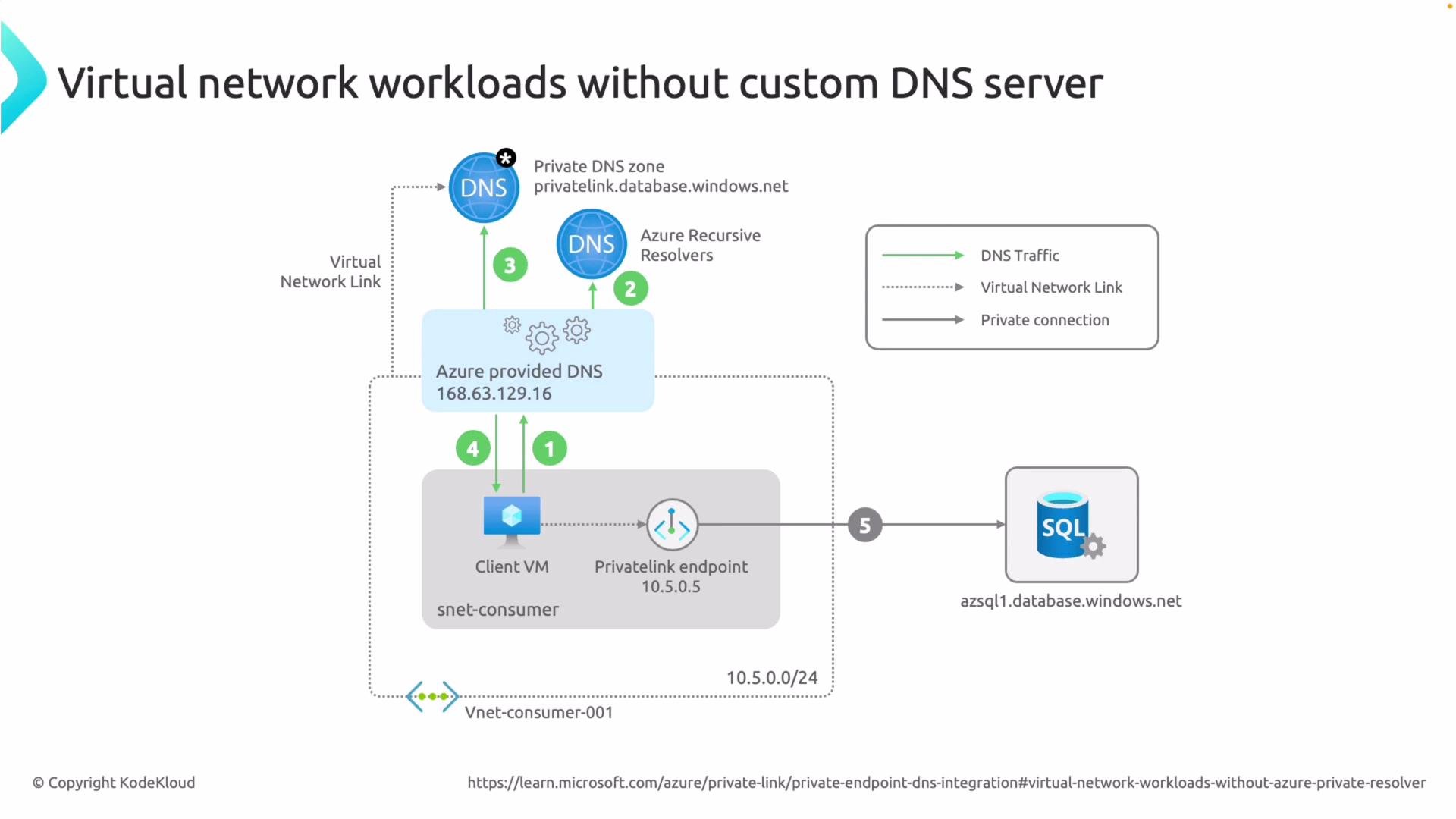
When a VNet uses Azure-provided DNS (the default, no custom DNS server configured), Azure resolves private endpoint hostnames automatically if the relevant private DNS zones are linked to the VNet.
DNS resolution flow:
1. A VM in the virtual network issues a DNS query for a public FQDN, e.g. `azsql1.database.windows.net`.
2. The VM sends the query to Azure-provided DNS (the VNet’s inherited DNS setting).
3. Azure-provided DNS checks private DNS zones linked to the VNet. If you created or auto-integrated a private DNS zone such as `privatelink.database.windows.net` during private endpoint creation, it finds the `azsql1` record there.
4. Azure-provided DNS returns the private IP from the private DNS zone to the client VM.
5. The client connects to the service using that private IP via the private endpoint.
In our lab this exact flow occurred: the VM queried Azure-provided DNS, discovered the private DNS zone auto-integrated during private endpoint creation, received the private IP, and connected to the SQL service over the private endpoint.
 Example: Storage account resolution
* If a client looks up `mystorage.blob.core.windows.net` and your private DNS zone for storage (for example `privatelink.blob.core.windows.net`) contains the record, Azure-provided DNS returns the private IP and the client connects to the storage account’s private endpoint to retrieve data (for example, download an image).
Warning — on-premises clients and Azure-provided DNS
The Azure internal DNS IP address `168.63.129.16` is reachable from Azure VMs but is not routable from on-premises networks. On-premises machines cannot query Azure-provided DNS directly. To resolve private endpoint names from on-premises, use Azure DNS Private Resolver or another supported forwarding solution.
Scenario 2 — Using Azure DNS Private Resolver for on-premises resolution
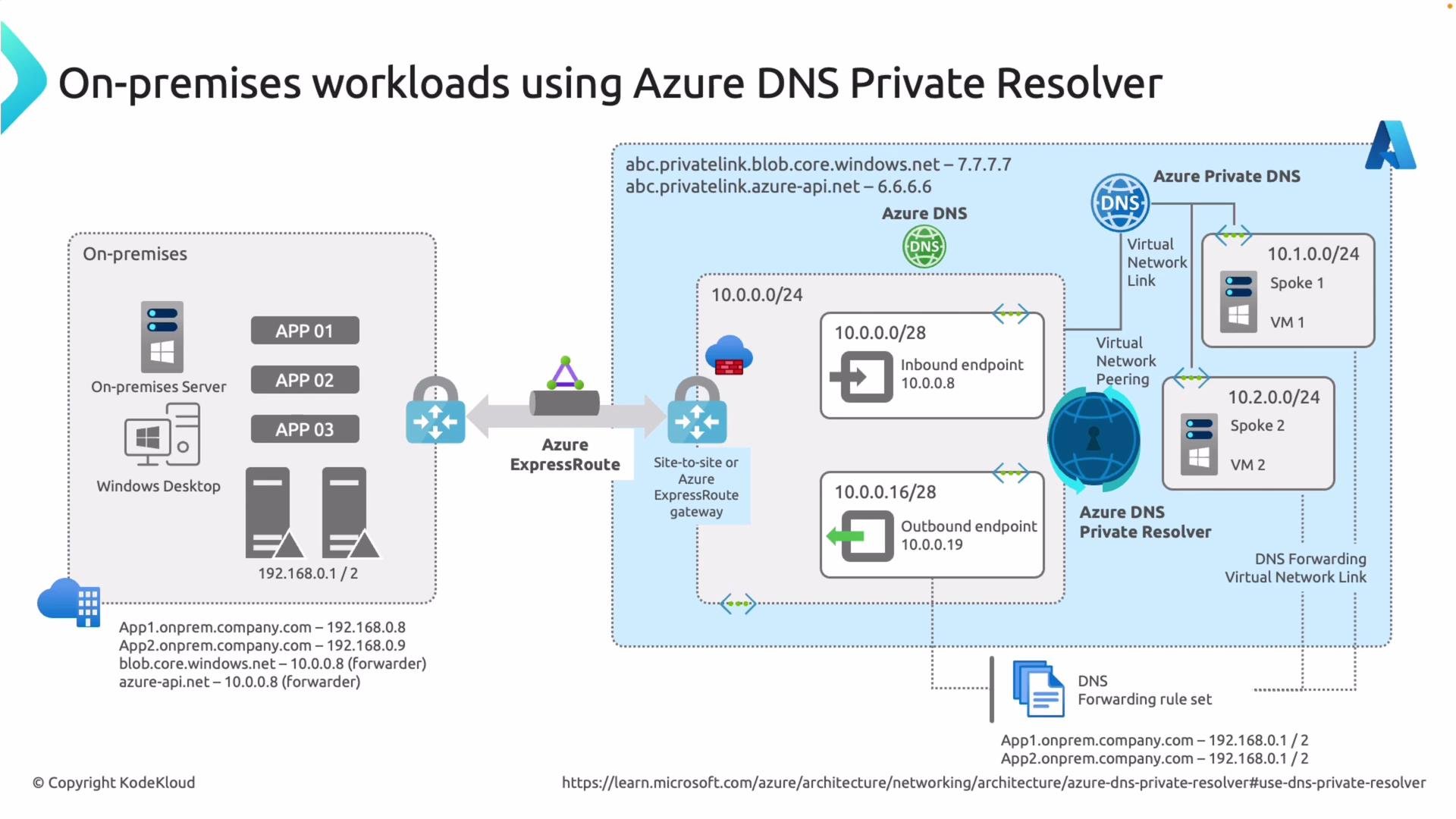
Azure DNS Private Resolver is a managed, scalable DNS resolver you deploy into a VNet. It exposes inbound endpoints with IP addresses you can use as conditional forward targets from on-premises DNS servers. When linked to private DNS zones, the resolver can answer queries for records in those zones.
Typical flow with Private Resolver:
1. An on-premises client issues a DNS query for an Azure service FQDN (for example `azsql1.database.windows.net` or `mystorage.blob.core.windows.net`).
2. Your on-premises DNS server has a conditional forwarder for the target service domain; it forwards matching queries to the inbound IP(s) of the Azure DNS Private Resolver over VPN or ExpressRoute.
3. The Azure DNS Private Resolver receives the query and checks the linked private DNS zone (for example `privatelink.database.windows.net`) for the requested record.
4. The resolver returns the private IP address to the on-premises client through the same connectivity path.
5. The on-premises client connects directly to the private endpoint in Azure.
Because the resolver is a managed service, you don’t need to deploy and manage your own DNS VMs in Azure for this purpose.
Example: Storage account resolution
* If a client looks up `mystorage.blob.core.windows.net` and your private DNS zone for storage (for example `privatelink.blob.core.windows.net`) contains the record, Azure-provided DNS returns the private IP and the client connects to the storage account’s private endpoint to retrieve data (for example, download an image).
Warning — on-premises clients and Azure-provided DNS
The Azure internal DNS IP address `168.63.129.16` is reachable from Azure VMs but is not routable from on-premises networks. On-premises machines cannot query Azure-provided DNS directly. To resolve private endpoint names from on-premises, use Azure DNS Private Resolver or another supported forwarding solution.
Scenario 2 — Using Azure DNS Private Resolver for on-premises resolution
Azure DNS Private Resolver is a managed, scalable DNS resolver you deploy into a VNet. It exposes inbound endpoints with IP addresses you can use as conditional forward targets from on-premises DNS servers. When linked to private DNS zones, the resolver can answer queries for records in those zones.
Typical flow with Private Resolver:
1. An on-premises client issues a DNS query for an Azure service FQDN (for example `azsql1.database.windows.net` or `mystorage.blob.core.windows.net`).
2. Your on-premises DNS server has a conditional forwarder for the target service domain; it forwards matching queries to the inbound IP(s) of the Azure DNS Private Resolver over VPN or ExpressRoute.
3. The Azure DNS Private Resolver receives the query and checks the linked private DNS zone (for example `privatelink.database.windows.net`) for the requested record.
4. The resolver returns the private IP address to the on-premises client through the same connectivity path.
5. The on-premises client connects directly to the private endpoint in Azure.
Because the resolver is a managed service, you don’t need to deploy and manage your own DNS VMs in Azure for this purpose.
 Implementation notes, DNS forwarding, and troubleshooting
* Configure a conditional forwarder on your on-premises DNS server for the Azure service domain(s) you want to resolve privately (examples below) and point that forwarder to the inbound IP(s) of your Azure DNS Private Resolver.
* Link the resolver to the private DNS zones that contain the private endpoint records (for example `privatelink.database.windows.net`).
* Once the resolver returns the private IP to the client, the client will access the target Azure service via the private endpoint.
Common service domain mappings
| Resource Type | Service domain | Private DNS zone example |
| -------------------- | ----------------------- | ----------------------------------- |
| Azure SQL | `database.windows.net` | `privatelink.database.windows.net` |
| Azure Storage (Blob) | `blob.core.windows.net` | `privatelink.blob.core.windows.net` |
Practical tips
* Ensure your site-to-site VPN or ExpressRoute permits DNS traffic to the resolver inbound IPs.
* If you use split-horizon DNS or custom DNS in Azure, verify that private DNS zones are linked to the correct VNets where clients reside.
* Use `nslookup` or `dig` from both on-premises and Azure VMs to confirm the DNS answer returns the private IP.
* Check network security groups (NSGs) and firewall rules that may block DNS or private endpoint connectivity.
Implementation notes, DNS forwarding, and troubleshooting
* Configure a conditional forwarder on your on-premises DNS server for the Azure service domain(s) you want to resolve privately (examples below) and point that forwarder to the inbound IP(s) of your Azure DNS Private Resolver.
* Link the resolver to the private DNS zones that contain the private endpoint records (for example `privatelink.database.windows.net`).
* Once the resolver returns the private IP to the client, the client will access the target Azure service via the private endpoint.
Common service domain mappings
| Resource Type | Service domain | Private DNS zone example |
| -------------------- | ----------------------- | ----------------------------------- |
| Azure SQL | `database.windows.net` | `privatelink.database.windows.net` |
| Azure Storage (Blob) | `blob.core.windows.net` | `privatelink.blob.core.windows.net` |
Practical tips
* Ensure your site-to-site VPN or ExpressRoute permits DNS traffic to the resolver inbound IPs.
* If you use split-horizon DNS or custom DNS in Azure, verify that private DNS zones are linked to the correct VNets where clients reside.
* Use `nslookup` or `dig` from both on-premises and Azure VMs to confirm the DNS answer returns the private IP.
* Check network security groups (NSGs) and firewall rules that may block DNS or private endpoint connectivity.
 Additional resources
* [Azure DNS Private Resolver documentation](https://learn.microsoft.com/azure/dns/private-resolver)
* [Azure Private Endpoint overview](https://learn.microsoft.com/azure/private-link/private-endpoint-overview)
* [Private DNS zones and records](https://learn.microsoft.com/azure/dns/private-dns-overview)
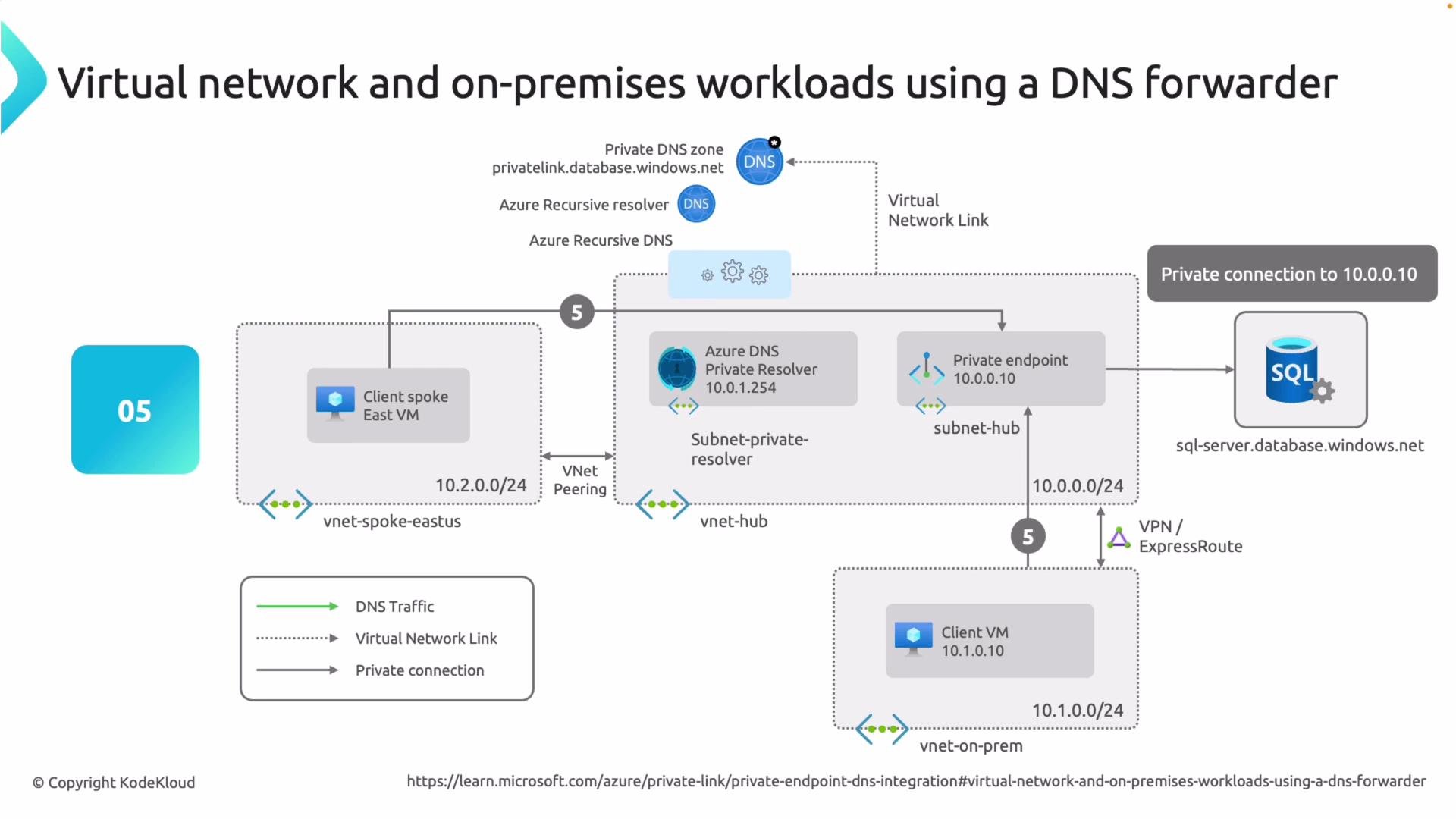
From on-premises, forward DNS requests for the relevant Azure service domains (for example `database.windows.net` or `blob.core.windows.net`) to the Azure DNS Private Resolver inbound IP(s). The resolver must be linked to the corresponding private DNS zones (for example `privatelink.database.windows.net`) so it can return private endpoint addresses.
Additional resources
* [Azure DNS Private Resolver documentation](https://learn.microsoft.com/azure/dns/private-resolver)
* [Azure Private Endpoint overview](https://learn.microsoft.com/azure/private-link/private-endpoint-overview)
* [Private DNS zones and records](https://learn.microsoft.com/azure/dns/private-dns-overview)
From on-premises, forward DNS requests for the relevant Azure service domains (for example `database.windows.net` or `blob.core.windows.net`) to the Azure DNS Private Resolver inbound IP(s). The resolver must be linked to the corresponding private DNS zones (for example `privatelink.database.windows.net`) so it can return private endpoint addresses.