> ## Documentation Index
> Fetch the complete documentation index at: https://notes.kodekloud.com/llms.txt
> Use this file to discover all available pages before exploring further.
# What is Azure Private Link and Private Endpoint
> Explains Azure Private Link and Private Endpoint concepts, setup, DNS integration and secure private connectivity to Azure PaaS without public internet exposure.
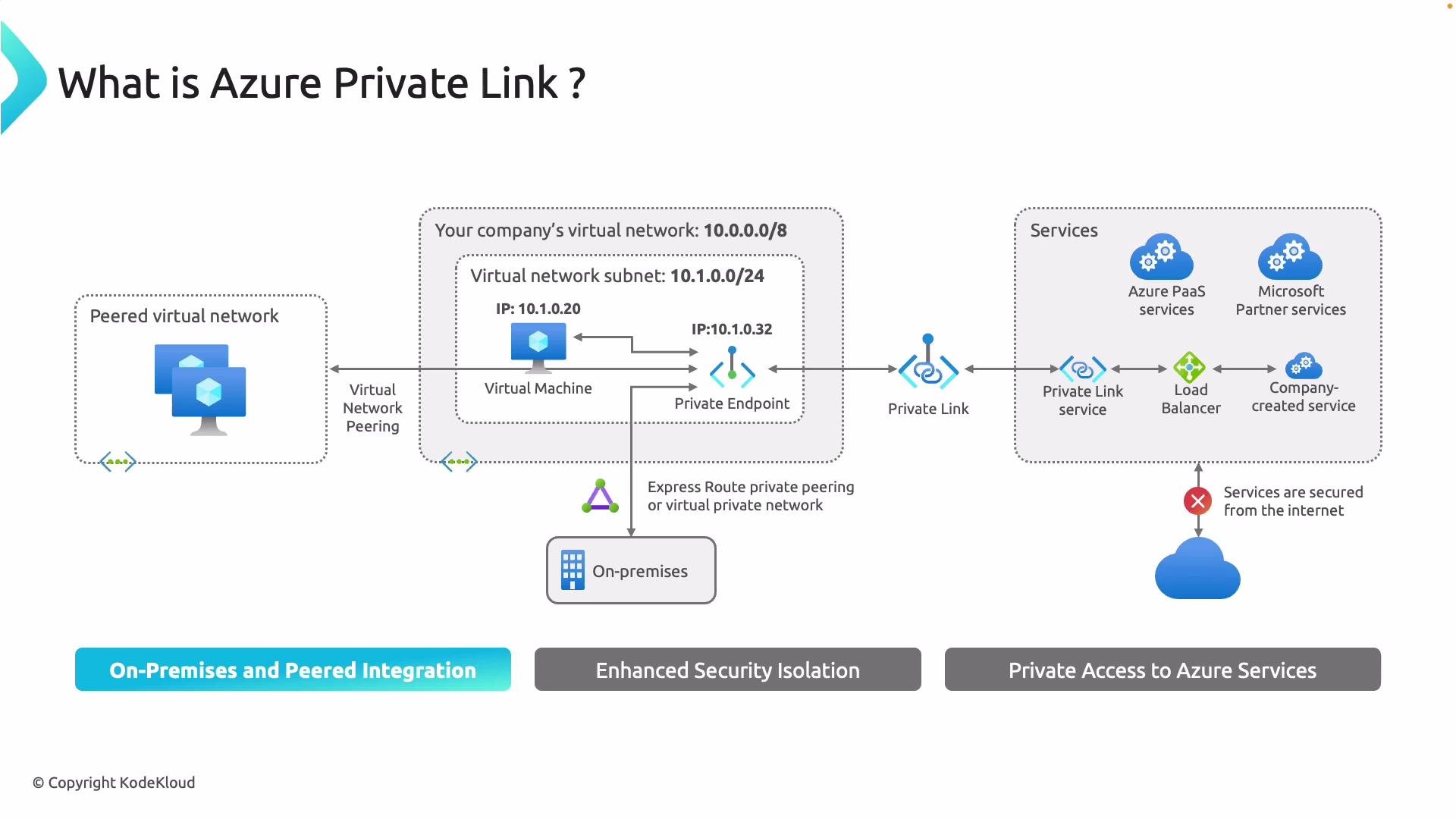
Azure Private Link enables private access to Azure resources—such as Azure SQL, Storage, and partner PaaS services—directly from your virtual networks, on-premises networks, or peered VNets without exposing public IPs. Traffic flows over the Microsoft backbone, removing the need to traverse the public internet and significantly reducing attack surface.
Read the diagram above from left to right: a VM in a peered VNet accesses a Private Endpoint by its private IP—traffic never requires a public IP. The Private Endpoint is deployed into a subnet and presents a private IP that maps to a single resource. Even if other parts of the virtual network are compromised, an attacker cannot pivot into the PaaS resource unless they gain access to that specific Private Endpoint, thereby reducing the attack surface.
On the right side of the diagram you can see Azure PaaS and partner services accessed via Azure Private Link instead of the public internet. Internet traffic is blocked; communication occurs over the Microsoft backbone using private IP addresses.
## What is a Private Endpoint?
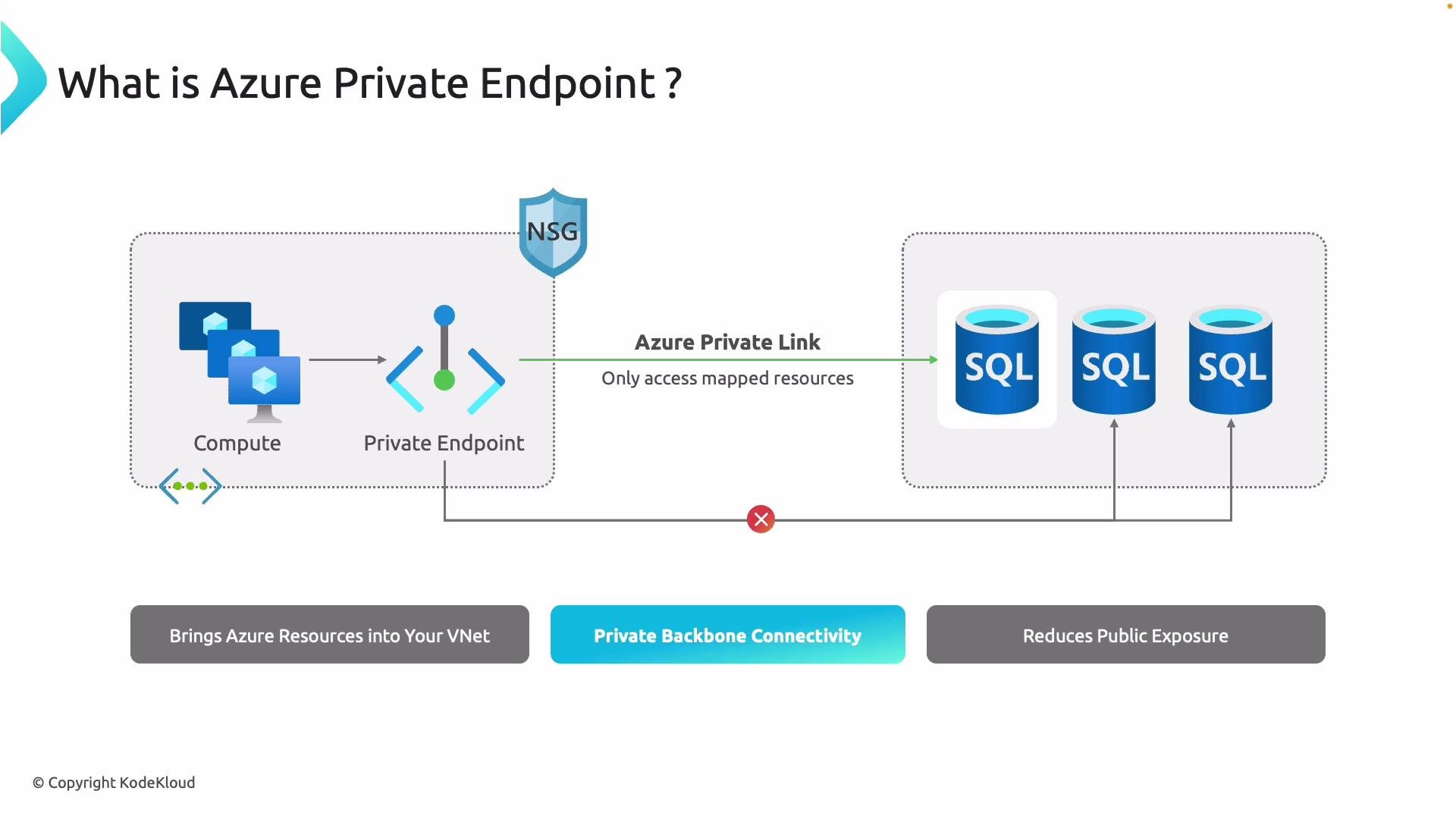
A Private Endpoint projects an Azure service into your VNet by assigning a private IP address to that service inside a subnet. DNS resolves the service’s FQDN to the Private Endpoint’s private IP, so traffic between your compute resources and the service flows entirely over the Microsoft backbone.
With a Private Endpoint:
* Access to the mapped resource is provided over a private IP.
* External internet requests cannot reach your SQL servers or other services.
* Exposure to brute-force or port-scan attacks is minimized while full functionality is preserved via private connectivity.
## What is a Private Link service?
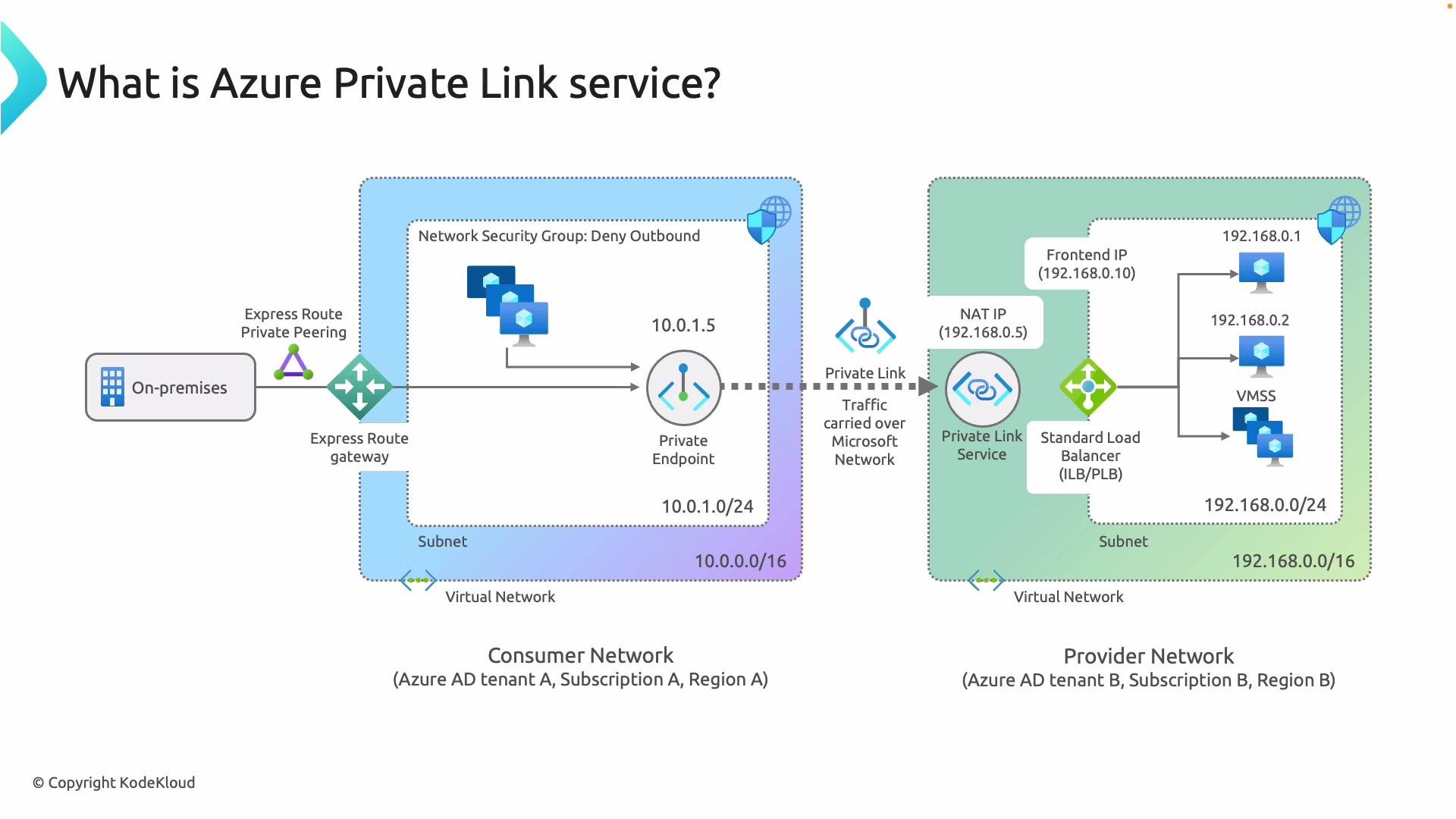
A Private Link service is how a provider privately publishes an application to consumers. Read the next diagram from left to right: the consumer network connects privately to the provider network over the Azure backbone (no public internet). The consumer creates a Private Endpoint (for example, `10.0.1.5`)—a NIC in the consumer VNet. DNS resolves the service name to that private IP. A dotted line represents the Private Link, bridging the consumer’s Private Endpoint to the provider’s Private Link service. On the provider side, the Private Link service typically fronts a Standard Load Balancer and fans out to VMs or instances. The provider controls and approves which consumers can connect.
## Quick concept summary
| Component | Purpose | Example / Behavior |
| -------------------- | ---------------------------------------------------------------- | ---------------------------------------------------------- |
| Private Link | The private connection “pipe” between consumer and provider | Carried entirely over Azure backbone |
| Private Endpoint | Consumer-side private IP (a NIC in the VNet) | DNS resolves resource FQDN to this IP (e.g., `10.0.1.5`) |
| Private Link service | Provider-side publishing of an application to approved consumers | Usually in front of a Standard Load Balancer and instances |
## Demonstration: Private Endpoint in the Azure portal
The following demo reuses a VM that currently resolves a storage account to a public IP. We’ll create a Private Endpoint and show DNS and connectivity changes.
First, observe the storage account resolving from the VM (public IP):
```bash theme={null}
kodekloud@vm-service-endpoints:~$ nslookup sanavidm.blob.core.windows.net
Server: 127.0.0.53
Address: 127.0.0.53#53
Non-authoritative answer:
sanavidm.blob.core.windows.net canonical name = blob.blz22prdstr07a.store.core.windows.net.
Address: 52.239.169.228
```
This resolves to a public IP. We want to restrict access so the storage account is reachable only via Private Endpoint.
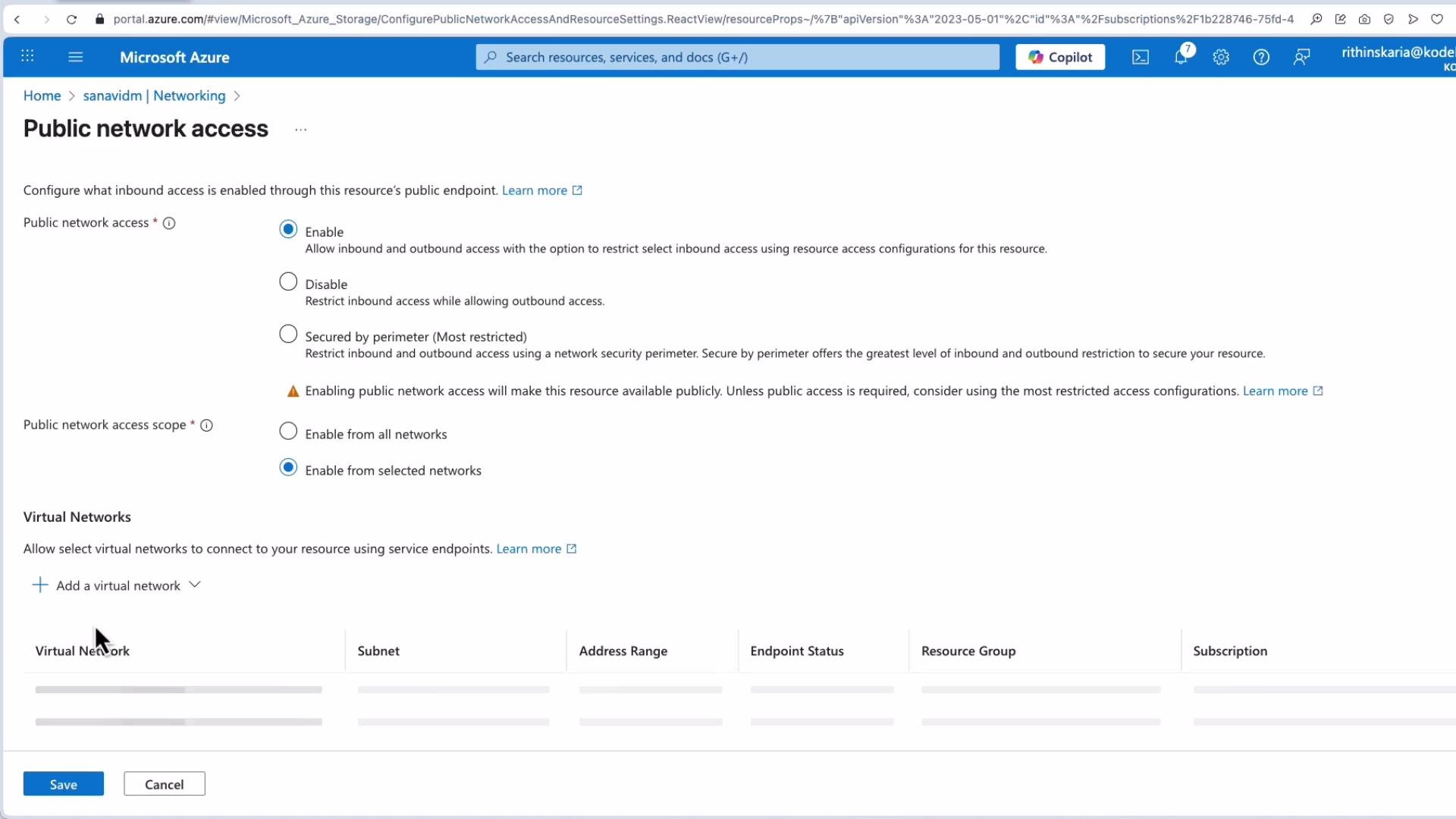
In the Storage Account's Networking settings, disable public network access so only private connectivity is allowed. After disabling public access, attempts that still resolve to the public IP will fail because public access is blocked:
```bash theme={null}
kodekloud@vm-service-endpoints:~$ curl https://sanavidm.blob.core.windows.net/data/gl2.jpeg
AuthorizationFailureThis request is not authorized to perform this operation.ba0fc934e-0073-55f6-0000-000000000000
```
### Create a Private Endpoint
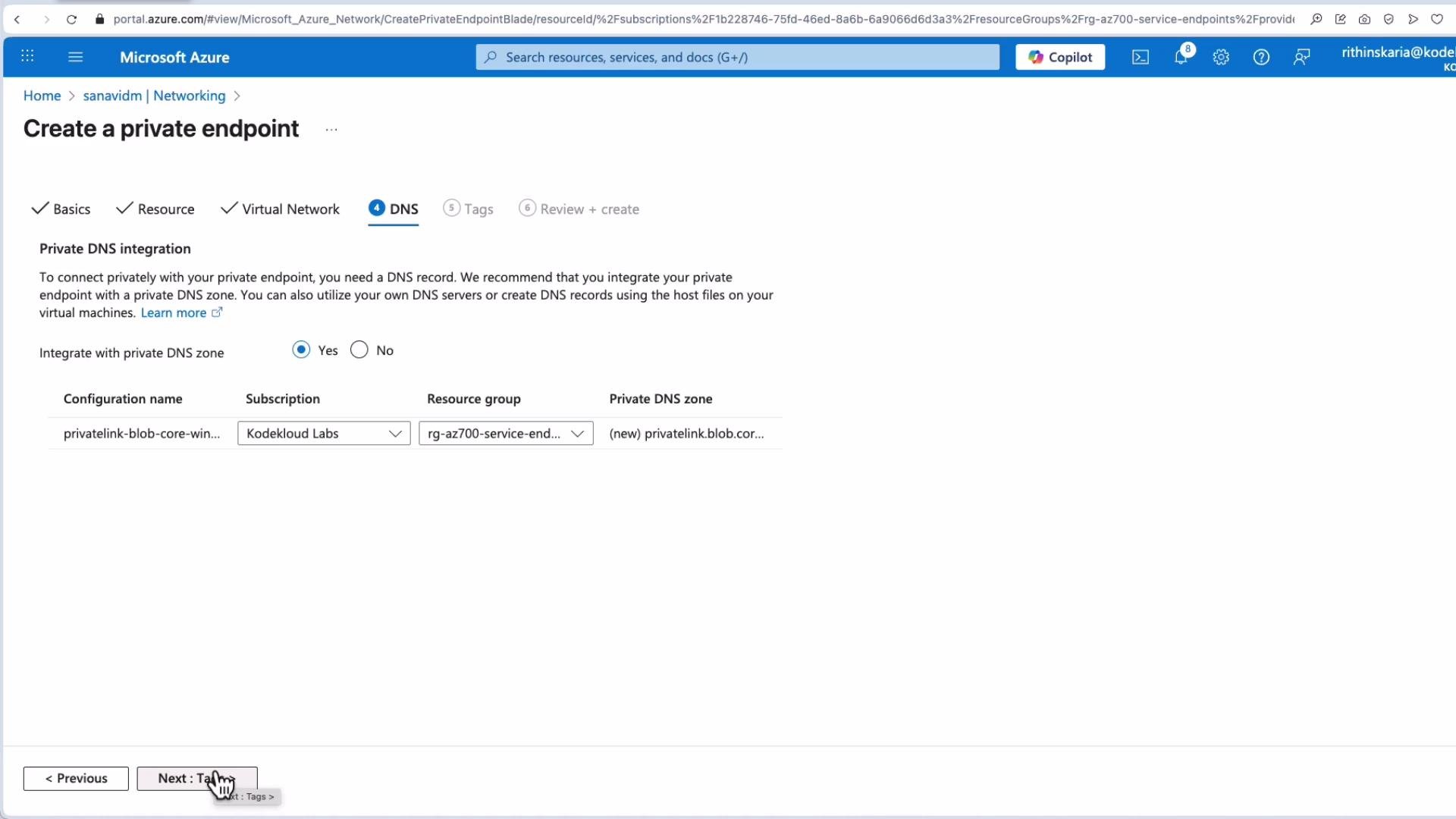
When creating a Private Endpoint for the storage account, use these typical settings:
* Resource group: same RG as the VM (for demo convenience).
* Name: e.g., `pest` (Azure will append `-nic` to create the network interface).
* Region: choose your region (e.g., East US).
* Resource: select the target storage account and the service (Blob).
* Virtual network/subnet: you can reuse the VM subnet for labs; in production use a dedicated subnet for Private Endpoints.
* IP allocation: dynamic is common for demos.
DNS is critical. Two common options:
1. Integrate with Azure Private DNS zones (easiest for Azure-provided DNS).
2. Manage DNS yourself (custom DNS server, conditional forwarders, or a Private Resolver), which requires extra configuration for on-premises access.
For Azure VMs using Azure-provided DNS, integrating the Private Endpoint with an Azure Private DNS zone (for example, `privatelink.blob.core.windows.net`) is the simplest approach. On-premises access requires DNS forwarding or a Private Resolver and additional configuration.
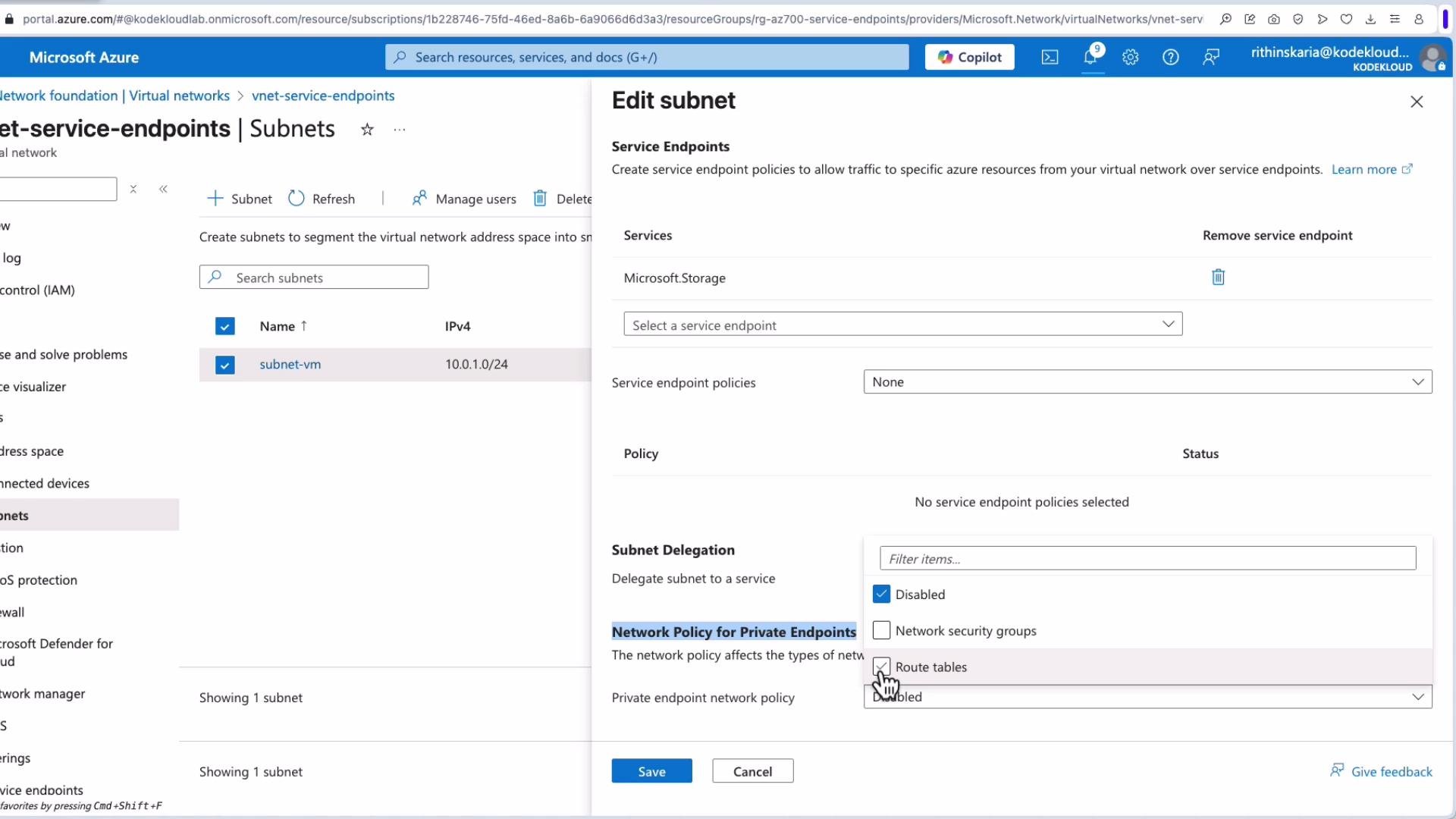
Private Endpoints are implemented as NICs in your subnet and obey routing, NSGs, and UDRs. User-defined routes that force traffic to a firewall or on-premises (for example, forced tunneling) can break Private Endpoint connectivity. Ensure UDRs, firewalls/NVAs (including SNAT behavior), and NSGs permit traffic to and from the Private Endpoint and the Microsoft backbone.
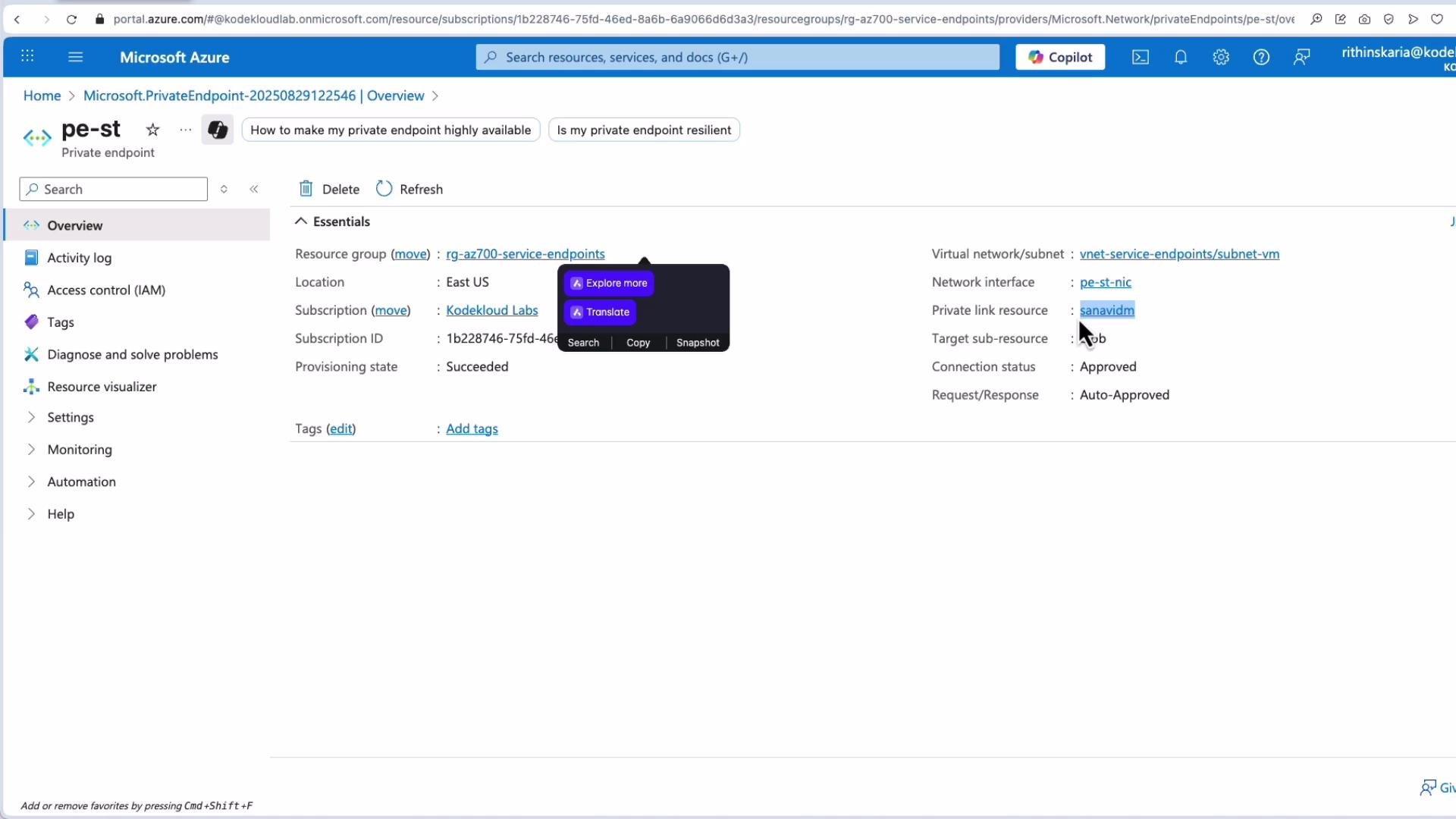
When the Private Endpoint is provisioned it appears as a network interface tied to the Private Link resource (the storage account). The Private Endpoint overview shows provisioning state and connection status:
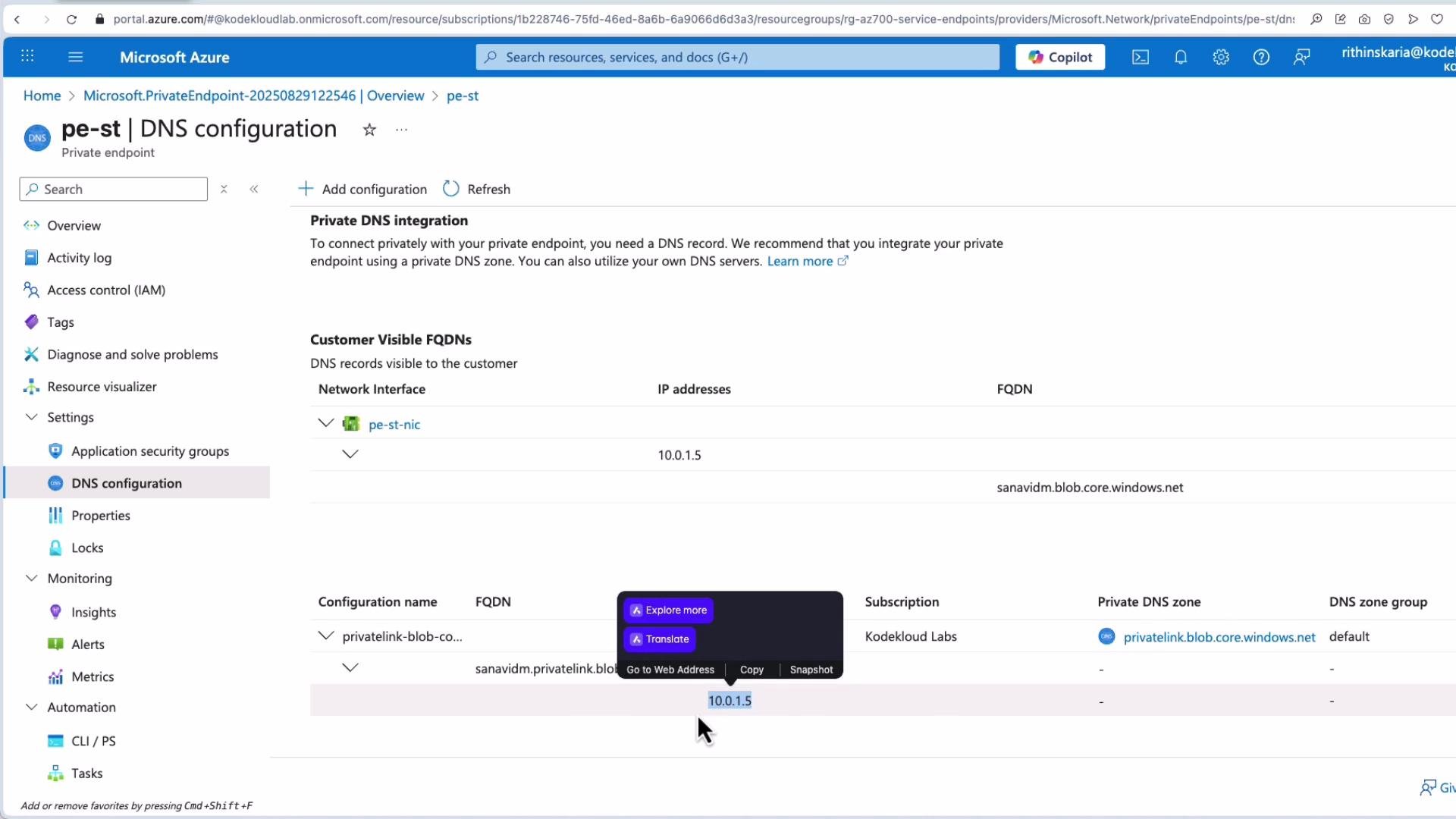
Under the Private Endpoint's DNS configuration you will see the Azure Private DNS zone that was created or linked (for example, `privatelink.blob.core.windows.net`). After DNS integration completes, name resolution from the VM (which uses Azure DNS) should return the private IP allocated to the endpoint (e.g., `10.0.1.5`):
From the VM, after DNS integration completes:
```bash theme={null}
kodekloud@vm-service-endpoints:~$ nslookup sanavidm.blob.core.windows.net
Server: 127.0.0.53
Address: 127.0.0.53#53
Non-authoritative answer:
Name: sanavidm.blob.core.windows.net
canonical name = sanavidm.privatelink.blob.core.windows.net.
Address: 10.0.1.5
```
Now communication between the VM (`10.0.1.4`) and the storage account flows from the VM to the Private Endpoint IP (`10.0.1.5`) over the Microsoft backbone—no public IP is involved.
## Front Door + Private Link (brief)
If you use Azure Front Door (Premium) with backend origin groups, you can enable Private Link for origin groups so Front Door accesses your App Service via the Private Endpoint. This lets you disable public access to the App Service completely. Note: App Service Private Link is supported on Standard and higher SKUs (not on free tiers).
## References and further reading
* [Azure Private Link overview](https://learn.microsoft.com/azure/private-link/)
* [Private Endpoint DNS integration](https://learn.microsoft.com/azure/private-link/private-endpoint-dns)
* [Azure Front Door + Private Link (Premium)](https://learn.microsoft.com/azure/frontdoor/)
* [Azure networking concepts](https://learn.microsoft.com/azure/architecture/reference-architecture/networking/)
That concludes the Private Endpoint and Private Link demonstration: concepts, portal configuration, DNS implications, and how private connectivity replaces public exposure for PaaS services.
 Read the diagram above from left to right: a VM in a peered VNet accesses a Private Endpoint by its private IP—traffic never requires a public IP. The Private Endpoint is deployed into a subnet and presents a private IP that maps to a single resource. Even if other parts of the virtual network are compromised, an attacker cannot pivot into the PaaS resource unless they gain access to that specific Private Endpoint, thereby reducing the attack surface.
On the right side of the diagram you can see Azure PaaS and partner services accessed via Azure Private Link instead of the public internet. Internet traffic is blocked; communication occurs over the Microsoft backbone using private IP addresses.
## What is a Private Endpoint?
A Private Endpoint projects an Azure service into your VNet by assigning a private IP address to that service inside a subnet. DNS resolves the service’s FQDN to the Private Endpoint’s private IP, so traffic between your compute resources and the service flows entirely over the Microsoft backbone.
Read the diagram above from left to right: a VM in a peered VNet accesses a Private Endpoint by its private IP—traffic never requires a public IP. The Private Endpoint is deployed into a subnet and presents a private IP that maps to a single resource. Even if other parts of the virtual network are compromised, an attacker cannot pivot into the PaaS resource unless they gain access to that specific Private Endpoint, thereby reducing the attack surface.
On the right side of the diagram you can see Azure PaaS and partner services accessed via Azure Private Link instead of the public internet. Internet traffic is blocked; communication occurs over the Microsoft backbone using private IP addresses.
## What is a Private Endpoint?
A Private Endpoint projects an Azure service into your VNet by assigning a private IP address to that service inside a subnet. DNS resolves the service’s FQDN to the Private Endpoint’s private IP, so traffic between your compute resources and the service flows entirely over the Microsoft backbone.
 With a Private Endpoint:
* Access to the mapped resource is provided over a private IP.
* External internet requests cannot reach your SQL servers or other services.
* Exposure to brute-force or port-scan attacks is minimized while full functionality is preserved via private connectivity.
## What is a Private Link service?
A Private Link service is how a provider privately publishes an application to consumers. Read the next diagram from left to right: the consumer network connects privately to the provider network over the Azure backbone (no public internet). The consumer creates a Private Endpoint (for example, `10.0.1.5`)—a NIC in the consumer VNet. DNS resolves the service name to that private IP. A dotted line represents the Private Link, bridging the consumer’s Private Endpoint to the provider’s Private Link service. On the provider side, the Private Link service typically fronts a Standard Load Balancer and fans out to VMs or instances. The provider controls and approves which consumers can connect.
With a Private Endpoint:
* Access to the mapped resource is provided over a private IP.
* External internet requests cannot reach your SQL servers or other services.
* Exposure to brute-force or port-scan attacks is minimized while full functionality is preserved via private connectivity.
## What is a Private Link service?
A Private Link service is how a provider privately publishes an application to consumers. Read the next diagram from left to right: the consumer network connects privately to the provider network over the Azure backbone (no public internet). The consumer creates a Private Endpoint (for example, `10.0.1.5`)—a NIC in the consumer VNet. DNS resolves the service name to that private IP. A dotted line represents the Private Link, bridging the consumer’s Private Endpoint to the provider’s Private Link service. On the provider side, the Private Link service typically fronts a Standard Load Balancer and fans out to VMs or instances. The provider controls and approves which consumers can connect.
 ## Quick concept summary
| Component | Purpose | Example / Behavior |
| -------------------- | ---------------------------------------------------------------- | ---------------------------------------------------------- |
| Private Link | The private connection “pipe” between consumer and provider | Carried entirely over Azure backbone |
| Private Endpoint | Consumer-side private IP (a NIC in the VNet) | DNS resolves resource FQDN to this IP (e.g., `10.0.1.5`) |
| Private Link service | Provider-side publishing of an application to approved consumers | Usually in front of a Standard Load Balancer and instances |
## Demonstration: Private Endpoint in the Azure portal
The following demo reuses a VM that currently resolves a storage account to a public IP. We’ll create a Private Endpoint and show DNS and connectivity changes.
First, observe the storage account resolving from the VM (public IP):
```bash theme={null}
kodekloud@vm-service-endpoints:~$ nslookup sanavidm.blob.core.windows.net
Server: 127.0.0.53
Address: 127.0.0.53#53
Non-authoritative answer:
sanavidm.blob.core.windows.net canonical name = blob.blz22prdstr07a.store.core.windows.net.
Address: 52.239.169.228
```
This resolves to a public IP. We want to restrict access so the storage account is reachable only via Private Endpoint.
In the Storage Account's Networking settings, disable public network access so only private connectivity is allowed. After disabling public access, attempts that still resolve to the public IP will fail because public access is blocked:
## Quick concept summary
| Component | Purpose | Example / Behavior |
| -------------------- | ---------------------------------------------------------------- | ---------------------------------------------------------- |
| Private Link | The private connection “pipe” between consumer and provider | Carried entirely over Azure backbone |
| Private Endpoint | Consumer-side private IP (a NIC in the VNet) | DNS resolves resource FQDN to this IP (e.g., `10.0.1.5`) |
| Private Link service | Provider-side publishing of an application to approved consumers | Usually in front of a Standard Load Balancer and instances |
## Demonstration: Private Endpoint in the Azure portal
The following demo reuses a VM that currently resolves a storage account to a public IP. We’ll create a Private Endpoint and show DNS and connectivity changes.
First, observe the storage account resolving from the VM (public IP):
```bash theme={null}
kodekloud@vm-service-endpoints:~$ nslookup sanavidm.blob.core.windows.net
Server: 127.0.0.53
Address: 127.0.0.53#53
Non-authoritative answer:
sanavidm.blob.core.windows.net canonical name = blob.blz22prdstr07a.store.core.windows.net.
Address: 52.239.169.228
```
This resolves to a public IP. We want to restrict access so the storage account is reachable only via Private Endpoint.
In the Storage Account's Networking settings, disable public network access so only private connectivity is allowed. After disabling public access, attempts that still resolve to the public IP will fail because public access is blocked:
 ```bash theme={null}
kodekloud@vm-service-endpoints:~$ curl https://sanavidm.blob.core.windows.net/data/gl2.jpeg
```bash theme={null}
kodekloud@vm-service-endpoints:~$ curl https://sanavidm.blob.core.windows.net/data/gl2.jpeg
 When the Private Endpoint is provisioned it appears as a network interface tied to the Private Link resource (the storage account). The Private Endpoint overview shows provisioning state and connection status:
 Under the Private Endpoint's DNS configuration you will see the Azure Private DNS zone that was created or linked (for example, `privatelink.blob.core.windows.net`). After DNS integration completes, name resolution from the VM (which uses Azure DNS) should return the private IP allocated to the endpoint (e.g., `10.0.1.5`):
 From the VM, after DNS integration completes:
```bash theme={null}
kodekloud@vm-service-endpoints:~$ nslookup sanavidm.blob.core.windows.net
Server: 127.0.0.53
Address: 127.0.0.53#53
Non-authoritative answer:
Name: sanavidm.blob.core.windows.net
canonical name = sanavidm.privatelink.blob.core.windows.net.
Address: 10.0.1.5
```
Now communication between the VM (`10.0.1.4`) and the storage account flows from the VM to the Private Endpoint IP (`10.0.1.5`) over the Microsoft backbone—no public IP is involved.
## Front Door + Private Link (brief)
If you use Azure Front Door (Premium) with backend origin groups, you can enable Private Link for origin groups so Front Door accesses your App Service via the Private Endpoint. This lets you disable public access to the App Service completely. Note: App Service Private Link is supported on Standard and higher SKUs (not on free tiers).
## References and further reading
* [Azure Private Link overview](https://learn.microsoft.com/azure/private-link/)
* [Private Endpoint DNS integration](https://learn.microsoft.com/azure/private-link/private-endpoint-dns)
* [Azure Front Door + Private Link (Premium)](https://learn.microsoft.com/azure/frontdoor/)
* [Azure networking concepts](https://learn.microsoft.com/azure/architecture/reference-architecture/networking/)
That concludes the Private Endpoint and Private Link demonstration: concepts, portal configuration, DNS implications, and how private connectivity replaces public exposure for PaaS services.
From the VM, after DNS integration completes:
```bash theme={null}
kodekloud@vm-service-endpoints:~$ nslookup sanavidm.blob.core.windows.net
Server: 127.0.0.53
Address: 127.0.0.53#53
Non-authoritative answer:
Name: sanavidm.blob.core.windows.net
canonical name = sanavidm.privatelink.blob.core.windows.net.
Address: 10.0.1.5
```
Now communication between the VM (`10.0.1.4`) and the storage account flows from the VM to the Private Endpoint IP (`10.0.1.5`) over the Microsoft backbone—no public IP is involved.
## Front Door + Private Link (brief)
If you use Azure Front Door (Premium) with backend origin groups, you can enable Private Link for origin groups so Front Door accesses your App Service via the Private Endpoint. This lets you disable public access to the App Service completely. Note: App Service Private Link is supported on Standard and higher SKUs (not on free tiers).
## References and further reading
* [Azure Private Link overview](https://learn.microsoft.com/azure/private-link/)
* [Private Endpoint DNS integration](https://learn.microsoft.com/azure/private-link/private-endpoint-dns)
* [Azure Front Door + Private Link (Premium)](https://learn.microsoft.com/azure/frontdoor/)
* [Azure networking concepts](https://learn.microsoft.com/azure/architecture/reference-architecture/networking/)
That concludes the Private Endpoint and Private Link demonstration: concepts, portal configuration, DNS implications, and how private connectivity replaces public exposure for PaaS services.