> ## Documentation Index
> Fetch the complete documentation index at: https://notes.kodekloud.com/llms.txt
> Use this file to discover all available pages before exploring further.
# Azure Firewall Manager
> Centralized, policy-driven management for Azure Firewall and partner security across subscriptions and regions, enabling consistent deployments, hierarchical policies, and centralized routing in vHub or hub VNet models.
Azure Firewall Manager provides centralized, policy-driven management for Azure Firewall and supported third‑party network security providers. It centralizes deployment, lifecycle operations, and policy enforcement across subscriptions and regions so you can maintain consistent security posture at scale.
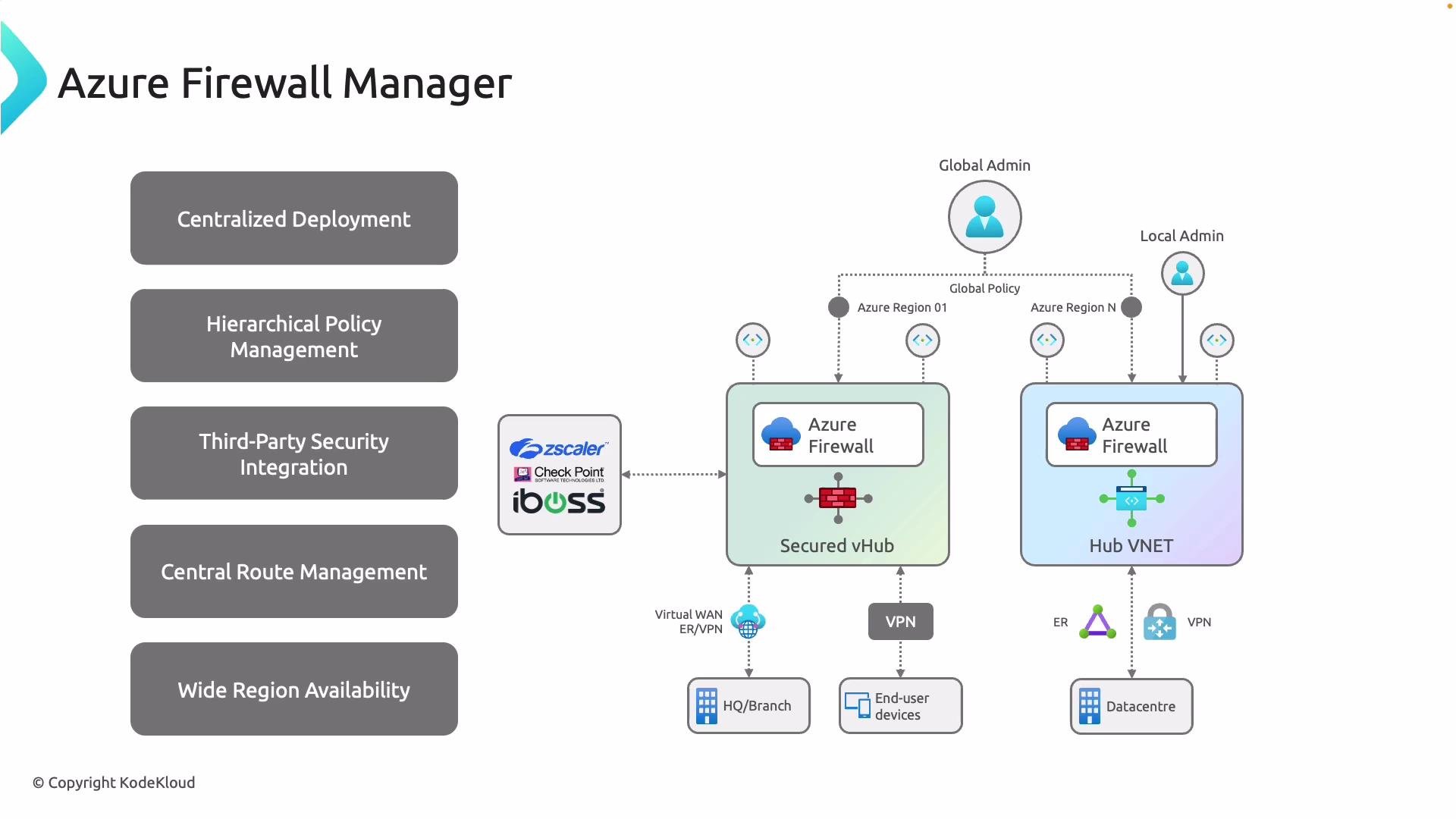
The diagram below illustrates the two primary deployment models supported by Azure Firewall Manager:
* Left: Firewall Manager manages a secured virtual hub (vHub) with integrated third‑party providers (for example, [Zscaler](https://www.zscaler.com/), [Check Point](https://www.checkpoint.com/), or [iboss](https://www.iboss.com/)).
* Right: Firewall Manager manages hub VNets where Azure Firewall instances are deployed in the hub VNet.
Use the model that best matches your network architecture—whether you prefer a Microsoft-managed Virtual WAN secured vHub or a traditional hub VNet with Azure Firewall instances. In both models, Firewall Manager provides a single control plane for deploying firewalls and applying hierarchical security policies.
 ## Key capabilities of Azure Firewall Manager
Azure Firewall Manager combines deployment orchestration with hierarchical policy control and routing to simplify enterprise network security at scale.
| Capability | Description | Typical benefits |
| -------------------------------- | ----------------------------------------------------------------------------------------------------------------------------------------------- | ---------------------------------------------------------------------------------------------- |
| Centralized deployment | Deploy and manage Azure Firewall instances or supported third‑party providers across subscriptions and regions from a single control plane. | Faster, consistent deployments across environments; reduced management overhead. |
| Hierarchical policy management | Define global security baselines at the top level and delegate local refinements to regional or workload owners. | Consistent baseline enforcement with controlled local flexibility for exceptions. |
| Third‑party security integration | Integrate partner virtual appliances and managed security service providers (Zscaler, Check Point, iboss) to extend inspection and enforcement. | Leverage advanced inspection or compliance features beyond native Azure Firewall capabilities. |
| Central route management | Configure central route tables and forced tunneling so traffic flows through designated inspection points across hubs and VNets. | Predictable traffic paths, simplified troubleshooting, and enforceable inspection points. |
| Wide region availability | Apply consistent security policies across multiple geographies and subscriptions. | Global policy consistency for distributed workloads and regulatory requirements. |
## Deployment comparison: secured virtual hub (vHub) vs hub VNet
Choose the model that matches your operational priorities—managed vHub for integrated Virtual WAN scenarios or hub VNets for more traditional hub-and-spoke designs.
| Aspect | Secured virtual hub (vHub) | Hub VNet with Azure Firewall |
| ----------------------- | ----------------------------------------------------------------------------------: | --------------------------------------------------------------------------------- |
| Management | Microsoft-managed virtual WAN hub integrated with Firewall Manager | Customer-managed hub VNet where Azure Firewall instances are deployed |
| Best for | Organizations using Virtual WAN, SD-WAN integrations, or partner-managed inspection | Traditional hub-and-spoke topologies with Azure-native routing and control |
| Third‑party integration | Native support for partner security service chaining in the vHub | Can deploy partner NVA appliances in the hub VNet and manage via Firewall Manager |
| Route control | Central route tables within Virtual WAN with forced tunneling | Central route tables and UDRs in hub VNet; requires explicit route configuration |
| Operational control | Less infrastructure management (Microsoft handles vHub operations) | Full control over hub VNet resources and firewall instances |
When deciding between vHub and hub VNet, evaluate your routing needs, partner integrations, and operational model (managed vs. customer-managed). If you rely on Virtual WAN features or SD‑WAN provider integrations, a secured vHub often simplifies management.
## Implementation considerations
* Policy design: Start with a global baseline policy in Firewall Manager, then use local policies or delegated rule sets for regional or workload-specific requirements.
* Routing and forced tunneling: Plan route tables and BGP/UDR configurations so traffic reliably traverses inspection points (Azure Firewall or third‑party NVAs).
* Third‑party appliances: Verify partner compatibility with Firewall Manager and validate throughput, logging, and telemetry integration for your workloads.
* Scale and availability: Design firewall instances and hubs for high availability and predictable scaling; consider region distribution to meet compliance needs.
Avoid applying overly permissive local overrides. Hierarchical policy delegation enables flexibility, but misconfigured local rules can weaken global security posture—review local policy exceptions regularly.
## Quick links and references
* [Azure Firewall Manager documentation](https://learn.microsoft.com/azure/firewall-manager/)
* [Azure Firewall overview](https://learn.microsoft.com/azure/firewall/)
* [Azure Virtual WAN overview](https://learn.microsoft.com/azure/virtual-wan/)
* Third‑party partners: [Zscaler](https://www.zscaler.com/), [Check Point](https://www.checkpoint.com/), [iboss](https://www.iboss.com/)
Consider the architectural differences between deploying Azure Firewall in a secured virtual hub (vWAN vHub) and deploying Azure Firewall in a hub VNet when choosing the model that best meets your organization’s security, routing, and operational requirements.
## Key capabilities of Azure Firewall Manager
Azure Firewall Manager combines deployment orchestration with hierarchical policy control and routing to simplify enterprise network security at scale.
| Capability | Description | Typical benefits |
| -------------------------------- | ----------------------------------------------------------------------------------------------------------------------------------------------- | ---------------------------------------------------------------------------------------------- |
| Centralized deployment | Deploy and manage Azure Firewall instances or supported third‑party providers across subscriptions and regions from a single control plane. | Faster, consistent deployments across environments; reduced management overhead. |
| Hierarchical policy management | Define global security baselines at the top level and delegate local refinements to regional or workload owners. | Consistent baseline enforcement with controlled local flexibility for exceptions. |
| Third‑party security integration | Integrate partner virtual appliances and managed security service providers (Zscaler, Check Point, iboss) to extend inspection and enforcement. | Leverage advanced inspection or compliance features beyond native Azure Firewall capabilities. |
| Central route management | Configure central route tables and forced tunneling so traffic flows through designated inspection points across hubs and VNets. | Predictable traffic paths, simplified troubleshooting, and enforceable inspection points. |
| Wide region availability | Apply consistent security policies across multiple geographies and subscriptions. | Global policy consistency for distributed workloads and regulatory requirements. |
## Deployment comparison: secured virtual hub (vHub) vs hub VNet
Choose the model that matches your operational priorities—managed vHub for integrated Virtual WAN scenarios or hub VNets for more traditional hub-and-spoke designs.
| Aspect | Secured virtual hub (vHub) | Hub VNet with Azure Firewall |
| ----------------------- | ----------------------------------------------------------------------------------: | --------------------------------------------------------------------------------- |
| Management | Microsoft-managed virtual WAN hub integrated with Firewall Manager | Customer-managed hub VNet where Azure Firewall instances are deployed |
| Best for | Organizations using Virtual WAN, SD-WAN integrations, or partner-managed inspection | Traditional hub-and-spoke topologies with Azure-native routing and control |
| Third‑party integration | Native support for partner security service chaining in the vHub | Can deploy partner NVA appliances in the hub VNet and manage via Firewall Manager |
| Route control | Central route tables within Virtual WAN with forced tunneling | Central route tables and UDRs in hub VNet; requires explicit route configuration |
| Operational control | Less infrastructure management (Microsoft handles vHub operations) | Full control over hub VNet resources and firewall instances |
When deciding between vHub and hub VNet, evaluate your routing needs, partner integrations, and operational model (managed vs. customer-managed). If you rely on Virtual WAN features or SD‑WAN provider integrations, a secured vHub often simplifies management.
## Implementation considerations
* Policy design: Start with a global baseline policy in Firewall Manager, then use local policies or delegated rule sets for regional or workload-specific requirements.
* Routing and forced tunneling: Plan route tables and BGP/UDR configurations so traffic reliably traverses inspection points (Azure Firewall or third‑party NVAs).
* Third‑party appliances: Verify partner compatibility with Firewall Manager and validate throughput, logging, and telemetry integration for your workloads.
* Scale and availability: Design firewall instances and hubs for high availability and predictable scaling; consider region distribution to meet compliance needs.
Avoid applying overly permissive local overrides. Hierarchical policy delegation enables flexibility, but misconfigured local rules can weaken global security posture—review local policy exceptions regularly.
## Quick links and references
* [Azure Firewall Manager documentation](https://learn.microsoft.com/azure/firewall-manager/)
* [Azure Firewall overview](https://learn.microsoft.com/azure/firewall/)
* [Azure Virtual WAN overview](https://learn.microsoft.com/azure/virtual-wan/)
* Third‑party partners: [Zscaler](https://www.zscaler.com/), [Check Point](https://www.checkpoint.com/), [iboss](https://www.iboss.com/)
Consider the architectural differences between deploying Azure Firewall in a secured virtual hub (vWAN vHub) and deploying Azure Firewall in a hub VNet when choosing the model that best meets your organization’s security, routing, and operational requirements.