> ## Documentation Index
> Fetch the complete documentation index at: https://notes.kodekloud.com/llms.txt
> Use this file to discover all available pages before exploring further.
# Using Azure Firewall Manager
> Guide to using Azure Firewall Manager and comparing Hub Virtual Networks versus Secured Virtual Hubs, covering deployment models, routing, scale, integrations, and policy management.
This lesson explains how to use Azure Firewall Manager in practice, focusing on two deployment models: Hub Virtual Network (hub VNet) and Secured Virtual Hub (built on Azure Virtual WAN). Both models provide a centralized inspection point for traffic, but they differ in scale, automation, routing, and partner integrations. Use this guide to decide which model fits your organization's requirements and to understand operational differences for day-to-day management.
First, a high-level comparison of hub VNets vs secured virtual hubs.
* Hub Virtual Network (hub VNet)
* A standard Azure Virtual Network you create and manage.
* Uses manual hub-and-spoke peering and user-defined routes (UDRs).
* You control the firewall IP addressing and configuration.
* Suitable for fine-grained control and smaller-scale topologies.
* Secured Virtual Hub
* Built on Azure Virtual WAN and intended for large-scale/global networking.
* Automates hub creation, spoke connectivity, and routing distribution.
* Can auto-generate hub IP addresses and integrates with SD-WAN partners.
* Ideal for enterprise-scale deployments requiring automation and high throughput.
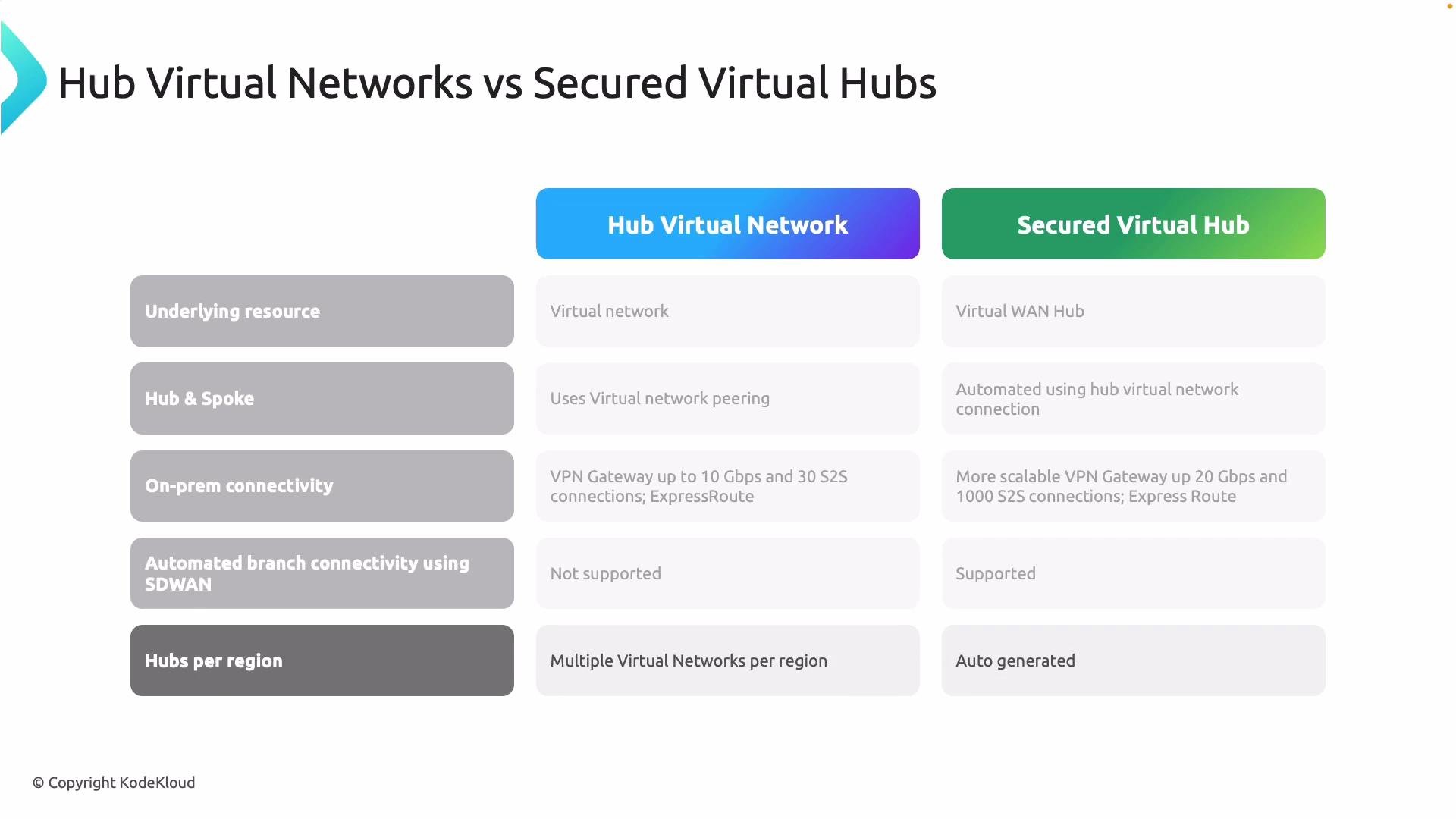 Key operational and design differences
* IP addressing and availability
* Hub VNets: you assign and manage firewall IPs; Availability Zones supported for resiliency.
* Secured virtual hubs: Virtual WAN can auto-generate IPs; also supports zones where applicable.
* On-premises connectivity and scale
* Hub VNets: VPN gateway scale depends on the chosen SKU (tens of tunnels, limited aggregate throughput).
* Secured virtual hubs: Virtual WAN is designed for much higher scale (many more tunnels and larger aggregate throughput), with built-in BGP and route distribution.
* Automation and partner integrations
* Hub VNets: manual configuration for third-party appliances (NVAs) and forced tunneling.
* Secured virtual hubs: native SD-WAN integration and automated partner onboarding (e.g., Zscaler, Check Point), allowing mixed Azure Firewall + partner models.
* Routing
* Hub VNets: rely on UDRs per subnet or per route table.
* Secured virtual hubs: central route management via Virtual WAN route tables and BGP, reducing per-subnet routing overhead.
Key operational and design differences
* IP addressing and availability
* Hub VNets: you assign and manage firewall IPs; Availability Zones supported for resiliency.
* Secured virtual hubs: Virtual WAN can auto-generate IPs; also supports zones where applicable.
* On-premises connectivity and scale
* Hub VNets: VPN gateway scale depends on the chosen SKU (tens of tunnels, limited aggregate throughput).
* Secured virtual hubs: Virtual WAN is designed for much higher scale (many more tunnels and larger aggregate throughput), with built-in BGP and route distribution.
* Automation and partner integrations
* Hub VNets: manual configuration for third-party appliances (NVAs) and forced tunneling.
* Secured virtual hubs: native SD-WAN integration and automated partner onboarding (e.g., Zscaler, Check Point), allowing mixed Azure Firewall + partner models.
* Routing
* Hub VNets: rely on UDRs per subnet or per route table.
* Secured virtual hubs: central route management via Virtual WAN route tables and BGP, reducing per-subnet routing overhead.
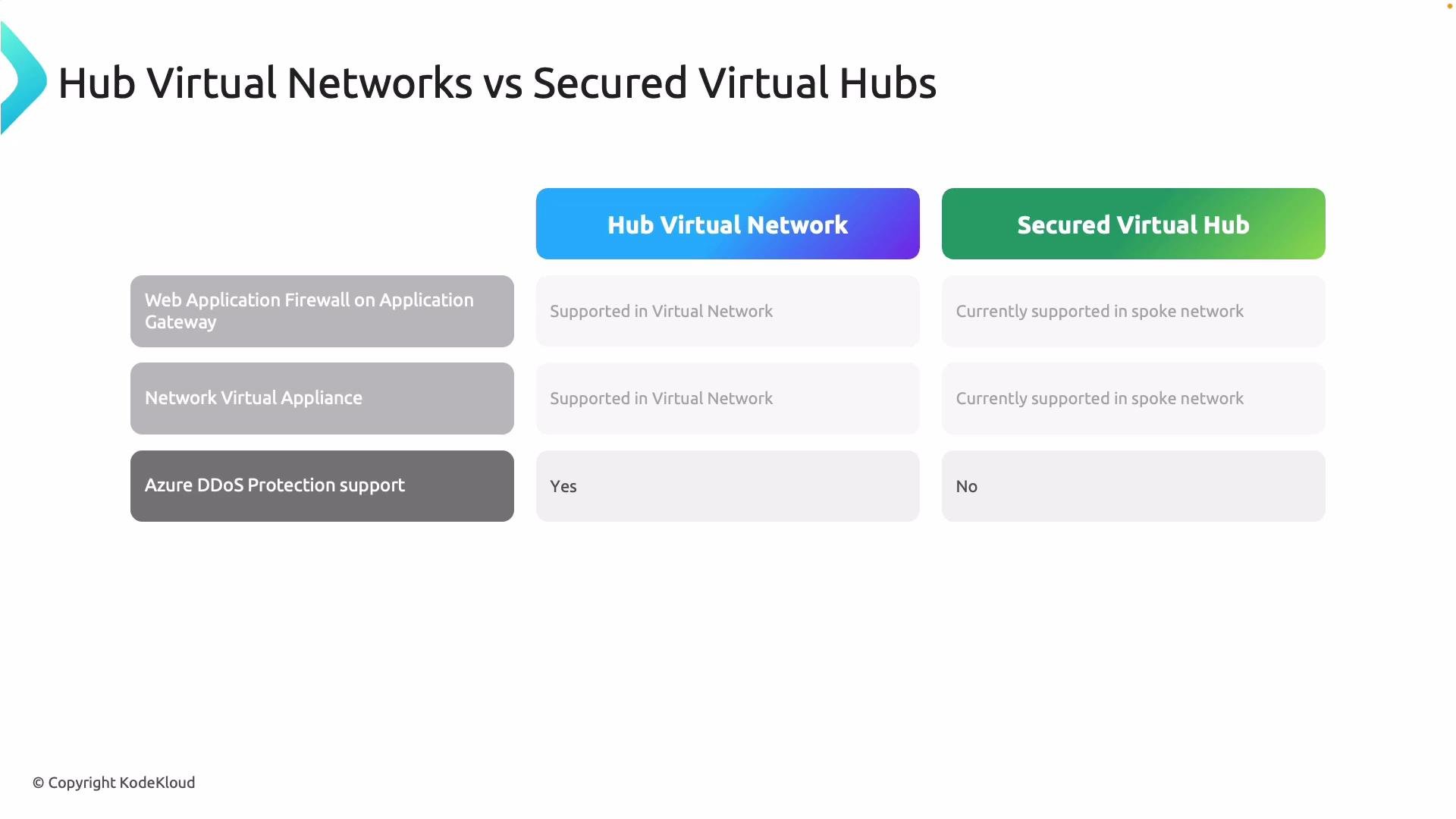
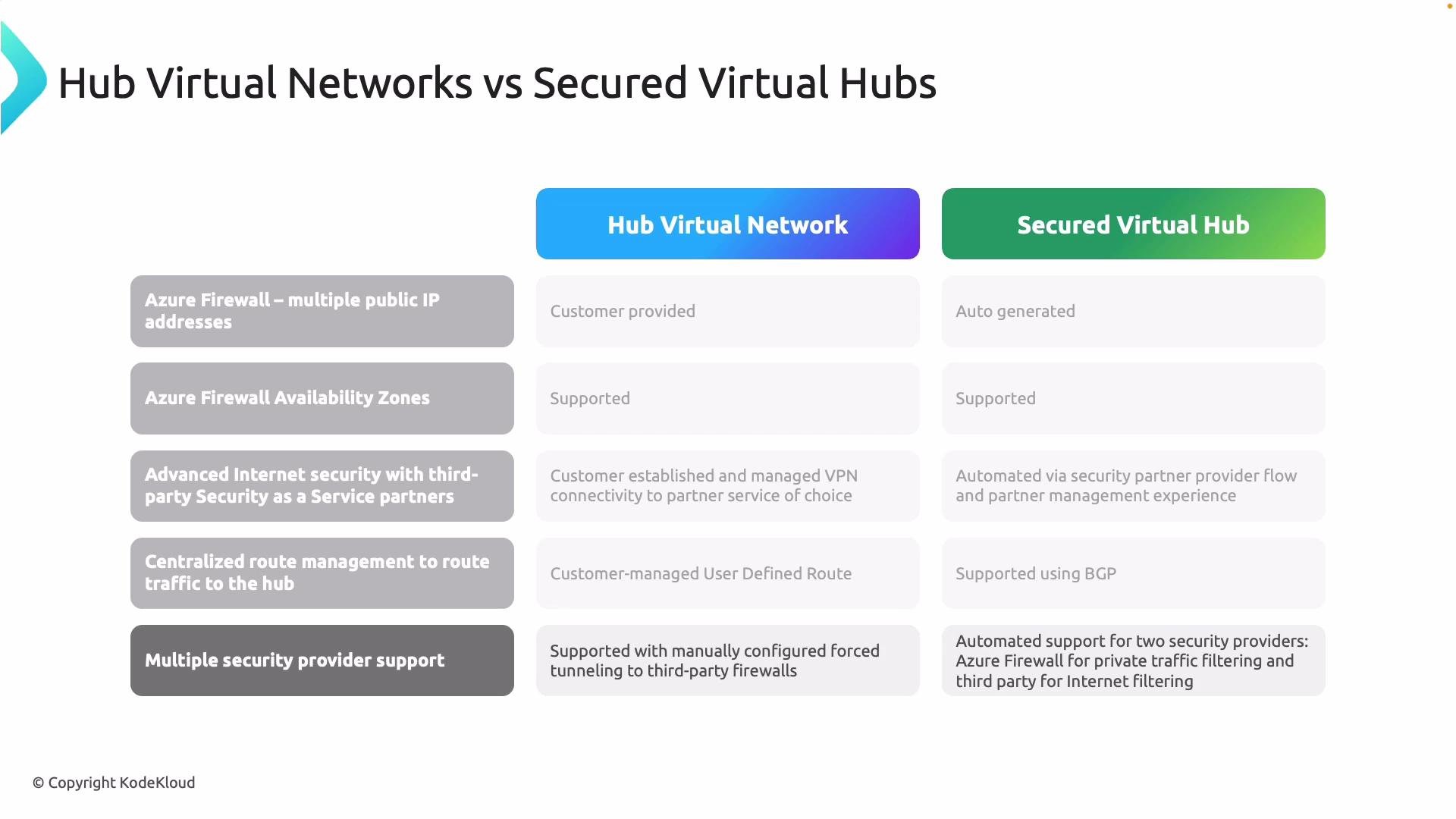 Security components, WAF, NVAs, and DDoS
* Web Application Firewall (WAF)
* Supported in both models. In secured virtual hub designs, WAF is often deployed in the spoke rather than inside the hub to keep application-layer protection closer to the workloads.
* Network Virtual Appliances (NVAs)
* Supported in both approaches; NVAs are frequently deployed in spokes for secured virtual hub designs.
* DDoS Protection
* Hub VNets can integrate directly with Azure DDoS Protection plans applied at the VNet level.
* Virtual WAN and secured virtual hubs require additional planning for DDoS protection and may involve different integration patterns.
Security components, WAF, NVAs, and DDoS
* Web Application Firewall (WAF)
* Supported in both models. In secured virtual hub designs, WAF is often deployed in the spoke rather than inside the hub to keep application-layer protection closer to the workloads.
* Network Virtual Appliances (NVAs)
* Supported in both approaches; NVAs are frequently deployed in spokes for secured virtual hub designs.
* DDoS Protection
* Hub VNets can integrate directly with Azure DDoS Protection plans applied at the VNet level.
* Virtual WAN and secured virtual hubs require additional planning for DDoS protection and may involve different integration patterns.
 When to choose each model (summary)
* Choose Hub VNets when:
* You need fine-grained control over networking configuration and firewall placement.
* You manage a smaller number of hubs/regions and prefer manual peering and route control.
* Choose Secured Virtual Hubs when:
* You require global scale, automation, and simplified route distribution.
* You need built-in SD-WAN or partner integration and higher on-premises VPN scale.
In short: hub VNets = flexibility and control; secured virtual hubs = automation, scale, and simplified partner integration.
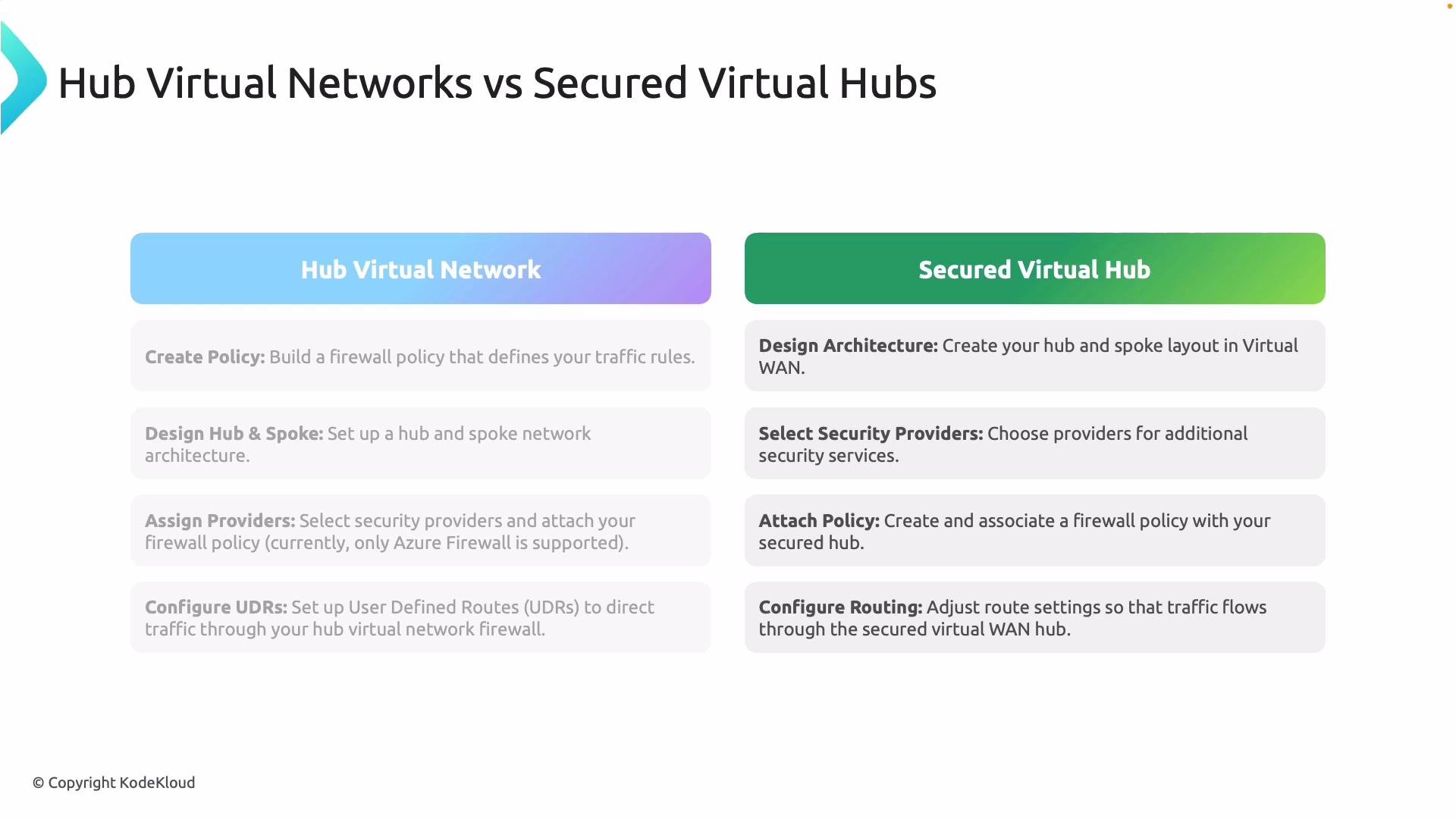
Operational steps: configuring each model
For Hub Virtual Networks (manual operations)
1. Create an Azure Firewall Policy to define network/application rules, NAT, and threat intelligence.
2. Design the hub-and-spoke topology and create peering links between hubs and spokes.
3. Deploy Azure Firewall instances in the hub VNet and configure public/private IPs.
4. Implement User-Defined Routes (UDRs) so outbound and cross-spoke traffic traverses the hub firewall.
5. For third-party integration, deploy NVAs and configure forced tunneling manually as required.
For Secured Virtual Hubs (Virtual WAN-based automation)
1. Design the topology in Azure Virtual WAN; Virtual WAN automates hub provisioning and spoke attachments.
2. Attach Azure Firewall (and optional third-party security providers) directly to the secured virtual hub.
3. Apply centralized Firewall Policies to the secured virtual hub for consistent enforcement across spokes.
4. Let the secured virtual hub manage routing and route distribution (BGP and Virtual WAN route tables), reducing UDR maintenance.
5. Use automated SD-WAN and partner connectivity features for large-scale branch deployments.
When to choose each model (summary)
* Choose Hub VNets when:
* You need fine-grained control over networking configuration and firewall placement.
* You manage a smaller number of hubs/regions and prefer manual peering and route control.
* Choose Secured Virtual Hubs when:
* You require global scale, automation, and simplified route distribution.
* You need built-in SD-WAN or partner integration and higher on-premises VPN scale.
In short: hub VNets = flexibility and control; secured virtual hubs = automation, scale, and simplified partner integration.
Operational steps: configuring each model
For Hub Virtual Networks (manual operations)
1. Create an Azure Firewall Policy to define network/application rules, NAT, and threat intelligence.
2. Design the hub-and-spoke topology and create peering links between hubs and spokes.
3. Deploy Azure Firewall instances in the hub VNet and configure public/private IPs.
4. Implement User-Defined Routes (UDRs) so outbound and cross-spoke traffic traverses the hub firewall.
5. For third-party integration, deploy NVAs and configure forced tunneling manually as required.
For Secured Virtual Hubs (Virtual WAN-based automation)
1. Design the topology in Azure Virtual WAN; Virtual WAN automates hub provisioning and spoke attachments.
2. Attach Azure Firewall (and optional third-party security providers) directly to the secured virtual hub.
3. Apply centralized Firewall Policies to the secured virtual hub for consistent enforcement across spokes.
4. Let the secured virtual hub manage routing and route distribution (BGP and Virtual WAN route tables), reducing UDR maintenance.
5. Use automated SD-WAN and partner connectivity features for large-scale branch deployments.
 Azure Firewall Manager: control plane vs data plane
Azure Firewall Manager is a centralized, control-plane orchestration service. You do not deploy a "Firewall Manager" appliance. Instead, Firewall Manager manages and coordinates the actual data-plane resources you deploy:
* Azure Firewall instances (deployed in hubs or secured virtual hubs)
* Azure Firewall Policies (parent/child hierarchies and attachments)
* Secured virtual hubs and hub VNets
* Integrations with third-party security providers and DDoS plans
Azure Firewall Manager is a control-plane orchestration service. Look for Azure Firewall, Firewall Policies, and hub/network resources in the portal — there's no separate "Firewall Manager" appliance to deploy.
Using the Azure portal for Firewall Manager and policies
* In the Azure portal, go to Network Security > Firewall Manager to view a consolidated control-plane view of your managed firewalls and policy attachments.
* Firewall Policies support features such as Threat Intelligence, TLS inspection configurations, rule collection order, and parent/child policy hierarchies.
* You can attach a local (child) policy to a specific firewall or hub while maintaining a parent (global) policy for organization-wide defaults.
Azure Firewall Manager: control plane vs data plane
Azure Firewall Manager is a centralized, control-plane orchestration service. You do not deploy a "Firewall Manager" appliance. Instead, Firewall Manager manages and coordinates the actual data-plane resources you deploy:
* Azure Firewall instances (deployed in hubs or secured virtual hubs)
* Azure Firewall Policies (parent/child hierarchies and attachments)
* Secured virtual hubs and hub VNets
* Integrations with third-party security providers and DDoS plans
Azure Firewall Manager is a control-plane orchestration service. Look for Azure Firewall, Firewall Policies, and hub/network resources in the portal — there's no separate "Firewall Manager" appliance to deploy.
Using the Azure portal for Firewall Manager and policies
* In the Azure portal, go to Network Security > Firewall Manager to view a consolidated control-plane view of your managed firewalls and policy attachments.
* Firewall Policies support features such as Threat Intelligence, TLS inspection configurations, rule collection order, and parent/child policy hierarchies.
* You can attach a local (child) policy to a specific firewall or hub while maintaining a parent (global) policy for organization-wide defaults.
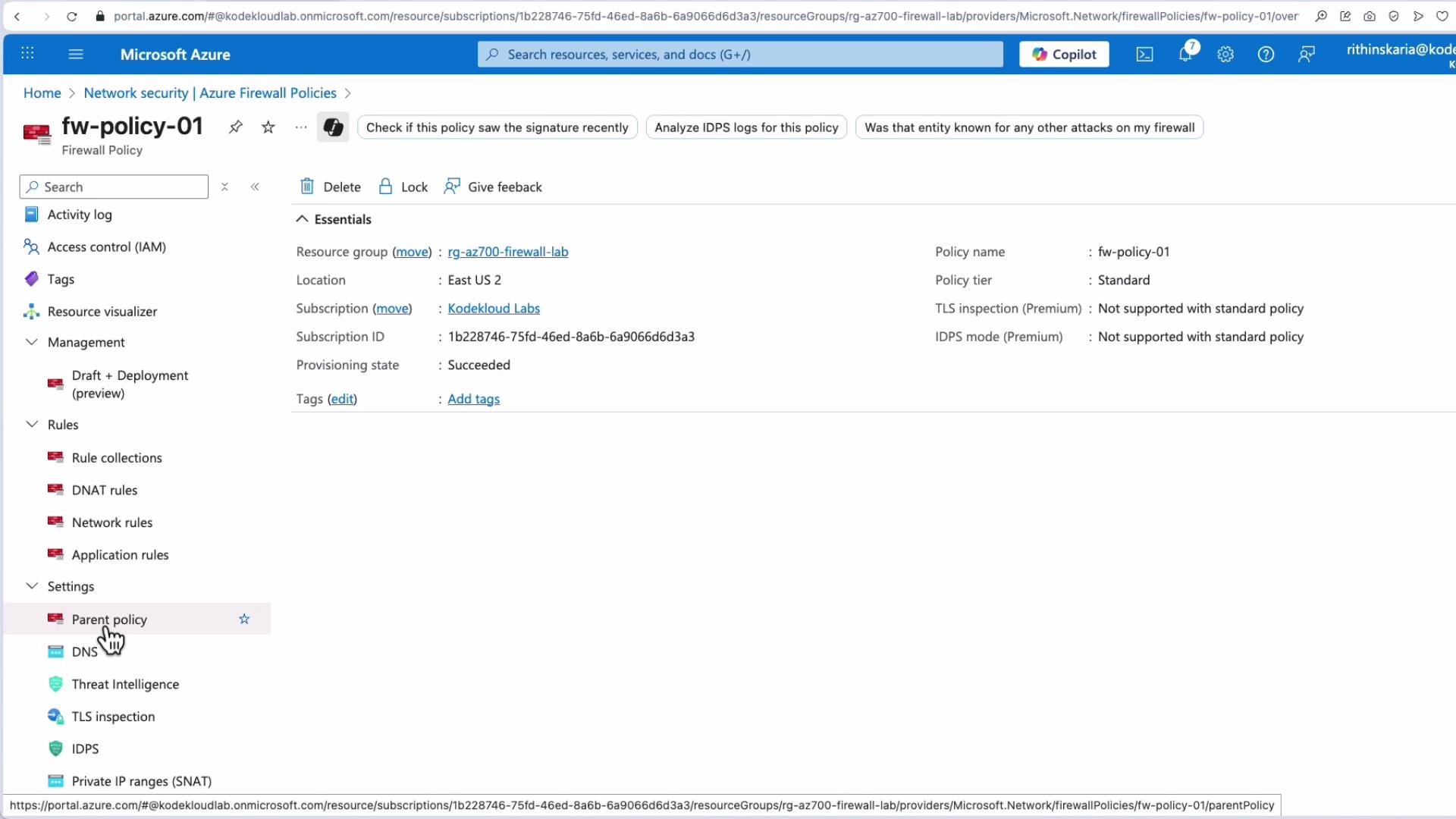 From the policy blade you can manage rule collections, threat protection, and the policy hierarchy. The portal exposes attachments so you can quickly see which hubs, VNets, or firewalls are governed by a particular policy.
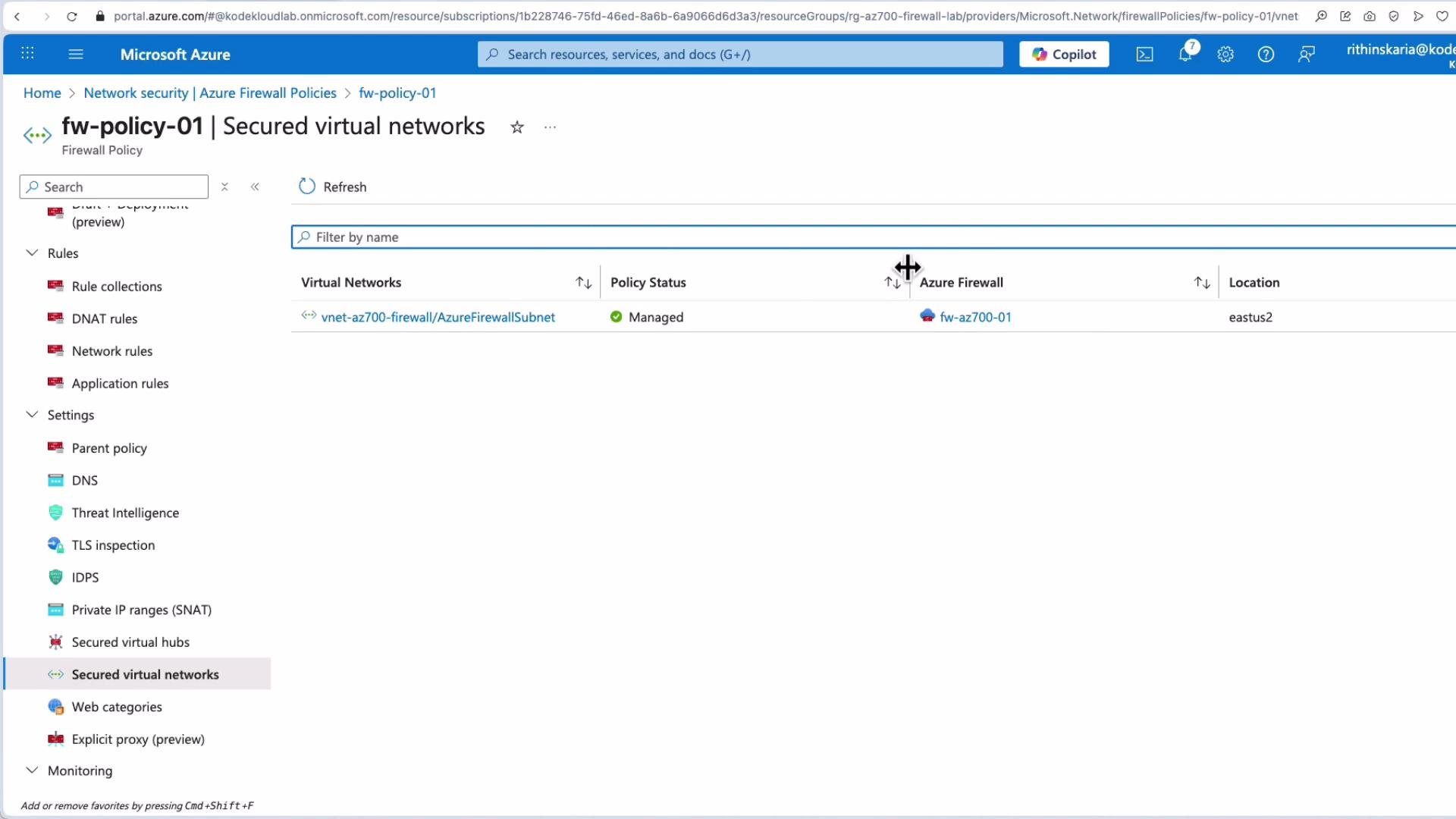
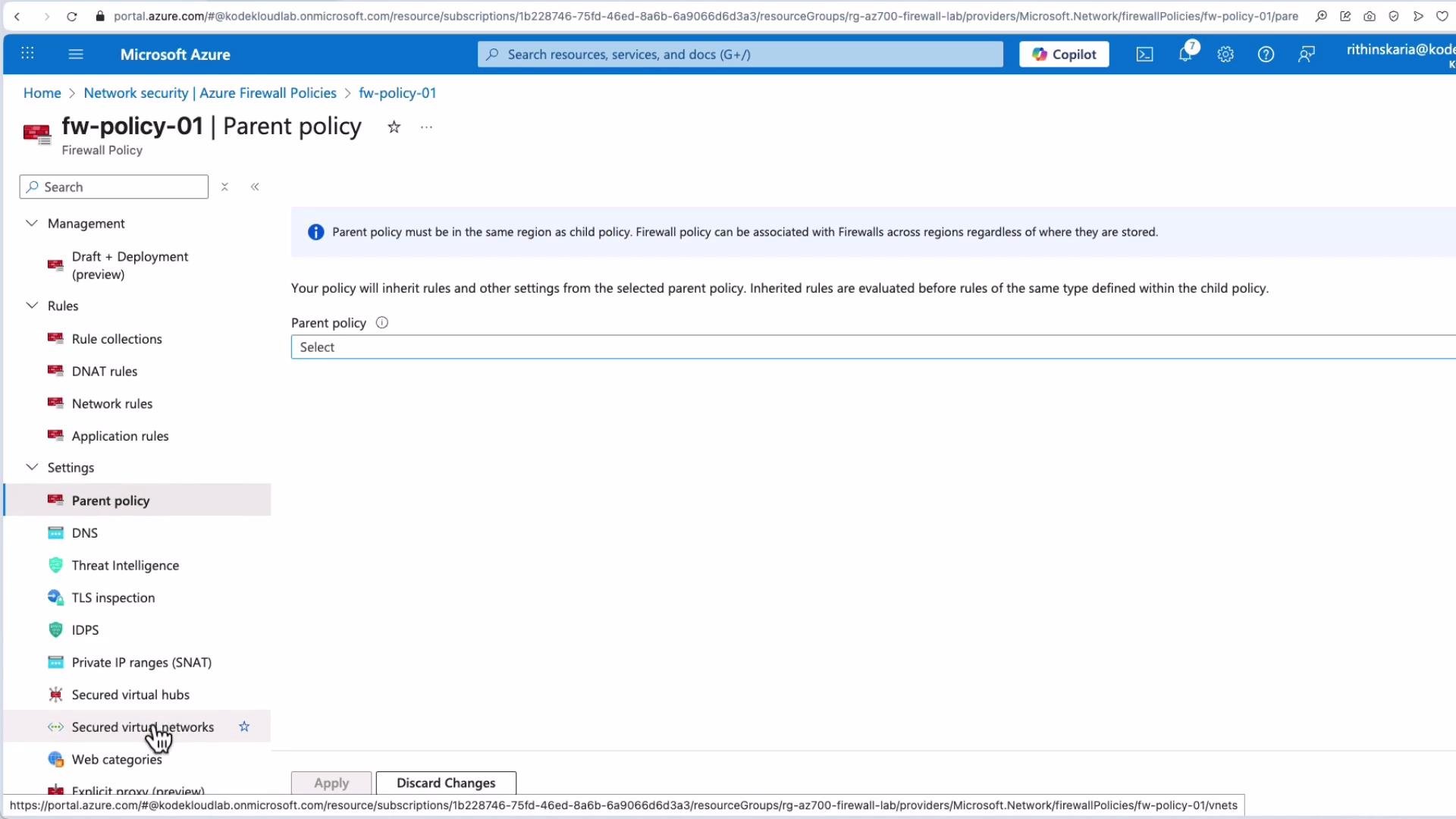 When a policy is attached and managed, the portal shows the integrated virtual network or secured virtual hub and the associated Azure Firewall instance. This combined control-plane view makes it easier to manage policy changes, rollouts, and compliance reporting.
 Quick reference table
| Area | Hub Virtual Network | Secured Virtual Hub (Virtual WAN) |
| ---------------------- | -------------------------------------- | ---------------------------------------------- |
| Underlying resource | VNet (customer-managed) | Virtual WAN secured virtual hub |
| Peering / connectivity | Manual VNet peering | Automated via Virtual WAN |
| On-prem VPN scale | Limited by gateway SKU | High-scale Virtual WAN hubs |
| Routing | UDRs per subnet | Centralized Virtual WAN route tables (BGP) |
| Partner / SD-WAN | Manual integration | Native partner and SD-WAN integrations |
| Policy management | Firewall Policies attach to VNets/hubs | Centralized Firewall Policies for secured hubs |
Further reading and references
* Azure Firewall Manager documentation: [https://learn.microsoft.com/azure/firewall-manager/](https://learn.microsoft.com/azure/firewall-manager/)
* Azure Virtual WAN overview: [https://learn.microsoft.com/azure/virtual-wan/overview](https://learn.microsoft.com/azure/virtual-wan/overview)
* Azure Firewall policy documentation: [https://learn.microsoft.com/azure/firewall/policy-overview](https://learn.microsoft.com/azure/firewall/policy-overview)
That concludes this lesson: use hub VNets when you need explicit control and per-hub customization; choose secured virtual hubs for automation, greater scale, and simplified partner integration. Azure Firewall Manager provides the centralized control plane to manage policies and firewall deployments across either model.
Quick reference table
| Area | Hub Virtual Network | Secured Virtual Hub (Virtual WAN) |
| ---------------------- | -------------------------------------- | ---------------------------------------------- |
| Underlying resource | VNet (customer-managed) | Virtual WAN secured virtual hub |
| Peering / connectivity | Manual VNet peering | Automated via Virtual WAN |
| On-prem VPN scale | Limited by gateway SKU | High-scale Virtual WAN hubs |
| Routing | UDRs per subnet | Centralized Virtual WAN route tables (BGP) |
| Partner / SD-WAN | Manual integration | Native partner and SD-WAN integrations |
| Policy management | Firewall Policies attach to VNets/hubs | Centralized Firewall Policies for secured hubs |
Further reading and references
* Azure Firewall Manager documentation: [https://learn.microsoft.com/azure/firewall-manager/](https://learn.microsoft.com/azure/firewall-manager/)
* Azure Virtual WAN overview: [https://learn.microsoft.com/azure/virtual-wan/overview](https://learn.microsoft.com/azure/virtual-wan/overview)
* Azure Firewall policy documentation: [https://learn.microsoft.com/azure/firewall/policy-overview](https://learn.microsoft.com/azure/firewall/policy-overview)
That concludes this lesson: use hub VNets when you need explicit control and per-hub customization; choose secured virtual hubs for automation, greater scale, and simplified partner integration. Azure Firewall Manager provides the centralized control plane to manage policies and firewall deployments across either model.