> ## Documentation Index
> Fetch the complete documentation index at: https://notes.kodekloud.com/llms.txt
> Use this file to discover all available pages before exploring further.
# Pipefail
> This guide explains how to handle pipeline errors in Bash using `set -o pipefail` for robust scripting.
In this guide, we’ll dive into how Unix-like shells handle pipelines, why errors can be hidden, and how to enforce early exits using `set -o pipefail`. You’ll learn best practices for robust Bash scripting and see practical examples.
## How Pipelines Work
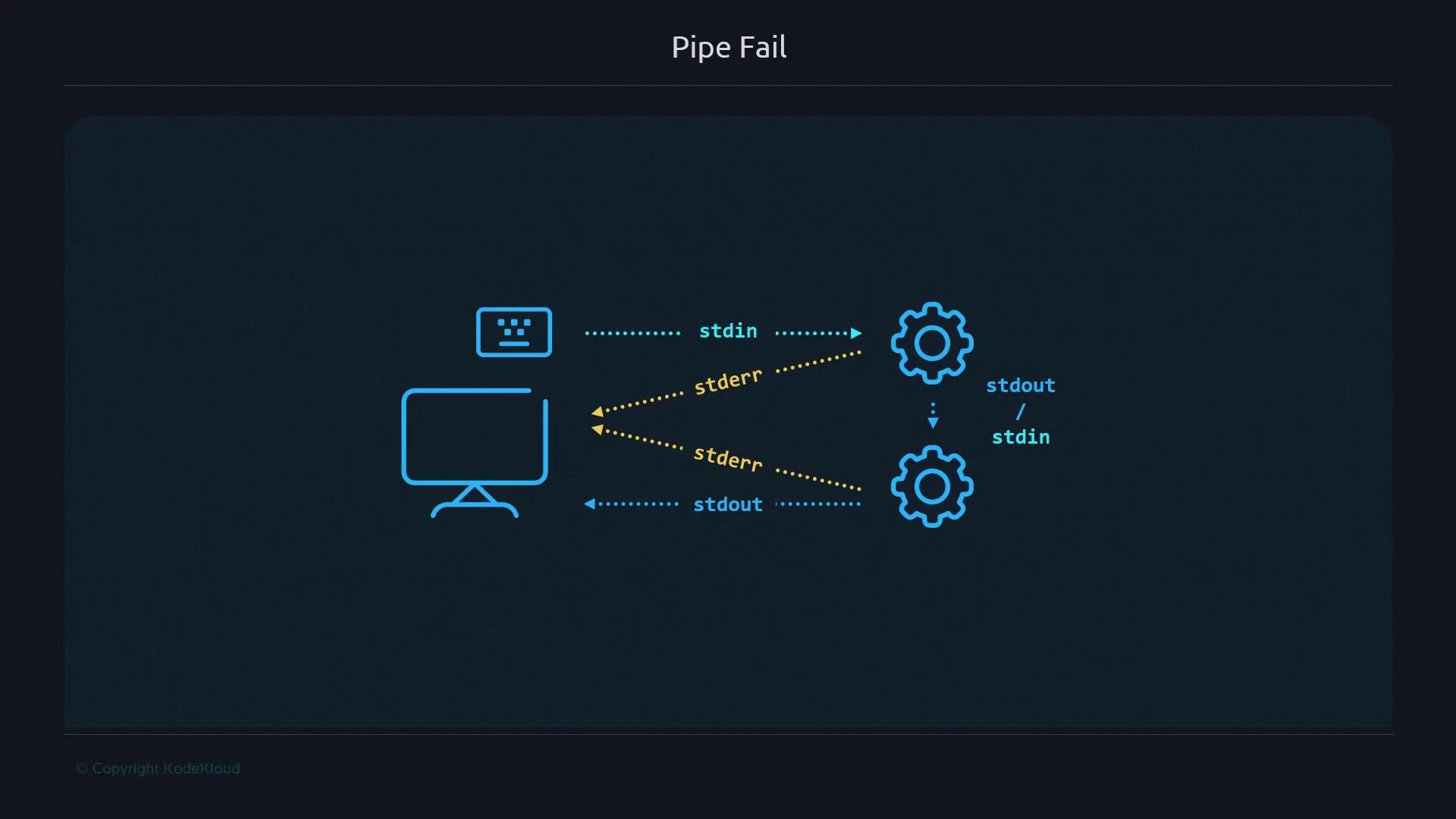
When you connect commands with a pipe (`|`), each command’s standard output (`stdout`) feeds into the next command’s standard input (`stdin`). However, if a middle command writes to standard error (`stderr`), that error goes straight to your terminal—even though the rest of the pipeline keeps running.
## Behavior Without `pipefail`
Consider this simple pipeline:
```bash theme={null}
$ sort somefile.txt | uniq | cat file.txt
sort: cannot read somefile.txt: No such file or directory
hello
```
What happens here:
* `sort` fails (exit code ≠ 0) and emits an error.
* `uniq` still runs (no input) and exits successfully.
* `cat file.txt` prints its content.
Even though `sort` failed, the pipeline’s final exit status is `0`, which masks the error.
## Checking Exit Status
Inspect the pipeline’s return code with `echo $?`:
```bash theme={null}
$ sort somefile.txt | uniq
sort: cannot read somefile.txt: No such file or directory
$ echo $?
0
```
Despite the failure, you get `0`. Likewise, boolean operators behave unexpectedly:
```bash theme={null}
$ sort somefile.txt | uniq && echo "Won't stop on error"
sort: cannot read somefile.txt: No such file or directory
Won't stop on error
```
Here, `echo` still runs because the pipeline exit code is `0`.
## Enabling `pipefail`
To force a pipeline to return a non-zero status if any command fails, enable `pipefail`:
```bash theme={null}
#!/usr/bin/env bash
set -o pipefail
sort somefile.txt | uniq && echo "This won't print"
echo "Exit status: $?"
```
Save as `set-pipefail.sh` and execute:
```bash theme={null}
$ ./set-pipefail.sh
sort: cannot read somefile.txt: No such file or directory
Exit status: 2
```
With `pipefail`:
* The pipeline returns the exit status of the rightmost failing command.
* Subsequent commands and `&&` branches are skipped on error.
## Common Shell Options
| Option | Description | Default |
| --------- | ---------------------------------------------------- | ------- |
| pipefail | Pipeline fails if any command errors | off |
| errexit | Exit script on any non-zero command (`set -e`) | off |
| noclobber | Prevent overwriting files via redirection (`set -C`) | off |
Stack each `set -o` on its own line for clarity:
```bash theme={null}
set -o errexit
set -o pipefail
set -o noclobber
```
## Adding a Guard Clause
Combine `pipefail` with an exit-on-failure guard:
```bash theme={null}
#!/usr/bin/env bash
set -o pipefail
sort somefile.txt | uniq || exit 80
```
If any pipeline stage fails, the script exits immediately with status 80.
Always choose a non-zero exit code that makes sense for your script. Avoid overlapping with common system codes.
## Combining `pipefail` with Other Options
Here’s a script that prevents file overwrites and enforces pipeline errors:
```bash theme={null}
#!/usr/bin/env bash
set -o noclobber
set -o pipefail
echo "First line" > file.txt
echo "Second line" > file.txt # Fails due to noclobber
sort somefile.txt | uniq || exit 100
echo "This line never runs"
exit 0
```
Run it:
```bash theme={null}
$ ./set-pipefail3.sh
$ cat file.txt
First line
```
The second redirect fails, and because of `pipefail` plus the guard clause, the script exits with code 100.
## Links and References
* [Bash Reference Manual – Bourne Shell Builtins](https://www.gnu.org/software/bash/manual/html_node/Bourne-Shell-Builtins.html)
* [Advanced Bash-Scripting Guide](https://tldp.org/LDP/abs/html/)
* [Stack Overflow: What does `set -o pipefail` do?](https://stackoverflow.com/questions/54577587)
* [GitHub Gist: Bash Exit Codes](https://gist.github.com/)