> ## Documentation Index
> Fetch the complete documentation index at: https://notes.kodekloud.com/llms.txt
> Use this file to discover all available pages before exploring further.
# Bash Hybrid
> This guide demonstrates combining awk with Bash for processing text files and building a reusable salary-benchmarking tool.
This guide demonstrates how to combine the power of **awk** with **Bash** to process delimited text files. We’ll compare a pure awk script to a Bash/awk hybrid, then progressively build a reusable salary‐benchmarking tool.
***
## Why Bash-AWK Hybrids?
* Pure awk scripts are concise for text processing.
* Embedding awk inside Bash adds flexibility (variables, flags, CLI args).
* Shebangs (`#!/usr/bin/env …`) let you run scripts directly.
### Pure awk Script (`salary.awk`)
```bash theme={null}
#!/usr/bin/env awk -f
BEGIN {
FS = "|"
}
{
print $2, $3
}
```
### Bash Script Embedding awk (`print_names.sh`)
```bash theme={null}
#!/usr/bin/env bash
awk -F "|" '{
print $2, $3
}'
```
You can run either script by:
```bash theme={null}
chmod +x print_names.sh
./print_names.sh < employees.txt
```
Or invoke awk directly:
```bash theme={null}
awk -f salary.awk employees.txt
```
***
## Preparing the Data Source
Our `employees.txt` file uses `|` as the field separator and contains:
| Column No | Field | Description |
| --------- | ----------- | ------------------- |
| 1 | Employee ID | Unique identifier |
| 2 | First name | Given name |
| 3 | Last name | Family name |
| 4 | Department | Department name |
| 5 | Job title | Position title |
| 6 | Email | Contact email |
| 7 | Salary | Annual salary (USD) |
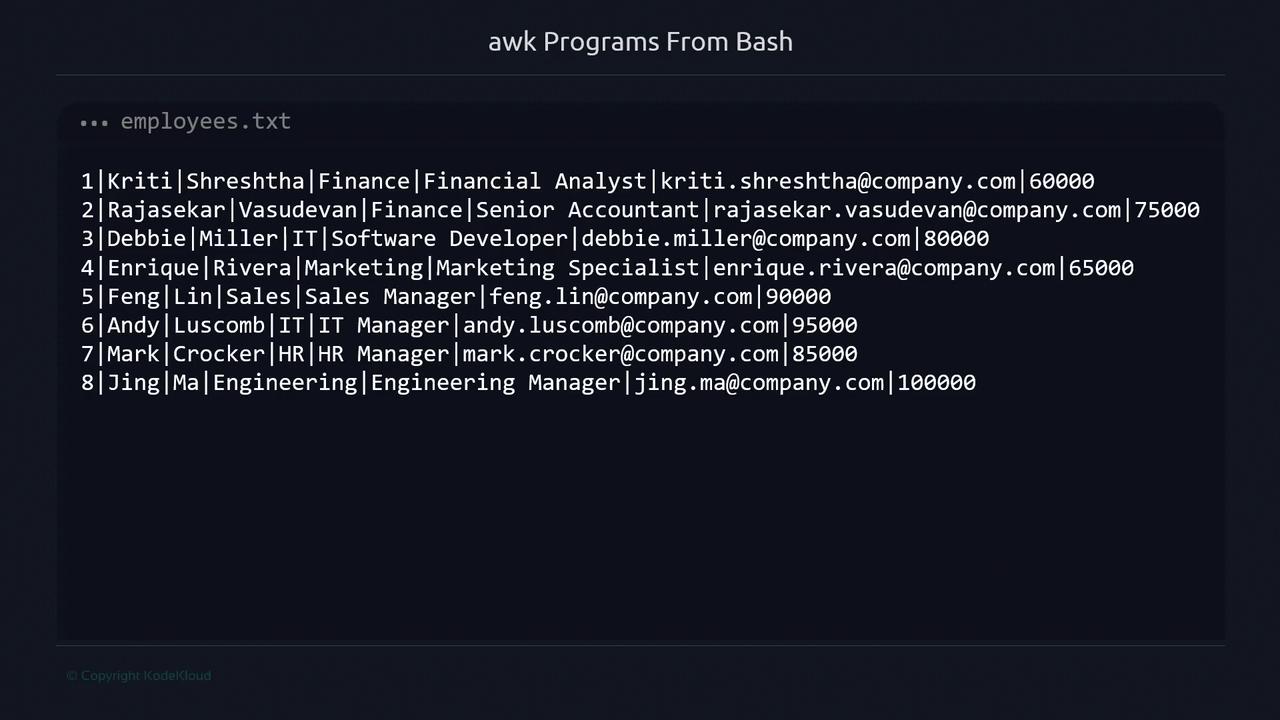
Set the field separator with `-F` or `FS` to split on `|`.
### Salary Thresholds
| Threshold Variable | Criteria |
| ------------------ | -------------------------------- |
| `high_salary` | Salary ≥ 90000 (high earners) |
| `low_salary` | Salary ≤ 65000 (potential bumps) |
***
## 1. Basic One-Liner
Print first name, last name, and salary for **every** employee:
```bash theme={null}
awk -F "|" '{ print $2, $3, $7 }' employees.txt
```
Output:
```text theme={null}
Kriti Shreshtha 60000
Rajasekar Vasudevan 75000
Debbie Miller 80000
Enrique Rivera 65000
Feng Lin 90000
Andy Luscomb 95000
Mark Crocker 85000
Jing Ma 100000
```
***
## 2. Filter by Salary Range
Use `-v` to pass thresholds into awk:
```bash theme={null}
awk -F "|" \
-v high_salary=90000 \
-v low_salary=65000 \
'$7 >= high_salary || $7 <= low_salary {
print $2, $3, $7
}' employees.txt
```
This shows both high and low earners in one stream.
***
## 3. Add a Header with `BEGIN`
Introduce a one-time header via `BEGIN`:
```bash theme={null}
awk -F "|" \
-v high_salary=90000 \
-v low_salary=65000 \
-v header="==== Salary Adjustments ====" \
'BEGIN { print header }
$7 >= high_salary || $7 <= low_salary {
print $2, $3, $7
}' employees.txt
```
***
## 4. Wrap into a Bash Script (`salary.sh`)
For readability and reuse, move the awk call into a Bash script:
```bash theme={null}
#!/usr/bin/env bash
awk -F "|" \
-v high_salary=90000 \
-v low_salary=65000 \
-v header="==== Salary Adjustments ====" '
BEGIN {
print header
}
$7 >= high_salary || $7 <= low_salary {
print $2, $3, $7
}
' < employees.txt
```
Make it executable and run:
```bash theme={null}
chmod +x salary.sh
./salary.sh
```
***
## 5. Separate “Up” and “Down” Sections (`salary-v2.sh`)
Print distinct headers for high and low salaries:
```bash theme={null}
#!/usr/bin/env bash
awk -F "|" \
-v high_salary=90000 \
-v low_salary=65000 \
-v up_header="===== Needs to be adjusted up =====" \
-v down_header="===== Needs to be adjusted down =====" '
$7 >= high_salary {
print down_header
print $2, $3, $7
}
$7 <= low_salary {
print up_header
print $2, $3, $7
}
' < employees.txt
```
***
## 6. One Header per Group (`salary-v3.sh`)
Use flags inside awk to avoid repeating headers:
```bash theme={null}
#!/usr/bin/env bash
awk -F "|" \
-v high_salary=90000 \
-v low_salary=65000 \
-v up_header="===== Needs to be adjusted up =====" \
-v down_header="===== Needs to be adjusted down =====" '
$7 <= low_salary {
if (!printed_up_header) {
print up_header
printed_up_header = 1
}
print $2, $3, $7
}
$7 >= high_salary {
if (!printed_down_header) {
print down_header
printed_down_header = 1
}
print $2, $3, $7
}
' < employees.txt
```
***
## 7. Parameterize with CLI Arguments (`salary-v4.sh`)
Allow users to override thresholds when running the script:
```bash theme={null}
#!/usr/bin/env bash
readonly UP_HEADER="===== Needs to be adjusted up ====="
readonly DOWN_HEADER="===== Needs to be adjusted down ====="
high_salary="${1:-90000}"
low_salary="${2:-65000}"
awk -F "|" \
-v high_salary="$high_salary" \
-v low_salary="$low_salary" \
-v up_header="$UP_HEADER" \
-v down_header="$DOWN_HEADER" '
$7 >= high_salary {
if (!printed_down_header) {
print down_header
printed_down_header = 1
}
print $2, $3, $7
}
$7 <= low_salary {
if (!printed_up_header) {
print up_header
printed_up_header = 1
}
print $2, $3, $7
}
' < employees.txt
```
Run with defaults:
```bash theme={null}
chmod +x salary-v4.sh
./salary-v4.sh
```
Or specify custom thresholds:
```bash theme={null}
./salary-v4.sh 80000 60000
```
***
## Next Steps
You’ve now explored:
* Pure awk vs Bash/awk hybrids
* Using `-v` to pass variables into awk
* Conditional headers with `BEGIN` and internal flags
* Parameterizing scripts via CLI
Practice customizing these scripts for different file formats, field counts, or more complex filtering logic.
***
## References
* [GNU Awk User’s Guide](https://www.gnu.org/software/gawk/manual/)
* [Bash Reference Manual](https://www.gnu.org/software/bash/manual/)
* [Advanced Bash-Scripting Guide](https://tldp.org/LDP/abs/html/)