> ## Documentation Index
> Fetch the complete documentation index at: https://notes.kodekloud.com/llms.txt
> Use this file to discover all available pages before exploring further.
# Publishing a module
> How to publish a Go module to GitHub, tag a release, push it, and consume the released version from another local module.
In this lesson we'll publish a Go module to GitHub and then consume that published version from another local module. Follow the steps below to initialize a repository, tag a release, push it to GitHub, and update a consuming module to use the released version.
## Overview
* Initialize a local Git repository and connect it to a GitHub remote.
* Commit and tag a release (e.g. `v0.1.0`).
* Push the branch and tag to GitHub.
* Remove any local `replace` directives in the consuming module and fetch the released version with `go get`.
* Verify the consuming module uses the published release.
## 1. Initialize a Git repository
From the root of your unversioned project directory:
```bash theme={null}
git init
```
This creates an empty Git repository in the current directory.
## 2. Add a remote and verify it
Copy your repository URL from GitHub (for example: `https://github.com/Priyanka-yadavv/cryptit.git`) and add it as the `origin` remote:
```bash theme={null}
git remote add origin https://github.com/Priyanka-yadavv/cryptit.git
```
Verify the remote:
```bash theme={null}
git remote -v
```
Expected output:
```text theme={null}
origin https://github.com/Priyanka-yadavv/cryptit.git (fetch)
origin https://github.com/Priyanka-yadavv/cryptit.git (push)
```
## 3. Stage and commit your files
Add your module files (for example, `encrypt/`, `decrypt/`, `go.mod`, `main.go`) and create a commit:
```bash theme={null}
git add .
git commit -m "cryptit: changes for v0.1.0"
```
Example commit output:
```text theme={null}
[master (root-commit) 659d982] cryptit: changes for v0.1.0
4 files changed, 40 insertions(+)
create mode 100644 decrypt/algorithm.go
create mode 100644 encrypt/algorithm.go
create mode 100644 go.mod
create mode 100644 main.go
```
## 4. Tag the release
Create a version tag for this set of changes. Semantic version tags are recommended:
```bash theme={null}
git tag v0.1.0
```
List tags to confirm:
```bash theme={null}
git tag
```
## 5. Push the branch and tag to GitHub
If you haven't pushed the branch yet, push it (replace `master` with your branch name if different):
```bash theme={null}
git push -u origin master
```
Then push the tag:
```bash theme={null}
git push origin v0.1.0
```
Or push all tags at once:
```bash theme={null}
git push --tags
```
Typical output:
```text theme={null}
Enumerating objects: 8, done.
Counting objects: 100% (8/8), done.
Delta compression using up to 8 threads
Compressing objects: 100% (6/6), done.
Writing objects: 100% (8/8), 858 bytes, done.
Total 8 (delta 1), reused 0 (delta 0), pack-reused 0
remote: Resolving deltas: 100% (1/1), done.
```
Make sure you push both the branch and the tag. Tags are not automatically pushed with branches unless you use `git push --tags`.
## 6. Verify on GitHub
After pushing, open your repository on GitHub and confirm the files and tag appear.
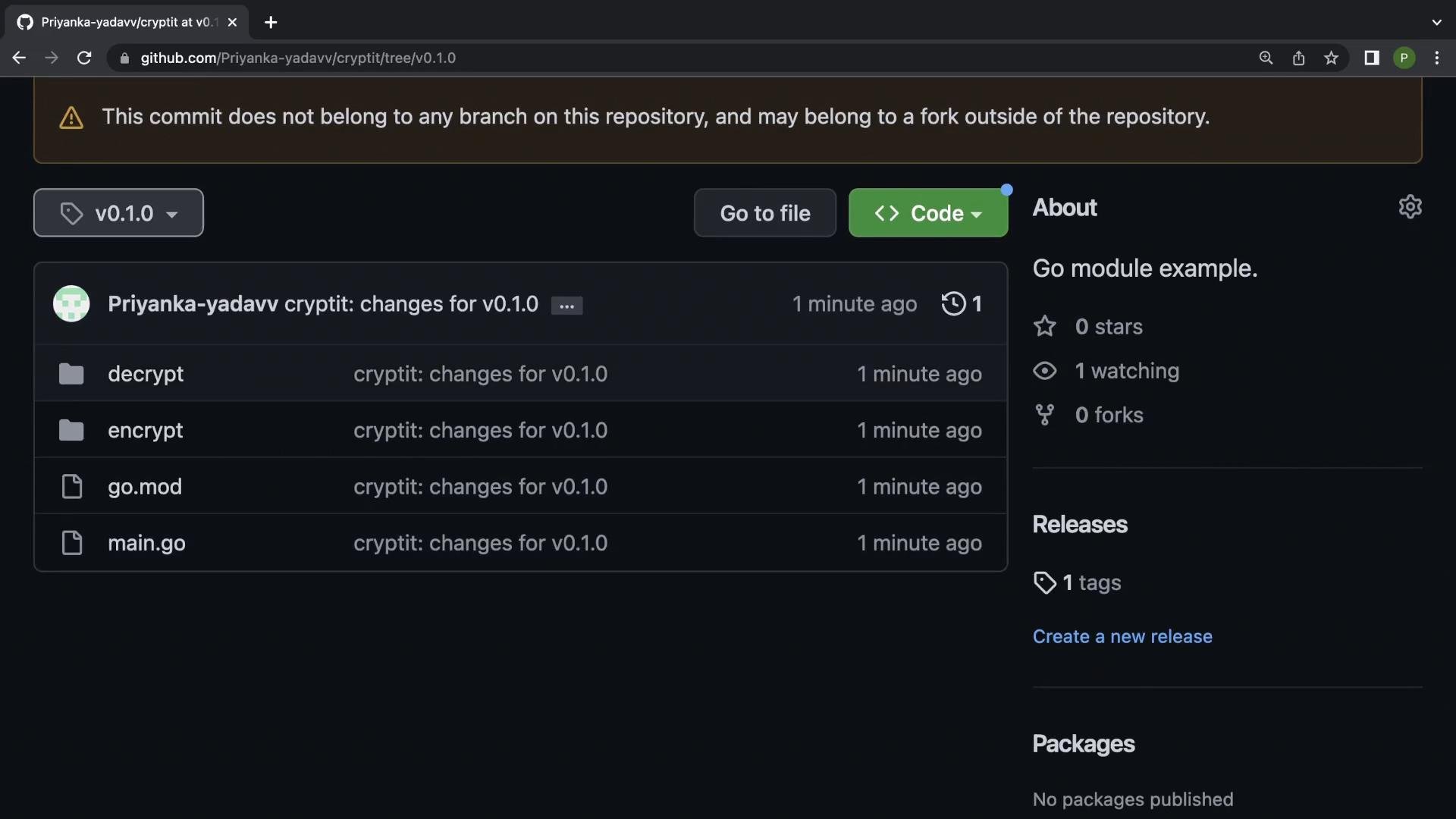 You should see the folder structure and the `v0.1.0` tag on the repository page.
## 7. Remove local replace in the consuming module
If a consuming module previously used a `replace` directive to point to a local copy of your module, remove that directive so Go can fetch the published version from GitHub.
Example `go.mod` before removing `replace`:
```go theme={null}
module example.com/learn
go 1.19
require (
github.com/Priyanka-yadavv/cryptit v0.0.0-00010101000000-000000000000
github.com/pborman/uuid v1.2.1
)
require github.com/google/uuid v1.0.0 // indirect
replace github.com/Priyanka-yadavv/cryptit => ../cryptit
```
Delete the `replace` line. After removing it, `go` can resolve and download the module from the remote repository.
## 8. Fetch the published version with go get
In the consuming module run:
```bash theme={null}
go get github.com/Priyanka-yadavv/cryptit@v0.1.0
```
You should see:
```text theme={null}
go: added github.com/Priyanka-yadavv/cryptit v0.1.0
```
Your `go.mod` will reflect the published version (it may show `// indirect` if not directly referenced by imports):
```go theme={null}
go 1.19
require (
github.com/Priyanka-yadavv/cryptit v0.1.0 // indirect
github.com/pborman/uuid v1.2.1
github.com/google/uuid v1.0.0 // indirect
)
```
## 9. Run your main program to verify
In your consuming module (for example `example.com/learn`) ensure you import and call the function from the published module.
Example `main.go`:
```go theme={null}
package main
import (
"fmt"
"github.com/google/uuid"
"github.com/Priyanka-yadavv/cryptit/encrypt"
)
func main() {
u := uuid.New()
fmt.Println(u)
encryptedStr := encrypt.Nimbus("Kodekloud")
fmt.Println(encryptedStr)
}
```
Run it:
```bash theme={null}
go run main.go
```
Example output:
```text theme={null}
8e599e4e-3fb5-46ea-b6a8-bd7098a554c0
Nrghnorxg
```
This confirms the consuming module uses the published `cryptit` module fetched from GitHub (not a local replacement).
## Quick reference: common Git commands for publishing
| Action | Command | What it does |
| - | - | - |
| Initialize repo | `git init` | Create a local Git repository |
| Add remote | `git remote add origin ` | Add GitHub as `origin` |
| Stage & commit | `git add .`
You should see the folder structure and the `v0.1.0` tag on the repository page.
## 7. Remove local replace in the consuming module
If a consuming module previously used a `replace` directive to point to a local copy of your module, remove that directive so Go can fetch the published version from GitHub.
Example `go.mod` before removing `replace`:
```go theme={null}
module example.com/learn
go 1.19
require (
github.com/Priyanka-yadavv/cryptit v0.0.0-00010101000000-000000000000
github.com/pborman/uuid v1.2.1
)
require github.com/google/uuid v1.0.0 // indirect
replace github.com/Priyanka-yadavv/cryptit => ../cryptit
```
Delete the `replace` line. After removing it, `go` can resolve and download the module from the remote repository.
## 8. Fetch the published version with go get
In the consuming module run:
```bash theme={null}
go get github.com/Priyanka-yadavv/cryptit@v0.1.0
```
You should see:
```text theme={null}
go: added github.com/Priyanka-yadavv/cryptit v0.1.0
```
Your `go.mod` will reflect the published version (it may show `// indirect` if not directly referenced by imports):
```go theme={null}
go 1.19
require (
github.com/Priyanka-yadavv/cryptit v0.1.0 // indirect
github.com/pborman/uuid v1.2.1
github.com/google/uuid v1.0.0 // indirect
)
```
## 9. Run your main program to verify
In your consuming module (for example `example.com/learn`) ensure you import and call the function from the published module.
Example `main.go`:
```go theme={null}
package main
import (
"fmt"
"github.com/google/uuid"
"github.com/Priyanka-yadavv/cryptit/encrypt"
)
func main() {
u := uuid.New()
fmt.Println(u)
encryptedStr := encrypt.Nimbus("Kodekloud")
fmt.Println(encryptedStr)
}
```
Run it:
```bash theme={null}
go run main.go
```
Example output:
```text theme={null}
8e599e4e-3fb5-46ea-b6a8-bd7098a554c0
Nrghnorxg
```
This confirms the consuming module uses the published `cryptit` module fetched from GitHub (not a local replacement).
## Quick reference: common Git commands for publishing
| Action | Command | What it does |
| - | - | - |
| Initialize repo | `git init` | Create a local Git repository |
| Add remote | `git remote add origin ` | Add GitHub as `origin` |
| Stage & commit | `git add .`
`git commit -m "msg"` | Stage files and commit changes |
| Tag release | `git tag vX.Y.Z` | Create a version tag |
| Push branch | `git push -u origin master` | Push branch to remote |
| Push tag | `git push origin vX.Y.Z`
or `git push --tags` | Push one or all tags |
## Updating the module later
When you change the module and want to publish a new release:
1. Bump the version tag (for example `v0.1.1`).
2. Commit required changes.
3. Create and push the new tag: `git tag v0.1.1 && git push origin v0.1.1`
4. In the consuming module: `go get github.com/Priyanka-yadavv/cryptit@v0.1.1`
Always increment the module version (tag) for new releases. Consumers should use `go get @` to fetch a specific release.
## Links and references
* [Go modules (official documentation)](https://go.dev/doc/modules)
* [GitHub: Creating tags](https://docs.github.com/en/repositories/releases/about-releases)
* [Go command reference (`go get`)](https://pkg.go.dev/cmd/go#hdr-Module_maintenance)
That's it — you've published a Go module to GitHub and consumed it from another module.
This documentation is built and hosted on [Mintlify](https://mintlify.com), a developer documentation platform.