> ## Documentation Index
> Fetch the complete documentation index at: https://notes.kodekloud.com/llms.txt
> Use this file to discover all available pages before exploring further.
# Utilize Agents in Jobs
> How to bind Jenkins jobs and pipeline stages to specific agents using node labels, demonstrating Freestyle job restrictions and Declarative pipeline global agent with stage-level overrides.
In this lesson you'll learn how to run Jenkins jobs on specific agents using node labels. We cover both a Freestyle job (binding a job to an agent via the UI) and a Declarative Pipeline that demonstrates a global `agent` with a stage-level `agent` override.
Why this matters:
* Ensures builds run on nodes with the required OS, tools, or runtime versions.
* Keeps resource-sensitive or platform-specific builds isolated to the correct agents.
* Helps scale CI by distributing pipeline stages across multiple worker nodes.
***
## Freestyle job
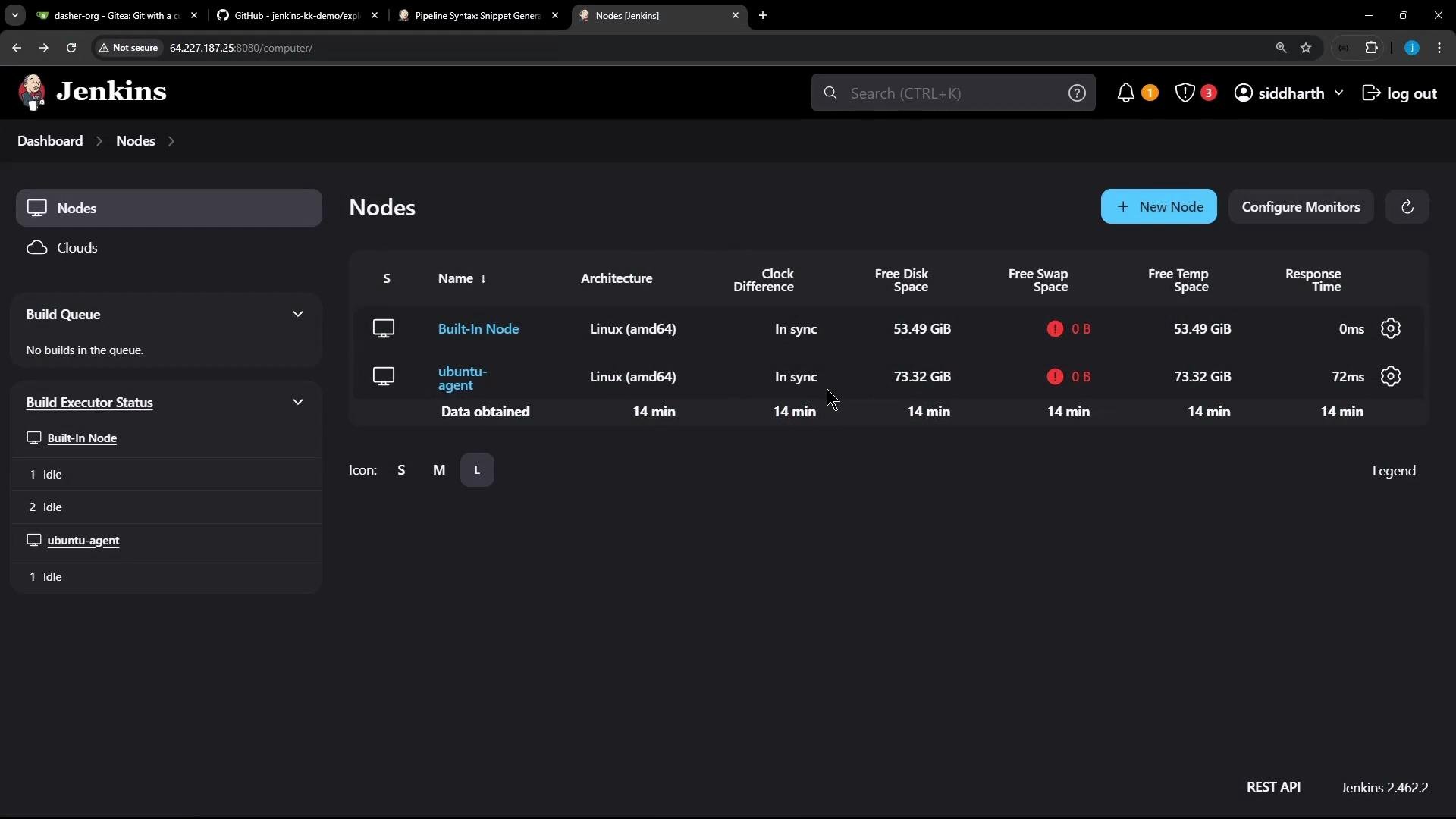
1. From the Jenkins UI, confirm your external agent is online and ready to accept builds.
 2. Create a new Freestyle job (for example, `FreestyleExternalAgent`).
3. Add a Build Step → Execute shell with the following commands to print the OS and Node.js/NPM versions available on the agent:
```bash theme={null}
cat /etc/os-release
node -v
npm -v
```
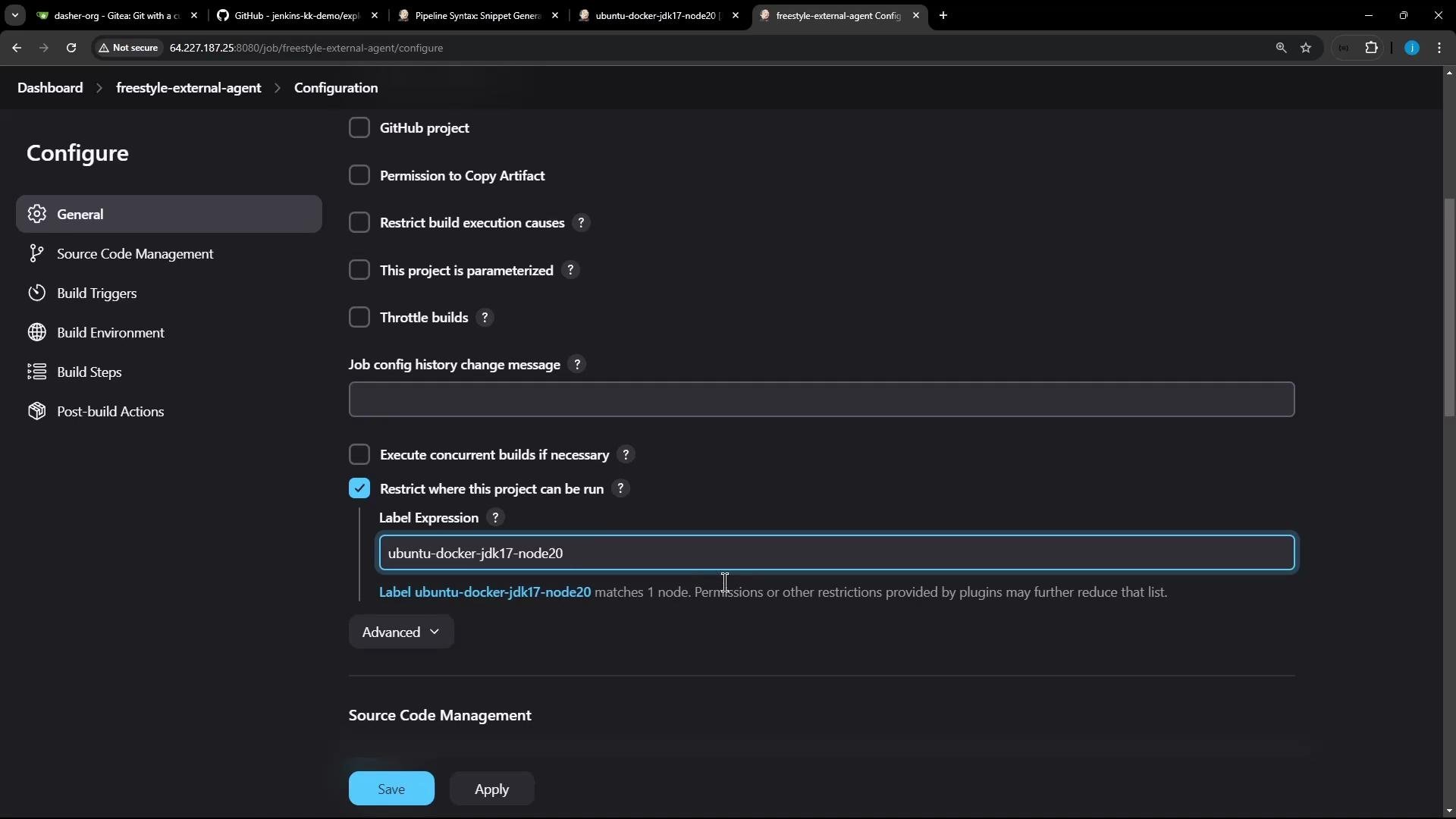
4. Restrict the job to run on the external agent by enabling **Restrict where this project can be run** and entering the node label. In this example the label is `ubuntu-docker-jdk17-node20`.
2. Create a new Freestyle job (for example, `FreestyleExternalAgent`).
3. Add a Build Step → Execute shell with the following commands to print the OS and Node.js/NPM versions available on the agent:
```bash theme={null}
cat /etc/os-release
node -v
npm -v
```
4. Restrict the job to run on the external agent by enabling **Restrict where this project can be run** and entering the node label. In this example the label is `ubuntu-docker-jdk17-node20`.
 5. Save and build the job. The build console will show the job executing remotely on the matching agent and will print the OS and Node/NPM versions returned by that agent.
Example console excerpt:
```bash theme={null}
Started by user siddharth
Running as SYSTEM
Building remotely on ubuntu-agent (ubuntu-docker-jdk17-node20) in workspace /home/jenkins-agent/workspace/freestyle-external-agent
[freestyle-external-agent] $ /bin/sh -xe /tmp/jenkins17351491148126919661.sh
+ cat /etc/os-release
PRETTY_NAME="Ubuntu 24.04 LTS"
NAME="Ubuntu"
VERSION_ID="24.04"
VERSION="24.04 LTS (Noble Numbat)"
VERSION_CODENAME=noble
ID=ubuntu
ID_LIKE=debian
HOME_URL="https://www.ubuntu.com/"
SUPPORT_URL="https://help.ubuntu.com/"
BUG_REPORT_URL="https://bugs.launchpad.net/ubuntu/"
PRIVACY_POLICY_URL="https://www.ubuntu.com/legal/terms-and-policies/privacy-policy"
UBUNTU_CODENAME=noble
LOGO=ubuntu-logo
+ node -v
v22.11.0
+ npm -v
10.9.0
[Gitea] do not publish assets due to source being no GiteaSCMSource
Finished: SUCCESS
```
***
## Declarative Pipeline job
This section shows how to use a top-level (global) `agent` for default behavior and override it for an individual stage using a `label`.
1. Create a new Pipeline job (for example, `ExternalAgentsPipelineJob`).
2. Configure the job to fetch the `Jenkinsfile` from Git (Gitea, GitHub, etc.). In the demo the repository was imported into Gitea. Example migration parameters used for the import:
```text theme={null}
https://github.com/jenkins-kk-demo/exploring-agents
dasher-org
exploring-agents
```
3. Use the following Declarative `Jenkinsfile`. It sets `agent any` at the pipeline level and overrides the agent for stage `S2-Ubuntu Agent` to use the label `ubuntu-docker-jdk17-node20`:
```groovy theme={null}
pipeline {
agent any
stages {
stage('S1-Any Agent') {
steps {
sh 'cat /etc/os-release'
sh 'node -v'
sh 'npm -v'
}
}
stage('S2-Ubuntu Agent') {
agent {
label 'ubuntu-docker-jdk17-node20'
}
steps {
sh 'cat /etc/os-release'
sh 'node -v'
sh 'npm -v'
}
}
}
}
```
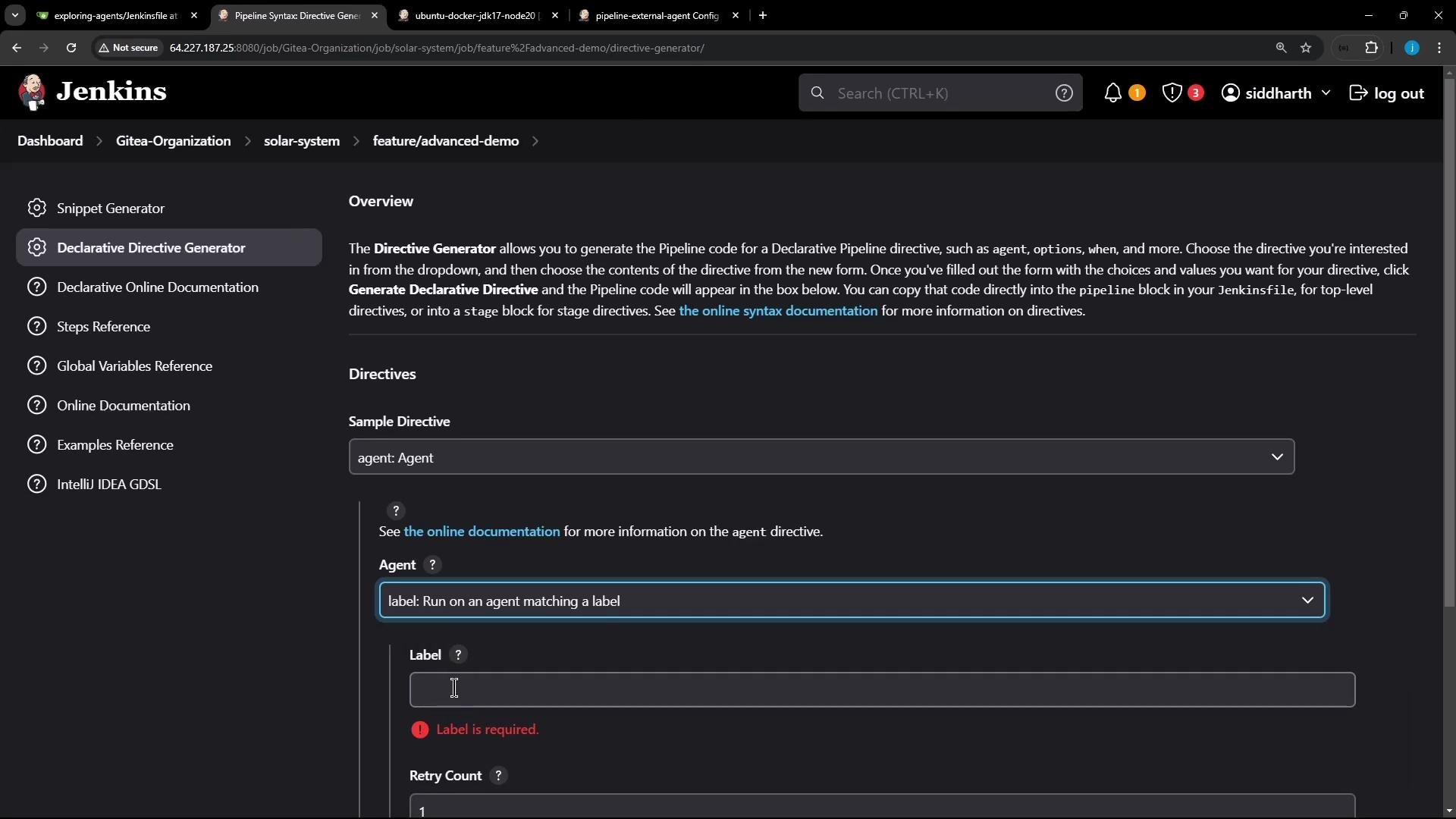
Tip: If you need help constructing `agent` directives (for example, `label`, `docker`, `dockerfile`, `none`), use the Declarative Directive Generator on the Pipeline Syntax page to create the correct snippet.
5. Save and build the job. The build console will show the job executing remotely on the matching agent and will print the OS and Node/NPM versions returned by that agent.
Example console excerpt:
```bash theme={null}
Started by user siddharth
Running as SYSTEM
Building remotely on ubuntu-agent (ubuntu-docker-jdk17-node20) in workspace /home/jenkins-agent/workspace/freestyle-external-agent
[freestyle-external-agent] $ /bin/sh -xe /tmp/jenkins17351491148126919661.sh
+ cat /etc/os-release
PRETTY_NAME="Ubuntu 24.04 LTS"
NAME="Ubuntu"
VERSION_ID="24.04"
VERSION="24.04 LTS (Noble Numbat)"
VERSION_CODENAME=noble
ID=ubuntu
ID_LIKE=debian
HOME_URL="https://www.ubuntu.com/"
SUPPORT_URL="https://help.ubuntu.com/"
BUG_REPORT_URL="https://bugs.launchpad.net/ubuntu/"
PRIVACY_POLICY_URL="https://www.ubuntu.com/legal/terms-and-policies/privacy-policy"
UBUNTU_CODENAME=noble
LOGO=ubuntu-logo
+ node -v
v22.11.0
+ npm -v
10.9.0
[Gitea] do not publish assets due to source being no GiteaSCMSource
Finished: SUCCESS
```
***
## Declarative Pipeline job
This section shows how to use a top-level (global) `agent` for default behavior and override it for an individual stage using a `label`.
1. Create a new Pipeline job (for example, `ExternalAgentsPipelineJob`).
2. Configure the job to fetch the `Jenkinsfile` from Git (Gitea, GitHub, etc.). In the demo the repository was imported into Gitea. Example migration parameters used for the import:
```text theme={null}
https://github.com/jenkins-kk-demo/exploring-agents
dasher-org
exploring-agents
```
3. Use the following Declarative `Jenkinsfile`. It sets `agent any` at the pipeline level and overrides the agent for stage `S2-Ubuntu Agent` to use the label `ubuntu-docker-jdk17-node20`:
```groovy theme={null}
pipeline {
agent any
stages {
stage('S1-Any Agent') {
steps {
sh 'cat /etc/os-release'
sh 'node -v'
sh 'npm -v'
}
}
stage('S2-Ubuntu Agent') {
agent {
label 'ubuntu-docker-jdk17-node20'
}
steps {
sh 'cat /etc/os-release'
sh 'node -v'
sh 'npm -v'
}
}
}
}
```
Tip: If you need help constructing `agent` directives (for example, `label`, `docker`, `dockerfile`, `none`), use the Declarative Directive Generator on the Pipeline Syntax page to create the correct snippet.
 4. Commit the `Jenkinsfile`, point the Pipeline job to your repository and branch (for example, `main`), and run the build.
***
## Behavior and console output
* A global `agent` (e.g., `agent any`) provides the default node for stages that do not declare their own `agent`.
* A stage-level `agent` directive overrides the global `agent` for that stage only and will schedule the stage on a node that matches the provided label (or other directive).
* If a stage is restricted to a label that no node matches, that stage remains queued until a matching agent becomes available.
Example console excerpts:
Controller (stage 1 — default/global agent):
```bash theme={null}
Started by user siddharth
Obtained Jenkinsfile from git http://64.227.187.25:5555/dasher-org/exploring-agents
[Pipeline] Start of Pipeline
[Pipeline] node
Running on Jenkins in /var/lib/jenkins/workspace/pipeline-external-agent
[Pipeline] {
[Pipeline] stage
[Pipeline] { (Declarative: Checkout SCM)
[Pipeline] checkout
...
[Pipeline] sh
+ node -v
v20.16.0
[Pipeline] sh
+ npm -v
10.8.1
[Pipeline] }
[Pipeline] // stage
```
Ubuntu agent (stage 2 — label override):
```bash theme={null}
[Pipeline] stage
[Pipeline] { (S2-Ubuntu Agent)
[Pipeline] node
Running on ubuntu-agent in /home/jenkins-agent/workspace/pipeline-external-agent
[Pipeline] {
[Pipeline] sh
+ cat /etc/os-release
PRETTY_NAME="Ubuntu 24.04 LTS"
NAME="Ubuntu"
VERSION_ID="24.04"
VERSION="24.04 LTS (Noble Numbat)"
VERSION_CODENAME=noble
ID=ubuntu
ID_LIKE=debian
HOME_URL="https://www.ubuntu.com/"
SUPPORT_URL="https://help.ubuntu.com/"
...
[Pipeline] sh
+ node -v
v22.11.0
[Pipeline] sh
+ npm -v
10.9.0
```
You can also inspect the agent workspace (for example, `/home/jenkins-agent/workspace/pipeline-external-agent`) to view the checked-out repository and build artifacts. In this demo the agent workspace contains both `PipelineExternalAgent` and `FreestyleExternalAgent` folders.
Stage-level `agent` directives override the global `agent` for that stage only. If a stage is restricted to a label that no node matches, the stage will remain queued until a matching agent is available.
***
## Quick reference
| Topic | Example / Usage |
| ------------------------------------ | ----------------------------------------------------------------------------------------------------- |
| Restrict Freestyle job to a node | Enable **Restrict where this project can be run** and set the label e.g. `ubuntu-docker-jdk17-node20` |
| Global agent in Declarative Pipeline | `agent any` (runs on any available agent) |
| Stage-level agent override | `agent { label 'my-label' }` inside a `stage` |
| Common agent directive options | `label`, `docker`, `dockerfile`, `none` |
***
## Links and references
* [Jenkins: Pipeline Syntax — Declarative Directive Generator](https://www.jenkins.io/doc/book/pipeline/syntax/#declarative-directive-generator)
* [Jenkins: Agents and Nodes](https://www.jenkins.io/doc/book/infra/agents/)
* [Jenkins Pipeline: Declarative Pipeline](https://www.jenkins.io/doc/book/pipeline/syntax/)
***
## Summary
* For Freestyle jobs, use the node label with **Restrict where this project can be run** to bind a job to a specific agent.
* For Declarative Pipelines, use a global `agent` for default behavior and a stage-level `agent` to run an individual stage on a specific agent.
* Verify which agent executed a build by checking the build console — it reports the node name and the workspace path and prints any tool versions you run during the build.
That's all for now.
4. Commit the `Jenkinsfile`, point the Pipeline job to your repository and branch (for example, `main`), and run the build.
***
## Behavior and console output
* A global `agent` (e.g., `agent any`) provides the default node for stages that do not declare their own `agent`.
* A stage-level `agent` directive overrides the global `agent` for that stage only and will schedule the stage on a node that matches the provided label (or other directive).
* If a stage is restricted to a label that no node matches, that stage remains queued until a matching agent becomes available.
Example console excerpts:
Controller (stage 1 — default/global agent):
```bash theme={null}
Started by user siddharth
Obtained Jenkinsfile from git http://64.227.187.25:5555/dasher-org/exploring-agents
[Pipeline] Start of Pipeline
[Pipeline] node
Running on Jenkins in /var/lib/jenkins/workspace/pipeline-external-agent
[Pipeline] {
[Pipeline] stage
[Pipeline] { (Declarative: Checkout SCM)
[Pipeline] checkout
...
[Pipeline] sh
+ node -v
v20.16.0
[Pipeline] sh
+ npm -v
10.8.1
[Pipeline] }
[Pipeline] // stage
```
Ubuntu agent (stage 2 — label override):
```bash theme={null}
[Pipeline] stage
[Pipeline] { (S2-Ubuntu Agent)
[Pipeline] node
Running on ubuntu-agent in /home/jenkins-agent/workspace/pipeline-external-agent
[Pipeline] {
[Pipeline] sh
+ cat /etc/os-release
PRETTY_NAME="Ubuntu 24.04 LTS"
NAME="Ubuntu"
VERSION_ID="24.04"
VERSION="24.04 LTS (Noble Numbat)"
VERSION_CODENAME=noble
ID=ubuntu
ID_LIKE=debian
HOME_URL="https://www.ubuntu.com/"
SUPPORT_URL="https://help.ubuntu.com/"
...
[Pipeline] sh
+ node -v
v22.11.0
[Pipeline] sh
+ npm -v
10.9.0
```
You can also inspect the agent workspace (for example, `/home/jenkins-agent/workspace/pipeline-external-agent`) to view the checked-out repository and build artifacts. In this demo the agent workspace contains both `PipelineExternalAgent` and `FreestyleExternalAgent` folders.
Stage-level `agent` directives override the global `agent` for that stage only. If a stage is restricted to a label that no node matches, the stage will remain queued until a matching agent is available.
***
## Quick reference
| Topic | Example / Usage |
| ------------------------------------ | ----------------------------------------------------------------------------------------------------- |
| Restrict Freestyle job to a node | Enable **Restrict where this project can be run** and set the label e.g. `ubuntu-docker-jdk17-node20` |
| Global agent in Declarative Pipeline | `agent any` (runs on any available agent) |
| Stage-level agent override | `agent { label 'my-label' }` inside a `stage` |
| Common agent directive options | `label`, `docker`, `dockerfile`, `none` |
***
## Links and references
* [Jenkins: Pipeline Syntax — Declarative Directive Generator](https://www.jenkins.io/doc/book/pipeline/syntax/#declarative-directive-generator)
* [Jenkins: Agents and Nodes](https://www.jenkins.io/doc/book/infra/agents/)
* [Jenkins Pipeline: Declarative Pipeline](https://www.jenkins.io/doc/book/pipeline/syntax/)
***
## Summary
* For Freestyle jobs, use the node label with **Restrict where this project can be run** to bind a job to a specific agent.
* For Declarative Pipelines, use a global `agent` for default behavior and a stage-level `agent` to run an individual stage on a specific agent.
* Verify which agent executed a build by checking the build console — it reports the node name and the workspace path and prints any tool versions you run during the build.
That's all for now.