> ## Documentation Index
> Fetch the complete documentation index at: https://notes.kodekloud.com/llms.txt
> Use this file to discover all available pages before exploring further.
# Utilize Docker Image Agent
> Using Docker images to run Jenkins Declarative Pipeline stages in containers, providing isolated, reproducible build environments and configuration options for image, args, labels, and registry credentials
In this lesson you'll learn how to use Docker containers as Jenkins pipeline agents. A Docker image is used to create a container and run pipeline stages inside it. This approach provides isolated, reproducible build environments for individual stages in a Declarative Pipeline.
Prerequisites:
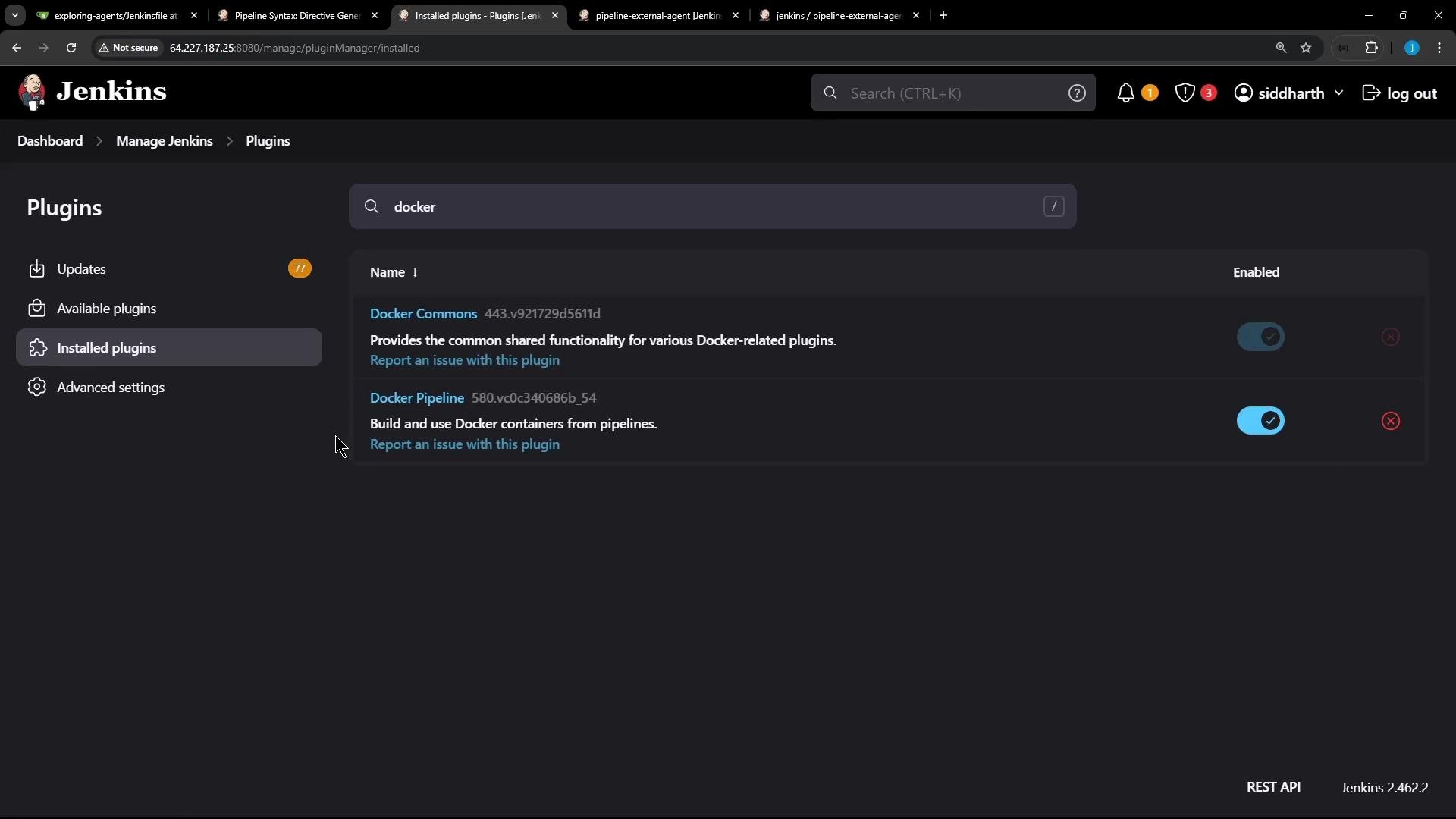
* Install the Jenkins [Docker Pipeline plugin](https://plugins.jenkins.io/docker-workflow/).
* Ensure the agent node(s) intended to run Docker containers have the [Docker Engine](https://docs.docker.com/engine/) and the [docker CLI](https://docs.docker.com/engine/reference/commandline/docker/) installed.
* Make sure the Jenkins agent process can execute Docker commands (for example, the agent user is in the `docker` group or the Docker socket is accessible).
 ## How the Docker-based agent is configured
When using Declarative Pipelines, the `agent` block supports a `docker` declaration. Key options include:
| Option | Description |
| ------------------------------ | ------------------------------------------------------------------------------------------------- |
| `image` | The Docker image to run (for example `node:18` or `node:18-alpine`). |
| `args` | Additional arguments passed to `docker run` (for example `--network host`). |
| `alwaysPull` | If `true`, forces Jenkins to pull the image before running the container. |
| `label` | Ensures the container runs on a node that matches this label (e.g. `ubuntu-docker-jdk17-node20`). |
| `reuseNode` | If `true`, keeps the workspace mounted on the same node. |
| `customWorkspace` | Override the workspace path inside the container. |
| `registryUrl`, `credentialsId` | For pulling images from private registries. |
A minimal `agent` block to run inside a Docker image:
```groovy theme={null}
agent {
docker {
image 'node:18'
}
}
```
## Example Jenkinsfile — Docker image as a stage agent
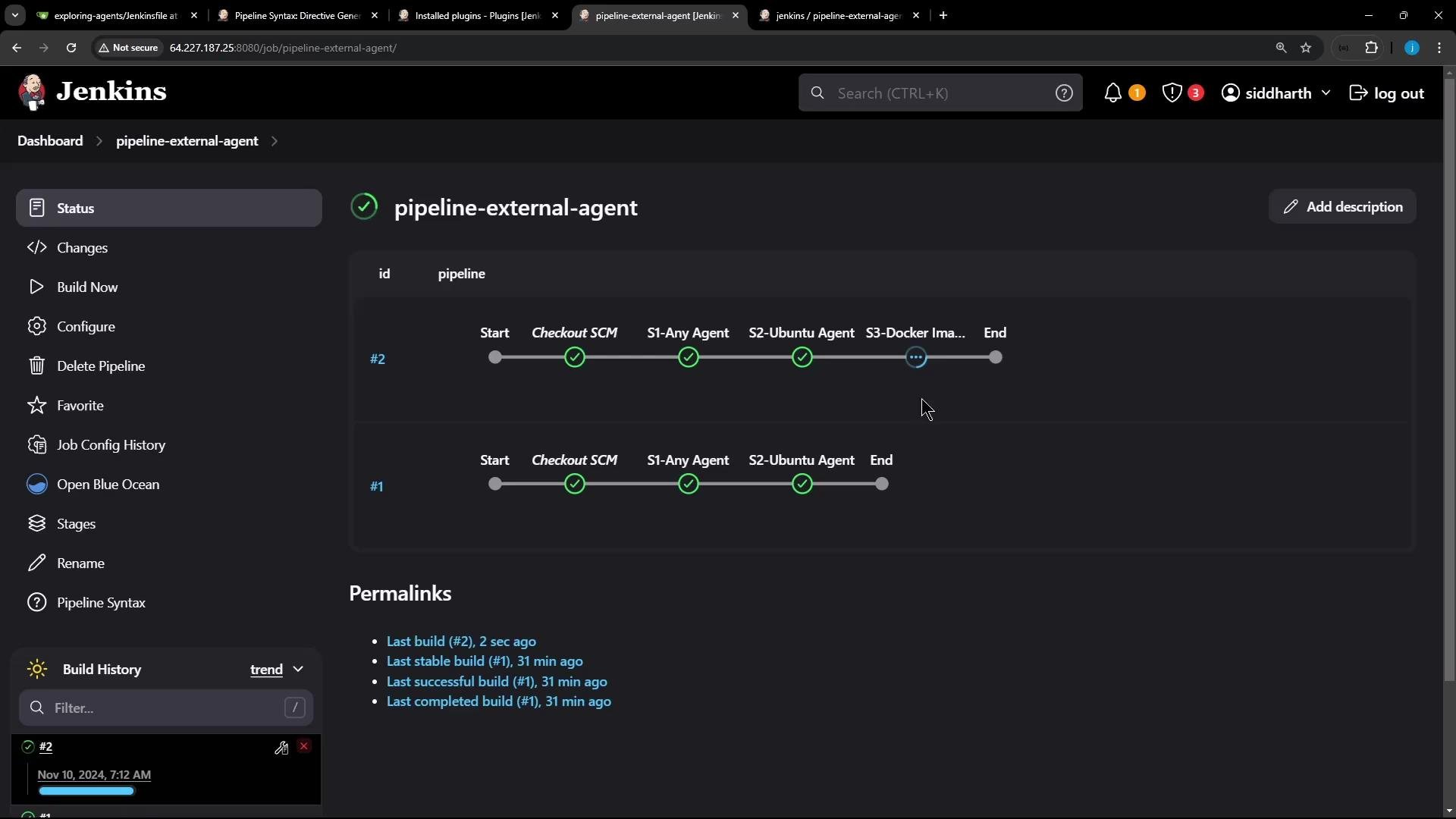
This Declarative Pipeline uses a global `agent any` for the pipeline, runs two stages on default agents, and a third stage inside a Docker container (`node:18-alpine`) on a labeled node.
```groovy theme={null}
pipeline {
agent any
stages {
stage('S1-Any Agent') {
steps {
sh 'cat /etc/os-release'
sh 'node -v'
sh 'npm -v'
}
}
stage('S2-Ubuntu Agent') {
agent {
label 'ubuntu-docker-jdk17-node20'
}
steps {
sh 'cat /etc/os-release'
sh 'node -v'
sh 'npm -v'
}
}
stage('S3-Docker Image Agent') {
agent {
docker {
image 'node:18-alpine'
label 'ubuntu-docker-jdk17-node20'
alwaysPull true
}
}
steps {
sh 'cat /etc/os-release'
sh 'node -v'
sh 'npm -v'
}
}
}
}
```
## What happens when the pipeline runs
* When the pipeline reaches stage `S3-Docker Image Agent`, Jenkins schedules the build on a node that matches the `label` (`ubuntu-docker-jdk17-node20`).
* Jenkins will pull the `node:18-alpine` image on that node (if `alwaysPull` is enabled, it pulls even if present).
* Jenkins launches a container with the workspace mounted and environment variables forwarded from the agent.
* Build steps in that stage execute inside the container.
* After the stage completes, Jenkins stops and removes the container (default behavior). The pulled image remains cached on the node unless removed.
Pipeline execution overview (UI)
## How the Docker-based agent is configured
When using Declarative Pipelines, the `agent` block supports a `docker` declaration. Key options include:
| Option | Description |
| ------------------------------ | ------------------------------------------------------------------------------------------------- |
| `image` | The Docker image to run (for example `node:18` or `node:18-alpine`). |
| `args` | Additional arguments passed to `docker run` (for example `--network host`). |
| `alwaysPull` | If `true`, forces Jenkins to pull the image before running the container. |
| `label` | Ensures the container runs on a node that matches this label (e.g. `ubuntu-docker-jdk17-node20`). |
| `reuseNode` | If `true`, keeps the workspace mounted on the same node. |
| `customWorkspace` | Override the workspace path inside the container. |
| `registryUrl`, `credentialsId` | For pulling images from private registries. |
A minimal `agent` block to run inside a Docker image:
```groovy theme={null}
agent {
docker {
image 'node:18'
}
}
```
## Example Jenkinsfile — Docker image as a stage agent
This Declarative Pipeline uses a global `agent any` for the pipeline, runs two stages on default agents, and a third stage inside a Docker container (`node:18-alpine`) on a labeled node.
```groovy theme={null}
pipeline {
agent any
stages {
stage('S1-Any Agent') {
steps {
sh 'cat /etc/os-release'
sh 'node -v'
sh 'npm -v'
}
}
stage('S2-Ubuntu Agent') {
agent {
label 'ubuntu-docker-jdk17-node20'
}
steps {
sh 'cat /etc/os-release'
sh 'node -v'
sh 'npm -v'
}
}
stage('S3-Docker Image Agent') {
agent {
docker {
image 'node:18-alpine'
label 'ubuntu-docker-jdk17-node20'
alwaysPull true
}
}
steps {
sh 'cat /etc/os-release'
sh 'node -v'
sh 'npm -v'
}
}
}
}
```
## What happens when the pipeline runs
* When the pipeline reaches stage `S3-Docker Image Agent`, Jenkins schedules the build on a node that matches the `label` (`ubuntu-docker-jdk17-node20`).
* Jenkins will pull the `node:18-alpine` image on that node (if `alwaysPull` is enabled, it pulls even if present).
* Jenkins launches a container with the workspace mounted and environment variables forwarded from the agent.
* Build steps in that stage execute inside the container.
* After the stage completes, Jenkins stops and removes the container (default behavior). The pulled image remains cached on the node unless removed.
Pipeline execution overview (UI)
 ## Representative console output
Jenkins logs `docker pull` and `docker run` operations in the build console. Example (trimmed) output for the Docker-based stage:
```bash theme={null}
+ docker pull node:18-alpine
18-alpine: Pulling from library/node
...
Status: Downloaded newer image for node:18-alpine
docker.io/library/node:18-alpine
+ docker run -t -d -u 0:0 -w /home/jenkins-agent/workspace/pipeline-external-agent \
-v /home/jenkins-agent/workspace/pipeline-external-agent:/home/jenkins-agent/workspace/pipeline-external-agent:rw,z \
-v /home/jenkins-agent/workspace/pipeline-external-agent@tmp:/home/jenkins-agent/workspace/pipeline-external-agent@tmp:rw,z \
-e JENKINS_HOME -e OTHER_ENV ... node:18-alpine cat
+ cat /etc/os-release
NAME="Alpine Linux"
ID=alpine
VERSION_ID=3.20.3
PRETTY_NAME="Alpine Linux v3.20"
HOME_URL="https://alpinelinux.org/"
+ node -v
v18.20.4
+ npm -v
9.8.1
```
## Notes on container lifecycle
* The container is launched with `docker run` and mounts the Jenkins workspace so build files are available inside the container.
* By default, the container is removed after the stage finishes. If you need to persist artifacts, use workspace steps (e.g., `archiveArtifacts`) or configure workspace behavior appropriately.
* Images are cached on the node until explicitly removed with `docker rmi`.
## Inspecting Docker on the agent node
After a run you can verify running and stopped containers as well as local images on the agent node:
```bash theme={null}
root@ubuntu-docker-jdk17-node20 in /home/jenkins-agent/workspace
➜ docker ps
CONTAINER ID IMAGE COMMAND CREATED STATUS PORTS NAMES
root@ubuntu-docker-jdk17-node20 in /home/jenkins-agent/workspace
➜ docker ps -a
CONTAINER ID IMAGE COMMAND CREATED STATUS PORTS NAMES
4227b9610c63 hello-world "/hello" About an hour ago Exited (0) About an hour ago relaxed_curran
root@ubuntu-docker-jdk17-node20 in /home/jenkins-agent/workspace
➜ docker images
REPOSITORY TAG IMAGE ID CREATED SIZE
node 18-alpine f48cc5826852 4 months ago 128MB
hello-world latest d2c94e258dcb 18 months ago 13.3kB
```
If you need custom dependencies or a reproducible build environment, consider building a custom Docker image with a `Dockerfile` and using that image in your pipeline stage instead of relying on official base images.
## Additional resources
* [Docker Pipeline plugin](https://plugins.jenkins.io/docker-workflow/)
* [Docker Engine documentation](https://docs.docker.com/engine/)
* [Jenkins Pipeline Syntax](https://www.jenkins.io/doc/book/pipeline/syntax/)
* [Jenkins: Agents and Nodes](https://www.jenkins.io/doc/book/using/agents/)
## Representative console output
Jenkins logs `docker pull` and `docker run` operations in the build console. Example (trimmed) output for the Docker-based stage:
```bash theme={null}
+ docker pull node:18-alpine
18-alpine: Pulling from library/node
...
Status: Downloaded newer image for node:18-alpine
docker.io/library/node:18-alpine
+ docker run -t -d -u 0:0 -w /home/jenkins-agent/workspace/pipeline-external-agent \
-v /home/jenkins-agent/workspace/pipeline-external-agent:/home/jenkins-agent/workspace/pipeline-external-agent:rw,z \
-v /home/jenkins-agent/workspace/pipeline-external-agent@tmp:/home/jenkins-agent/workspace/pipeline-external-agent@tmp:rw,z \
-e JENKINS_HOME -e OTHER_ENV ... node:18-alpine cat
+ cat /etc/os-release
NAME="Alpine Linux"
ID=alpine
VERSION_ID=3.20.3
PRETTY_NAME="Alpine Linux v3.20"
HOME_URL="https://alpinelinux.org/"
+ node -v
v18.20.4
+ npm -v
9.8.1
```
## Notes on container lifecycle
* The container is launched with `docker run` and mounts the Jenkins workspace so build files are available inside the container.
* By default, the container is removed after the stage finishes. If you need to persist artifacts, use workspace steps (e.g., `archiveArtifacts`) or configure workspace behavior appropriately.
* Images are cached on the node until explicitly removed with `docker rmi`.
## Inspecting Docker on the agent node
After a run you can verify running and stopped containers as well as local images on the agent node:
```bash theme={null}
root@ubuntu-docker-jdk17-node20 in /home/jenkins-agent/workspace
➜ docker ps
CONTAINER ID IMAGE COMMAND CREATED STATUS PORTS NAMES
root@ubuntu-docker-jdk17-node20 in /home/jenkins-agent/workspace
➜ docker ps -a
CONTAINER ID IMAGE COMMAND CREATED STATUS PORTS NAMES
4227b9610c63 hello-world "/hello" About an hour ago Exited (0) About an hour ago relaxed_curran
root@ubuntu-docker-jdk17-node20 in /home/jenkins-agent/workspace
➜ docker images
REPOSITORY TAG IMAGE ID CREATED SIZE
node 18-alpine f48cc5826852 4 months ago 128MB
hello-world latest d2c94e258dcb 18 months ago 13.3kB
```
If you need custom dependencies or a reproducible build environment, consider building a custom Docker image with a `Dockerfile` and using that image in your pipeline stage instead of relying on official base images.
## Additional resources
* [Docker Pipeline plugin](https://plugins.jenkins.io/docker-workflow/)
* [Docker Engine documentation](https://docs.docker.com/engine/)
* [Jenkins Pipeline Syntax](https://www.jenkins.io/doc/book/pipeline/syntax/)
* [Jenkins: Agents and Nodes](https://www.jenkins.io/doc/book/using/agents/)