> ## Documentation Index
> Fetch the complete documentation index at: https://notes.kodekloud.com/llms.txt
> Use this file to discover all available pages before exploring further.
# Utilize newContainerPerStage
> Explains Jenkins Pipeline option newContainerPerStage to run a fresh Docker container per stage versus reusing a single container, showing impacts on filesystem sharing and isolation.
This guide explains why and when to use the `newContainerPerStage` directive in Jenkins Pipeline. It walks through examples that show the difference between reusing a single container for all stages (the default when using a top-level `docker`/`dockerfile` agent) and launching a fresh container per stage with `options { newContainerPerStage() }`.
## When you might run different agents per stage
Often pipelines define different agents at the stage level (for example, a global `any` agent with a single stage that uses a `dockerfile` agent). A pipeline that mixes global and per-stage agents can look like this:
```groovy theme={null}
pipeline {
agent any
stages {
stage('S1-Any Agent') {
steps {
// runs on the global 'any' agent
}
}
stage('S2-Ubuntu Agent') {
agent { label 'ubuntu' }
steps {
// runs on an Ubuntu node
}
}
stage('S3-Docker Image Agent') {
agent { docker 'node:18-alpine' }
steps {
// runs inside docker image
}
}
stage('S4-Dockerfile Agent') {
agent {
dockerfile {
filename 'Dockerfile.cowsay'
label 'ubuntu-docker-jdk17-node20'
}
}
steps {
sh 'node -v'
}
}
}
}
```
In the next sections we demonstrate switching from a mix of per-stage agents to a single top-level Dockerfile-based agent — and how the `newContainerPerStage` option changes runtime behavior.
## Top-level `dockerfile` agent (single container reused for all stages)
If you configure a top-level `dockerfile` agent, Jenkins will build the image, run a container from that image on the chosen node, and reuse that container for every stage in the pipeline. For example:
```groovy theme={null}
pipeline {
agent {
dockerfile {
filename 'Dockerfile.cowsay'
label 'ubuntu-docker-jdk17-node20'
}
}
stages {
stage('Stage-1') {
steps {
sh 'cat /etc/os-release'
sh 'node -v'
sh 'npm -v'
}
}
stage('Stage-2') {
steps {
sh 'cat /etc/os-release'
sh 'node -v'
sh 'npm -v'
}
}
stage('Stage-3') {
steps {
sh 'cat /etc/os-release'
sh 'node -v'
sh 'npm -v'
}
}
stage('Stage-4') {
steps {
sh 'cat /etc/os-release'
sh 'node -v'
sh 'npm -v'
}
}
}
}
```
When a pipeline runs this way, Jenkins:
* Builds the image from the specified Dockerfile (`Dockerfile.cowsay`).
* Starts a single container from that image on the selected node.
* Reuses the same container and workspace for all stages.
* Stops and removes the container when the pipeline completes.
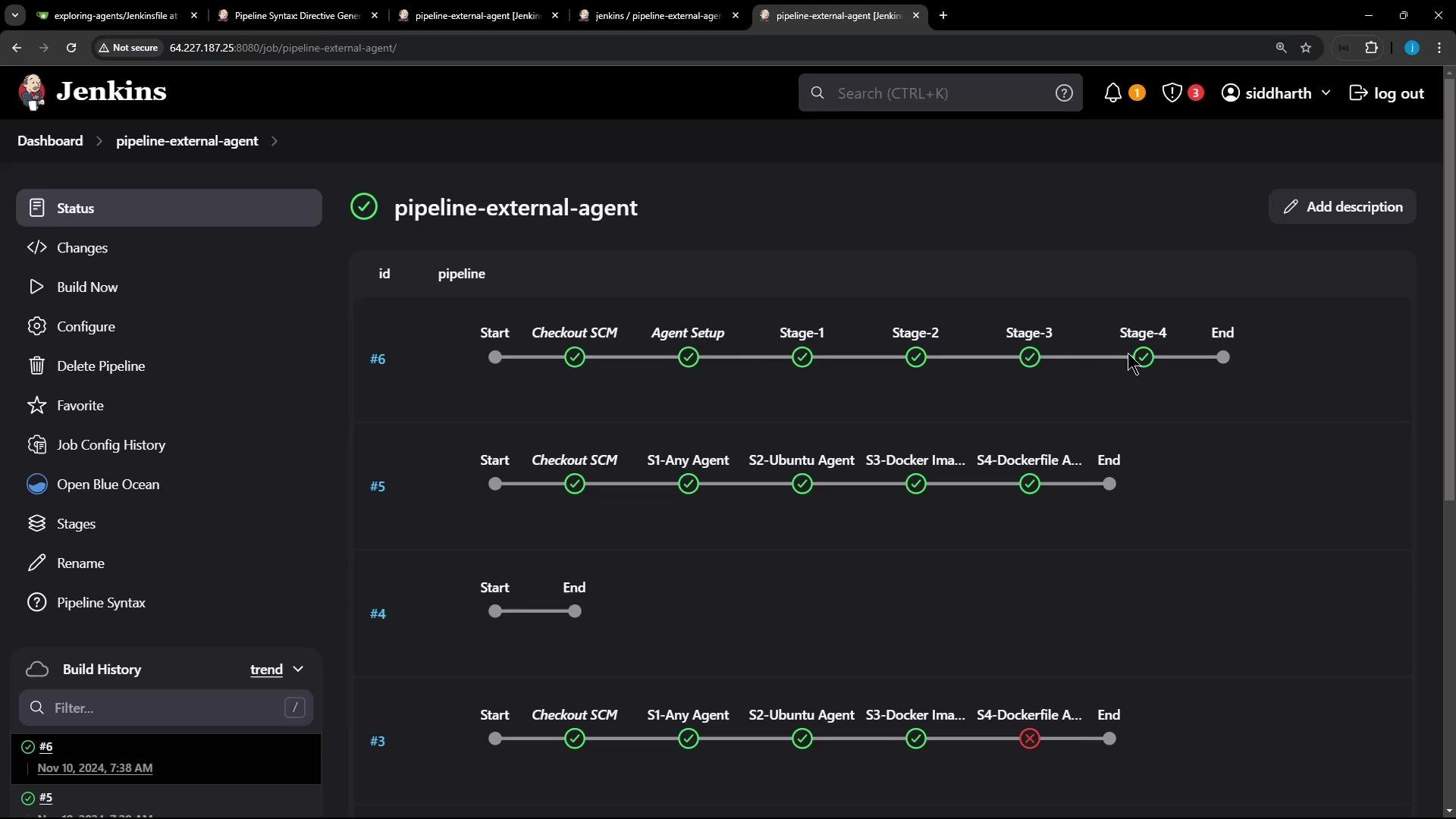 Controller logs for such a run show the Docker image build and the container start:
```console theme={null}
[Pipeline] sh
+ docker build -t 0f559f3f6ac2e220b616594d407b50bd36d83f74 -f Dockerfile.cowsay .
#1 [internal] load build definition from Dockerfile.cowsay
#1 DONE 0.0s
#2 [internal] load metadata for docker.io/library/node:18-alpine
#2 DONE 0.0s
#4 [1/2] FROM docker.io/library/node:18-alpine
#4 DONE 0.0s
#5 [2/2] RUN apk update && apk add --no-cache git perl && cd /tmp && git clone https://github.com/jasonm23/cowsay.git && cd cowsay ; ./install.sh /usr/local
#5 CACHED
#6 exporting to image
#6 writing image sha256:d76b723... done
[Pipeline] withDockerContainer
$ docker run -t -d -u 0:0 -w /home/jenkins-agent/workspace/pipeline-external-agent -v /home/jenkins-agent/workspace/pipeline-external-agent:/home/jenkins-agent/workspace/pipeline-external-agent:rw,z 0f559f3f6ac2e220b616594d407b50bd36d83f74 cat
```
### Sharing files via the container filesystem
Because the same container and workspace are reused, files written by one stage to the container filesystem (for example, `/tmp`) will still be present for subsequent stages. Example pipeline that writes and reads a transient file:
```groovy theme={null}
pipeline {
agent {
dockerfile {
filename 'Dockerfile.cowsay'
}
}
stages {
stage('Stage-1') {
steps {
sh 'cat /etc/os-release'
sh 'node -v'
sh 'npm -v'
echo "********************************************************************************************************"
sh 'echo $((RANDOM)) > /tmp/imp-file-$BUILD_ID'
sh 'ls -ltr /tmp/imp-file-$BUILD_ID'
sh 'cat /tmp/imp-file-$BUILD_ID'
echo "********************************************************************************************************"
}
}
stage('Stage-2') {
steps {
sh 'cat /etc/os-release'
sh 'node -v'
sh 'npm -v'
echo "####################################################################################################"
sh 'ls -ltr /tmp/imp-file-$BUILD_ID'
sh 'cat /tmp/imp-file-$BUILD_ID'
echo "####################################################################################################"
}
}
stage('Stage-3') {
steps {
sh 'cat /etc/os-release'
sh 'node -v'
sh 'npm -v'
echo "####################################################################################################"
sh 'ls -ltr /tmp/imp-file-$BUILD_ID'
sh 'cat /tmp/imp-file-$BUILD_ID'
echo "####################################################################################################"
}
}
stage('Stage-4') {
steps {
sh 'node -v'
sh 'npm -v'
sh 'cowsay -f dragon This is running on Docker Container'
echo "########################################################################################################"
sh 'ls -ltr /tmp/imp-file-$BUILD_ID'
sh 'cat /tmp/imp-file-$BUILD_ID'
echo "########################################################################################################"
sh 'sleep 120s' // keep container alive briefly for demo
}
}
}
}
```
Trimmed logs (showing the same random number read across stages):
```console theme={null}
+ ls -ltr /tmp/imp-file-7
-rw-r--r-- 1 109 112 5 Nov 10 07:42 /tmp/imp-file-7
+ cat /tmp/imp-file-7
7577
...
+ cat /tmp/imp-file-7
7577
```
While the Stage-4 sleep keeps the container alive, you can confirm the file exists by inspecting the container on the controller:
```console theme={null}
$ docker ps
CONTAINER ID IMAGE STATUS
d1ae29e5fc61 0f559f3f6ac2... Up About a minute
$ docker exec -it d1ae29e5fc61 sh
/var/lib/jenkins/workspace/pipeline-external-agent $ cat /tmp/imp-file-7
7577
```
## Isolated containers per stage with `newContainerPerStage()`
If you need strict isolation between stages — for example, to ensure no filesystem state is carried over — use the `newContainerPerStage()` option. When applied together with a top-level `dockerfile` (or `docker`) agent, Jenkins will create a fresh container for each stage using the same image definition.
Using `options { newContainerPerStage() }` makes Jenkins run each stage in a brand-new container created from the same Dockerfile. Files written to the container filesystem in one stage will not be visible in subsequent stages.
Example pipeline with `newContainerPerStage()`:
```groovy theme={null}
pipeline {
agent {
dockerfile {
filename 'Dockerfile.cowsay'
}
}
options {
newContainerPerStage()
}
stages {
stage('Stage-1') {
steps {
sh 'cat /etc/os-release'
sh 'node -v'
sh 'npm -v'
sh 'echo $((RANDOM)) > /tmp/imp-file-$BUILD_ID'
sh 'ls -ltr /tmp/imp-file-$BUILD_ID'
sh 'cat /tmp/imp-file-$BUILD_ID'
}
}
stage('Stage-2') {
steps {
sh 'cat /etc/os-release'
sh 'node -v'
sh 'npm -v'
sh 'ls -ltr /tmp/imp-file-$BUILD_ID'
sh 'cat /tmp/imp-file-$BUILD_ID'
}
}
}
}
```
Note: The `ls` and `cat` calls in `Stage-2` will typically fail because those files were created in the previous stage's container, not the current one.
When `newContainerPerStage()` is enabled, you will observe:
* Jenkins builds (or validates) the image and runs a new container for each stage.
* Files created inside one stage's container are not present in the next stage's container.
* Expect `No such file or directory` errors when trying to access stage-local files created previously.
Example trimmed failure log from Stage-2:
```console theme={null}
+ docker build -t 0f559f3f6ac2e220b... -f Dockerfile.cowsay .
$ docker run -t -d ... 0f559f3f6ac2e220b... cat
+ ls -ltr /tmp/imp-file-8
ls: /tmp/imp-file-8: No such file or directory
```
## Quick comparison
| Behavior | Top-level `dockerfile` agent (default) | `options { newContainerPerStage() }` |
| -----------------: | ----------------------------------------------------------------: | ------------------------------------------------------------: |
| Containers created | Single container created and reused | New container created for each stage |
| Filesystem sharing | Yes — files persist between stages | No — each container has a fresh filesystem |
| Use case | When stages need to share transient data (fast local persistence) | When you want strict stage isolation to avoid state carryover |
| Node requirement | Runs on the same node | Runs on the same node (different containers) |
## Summary
* A top-level `dockerfile` or `docker` agent builds the image and reuses a single container and workspace across all stages. Useful when you want to share files or state via the container filesystem.
* `options { newContainerPerStage() }` forces Jenkins to create a fresh container for each stage (using the same image definition). Use this when you need strict isolation between stages and want to avoid accidental state carryover.
* Choose the mode that matches your pipeline needs: inter-stage filesystem sharing vs. per-stage isolation.
## Links and references
* [Jenkins Pipeline: Agents documentation](https://www.jenkins.io/doc/book/pipeline/syntax/#agent)
* [Jenkins Pipeline: Options](https://www.jenkins.io/doc/book/pipeline/syntax/#options)
Controller logs for such a run show the Docker image build and the container start:
```console theme={null}
[Pipeline] sh
+ docker build -t 0f559f3f6ac2e220b616594d407b50bd36d83f74 -f Dockerfile.cowsay .
#1 [internal] load build definition from Dockerfile.cowsay
#1 DONE 0.0s
#2 [internal] load metadata for docker.io/library/node:18-alpine
#2 DONE 0.0s
#4 [1/2] FROM docker.io/library/node:18-alpine
#4 DONE 0.0s
#5 [2/2] RUN apk update && apk add --no-cache git perl && cd /tmp && git clone https://github.com/jasonm23/cowsay.git && cd cowsay ; ./install.sh /usr/local
#5 CACHED
#6 exporting to image
#6 writing image sha256:d76b723... done
[Pipeline] withDockerContainer
$ docker run -t -d -u 0:0 -w /home/jenkins-agent/workspace/pipeline-external-agent -v /home/jenkins-agent/workspace/pipeline-external-agent:/home/jenkins-agent/workspace/pipeline-external-agent:rw,z 0f559f3f6ac2e220b616594d407b50bd36d83f74 cat
```
### Sharing files via the container filesystem
Because the same container and workspace are reused, files written by one stage to the container filesystem (for example, `/tmp`) will still be present for subsequent stages. Example pipeline that writes and reads a transient file:
```groovy theme={null}
pipeline {
agent {
dockerfile {
filename 'Dockerfile.cowsay'
}
}
stages {
stage('Stage-1') {
steps {
sh 'cat /etc/os-release'
sh 'node -v'
sh 'npm -v'
echo "********************************************************************************************************"
sh 'echo $((RANDOM)) > /tmp/imp-file-$BUILD_ID'
sh 'ls -ltr /tmp/imp-file-$BUILD_ID'
sh 'cat /tmp/imp-file-$BUILD_ID'
echo "********************************************************************************************************"
}
}
stage('Stage-2') {
steps {
sh 'cat /etc/os-release'
sh 'node -v'
sh 'npm -v'
echo "####################################################################################################"
sh 'ls -ltr /tmp/imp-file-$BUILD_ID'
sh 'cat /tmp/imp-file-$BUILD_ID'
echo "####################################################################################################"
}
}
stage('Stage-3') {
steps {
sh 'cat /etc/os-release'
sh 'node -v'
sh 'npm -v'
echo "####################################################################################################"
sh 'ls -ltr /tmp/imp-file-$BUILD_ID'
sh 'cat /tmp/imp-file-$BUILD_ID'
echo "####################################################################################################"
}
}
stage('Stage-4') {
steps {
sh 'node -v'
sh 'npm -v'
sh 'cowsay -f dragon This is running on Docker Container'
echo "########################################################################################################"
sh 'ls -ltr /tmp/imp-file-$BUILD_ID'
sh 'cat /tmp/imp-file-$BUILD_ID'
echo "########################################################################################################"
sh 'sleep 120s' // keep container alive briefly for demo
}
}
}
}
```
Trimmed logs (showing the same random number read across stages):
```console theme={null}
+ ls -ltr /tmp/imp-file-7
-rw-r--r-- 1 109 112 5 Nov 10 07:42 /tmp/imp-file-7
+ cat /tmp/imp-file-7
7577
...
+ cat /tmp/imp-file-7
7577
```
While the Stage-4 sleep keeps the container alive, you can confirm the file exists by inspecting the container on the controller:
```console theme={null}
$ docker ps
CONTAINER ID IMAGE STATUS
d1ae29e5fc61 0f559f3f6ac2... Up About a minute
$ docker exec -it d1ae29e5fc61 sh
/var/lib/jenkins/workspace/pipeline-external-agent $ cat /tmp/imp-file-7
7577
```
## Isolated containers per stage with `newContainerPerStage()`
If you need strict isolation between stages — for example, to ensure no filesystem state is carried over — use the `newContainerPerStage()` option. When applied together with a top-level `dockerfile` (or `docker`) agent, Jenkins will create a fresh container for each stage using the same image definition.
Using `options { newContainerPerStage() }` makes Jenkins run each stage in a brand-new container created from the same Dockerfile. Files written to the container filesystem in one stage will not be visible in subsequent stages.
Example pipeline with `newContainerPerStage()`:
```groovy theme={null}
pipeline {
agent {
dockerfile {
filename 'Dockerfile.cowsay'
}
}
options {
newContainerPerStage()
}
stages {
stage('Stage-1') {
steps {
sh 'cat /etc/os-release'
sh 'node -v'
sh 'npm -v'
sh 'echo $((RANDOM)) > /tmp/imp-file-$BUILD_ID'
sh 'ls -ltr /tmp/imp-file-$BUILD_ID'
sh 'cat /tmp/imp-file-$BUILD_ID'
}
}
stage('Stage-2') {
steps {
sh 'cat /etc/os-release'
sh 'node -v'
sh 'npm -v'
sh 'ls -ltr /tmp/imp-file-$BUILD_ID'
sh 'cat /tmp/imp-file-$BUILD_ID'
}
}
}
}
```
Note: The `ls` and `cat` calls in `Stage-2` will typically fail because those files were created in the previous stage's container, not the current one.
When `newContainerPerStage()` is enabled, you will observe:
* Jenkins builds (or validates) the image and runs a new container for each stage.
* Files created inside one stage's container are not present in the next stage's container.
* Expect `No such file or directory` errors when trying to access stage-local files created previously.
Example trimmed failure log from Stage-2:
```console theme={null}
+ docker build -t 0f559f3f6ac2e220b... -f Dockerfile.cowsay .
$ docker run -t -d ... 0f559f3f6ac2e220b... cat
+ ls -ltr /tmp/imp-file-8
ls: /tmp/imp-file-8: No such file or directory
```
## Quick comparison
| Behavior | Top-level `dockerfile` agent (default) | `options { newContainerPerStage() }` |
| -----------------: | ----------------------------------------------------------------: | ------------------------------------------------------------: |
| Containers created | Single container created and reused | New container created for each stage |
| Filesystem sharing | Yes — files persist between stages | No — each container has a fresh filesystem |
| Use case | When stages need to share transient data (fast local persistence) | When you want strict stage isolation to avoid state carryover |
| Node requirement | Runs on the same node | Runs on the same node (different containers) |
## Summary
* A top-level `dockerfile` or `docker` agent builds the image and reuses a single container and workspace across all stages. Useful when you want to share files or state via the container filesystem.
* `options { newContainerPerStage() }` forces Jenkins to create a fresh container for each stage (using the same image definition). Use this when you need strict isolation between stages and want to avoid accidental state carryover.
* Choose the mode that matches your pipeline needs: inter-stage filesystem sharing vs. per-stage isolation.
## Links and references
* [Jenkins Pipeline: Agents documentation](https://www.jenkins.io/doc/book/pipeline/syntax/#agent)
* [Jenkins Pipeline: Options](https://www.jenkins.io/doc/book/pipeline/syntax/#options)