> ## Documentation Index
> Fetch the complete documentation index at: https://notes.kodekloud.com/llms.txt
> Use this file to discover all available pages before exploring further.
# Github Actions Basics
> Introduction to GitHub Actions explaining workflows, jobs, steps, runners, matrix strategies, and hosted versus self hosted runners for CI/CD and repository automation
Get a concise introduction to GitHub Actions — an integrated automation platform for repositories hosted on GitHub. If your code already lives on GitHub, Actions offers a seamless way to build CI/CD pipelines, run repository automations, and respond to events without adopting an external CI system.
What is GitHub Actions?
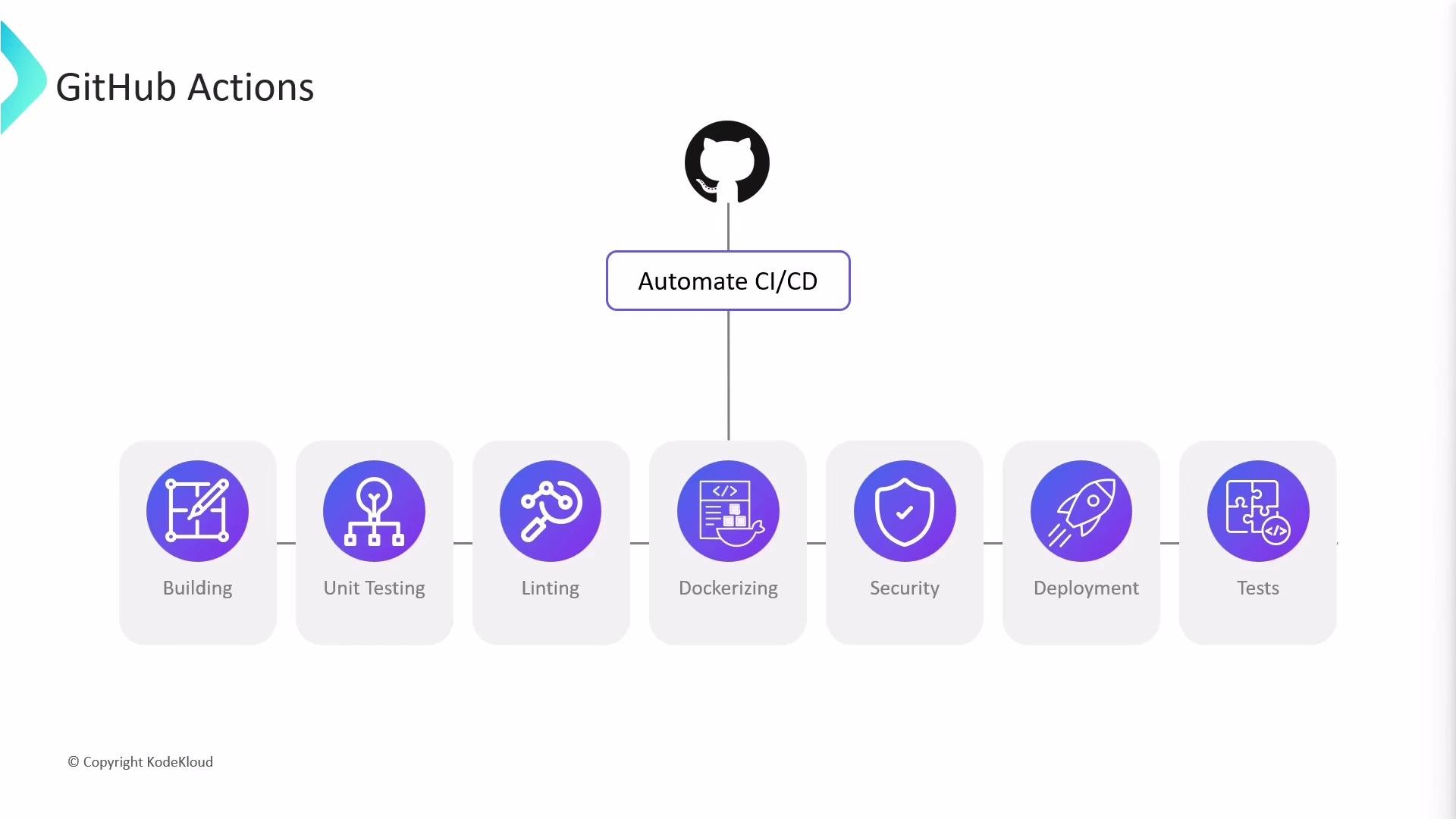
GitHub Actions is a flexible automation platform built into GitHub. You define automated processes as workflows using YAML files stored in your repository, and GitHub executes those workflows in response to repository events. With Actions you can:
* Build, test, and deploy code on pushes and pull requests.
* Run checks and analyses (linting, security scans, dependency updates).
* Orchestrate repository automations (comment bots, labeling, notifications).
* Schedule workflows or trigger them from webhooks and other GitHub events.
Workflows and jobs can run on multiple operating systems, including Ubuntu, Windows, and macOS.
 Why choose GitHub Actions?
* Hosted infrastructure managed by GitHub (provisioning, scaling, and maintenance).
* Declarative workflows in YAML that live with your code (`.github/workflows/`).
* Built-in capabilities: dependency caching, artifact storage, and detailed logs.
* Automation reduces manual steps, lowers human error, and accelerates delivery.
Is GitHub Actions only for CI/CD pipelines?
No. CI/CD (build, test, release) is a primary use case, but Actions can run workflows on many repository events — pushes, pull requests, issues, package registry events, and more. For example, when a contributor opens a pull request you can automatically add labels, assign reviewers, post comments, or run security scans.
Why choose GitHub Actions?
* Hosted infrastructure managed by GitHub (provisioning, scaling, and maintenance).
* Declarative workflows in YAML that live with your code (`.github/workflows/`).
* Built-in capabilities: dependency caching, artifact storage, and detailed logs.
* Automation reduces manual steps, lowers human error, and accelerates delivery.
Is GitHub Actions only for CI/CD pipelines?
No. CI/CD (build, test, release) is a primary use case, but Actions can run workflows on many repository events — pushes, pull requests, issues, package registry events, and more. For example, when a contributor opens a pull request you can automatically add labels, assign reviewers, post comments, or run security scans.
 Core concepts: workflows, jobs, steps, and runners
* Workflow: an automated process defined in a YAML file stored in `/.github/workflows/`. A repository can contain multiple workflows triggered by different events.
* Job: a group of steps that runs on a single runner. Jobs run in parallel by default unless you specify dependencies with `needs`.
* Step: a single task in a job. Steps run sequentially within a job.
* Runner: the machine (virtual or physical) that executes a job. Runners are either GitHub-hosted or self-hosted.
Quick reference table
| Concept | Purpose | Example |
| -------- | ------------------------------------- | ------------------------------ |
| Workflow | Defines automation and triggers | `/.github/workflows/ci.yml` |
| Job | Group of steps that run on one runner | `jobs: build:` |
| Step | Single task (action or command) | `- name: Install dependencies` |
| Runner | Execution environment | `runs-on: ubuntu-latest` |
Matrix strategy and parallel jobs
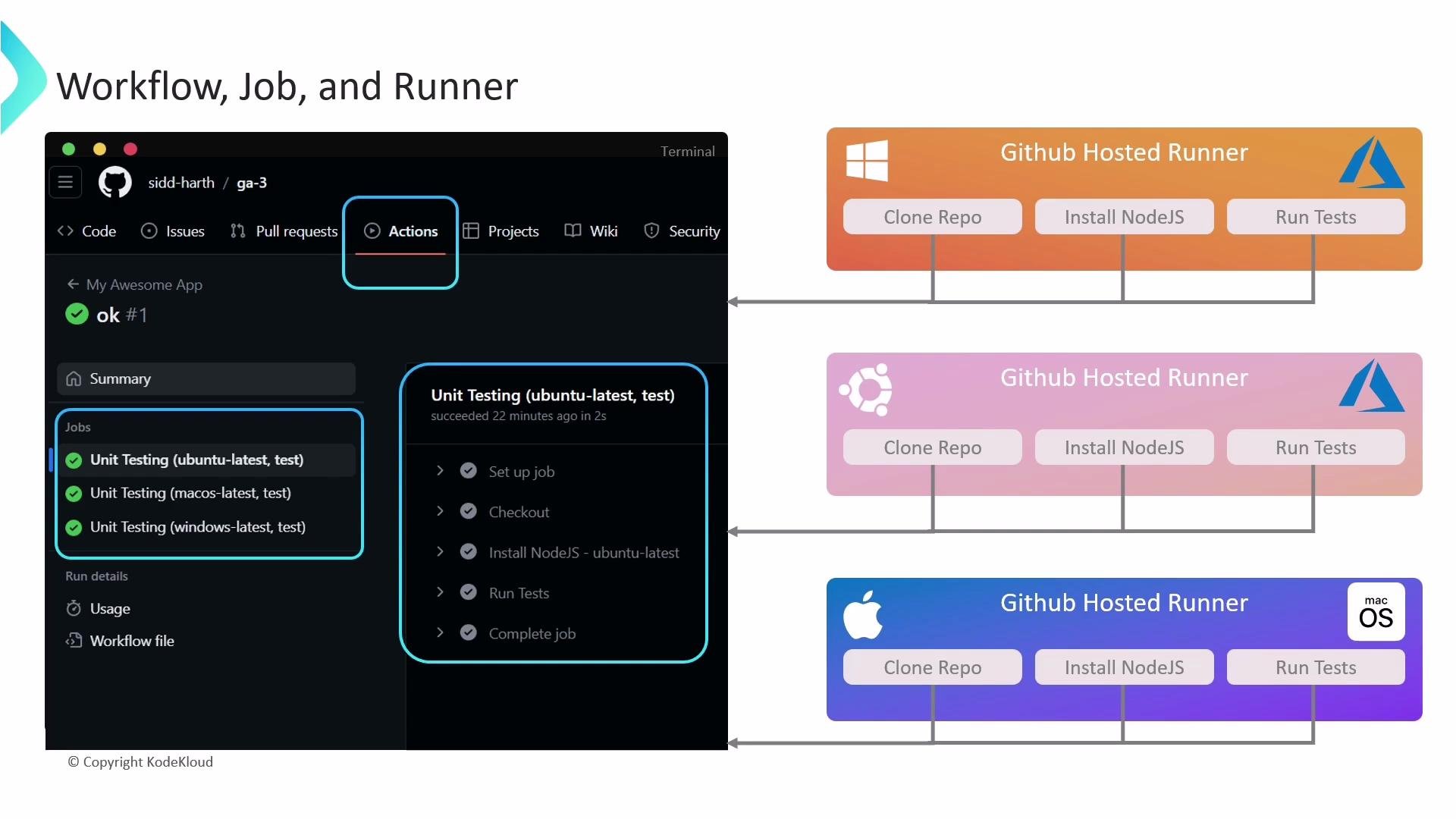
A common pattern uses a matrix strategy to run the same job across multiple OSes or versions. Each matrix entry becomes a separate job executed concurrently on its own runner.
Example: run tests on Ubuntu, macOS, and Windows
```yaml theme={null}
name: My Awesome App
on: push
jobs:
unit-testing:
name: Unit Testing
strategy:
matrix:
os: [ubuntu-latest, macos-latest, windows-latest]
node-version: [16]
runs-on: ${{ matrix.os }}
steps:
- name: Checkout repository
uses: actions/checkout@v3
- name: Set up Node.js ${{ matrix.node-version }}
uses: actions/setup-node@v3
with:
node-version: ${{ matrix.node-version }}
- name: Install dependencies
run: npm ci
- name: Run tests
run: npm test
```
Execution notes
* GitHub provisions a separate runner for each matrix job concurrently (three runners in the example).
* Steps inside a job execute sequentially (checkout → setup → install → test).
* Each matrix job is evaluated independently: a matrix instance’s success or failure is reported separately. The overall workflow succeeds only when all required jobs complete successfully.
* You can view logs, step output, and artifacts for each job in the repository’s Actions tab.
Core concepts: workflows, jobs, steps, and runners
* Workflow: an automated process defined in a YAML file stored in `/.github/workflows/`. A repository can contain multiple workflows triggered by different events.
* Job: a group of steps that runs on a single runner. Jobs run in parallel by default unless you specify dependencies with `needs`.
* Step: a single task in a job. Steps run sequentially within a job.
* Runner: the machine (virtual or physical) that executes a job. Runners are either GitHub-hosted or self-hosted.
Quick reference table
| Concept | Purpose | Example |
| -------- | ------------------------------------- | ------------------------------ |
| Workflow | Defines automation and triggers | `/.github/workflows/ci.yml` |
| Job | Group of steps that run on one runner | `jobs: build:` |
| Step | Single task (action or command) | `- name: Install dependencies` |
| Runner | Execution environment | `runs-on: ubuntu-latest` |
Matrix strategy and parallel jobs
A common pattern uses a matrix strategy to run the same job across multiple OSes or versions. Each matrix entry becomes a separate job executed concurrently on its own runner.
Example: run tests on Ubuntu, macOS, and Windows
```yaml theme={null}
name: My Awesome App
on: push
jobs:
unit-testing:
name: Unit Testing
strategy:
matrix:
os: [ubuntu-latest, macos-latest, windows-latest]
node-version: [16]
runs-on: ${{ matrix.os }}
steps:
- name: Checkout repository
uses: actions/checkout@v3
- name: Set up Node.js ${{ matrix.node-version }}
uses: actions/setup-node@v3
with:
node-version: ${{ matrix.node-version }}
- name: Install dependencies
run: npm ci
- name: Run tests
run: npm test
```
Execution notes
* GitHub provisions a separate runner for each matrix job concurrently (three runners in the example).
* Steps inside a job execute sequentially (checkout → setup → install → test).
* Each matrix job is evaluated independently: a matrix instance’s success or failure is reported separately. The overall workflow succeeds only when all required jobs complete successfully.
* You can view logs, step output, and artifacts for each job in the repository’s Actions tab.
 Runner types — GitHub-hosted vs. self-hosted
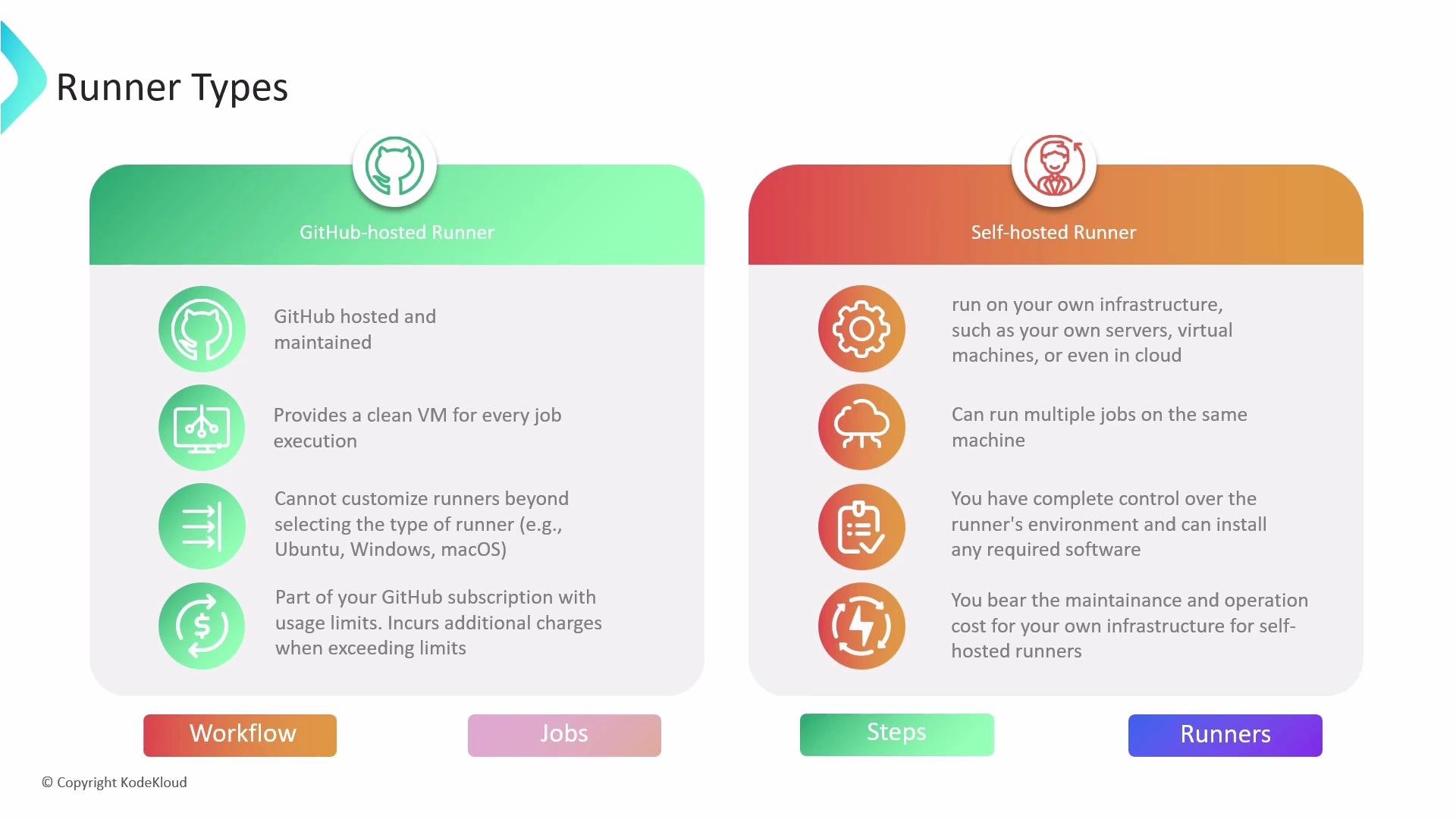
There are two main runner options:
| Runner type | Pros | Cons | When to use |
| ------------- | -------------------------------------------------------------------------------------------------- | ----------------------------------------------------------------------------- | ------------------------------------------------------------------------------- |
| GitHub-hosted | No server maintenance; fresh environment per job; common tooling preinstalled | Limited control over system-level config; usage subject to GitHub plan limits | Best for typical CI/CD where convenience and low ops overhead matter |
| Self-hosted | Full control over OS, installed software, and network access; can access private resources or GPUs | You manage maintenance, scaling, and security | Use when you need custom software, specific hardware, or private network access |
Choose GitHub-hosted runners for convenience and low maintenance. Choose self-hosted runners when you need custom software, special hardware, or specific network access that hosted runners can't provide.
Runner types — GitHub-hosted vs. self-hosted
There are two main runner options:
| Runner type | Pros | Cons | When to use |
| ------------- | -------------------------------------------------------------------------------------------------- | ----------------------------------------------------------------------------- | ------------------------------------------------------------------------------- |
| GitHub-hosted | No server maintenance; fresh environment per job; common tooling preinstalled | Limited control over system-level config; usage subject to GitHub plan limits | Best for typical CI/CD where convenience and low ops overhead matter |
| Self-hosted | Full control over OS, installed software, and network access; can access private resources or GPUs | You manage maintenance, scaling, and security | Use when you need custom software, specific hardware, or private network access |
Choose GitHub-hosted runners for convenience and low maintenance. Choose self-hosted runners when you need custom software, special hardware, or specific network access that hosted runners can't provide.
 Summary and next steps
This article covered the essentials of GitHub Actions: what it is, how workflows, jobs, steps, and runners relate, how matrix jobs enable parallel runs across OSes, and the differences between GitHub-hosted and self-hosted runners. Use these fundamentals to design CI/CD workflows and repository automations.
Further reading and references
* GitHub Actions docs: [https://docs.github.com/actions](https://docs.github.com/actions)
* Actions marketplace: [https://github.com/marketplace?type=actions](https://github.com/marketplace?type=actions)
* actions/checkout: [https://github.com/actions/checkout](https://github.com/actions/checkout)
* actions/setup-node: [https://github.com/actions/setup-node](https://github.com/actions/setup-node)
Summary and next steps
This article covered the essentials of GitHub Actions: what it is, how workflows, jobs, steps, and runners relate, how matrix jobs enable parallel runs across OSes, and the differences between GitHub-hosted and self-hosted runners. Use these fundamentals to design CI/CD workflows and repository automations.
Further reading and references
* GitHub Actions docs: [https://docs.github.com/actions](https://docs.github.com/actions)
* Actions marketplace: [https://github.com/marketplace?type=actions](https://github.com/marketplace?type=actions)
* actions/checkout: [https://github.com/actions/checkout](https://github.com/actions/checkout)
* actions/setup-node: [https://github.com/actions/setup-node](https://github.com/actions/setup-node)