> ## Documentation Index
> Fetch the complete documentation index at: https://notes.kodekloud.com/llms.txt
> Use this file to discover all available pages before exploring further.
# Refactoring Solar System Pipeline
> Guide to refactor a Jenkins pipeline to run Node.js stages inside a Kubernetes pod using a repository pod spec and keep controller for non-containerized tasks
In this guide you'll refactor the existing Solar System `Jenkinsfile` to run selected Node.js stages inside a Kubernetes pod by referencing a `k8s-agent.yaml` pod specification file stored in the repository. This keeps the pod spec versioned alongside your code and lets you run Node.js-related steps inside a container while leaving non-containerized stages (for example Docker or privileged Trivy scans) to run on the controller.
What you'll do:
* Add a `k8s-agent.yaml` pod spec at the repository root.
* Update the `Jenkinsfile` to use the Kubernetes declarative `agent` with `yamlFile`.
* Run Node.js stages inside the pod (default container `node-18`) and run other stages on the controller using `agent any` at the stage level.
Tip: keep your repository open at the project root (`solar-system`) while editing.
## Existing Jenkinsfile (before refactor)
This is the top of the original `Jenkinsfile` used as the starting point:
```groovy theme={null}
@Library('dasher-trusted-shared-library@featureTrivyScan') _
pipeline {
agent any
tools {
// existing tool declarations...
}
environment {
MONGO_URI = "mongodb+srv://supercluster.d83jj.mongodb.net/superData"
MONGO_DB_CREDS = credentials('mongo-db-credentials')
MONGO_USERNAME = credentials('mongo-db-username')
MONGO_PASSWORD = credentials('mongo-db-password')
SONAR_SCANNER_HOME = tool 'sonarqube-scanner-610'
GITEA_TOKEN = credentials('gitea-api-token')
}
options {
// existing options...
}
stages {
stage('Installing Dependencies') {
options { timestamps() }
steps {
// ...
}
}
// ... many more stages ...
}
}
```
## 1) Create the Kubernetes pod spec file (`k8s-agent.yaml`)
At the repository root create `k8s-agent.yaml`. This minimal pod spec provides two Node.js containers that remain running (using `cat` and `tty: true`) so Jenkins can `exec` into them. Save the following content into `k8s-agent.yaml`:
```yaml theme={null}
apiVersion: v1
kind: Pod
spec:
containers:
- name: node-18
image: node:18-alpine
command:
- cat
tty: true
- name: node-19
image: node:19-alpine
command:
- cat
tty: true
```
This pod spec intentionally keeps the containers alive to allow Jenkins to run shell commands inside the selected container. We will use `node-18` as the pipeline default container.
Keeping a small `k8s-agent.yaml` in the repo improves reproducibility. You can extend this pod spec with init containers, environment variables, or volume mounts later (for example to inject credentials or cache layers).
## 2) Update the `Jenkinsfile` to use the Kubernetes agent
Replace the top-level `agent any` with a Kubernetes `agent` block that references the YAML file and sets a `defaultContainer`:
```groovy theme={null}
@Library('dasher-trusted-shared-library@featureTrivyScan') _
pipeline {
agent {
kubernetes {
cloud 'dasher-prod-k8s-us-east'
yamlFile 'k8s-agent.yaml'
defaultContainer 'node-18'
}
}
tools {
// existing tool declarations...
}
environment {
MONGO_URI = "mongodb+srv://supercluster.d83jj.mongodb.net/superData"
MONGO_DB_CREDS = credentials('mongo-db-credentials')
MONGO_USERNAME = credentials('mongo-db-username')
MONGO_PASSWORD = credentials('mongo-db-password')
SONAR_SCANNER_HOME = tool 'sonarqube-scanner-610'
GITEA_TOKEN = credentials('gitea-api-token')
}
options {
// existing options...
}
stages {
// stages below...
}
}
```
Notes:
* `cloud` must match a configured Kubernetes cloud in your Jenkins Kubernetes plugin.
* `yamlFile` points to the pod spec file in the repository (`k8s-agent.yaml`).
* `defaultContainer` designates the container where shell steps run by default (`node-18`).
Make sure the Jenkins Kubernetes cloud name (`cloud 'dasher-prod-k8s-us-east'`) matches a configured Kubernetes cloud in your Jenkins settings. If it does not match, pod provisioning will fail.
## 3) Run only Node.js stages inside the Kubernetes pod
Change the stages that depend on Node.js to run inside the pod (they will run in the `node-18` container by default). For stages that need to run on the controller (for Docker builds, privileged Trivy scans, etc.), specify `agent any` at the stage level.
Example Node.js stage implementations after the refactor:
* Installing Dependencies (runs inside Kubernetes pod, default `node-18`):
```groovy theme={null}
stage('Installing Dependencies') {
options { timestamps() }
steps {
sh 'node -v'
sh 'npm install --no-audit'
}
}
```
* Dependency scanning (parallel branch with NPM audit):
```groovy theme={null}
stage('Dependency Scanning') {
parallel {
stage('NPM Dependency Audit') {
steps {
sh '''
node -v
npm audit --audit-level=critical
echo $?
'''
}
}
// add other dependency scanners here
}
}
```
* Unit Testing (with retry):
```groovy theme={null}
stage('Unit Testing') {
options { retry(2) }
steps {
sh 'node -v'
sh 'npm test'
}
}
```
* Code Coverage (allow failures so coverage reporting won't break the pipeline):
```groovy theme={null}
stage('Code Coverage') {
steps {
catchError(buildResult: 'SUCCESS', message: 'Coverage stage failed, continuing pipeline') {
sh 'node -v'
sh 'npm run coverage'
}
}
}
```
* Docker build or Trivy scans (run on controller or appropriate agent): declare `agent any` at the stage level.
```groovy theme={null}
stage('Docker Build & Push') {
agent any
steps {
// Docker build/push or containerized Trivy scans that require the controller or a specific agent
}
}
```
## Stage placement quick reference
| Stage type | Where it runs | Example agent declaration |
| ------------------------------- | ------------------------------------------------ | ----------------------------------------------------------------------------------------- |
| Node.js build/test/coverage | Kubernetes pod (container `node-18`) | top-level `agent { kubernetes { yamlFile 'k8s-agent.yaml' defaultContainer 'node-18' } }` |
| Docker build / privileged scans | Controller or a specific agent | `stage('Docker Build') { agent any; steps { ... } }` |
| Short utility tasks | Pod or controller depending on tool availability | Use stage-level `agent` to override when necessary |
## 4) Commit and push
Commit both `k8s-agent.yaml` and the modified `Jenkinsfile` to your feature branch and push. Depending on your SCM hooks, the pipeline should be triggered automatically.
When the pipeline runs, Jenkins will:
* Fetch the `k8s-agent.yaml` file from the repository.
* Provision a pod on the configured Kubernetes cloud using the pod spec.
* Mount a shared `workspace` volume so all containers in the pod share the same workspace across stages.
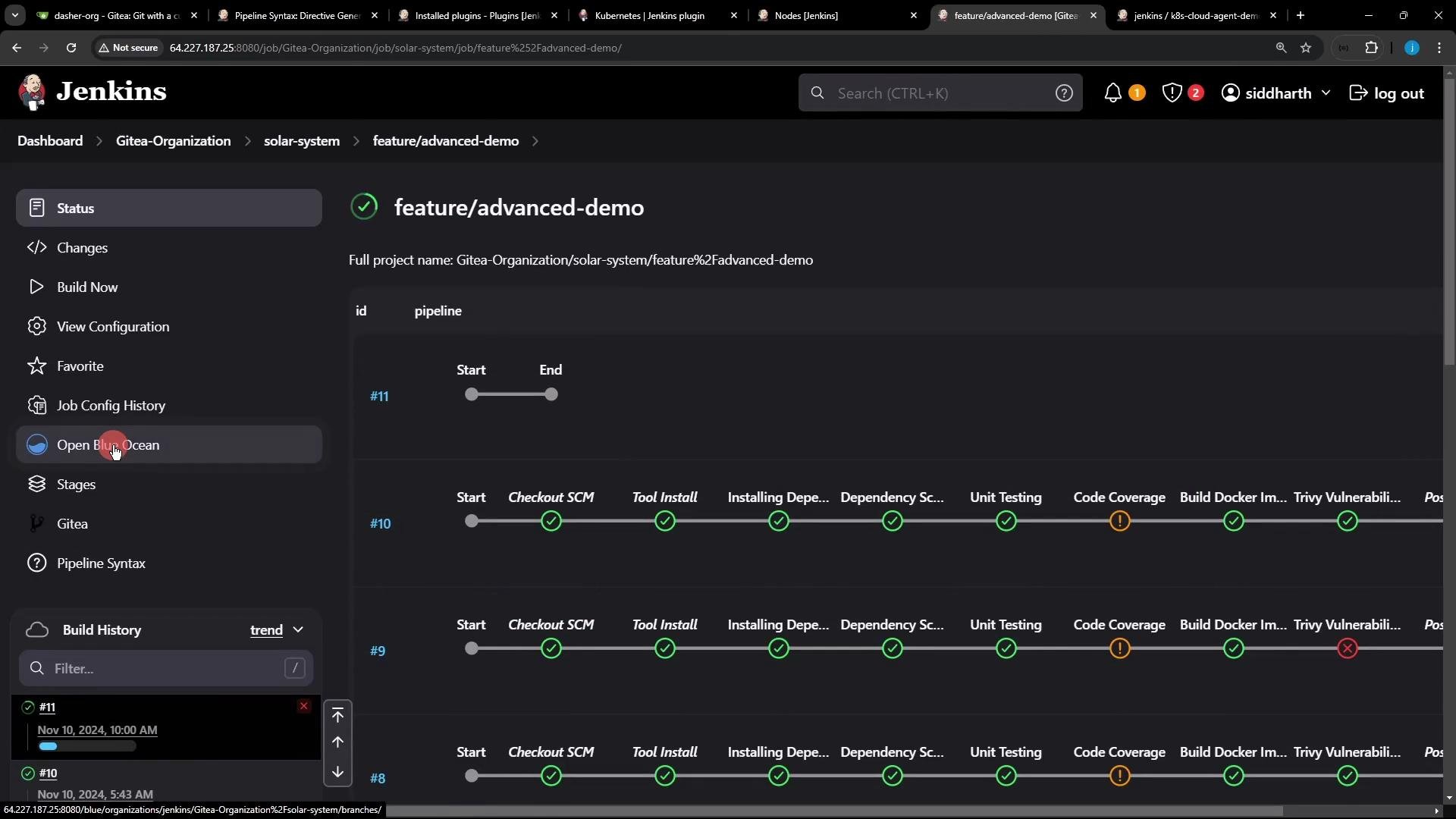
* Execute Node.js stages inside the `node-18` container (default), allowing artifacts and dependencies installed during one stage to be available to subsequent stages in the same pod.
Below is the pipeline UI showing the run in Blue Ocean:
 ## Example console output highlights
During a run you'll see Jenkins load the shared library, retrieve the YAML, and provision the pod. Example excerpts (shortened):
* Loading library and obtaining the YAML:
```jenkins theme={null}
Loading library dasher-trusted-shared-library@featureTrivyScan
Obtained k8s-agent.yaml from
[Pipeline] podTemplate
[Pipeline] node
Created Pod: dasher-prod-k8s-us-east jenkins/
Agent is provisioned from template ...
```
* Pod spec created by the plugin (excerpt):
```YAML theme={null}
apiVersion: "v1"
kind: "Pod"
metadata:
name: ""
namespace: "jenkins"
spec:
containers:
- name: "node-18"
image: "node:18-alpine"
command:
- "cat"
tty: true
volumeMounts:
- mountPath: "/home/jenkins/agent"
name: "workspace-volume"
- name: "node-19"
image: "node:19-alpine"
command:
- "cat"
tty: true
volumes:
- emptyDir: {}
name: "workspace-volume"
restartPolicy: Never
```
* Sample `Installing Dependencies` output:
```bash theme={null}
15:31:10 + node -v
15:31:10 v18.20.4
15:31:11 + npm install --no-audit
15:31:16
15:31:16 added 358 packages in 4s
15:31:16
15:31:16 44 packages are looking for funding
15:31:16 run `npm fund` for details
```
* Sample `npm audit` output:
```bash theme={null}
8 vulnerabilities (1 low, 2 moderate, 5 high)
To address all issues, run:
npm audit fix
+ echo 0
0
```
* Sample test and coverage output:
```bash theme={null}
+ node -v
v18.20.4
+ npm run coverage
> Solar System@6.7.6 coverage
> nyc --reporter cobertura --reporter lcov --reporter text --reporter json-summary mocha app-test.js --timeout 10000 --exit
Server successfully running on port - 3000
Planets API Suite
Fetching Planet Details
✓ it should fetch a planet named Mercury (2742ms)
✓ it should fetch a planet named Venus (277ms)
✓ it should fetch a planet named Earth (276ms)
✓ it should fetch a planet named Mars (275ms)
✓ it should fetch a planet named Jupiter (276ms)
✓ it should fetch a planet named Saturn (275ms)
✓ it should fetch a planet named Uranus (276ms)
✓ it should fetch a planet named Neptune (276ms)
```
Because Node.js stages share the same `workspace` volume in the pod, dependencies installed in the "Installing Dependencies" stage persist for subsequent stages without re-installing.
## Summary and best practices
* Use `agent { kubernetes { yamlFile 'k8s-agent.yaml' } }` to keep a reusable pod spec in your repository instead of embedding YAML inside the `Jenkinsfile`.
* Select a `defaultContainer` (for example `node-18`) for Node-based stages.
* Override stage-level `agent` with `agent any` for steps that must run outside the pod (Docker builds, privileged scans).
* A single pod with multiple containers and a shared `workspace` volume lets you reuse artifacts and installed dependencies across stages, reducing duplication and improving pipeline speed.
* You can add more containers to the pod and switch containers within stages using `container('container-name') { ... }` if you need different runtimes or tools in different stages.
## Links and references
* Jenkins Kubernetes plugin: [https://plugins.jenkins.io/kubernetes/](https://plugins.jenkins.io/kubernetes/)
* Kubernetes pod specification: [https://kubernetes.io/docs/concepts/workloads/pods/pod/](https://kubernetes.io/docs/concepts/workloads/pods/pod/)
* Trivy (Aqua Security): [https://github.com/aquasecurity/trivy](https://github.com/aquasecurity/trivy)
* Node.js Docker images on Docker Hub: [https://hub.docker.com/\_/node](https://hub.docker.com/_/node)
## Example console output highlights
During a run you'll see Jenkins load the shared library, retrieve the YAML, and provision the pod. Example excerpts (shortened):
* Loading library and obtaining the YAML:
```jenkins theme={null}
Loading library dasher-trusted-shared-library@featureTrivyScan
Obtained k8s-agent.yaml from
[Pipeline] podTemplate
[Pipeline] node
Created Pod: dasher-prod-k8s-us-east jenkins/
Agent is provisioned from template ...
```
* Pod spec created by the plugin (excerpt):
```YAML theme={null}
apiVersion: "v1"
kind: "Pod"
metadata:
name: ""
namespace: "jenkins"
spec:
containers:
- name: "node-18"
image: "node:18-alpine"
command:
- "cat"
tty: true
volumeMounts:
- mountPath: "/home/jenkins/agent"
name: "workspace-volume"
- name: "node-19"
image: "node:19-alpine"
command:
- "cat"
tty: true
volumes:
- emptyDir: {}
name: "workspace-volume"
restartPolicy: Never
```
* Sample `Installing Dependencies` output:
```bash theme={null}
15:31:10 + node -v
15:31:10 v18.20.4
15:31:11 + npm install --no-audit
15:31:16
15:31:16 added 358 packages in 4s
15:31:16
15:31:16 44 packages are looking for funding
15:31:16 run `npm fund` for details
```
* Sample `npm audit` output:
```bash theme={null}
8 vulnerabilities (1 low, 2 moderate, 5 high)
To address all issues, run:
npm audit fix
+ echo 0
0
```
* Sample test and coverage output:
```bash theme={null}
+ node -v
v18.20.4
+ npm run coverage
> Solar System@6.7.6 coverage
> nyc --reporter cobertura --reporter lcov --reporter text --reporter json-summary mocha app-test.js --timeout 10000 --exit
Server successfully running on port - 3000
Planets API Suite
Fetching Planet Details
✓ it should fetch a planet named Mercury (2742ms)
✓ it should fetch a planet named Venus (277ms)
✓ it should fetch a planet named Earth (276ms)
✓ it should fetch a planet named Mars (275ms)
✓ it should fetch a planet named Jupiter (276ms)
✓ it should fetch a planet named Saturn (275ms)
✓ it should fetch a planet named Uranus (276ms)
✓ it should fetch a planet named Neptune (276ms)
```
Because Node.js stages share the same `workspace` volume in the pod, dependencies installed in the "Installing Dependencies" stage persist for subsequent stages without re-installing.
## Summary and best practices
* Use `agent { kubernetes { yamlFile 'k8s-agent.yaml' } }` to keep a reusable pod spec in your repository instead of embedding YAML inside the `Jenkinsfile`.
* Select a `defaultContainer` (for example `node-18`) for Node-based stages.
* Override stage-level `agent` with `agent any` for steps that must run outside the pod (Docker builds, privileged scans).
* A single pod with multiple containers and a shared `workspace` volume lets you reuse artifacts and installed dependencies across stages, reducing duplication and improving pipeline speed.
* You can add more containers to the pod and switch containers within stages using `container('container-name') { ... }` if you need different runtimes or tools in different stages.
## Links and references
* Jenkins Kubernetes plugin: [https://plugins.jenkins.io/kubernetes/](https://plugins.jenkins.io/kubernetes/)
* Kubernetes pod specification: [https://kubernetes.io/docs/concepts/workloads/pods/pod/](https://kubernetes.io/docs/concepts/workloads/pods/pod/)
* Trivy (Aqua Security): [https://github.com/aquasecurity/trivy](https://github.com/aquasecurity/trivy)
* Node.js Docker images on Docker Hub: [https://hub.docker.com/\_/node](https://hub.docker.com/_/node)