> ## Documentation Index
> Fetch the complete documentation index at: https://notes.kodekloud.com/llms.txt
> Use this file to discover all available pages before exploring further.
# Sequential Stages
> Explains nested sequential stages in Jenkins Declarative Pipelines to run ordered steps inside parallel branches, improving visibility and offering troubleshooting and best practices for Node npm issues
What are sequential stages?
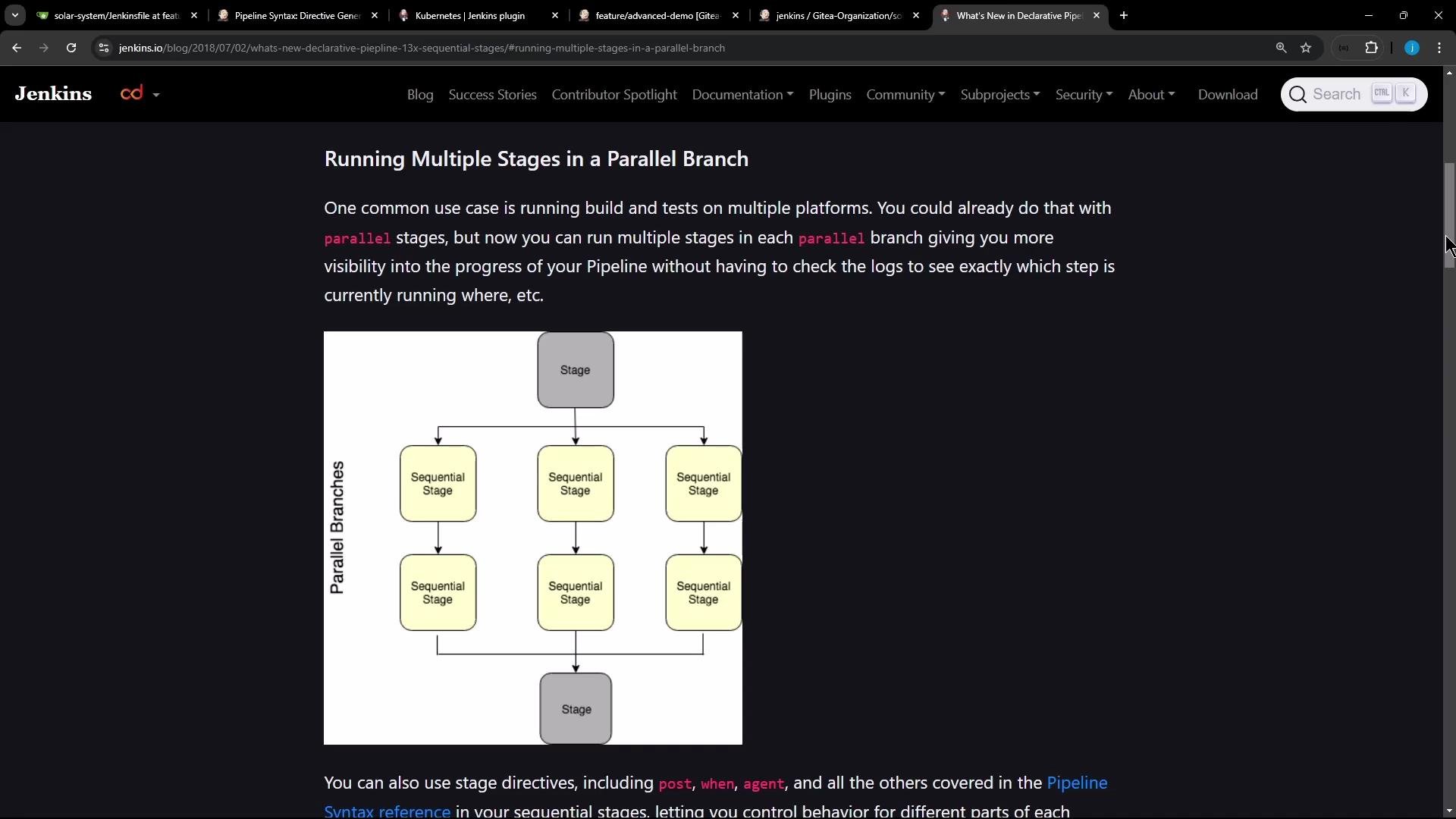
Sequential stages allow you to run multiple stages in order inside each branch of a parallel pipeline. Introduced for Jenkins Declarative Pipelines around 2018, this feature combines the benefits of parallel execution (for coverage across platforms or configs) with explicit, visible sequences inside each branch — so you can see exactly which step is running or failed without digging through logs.
 Why use sequential stages?
* Better visibility: the Jenkins UI shows each nested stage, making it clear which step is running or failing inside a parallel branch.
* Ordered work: tasks that must run in sequence (like install → test → package) can be expressed cleanly within each parallel branch.
* Isolation of flow: a failure in one stage only affects the remaining inner stages of that branch; other parallel branches continue.
Example: Node.js branch that first installs dependencies, then runs tests
To run a sequence inside a parallel branch you nest a `stages` block inside that branch's `stage`. The following Declarative Pipeline snippet demonstrates this pattern:
```groovy theme={null}
stage('NodeJS 20') {
agent { label 'nodejs-20' }
stages {
stage('Install Dependencies') {
options { retry(2) }
steps {
sh 'node -v'
sh 'npm install --no-audit --cache .'
}
}
stage('Testing') {
steps {
sh 'npm test'
}
}
}
}
```
Key point: a `stage` may contain a `stages` block, and those inner `stage` declarations execute sequentially inside that branch while sibling branches run in parallel.
Common failure modes and debugging tips
1. npm cache / permission problems (EACCES)
If agents have a root-owned global npm cache or restricted filesystem permissions, `npm install` may fail with EACCES errors (attempting to create directories under root-owned locations). Example excerpt:
```bash theme={null}
+ npm install --no-audit
npm WARN tar TAR_ENTRY_ERROR ENOENT: no such file or directory, open '/var/lib/jenkins/workspace/lar-system_feature_advanced-demo/node_modules/@types/node/child_process.d.ts'
...
npm ERR! code EACCES
npm ERR! syscall mkdir
npm ERR! path /.npm
npm ERR! errno -13
npm ERR!
npm ERR! Your cache folder contains root-owned files, due to a bug in
npm ERR! previous versions of npm which has since been addressed.
npm ERR!
npm ERR! To permanently fix this problem, please run:
npm ERR! sudo chown -R $(id -u):$(id -g) ~/.npm
npm ERR! Log files were not written due to an error writing to the directory: /.npm/_logs
script returned exit code 243
```
Workarounds:
* Use an agent-writable cache directory (example in the snippet above): `npm install --no-audit --cache .`
* Or ensure the agent user owns the global cache: `sudo chown -R $(id -u):$(id -g) ~/.npm` on the agent (if you control it).
* Alternatively, run builds inside containers or ephemeral workspaces where cache and ownership are predictable.
2. ENOTEMPTY / rename errors (workspace state)
Even after switching cache directories, npm may fail with `ENOTEMPTY` when renaming subfolders in `node_modules`. That indicates leftover files or race conditions in the workspace rather than a Jenkins pipeline bug:
```bash theme={null}
+ npm install --no-audit --cache .
npm ERR! code ENOTEMPTY
npm ERR! syscall rename
npm ERR! path /var/lib/jenkins/workspace/lar-system_feature_advanced-demo/node_modules/chai
npm ERR! dest /var/lib/jenkins/workspace/lar-system_feature_advanced-demo/node_modules/.chai-5ivncl6v
npm ERR! errno -39
npm ERR! ENOTEMPTY: directory not empty, rename '/var/lib/jenkins/workspace/lar-system_feature_advanced-demo/node_modules/chai' -> '/var/lib/jenkins/workspace/lar-system_feature_advanced-demo/node_modules/.chai-5ivncl6v'
npm ERR! A complete log of this run can be found in: /var/lib/jenkins/workspace/lar-system_feature_advanced-demo/_logs/2024-11-10T10_53_47_716Z-debug-0.log
script returned exit code 217
```
Mitigations:
* Clean the workspace between runs (`deleteDir()` in a Declarative `post` step or use the Workspace Cleanup plugin).
* Use isolated build containers or workspaces per job/branch to avoid leftover node\_modules interference.
* Consider caching strategies that store prebuilt artifacts instead of `node_modules` where feasible.
When using nested `stages` inside a parallel branch:
* Put the inner `stages` block directly inside the branch's `stage`.
* Each inner `stage` runs in order; if one fails, following stages in that branch are skipped.
* Other parallel branches are unaffected and continue to run concurrently.
Summary table — behavior and recommendations
| Topic | Behavior | Recommendation |
| ---------------- | ------------------------------------------------------------------- | ------------------------------------------------------------------------------ |
| Nested stages | Inner `stages` run sequentially inside a parallel `stage` | Use `stages` inside branch `stage` to reflect ordered steps |
| Failure handling | An inner stage failure stops remaining inner stages for that branch | Use retries, `try/catch` (scripted) or `options { retry(...) }` for resilience |
| npm permissions | EACCES due to root-owned cache | Use `--cache .`, run chown on agent cache, or use containers |
| Workspace state | ENOTEMPTY from stale files in `node_modules` | Clean workspace, use isolated workspaces, or containerized builds |
Best practices and recommendations
* Prefer containerized or ephemeral agents for reproducible Node builds.
* Use `--cache .` or explicitly configured cache directories to avoid global cache ownership issues.
* Clean workspaces or use new workspaces for each build to avoid ENOTEMPTY and rename races.
* Use stage-level `options { retry(n) }` for transient failures, especially around networked installs.
Further reading and references
* Jenkins Declarative Pipeline: [https://www.jenkins.io/doc/book/pipeline/syntax/#stages](https://www.jenkins.io/doc/book/pipeline/syntax/#stages)
* Jenkins: Running multiple stages in a parallel branch (diagram reference) — see Jenkins docs/webpages for visuals and examples
* npm troubleshooting: [https://docs.npmjs.com/cli/v9/commands/npm-install#troubleshooting](https://docs.npmjs.com/cli/v9/commands/npm-install#troubleshooting)
In short:
* Sequential stages inside parallel branches give you ordered steps per branch with clear UI visibility.
* Define them by nesting a `stages` block inside a branch `stage`.
* Fix npm cache/permission issues by using a writable cache path or fixing ownership; resolve workspace errors by cleaning or isolating builds.
* Remember: a failed inner stage prevents subsequent inner stages from running in that branch, but does not stop other parallel branches.
Why use sequential stages?
* Better visibility: the Jenkins UI shows each nested stage, making it clear which step is running or failing inside a parallel branch.
* Ordered work: tasks that must run in sequence (like install → test → package) can be expressed cleanly within each parallel branch.
* Isolation of flow: a failure in one stage only affects the remaining inner stages of that branch; other parallel branches continue.
Example: Node.js branch that first installs dependencies, then runs tests
To run a sequence inside a parallel branch you nest a `stages` block inside that branch's `stage`. The following Declarative Pipeline snippet demonstrates this pattern:
```groovy theme={null}
stage('NodeJS 20') {
agent { label 'nodejs-20' }
stages {
stage('Install Dependencies') {
options { retry(2) }
steps {
sh 'node -v'
sh 'npm install --no-audit --cache .'
}
}
stage('Testing') {
steps {
sh 'npm test'
}
}
}
}
```
Key point: a `stage` may contain a `stages` block, and those inner `stage` declarations execute sequentially inside that branch while sibling branches run in parallel.
Common failure modes and debugging tips
1. npm cache / permission problems (EACCES)
If agents have a root-owned global npm cache or restricted filesystem permissions, `npm install` may fail with EACCES errors (attempting to create directories under root-owned locations). Example excerpt:
```bash theme={null}
+ npm install --no-audit
npm WARN tar TAR_ENTRY_ERROR ENOENT: no such file or directory, open '/var/lib/jenkins/workspace/lar-system_feature_advanced-demo/node_modules/@types/node/child_process.d.ts'
...
npm ERR! code EACCES
npm ERR! syscall mkdir
npm ERR! path /.npm
npm ERR! errno -13
npm ERR!
npm ERR! Your cache folder contains root-owned files, due to a bug in
npm ERR! previous versions of npm which has since been addressed.
npm ERR!
npm ERR! To permanently fix this problem, please run:
npm ERR! sudo chown -R $(id -u):$(id -g) ~/.npm
npm ERR! Log files were not written due to an error writing to the directory: /.npm/_logs
script returned exit code 243
```
Workarounds:
* Use an agent-writable cache directory (example in the snippet above): `npm install --no-audit --cache .`
* Or ensure the agent user owns the global cache: `sudo chown -R $(id -u):$(id -g) ~/.npm` on the agent (if you control it).
* Alternatively, run builds inside containers or ephemeral workspaces where cache and ownership are predictable.
2. ENOTEMPTY / rename errors (workspace state)
Even after switching cache directories, npm may fail with `ENOTEMPTY` when renaming subfolders in `node_modules`. That indicates leftover files or race conditions in the workspace rather than a Jenkins pipeline bug:
```bash theme={null}
+ npm install --no-audit --cache .
npm ERR! code ENOTEMPTY
npm ERR! syscall rename
npm ERR! path /var/lib/jenkins/workspace/lar-system_feature_advanced-demo/node_modules/chai
npm ERR! dest /var/lib/jenkins/workspace/lar-system_feature_advanced-demo/node_modules/.chai-5ivncl6v
npm ERR! errno -39
npm ERR! ENOTEMPTY: directory not empty, rename '/var/lib/jenkins/workspace/lar-system_feature_advanced-demo/node_modules/chai' -> '/var/lib/jenkins/workspace/lar-system_feature_advanced-demo/node_modules/.chai-5ivncl6v'
npm ERR! A complete log of this run can be found in: /var/lib/jenkins/workspace/lar-system_feature_advanced-demo/_logs/2024-11-10T10_53_47_716Z-debug-0.log
script returned exit code 217
```
Mitigations:
* Clean the workspace between runs (`deleteDir()` in a Declarative `post` step or use the Workspace Cleanup plugin).
* Use isolated build containers or workspaces per job/branch to avoid leftover node\_modules interference.
* Consider caching strategies that store prebuilt artifacts instead of `node_modules` where feasible.
When using nested `stages` inside a parallel branch:
* Put the inner `stages` block directly inside the branch's `stage`.
* Each inner `stage` runs in order; if one fails, following stages in that branch are skipped.
* Other parallel branches are unaffected and continue to run concurrently.
Summary table — behavior and recommendations
| Topic | Behavior | Recommendation |
| ---------------- | ------------------------------------------------------------------- | ------------------------------------------------------------------------------ |
| Nested stages | Inner `stages` run sequentially inside a parallel `stage` | Use `stages` inside branch `stage` to reflect ordered steps |
| Failure handling | An inner stage failure stops remaining inner stages for that branch | Use retries, `try/catch` (scripted) or `options { retry(...) }` for resilience |
| npm permissions | EACCES due to root-owned cache | Use `--cache .`, run chown on agent cache, or use containers |
| Workspace state | ENOTEMPTY from stale files in `node_modules` | Clean workspace, use isolated workspaces, or containerized builds |
Best practices and recommendations
* Prefer containerized or ephemeral agents for reproducible Node builds.
* Use `--cache .` or explicitly configured cache directories to avoid global cache ownership issues.
* Clean workspaces or use new workspaces for each build to avoid ENOTEMPTY and rename races.
* Use stage-level `options { retry(n) }` for transient failures, especially around networked installs.
Further reading and references
* Jenkins Declarative Pipeline: [https://www.jenkins.io/doc/book/pipeline/syntax/#stages](https://www.jenkins.io/doc/book/pipeline/syntax/#stages)
* Jenkins: Running multiple stages in a parallel branch (diagram reference) — see Jenkins docs/webpages for visuals and examples
* npm troubleshooting: [https://docs.npmjs.com/cli/v9/commands/npm-install#troubleshooting](https://docs.npmjs.com/cli/v9/commands/npm-install#troubleshooting)
In short:
* Sequential stages inside parallel branches give you ordered steps per branch with clear UI visibility.
* Define them by nesting a `stages` block inside a branch `stage`.
* Fix npm cache/permission issues by using a writable cache path or fixing ownership; resolve workspace errors by cleaning or isolating builds.
* Remember: a failed inner stage prevents subsequent inner stages from running in that branch, but does not stop other parallel branches.