> ## Documentation Index
> Fetch the complete documentation index at: https://notes.kodekloud.com/llms.txt
> Use this file to discover all available pages before exploring further.
# Sharing a File between Containers
> Demonstrates sharing a file between two containers in the same Kubernetes Pod using a Jenkins pipeline and shared workspace (emptyDir), showing creation in Ubuntu and reading in Node
If you've used Kubernetes, you know that multiple containers running in the same Pod can share storage (for example via an `emptyDir` volume). This article demonstrates that behavior by showing a Jenkins pipeline (using the Kubernetes plugin) that creates a file in one container and reads it from another container running in the same Pod.
Below is a compact, corrected Jenkinsfile that uses inline Pod YAML to launch two containers in the same Pod: `ubuntu-container` (the default) and `node-container`. The pipeline creates a file from the Ubuntu container in one stage and reads the same file from the Node container in a later stage.
```groovy theme={null}
pipeline {
agent {
kubernetes {
cloud 'dasher-prod-k8s-us-east'
// Instead of inline YAML you could use: yamlFile 'jenkins-pod.yaml'
yaml '''
apiVersion: v1
kind: Pod
spec:
containers:
- name: node-container
image: node:18-alpine
command:
- cat
tty: true
- name: ubuntu-container
image: ubuntu
command:
- sleep
args:
- "infinity"
restartPolicy: Never
'''
defaultContainer 'ubuntu-container'
retries 2
}
}
stages {
stage('Print Hostname and Create File') {
steps {
// This runs in the default container (ubuntu-container)
sh 'hostname'
echo "###############################################################"
sh 'echo important_UBUNTU_data > ubuntu-$BUILD_ID.txt'
sh 'ls -ltr ubuntu-$BUILD_ID.txt'
echo "###############################################################"
}
}
stage('Print Node Version and Read File') {
steps {
container('node-container') {
sh 'node -v'
sh 'npm -v'
echo "###############################################################"
sh 'ls -ltr ubuntu-$BUILD_ID.txt'
sh 'cat ubuntu-$BUILD_ID.txt'
echo "###############################################################"
}
}
}
}
}
```
How this Jenkinsfile works (key parts)
* agent.kubernetes: Declares a Kubernetes agent and provides an inline Pod manifest (you can also reference a YAML file via `yamlFile`).
* Pod spec: Defines two containers in the same Pod:
* `node-container` (image: `node:18-alpine`) — used to read the file in the second stage.
* `ubuntu-container` (image: `ubuntu`) — set to run `sleep infinity` and designated as the `defaultContainer`.
* `defaultContainer 'ubuntu-container'`: Ensures the first stage runs inside the Ubuntu container without an explicit `container(...)` block.
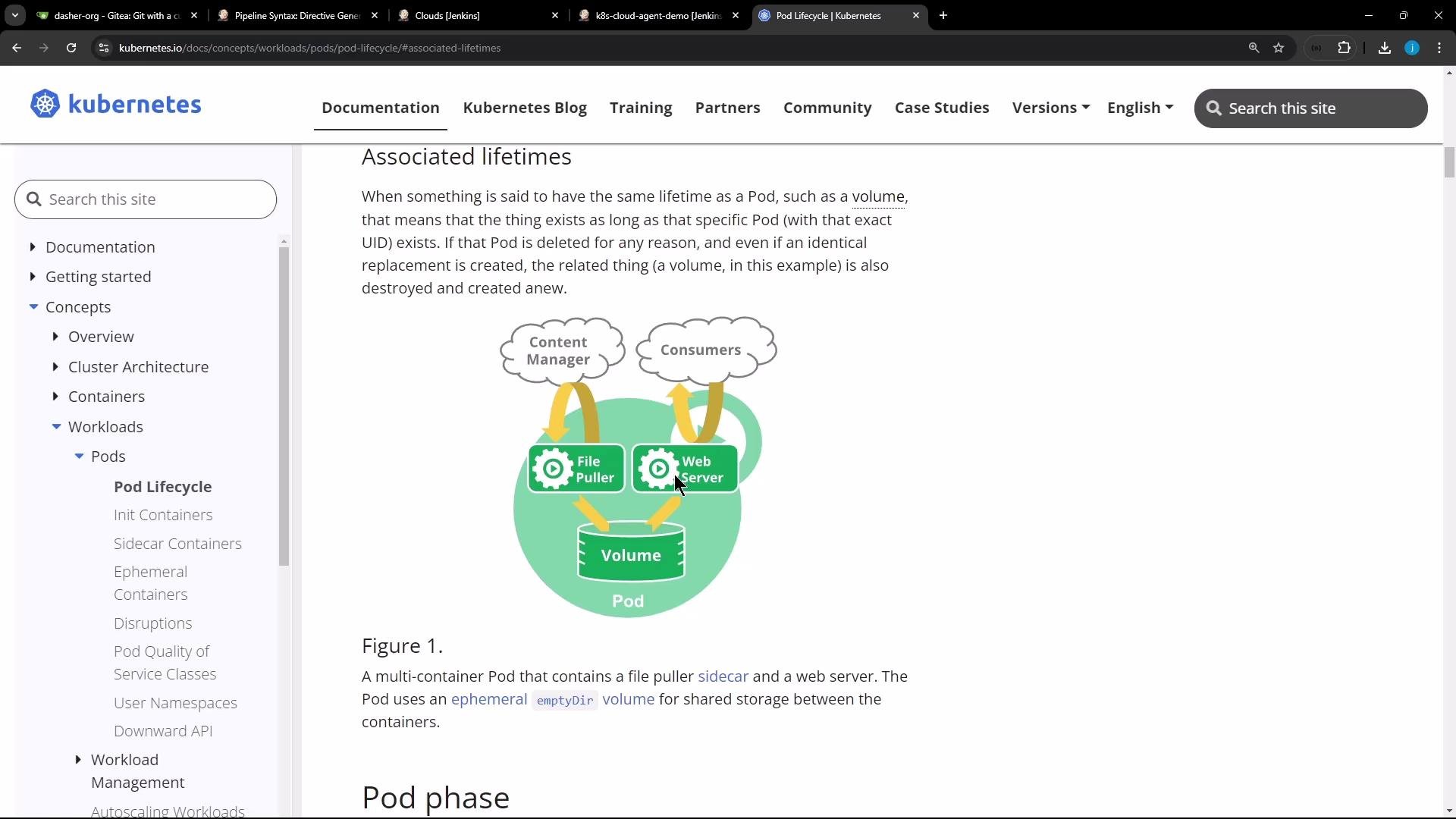
* Workspace sharing: The file created in the Ubuntu stage is written to the Pod workspace. Because both containers run inside the same Pod and share the Pod’s workspace (backed by a volume such as `emptyDir` in many setups), the Node container can list and read the same file in a later stage.
In typical Kubernetes setups the workspace is mounted into the Pod (for example using an `emptyDir` volume) so files created by one container in the Pod are accessible to the other containers. Note that `emptyDir` is ephemeral and its lifetime is tied to the Pod lifecycle.
The Kubernetes documentation illustrates this pattern: containers in the same Pod can share volumes and therefore files. The image below shows a Pod containing a shared volume accessible to multiple containers.
 Example pipeline output (excerpt)
```text theme={null}
[Pipeline] sh
+ hostname
k8s-cloud-agent-demo-5-rv7b8-8frt0-n41pw
[Pipeline] sh
+ echo important_UBUNTU_data
[Pipeline] sh
+ ls -ltr ubuntu-5.txt
-rw-r--r-- 1 root root 22 Nov 10 09:47 ubuntu-5.txt
[Pipeline] stage
[Pipeline] { (Print Node Version)
[Pipeline] container
[Pipeline] sh
+ node -v
v18.20.4
[Pipeline] sh
+ ls -ltr ubuntu-5.txt
-rw-r--r-- 1 root root 22 Nov 10 09:47 ubuntu-5.txt
[Pipeline] sh
+ cat ubuntu-5.txt
important_UBUNTU_data
```
This confirms the file created in the Ubuntu container is accessible from the Node container because both containers share the same Pod workspace.
Best practices and considerations
* Workspace persistence: The workspace is typically provided by the Jenkins agent configuration (often with an `emptyDir` in Kubernetes-based agents). `emptyDir` is ephemeral — it exists only for the lifetime of the Pod. If you need persistence across Pods, use a persistent volume (e.g., `PersistentVolumeClaim`).
* Permissions: Ensure user permissions and owners inside each container allow reading/writing the workspace files.
* Tooling inside images: Bake required CLI tools into agent images when possible to reduce per-job setup overhead.
* Debugging: Use `sh 'ls -la'` and `sh 'id'` in each container to inspect permissions and verify the shared directory.
Comparison: static nodes vs. container-based agents
| Agent Type | Use Case | Pros | Cons |
| ------------------------------------------------------- | ---------------------------------------------------------- | ----------------------------------------------------------- | --------------------------------------------------------------------------------------------- |
| Static nodes (long-running VMs) | Persistent environments, special hardware, or macOS builds | Always available, supports specialized tooling and hardware | Maintenance overhead, manual software updates |
| Docker or Kubernetes agents (ephemeral containers/Pods) | Reproducible, on-demand builds and CI tasks | Ephemeral and reproducible, easy to scale, low maintenance | Ephemeral storage (use PVCs if persistence needed); requires Kubernetes/Docker infrastructure |
Useful links and references
* [Kubernetes Volumes — Associated lifetimes](https://kubernetes.io/docs/concepts/storage/volumes/#associated-lifetimes)
* [Jenkins Kubernetes Plugin](https://plugins.jenkins.io/kubernetes/)
* [Jenkins Pipeline Syntax](https://www.jenkins.io/doc/book/pipeline/syntax/)
Summary
* Running multiple containers in the same Pod allows them to share files through a mounted workspace (commonly via `emptyDir`).
* The example Jenkinsfile demonstrates creating a file in one container and reading it from another within the same Pod.
* Choose static nodes for specialized persistent needs; prefer container-based or Kubernetes agents for ephemeral, reproducible builds and reduced maintenance.
That is all for now.
Example pipeline output (excerpt)
```text theme={null}
[Pipeline] sh
+ hostname
k8s-cloud-agent-demo-5-rv7b8-8frt0-n41pw
[Pipeline] sh
+ echo important_UBUNTU_data
[Pipeline] sh
+ ls -ltr ubuntu-5.txt
-rw-r--r-- 1 root root 22 Nov 10 09:47 ubuntu-5.txt
[Pipeline] stage
[Pipeline] { (Print Node Version)
[Pipeline] container
[Pipeline] sh
+ node -v
v18.20.4
[Pipeline] sh
+ ls -ltr ubuntu-5.txt
-rw-r--r-- 1 root root 22 Nov 10 09:47 ubuntu-5.txt
[Pipeline] sh
+ cat ubuntu-5.txt
important_UBUNTU_data
```
This confirms the file created in the Ubuntu container is accessible from the Node container because both containers share the same Pod workspace.
Best practices and considerations
* Workspace persistence: The workspace is typically provided by the Jenkins agent configuration (often with an `emptyDir` in Kubernetes-based agents). `emptyDir` is ephemeral — it exists only for the lifetime of the Pod. If you need persistence across Pods, use a persistent volume (e.g., `PersistentVolumeClaim`).
* Permissions: Ensure user permissions and owners inside each container allow reading/writing the workspace files.
* Tooling inside images: Bake required CLI tools into agent images when possible to reduce per-job setup overhead.
* Debugging: Use `sh 'ls -la'` and `sh 'id'` in each container to inspect permissions and verify the shared directory.
Comparison: static nodes vs. container-based agents
| Agent Type | Use Case | Pros | Cons |
| ------------------------------------------------------- | ---------------------------------------------------------- | ----------------------------------------------------------- | --------------------------------------------------------------------------------------------- |
| Static nodes (long-running VMs) | Persistent environments, special hardware, or macOS builds | Always available, supports specialized tooling and hardware | Maintenance overhead, manual software updates |
| Docker or Kubernetes agents (ephemeral containers/Pods) | Reproducible, on-demand builds and CI tasks | Ephemeral and reproducible, easy to scale, low maintenance | Ephemeral storage (use PVCs if persistence needed); requires Kubernetes/Docker infrastructure |
Useful links and references
* [Kubernetes Volumes — Associated lifetimes](https://kubernetes.io/docs/concepts/storage/volumes/#associated-lifetimes)
* [Jenkins Kubernetes Plugin](https://plugins.jenkins.io/kubernetes/)
* [Jenkins Pipeline Syntax](https://www.jenkins.io/doc/book/pipeline/syntax/)
Summary
* Running multiple containers in the same Pod allows them to share files through a mounted workspace (commonly via `emptyDir`).
* The example Jenkinsfile demonstrates creating a file in one container and reading it from another within the same Pod.
* Choose static nodes for specialized persistent needs; prefer container-based or Kubernetes agents for ephemeral, reproducible builds and reduced maintenance.
That is all for now.