> ## Documentation Index
> Fetch the complete documentation index at: https://notes.kodekloud.com/llms.txt
> Use this file to discover all available pages before exploring further.
# Stash and Unstash
> Explains using Jenkins stash and unstash to transfer and cache files between pipeline stages, enabling reuse of build artifacts and dependencies within a single pipeline run.
In this lesson you will learn how to use the Jenkins `stash` and `unstash` Pipeline steps to move files between stages within a single pipeline run. This technique is commonly used to cache build artifacts or dependency directories (for example, `node_modules`) so later stages, possibly running on different agents, can reuse them without repeating expensive operations.
* `stash` archives a set of files from the current workspace so they can be restored later in another stage of the same pipeline run.
* `unstash` restores a previously created stash by name into the current workspace.
* By default, stashes are discarded at the end of the pipeline run. Use persistent artifact storage (or plugins that support retention) if you need data to persist across separate runs.
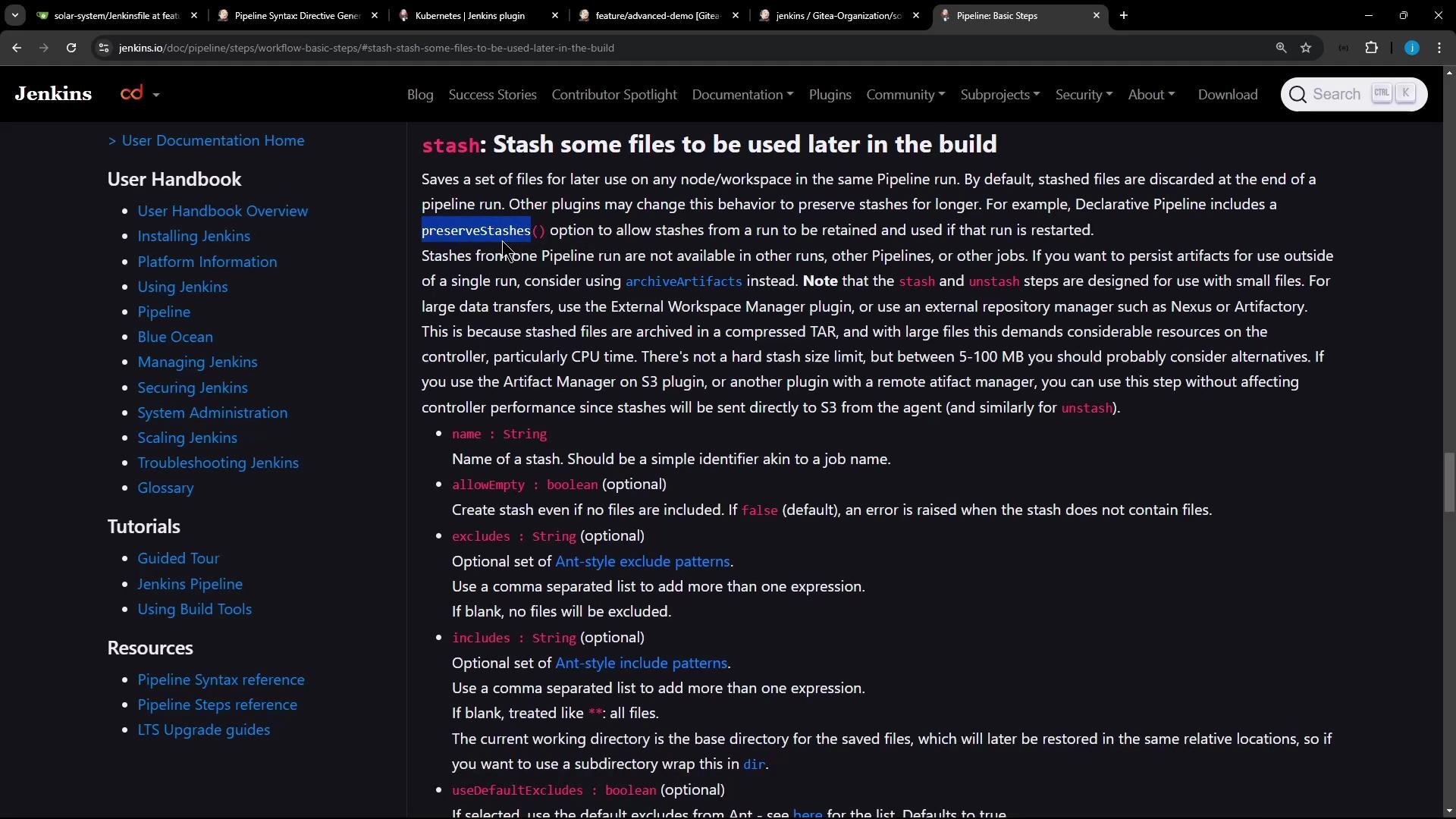 Stashes are specific to a single pipeline run. If you want to retain artifacts between runs, consider using persistent artifact storage or plugins that support preserving stashes.
## Typical workflow
1. Install dependencies or create artifacts in an early stage.
2. `stash` the produced files (e.g., `node_modules/**`) immediately after they are created.
3. `unstash` the named stash in a later stage, even if that stage runs on a different agent.
4. Continue with tests or other tasks using the restored files.
Example stash invocation (simple snippet):
```groovy theme={null}
stash(includes: 'node_modules/**', name: 'solar-system-node-modules')
```
## Example: Node.js pipeline before and after stashing
Initial Jenkinsfile fragment (before stashing):
```groovy theme={null}
stage('NodeJS 20') {
agent { label 'nodejs-agent' }
stages {
stage ('Install Dependencies') {
options { retry(2) }
steps {
sh 'node -v'
sh 'npm install --no-audit'
}
}
stage ('Testing') {
steps {
sh 'node -v'
sh 'npm test'
}
}
}
}
```
Add the stash immediately after `npm install` so the installed dependencies are archived for later stages:
```groovy theme={null}
stage('NodeJS 20') {
agent { label 'nodejs-agent' }
stages {
stage ('Install Dependencies') {
options { retry(2) }
steps {
sh 'node -v'
sh 'npm install --no-audit'
stash(includes: 'node_modules/**', name: 'solar-system-node-modules')
}
}
stage ('Testing') {
steps {
sh 'node -v'
// restore node_modules from the stash
unstash 'solar-system-node-modules'
sh 'npm test'
}
}
}
}
```
If you prefer the later stage to skip `npm install` entirely and rely solely on the previously stashed `node_modules`, remove the install step and `unstash` instead:
```groovy theme={null}
stage ('Install Dependencies (Sequential)') {
options { retry(2) }
steps {
sh 'node -v'
// Use previously stashed node_modules instead of npm install
unstash 'solar-system-node-modules'
}
}
```
## Console output (example excerpts)
From the stage that creates the stash:
```text theme={null}
Installing Dependencies - 9s
Check out from version control
nodejs-22-6-0 — Use a tool from a predefined Tool Installation 3s
node -v — Shell Script <1s
npm install --no-audit — Shell Script 6s
solar-system-node-modules — Stash some files to be used later in the build 3s
stashed 4,898 files successfully
```
From the stage that restores the stash:
```text theme={null}
Install Dependencies - <1s
nodejs-22-6-0 — Use a tool from a predefined Tool Installation
node -v — Shell Script
solar-system-node-modules — Restore files previously stashed
restored files previously stashed successfully
```
## Why use stash + unstash
* Enables moving files between stages that run on different agents (e.g., different nodes, Docker containers, or Kubernetes pods).
* Avoids repeating expensive operations like re-installing dependencies during the same pipeline run.
* Keeps workspaces clean by allowing you to store only the required files and restore them on demand.
## Quick comparison: stash vs archived artifacts
| Feature | `stash` | `archiveArtifacts` |
| ---------------- | --------------------------------------- | ----------------------------------------------------- |
| Scope | Single pipeline run | Persists across builds (stored with the build) |
| Typical use case | Temporary caching between stages/agents | Long-term artifact retention, downloads from build UI |
| Overhead | Fast, optimized for intra-run transfer | Larger storage usage; intended for release artifacts |
## Notes and gotchas
* Keep your `includes`/`excludes` precise. Stash patterns use Ant-style globs (e.g., `node_modules/**`). Over-broad patterns increase stash size and transfer time.
* Stashes are per-run and ephemeral. To reuse artifacts across separate builds, use `archiveArtifacts`, an external cache, or a plugin that retains stashes.
* Some filesystem issues (rename, locking) can surface during install; stashing can help avoid repeating a problematic step within the same run but does not fix the underlying filesystem issue.
* If your pipeline creates many or very large stashes, consider using a persistent caching mechanism (artifact repository, shared volume, or build cache) for efficiency.
Stashed files are discarded when the pipeline run finishes. Do not rely on `stash` for long-term caching across separate builds—use artifact storage or a caching plugin for persistent reuse.
## Best practices
* Stash only what is necessary (e.g., `node_modules/**` rather than `**`).
* Name stashes clearly (e.g., `solar-system-node-modules`) so they are easy to reference in later stages.
* Use `options { retry(n) }` around fragile steps like installs to reduce flakiness before stashing.
* Monitor stash sizes and transfer times; large stashes may negate the performance benefits.
## Links and references
* [Jenkins Pipeline Steps: stash](https://www.jenkins.io/doc/pipeline/steps/workflow-basic-steps/#stash-stash-some-files-to-be-used-later-in-the-build)
* [Jenkins Pipeline Steps: unstash](https://www.jenkins.io/doc/pipeline/steps/workflow-basic-steps/#unstash-unstash-files-from-a-stash)
* [archiveArtifacts step (for persistent build artifacts)](https://www.jenkins.io/doc/pipeline/steps/core-steps/#archiveartifacts-archive-the-artifacts)
That's the essence of using `stash` and `unstash` to move files between stages inside the same Jenkins pipeline run—an effective way to cache dependencies and reduce redundant work.
Stashes are specific to a single pipeline run. If you want to retain artifacts between runs, consider using persistent artifact storage or plugins that support preserving stashes.
## Typical workflow
1. Install dependencies or create artifacts in an early stage.
2. `stash` the produced files (e.g., `node_modules/**`) immediately after they are created.
3. `unstash` the named stash in a later stage, even if that stage runs on a different agent.
4. Continue with tests or other tasks using the restored files.
Example stash invocation (simple snippet):
```groovy theme={null}
stash(includes: 'node_modules/**', name: 'solar-system-node-modules')
```
## Example: Node.js pipeline before and after stashing
Initial Jenkinsfile fragment (before stashing):
```groovy theme={null}
stage('NodeJS 20') {
agent { label 'nodejs-agent' }
stages {
stage ('Install Dependencies') {
options { retry(2) }
steps {
sh 'node -v'
sh 'npm install --no-audit'
}
}
stage ('Testing') {
steps {
sh 'node -v'
sh 'npm test'
}
}
}
}
```
Add the stash immediately after `npm install` so the installed dependencies are archived for later stages:
```groovy theme={null}
stage('NodeJS 20') {
agent { label 'nodejs-agent' }
stages {
stage ('Install Dependencies') {
options { retry(2) }
steps {
sh 'node -v'
sh 'npm install --no-audit'
stash(includes: 'node_modules/**', name: 'solar-system-node-modules')
}
}
stage ('Testing') {
steps {
sh 'node -v'
// restore node_modules from the stash
unstash 'solar-system-node-modules'
sh 'npm test'
}
}
}
}
```
If you prefer the later stage to skip `npm install` entirely and rely solely on the previously stashed `node_modules`, remove the install step and `unstash` instead:
```groovy theme={null}
stage ('Install Dependencies (Sequential)') {
options { retry(2) }
steps {
sh 'node -v'
// Use previously stashed node_modules instead of npm install
unstash 'solar-system-node-modules'
}
}
```
## Console output (example excerpts)
From the stage that creates the stash:
```text theme={null}
Installing Dependencies - 9s
Check out from version control
nodejs-22-6-0 — Use a tool from a predefined Tool Installation 3s
node -v — Shell Script <1s
npm install --no-audit — Shell Script 6s
solar-system-node-modules — Stash some files to be used later in the build 3s
stashed 4,898 files successfully
```
From the stage that restores the stash:
```text theme={null}
Install Dependencies - <1s
nodejs-22-6-0 — Use a tool from a predefined Tool Installation
node -v — Shell Script
solar-system-node-modules — Restore files previously stashed
restored files previously stashed successfully
```
## Why use stash + unstash
* Enables moving files between stages that run on different agents (e.g., different nodes, Docker containers, or Kubernetes pods).
* Avoids repeating expensive operations like re-installing dependencies during the same pipeline run.
* Keeps workspaces clean by allowing you to store only the required files and restore them on demand.
## Quick comparison: stash vs archived artifacts
| Feature | `stash` | `archiveArtifacts` |
| ---------------- | --------------------------------------- | ----------------------------------------------------- |
| Scope | Single pipeline run | Persists across builds (stored with the build) |
| Typical use case | Temporary caching between stages/agents | Long-term artifact retention, downloads from build UI |
| Overhead | Fast, optimized for intra-run transfer | Larger storage usage; intended for release artifacts |
## Notes and gotchas
* Keep your `includes`/`excludes` precise. Stash patterns use Ant-style globs (e.g., `node_modules/**`). Over-broad patterns increase stash size and transfer time.
* Stashes are per-run and ephemeral. To reuse artifacts across separate builds, use `archiveArtifacts`, an external cache, or a plugin that retains stashes.
* Some filesystem issues (rename, locking) can surface during install; stashing can help avoid repeating a problematic step within the same run but does not fix the underlying filesystem issue.
* If your pipeline creates many or very large stashes, consider using a persistent caching mechanism (artifact repository, shared volume, or build cache) for efficiency.
Stashed files are discarded when the pipeline run finishes. Do not rely on `stash` for long-term caching across separate builds—use artifact storage or a caching plugin for persistent reuse.
## Best practices
* Stash only what is necessary (e.g., `node_modules/**` rather than `**`).
* Name stashes clearly (e.g., `solar-system-node-modules`) so they are easy to reference in later stages.
* Use `options { retry(n) }` around fragile steps like installs to reduce flakiness before stashing.
* Monitor stash sizes and transfer times; large stashes may negate the performance benefits.
## Links and references
* [Jenkins Pipeline Steps: stash](https://www.jenkins.io/doc/pipeline/steps/workflow-basic-steps/#stash-stash-some-files-to-be-used-later-in-the-build)
* [Jenkins Pipeline Steps: unstash](https://www.jenkins.io/doc/pipeline/steps/workflow-basic-steps/#unstash-unstash-files-from-a-stash)
* [archiveArtifacts step (for persistent build artifacts)](https://www.jenkins.io/doc/pipeline/steps/core-steps/#archiveartifacts-archive-the-artifacts)
That's the essence of using `stash` and `unstash` to move files between stages inside the same Jenkins pipeline run—an effective way to cache dependencies and reduce redundant work.