> ## Documentation Index
> Fetch the complete documentation index at: https://notes.kodekloud.com/llms.txt
> Use this file to discover all available pages before exploring further.
# Scripted Pipeline Static Agent
> Concise scripted Jenkins pipeline running entirely on a specified static agent, demonstrating checkout, Node.js tool usage, dependency install, and credentialed unit testing with MongoDB
This article shows a concise scripted Jenkins pipeline that runs entirely on a dedicated static agent. By specifying the agent label at the top-level `node(...)`, every stage executes on that agent instead of the controller (master) node.
We already have an agent configured with the label `ubuntu-docker-jdk17-node20` (Ubuntu + Docker + JDK 17 + Node 20). We'll use that label to ensure the pipeline uses the static agent.
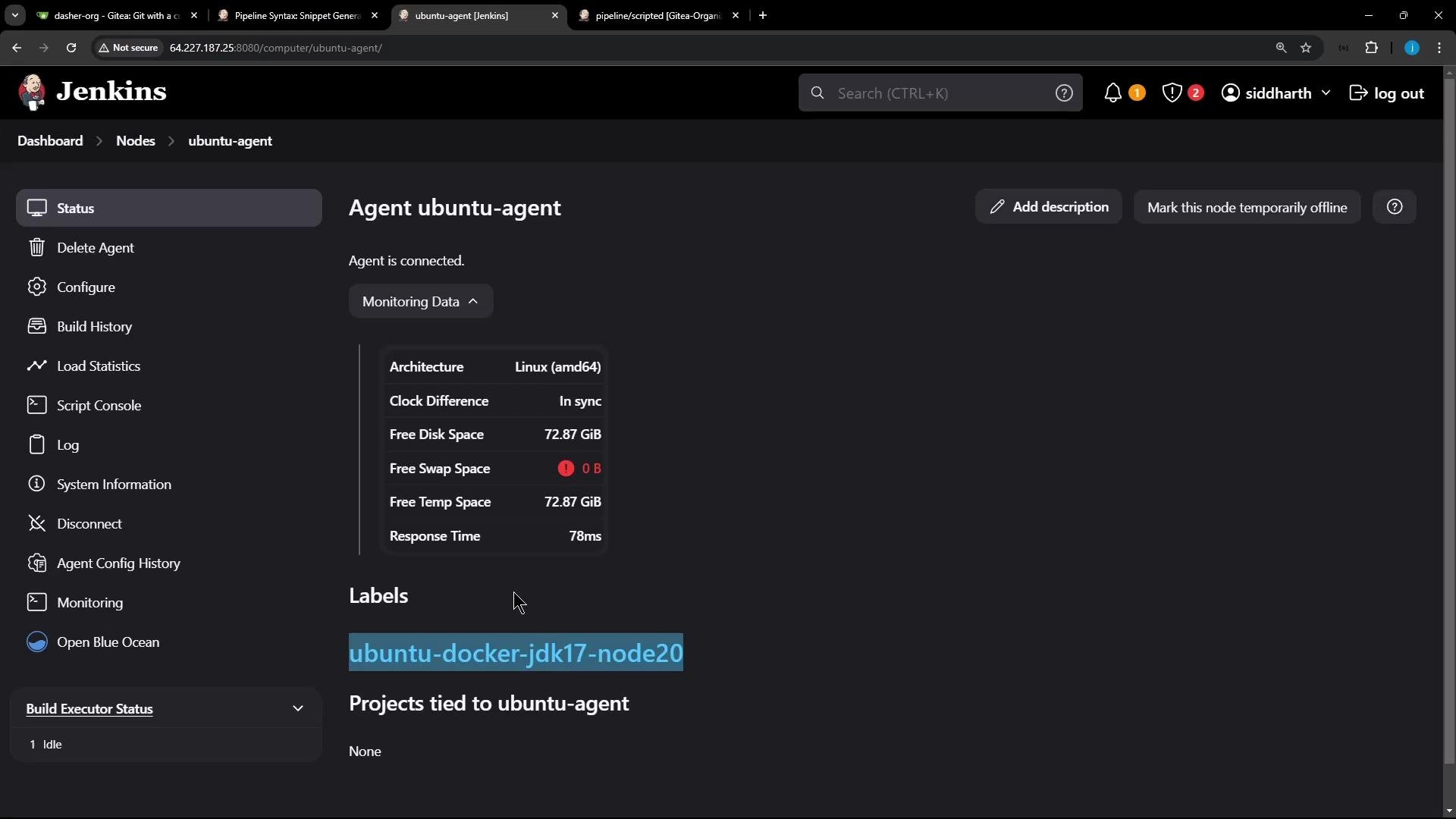 Wrap the label in single quotes when specifying the node: `node('ubuntu-docker-jdk17-node20')`.
Below is a compact, production-oriented example Jenkinsfile that:
* pins the pipeline to the static agent at the `node` level,
* checks out source code,
* uses a configured Node.js tool installation (updates `PATH`),
* and runs a Unit Testing stage that injects MongoDB credentials with `withCredentials`.
```groovy theme={null}
// Jenkinsfile (scripted pipeline)
node('ubuntu-docker-jdk17-node20') {
stage('Checkout') {
// Example checkout; adapt to your SCM setup
checkout scm
}
// Optional: cache or install dependencies here
stage('Install') {
// Use a configured NodeJS tool installation (name as configured in Jenkins).
// The 'tool' step returns the installation path; add its bin directory to PATH.
def nodeHome = tool name: 'nodejs-22', type: 'jenkins.plugins.nodejs.tools.NodeJSInstallation'
withEnv(["PATH+NODE=${nodeHome}/bin"]) {
sh 'node -v'
sh 'npm install'
}
}
stage('Unit Testing') {
// Use withCredentials to inject username/password into environment variables
withCredentials([usernamePassword(
credentialsId: 'mongo-credentials', // replace with your credential ID
usernameVariable: 'MONGO_USERNAME',
passwordVariable: 'MONGO_PASSWORD')]) {
// If you have a pre-configured MONGO_URI (connection string) in Jenkins env,
// it will be available here as MONGO_URI. Otherwise you can construct it.
// Run tests which rely on MONGO_URI, MONGO_USERNAME and MONGO_PASSWORD.
sh 'npm test'
}
}
}
```
Stages and common commands
| Stage | Purpose | Example commands |
| ------------ | --------------------------------------------------------- | --------------------------------------------------------------------------------------------------------------------------------------------------------------------- |
| Checkout | Retrieve source from SCM (Git, etc.) | `checkout scm` |
| Install | Make a configured Node.js available, install dependencies | `def nodeHome = tool name: 'nodejs-22', type: 'jenkins.plugins.nodejs.tools.NodeJSInstallation'`
Wrap the label in single quotes when specifying the node: `node('ubuntu-docker-jdk17-node20')`.
Below is a compact, production-oriented example Jenkinsfile that:
* pins the pipeline to the static agent at the `node` level,
* checks out source code,
* uses a configured Node.js tool installation (updates `PATH`),
* and runs a Unit Testing stage that injects MongoDB credentials with `withCredentials`.
```groovy theme={null}
// Jenkinsfile (scripted pipeline)
node('ubuntu-docker-jdk17-node20') {
stage('Checkout') {
// Example checkout; adapt to your SCM setup
checkout scm
}
// Optional: cache or install dependencies here
stage('Install') {
// Use a configured NodeJS tool installation (name as configured in Jenkins).
// The 'tool' step returns the installation path; add its bin directory to PATH.
def nodeHome = tool name: 'nodejs-22', type: 'jenkins.plugins.nodejs.tools.NodeJSInstallation'
withEnv(["PATH+NODE=${nodeHome}/bin"]) {
sh 'node -v'
sh 'npm install'
}
}
stage('Unit Testing') {
// Use withCredentials to inject username/password into environment variables
withCredentials([usernamePassword(
credentialsId: 'mongo-credentials', // replace with your credential ID
usernameVariable: 'MONGO_USERNAME',
passwordVariable: 'MONGO_PASSWORD')]) {
// If you have a pre-configured MONGO_URI (connection string) in Jenkins env,
// it will be available here as MONGO_URI. Otherwise you can construct it.
// Run tests which rely on MONGO_URI, MONGO_USERNAME and MONGO_PASSWORD.
sh 'npm test'
}
}
}
```
Stages and common commands
| Stage | Purpose | Example commands |
| ------------ | --------------------------------------------------------- | --------------------------------------------------------------------------------------------------------------------------------------------------------------------- |
| Checkout | Retrieve source from SCM (Git, etc.) | `checkout scm` |
| Install | Make a configured Node.js available, install dependencies | `def nodeHome = tool name: 'nodejs-22', type: 'jenkins.plugins.nodejs.tools.NodeJSInstallation'`
`withEnv(["PATH+NODE=${nodeHome}/bin"]) { sh 'npm install' }` |
| Unit Testing | Run tests with injected credentials | `withCredentials([usernamePassword(credentialsId: 'mongo-credentials', usernameVariable: 'MONGO_USERNAME', passwordVariable: 'MONGO_PASSWORD')]) { sh 'npm test' }` |
Never hard-code secrets in your Jenkinsfile. Store credentials in the Jenkins Credentials store and reference them by credential ID (for example `mongo-credentials`). `withCredentials` masks/hides sensitive values in the console output.
Notes on credentials and environment variables:
* `withCredentials` injects `MONGO_USERNAME` and `MONGO_PASSWORD` into the environment for the duration of the block.
* If your tests need a `MONGO_URI`, provide it either as:
* a global environment variable in Jenkins (Pipeline environment/global config), or
* build it dynamically inside the pipeline and export via `withEnv`.
* Use the Jenkins UI to create and manage credentials. Reference them by the returned credential ID in your pipeline.
Example trimmed console output from a successful run:
```bash theme={null}
[Pipeline] Start of Pipeline
[Pipeline] node
Running on ubuntu-docker-jdk17-node20 in /home/jenkins-agent/workspace/n_solar-system_pipeline_scripted
[Pipeline] {
[Pipeline] tool
Installing NodeJS from /var/lib/jenkins/caches/nodejs/LINUX/amd64/22.6.0.tar.gz to /home/jenkins-agent/tools/jenkins.plugins.nodejs.tools.NodeJSInstallation/nodejs-22-6-0 on ubuntu-docker-jdk17-node20
[Pipeline] stage
[Pipeline] { (Checkout)
[Pipeline] checkout
Cloning the remote Git repository
Checking out Revision a012a80153207ffb757c966314d750dce9709fbe (pipeline/scripted)
[Pipeline] }
[Pipeline] // stage
[Pipeline] stage
[Pipeline] { (Unit Testing)
[Pipeline] withCredentials (hide)
Masking supported pattern matches of $MONGO_PASSWORD
[Pipeline] {
[Pipeline] sh
+ node -v
v22.6.0
[Pipeline] sh
+ npm test
> Solar System@6.7.6 test
> mocha app-test.js --timeout 10000 --reporter mocha-junit-reporter --exit
Server successfully running on port - 3000
(node:34277) [DEP0170] DeprecationWarning: The URL mongodb://supercluster-shard-00-00.d83jj.mongodb.net:27017,supercluster-shard-00-02.d83jj.mongodb.net:27017,supercluster-shard-00-01.d83jj.mongodb.net:27017/superData?authSource=admin&replicaSet=atlas-11b0vt-shard-0&ssl=true is invalid. Future versions of Node.js will throw an error.
[Pipeline] }
[Pipeline] // withCredentials
[Pipeline] }
[Pipeline] // stage
[Pipeline] }
[Pipeline] // node
[Pipeline] End of Pipeline
Finished: SUCCESS
```
What happened
* Because the `node` label was provided at the top level (`node('ubuntu-docker-jdk17-node20')`), the entire scripted pipeline executed on that static agent.
* The `tool` step installed/mapped the Node.js tool and `withEnv` updated `PATH` so `node`/`npm` were available.
* `withCredentials` injected `MONGO_USERNAME` and `MONGO_PASSWORD` for the test run; the tests connected to MongoDB and completed successfully.
Links and references
* Jenkins Pipeline documentation: [https://www.jenkins.io/doc/book/pipeline/](https://www.jenkins.io/doc/book/pipeline/)
* Pipeline: Node documentation (reference for `node` step): [https://www.jenkins.io/doc/pipeline/steps/workflow-durable-task-step/](https://www.jenkins.io/doc/pipeline/steps/workflow-durable-task-step/)
* Jenkins Credentials Binding Plugin (withCredentials): [https://plugins.jenkins.io/credentials-binding/](https://plugins.jenkins.io/credentials-binding/)
* NodeJS Plugin (tool step usage): [https://plugins.jenkins.io/nodejs/](https://plugins.jenkins.io/nodejs/)