> ## Documentation Index
> Fetch the complete documentation index at: https://notes.kodekloud.com/llms.txt
> Use this file to discover all available pages before exploring further.
# Configure Shared Library in Jenkins
> How to register and configure Jenkins Global Pipeline Shared Libraries, trust models, sandbox implications, usage in Pipelines, and examples for steps, dependencies and security
This lesson assumes a Shared Library repository has already been created. Here we’ll configure that library in Jenkins so Pipeline jobs can fetch and use its reusable steps, classes, and resources.
For detailed, guided steps and screenshots, see the official Jenkins Shared Libraries documentation:
* [Shared Libraries — Jenkins Pipeline](https://www.jenkins.io/doc/book/pipeline/shared-libraries/)
Example: a simple library step that sends a Slack notification
```groovy theme={null}
def call(String buildStatus = 'STARTED') {
buildStatus = buildStatus ?: 'SUCCESS'
def color
if (buildStatus == 'SUCCESS') {
color = '#47ec05'
} else if (buildStatus == 'UNSTABLE') {
color = '#d5ee0d'
} else {
color = '#ec2805'
}
def msg = "${buildStatus}: ${env.JOB_NAME} #${env.BUILD_NUMBER}:\n${env.BUILD_URL}"
slackSend(color: color, message: msg)
}
```
How pipelines fetch a shared library
* To make the library available to Pipelines, you must register it in Jenkins under Global Pipeline Libraries.
Steps to register a shared library:
1. Open the Jenkins UI and go to Manage Jenkins → Configure System (or search for "Global Pipeline Libraries" on the Manage Jenkins page).
2. Locate the Global Pipeline Libraries section and click Add to create a new library entry.
3. Provide the repository and retrieval settings described below, then click Apply / Save.
Two main library trust models
* Global trusted pipeline libraries — run without the Groovy sandbox, suitable for libraries you control and maintain.
* Global untrusted pipeline libraries — executed inside Jenkins’ Groovy sandbox; any non-whitelisted method calls require admin approval via the Script Security plugin.
Use trusted libraries for code you fully control to avoid sandbox restrictions. Use untrusted libraries for external or third-party code until you approve specific methods via the Script Security plugin.
Sandbox behavior and an example error
* The Groovy sandbox blocks certain operations for safety. When a sandboxed script uses blocked methods, Jenkins logs a RejectedAccessException and an admin must whitelist the required methods.
Example sandbox error when an unapproved static method is invoked:
```text theme={null}
Started by user L. Jenkins
[Pipeline] End of Pipeline
org.jenkinsci.plugins.scriptsecurity.sandbox.RejectedAccessException: Scripts not permitted to use staticMethod org.codehaus.groovy.runtime.DefaultGroovyMethods get java.util.Map java.lang.Object java.lang.Object
at org.jenkinsci.plugins.scriptsecurity.sandbox.whitelists.StaticWhitelist.rejectStaticMethod(StaticWhitelist.java:?)
at org.jenkinsci.plugins.scriptsecurity.sandbox.groovy.SandboxInterceptor.onMethodCall(SandboxInterceptor.java:?)
at org.kohsuke.groovy.sandbox.impl.Checker$1.call(Checker.java:148)
at org.kohsuke.groovy.sandbox.impl.Checker.checkedCall(Checker:152)
at com.cloudbees.groovy.cps.sandbox.SandboxInvoker.methodCall(SandboxInvoker.java:16)
at workflowScript.run(WorkflowScript:1)
at __cps.transform__ (Native Method)
at com.cloudbees.groovy.cps.impl.ContinuationGroup.methodCall(ContinuationGroup.java:57)
```
What to configure when adding a library
* When adding a Global Pipeline Library, fill in these core fields:
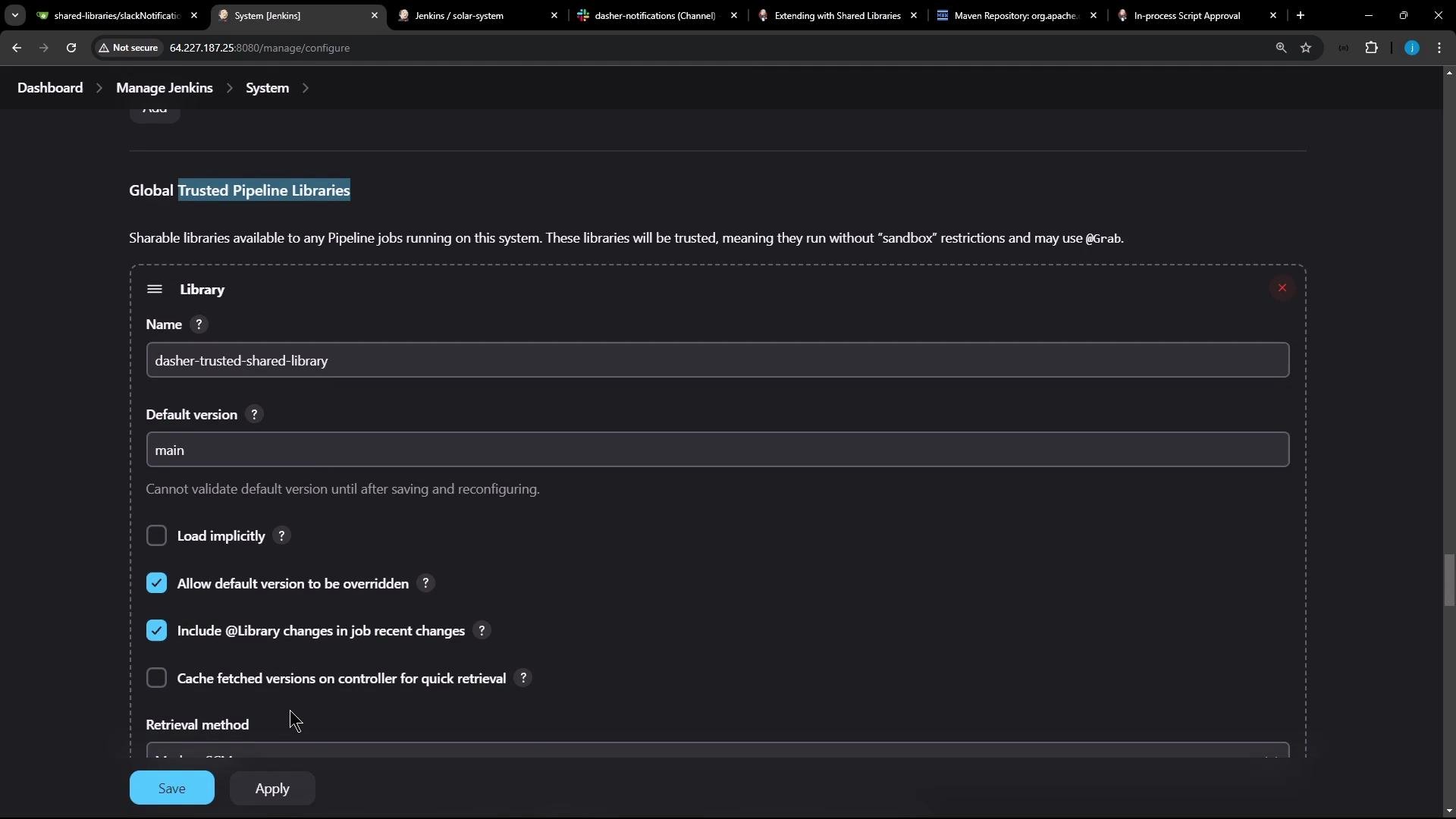
| Setting | Purpose | Example |
| ---------------- | ------------------------------------------------------------------- | -------------------------------------------------- |
| Name | Identifier used by `@Library` | `dasher-shared-library` |
| Default version | Branch or tag name to use when no explicit version is requested | `main` |
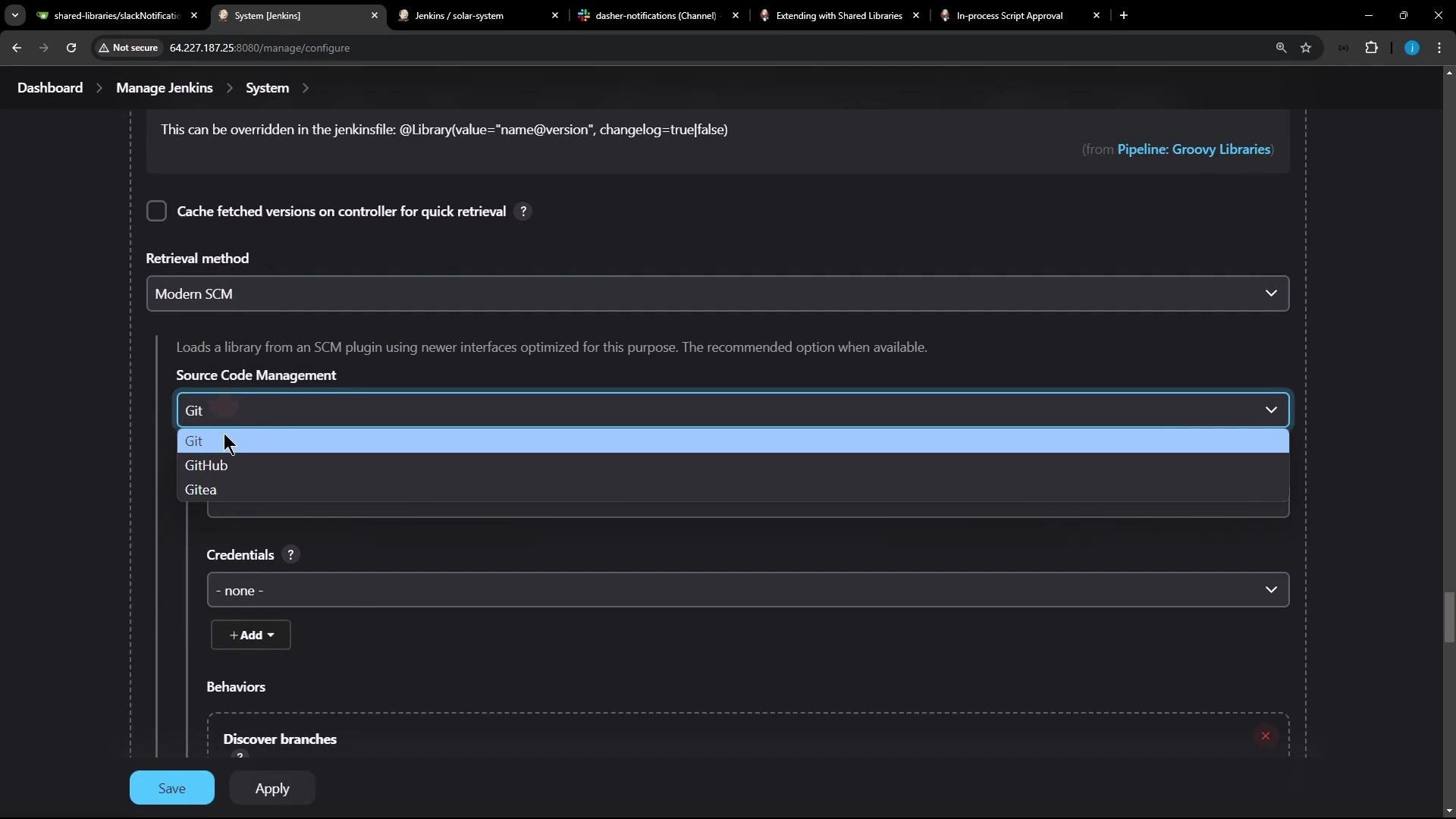
| Retrieval method | How Jenkins fetches the repository (Modern SCM → Git, GitHub, etc.) | `Modern SCM → Git` |
| Repository URL | Git URL for the library repo | `https://github.com/your-org/shared-libraries.git` |
| Credentials | If the repo is private, provide credentials | (Jenkins credential selection) |
| Options | See list below for checkboxes and behavior | |
Common option checkboxes and what they do:
* Load implicitly — pipelines can use the library without an `@Library` annotation.
* Allow default version to be overridden — pipelines may specify a different version with `@Library("name@branch")`.
* Include library changes in job recent changes — shows library updates in the job change history.
* Cache retrieved versions on the controller — speeds up fetches by caching artifacts on the controller.
Configure the Git endpoint (public repos do not require credentials). Click Apply/Save to persist the configuration.
 Using the library inside a Pipeline
* Once the library is registered, pipelines can load it via the `@Library` annotation or, if enabled, use it implicitly.
Explicit `@Library` usage:
```groovy theme={null}
@Library('your-library-name@main') _
import com.mycompany.pipeline.SomeClass
pipeline {
agent any
stages {
stage('Example') {
steps {
script {
// use library step or class here
sendSlackNotification('SUCCESS')
}
}
}
}
}
```
You can also enable changelog capture and allow version overrides:
```groovy theme={null}
@Library(value = "name@version", changelog = true) _
```
If you checked "Load implicitly" when registering the library, pipelines do not need the `@Library` annotation — the library’s steps and classes are available automatically.
Using third-party Java libraries (Maven) inside a trusted library
* Trusted shared libraries can fetch external JARs using `@Grab`. This requires the library to be trusted (not sandboxed).
Example using Apache Commons Math inside a trusted library:
```groovy theme={null}
@Grab('org.apache.commons:commons-math3:3.4.1')
import org.apache.commons.math3.primes.Primes
void parallelize(int count) {
if (!Primes.isPrime(count)) {
error "${count} was not prime"
}
// …
}
def request = libraryResource 'com/mycorp/pipeline/somelib/request.json'
```
Maven dependency coordinates (example):
```xml theme={null}
org.apache.commons
commons-math3
3.4.1
```
`@Grab` only works for trusted libraries. Fetching arbitrary jars and executing code from them may require operations that are blocked by the sandbox and will require admin approval via the Script Security plugin.
Example: we registered this repository as a Global Trusted Shared Library
* Because this library is trusted, it will run without sandbox restrictions and can use `@Grab`, libraryResource, and other features that might be restricted in sandboxed libraries.
Using the library inside a Pipeline
* Once the library is registered, pipelines can load it via the `@Library` annotation or, if enabled, use it implicitly.
Explicit `@Library` usage:
```groovy theme={null}
@Library('your-library-name@main') _
import com.mycompany.pipeline.SomeClass
pipeline {
agent any
stages {
stage('Example') {
steps {
script {
// use library step or class here
sendSlackNotification('SUCCESS')
}
}
}
}
}
```
You can also enable changelog capture and allow version overrides:
```groovy theme={null}
@Library(value = "name@version", changelog = true) _
```
If you checked "Load implicitly" when registering the library, pipelines do not need the `@Library` annotation — the library’s steps and classes are available automatically.
Using third-party Java libraries (Maven) inside a trusted library
* Trusted shared libraries can fetch external JARs using `@Grab`. This requires the library to be trusted (not sandboxed).
Example using Apache Commons Math inside a trusted library:
```groovy theme={null}
@Grab('org.apache.commons:commons-math3:3.4.1')
import org.apache.commons.math3.primes.Primes
void parallelize(int count) {
if (!Primes.isPrime(count)) {
error "${count} was not prime"
}
// …
}
def request = libraryResource 'com/mycorp/pipeline/somelib/request.json'
```
Maven dependency coordinates (example):
```xml theme={null}
org.apache.commons
commons-math3
3.4.1
```
`@Grab` only works for trusted libraries. Fetching arbitrary jars and executing code from them may require operations that are blocked by the sandbox and will require admin approval via the Script Security plugin.
Example: we registered this repository as a Global Trusted Shared Library
* Because this library is trusted, it will run without sandbox restrictions and can use `@Grab`, libraryResource, and other features that might be restricted in sandboxed libraries.
 Links and references
* [Shared Libraries — Jenkins Pipeline documentation](https://www.jenkins.io/doc/book/pipeline/shared-libraries/)
* [Script Security plugin — Jenkins Plugins](https://plugins.jenkins.io/script-security/)
* [Maven Central / mvnrepository search](https://mvnrepository.com/)
If you run into permission issues or blocked method errors, review the Script Security approval queue and consider whether the library should be marked as trusted or if specific methods need to be whitelisted.
Links and references
* [Shared Libraries — Jenkins Pipeline documentation](https://www.jenkins.io/doc/book/pipeline/shared-libraries/)
* [Script Security plugin — Jenkins Plugins](https://plugins.jenkins.io/script-security/)
* [Maven Central / mvnrepository search](https://mvnrepository.com/)
If you run into permission issues or blocked method errors, review the Script Security approval queue and consider whether the library should be marked as trusted or if specific methods need to be whitelisted.