> ## Documentation Index
> Fetch the complete documentation index at: https://notes.kodekloud.com/llms.txt
> Use this file to discover all available pages before exploring further.
# Create a Shared Library for Slack Notification
> How to create a Jenkins Shared Library to centralize and reuse Slack notification logic across pipelines for consistent, maintainable notifications.
In this lesson you'll centralize Slack notification logic into a Jenkins Shared Library so it can be reused across multiple pipelines. Moving custom Groovy notification code out of individual Jenkinsfiles and into a shared library improves maintainability, reduces duplication, and makes it easier to apply consistent notification behavior across projects.
Why use a Shared Library?
* Reuse the same notification logic across many repositories and jobs.
* Keep Jenkinsfiles small and focused on pipeline structure.
* Update notification behavior in one place rather than across dozens of Jenkinsfiles.
Example: inline notification function you might have inside a Jenkinsfile
```groovy theme={null}
// Example inline function in a Jenkinsfile
def slackNotificationMethod(String buildStatus = 'STARTED') {
def color
if (buildStatus == 'SUCCESS') {
color = '#47ec05'
} else if (buildStatus == 'UNSTABLE') {
color = '#d5ee0d'
} else {
color = '#ec2805'
}
def msg = "${buildStatus}: ${env.JOB_NAME} #${env.BUILD_NUMBER}:\n${env.BUILD_URL}"
slackSend(color: color, message: msg)
}
```
That works for a single repository. To reuse the function across many pipelines, create a Shared Library repository and expose the logic as a global step under `vars/`.
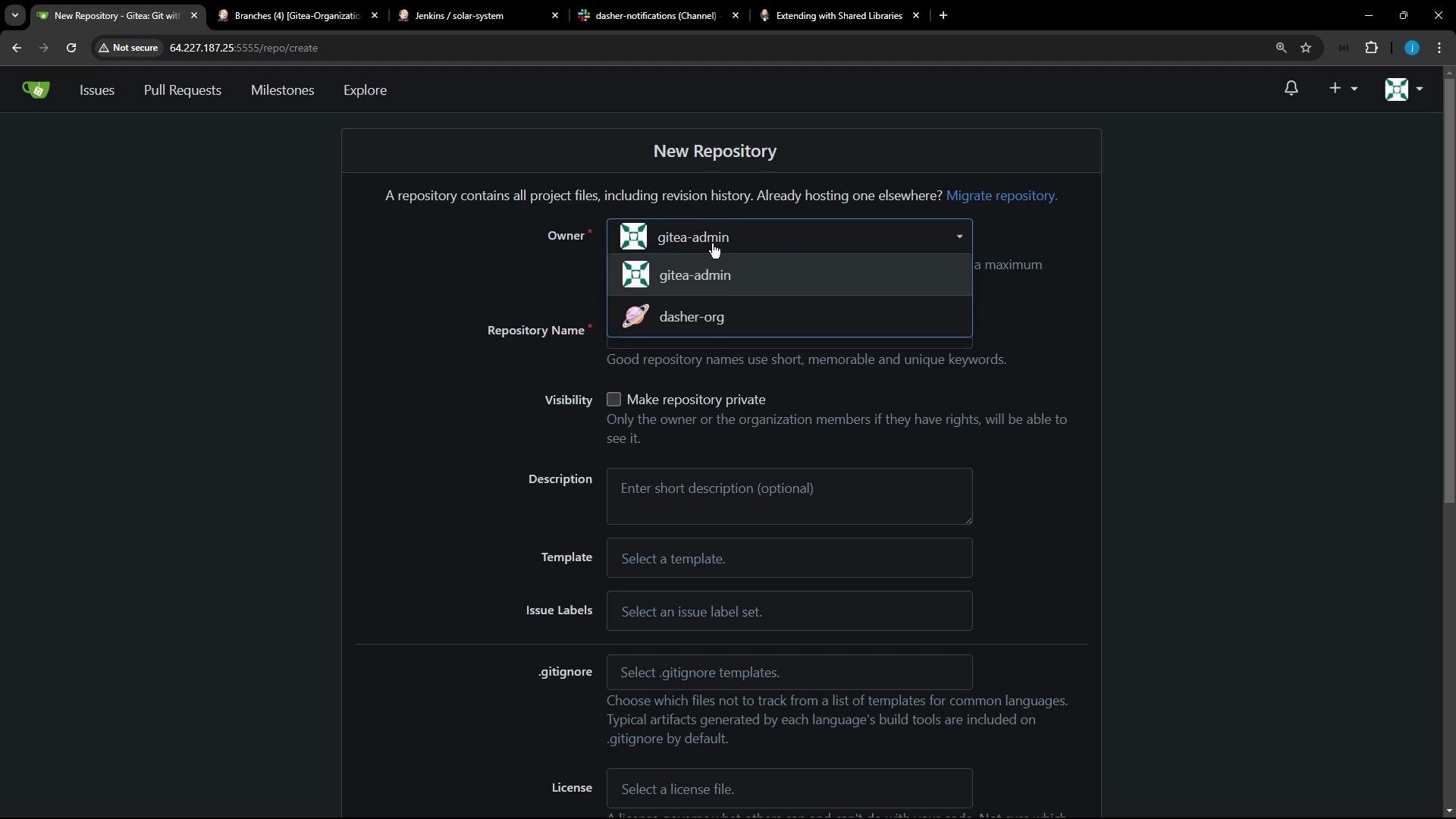 Create a new Git repository in your organization (for example, `shared-libraries`). Initialize it and push an initial commit:
```bash theme={null}
# Initialize and push a new repository
touch README.md
git init
git checkout -b main
git add README.md
git commit -m "first commit"
git remote add origin http://64.227.187.25:5555/dasher-org/shared-libraries.git
git push -u origin main
```
Always consult the official Jenkins documentation for Shared Libraries for configuration details and the expected directory layout:
* Jenkins Shared Libraries documentation: [https://www.jenkins.io/doc/book/pipeline/shared-libraries/](https://www.jenkins.io/doc/book/pipeline/shared-libraries/)
Create a new Git repository in your organization (for example, `shared-libraries`). Initialize it and push an initial commit:
```bash theme={null}
# Initialize and push a new repository
touch README.md
git init
git checkout -b main
git add README.md
git commit -m "first commit"
git remote add origin http://64.227.187.25:5555/dasher-org/shared-libraries.git
git push -u origin main
```
Always consult the official Jenkins documentation for Shared Libraries for configuration details and the expected directory layout:
* Jenkins Shared Libraries documentation: [https://www.jenkins.io/doc/book/pipeline/shared-libraries/](https://www.jenkins.io/doc/book/pipeline/shared-libraries/)
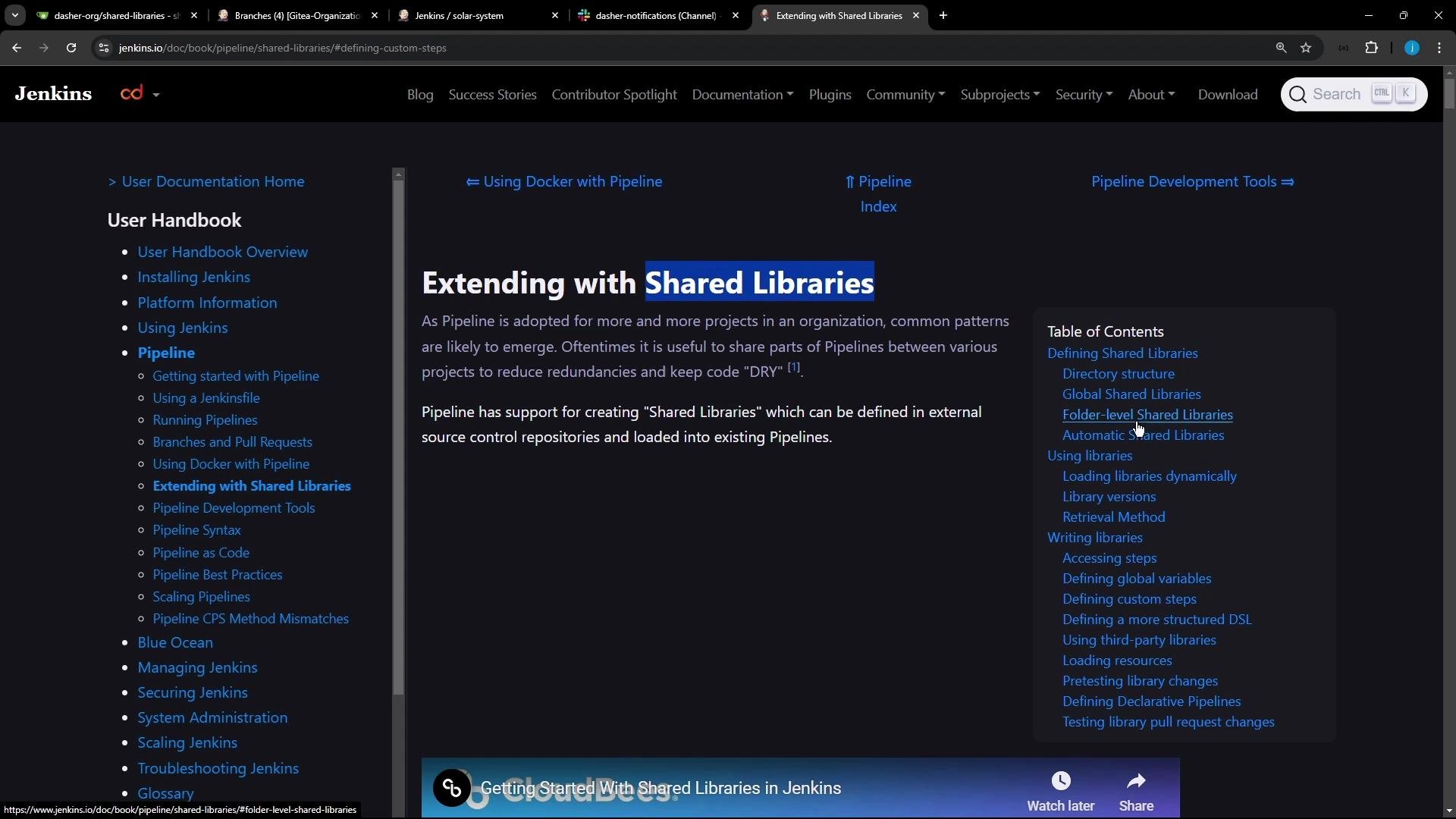 Shared libraries use a specific layout. A minimal structure looks like this:
```text theme={null}
(root)
+- src # Groovy source files (compiled classes)
| +- org
| | +- foo
| | | +- Bar.groovy # for org.foo.Bar class
+- vars
| +- foo.groovy # for global 'foo' variable/step
| +- foo.txt # help for 'foo' variable
+- resources # resource files (for classes to load)
| +- org
| | +- foo
| | | +- bar.json # static helper data for org.foo.Bar
```
Directory purpose at a glance:
| Directory | Purpose | Example |
| ----------- | ---------------------------------------------- | ------------------------------------ |
| `src` | Compiled Groovy classes, organized by package | `src/org/foo/Bar.groovy` |
| `vars` | Global step scripts (each file exposes a step) | `vars/foo.groovy` and `vars/foo.txt` |
| `resources` | Static files that your classes may load | `resources/org/foo/bar.json` |
To create a step-style global function (so you can call it like a built-in step such as `sh` or `git`), add a Groovy file under `vars/` and define a `call` method.
Create the file `vars/slackNotification.groovy` in your `shared-libraries` repository.
Shared libraries use a specific layout. A minimal structure looks like this:
```text theme={null}
(root)
+- src # Groovy source files (compiled classes)
| +- org
| | +- foo
| | | +- Bar.groovy # for org.foo.Bar class
+- vars
| +- foo.groovy # for global 'foo' variable/step
| +- foo.txt # help for 'foo' variable
+- resources # resource files (for classes to load)
| +- org
| | +- foo
| | | +- bar.json # static helper data for org.foo.Bar
```
Directory purpose at a glance:
| Directory | Purpose | Example |
| ----------- | ---------------------------------------------- | ------------------------------------ |
| `src` | Compiled Groovy classes, organized by package | `src/org/foo/Bar.groovy` |
| `vars` | Global step scripts (each file exposes a step) | `vars/foo.groovy` and `vars/foo.txt` |
| `resources` | Static files that your classes may load | `resources/org/foo/bar.json` |
To create a step-style global function (so you can call it like a built-in step such as `sh` or `git`), add a Groovy file under `vars/` and define a `call` method.
Create the file `vars/slackNotification.groovy` in your `shared-libraries` repository.
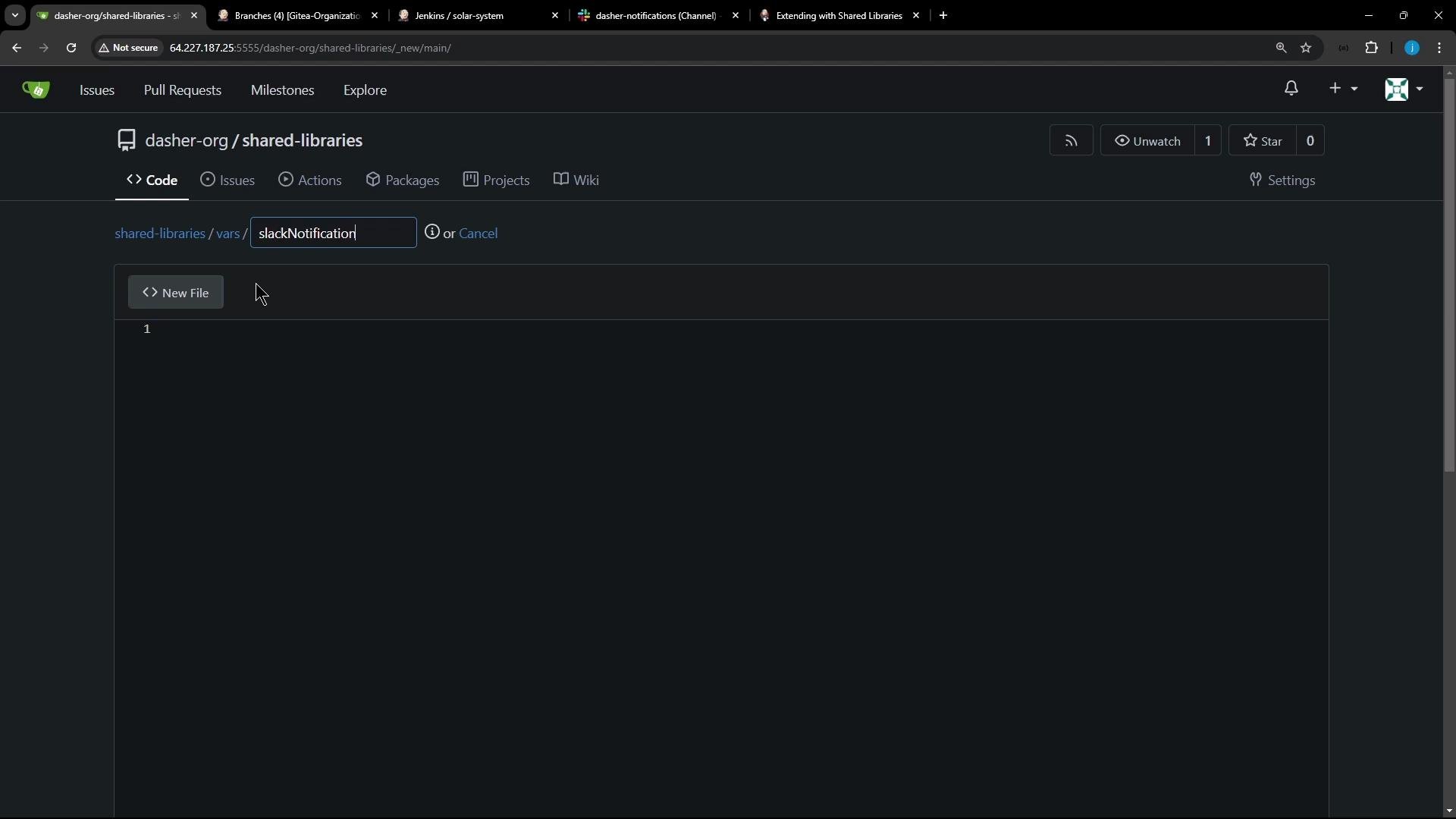 Example implementation for `vars/slackNotification.groovy`. This exposes a `slackNotification(...)` step that your pipelines can call directly:
```groovy theme={null}
// vars/slackNotification.groovy
def call(String buildStatus = 'STARTED') {
def color
if (buildStatus == 'SUCCESS') {
color = '#47ec05'
} else if (buildStatus == 'UNSTABLE') {
color = '#d5ee0d'
} else {
color = '#ec2805'
}
def msg = "${buildStatus}: ${env.JOB_NAME} #${env.BUILD_NUMBER}:\n${env.BUILD_URL}"
slackSend(color: color, message: msg)
}
```
Define `call` in `vars/.groovy` to allow invoking the library step directly as `(...)` from a Pipeline (this mirrors built-in steps like `sh` or `git`).
After committing the repository and pushing the file, make the Shared Library available to Jenkins.
Option 1 — Configure as a Global Pipeline Library
* In Jenkins: Manage Jenkins → Configure System → Global Pipeline Libraries
* Add your `shared-libraries` repository with a name (for example, `shared-libraries`) so it can be referenced by name from any pipeline.
Option 2 — Use `@Library` annotation per-repository
* Add `@Library('') _` at the top of a Jenkinsfile to import the library for that pipeline.
Example usage in a Jenkinsfile (after the shared library is configured):
```groovy theme={null}
@Library('shared-libraries') _
pipeline {
agent any
stages {
stage('Build') {
steps {
// build steps ...
}
}
}
post {
success {
script {
// call the shared library step
slackNotification('SUCCESS')
}
}
unstable {
script {
slackNotification('UNSTABLE')
}
}
failure {
script {
slackNotification('FAILURE')
}
}
}
}
```
Next steps and references
* Review the Jenkins documentation on Shared Libraries to learn about loading strategies, caching, and versioning: [https://www.jenkins.io/doc/book/pipeline/shared-libraries/](https://www.jenkins.io/doc/book/pipeline/shared-libraries/)
* Consider adding a `vars/slackNotification.txt` file to document usage/help for the step.
* If your notification logic requires credentials or tokens (e.g., Slack webhook), use Jenkins Credentials and refer to them securely from your library code.
Further reading and references
* Jenkins Shared Libraries — [https://www.jenkins.io/doc/book/pipeline/shared-libraries/](https://www.jenkins.io/doc/book/pipeline/shared-libraries/)
* Jenkins Pipeline Syntax — [https://www.jenkins.io/doc/book/pipeline/syntax/](https://www.jenkins.io/doc/book/pipeline/syntax/)
Example implementation for `vars/slackNotification.groovy`. This exposes a `slackNotification(...)` step that your pipelines can call directly:
```groovy theme={null}
// vars/slackNotification.groovy
def call(String buildStatus = 'STARTED') {
def color
if (buildStatus == 'SUCCESS') {
color = '#47ec05'
} else if (buildStatus == 'UNSTABLE') {
color = '#d5ee0d'
} else {
color = '#ec2805'
}
def msg = "${buildStatus}: ${env.JOB_NAME} #${env.BUILD_NUMBER}:\n${env.BUILD_URL}"
slackSend(color: color, message: msg)
}
```
Define `call` in `vars/.groovy` to allow invoking the library step directly as `(...)` from a Pipeline (this mirrors built-in steps like `sh` or `git`).
After committing the repository and pushing the file, make the Shared Library available to Jenkins.
Option 1 — Configure as a Global Pipeline Library
* In Jenkins: Manage Jenkins → Configure System → Global Pipeline Libraries
* Add your `shared-libraries` repository with a name (for example, `shared-libraries`) so it can be referenced by name from any pipeline.
Option 2 — Use `@Library` annotation per-repository
* Add `@Library('') _` at the top of a Jenkinsfile to import the library for that pipeline.
Example usage in a Jenkinsfile (after the shared library is configured):
```groovy theme={null}
@Library('shared-libraries') _
pipeline {
agent any
stages {
stage('Build') {
steps {
// build steps ...
}
}
}
post {
success {
script {
// call the shared library step
slackNotification('SUCCESS')
}
}
unstable {
script {
slackNotification('UNSTABLE')
}
}
failure {
script {
slackNotification('FAILURE')
}
}
}
}
```
Next steps and references
* Review the Jenkins documentation on Shared Libraries to learn about loading strategies, caching, and versioning: [https://www.jenkins.io/doc/book/pipeline/shared-libraries/](https://www.jenkins.io/doc/book/pipeline/shared-libraries/)
* Consider adding a `vars/slackNotification.txt` file to document usage/help for the step.
* If your notification logic requires credentials or tokens (e.g., Slack webhook), use Jenkins Credentials and refer to them securely from your library code.
Further reading and references
* Jenkins Shared Libraries — [https://www.jenkins.io/doc/book/pipeline/shared-libraries/](https://www.jenkins.io/doc/book/pipeline/shared-libraries/)
* Jenkins Pipeline Syntax — [https://www.jenkins.io/doc/book/pipeline/syntax/](https://www.jenkins.io/doc/book/pipeline/syntax/)