> ## Documentation Index
> Fetch the complete documentation index at: https://notes.kodekloud.com/llms.txt
> Use this file to discover all available pages before exploring further.
# Demo Refactor existing Jenkinsfile
> Refactoring a Jenkinsfile to create reusable CI pipelines with Slack notifications, integrated Trivy scanning and in-stage report publishing while disabling long running deployment stages for demo use
This lesson refactors an existing `Jenkinsfile` so the same pipeline can be reused across upcoming demos. It builds on concepts from the Jenkins Pipelines course. If you haven't completed that course, review it first:
* [Jenkins Pipelines course](https://learn.kodekloud.com/user/courses/jenkins-pipelines)
This demo shows a practical Jenkinsfile refactor to:
* Reduce and focus stages for CI-focused demos.
* Keep Slack notifications and critical scans.
* Move report generation into the stage that produces the artifacts (Trivy).
Prerequisites
* Familiarity with Declarative Jenkins Pipelines.
* Basic Git usage (branching, committing, pushing).
* Basic knowledge of Trivy for container vulnerability scanning.
* The repository used in this demo (details below).
Repository and branch being used
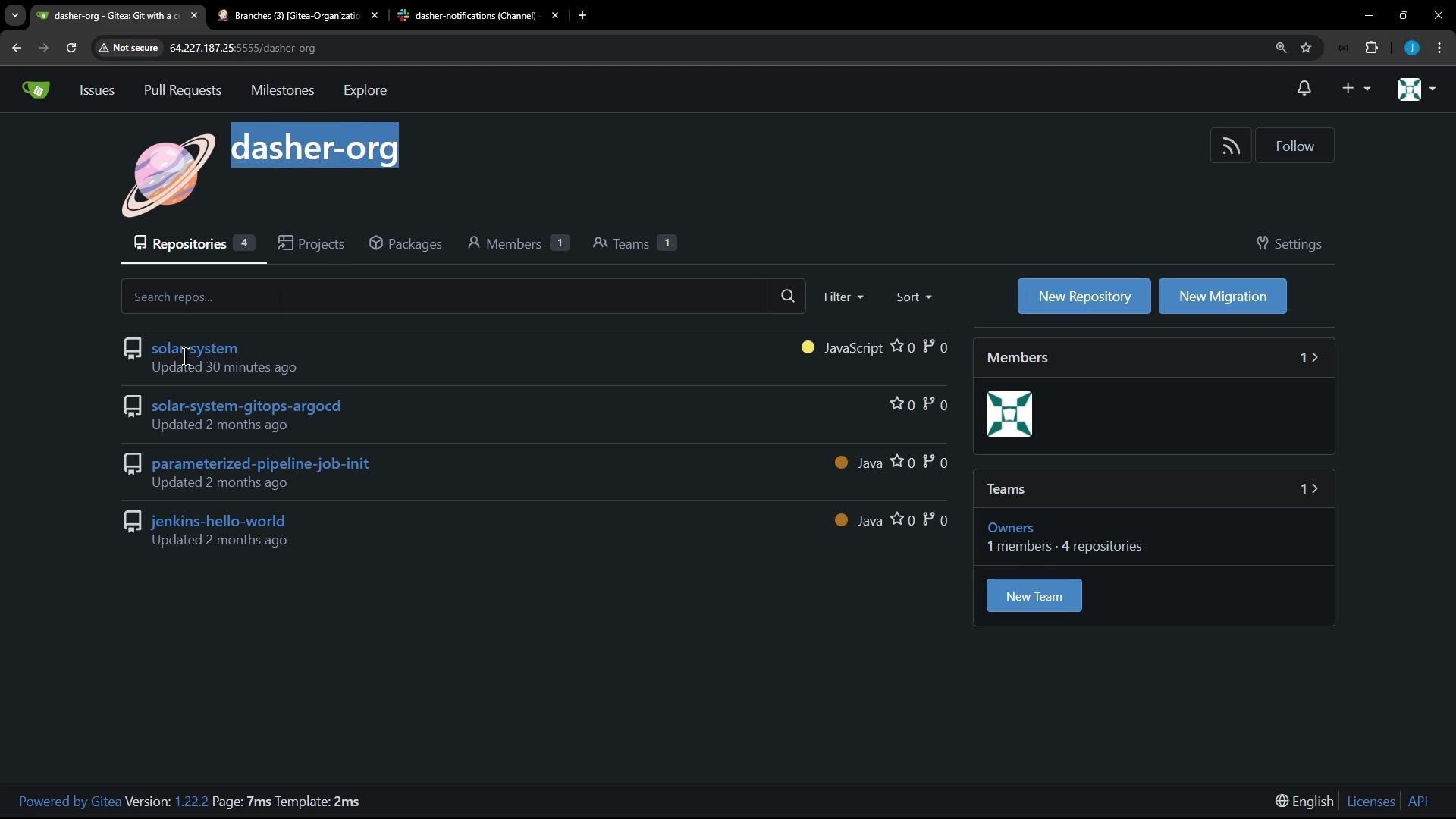
This repo lives under the `dasher` organization as `solar-system`. In the previous course we used the `feature/enabling-slack` branch. For the advanced demos we create a new branch from that branch so we can experiment without affecting the original.
 Open the repository in your editor or terminal. Example shell prompt:
```bash theme={null}
root@jenkins-controller-1 in ~ on ☁ (us-east-2)
◯>
```
Goals of the refactor
* Retain Slack notification logic to keep CI visibility.
* Keep Docker build and Trivy vulnerability scan stages.
* Keep `npm install`, unit tests, and code coverage stages.
* Comment out long-running or environment-specific stages we won't use (SonarQube, OWASP dependency-check, pushing to registries, EC2/K8s deployments).
* Move Trivy `convert` and report publishing (`publishHTML`, `junit`) into the Trivy stage so artifacts are grouped with their generating stage.
Slack notification helper
The Slack helper function is a small Groovy method used inside the `post` blocks. It remains unchanged and will be reused by the simplified top-level `post` block.
```groovy theme={null}
def slackNotificationMethod(String buildStatus = 'STARTED') {
buildStatus = buildStatus ?: 'SUCCESS'
def color
if (buildStatus == 'SUCCESS') {
color = '#47ec05'
} else if (buildStatus == 'UNSTABLE') {
color = '#d5ee0d'
} else {
color = '#ec2805'
}
def msg = "${buildStatus}: `${env.JOB_NAME}` #${env.BUILD_NUMBER}:\n${env.BUILD_URL}"
slackSend(color: color, message: msg)
}
```
Top of the Jenkinsfile — agent, tools, environment
Example snippet from the top of the `Jenkinsfile` showing `agent`, `tools`, `environment`, and the simplified `post` block. This remains the structural basis for the pipeline:
```groovy theme={null}
pipeline {
agent any
tools {
// tool installations, e.g. nodejs, maven etc.
// ...
}
environment {
MONGO_URI = "mongodb+srv://supercluster.d83jj.mongodb.net/superData"
MONGO_DB_CREDS = credentials('mongo_db_credentials')
GITEA_TOKEN = credentials('gitea-api-token')
}
options {
// pipeline/options ...
}
stages {
// stages defined below
}
post {
always {
slackNotificationMethod("${currentBuild.result}")
// If we still want to clean up repo copies that the pipeline clones:
script {
if (fileExists('solar-system-gitops-argocd')) {
sh 'rm -rf solar-system-gitops-argocd'
}
}
}
}
}
```
Which stages we keep vs. comment out
To make the pipeline concise and focused for demos, we kept the core CI stages and commented out most environment-dependent or long-running stages.
| Kept (active) | Commented out / Disabled |
| --------------------------------------------- | ------------------------------------------------------ |
| Installing Dependencies (`npm install`) | `Push Docker Image` |
| Dependency Scanning (`npm audit`) | `Deploy - AWS EC2` |
| Build Docker Image | `Integration Testing - AWS EC2` |
| Trivy Vulnerability Scanner (with local post) | `K8S - Update Image Tag` |
| Unit Tests + Code Coverage | `K8S - Raise PR` |
| | `App Deployed?` |
| | OWASP ZAP, SonarQube, S3 uploads, Lambda deploys, etc. |
For readability the disabled stages are preserved in the file as commented placeholders to show they exist but are not executed in this demo:
```groovy theme={null}
stage('Build Docker Image') {
// kept
}
stage('Trivy Vulnerability Scanner') {
// kept
}
stage('Push Docker Image') {
// commented out for these demos
}
stage('Deploy - AWS EC2') {
// commented out
}
stage('Integration Testing - AWS EC2') {
// commented out
}
stage('K8S - Update Image Tag') {
// commented out
}
stage('K8S - Raise PR') {
// commented out
}
stage('App Deployed?') {
// commented out
}
```
Trivy stage: run, convert, and publish reports locally within the stage
Rather than publishing Trivy’s HTML/XML reports from a global `post` block, move the conversion and publishing into the Trivy stage's own `post` so that report generation stays close to its source. The workflow in the Trivy stage typically:
1. Run Trivy scans for different severity sets.
2. Output JSON results.
3. Convert JSON to HTML and JUnit XML using `trivy convert`.
4. Publish JUnit and HTML reports using `junit` and `publishHTML`.
Example Trivy scan commands used in the Trivy stage (shell commands executed by the stage):
```bash theme={null}
# MEDIUM severity scan (exit code 0 keeps pipeline going)
trivy image siddharth67/solar-system:$GIT_COMMIT \
--severity LOW,MEDIUM,HIGH \
--exit-code 0 \
--quiet \
--format json -o trivy-image-MEDIUM-results.json
# CRITICAL severity scan (exit code 1 on finding CRITICAL issues)
trivy image siddharth67/solar-system:$GIT_COMMIT \
--severity CRITICAL \
--exit-code 1 \
--quiet \
--format json -o trivy-image-CRITICAL-results.json
```
Convert the JSON results to HTML and JUnit XML:
```bash theme={null}
trivy convert \
--format template --template "@/usr/local/share/trivy/templates/html.tpl" \
--output trivy-image-MEDIUM-results.html trivy-image-MEDIUM-results.json
trivy convert \
--format template --template "@/usr/local/share/trivy/templates/html.tpl" \
--output trivy-image-CRITICAL-results.html trivy-image-CRITICAL-results.json
trivy convert \
--format template --template "@/usr/local/share/trivy/templates/junit.tpl" \
--output trivy-image-MEDIUM-results.xml trivy-image-MEDIUM-results.json
trivy convert \
--format template --template "@/usr/local/share/trivy/templates/junit.tpl" \
--output trivy-image-CRITICAL-results.xml trivy-image-CRITICAL-results.json
```
Publish JUnit/XML and HTML reports inside the Trivy stage `post` block:
```groovy theme={null}
post {
always {
sh '''
# trivy convert commands above
'''
// Publish JUnit results converted from Trivy JSON -> JUnit
junit allowEmptyResults: true, testResults: 'trivy-image-MEDIUM-results.xml'
junit allowEmptyResults: true, testResults: 'trivy-image-CRITICAL-results.xml'
// Publish HTML reports
publishHTML([allowMissing: true,
alwaysLinkToLastBuild: true,
keepAll: true,
reportDir: './',
reportFiles: 'trivy-image-MEDIUM-results.html',
reportName: 'Trivy MEDIUM Report'])
publishHTML([allowMissing: true,
alwaysLinkToLastBuild: true,
keepAll: true,
reportDir: './',
reportFiles: 'trivy-image-CRITICAL-results.html',
reportName: 'Trivy CRITICAL Report'])
}
}
```
Cleaning up the global `post` section
To keep the pipeline concise and visually clear in the Jenkins UI, we removed or commented out global `junit` and `publishHTML` calls and instead publish results in the specific stage that produces them. The top-level `post` block now contains only notifications and optional workspace cleanup:
```groovy theme={null}
post {
always {
slackNotificationMethod("${currentBuild.result}")
script {
if (fileExists('solar-system-gitops-argocd')) {
sh 'rm -rf solar-system-gitops-argocd'
}
}
}
}
```
Creating and pushing a new feature branch
Rather than editing the original `feature/enabling-slack` branch directly, create a new branch `feature/advanced-demo`. Example git flow:
```bash theme={null}
root@jenkins-controller-1 in solar-system on feature/enabling-slack via v20.16.0 on (us-east-2)
# create & switch to new branch
git checkout -b feature/advanced-demo
# edit Jenkinsfile, save changes, then commit and push
git add Jenkinsfile
git commit -m "refactored Jenkinsfile for advanced demos"
git push -u origin feature/advanced-demo
```
As soon as the branch is pushed, the multibranch pipeline (Git Organization job) detects the new branch and triggers a build when it finds the `Jenkinsfile`.
Build execution and handling expected failures
The refactor reduces stage count (from \~20 to \~4–5), which is ideal for demos. During early runs you may encounter Trivy failures that originate outside your environment (e.g., rate-limiting when Trivy downloads its vulnerability DB). These failures are external and should be handled separately (e.g., use a cached local DB, adjust Trivy exit codes, or re-run).
Sample console excerpt showing a Trivy DB download rate-limit error:
```text theme={null}
+ trivy image siddharth67/solar-system:23ac3d5c61f666daf3f8795cc229693d3e3af78e \
--severity LOW,MEDIUM,HIGH --exit-code 0 --quiet --format json -o trivy-image-MEDIUM-results.json
2024-11-10T03:03:22Z FATAL Fatal error init error: DB error: failed to download vulnerability DB: database download error: oci download error: failed to fetch the layer: GET https://ghcr.io/v2/aquasecurity/trivy-db/blobs/sha256:...: TOOMANYREQUESTS: retry-after: 160.753µs, allowed: 44000/minute
script returned exit code 1
```
Trivy failures like the example above are usually due to external rate-limiting of Trivy DB downloads. Consider these mitigations:
* Use a local Trivy DB cache (mirror) for CI.
* Adjust `--exit-code` thresholds to avoid failing builds on lower-severity issues.
* Add retry logic or fallback behavior for DB downloads.
Summary of the refactor
* Focused and reduced the Jenkinsfile to key CI stages for demos: dependencies, unit tests/coverage, Docker build, and Trivy scans.
* Preserved and reused Slack notification logic; simplified the global `post` block to notifications and cleanup.
* Moved Trivy report conversion and publishing into the Trivy stage `post` block for logical grouping of artifacts and easier debugging.
* Disabled long-running/deployment-specific stages in-place (commented) so they can be re-enabled later if needed.
* Created `feature/advanced-demo` branch to test the refactor without modifying the original branch.
Next steps
* Implement Trivy DB caching or retry strategies to avoid rate-limit issues.
* Consider moving shared helper functions (like `slackNotificationMethod`) to a Jenkins shared library if they will be reused across multiple pipelines.
* Re-enable additional stages gradually when demonstration requirements expand (for example, SonarQube or K8s deployment stages).
Links and references
* [Jenkins Pipelines course](https://learn.kodekloud.com/user/courses/jenkins-pipelines)
* [Trivy documentation](https://aquasecurity.github.io/trivy/)
* [Jenkins Pipeline Syntax / Declarative Pipeline](https://www.jenkins.io/doc/book/pipeline/syntax/)
Open the repository in your editor or terminal. Example shell prompt:
```bash theme={null}
root@jenkins-controller-1 in ~ on ☁ (us-east-2)
◯>
```
Goals of the refactor
* Retain Slack notification logic to keep CI visibility.
* Keep Docker build and Trivy vulnerability scan stages.
* Keep `npm install`, unit tests, and code coverage stages.
* Comment out long-running or environment-specific stages we won't use (SonarQube, OWASP dependency-check, pushing to registries, EC2/K8s deployments).
* Move Trivy `convert` and report publishing (`publishHTML`, `junit`) into the Trivy stage so artifacts are grouped with their generating stage.
Slack notification helper
The Slack helper function is a small Groovy method used inside the `post` blocks. It remains unchanged and will be reused by the simplified top-level `post` block.
```groovy theme={null}
def slackNotificationMethod(String buildStatus = 'STARTED') {
buildStatus = buildStatus ?: 'SUCCESS'
def color
if (buildStatus == 'SUCCESS') {
color = '#47ec05'
} else if (buildStatus == 'UNSTABLE') {
color = '#d5ee0d'
} else {
color = '#ec2805'
}
def msg = "${buildStatus}: `${env.JOB_NAME}` #${env.BUILD_NUMBER}:\n${env.BUILD_URL}"
slackSend(color: color, message: msg)
}
```
Top of the Jenkinsfile — agent, tools, environment
Example snippet from the top of the `Jenkinsfile` showing `agent`, `tools`, `environment`, and the simplified `post` block. This remains the structural basis for the pipeline:
```groovy theme={null}
pipeline {
agent any
tools {
// tool installations, e.g. nodejs, maven etc.
// ...
}
environment {
MONGO_URI = "mongodb+srv://supercluster.d83jj.mongodb.net/superData"
MONGO_DB_CREDS = credentials('mongo_db_credentials')
GITEA_TOKEN = credentials('gitea-api-token')
}
options {
// pipeline/options ...
}
stages {
// stages defined below
}
post {
always {
slackNotificationMethod("${currentBuild.result}")
// If we still want to clean up repo copies that the pipeline clones:
script {
if (fileExists('solar-system-gitops-argocd')) {
sh 'rm -rf solar-system-gitops-argocd'
}
}
}
}
}
```
Which stages we keep vs. comment out
To make the pipeline concise and focused for demos, we kept the core CI stages and commented out most environment-dependent or long-running stages.
| Kept (active) | Commented out / Disabled |
| --------------------------------------------- | ------------------------------------------------------ |
| Installing Dependencies (`npm install`) | `Push Docker Image` |
| Dependency Scanning (`npm audit`) | `Deploy - AWS EC2` |
| Build Docker Image | `Integration Testing - AWS EC2` |
| Trivy Vulnerability Scanner (with local post) | `K8S - Update Image Tag` |
| Unit Tests + Code Coverage | `K8S - Raise PR` |
| | `App Deployed?` |
| | OWASP ZAP, SonarQube, S3 uploads, Lambda deploys, etc. |
For readability the disabled stages are preserved in the file as commented placeholders to show they exist but are not executed in this demo:
```groovy theme={null}
stage('Build Docker Image') {
// kept
}
stage('Trivy Vulnerability Scanner') {
// kept
}
stage('Push Docker Image') {
// commented out for these demos
}
stage('Deploy - AWS EC2') {
// commented out
}
stage('Integration Testing - AWS EC2') {
// commented out
}
stage('K8S - Update Image Tag') {
// commented out
}
stage('K8S - Raise PR') {
// commented out
}
stage('App Deployed?') {
// commented out
}
```
Trivy stage: run, convert, and publish reports locally within the stage
Rather than publishing Trivy’s HTML/XML reports from a global `post` block, move the conversion and publishing into the Trivy stage's own `post` so that report generation stays close to its source. The workflow in the Trivy stage typically:
1. Run Trivy scans for different severity sets.
2. Output JSON results.
3. Convert JSON to HTML and JUnit XML using `trivy convert`.
4. Publish JUnit and HTML reports using `junit` and `publishHTML`.
Example Trivy scan commands used in the Trivy stage (shell commands executed by the stage):
```bash theme={null}
# MEDIUM severity scan (exit code 0 keeps pipeline going)
trivy image siddharth67/solar-system:$GIT_COMMIT \
--severity LOW,MEDIUM,HIGH \
--exit-code 0 \
--quiet \
--format json -o trivy-image-MEDIUM-results.json
# CRITICAL severity scan (exit code 1 on finding CRITICAL issues)
trivy image siddharth67/solar-system:$GIT_COMMIT \
--severity CRITICAL \
--exit-code 1 \
--quiet \
--format json -o trivy-image-CRITICAL-results.json
```
Convert the JSON results to HTML and JUnit XML:
```bash theme={null}
trivy convert \
--format template --template "@/usr/local/share/trivy/templates/html.tpl" \
--output trivy-image-MEDIUM-results.html trivy-image-MEDIUM-results.json
trivy convert \
--format template --template "@/usr/local/share/trivy/templates/html.tpl" \
--output trivy-image-CRITICAL-results.html trivy-image-CRITICAL-results.json
trivy convert \
--format template --template "@/usr/local/share/trivy/templates/junit.tpl" \
--output trivy-image-MEDIUM-results.xml trivy-image-MEDIUM-results.json
trivy convert \
--format template --template "@/usr/local/share/trivy/templates/junit.tpl" \
--output trivy-image-CRITICAL-results.xml trivy-image-CRITICAL-results.json
```
Publish JUnit/XML and HTML reports inside the Trivy stage `post` block:
```groovy theme={null}
post {
always {
sh '''
# trivy convert commands above
'''
// Publish JUnit results converted from Trivy JSON -> JUnit
junit allowEmptyResults: true, testResults: 'trivy-image-MEDIUM-results.xml'
junit allowEmptyResults: true, testResults: 'trivy-image-CRITICAL-results.xml'
// Publish HTML reports
publishHTML([allowMissing: true,
alwaysLinkToLastBuild: true,
keepAll: true,
reportDir: './',
reportFiles: 'trivy-image-MEDIUM-results.html',
reportName: 'Trivy MEDIUM Report'])
publishHTML([allowMissing: true,
alwaysLinkToLastBuild: true,
keepAll: true,
reportDir: './',
reportFiles: 'trivy-image-CRITICAL-results.html',
reportName: 'Trivy CRITICAL Report'])
}
}
```
Cleaning up the global `post` section
To keep the pipeline concise and visually clear in the Jenkins UI, we removed or commented out global `junit` and `publishHTML` calls and instead publish results in the specific stage that produces them. The top-level `post` block now contains only notifications and optional workspace cleanup:
```groovy theme={null}
post {
always {
slackNotificationMethod("${currentBuild.result}")
script {
if (fileExists('solar-system-gitops-argocd')) {
sh 'rm -rf solar-system-gitops-argocd'
}
}
}
}
```
Creating and pushing a new feature branch
Rather than editing the original `feature/enabling-slack` branch directly, create a new branch `feature/advanced-demo`. Example git flow:
```bash theme={null}
root@jenkins-controller-1 in solar-system on feature/enabling-slack via v20.16.0 on (us-east-2)
# create & switch to new branch
git checkout -b feature/advanced-demo
# edit Jenkinsfile, save changes, then commit and push
git add Jenkinsfile
git commit -m "refactored Jenkinsfile for advanced demos"
git push -u origin feature/advanced-demo
```
As soon as the branch is pushed, the multibranch pipeline (Git Organization job) detects the new branch and triggers a build when it finds the `Jenkinsfile`.
Build execution and handling expected failures
The refactor reduces stage count (from \~20 to \~4–5), which is ideal for demos. During early runs you may encounter Trivy failures that originate outside your environment (e.g., rate-limiting when Trivy downloads its vulnerability DB). These failures are external and should be handled separately (e.g., use a cached local DB, adjust Trivy exit codes, or re-run).
Sample console excerpt showing a Trivy DB download rate-limit error:
```text theme={null}
+ trivy image siddharth67/solar-system:23ac3d5c61f666daf3f8795cc229693d3e3af78e \
--severity LOW,MEDIUM,HIGH --exit-code 0 --quiet --format json -o trivy-image-MEDIUM-results.json
2024-11-10T03:03:22Z FATAL Fatal error init error: DB error: failed to download vulnerability DB: database download error: oci download error: failed to fetch the layer: GET https://ghcr.io/v2/aquasecurity/trivy-db/blobs/sha256:...: TOOMANYREQUESTS: retry-after: 160.753µs, allowed: 44000/minute
script returned exit code 1
```
Trivy failures like the example above are usually due to external rate-limiting of Trivy DB downloads. Consider these mitigations:
* Use a local Trivy DB cache (mirror) for CI.
* Adjust `--exit-code` thresholds to avoid failing builds on lower-severity issues.
* Add retry logic or fallback behavior for DB downloads.
Summary of the refactor
* Focused and reduced the Jenkinsfile to key CI stages for demos: dependencies, unit tests/coverage, Docker build, and Trivy scans.
* Preserved and reused Slack notification logic; simplified the global `post` block to notifications and cleanup.
* Moved Trivy report conversion and publishing into the Trivy stage `post` block for logical grouping of artifacts and easier debugging.
* Disabled long-running/deployment-specific stages in-place (commented) so they can be re-enabled later if needed.
* Created `feature/advanced-demo` branch to test the refactor without modifying the original branch.
Next steps
* Implement Trivy DB caching or retry strategies to avoid rate-limit issues.
* Consider moving shared helper functions (like `slackNotificationMethod`) to a Jenkins shared library if they will be reused across multiple pipelines.
* Re-enable additional stages gradually when demonstration requirements expand (for example, SonarQube or K8s deployment stages).
Links and references
* [Jenkins Pipelines course](https://learn.kodekloud.com/user/courses/jenkins-pipelines)
* [Trivy documentation](https://aquasecurity.github.io/trivy/)
* [Jenkins Pipeline Syntax / Declarative Pipeline](https://www.jenkins.io/doc/book/pipeline/syntax/)