> ## Documentation Index
> Fetch the complete documentation index at: https://notes.kodekloud.com/llms.txt
> Use this file to discover all available pages before exploring further.
# Load TrivyScan Library in Jenkins Pipeline
> Explains loading and using a TrivyScan Jenkins shared library in Declarative Pipelines to scan Docker images and publish Trivy JSON HTML and JUnit reports
This guide shows how to load a TrivyScan shared library into a Jenkins Declarative Pipeline and invoke its methods from pipeline stages. The shared library runs Trivy to scan Docker images and converts JSON results into HTML and JUnit formats for publishing.
What you'll learn:
* How the `trivyScan` shared library is implemented
* How to reference a specific branch of a trusted library with `@Library`
* How to call shared-library methods inside a Declarative Pipeline
* How to publish Trivy reports in Jenkins
## Shared library implementation
Create a shared library file at `vars/trivyScan.groovy` that exposes two global methods:
* `vulnerability(String imageName)`: runs Trivy to generate JSON vulnerability results
* `reportsConverter()`: converts JSON results to HTML and JUnit (XML) formats
Example contents of `vars/trivyScan.groovy`:
```groovy theme={null}
// vars/trivyScan.groovy
def vulnerability(String imageName) {
echo "image - ${imageName}"
sh """
trivy image ${imageName} \
--severity LOW,MEDIUM,HIGH \
--exit-code 0 \
--quiet \
--format json -o trivy-image-MEDIUM-results.json
trivy image ${imageName} \
--severity CRITICAL \
--exit-code 1 \
--quiet \
--format json -o trivy-image-CRITICAL-results.json
"""
}
def reportsConverter() {
sh '''
trivy convert \
--format template --template "@/usr/local/share/trivy/templates/html.tpl" \
--output trivy-image-MEDIUM-results.html trivy-image-MEDIUM-results.json
trivy convert \
--format template --template "@/usr/local/share/trivy/templates/html.tpl" \
--output trivy-image-CRITICAL-results.html trivy-image-CRITICAL-results.json
trivy convert \
--format template --template "@/usr/local/share/trivy/templates/junit.tpl" \
--output trivy-image-MEDIUM-results.xml trivy-image-MEDIUM-results.json
'''
}
```
Table: shared library methods at a glance
| Method | Parameters | Description |
| ------------------ | ------------------ | -------------------------------------------------------------------------------------------------------------------------- |
| `vulnerability` | `String imageName` | Runs `trivy image` twice to produce JSON results: one for LOW/MEDIUM/HIGH (non-failing) and one for CRITICAL (exit code 1) |
| `reportsConverter` | — | Converts JSON results to HTML and JUnit XML using `trivy convert` |
Links:
* Trivy: [https://github.com/aquasecurity/trivy](https://github.com/aquasecurity/trivy)
## Repository setup and branch usage
* In the shared-libraries repository we added a branch named `featureTrivyScan` that contains `trivyScan.groovy` (and other shared library files, e.g., Slack notification helpers).
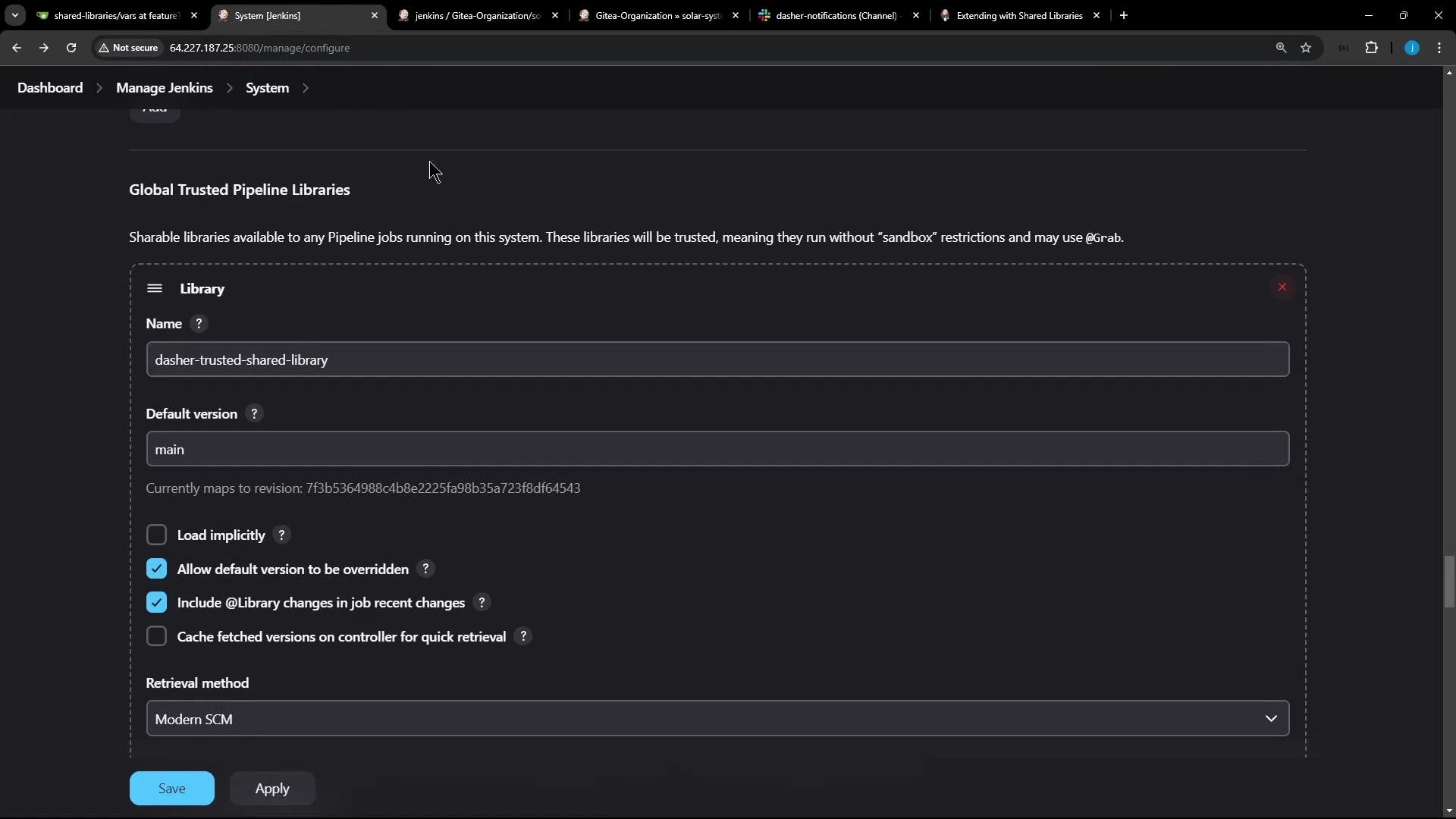
* When configuring Jenkins Global Trusted Pipeline Libraries, the library's default version is usually `main`. Administrators can allow pipeline authors to override the default version so a pipeline can use a different branch or tag.
To use a specific branch of a trusted shared library from your Jenkinsfile add an `@Library` annotation at the top of the Jenkinsfile with the library name and branch:
```groovy theme={null}
@Library('dasher-trusted-shared-library@featureTrivyScan') _
pipeline {
agent any
tools { /* … */ }
environment {
MONGO_URI = "mongodb+srv://supercluster.d83jj.mongodb.net/superData"
MONGO_DB_CREDS = credentials('mongo-db-credentials')
MONGO_USERNAME = credentials('mongo-db-username')
MONGO_PASSWORD = credentials('mongo-db-password')
SONAR_SCANNER_HOME = tool 'sonarqube-scanner-610'
GITEA_TOKEN = credentials('gitea-api-token')
}
options { /* … */ }
stages {
stage('Build Docker Image') {
steps {
sh 'printenv'
sh 'docker build -t siddharth67/solar-system:$GIT_COMMIT .'
}
}
stage('Trivy Vulnerability Scanner') {
steps {
script {
// Call the shared library method and pass the image name
trivyScan.vulnerability("siddharth67/solar-system:$GIT_COMMIT")
}
}
post {
always {
script {
// Generate reports via the shared library
trivyScan.reportsConverter()
}
// Publish HTML reports (example usage)
publishHTML([
allowMissing: true,
alwaysLinkToLastBuild: true,
keepAll: true,
reportDir: '.',
reportFiles: 'trivy-image-MEDIUM-results.html',
reportName: 'Trivy MEDIUM Report'
])
publishHTML([
allowMissing: true,
alwaysLinkToLastBuild: true,
keepAll: true,
reportDir: '.',
reportFiles: 'trivy-image-CRITICAL-results.html',
reportName: 'Trivy CRITICAL Report'
])
}
}
}
// other stages...
}
}
```
## Declarative vs Scripted pipeline: where to call shared-library methods
* Scripted Pipeline: you can call global `vars` methods directly, e.g.:
* `trivyScan.vulnerability "image-name"`
* Declarative Pipeline: method calls on global `vars` must be executed inside a `script { ... }` block. Calling them directly inside `steps` (outside `script`) will raise an error:
* "method calls on objects are not allowed outside the script directive block."
Wrap shared-library method invocations in a `script` block in Declarative Pipelines. Example:
```groovy theme={null}
script {
trivyScan.vulnerability("siddharth67/solar-system:$GIT_COMMIT")
}
```
Use fenced code blocks for any examples containing braces to avoid MDX parsing issues.
## Pipeline execution and logs (high level)
* The `@Library('dasher-trusted-shared-library@featureTrivyScan')` annotation instructs Jenkins to resolve and load the specified branch of the shared library at build time.
* `trivyScan.vulnerability` prints the image name and runs Trivy to create JSON results for medium/low/high severities (non-failing) and for critical severity (exit-code 1).
* `trivyScan.reportsConverter` converts JSON results to HTML and JUnit XML so they can be published as build artifacts and test reports.
Example console output lines (trimmed):
```text theme={null}
+ echo image - siddharth67/solar-system:c9dc5eb9b28147642a87fb0e2c8f9f2845fa4b1d
image - siddharth67/solar-system:c9dc5eb9b28147642a87fb0e2c8f9f2845fa4b1d
+ trivy image siddharth67/solar-system:c9dc5eb9b28147642a87fb0e2c8f9f2845fa4b1d --severity LOW,MEDIUM,HIGH --exit-code 0 --quiet --format json -o trivy-image-MEDIUM-results.json
+ trivy image siddharth67/solar-system:c9dc5eb9b28147642a87fb0e2c8f9f2845fa4b1d --severity CRITICAL --exit-code 1 --quiet --format json -o trivy-image-CRITICAL-results.json
Loading library dasher-trusted-shared-library@featureTrivyScan
Found match: refs/heads/featureTrivyScan revision 6cbbbd114ce8938745132865995d01431d1b0d31
Checking out Revision 6cbbbd114ce8938745132865995d01431d1b0d31 (featureTrivyScan)
```
## Reports and artifacts
* After running `reportsConverter`, the generated HTML and XML files are available as build artifacts.
* Use the HTML Publisher plugin to display HTML reports in the Jenkins job UI, or archive the artifacts for download.
Useful plugin:
* HTML Publisher: [https://plugins.jenkins.io/htmlpublisher/](https://plugins.jenkins.io/htmlpublisher/)
## Using multiple library versions
* Jenkins supports loading multiple shared libraries. You can reference specific branches or tags with `@Library('name@branch')` and call methods from each loaded library as needed.
That's the complete flow to load and invoke the TrivyScan shared library from a Declarative Jenkins Pipeline, including the required `script {}` wrapper for method calls on library objects.
 ## Links and references
* Trivy (Aqua Security): [https://github.com/aquasecurity/trivy](https://github.com/aquasecurity/trivy)
* Jenkins Shared Libraries: [https://www.jenkins.io/doc/book/pipeline/shared-libraries/](https://www.jenkins.io/doc/book/pipeline/shared-libraries/)
* HTML Publisher plugin: [https://plugins.jenkins.io/htmlpublisher/](https://plugins.jenkins.io/htmlpublisher/)
## Links and references
* Trivy (Aqua Security): [https://github.com/aquasecurity/trivy](https://github.com/aquasecurity/trivy)
* Jenkins Shared Libraries: [https://www.jenkins.io/doc/book/pipeline/shared-libraries/](https://www.jenkins.io/doc/book/pipeline/shared-libraries/)
* HTML Publisher plugin: [https://plugins.jenkins.io/htmlpublisher/](https://plugins.jenkins.io/htmlpublisher/)